CPI490 - Battery COBRA - Free user manual and instructions
Find the device manual for free CPI490 COBRA in PDF.


| Product Type | Battery |
| Brand | Cobra |
| Model | CPI490 |
| Battery Type | Sealed Lead Acid (SLA) |
| Voltage | 12V |
| Capacity | 50Ah |
| Chemistry | Lead Acid |
| Dimensions (L x W x H) | 200 x 150 x 170 mm |
| Weight | 15 kg |
| Terminals | Standard automotive posts |
| Charging Voltage | 13.8-14.5V |
| Operating Temperature | -20°C to 50°C |
| Maintenance | Low maintenance, sealed design |
| Safety Features | Overcharge protection, valve regulated |
| Rechargeable | Yes |
| Cycle Life | 500-800 cycles at 50% depth of discharge |
| Self-Discharge | <3% per month at 25°C |
| Applications | UPS, emergency lighting, alarm systems, mobility scooters |
| Warranty | 1 year |
| Certifications | CE, RoHS |
Frequently Asked Questions - CPI490 COBRA
User questions about CPI490 COBRA
0 question about this device. Answer the ones you know or ask your own.
Ask a new question about this device
Download the instructions for your Battery in PDF format for free! Find your manual CPI490 - COBRA and take your electronic device back in hand. On this page are published all the documents necessary for the use of your device. CPI490 by COBRA.
USER MANUAL CPI490 COBRA
Operating Instructions

natural_image
Product photo of a 400 WERTY DC power supply with coiled cable, clampers, and test probes (no visible text or symbols)400 WATT POWER INVERTER
CPI 490
Printed in China Part No. 480-994-P Version B
Nothing Comes Close to a Cobra®
Introduction
Thank you for purchasing the Cobra Power Inverter CPI490. Properly used, this Cobra product will give you many years of reliable service.
How Your Cobra Power Inverter Works
The Cobra power inverter is an electronic product that has been designed and built to take low voltage DC (Direct Current) power from your automobile or other low voltage power supplies and convert it to standard 115 Volt AC (Alternating Current) power like the current you have in your home. This conversion process thereby allows you to use many of your household appliances and electronic products in automobiles, RVs, boats, tractors, trucks and virtually anywhere else.

Customer Assistance
Customer Assistance
Should you encounter any problems with this product, or not understand its many features, please refer to this owner's manual. If you require further assistance after reading this manual, Cobra Electronics offers the following customer assistance services:
For Assistance in the U.S.A.
Automated Help Desk English only.
24 hours a day, 7 days a week 773-889-3087 (phone).
Customer Assistance Operators English and Spanish.
8:00 a.m. to 5:30 p.m. CT, Monday through Friday (except holidays) 773-889-3087 (phone).
Questions English and Spanish.
Faxes can be received at 773-622-2269 (fax).
Technical Assistance English only.
www.cobra.com (on-line: Frequently Asked Questions).
English and Spanish. productinfo@cobra.com (e-mail).
For Assistance Outside the U.S.A.
Contact Your Local Dealer
Features
- Two AC Receptacles
-
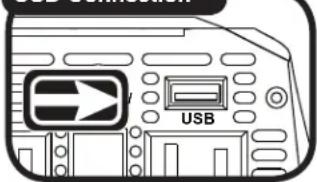
5V/2.1 USB Output
• Automatic Thermal Protection/Shutdown -
Reverse Polarity Protection
- Low Battery Alarm
- Low Battery Shutdown

text_image
Protection and Power Indicator On/Off Power Switch AC Outlet USB Outlet AC Outlet POWER/ FAULT USB POWER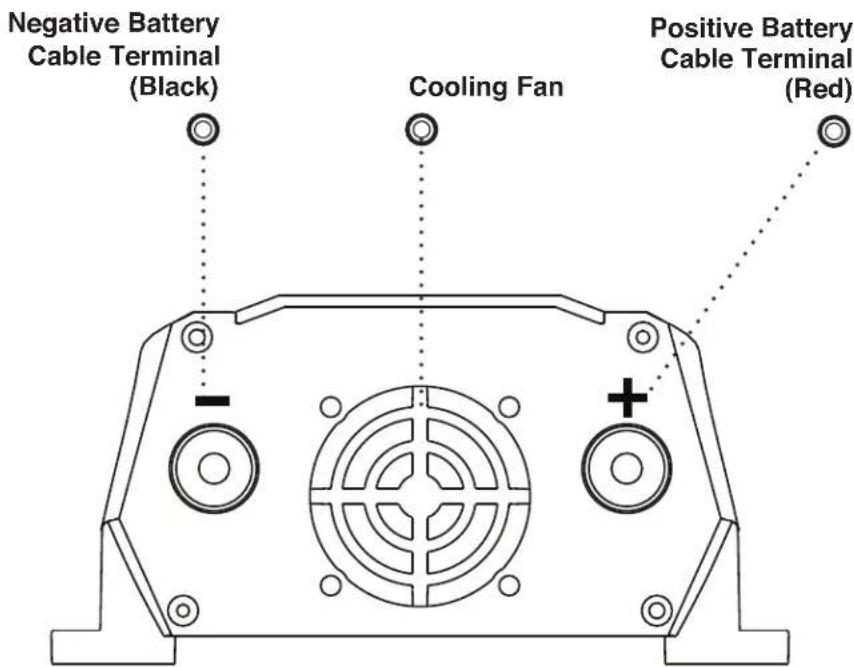
text_image
Negative Battery Cable Terminal (Black) Cooling Fan Positive Battery Cable Terminal (Red)
Introduction
Our Thanks to You A 1
Customer Assistance A 1
Product Features A 2
Important Safety Information ..... 1
Quick Evaluation Before Installation ..... 3
Installation
Installation Requirements 5
Mounting 6
Connecting Cables 6
Power Consumption 10

Operation
Turning Your Inverter On or Off ..... 1 1
Power and Protection Indicators ..... 1 2
Operating Limits 13
Troubleshooting Guide 14
Specifications 15

Warranty
Warranty 16

Customer Assistance
Maintenance 17
Product Service 17
Important Safety Information
Before installing and using your Cobra power inverter, please read these general precautions and warnings.
Caution and Warning Statements
To make the most of this inverter, it must be installed and used properly. Please read the installation and operating instructions carefully before installing and using it. Special attention must be paid to the CAUTION and WARNING statements in the manual.

CAUTION Statements specify conditions which could cause damage to the unit or other equipment.

WARNING Statements identify conditions that could result in personal injury or loss of life.
General Precautions
- Never install the inverter in a boat's engine compartment where gas and battery fumes are present.
- Do not operate the inverter if it has been dropped or damaged in any way.
- Do not open the inverter; it contains no user-serviceable parts. Attempting to service unit could cause electrical shock.

NOTE Internal components remain charged after all power is disconnected.
- Do not expose the inverter to rain, snow, bilge water or spray.
- Do not obstruct the ventilation openings.
- Do not install the inverter in zero-clearance compartment.

CAUTION This inverter should be used in negative ground applications only.

WARNING Power inverters contain components that can produce arcs or sparks. To prevent fire or explosion, do not install the inverter in areas or compartments containing batteries or flammable materials or in locations that require ignition-protected equipment.
WARNING To reduce the risk of fire, do not cover or obstruct the ventilation openings. Do not install inverter in zero-clearance compartment.
Proposition 65: Warning: Wash Hands After Handling Power Cord
The power cord on this product contains lead, a chemical known in the state of California to cause birth defects or other reproductive harm.
Caution: Rechargeable Appliances
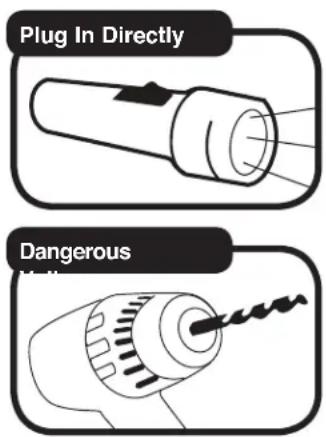
Certain chargers for small nickel cadmium batteries can be damaged if connected to the Cobra 400 watt inverter. Two particular types of equipment are prone to this problem:
text_image
Plug In Directly Dangerous- Small battery-operated appliances such as flashlights, razors, and night lights that can be plugged directly into an AC receptacle to recharge.
- Certain battery chargers for battery packs used in hand power tools. These chargers have a WARNING label stating that dangerous voltages are present at the battery terminals.
This problem does not occur with the vast majority of battery operated equipment. Most use a separate charger or transformer that is plugged into the AC receptacle and produces a low voltage output. If the label on the AC adapter or charger states that it produces a low voltage AC or DC output (less than 30 volts), the inverter will have no problem powering the adapter safely.
Output Waveform
Some very sensitive electronic equipment may not operate satisfactory on “square wave” or “modified sine wave.” The output waveform is referred to as “square wave” or “modified sine wave.” It is a stepped waveform designed to have characteristics similar to the sine wave shape of utility power. A waveform of this nature is suitable for most AC loads (including linear and switching power suppliers used in electronic equipment, transformers and motors).
Quick Evaluation Before Installation
This section provides you with basic information about the inverter and how to check its performance before installation.
Be sure to have on hand:
- A 12 volt DC power source (such as a vehicle battery).
text_image
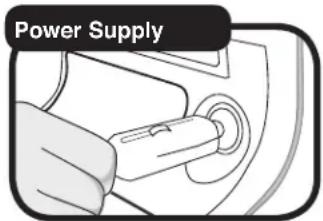
Power SupplyThe power source must provide between 11 and 15 volts DC and be able to supply enough current to run the test load. As a rough guide, divide the wattage of the test load by 10 to get the current (in amperes) the power source must deliver.
- The provided two foot cigarette lighter cable and two foot direct-to-battery 12 gauge cable.
Only use the cables provided with your inverter. The cigarette lighter cable is suitable for operating the inverter at loads up to 150 watts. Connect by securely inserting the plug into the cigarette lighter socket.

text_image
Cig. Lighter Cable 12 (Cupc)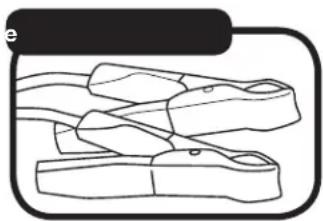
natural_image
Line drawing of a mechanical clamp or clamp device (no text or symbols)
CAUTION Do not use the cigarette lighter cable for loads higher than 150 watts. When connecting loads larger than 150 watts, please connect the inverter directly to the battery.

Quick Evaluation Before Installation
Introduction
Test Load

natural_image
Simple line drawing of a lamp with a conical shade and base (no text or symbols)- A test load that can be plugged into the AC receptacle on the inverter for short term testing at a low power level.
To check your inverter's performance before installation:
On/Off Switch to Off

text_image
POWER- Turn the inverter off (see page 11 for details). If the power source is a DC power supply, switch it off as well.
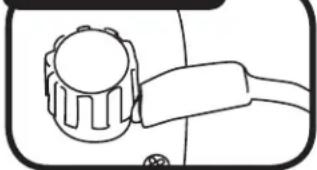
- Connect cables to power input terminals (see page 6 for details).
- Connect cable to power source (see page 8 for details).
- Check to make sure all connections are secure.
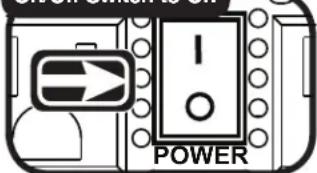
- Turn the inverter on. If the power source is a DC power supply, switch it on first.
- Plug in the test load.
- Connect cable to power source (see page 8 for details).
- Check to make sure all connections are secure.
- Turn the inverter on. If the power source is a DC power supply, switch it on first.
- Plug in the test load.
Connect Terminals
natural_image
Simple line drawing of a mechanical component with no text or symbolsConnect Power Source

natural_image
Close-up of a hand inserting a plug into a circular component (no text or symbols visible)The inverter should supply power to the load. If the inverter is not working properly, refer to the troubleshooting guide on page 14 or power and protection indicators section on page 12.
On/Off Switch to On
text_image
POWERConnect Test Load

text_image
POWER/FAULT POWERUSB Connection
text_image
USBInstallation Requirements
The inverter must be installed in an area that meets all of the following requirements:
A. Dry
Do not place in an area where water can drip or splash on the inverter.
B. Cool
Ambient air temperature should be between 30^ F and 105^ F ( 0^ C and 40^ C). The cooler the better.
C. Ventilate
Allow at least one inch (three cm) of clearance around the inverter for proper airflow. Make sure that ventilation openings on the ends of the unit are not obstructed.
D. Safe
Do not install the inverter in the same compartment as a battery or in any compartment that contains flammable liquids such as gasoline.
E. Close to Battery
Install unit as close to battery as possible (without being in the same compartment) to minimize the length of cable required to connect the inverter to the battery. It is better and cheaper to run longer AC wires than longer DC wires (cables).

CAUTION To avoid fire, do not cover or obstruct ventilation openings. Do not install inverter in a zero-clearance compartment. Overheating may result.
CAUTION The inverter must only be connected to batteries with a nominal output voltage of 12 volts. It will not work with a 6 volt battery, and will be damaged if it is connected to a 16 volt battery.

WARNING This unit contains components which can produce arcs or sparks. To prevent fire or explosion, do not install in compartments containing a battery or flammable materials, or in a location which requires ignition protected equipment.
Mounting
To mount your inverter:
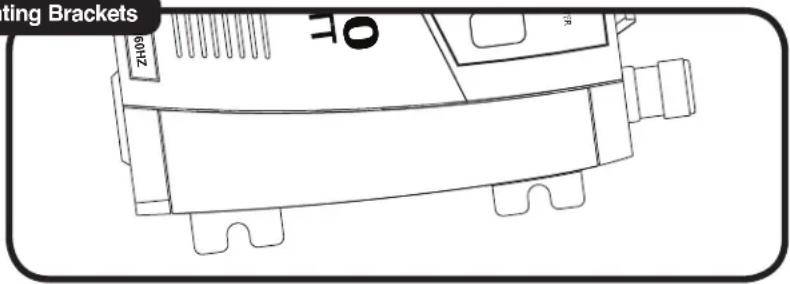
- Place the inverter on a flat surface with the mounting bracket against the mounting surface.
Mounting Brackets
text_image
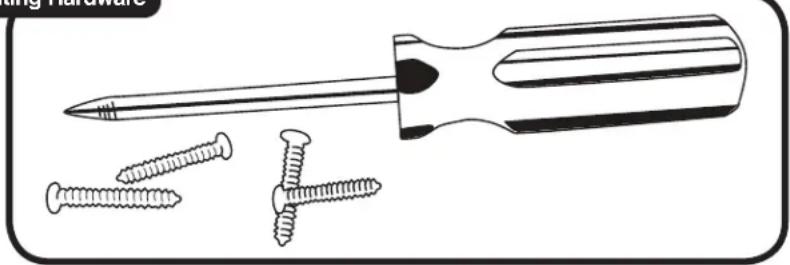
Biting Brackets 69HZ 01- Mount to secure surface using mounting hardware that is corrosion resistant (not included).
Mounting Hardware
natural_image
Illustration of a screwdriver with three screws, shown in line style (no text or symbols)The inverter can be mounted horizontally or vertically.
Connecting Cables
Power wire and wiring are very important to the performance of the inverter. Because the inverter has a low voltage, high current input, low resistance wiring is essential between the battery and inverter. This is so it can deliver the maximum amount of energy to the load. Only use the cables provided with your power inverter.
To convert the cables between
text_image
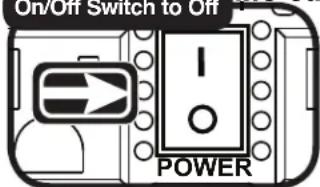
On/Off Switch to On POWERthe inverter and the battery:
- Turn the On/Off Switch on the inverter to the off position. If the power source is a DC power supply, switch it off as well.
Installation
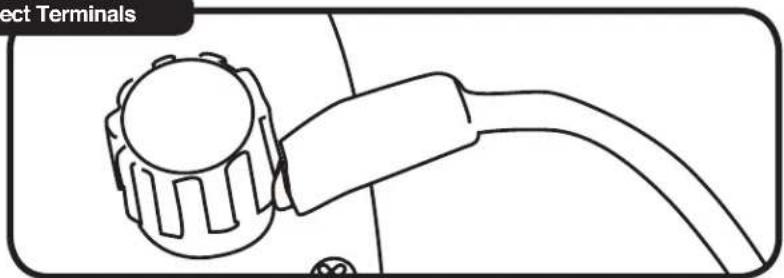
- Connect cable to the Power Input Terminals on right side panel of the inverter. The red terminal is positive (+) and the black terminal is negative (-). Insert the ends of the cables onto the terminals and tighten the screws to clamp the cables safely.
Connect Terminals
natural_image
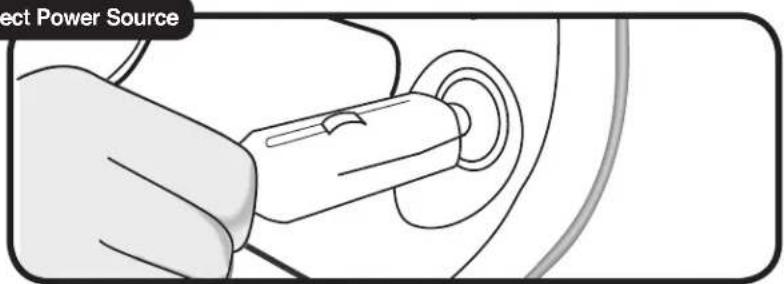
Line drawing of a mechanical component with a curved cable and circular component (no text or symbols)- Connect cable to your vehicle's cigarette lighter socket.
Connect Power Source
text_image
Elect Power Source
NOTE If the inverter is to be used at levels above 150 watts for extended periods of time, a direct connection to the battery is recommended. Do not use the cigarette cord for loads higher than 150 watts. Please contact your local dealer or customer assistance for the proper cord for direct to battery connections.

CAUTION Reverse polarity connections (positive to negative) will blow inverter fuses and may permanently damage the unit. Such damage is not covered by the warranty.
CAUTION Remove any jewelry (watch, ring, etc.). Be careful not to short circuit the battery with any metallic object (wrench, etc.).

WARNING You may observe a spark when making the connection because current can flow to charge the capacitors in the inverter. Do not make this connection in the presence of flammable fumes. Explosion or fire may result. Thoroughly ventilate the battery compartment before making this connection.
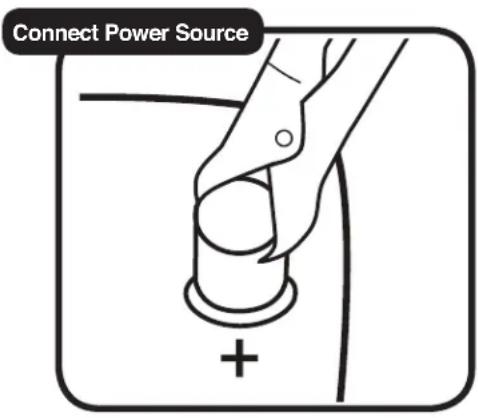
- Connect cable to the power source:
a. Connect the cable from the Negative (Black) Terminal of inverter to the Negative Terminal of the power source. Make a secure connection.
b. Connect the cable from the Positive (Red) Terminal of the inverter to the Positive Terminal of the power source (the battery's main fuse or the battery selector switch, if you are using one). Make a secure connection.
You might observe a spark when you make this connection since current can flow to charge capacitors in the inverter.
All power connections to your Cobra inverter must be Positive to Positive and Negative to Negative.
text_image
Connect Power Source
CAUTION Do not connect the inverter and another AC source (such as a generator or utility power) to the AC wiring at the same time. The inverter will be damaged if its output is connected to AC voltage from another source. Damage can even occur if the inverter is switched off.
CAUTION Do not connect the inverter to an AC branch circuit that has high-power consumption loads. It will not operate electric heaters, air conditioners, stoves, and other electrical appliances that consume more than 400 watts.
CAUTION Loose connectors result in excessive voltage drop and may cause over heated wires and melted insulation.
CAUTION Reverse polarity connections (positive to negative) will blow external fuse in the inverter and may permanently damage the unit. Such damage is not covered by the warranty.
CAUTION Remove any jewelry (watch, ring, etc.). Be careful not to short circuit the battery with any metallic object (wrench, etc.).

WARNING 115 volt AC power is potentially lethal. Do not work on AC wiring when it is connected to the inverter (even if it is switched off) unless the DC power source is physically disconnected from the inverter. Also, do not work on AC wiring if it is connected to another AC power source such as a generator or the utility line.
WARNING You may observe a spark when making the connection because current can flow to charge the capacitors in the inverter. Do not make this connection in the presence of flammable fumes. Explosion or fire may result. Thoroughly ventilate the battery compartment before making this connection.
Power Consumption
For each piece of equipment you will be operating from the inverter, you must determine the battery's reserve capacity (how long the battery can deliver a specific amount of current — in automotive batteries, usually 25 amperes) or ampere-hour capacity (a measure of how many amperes a battery can deliver for a specified length of time).
Example – Reserve capacity: a battery with a reserve capacity of 180 minutes can deliver 25 amperes for 180 minutes before it is completely discharged.
Example – Ampere-hour capacity: a battery with an ampere-hour capacity of 100 ampere-hours can deliver 5 amperes for 20 hours before it is completely discharged.
To determine the battery ampere-hour capacity you require:
- Determine how many watts each piece of equipment consumes. This can normally be found on the product label. If only the current draw is given, multiply the current draw by 115 to get the watt consumption.
- Estimate the time (in hours) that each piece of equipment will be running between battery charging cycles.
- Calculate the total watt-hours of energy consumption (power x operating time) using the average power consumption and the total estimated running time (in hours). Power x Operating Time = Watt-Hours.

natural_image
Illustration of a laptop with a screen and keyboard, no text or symbols present50 watts x 2 hours = 100 watt-hours

natural_image
Illustration of a blender with a water-filled cup and a wooden base (no text or symbols)300 watts x 15 minutes = 75 watt-hours
- Divide the watt-hours by 10 to determine how many power supply's (12 volt) ampere-hours will be consumed.
Turning Your Inverter On or Off
Be sure to have your power inverter properly installed before attempting to turn the unit on (see installation page 5).
text_image
On/Off Switch to On POWERTo turn the power inverter on:
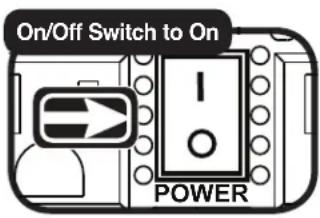
- If a DC power supply is being used as the power source, switch it on.
- On the left side panel, switch the On/Off Switch to on.
The inverter is now ready to deliver AC power to your loads. If several loads are to be operated by the inverter, turn them on separately, after the inverter has been turned on. This will ensure that the inverter does not have to deliver the starting currents required for all the loads at once.

text_image
On/Off Switch to Off POWERTo turn the power inverter off:
- On the left side panel, switch the On/Off Switch to off.

NOTE The On/Off Switch turns the control circuit in the inverter on and off. It does not disconnect power from the inverter.
When the switch is in the off position, the inverter draws no current from the battery. When it's in the on position, but no power is being supplied to the load, the inverter draws less than 500 milliamperes from the battery. This is low current draw. It would take more than a week to discharge a 100 ampere-hour battery at this rate depending on the age of the battery.
Power and Protection Indicators
The power and protection indicator includes a dual color green and red light, and an alarm.
Green Light
Power on – The green light should remain on steady.
Red Light and/or Alarm
Current overload – The red light will blink continuously, then the inverter will shutdown. The inverter will continue to check for appropriate current levels while trying to restart the load.
DC input voltage overload – The red light will turn on and the inverter will shutdown. The inverter will continue to check for appropriate voltage levels while trying to restart the load.
DC input voltage shortage – As a warning that the voltage is getting low, the internal alarm will sound. When the voltage is too low, the inverter will shutdown and the light will turn red. The inverter will continue to check for appropriate voltage levels while trying to restart the load.
Temperature overload – The red light will blink, then the inverter will shutdown. The inverter will continue to check for appropriate temperature levels while trying to restart the load.

NOTE A momentary sound of the internal alarm and/or flash of the red light is normal at start up.
Operating Limits
Power Output
The inverter can deliver 400 watts for about 60 minutes. The inverter must cool for 15 minutes before it can resume operation at 400 watts. Note: The wattage rating applies to resistive loads.
The inverter will operate most AC loads within its power rating. Some induction motors used in freezers, pumps, and other motor-operated equipment require very high surge currents to start. The inverter may not be able to start some of these motors even though their rated current draw is within the inverter's limits. The inverter will normally start single phase induction motors rated at one-half HP or less.
Input Voltage
The inverter will operate from input voltage ranging from 10 volts to 15 volts. Optimum performance will occur when the voltage is between 12 volts and 14 volts. If the voltage drops below 10.5V+/-0.3V , an audible low battery warning will sound. The inverter will shut down if the input voltage drops below 9.5V+/-0.3V . This protects the battery from being over-discharged. It will restart when the input voltage exceeds 12V+/-0.3V .
The inverter will also shut down if the input voltage exceeds 15.75V+/-0.75V . This protects the inverter against excessive input voltage. Although the inverter has protection against over-voltage, it may still be damaged if the input voltage were to exceed 16 volts.
Troubleshooting Guide
| Problem/Symptom | Possible Causes | Solution |
| Low output voltage | Overload | Reduce the load. |
| No output voltage | Low input voltage | Recharge battery.Check connections and cable. |
| No output voltage after prolonged use | Thermal shutdown | Allow inverter to cool off.Reduce load, continuous operation input current required.Improve ventilation;Make sure ventilation openings in the inverter are not obstructed.Reduce ambient temperature. |
| No output voltage, “Protect” indicator lighted | High input voltage | Make sure the inverter is connected to 12V battery.Check regulation of charging system. |
| No output voltage | Short circuit | Check load for proper operation. |
| No power to inverter | Blown fuse in CLP | Replace fuse. |
| Low battery alarm on all the time | Poor DC wiring | Check connections. |
| Poor battery condition | Make sure battery is fully charged. |
Specifications
Continuous output power (1 hour) 400 W
Surge rating (0.1 second) 800 W
Peak efficiency (12V - 1/2 load) .... > 88%
Efficiency (full load, 12V) > 83%
No load current draw .... < 0.5A (12.6V)
Output waveform (resistive load) ... Modified sine wave
Output frequency 58HZ - 62HZ
Output voltage 109V - 120V
USB output 5 V
Input voltage 10.4VDC - 14.4VDC
Alarm voltage (unload) 10.2V - 10.8V
Shutdown voltage (unload) 9.2V - 9.8V
Operating temperature range ..... 0°C – 40°C
(32^ - 104^)
Storage temperature range .... -40°C - 85°C
(-40^ - 185^)
Protection .... Overload, short-circuit, overtemp,
reverse polarity, under/over voltage
Notes
All protection is automatically recovered.
To protect the battery, if the unit needs to be restarted after low voltage protection, the voltage of DC input should be above 12V.
To extend the life of the fan, it will stop when there is no load. The speed of the fan increases as the load increases.
The unit is completely insulated in input and output for added safety.
Warranty and Trademark Acknowledgement
Warranty
Limited Two-Year Warranty
For Products Purchased in the U.S.A.
Cobra Electronics Corporation warrants that its Cobra power inverter, and the component parts thereof, will be free of defects in workmanship and materials for a period of two years from the date of first consumer purchase. This warranty may be enforced by the first consumer purchaser, provided that the product is utilized within the U.S.A.
Cobra will, without charge, repair or replace, at its option, defective power inverters, products or component parts upon delivery to the Cobra Factory Service department, accompanied by proof of the date of first consumer purchase, such as a duplicated copy of a sales receipt.
You must pay any initial shipping charges required to ship the product for warranty service, but the return charges will be at Cobra's expense, if the product is repaired or replaced under warranty. This warranty gives you specific legal rights, and you may also have other rights which may vary from state to state.
Exclusions: This limited warranty does not apply:
- To any product damaged by accident.
- In the event of misuse or abuse of the product or as a result of unauthorized alterations or repairs.
- If the serial number has been altered, defaced, or removed.
- If the owner of the product resides outside the U.S.A.
All implied warranties, including warranties of merchantability and fitness for a particular purpose are limited in duration to the length of this warranty. Cobra shall not be liable for any incidental, consequential or other damages; including, without limitation, to damages resulting from loss of use or cost of installation.
Some states do not allow limitations on how long an implied warranty lasts and/or do not allow the exclusion or limitation of incidental or consequential damages, so the above limitations may not apply to you.
For Products Purchased Outside the U.S.A.
Please contact your local dealer for warranty information.
Trademark Acknowledgement
Cobra ^® , Nothing Comes Close to a Cobra ^® and the snake design are registered trademarks of Cobra Electronics Corporation, USA. Cobra Electronics Corporation ^™ is a trademark of Cobra Electronics Corporation, USA.
Maintenance
Very little maintenance is required to keep the inverter operating properly. The exterior of the unit should be cleaned periodically with a damp cloth to prevent accumulation of dust and dirt. At the same time, tighten the screws on the DC input terminals. Be sure vents and fans are free of dust or debris.
Product Service
If you have any questions about operating or installing your new Cobra product, or if you are missing parts...
Please call Cobra first!
DO NOT RETURN THIS PRODUCT TO THE STORE!
See customer assistance on page A1.
If your product should require factory service, please call Cobra first before sending your power inverter. This will ensure the fastest turn-around time on your repair. You may be asked to send your power inverter to the Cobra factory.
It will be necessary to furnish the following to have the product serviced and returned.
- For warranty repair include some form of proof-of-purchase, such as a mechanical reproduction or carbon copy of a sales receipt. If you send the original receipt, it cannot be returned.
- Send the entire product.
- Enclose a description of what is happening with the power inverter. Include a typed or clearly printed name and address of where the power inverter is to be returned.
- Pack power inverter securely to prevent damage in transit. If possible, use the original packing material.
- Ship prepaid and insured by way of a traceable carrier such as United Parcel Service (UPS) or Priority Mail to avoid loss in transit to:
Cobra Factory Service
Cobra Electronics Corporation
6500 West Cortland Street
Chicago, Illinois 60707 USA.
- If the power inverter is in warranty, upon receipt of your power inverter, it will either be repaired or exchanged depending on the model. Please allow approximately three to four weeks before contacting Cobra for status. If the power inverter is out of warranty, a letter will automatically be sent informing you of the repair charge or replacement charge.
If you have any questions, please call 773-889-3087 for assistance.
The Cobra line of quality products includes:
CB Radios
microTALK® 2-Way Radios
Radar/Laser Detectors
Mobile GPS Navigation Systems
HighGear® Accessories
CobraMarine® VHF Radios
Power Inverters
Accessories
For more information or to order any of our products, please visit our website:
www.cobra.com