RQX-411-G - Radio Ritron - Free user manual and instructions
Find the device manual for free RQX-411-G Ritron in PDF.


| Product Type | Two-way radio |
| Brand | Ritron |
| Model | RQX-411-G |
| Frequency Band | UHF 400-470 MHz |
| Number of Channels | 4 programmable (via software) |
| RF Power Output | 1 watt (low power) |
| Battery Type | Rechargeable NiMH or Li-Ion |
| Battery Capacity | 1100 mAh (typical) |
| Talk Time | Up to 10 hours (depends on usage) |
| Dimensions (H x W x D) | 4.5 x 2.5 x 1.2 inches (114 x 64 x 30 mm) |
| Weight (with battery) | 7.1 oz (200 g) |
| Operating Temperature Range | -20°C to +60°C (-4°F to +140°F) |
| Water Resistance | IP54 (splash and dust resistant) |
| Key Features | Scan, Monitor, VOX, CTCSS/DCS codes |
| Included Accessories | Antenna, belt clip, charger, NiMH battery pack |
| Certification | FCC Part 90, IC (Canada) |
| Warranty | 2 years limited |
| Cleaning Instructions | Wipe with a damp cloth; do not use solvents or abrasives. |
| Safety Precautions | Do not transmit without antenna; avoid exposure to RF when antenna is damaged. |
| Repairability | Replaceable battery, antenna, and belt clip; full service by Ritron authorized centers. |
| Environmental Compliance | RoHS compliant |
Frequently Asked Questions - RQX-411-G Ritron
User questions about RQX-411-G Ritron
0 question about this device. Answer the ones you know or ask your own.
Ask a new question about this device
Download the instructions for your Radio in PDF format for free! Find your manual RQX-411-G - Ritron and take your electronic device back in hand. On this page are published all the documents necessary for the use of your device. RQX-411-G by Ritron.
USER MANUAL RQX-411-G Ritron
Go Beyond Normal Limits... ^SM
RITRON®
WIRELESS SOLUTIONS
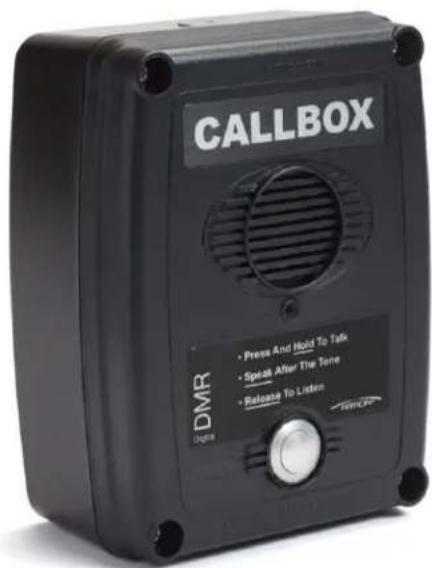
text_image
CALLBOX • Press And Hold To Talk • Spell After The Tone • Release To Listen DMR Dime Trinco
text_image
CALLBOX • Press And Hold To Talk • Speak After The Tone • Release To Listen DMR DigitalDMR
SERIES
OWNER'S
MANUAL
MADE IN THE
USA
m = 311
Ritron Pub. 14500095 02/18
© 2018 Ritron, Inc. All rights reserved.
Ritron®, Patriot®, Jobcom®, OutPost®, GateGuard®, Quiet Call®, Quick Assist® are registered trademarks of Ritron, Inc.
Quick Talk™, Liberty™ and RadioNexus™ are trademarks of Ritron, Inc.
NXDN™ is a trademark of JVC Kenwood Corporation
Call 800-USA-1-USA
For the right Wireless Solutions for your communication needs.
P.O. Box 1998 · Carmel, Indiana 46082-1998 · Ph: 317-846-1201 · Fax: 317-846-4978
Email: ritron@ritron.com · www.ritron.com
TABLE OF CONTENTS
Basic Operation
DMR-SERIES CALLBACK MODELS 1
ABOUT THE DMR-SERIES CALLBACK 2
EXPOSURE TO RADIO FREQUENCY ENERGY 3
OPERATING THE DMR-SERIES CALLBACK WITH
FACTORY DEFAULT SETTINGS 3
Installation Instructions
APPLYING POWER TO THE DMR-SERIES CALLBACK 4
POWER MANAGEMENT OPTIONS 5
FIG-1: Sensor Turn-On Jumper Shown in Turn-On Position.....6
EXTERNAL ANTENNA CONNECTOR AND ANTENNA JUMPER SETTING ..... 6
CALLBOX CONTROLS AND CONNECTORS 7
FIG-2: Callbox Assembly, Controls and Connectors....7
DMR-SERIES CALLBACK INSTALLATION INSTRUCTIONS......8
OPTIONAL DMR-SERIES CALLBACK PEDESTAL MOUNTING
BRACKET INSTALLATION INSTRUCTIONS 8
OPTIONAL DMR-SERIES EXTERNAL ANTENNA INSTALLATION
INSTRUCTIONS 9
DMR-Series Field Programming
DMR-SERIES FIELD PROGRAMMING OVERVIEW 10
HOW TO FIELD PROGRAM FREQUENCY CODES 11
TABLE 1: PROGRAMMABLE FREQUENCY CODES ...... 12
DMR ID AND COLOR CODES OVERVIEW 13
HOW TO FIELD PROGRAM DMR ID AND COLOR CODES ...... 14
TABLE 2: DMR ID AND COLOR CODES....15
HOW TO FIELD PROGRAM DMR RELAY AND
Glossary of Terms....23
TABLE 6: PC PROGRAMMABLE FEATURES....23
INTERCOM (ALWAYS-ON) PROGRAMMING 25
FEATURES TO USE WITH INTERCOM (ALWAYS-ON)
PROGRAMMING 25
SWITCH OUTPUT OPTIONS
(ALLOWS CONTROL OF AN EXTERNAL DEVICE) 26
Voice Messages
AUTOMATIC VOICE MESSAGES....27
AUTOMATIC ID RE-SEND....28
HOW TO RECORD A VOICE MESSAGE 29
HOW TO PLAY A VOICE MESSAGE .... 30
HOW TO ERASE A VOICE MESSAGE....30
GateGuard® Application
Configuration for the Remote Control of a Gate Controller
CONFIGURING THE CALLBACK FOR A GATEGUARD® APPLICATION 31
TABLE 7: CALLBACK 6-CONDUCTOR INTERFACE CABLE....31
INSTALLING THE CALLBACK 6-CONDUCTOR INTERFACE CABLE.....32
HOW TO FIELD PROGRAM THE DMR-SERIES CALLBACK FOR
How to Obtain an FCC Radio License....35
INDUSTRY CANADA Regulations....35
Safety Standards 35
Service....35
Warranty
RITRON, INC. LIMITED WARRANTY 36
THANK YOU FOR CHOOSING RITRON
Congratulations on your purchase of the RQX DMR-Series Callbox. Your new radio is the culmination of RITRON's 40 years of designing, manufacturing, and supplying reliable, professional wireless communication products. Ritron wireless products will improve the operation, safety, and profitability of any organization by providing instant voice communications between employees throughout the workplace.
DMR-SERIES CALLBACK MODELS
DMR-Series Models
RQX-117DMR VHF DMR-Series Digital Callbox
RQX-117DMR-CANADA ..... Canadian model VHF DMR-Series Digital Callbox
RQX-417DMR UHF DMR-Series Digital Callbox
RQX-417DMR-CANADA ..... Canadian model UHF DMR-Series Digital Callbox
The DMR-Series callbox can be programmed to operate as a DMR digital voice two way radio. The DMR capability is contained in a piggy back board that connects perpendicular to the main board. The DMR-Series callbox is available in both the standard model high visibility green enclosure, and in the -BLK model black enclosure.
The model number appears on the serial label located on the back of the DMR-Series Callbox enclosure.
VHF radios are designed to operate within the 15 MHz band between factory standard 150 to 165 MHz.
UHF radios are designed to operate within the 20 MHz band between factory standard 450 to 470 MHz.
Advanced Features available with the DMR-Series models include DMR Decode, Voice Messages, Sensor Input, and a Relay Switch Closure.
DMR Digital Features are based on Color Codes and ID codes and perform similar functions as the analog addressing modes. The Ritron® PC Programmer will aid in set up of these features. Limited Field Programming of these features that does not require the use of the PC Programmer are detailed in the "DMR-Series Field Programming" section of this manual.
The Power supply to the DMR-Series callbox can be three internal D-cells batteries, an external 8 to 12 VDC input, or both. See the "APPLYING POWER TO THE DMR-SERIES CALLBACK" section of this manual for details on powering the DMR-Series callbox.
text_image
CALLBOX EDMR - 10000000000000000000000000000000000000000000000000000000000000000000000000000000000DMR-Series Callboxes
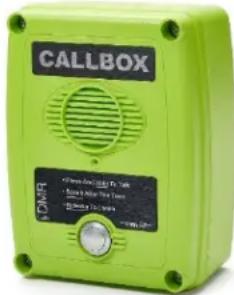
text_image
CALLBOX OFFICE: 10000000000000000000000000000000000000000000000000000000000000000000000000000000000000000000000000000 SOMR SOMR: 12.5x12.5x12.5x12.5x12.5x12.5x12.5x12.5x12.5x12.5x12.5x12.5x12.5x12.5x12.5x12.5x12.5x12.5x12.5x12.5x12.5Optional Accessory Equipment
Several options are available for the Ritron® DMR-Series Callbox. These options, individually, or in combination with one another can greatly enhance the functionality of the callbox as well as the overall communication system. Available options include:
- RPS-EXPO - External Power kit for the DMR-Series Callbox. Requires use of the Ritron® 60201124 accessory cable included with the callbox.
- RSS-100 - The RSS-100 is a complete solar power supply system consisting of a 10-watt solar panel, charge controller and 8 AH rechargeable battery all housed in a rugged, ready-to-mount enclosure.
- R-STROBE - The R-STROBE is a powerful strobe light, giving a visual indication of a checkbox in use. The R-STROBE is available in both AC (R-STROBE) and DC versions (R-STROBE-DC). If used the DMR checkbox must be externally powered.
• RQX-PCPK-1 - PC Programming kit, Software CD and radio-to-PC cable (5 pin USB to mini-USB, pn 60201119)
• RQX-Q-GN - Mounting Plate, for Gooseneck Post or flat surface, stainless steel. - 60201125 - Cable, SMB to BNC connector. Cable permits retrofit use of external antenna. Does not include antenna.
• RAM-45 - Magnetic Mount Antenna 12 ft coaxial cable, BNC connector (requires cable # 60201125) - 60201124 - Cable, 6-conductor with Heyco strain relief. Brings connection points out of the callbox for the following: external power, relay control/activation, switch input features.
• 25107400 - Torx Bit (hollow Point type), Replacement T-25 for DMR-Series tamper resistant fasteners.
For additional information and pictures of these items go to http://www ritron.com/dmr-series-callbox-dmr-digital and download pdf of the product brochure.
ABOUT THE DMR-SERIES CALLBACK
The DMR-Series Callbox is a 2-way radio transceiver used to communicate directly with portable, mobile and stationary DMR digital radios; or through radio repeaters if programmed using the Ritron® PC Programming software. Each callbox is equipped with the following features or capabilities.
- Field Programming. Field programming allows you to quickly program your radio in the field without the need for a PC programmer. Each radio can be field programmed to one of 27 VHF or 114 UHF channel table frequencies. DMR ID and Color Codes can also be field programmed.
• Volume Level. Field programmable or PC programmable to 20 – 100% volume level.
• Normal or High Microphone Gain. Field and PC programmable to Fixed or AGC microphone gain. - Battery Powered. The DMR-Series Callbox can be powered by 3 D-cell Alkaline or Ni-MH batteries for 700mW transmit power. D-cell batteries can operate the radio for up to one year or 8,000 three second transmissions. When the callbox is used in a battery only application, the Auto Turn-Off feature should be enabled – this is a factory default setting.
- Low Battery Alert. The callback will transmit an Alert Tone or voice message at the end of each transmission when the batteries approach end-of-life. This allows sufficient time for you to replace the batteries and assure uninterrupted service.
- External Power 8 to 12 VDC Capable. The DMR-Series Callbox can be powered by an external 8 to 12 VDC source. This method of powering the callbox allows the radio to remain ON at all times, like an intercom. Automatic Turn Off must be DISABLED via Field or PC programming for Intercom operation.
- External Power Fail Alert. This feature can be enabled via Field or PC programming. The callbox will transmit an Alert Tone or voice message if it detects loss of external DC power. The radio automatically continues to transmit an Alert Tone once every hour (unless programmed for Automatic Turn Off) until external DC is restored or the batteries are depleted.
- High/Low Power Output. When powered by External 8 to 12 VDC the DMR-Series callboxes will be transmitting at high power output (2W). When battery powered by 3 D-cells the DMR-Series callbox operates in Low power (700mW) mode exclusively.
- "Automatic Turn-Off" or "Intercom" Operation. The DMR-Series Callbox can operate in the standard "Automatic Turn-Off" mode (Factory Default), where the radio is normally OFF until the Call Button is pressed, or can be Field or PC programmed for "Intercom" operation where the radio is always ON. See "External Power 8 to 12 VDC Capable" feature above.
- Voice Messages. You can record custom voice messages that are played back during normal Callbox operation. Messages include Greeting, Voice Alert, Sensor status, Battery status, and External DC Power Fail.
- Listen In. Allows remote activation of the transmitter when a unique DMR ID code is received.
- Sensor Turn-On. When operating the Callbox with Automatic Turn-Off enabled, the unit can be configured to turn itself ON any time the Sensor Input is pulled LOW (ground). This allows an external switch closure to activate the Callbox. The callbox will remain on as long as the switch is closed.
- Relay Switch Output. The switch output is a simple 3-Amp relay contact closure that can be used to OPEN and CLOSE a gate, switch on a light, sound an alarm or any other application where remote control of an ON/OFF switch is required. The callbox can be programmed to OPEN and CLOSE the Switch Output with a DMR ID code.
- Sensor Input. The Callbox can be configured to send a warning tone or a pre-recorded voice message when a change in the Sensor Input is detected. The Sensor Input will respond to an OPEN or CLOSED switch. The unit must already be on to respond to a switch opening.
EXPOSURE TO RADIO FREQUENCY ENERGY
PLEASE NOTE THE FOLLOWING WITH REGARD TO RF EXPOSURE FOR THIS PRODUCT:
This product generates radio frequency (RF) energy when the PTT button on the front of the unit is depressed. This product has been evaluated for compliance with the maximum permissible exposure limits for RF energy at the maximum power rating of the unit. At the minimum expected separation distance and greater, the maximum RF exposure is at or below the General Population/Uncontrolled limits. This minimum separation distance is 20 cm in the US and 23 cm in Canada. Operator should stay at least that distance away from call box. External antennas have not been tested for compliance and may or may not meet the exposure limits at the distances given. Higher gain antennas are capable of generating higher fields in the strongest part of their field and would, therefore, require a greater separation from the antenna. They can be mounted higher than the call box which will increase the operator's separation from the antenna. This product is not to be used by the general public in an uncontrolled environment unless compliance with the Uncontrolled/General Population limits for RF exposure can be assured.
To limit exposure to RF energy to levels below the limit, please observe the following:
- DO NOT activate the transmitter when not actually wishing to transmit.
- When transmitting, make certain that the distance limits for the particular model in use are observed.
• DO NOT allow children to operate the radio.
When used as directed, this series of radios is designed to comply with the FCC's RF exposure limits for "Uncontrolled/General Population". In addition, they are designed to comply with the following Standards and Guidelines:
• United States Federal Communications Commission, Code of Federal Regulations; 47 CFR §§ 2 sub-part J.
• American National Standards Institute (ANSI) / Institute of Electrical and Electronic Engineers (IEEE) C95. 1-1992.
• Institute of Electrical and Electronic Engineers (IEEE) C95.1-1999 Edition.
Copyright Telecommunications Industry Association
OPERATING THE CALLBACK WITH FACTORY DEFAULT SETTINGS
The DMR-Series Callbox Factory Default setting is with Automatic Turn-Off ENABLED. This means the callbox is OFF and will not receive a call until the callbox first initiates a call. When the callbox is used in a battery only application, the Auto Turn-Off feature should be Enabled.
In Automatic Turn Off mode the mailbox automatically shuts off whenever there is “no activity” for a programmed number of seconds (10 second default). Activity keeping it awake is either the ON/PTT button activation or a received call.
To Initiate a Call
Press and hold the ON/PTT Button. Listen for the "beep", then, begin speaking. For best communication, the caller should be 3 feet or less from the mailbox. The mailbox can be programmed to send a unique CALL TONE to alert radio equipped personnel. This CALL TONE will also be heard at the mailbox.
To Receive a Call
- When you have finished speaking, release the ON/PTT Button.
- Any reply will be heard through the callbox speaker. If a call is not received within 10 seconds of releasing the ON/PTT Button and there is no activity on the channel, the callbox will sound a low double tone and turn-off automatically. This automatic turn-off feature is designed to conserve battery life.
Operation Notes
The DMR-Series Callbox must be powered internally with Alkaline or Ni-MH batteries ONLY. The standard unit comes with a 3 D-cell holder. Ni-MH low self discharge (LSD) batteries are available online which offer a great rechargeable option. Alternatively, an external 8 to 12 VDC power supply can be used, order Ritron® model RPS-EXPO 110 VAC to 12 VDC cube power supply with ferrite clamp. When using an external supply, the internal D-cell batteries can be used as back-up. The unit will work with external voltages down to about 6 VDC but the power output will shift to the low power 700mW level when the voltage is too low.
Low Battery Alert
The callbox will transmit an Alert Tone at the end of each transmission when the batteries approach end-of-life. This allows sufficient time for you to replace the batteries and assure uninterrupted service. On DMR-Series Callboxes the LOW battery alert tone can be replaced by a LOW battery voice message.
APPLYING POWER TO THE DMR-SERIES CALLBACK
The DMR-Series Callbox may be powered by:
- 3 internal D-cell batteries for 700mW operation.
• Powering the mailbox with batteries will allow for an installation that does not require wiring to an external source of power.
- When the mailbox is used in a battery only application, the Auto Turn-Off feature should be Enabled – this is the Factory Default setting.
-
An external 8 to 12 VDC (Use Ritron ^ pn RPS-EXPO) source for 2W operation.
-
Powering the mailbox by an external source will allow the unit to remain in Always-ON mode, like an intercom*. Be advised that battery only operation is not suitable for Always-On mode.
- Internal batteries can be installed as back-up in the event that external power is lost.
To extend battery life, one of two battery saver options may also be used. See "POWER MANAGEMENT OPTIONS".
* Automatic Turn Off must be DISABLED via Field or PC Programming.
Using Internal Batteries
Batteries may be installed in the internal battery holder for a no trenching, no wires required installation. If internal batteries are used, a LOW battery alert tone will be transmitted when the battery voltage drops below a programmed value. The LOW battery tone notifies personnel that the batteries should be replaced. On DMR-Series Callboxes the LOW battery alert tone can be replaced by a LOW battery voice message.
IMPORTANT! When installing D-cell batteries be sure all are the same, and are all new cells. DO NOT mix new and used batteries.
Alkaline D-cells are readily available in department stores. Alternatively, low self-discharge (LSD) nickel-metal hydride rechargeable can be ordered online. The advantage of the LSD NiMH is they can be reused, have a lower internal resistance and sustain good voltage over the battery life. If operating at very cold temperatures NiMH may be considered. A smart charger will also be needed with the rechargeable. The DMR-Series callbox can draw about 0.7 Amp when transmitting so battery health is important.
DMR-Series Battery Installation
- Using the T-25 Torx bit included with the radio, loosen the four corner screws on the plastic interior case and separate the case halves.
- Disconnect the power cable connecting the battery holder to the radio.
- Install 3 new D-cell batteries into the battery holder. Be sure to observe polarity as indicated.
- Re-connect the power cable.
- Secure the plastic case halves with the corner screws. Be sure power cable is in the area below the battery holder and is not pinched between the case halves.

natural_image
Interior view of an electronic device showing a red circuit board with visible components and wiring (no text or symbols)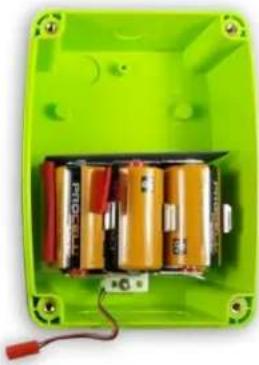
natural_image
Interior view of a green battery pack with multiple batteries and a red terminal block (no visible text or symbols)Using External +12 VDC Power with Battery Back-up
Note: An additional hole, strain relief, and conduit will need to be installed into the mailbox. Refer to the "INSTALLING THE CALLBACK 6-CONDUCTOR INTERFACE CABLE (60201124)" section of this manual for details.
The unit may be powered by an external source of 8 to 12 VDC. This source should be filtered, with minimum noise and hum, and capable of supplying at least 1 Ampere.
Factory Default programming of the mailbox is optimized for battery power operation. The External 8 to 12 VDC Power Fail Alert option is NOT ENABLED.
It is recommended that if an external source of power is used, that the internal batteries be installed as a back-up against loss of power. If this option is chosen, we recommend that the "External Power Fail Alert" feature be ENABLED via Field or PC programming.
For External +12 VDC power, order Ritron model RPS-EXPO 10 VAC to 12 VDC cube supply.

natural_image
Black rectangular electronic device with attached cable and power outlet (no visible text or symbols)RQX DMR-Series Wireless Callbox Installation Instructions
How the Callbox will operate:
If External 8 to 12 VDC Power Fail Alert Feature is NOT ENABLED:
- LOW battery detection can only occur when the external voltage is removed or failed.
- Radio will only check for LOW battery or DEAD battery condition when the radio is ON.
- If LOW battery is detected, a single LOW battery alert tone will be transmitted at the end of the transmission.
- Radio does NOT automatically transmit a LOW battery alert tone. The callbox must be ON and the Alert tone is only sent at the end of a transmission.
- If DEAD battery is detected, the radio ceases all operation. A DEAD battery tone is heard on the callbox speaker and the radio will turn OFF.
- On DMR-Series callboxes the LOW battery alert tone can be replaced with a LOW battery voice message.
If External 8 to 12 VDC Power Fail Alert Feature is ENABLED:
- Radio always checks for External voltage when the radio is ON. If loss of external voltage is detected while the radio is in standby: a single Alert Tone will be transmitted immediately.
- If loss of external voltage is detected while the radio is in receive: a single Alert Tone will be transmitted after the received message is complete.
- If loss of external voltage is detected while the radio is in transmit: a single Alert Tone will be transmitted at the end of the transmission.
- Once loss of external voltage is detected and the Alert Tone is transmitted, the radio will automatically send the Alert Tone once every hour until external voltage is restored or the batteries are exhausted. If radio is set for Automatic Turn-Off (default setting) this hourly alert will NOT occur.
- If Dead battery is detected the radio ceases all operation, a DEAD battery tone is heard on the callbox speaker and the radio will turn OFF.
- On DMR-Series callboxes the loss of External +12 VDC alert tone can be replaced by a Power Fail voice message.
Using External 8 to 12 VDC Power without Battery Back-up
The Ritron® DMR-Series checkbox can be programmed for always-on operation by disabling the Automatic Turn-Off option. This is accomplished using the RQX PC Programmer, or through Field Programming. Once Automatic Turn-Off is disabled, the user simply turns on the checkbox by pressing the front panel PTT button and it will remain on as long as power is applied. If power to the checkbox is lost then restored, the user must press the front panel PTT to restart the radio. For externally powered callboxes, battery backup is one method of keeping the radio on if the primary external power is lost.
For users that do not want to rely on battery backup, and do not want to "restart" the mailbox after a power loss, the mailbox can be modified to automatically restart after a power loss.
For details or questions about this modification contact Ritron ^® at 1-800-872-1872.
Important considerations before applying this modification:
- The Automatic Turn-Off option must be disabled.
- When Automatic Turn-Off is disabled the unit will consume the largest amount of current, but is always ready to instantly receive messages. This mode should only be considered if an external source of power is available.
- The mailbox receiver will always be on. All radio communication on the programmed frequency will be heard over the RQX mailbox.
POWER MANAGEMENT OPTIONS
There are three power management options available to the DMR-Series Callbox:
Automatic Turn-Off (In battery only application Auto Turn-Off must be Enabled) ....(Field or PC Programmable)
If Enabled (factory default), the mailbox will automatically turn itself off after a programmed period of no activity (no transmissions made and no calls received) has elapsed. Once the unit has turned itself off, it can only be turned back on by depressing the ON/PTT Button. The programmed period of no activity necessary before the unit turns itself off is called the RQX Reset Time. RQX Reset Time and Automatic Turn-Off can both be Field programmed, or PC programmed by the factory or your Ritron® dealer via the Ritron® RQX Series PC Programmer. Automatic Turn-Off mode is the factory default mode for power management with an RQX Reset Time of 10 seconds. Battery only operation is not suitable for Always-On mode.
RQX DMR-Series Wireless Callbox Installation Instructions
"Automatic Turn-Off" Disabled....(Field or PC Programmable)
If Automatic Turn-Off is disabled the unit will consume the largest amount of current, about 90 mA, but is always ready to instantly receive messages. This mode should only be considered if an external source of power is available (see "Using External 8 to 12 VDC Power with Battery Back-up").
DMR Mode Radio Power Consumption (Automatic)
"ON with sync": When the DMR radio is actively looking for a sync word in receive mode it consumes about 80 mA. The digital receiver IC is looking for the DMR preamble and sync word and once found will wake up the DMR processing board. Once awake while decoding voice the radio draws about 270 mA with a low audio volume setting. When the received signal disappears the unit's consumption goes back to about 80 mA. Battery only operation not suitable for Always-On mode.
"Always ON": DMR board is always ON consuming about 250 mA in RX mode.
If Automatic Turn-Off is enable the current will drop to zero at the expiration of the reset timer. If Automatic Turn-Off is not enabled the unit will continue drawing 80 mA in "ON with sync" or 250 mA in "Always ON" mode.
Sensor Turn-On
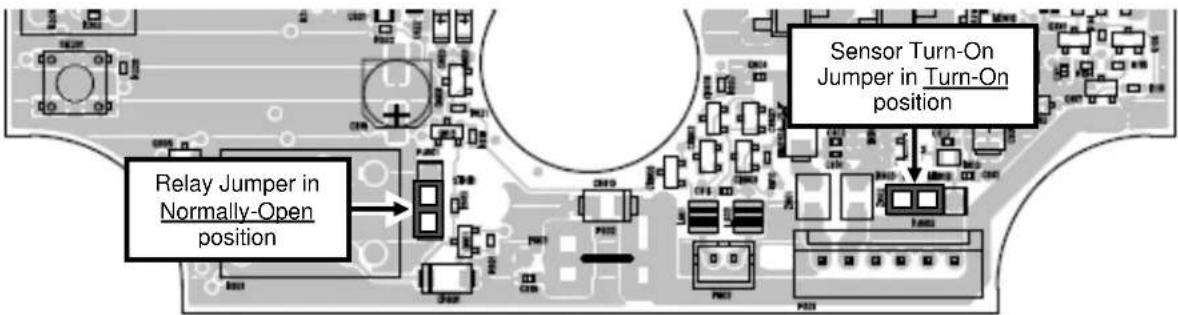
When operating a DMR-Series Callbox with Automatic Turn-Off enabled, the unit can be configured to turn itself ON any time the Sensor Input is pulled LOW (ground). This allows an external switch closure to activate the Callbox. When the switch closure is detected the Callbox will turn on and automatically transmit the Sensor On alert or Sensor ON voice message. The Callbox is then in normal operating mode and will automatically turn itself off after a programmed period of no activity as described in the Automatic Turn-Off topic in this section. For Sensor Turn-On operation the Sensor Turn-On jumper must be placed into the "Turn-On" position. Refer to FIG-1 below for correct placement of the jumper. If the Sensor Input is not used the jumper placement has no effect on Callbox operation.
text_image
Relay Jumper in Normally-Open position Sensor Turn-On Jumper in Turn-On positionFIG-1: Sensor Turn-On Jumper Shown in Turn-On Position
EXTERNAL ANTENNA CONNECTOR AND ANTENNA JUMPER SETTING ......
The DMR-Series Callbox is equipped with an Antenna Selector Jumper that will route all incoming and outgoing radio signals to either the built-in internal antenna, or to the SMB RF Test / External Antenna connector.
The DMR-Series Callbox comes from the factory with the Antenna Selector Jumper in the "INTERNAL ANTENNA" position for operation with the built-in internal antenna.
Important - For testing through the SMB RF connector, OR for connection to an optional external antenna (optional cable also required), you must remove the Antenna Selector Jumper PJ201.
For mounting an external antenna the Ritron ^® six inch coaxial adapter (Ritron ^® # 60201125) can be used to go from the SMB to a hole in the case. Care must be taken while drilling so as not to crack the case.

text_image
SMB connector for optional external cable and antenna PJ201 jumped to connect to internal antennaCALLBOX CONTROLS AND CONNECTORS
SMB RF Connector
SMB style RF connector for external antennas. The antenna jumper must be in the "SMB" position when using the SMB RF connector.
Internal Antenna
An internal antenna is etched and/or secured to the PCB. When used, the antenna jumper must be in the "ANTENNA" position and there will be no connection to the SMB RF connector.
Antenna Jumper
The antenna jumper connects either the internal antenna or the SMB RF connector.
Sensor Turn-On Jumper
The Sensor Turn-On jumper can be set to turn-on the radio whenever the Sensor Input is pulled low. (See FIG-1)
Relay Polarity Jumper
The Relay Polarity jumper can set the relay output to normally open or normally closed. (See FIG-1)
Case Screws
A T-25 Torx screw is located in each corner of the case front. These 4 screws are used to secure the case front containing the radio, to the case back that contains the batteries.
Input/Output Connector
The 6-pin, polarized connector is used to connect external input/output devices. This allows connection of an external 8 to 12 VDC input, an external DC level sensor input, and a 3A contact switch closure output.
Microphone
The microphone is installed on the PCB back side.
Speaker Connector
The internal speaker is connected to the radio printed circuit board with a polarized connector.
On/PTT Connector
The On/PTT switch is connected to the radio printed circuit board with a polarized connector.
USB Programming Connector
A Mini-USB style connector is used to connect the cable from the PC programmer to the radio.
Program Button
A small, momentary pushbutton is used for field programming the DMR-Series Callbox.
Program Display
A single digit LED display is used during field programming of the radio.
Battery Holder
The battery holder inside the case back is used for the installation of D-cell alkaline batteries. Refer to the labels beneath the cells for correct installation of the batteries.
Battery Mating Connectors
Polarized, 2-pin mating connectors are used to connect the batteries to the radio circuit board.

text_image
Case Screws (4 Corners) Internal Antenna Antenna Jumper SMB RF Connector USB Programming On/PTT Connector D-Cell Battery Holder with Batteries Installed Sensor Turn-On Jumper Program Display Program Button Input/Output Connector Relay Polarity Jumper Battery Mating Connectors Speaker ConnectorFIG-2: Callbox Assembly, Controls and Connectors
DMR-SERIES CALLBACK INSTALLATION INSTRUCTIONS
The DMR-Series Callbox can be mounted to virtually any surface using the mounting brackets included with the product. Choose a type of screw thread and screw length which will hold firmly in the surface to which the unit will be mounted.
MOUNTING THE DMR-SERIES CALLBACK
- Loosen the (4) screws in the front corners of the case and separate the case front from the case back.
- Install new D-cell alkaline batteries into the battery holder. Refer to FIG-2, or the labels beneath the cells, for correct installation of the batteries.
- If required, program the radio. Refer to the programming section of this manual for details.
- Disconnect the battery mating connectors. Set the case front containing the radio circuit board aside.
- Install the mounting brackets included with the product to the DMR-Series Callbox case back. The recommended installation is with the brackets on each side as shown, installing the brackets top and bottom may reduce radio range.
- Position the case in the chosen installation location and secure it in place with four screws.

Do not drill or penetrate the DMR-Series Callbox case with any additional holes. Use only the mounting brackets included with the product.
-
Reconnect the battery mating connectors between the case front and case back.
-
Fasten the case front to the case back with the four (4) corner screws.

natural_image
Close-up of a black rectangular electronic device with metallic mounting brackets and mounting holes (no visible text or symbols)COVERAGE Depending on the unit location and installation, the DMR-Series Callbox can cover up to 1 mile line of sight. To increase range, use an external antenna that is mounted higher. Contact RITRON for a RAM-1545 Magnet Mounted Antenna.
OPTIONAL DMR-SERIES CALLBACK PEDESTAL MOUNTING BRACKET INSTALLATION INSTRUCTIONS ....
The DMR-Series Callbox can be mounted to a gooseneck pedestal or a post using the optional RQX-Q-GN mounting bracket. The RQX-Q-GN includes hardware necessary to attach the bracket to the Callbox, but does not include hardware for attaching to a gooseneck pedestal or a post.
MOUNTING THE DMR-SERIES CALLBACK TO A GOOSENECK PEDESTAL
- Loosen the (4) screws in the front corners of the case and separate the case front from the case back.
- Install new D-cell alkaline batteries into the battery holder. Refer to FIG-2, or the labels beneath the cells, for correct installation of the batteries.
- If required, program the radio. Refer to the programming section of this manual for details.
- Disconnect the battery mating connectors. Set the case front containing the radio circuit board aside.
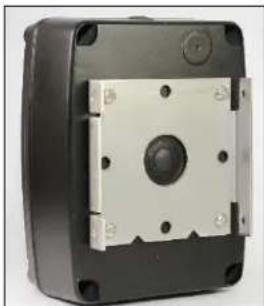
- Install one half of the optional RQX-Q-GN mounting bracket to the DMR-Series Callbox case back as shown at top right.
- Reconnect the battery mating connectors between the case front and case back.
- Fasten the case front to the case back with the four (4) corner screws.
- Install the other half of the optional RQX-Q-GN mounting bracket to a gooseneck pedestal or a post with the folded sides of the bracket to the sides. The hardware necessary to attach to a gooseneck pedestal or a post is not included with the RQX-Q-GN.
- Mate the mounting bracket on the DMR-Series Callbox to the bracket on the gooseneck pedestal or a post as shown at bottom right and secure with the 4 screws included with the RQX-Q-GN.
natural_image
Close-up of a black rectangular electronic device with a central circular button and mounting holes (no visible text or symbols)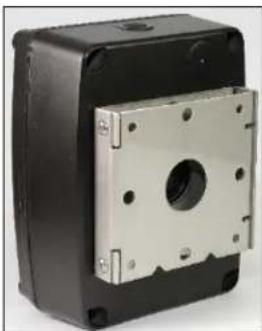
natural_image
Exterior view of a black rectangular electronic component with a metallic mounting bracket (no text or symbols visible)OPTIONAL DMR-SERIES EXTERNAL ANTENNA INSTALLATION INSTRUCTIONS.
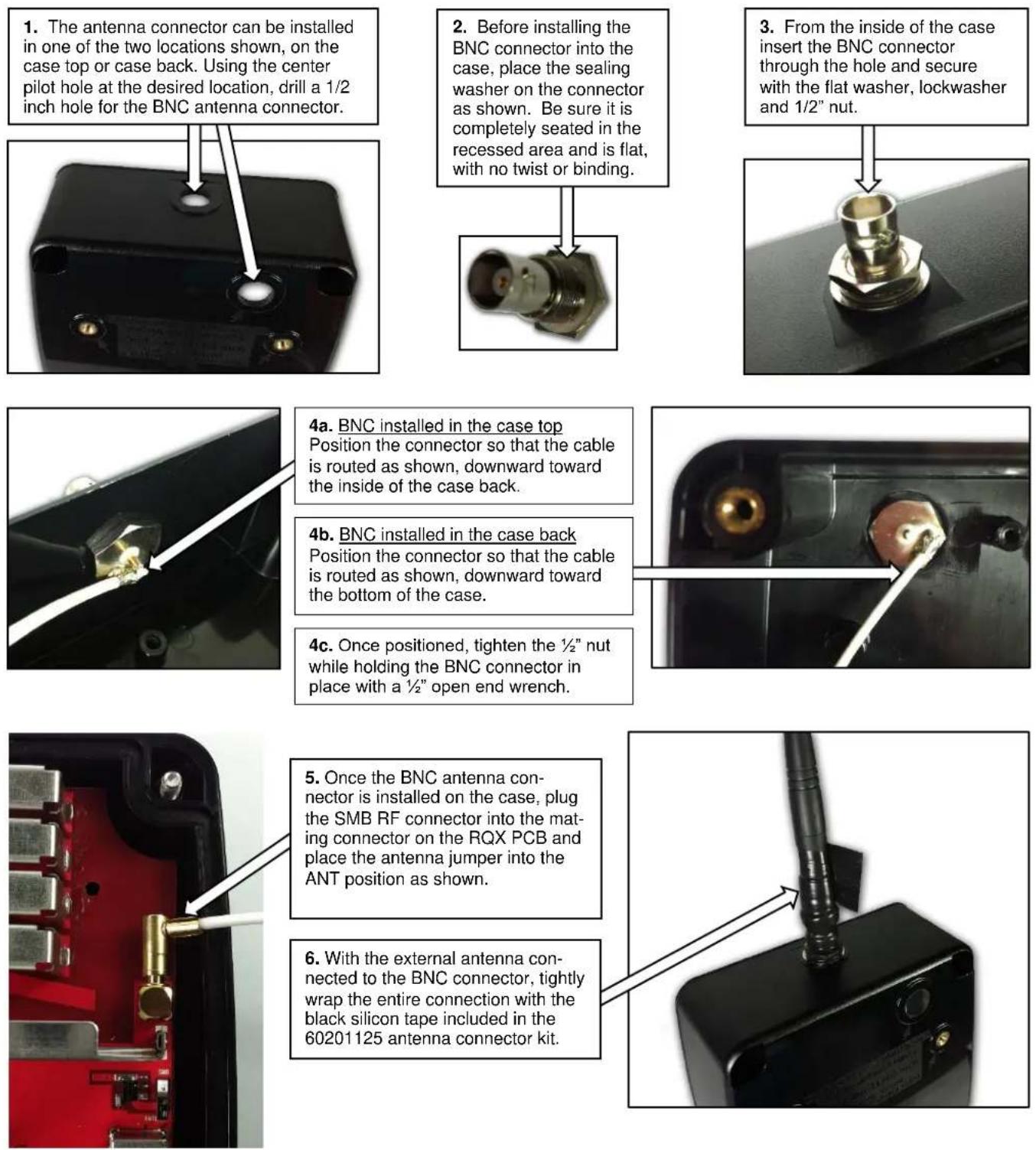
Order Ritron® PN 60201125 (Cable Assembly, RF SMB-BNC, Q-Series)
-
The antenna connector can be installed in one of the two locations shown, on the case top or case back. Using the center pilot hole at the desired location, drill a 1/2 inch hole for the BNC antenna connector.
-
Before installing the BNC connector into the case, place the sealing washer on the connector as shown. Be sure it is completely seated in the recessed area and is flat, with no twist or binding.
-
From the inside of the case insert the BNC connector through the hole and secure with the flat washer, lockwasher and 1/2" nut.
4a. BNC installed in the case top Position the connector so that the cable is routed as shown, downward toward the inside of the case back.
4b. BNC installed in the case back Position the connector so that the cable is routed as shown, downward toward the bottom of the case.
4c. Once positioned, tighten the 12 " nut while holding the BNC connector in place with a 12 " open end wrench.
- Once the BNC antenna connector is installed on the case, plug the SMB RF connector into the mating connector on the RQX PCB and place the antenna jumper into the ANT position as shown.
- With the external antenna connected to the BNC connector, tightly wrap the entire connection with the black silicon tape included in the 60201125 antenna connector kit.
DMR-SERIES FIELD PROGRAMMING OVERVIEW
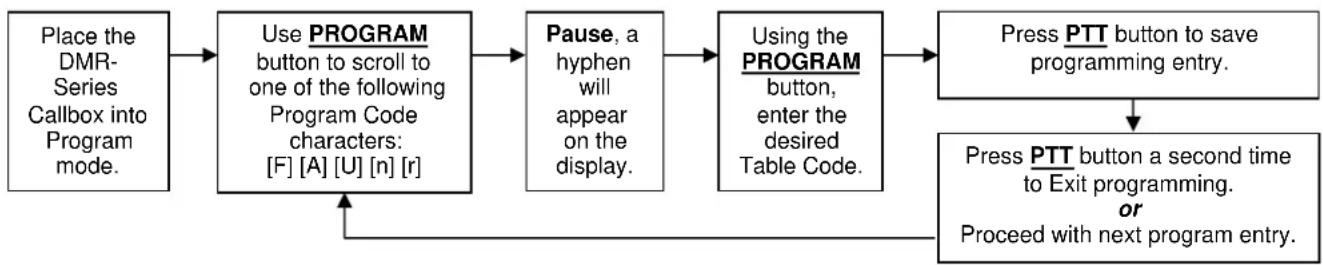
flowchart
graph TD
    A["Place the DMR-Series Callbox into Program mode."] --> B["Use PROGRAM button to scroll to one of the following Program Code characters: [F"] [A] [U] [n] [r]]
    B --> C["Pause, a hyphen will appear on the display."]
    C --> D["Using the PROGRAM button, enter the desired Table Code."]
    D --> E["Press PTT button to save programming entry."]
    E --> F["Press PTT button a second time to Exit programming. or Proceed with next program entry."]
    F --> G["End"]
Program Codes Table Codes


Enter a 2-digit or 3-digit Frequency Code from Table 1.


Enter any 2-digit or 3-digit Feature Code from Table 4 to:
- Enable or disable Call Tone.
- Enable or disable external power loss alert.
- Enable or disable Automatic Turn-Off.
- Enable or disable Busy Channel TX Inhibit.
- Set microphone gain fixed or AGC.
- Set RQX Reset Time.
- Set switch output operation.
- Reset RQX to Factory default programming.
• Record and Playback Voice Messages. - Readout codes currently programmed into the RQX by pressing display button.


Enter any 3-digit Relay and Listen-In Operation Code from Table 3


Enter the desired Speaker Volume Level as a 2-digit number from 20 - 99.


Enter 1 to 7 to write the desired DMR function then the 1 to 8 digit ID code from Table 2


Enter 1 to 7 to read out the desired DMR 1 to 8 digit code from Table 5
IMPORTANT NOTICE
While the RQX DMR-Series callbox offers limited field programming capability, it is recommended that Ritron PC Programmer RQX-PCPK-1 be used for DMR-Series programming.
Contact Ritron Sales Dept. @ 1-800-872-1872 for ordering details.
HOW TO FIELD PROGRAM FREQUENCY CODES
To match other radios, the owner can select a Frequency Code from Table 1. The radio will use the programmed code in both transmit and receive. In our example, we will program an RQX-417DMR to operate on the "Brown Dot" frequency of 464.500 MHz.
22
-
Refer to Table 1 to determine the two-digit frequency code and write it down.
-
Loosen the (4) screws in the front corners of the case.
-
Separate the case front from the case back, leaving the batteries connected to the radio. Make sure the unit has batteries installed.
NOTE: The voltage of the batteries must be greater than 3.3 VDC to program properly.
- Press and release the ON/PTT button on the front of the unit to turn the radio on.

- Press and HOLD the Program Button (See FIG-2 for location). A "P" will appear on the program display as you enter program mode and the radio will beep rapidly.

- Release the program button after the beeping has stopped. The radio will emit a triple beep indicating that the radio is in program mode and a hyphen will appear on the program display.

- Click the Program button until the program display shows the Program Code "F". Pause—the radio will sound a low tone and show a hyphen across the center of the display to indicate that it is ready to accept the 2 or 3-digit Frequency code from Table 1.

^st digit of the frequency code by clicking the Program button until the program display shows the desired number. Pause—the radio will sound a low tone and show a hyphen across the center of the display to indicate that it is ready to accept the next digit.

-
Enter the 2^nd digit of the frequency code by clicking the Program button until the program display shows the desired number. Pause—the radio sounds a low tone and will show a hyphen across the center of the display to indicate that it is ready to accept the next digit.
-
If necessary, enter the 3
^rd digit of the frequency code by clicking the Program button until the program
display shows the desired number. Pause—the radio sounds a low tone and will show a hyphen across the center of the display to indicate that it is ready to accept the next digit

- Press and release the ON/PTT button to save your programming. A triple beep will sound to indicate that programming was successful and a hyphen will appear on the program display. The radio is now ready for another program entry.
NOTE: An error tone will sound if you attempt to save an incorrect code, an "E" will appear on the display. Check the digits you are attempting to enter, then re-enter. This will also occur if the radio frequency has been PC programmed to something other than one of the table codes from Table 1.

- Once you have made your final program entry, press the ON/PTT button a final time to turn the radio off. Turn the radio back on for normal operation.
TABLE 1: PROGRAMMABLE FREQUENCY CODES (PROGRAM CODE F) ......
| UHF Business Band Models TableCode Frequency Color Dot BW | UHF Business Band Models TableCode Frequency Color Dot BW | VHF Business Band Models TableCode Frequency Color Dot BW | ||||||||
| 09 | 469.2625 | 12.5 † | 66 | 466.3125 | 12.5 | 03 | 151.6250 | Red Dot | 12.5 † | |
| 10 | 462.5750 | White Dot 12.5 † | 67 | 466.3375 | 12.5 | 04 | 151.9550 | Purple Dot | 12.5 † | |
| 11 | 462.6250 | Black Dot 12.5 † | 68 | 466.3625 | 12.5 | 05 | 151.9250 | 12.5 † | ||
| 12 | 462.6750 | Orange Dot 12.5 † | 69 | 467.7875 | 12.5 | 06 | 154.5400 | 12.5 † | ||
| 13 | 464.3250 | 12.5 † | 70 | 467.8375 | 12.5 | 07 | 154.5150 | 12.5 † | ||
| 14 | 464.8250 | 12.5 † | 71 | 467.8625 | 12.5 | 08 | 154.6550 | 12.5 † | ||
| 15 | 469.5000 | 12.5 † | 72 | 467.8875 | 12.5 | 09 | 151.6850 | 12.5 † | ||
| 16 | 469.5500 | 12.5 † | 73 | 467.9125 | 12.5 | 10 | 151.7150 | 12.5 † | ||
| 17 | 463.2625 | 12.5 † | 74 | 469.4875 | 12.5 | 11 | 151.7750 | 12.5 † | ||
| 18 | 464.9125 | 12.5 † | 75 | 469.5125 | 12.5 | 12 | 151.8050 | 12.5 † | ||
| 19 | 464.6000 | 12.5 † | 76 | 469.5375 | 12.5 | 13 | 151.8350 | 12.5 † | ||
| 20 | 464.7000 | 12.5 † | 77 | 469.5625 | 12.5 | 14 | 151.8950 | 12.5 † | ||
| 21 | 462.7250 | 12.5 † | 78 | 462.1875 | 12.5 | 15 | 154.4900 | 12.5 † | ||
| 22 | 464.5000 | Brown Dot 12.5 | 79 | 462.4625 | 12.5 | 16 | 151.6550 | 12.5 † | ||
| 23 | 464.5500 | Yellow Dot 12.5 | 80 | 462.4875 | 12.5 | 17 | 151.7450 | 12.5 † | ||
| 24 | 467.7625 | J 12.5 | 81 | 462.5125 | 12.5 | 18 | 151.8650 | 12.5 † | ||
| 25 | 467.8125 | K 12.5 | 82 | 467.1875 | 12.5 | 24 | 151.7000 | 12.5 | ||
| 26 | 467.8500 | Silver Star 12.5 | 83 | 467.4625 | 12.5 | 25 | 151.7600 | 12.5 | ||
| 27 | 467.8750 | Gold Star 12.5 | 84 | 467.4875 | 12.5 | 26 | 152.7000 | 12.5 † | ||
| 28 | 467.9000 | Red Star 12.5 | 85 | 467.5125 | 12.5 | 27 | 152.8850 | 12.5 | ||
| 29 | 467.9250 | Blue Star 12.5 | 86 | 451.1875 | 12.5 | 28 | 152.9150 | 12.5 | ||
| 30 | 461.0375 | 12.5 | 87 | 451.2375 | 12.5 | 29 | 152.9450 | 12.5 | ||
| 31 | 461.0625 | 12.5 | 88 | 451.2875 | 12.5 | 30 | 151.5125 | 12.5 | ||
| 32 | 461.0875 | 12.5 | 89 | 451.3375 | 12.5 | 31 | 154.5275 | 12.5 | ||
| 33 | 461.1125 | 12.5 | 90 | 451.4375 | 12.5 | 32 | 153.0050 | 12.5 | ||
| 34 | 461.1375 | 12.5 | 91 | 451.5375 | 12.5 | 33 | 158.4000 | 12.5 | ||
| 35 | 461.1625 | 12.5 | 92 | 451.6375 | 12.5 | 34 | 158.4075 | 12.5 | ||
| 36 | 461.1875 | 12.5 | 93 | 452.3125 | 12.5 | |||||
| 37 | 461.2125 | 12.5 | 94 | 452.5375 | 12.5 | |||||
| 38 | 461.2375 | 12.5 | 95 | 452.4125 | 12.5 | |||||
| 39 | 461.2625 | 12.5 | 96 | 452.5125 | 12.5 | |||||
| 40 | 461.2875 | 12.5 | 97 | 452.7625 | 12.5 | |||||
| 41 | 461.3125 | 12.5 | 98 | 452.8625 | 12.5 | |||||
| 42 | 461.3375 | 12.5 | 99 | 456.1875 | 12.5 | |||||
| 43 | 461.3625 | 12.5 | 100 | 456.2375 | 12.5 | |||||
| 44 | 462.7625 | 12.5 | 101 | 456.2875 | 12.5 | |||||
| 45 | 462.7875 | 12.5 | 102 | 468.2125 | 12.5 | |||||
| 46 | 462.8125 | 12.5 | 103 | 468.2625 | 12.5 | |||||
| 47 | 462.8375 | 12.5 | 104 | 468.3125 | 12.5 | |||||
| 48 | 462.8625 | 12.5 | 105 | 468.3625 | 12.5 | |||||
| 49 | 462.8875 | 12.5 | 106 | 468.4125 | 12.5 | |||||
| 50 | 462.9125 | 12.5 | 107 | 468.4625 | 12.5 | |||||
| 51 | 464.4875 | 12.5 | 108 | 468.5125 | 12.5 | |||||
| 52 | 464.5125 | 12.5 | 109 | 468.5625 | 12.5 | |||||
| 53 | 464.5375 | 12.5 | 110 | 468.6125 | 12.5 | |||||
| 54 | 464.5625 | 12.5 | 111 | 468.6625 | 12.5 | |||||
| 55 | 466.0375 | 12.5 | 112 | 456.3375 | 12.5 | |||||
| 56 | 466.0625 | 12.5 | 113 | 456.4375 | 12.5 | |||||
| 57 | 466.0875 | 12.5 | 114 | 456.5375 | 12.5 | |||||
| 58 | 466.1125 | 12.5 | 115 | 456.6375 | 12.5 | |||||
| 59 | 466.1375 | 12.5 | 116 | 457.3125 | 12.5 | |||||
| 60 | 466.1625 | 12.5 | 117 | 457.4125 | 12.5 | |||||
| 61 | 466.1875 | 12.5 | 118 | 457.5125 | 12.5 | |||||
| 62 | 466.2125 | 12.5 | 119 | 457.7625 | 12.5 | |||||
| 63 | 466.2375 | 12.5 | 120 | 457.8625 | 12.5 | |||||
| 64 | 466.2625 | 12.5 | 121 | 461.3175 | 12.5 | |||||
| 65 | 466.2875 | 12.5 | 122 | 464.8375 | 12.5 | |||||
DMR ID AND COLOR CODES OVERVIEW
DMR ID and Color Codes
Communication between any two DMR digital radios will include the following four codes:
| Color Code | A 4-bit (0-15) Color Code. Color Codes work much like QC/DQC codes in Analog mode, and are often used in conjunction with an SUID or Group ID code to screen calls when receiving and to uniquely identify the callbox when transmitting. |
| SUID | A 24-bit (0-16,777,215) Subscriber Unit ID code. Each radio in a DMR system must have a unique SUID. |
| Destination Type | A 4-bit code used to identify the type of Destination ID code that is transmitted. The DMR-Series callbox can be set for either Individual or Group Destination ID. |
| Destination ID | A 24-bit (0-16,777,215) ID code that is transmitted to determine what radios are to be called. The DMR-Series callbox can be set to call an individual radio or a group of radios. An Individual or Group Destination ID code of 16,777,215 is an All Call code that can be used to call all radios. |
DMR-Series callboxes can be programmed to send and receive these DMR codes. How the mailbox responds is determined by the specific programming of the radios within the DMR system.
Receive Operation
The DMR-Series callbox can be set to one of four Squelch Types using the Ritron® RQX-PCPS programmer:
| OFF The DMR-Series callbox will receive all valid on-frequency DMR calls, with no Color Code, SUID, or Group ID code required. Squelch Type OFF is similar to carrier squelch operation in an analog radio. | |
| Color Code | The DMR-Series callbox will receive all calls with the programmed RX Color Code. Squelch Type Color Code is similar to using QC/DQC codes in an analog radio. |
| ID | The DMR-Series callbox will only receive calls with its programmed SUID code, programmed Group Call code, or the All Call code (if enabled). Squelch Type ID is similar to using 2-Tone, DTMF or Selcall to selectively call the radio in an analog radio. |
| Color Code + ID | The DMR-Series callbox will only receive calls with the programmed RX Color Code AND with its programmed SUID code, programmed Group Call code, or the All Call code (if enabled). Squelch Type Color Code + ID is similar to using QC/DQC and 2-Tone, DTMF or Selcall to selectively call the radio in an analog radio. |
IMPORTANT NOTE: From the factory, the DMR-Series callbox is set to Squelch Type OFF above and cannot be changed via field programming. Changing this requires the Ritron® RQX-PCPS programmer.
Transmitter Operation
The DMR-Series callbox sends the programmed TX Color Code, SUID code, Destination Type, and Destination ID code each time it transmits. The combination of these codes determine which radios the callbox will communicate with in the DMR system.
The DMR-Series callbox can be set to transmit with one of three Call Types:
OFF The DMR-Series callbox will send the programmed TX Color Code and a Group Destination ID code for All Call (65535).
Individual The DMR-Series callbox will send the programmed TX Color Code and the programmed Individual Destination ID code.
Group The DMR-Series callbox will send the programmed TX Color Code and the programmed Group Destination ID code.
NOTE: DMR "All Call" code (16,777,215) can be programmed as an Individual Destination ID or Group Destination ID code.
Relay and Listen-In Operation
The DMR-Series callbox relay can be operated when a Primary or Secondary Control ID code is received, regardless of the programmed Squelch Type listed above. The Primary or Secondary Control ID codes are Individual ID codes, and as such the sending radio must transmit these as an Individual Destination ID code. The callbox can also be placed into Listen-In mode when a Secondary Control ID code is received, regardless of the programmed Squelch Type listed above. See Table 3 "Relay and Listen-In Operation Codes" to program how the radio will respond to the Primary or Secondary Control ID code.
NOTE: If Squelch Type requires an RX Color Code the Relay and Listen-In operation will also require the RX Color Code.
HOW TO FIELD PROGRAM DMR ID AND COLOR CODES
Each DMR-Series callbox is uniquely identified by programming a DMR 1-8 digit SUID code (1 to 16,777,215). The radio will transmit the SUID ID code in each transmission. The callbox can also be programmed with RX and TX Color Codes, RX Group ID code, Control Codes, and both Individual and Group Destination codes. Refer to Table 2 for DMR ID and Color Codes.
In our example we will program an RQX-417DMR to operate with an SUID Code 547, a TX Color Code 12, and a Group Destination ID code 631.
| 1. Write down the desired SUID code, TX Color Code, and Group Destination code. | |
| 2. Loosen the (4) captive screws in the front corners of the case. These screws are captive to the housing; to prevent damaging them,DO NOTremove the screws from the housing. | |
| 3. Separate the case front from the case back, leaving the batteries connected to the radio. Make sure the unit has batteries installed.NOTE: The voltage of the batteries must be greater than 3.3 VDC to program properly. | |
| 4. Press and release theON/PTTbutton on the front of the unit to turn the radio on. | |
 | 5. Press andHOLDthe Program Button(See FIG-2 for location). A "P" will appear on the program display as you enter program mode and the radio will beep rapidly. |
 | 6. Release the program button after the beeping has stopped. The radio will emit a triple beep indicating that the radio is in program mode and a hyphen will appear on the program display. |
 | 7. Click the Program button until the program display shows the Program Code "n". Pause—the radio will sound a low tone and show a hyphen across the center of the display to indicate that it is ready for DMR ID code programming. |
 | 8. Click the Program button until the program display shows the Table Code "3". Pause—the radio will sound a low tone and show a hyphen across the center of the display to indicate that it is ready to accept a 1 to 8-digit SUID code. |
 | stdigit of the SUID code by clicking the Program button until the program display shows the desired number. Pause—the radio will sound a low tone and show a hyphen across the center of the display to indicate that it is ready to accept the next digit. |
 | nddigit of the SUID code by clicking the Program button until the program display shows the desired number. Pause—the radio sounds a low tone and will show a hyphen across the center of the display to indicate that it is ready to accept the next digit. |
 | rddigit of the SUID sequence by clicking the Program button until the program display shows the desired number. Pause—the radio sounds a low tone and will show a hyphen across the center of the display to indicate that it is ready to accept the next digit. Continue entering up to eight digits. |
 | 12. Press and release theON/PTTbutton to save your programming. A triple beep will sound to indicate that programming was successful and a hyphen will appear on the program display. The radio is now ready for another program entry. |
 | NOTE: An error tone will sound if you attempt to save an incorrect code, an "E" will appear on the display. Check the digits you are attempting to enter, then re-enter. |
 | 13. Click the Program button until the program display shows the Program Code "n". Pause—the radio will sound a low tone and show a hyphen across the center of the display to indicate that it is ready for DMR ID code programming. |
 | 14. Click the Program button until the program display shows the Table Code "2". Pause—the radio will sound a low tone and show a hyphen across the center of the display to indicate that it is ready to accept a 2-digit Color Code. |
 | stdigit of the TX Color Code by clicking the Program button until the program display shows the desired number. Pause—the radio will sound a low tone and show a hyphen across the center of the display to indicate that it is ready to accept the next digit. |
 | nddigit of the TX Color Code by clicking the Program button until the program display shows the desired number. Pause—the radio sounds a low tone and will show a hyphen across the center of the display to indicate that it is ready to accept the next digit. |
 | 17. Press and release theON/PTTbutton to save your programming. A triple beep will sound to indicate that programming was successful and a hyphen will appear on the program display. The radio is now ready for another program entry. |
 | NOTE: An error tone will sound if you attempt to save an incorrect code, an "E" will appear on the display. Check the digits you are attempting to enter, then re-enter. |
 | 18. Click the Program button until the program display shows the Program Code "n". Pause—the radio will sound a low tone and show a hyphen across the center of the display to indicate that it is ready to accept DMR ID code programming. |
RQX DMR-Series Wireless Callbox DMR-Series Field Programming
| 19. |  |  | ^st digit of Table Code “72”. Pause—the radio will sound a low tone and show a hyphen across the center of the display to indicate that it is ready to accept the 2^nd digit of Table Code “72”. |
| 20. |  |  | ^nd digit of Table Code “72”. Pause—the radio will sound a low tone and show a hyphen across the center of the display to indicate that it is ready to accept a 1 to 8-digit Group Destination ID code. |
| 21. |  |  | ^st digit of the Group Destination ID code by clicking the Program button until the program display shows the desired number. Pause—the radio will sound a low tone and show a hyphen across the center of the display to indicate that it is ready to accept the next digit. |
| 22. |  |  | ^nd digit of the Group Destination ID code by clicking the Program button until the program display shows the desired number. Pause—the radio sounds a low tone and will show a hyphen across the center of the display to indicate that it is ready to accept the next digit. |
| 23. |  |  | ^rd digit of the Group Destination ID sequence by clicking the Program button until the program display shows the desired number. Pause—the radio sounds a low tone and will show a hyphen across the center of the display to indicate that it is ready to accept the next digit. Continue entering up to eight digits. |
 | 24. Press and release the ON/PTT button to save your programming. A triple beep will sound to indicate that programming was successful and a hyphen will appear on the program display. The radio is now ready for another program entry. | ||
 | NOTE: An error tone will sound if you attempt to save an incorrect code, an "E" will appear on the display. Check the digits you are attempting to enter, then re-enter. | ||
| 25. Once you have made your final program entry, press the ON/PTT button a final time to turn the radio off. Turn the radio back on for normal operation. |
TABLE 2: DMR ID AND COLOR CODES (PROGRAM CODE n)
| TableCode Feature Description | ||
| DMR Color Codes | ||
| 1 + xx | RX Color Code | The mailbox can be set for an RX Color Code of 00-15. Programming an RX Color Code will have no effect without first setting squelch type for Color Code using the PC Programmer. |
| 2 + xx | TX Color Code | The mailbox can be set for a TX Color Code of 00-15, which will then be sent on every transmission. |
| DMR ID Codes | ||
| 3 + xxxxxxxx | Subscriber Unit ID (SUID) code | The mailbox can be programmed for a 1-8 digit SUID code for unique identification. |
| 4 + xxxxxxxx | RX Group ID code | The mailbox can be programmed for a 1-8 digit Group ID code. Programming an RX Group ID code will have no effect without first setting squelch type for ID and enabling RX Group Call using the PC Programmer. |
| 5 + xxxxxxxx | Primary Control ID code | The mailbox can be programmed for a 1-8 digit Primary Control ID code used to active the radio's on board relay. See Table 3 “Relay and Listen In Operation Codes” to program how the radio will respond to the Primary Control ID code. |
| 6 + xxxxxxxx | Secondary Control ID code | The mailbox can be programmed for a 1-8 digit Secondary Control ID code used to deactive the radio's on board relay, or to enable the Listen-In feature. See Table 3 “Relay and Listen In Operation Codes” to program how the radio will respond to the Secondary Control ID code. |
| 71 + xxxxxxxx | Individual Destination ID code | The mailbox can be programmed for a 1-8 digit Individual Destination ID code that will be sent each time the radio transmits. If the radio was previously programmed with a Group Destination ID code it will be replaced with the programmed Individual Destination ID code. |
| 72 + xxxxxxxx | Group Destination ID code | The mailbox can be programmed for a 1-8 digit Group Destination ID code that will be sent each time the radio transmits. If the radio was previously programmed with an Individual Destination ID code it will be replaced with the programmed Group Destination ID code. |
NOTES: 1. 8-digit ID codes must be in the 1 to 16,777,215 range. If the receiving unit wishes only to receive messages targeted for it the individual or group "call type" must be set in the receiver. If "call type" is off all traffic will be heard.
- A Program Code "n" is used to program DMR ID and Color Codes, while a Program Code "r" will read out the codes. To read out a code select Program Code "r" followed by a 1 through 7, press the PTT, and the code will be displayed digit by digit. For example, if a Group Destination ID of 1000 is set, to read out the destination ID key in "r" then "7" and hit PTT. The display will show "2" then "01000". Here "2" indicates a group and "1" would mean individual ID.
HOW TO FIELD PROGRAM DMR RELAY AND LISTEN-IN OPERATION ......
For special applications, it is desirable to program the DMR-Series Callbox for a Primary or Secondary Control ID code. These codes are used to operate the DMR-Series callboxes relay or to enable Listen-In operation.
Programming the radio for Relay or Listen-In operation MUST BE DONE IN THE FOLLOWING ORDER!
- Program the desired Relay and Listen-In Operation code (Refer to Table 3). This will delete any previous Primary or Secondary Operation code programming.
- Program the desired Primary Control ID code (Refer to Table 2). The Primary Control ID code cannot be the same as the Secondary Control ID code or the SUID code.
- If required, program the desired Secondary Control ID code (Refer to Table 2). The Secondary Control ID code cannot be the same as the Primary Control ID code or the SUID code.
- Program the desired Features codes as desired (Refer to Table 4).
In the following example we will program an RQX-417DMR for GateGuard – On Code/Off Code operation, with a Primary Control ID code (ON) of 108 and a Secondary Control ID code (OFF) of 208. We will program both the Primary and the Secondary Control ID to transmit a transpond signal.
| 1. Loosen the (4) captive screws in the front corners of the case and separate the case front from the case back, leaving the batteries connected to the radio. Make sure the unit has batteries installed. The voltage of the batteries must be greater than 3.3 VDC to program properly. | |
| 2. Press and release the ON/PTT button on the front of the unit to turn the radio on. | |
| 3. Press and HOLD the Program Button (See FIG-2 for location). A "P" will appear on the program display as you enter program mode and the radio will beep rapidly. Release the program button after the beeping has stopped. The radio will emit a triple beep indicating that the radio is in program mode and a hyphen will appear on the program display. | |
| 419 | 4. Refer to Table 3 to determine the three-digit Operation code for GateGuard® Switch On/Off code. |
| 5. Click the Program button until the program display shows the Program Code "C". Pause—the radio will sound a low tone and show a hyphen across the center of the display to indicate that it is ready to accept the next programming code. | |
| 6. Enter the 1 | ^st digit of the Operation Code by clicking the Program button until the program display shows the desired number. Pause—the radio will sound a low tone and show a hyphen across the center of the display to indicate that it is ready to accept the next digit. |
| 7. Enter the 2 | ^nd digit of the Operation Code by clicking the Program button until the program display shows the desired number. Pause—the radio sounds a low tone and will show a hyphen across the center of the display to indicate that it is ready to accept the next digit. |
| 8. Enter the 3 | ^rd digit of the Operation Code by clicking the Program button until the program display shows the desired number. Pause—the radio sounds a low tone and will show a hyphen across the center of the display to indicate that it is ready to accept the next digit. |
| 9. Press and release the ON/PTT button to save your programming. A triple beep will sound to indicate that programming was successful and a hyphen will appear on the program display. The radio is now ready for another program entry. An error tone will sound if you attempt to save an incorrect code and an "E" will appear on the display. Check the digits you are attempting to enter, then re-enter. | |
| 10. Click the Program button until the program display shows the Program Code "n". Pause—the radio will sound a low tone and show a hyphen across the center of the display to indicate that it is ready to accept an DMRTM ID code. | |
| 5 | 11. Refer to Table 2 to determine the Table code for Primary Control ID. |
| 12. Click the Program button until the program display shows the Table Code "5". Pause—the radio will sound a low tone and show a hyphen across the center of the display to indicate that it is ready to accept a 1 to 8-digit Primary Control ID code. | |
| 13. Enter the 1 | ^st digit of the Primary Control ID code by clicking the Program button until the program display shows the desired number. Pause—the radio will sound a low tone and show a hyphen across the center of the display to indicate that it is ready to accept the next digit. |
| 14. Enter the 2 | ^nd digit of the Primary Control ID code by clicking the Program button until the program display shows the desired number. Pause—the radio sounds a low tone and will show a hyphen across the center of the display to indicate that it is ready to accept the next digit. |
| 15. Enter the 3 | ^rd digit of the Primary Control ID code by clicking the Program button until the program display shows the desired number. Pause—the radio sounds a low tone and will show a hyphen across the center of the display to indicate that it is ready to accept the next digit. Continue entering up to eight digits. |
| 16. Press and release the ON/PTT button to save your programming. A triple beep will sound to indicate that programming was successful and a hyphen will appear on the program display. The radio is now ready for another program entry. An error tone will sound if you attempt to save an incorrect code and an "E" will appear on the display. Check the digits you are attempting to enter, then re-enter. |
RQX DMR-Series Wireless Callbox DMR-Series Field Programming
| 17. Click the Program button until the program display shows the Program Code “n”. Pause—the radio will sound a low tone and show a hyphen across the center of the display to indicate that it is ready to accept an DMRTM ID code. | |
| 18. Refer to Table 2 to determine the Table code for Secondary Control ID. | |
| 19. Click the Program button until the program display shows the Table Code “6”. Pause—the radio will sound a low tone and show a hyphen across the center of the display to indicate that it is ready to accept a 1 to 8-digit Secondary Control ID code. | |
| 1-8 Digit Secondary Control ID code | st digit of the Secondary Control ID code by clicking the Program button until the program display shows the desired number. Pause—the radio will sound a low tone and show a hyphen across the center of the display to indicate that it is ready to accept the next digit. |
| nd digit of the Secondary Control ID code by clicking the Program button until the program display shows the desired number. Pause—the radio sounds a low tone and will show a hyphen across the center of the display to indicate that it is ready to accept the next digit. | |
| rd digit of the Secondary Control ID code by clicking the Program button until the program display shows the desired number. Pause—the radio sounds a low tone and will show a hyphen across the center of the display to indicate that it is ready to accept the next digit. Continue entering up to eight digits. | |
| 23. Press and release the ON/PTT button to save your programming. A triple beep will sound to indicate that programming was successful and a hyphen will appear on the program display. The radio is now ready for another program entry. An error tone will sound if you attempt to save an incorrect code and an "E" will appear on the display. Check the digits you are attempting to enter, then re-enter. | |
| 24. Refer to Table 3 to determine the three-digit Operation code for Primary Transpond ON. | |
| 25. Click the Program button until the program display shows the Program Code “C”. Pause—the radio will sound a low tone and show a hyphen across the center of the display to indicate that it is ready to accept the next programming code. | |
| Primary Transpond ON Code | st digit of the Primary Transpond ON code by clicking the Program button until the program display shows the desired number. Pause—the radio will sound a low tone and show a hyphen across the center of the display to indicate that it is ready to accept the next digit. |
| nd digit of the Primary Transpond ON code by clicking the Program button until the program display shows the desired number. Pause—the radio sounds a low tone and will show a hyphen across the center of the display to indicate that it is ready to accept the next digit. | |
| rd digit of the Primary Transpond ON code by clicking the Program button until the program display shows the desired number. Pause—the radio sounds a low tone and will show a hyphen across the center of the display to indicate that it is ready to accept the next digit. | |
| 29. Press and release the ON/PTT button to save your programming. A triple beep will sound to indicate that programming was successful and a hyphen will appear on the program display. The radio is now ready for another program entry. An error tone will sound if you attempt to save an incorrect code and an "E" will appear on the display. Check the digits you are attempting to enter, then re-enter. | |
| 24. Refer to Table 3 to determine the two-digit Operation code for Secondary Transpond ON. | |
| 25. Click the Program button until the program display shows the Program Code “C”. Pause—the radio will sound a low tone and show a hyphen across the center of the display to indicate that it is ready to accept the next programming code. | |
| Secondary Transpond ON Code | st digit of the Secondary Transpond ON code by clicking the Program button until the program display shows the desired number. Pause—the radio will sound a low tone and show a hyphen across the center of the display to indicate that it is ready to accept the next digit. |
| nd digit of the Secondary Transpond ON code by clicking the Program button until the program display shows the desired number. Pause—the radio sounds a low tone and will show a hyphen across the center of the display to indicate that it is ready to accept the next digit. | |
| rd digit of the Secondary Transpond ON code by clicking the Program button until the program display shows the desired number. Pause—the radio sounds a low tone and will show a hyphen across the center of the display to indicate that it is ready to accept the next digit. | |
| 29. Press and release the ON/PTT button to save your programming. A triple beep will sound to indicate that programming was successful and a hyphen will appear on the program display. The radio is now ready for anotherprogram entry. An error tone will sound if you attempt to save an incorrect code and an "E" will appear on the display. Check the digits you are attempting to enter, then re-enter. | |
| 30. Once you have made your final program entry, press the ON/PTT button a final time to turn the radio off. Turn theradio back on for normal operation. |
IMPORTANT NOTE:
- Your Ritron ^® dealer can PC program the checkbox to additional features associated with the Primary or Secondary Control ID function. Contact your Ritron ^® dealer for details.
TABLE 3: RELAY AND LISTEN IN OPERATION CODES (PROGRAM CODE C) .....
| TableCode Feature Key Description | ||
| Operation Codes | ||
| 401 No Switch | √ | Disables all switch and Listen In operation. No Primary or Secondary Control ID code required. |
| 403 No Switch, Listen In Listen In operation uses Secondary Control ID code only. | ||
| 405 Switch On when called Switch closes (e.g. strobe light turns on) when Callbox 1streceives a call.Switch opens (e.g. stobe light turns off) as soon as the PTT is pressed, or if the Callbox has not been used (transmit or receive) for a period of time longer than RQX Reset Time. No Primary or Secondary Control ID code required. | ||
| 407 Switch On when called, Listen In | Switch operation is as described for Operation Code 405. Listen In operation uses Secondary Control ID code only. | |
| 409 Switch On when active Switch is closed (e.g. strobe light turns on) as long as Callbox is in use. Switch opens (e.g. stobe light turns off) when Callbox has not been used (transmit or receive) for a period of time longer than RQX Reset Time. No Primary or Secondary Control ID code required. | ||
| 411 Switch On when active, Listen In | Switch operation is as described for Operation Code 409. Listen In operation uses Secondary Control ID code only. | |
| 413 Switch On when active with Turn Off code | Switch is closed (e.g. strobe light turns on) when the Callbox receives or transmits a message, and will remain on until the correct Secondary Control ID code is received. No Primary Control ID code required. | |
| 415 GateGuard® Switch momentary | Switch is closed for 1 second when the correct Primary Control ID code is received. No Secondary Control ID code required. | |
| 416 GateGuard® Switch momentary, Listen In | Momentary switch operation uses the Primary Control ID code, Listen In uses the Secondary Control ID code. | |
| 417 GateGuard® Switch toggle | Switch alternately closes and opens when the correct Primary Control ID code is received. No Secondary Control ID code required. | |
| 418 GateGuard® Switch toggle, Listen In | Toggle switch operation uses the Primary Control ID code, Listen In uses the Secondary Control ID code. | |
| 419 GateGuard® Switch On/Off code | Switch is closed when the correct Primary Control ID code is received, and opened when the correct Secondary Control ID code is received. | |
| Primary Control ID Features | ||
| 510 Primary Ring Tone OFF | No Ring signal when radio receives the Primary Control ID code. | |
| 511 Primary Ring Tone ON | √ | Callbox will sound a Ring signal in the speaker upon receiving the Primary Control ID code. |
| 520 Primary Transpond OFF | No Transpond transmission after receiving the Primary Control ID code. | |
| 521 Primary Transpond ON | √ | Callbox will transmit a Transpond tone to acknowledge receiving the Primary Control ID code. |
| Secondary Control ID Features | ||
| 550 Secondary Ring Tone OFF | √ | No Ring signal when radio receives the Secondary Control ID code. |
| 551 Secondary Ring Tone ON | √ | Callbox will sound a Ring signal in the speaker upon receiving the Secondary Control ID code. |
| 560 Secondary Transpond OFF | √ | No Transpond transmission after receiving the Secondary Control ID code. |
| 561 Secondary Transpond ON | √ | Callbox will transmit a Transpond tone to acknowledge receiving the Secondary Control ID code. |
| Listen In Time Features | ||
| 581 Listen In 5 seconds | √ | The Callbox will automatically transmit for a period of time equal to the Listen In Time when the correct Secondary Control ID code is received. |
| 582 Listen In 10 seconds | ||
| 583 Listen In 20 seconds | ||
| 584 Listen In 30 seconds | ||
KEY: √ The Callbox is set from the factory with these options enabled.
NOTE: Field programming any of the Primary Control ID Features (Ring Tone or Transpond) will not only apply to receiving the Primary Control ID code, but will also apply when receiving an SUID, Group ID or All Call code. If this is not desirable the radio must be PC Programmed.
HOW TO FIELD PROGRAM FEATURE CODES
The DMR-Series Callbox can be field programmed for a number of advanced features. Refer to Table 4 for the two or three digit codes available for field programming. In our example we will program an RQX-417DMR for an RQX Reset Time of 30 seconds.
| 04 | 1. Refer to Table 4 to determine the two or three-digit feature code and write it down. |
| 2. Loosen the (4) screws in the front corners of the case. | |
| 3. Separate the case front from the case back, leaving the batteries connected to the radio. Make sure the unit has batteries installed.NOTE: The voltage of the batteries must be greater than 3.3 VDC to program properly. | |
| 4. Press and release the ON/PTT button on the front of the unit to turn the radio on. | |
 | 5. Press and HOLD the Program Button (See FIG-2 for location). A "P" will appear on the program display as you enter program mode and the radio will beep rapidly. |
 | 6. Release the program button after the beeping has stopped. The radio will emit a triple beep indicating that the radio is in program mode and a hyphen will appear on the program display. |
| [KST4] | 7. Click the Program button until the program display shows the Program Code “A”. Pause—the radio will sound a low tone and show a hyphen across the center of the display to indicate that it is ready to accept a 2-digit or a 3-digit Feature code. |
8. | ^st digit of the feature code by clicking the Program button until the program display shows the desired number. Pause—the radio will sound a low tone and show a hyphen across the center of the display to indicate that it is ready to accept the next digit. |
FEATURECODEQ | ^nd digit of the feature code (if necessary) by clicking the Program button until the program display shows the desired number. Pause—the radio sounds a low tone and will show a hyphen across the center of the display to indicate that it is ready to accept the next digit. |
| 10. Enter the 3^rd digit of the feature code (if necessary) by clicking the Program button until the program display shows the desired number. Pause—the radio sounds a low tone and will show a hyphen across the center of the display to indicate that it is ready to accept the next digit. | |
| [2W6R] | 11. Press and release the ON/PTT button to save your programming. A triple beep will sound to indicate that programming was successful and a hyphen will appear on the program display. The radio is now ready for another program entry.NOTE: An error tone will sound if you attempt to save an incorrect code, an "E" will appear on the display. Check the digits you are attempting to enter, then re-enter. |
| 12. Once you have made your final program entry, press the ON/PTT button a final time to turn the radio off. Turn the radio back on for normal operation. |
TABLE 4: ADVANCED FEATURE CODES (PROGRAM CODE A)
| TableCode Feature Key Description | ||
| RQX Reset Time | ||
| 01 | 5 seconds | RQX Reset Time is the length of time the RQX Callbox can remain inactive (not receiving or transmitting) before it automatically shuts off. |
| 02 | 10 seconds | |
| 03 | 20 seconds | |
| 04 | 30 seconds | |
| 05 | 45 seconds | |
| 06 | 1 minute | |
| 07 | 2 minutes | |
| 08 | 3 minutes | |
| 09 | 4 minutes | |
Special Features
| 21 | Reset to Factory Defaults | Resets all Callbox features that can be field programmed to Factory default programming. | |
| 22 | Display Radio Revision | Callbox will display a sequence of 6 digits to identify operating code revision. The 1^st 2 digits are the model type and the last 4 are firmware revision. | |
| 230 | Disable external power loss alert | √ | Disables the External +12 VDC “Loss of power” notification and reverts back to “Low Battery” notification. |
| 231 | Enable external power loss alert | Enables the External +12 VDC “Loss of power” notification feature. | |
| 240 | Disable Auto Turn-Off | Callbox will remain on at all times. This mode of operation is not recommended for battery-powered applications. | |
| 241 | Enable Auto Turn-Off | √ | Callbox will automatically turn off when it has not been used (transmit or receive) for a period of time longer than the RQX Reset Time. |
| 250 | Disable Busy Channel TX Inhibit | √ | Callbox will transmit whenever the PTT is pressed, regardless of any received signal. |
| 251 | Enable Busy Channel TX Inhibit | Callbox cannot transmit when there is a received signal. A “busy signal” will be heard on the Callbox speaker when the PTT is pressed and a received signal is present. | |
| 260 | Fixed Mic Gain | Places the microphone into a fixed gain mode which can be experientally determined by selection various settings for the input gain from 0 to 255. Lower fixed gains may be desired for high background ambient noise situations. This number can only be programmed via PC. | |
| 261 | Mic Gain is AGCed | √ | Microphone gain adjusts to the loudness of the speaker’s voice. Higher background noise will be present compared to fixed gain. |
| 280 | Call Tone OFF | Disables Call Tone. | |
| 281 | Call Tone ON - Low | √ | When PTT button is initially pressed a Call Tone will be transmitted at a low level. |
| 282 | Call Tone ON – High | When PTT button is initially pressed a Call Tone will be transmitted at a high level. |
Record Voice Messages
| 31 | Voice Alert (4 sec. max) | Once recorded, the message is transmitted when the PTT is 1st pressed. |
| 32 | Greeting Message (12 sec. max) | Once recorded, the message plays on speaker when the PTT is 1st pressed. |
| 33 | Sensor Detect On (4 sec. max) | Once recorded, the messae is transmitted when the Sensor Input is pulled low. |
| 34 | Sensor Detect Off (4 sec. max) | Once recorded, the message is transmitted when the Sensor Input is pulled high. |
| 35 | Low Battery (4 sec. max) | Once recorded, the message is transmitted when low battery voltage is detected. |
| 36 | Power Fail (4 sec. max) | Once recorded, the message is transmitted when a +12VDC power fail is detected. |
Play Voice Messages
| 41 | Voice Alert |
| 42 | Greeting Message |
| 43 | Sensor Detect On |
| 44 | Sensor Detect Off |
| 45 | Low Battery |
| 46 | Power Fail |
Plays the recorded message on the speaker for review.
TABLE 4: ADVANCED FEATURE CODES (PROGRAM CODE A)
Table
Code Feature Key Description
Erase Voice Messages
| 51 | Voice Alert | Erases the recorded message. |
| 52 | Greeting Message | |
| 53 | Sensor Detect On | |
| 54 | Sensor Detect Off | |
| 55 | Low Battery | |
| 56 | Power Fail |
Resend Voice Alert Message
| 60 | 0 Re-Sends | √ | Number of times the Voice Alert message will be resent. The period of time between resends is the RQX Reset Time. Resend is terminated when the Callbox receives a response transmission. |
| 61 | 1 Re-Sends | ||
| 62 | 2 Re-Sends | ||
| 63 | 3 Re-Sends | ||
| 64 | 4 Re-Sends | ||
| 65 | 5 Re-Sends |
Programming Readout Codes
| 81 | Frequency Code | Display will sequentially show the programmed 2 or 3-digit Frequency Code. (1) |
| 84 | RQX Reset Time | Display will sequentially show the programmed 2-digit RQX Reset Time Code.(2) |
| 85 | Switch Operation | Display will sequentially show the programmed 2-digit Switch Operation Code. |
| 86 | Listen In Time | Display will sequentially show the programmed 2-digit Listen In Time Code. (2) |
| 87 | Receive Volume Level | Display will sequentially show the programmed 2-digit Receive Volume Level Code.(2) |
KEY: √ The Callbox is set from the factory with these options enabled.
NOTES: (1) 999 indicates a non-table frequency or that TX and RX are not the same. (2) ERROR indication will be displayed if not a Field Programming value (has been PC programmed).
HOW TO FIELD PROGRAM DIGITAL MODE READOUT CODES
In addition to the Programming Readout Codes available in Table 4, the DMR-Series digital mode programming can be read out using the field programming codes in Table 5. In our example we will readout the Destination ID code of an RQX-417DMR that has been programmed for a Group Destination ID of 408.
| 1. Loosen the (4) captive screws in the front corners of the case and separate the case front from the case back, leaving the batteries connected to the radio. Make sure the unit has batteries installed. The voltage of the batteries must be greater than 3.3 VDC to program properly. | |
| 2. Press and release the ON/PTT button on the front of the unit to turn the radio on. | |
| 3. Press and HOLD the Program Button (See FIG-2 for location). A "P" will appear on the program display as you enter program mode and the radio will beep rapidly. Release the program button after the beeping has stopped. The radio will emit a triple beep indicating that the radio is in program mode and a hyphen will appear on the program display. | |
| 7 | 4. Refer to Table 5 to determine the table code for Destination ID Code readout. |
| 5. Click the Program button until the program display shows the Program Code "r". Pause—the radio will sound a low tone and show a hyphen across the center of the display to indicate that it is ready to accept the next programming code. | |
| 6. Enter the single digit table code for Destination ID Code readout by clicking the Program button until the program display shows the desired number. Pause—the radio will sound a low tone and show a hyphen across the center of the display to indicate that it is ready to accept the next digit. | |
| 7. Press and release the ON/PTT button to initiate the code readout. | |
| 8. The first digit displayed indicates that the radio is programmed for a Group Destination ID code. | |
| 9. The next eight digits displayed indicates the Destination ID code. | |
| 10. Once the code readout is complete a triple beep will sound to and a hyphen will appear on the program display. The radio is now ready for another program entry. | |
| 11. Once you have made your final program entry, press the ON/PTT button a final time to turn the radio off. Turn the radio back on for normal operation. | |
TABLE 5: DIGITAL MODE READOUT CODES (PROGRAM CODE r) ......
| Table Code | Feature | Description |
| Digital Mode Readout Codes | ||
| 1 | RX Color Code | Display will sequentially show the programmed 2-digit RX Color Code. |
| 2 | TX Color Code | Display will sequentially show the programmed 2-digit TX Color Code. |
| 3 | SUID code | Display will sequentially show the programmed 8 digit SUID code. |
| 4 | RX Group ID code | Display will sequentially show the programmed 8 digit RX Group ID code. |
| 5 | Primary Control ID code | Display will sequentially show the programmed 8 digit Primary Control ID code. |
| 6 | Secondary Control ID code | Display will sequentially show the programmed 8 digit Secondary Control ID code. |
| 7 | Destination ID code | Display will sequentially show the programmed 8 digit Destination ID code.The first digit will display 1 for an Individual Destination or a 2 for a Group Destination ID.The next 8 digits are the destination ID. |
PC PROGRAMMABLE DMR-SERIES CALLBACK FEATURES
The DMR-Series Callbox has a variety of programmable features that determine how your callbox operates. Some of these features can be Field Programmed (FP) by you without using special tools, while other features can only be Programmed (PC) with a PC and RQX Series PC Programmer RQX-PCPS-1.0 or higher. Contact your Ritron ^® dealer or the factory for details.
Glossary of Terms
Intercom Mode The Automatic Turn-Off feature has been disabled and the Callbox is able to receive calls at any time.
No Activity Time A continuous period of time where the Callbox is not sending or receiving a call.
TABLE 6: PC PROGRAMMABLE FEATURES
| Feature Key Description | ||
| Field Programming Enable | This option is ENABLED as the Factory Default setting. This permits all Field Programmable features (FP) to be field programmed by you. If DISABLED, the features can only be programmed using special Ritron® PC Programming software. | |
| Send Call Tone | √ | The Factory Default setting has the Call Tone feature ON (refer to “HOW TO FIELD PROGRAM FEATURE CODES”). The callbox can be programmed to transmit a Call Tone if the Reset Time has expired and the ON/PTT button is pressed. This will alert system users that the call is originating from the callbox. The duration of the Call Tone can be PC programmed for 0.5-8 seconds (factory default setting is 1.5 seconds). |
| Speaker Volume | √ | The Factory Default setting is medium volume setting of 50%. Field Programming or PC Programming allows any volume level between 20 – 100%. A lower speaker volume reduces audio distortion and provides a more natural sound. For best performance, do not set the volume any higher than is necessary for your application. |
| Automatic Turn-Off | √ | This feature is ENABLED as the Factory Default setting. The callbox will turn OFF when the RQX Reset Time has expired. The Reset Time is a pre-programmed amount of time of “no activity” (no calls transmitted, no calls received) before the callbox turns OFF in order to conserve battery life. The callbox can be turned back ON when the ON/PTT button is pressed. This is the recommended mode of operation for all battery only powered applications.If Automatic Turn-OFF is NOT selected the callbox does NOT completely turn OFF, but remains in the Intercom mode, allowing the callbox to receive calls at any time.Operating the callbox with Automatic Turn-Off DISABLED significantly increases battery drain, and is therefore NOT recommended for battery only powered applications. Battery life can be increased using the Battery Saver Enable feature detailed in this section. |
| RQX Reset Time | √ | Set from the factory for 10 seconds, the RQX Reset Time can be Field Programmed to 9 different times ranging from 5 seconds to 4 minutes, and PC programmed for 5-255 seconds. A shorter RQX Reset Time will result in increased battery life. In standard Automatic Turn-Off operation a longer RQX Reset Time will allow more time for a response before the Callbox turns off.RQX Reset Time defines the Inactivity Time allowed before the Callbox:Turns Off if Automatic Turn-Off is ENABLED.Automatically opens the Switch output. |
| Power Fail Alert Tone | √ | By selecting the +12 VDC Power Fail Alert Tone feature the callbox will look for a loss of the +12 VDC power source. The callbox will immediately transmit an Alert Tone to notify personnel that the +12 VDC source has been lost and is now operating on battery back-up. The callbox will transmit an Alert Tone once every hour until the +12 VDC power source is restored or until the back-up batteries are exhausted. Even if this feature is NOT selected, it will always revert to Back-up Battery power. |
| Microphone Gain | √ | The Microphone can be placed in FIXED or AGC gain mode. The AGC mode generally works well for applications where the speakers voice level can vary greatly. However, with quiet periods of speech background noise will rise due to increasing gain. In high background noise applications, using the fixed gain mode with a lower number programmed in the text box will decrease background noise transmitted by the Callbox. The caller will need to get closer to the callbox when speaking but overall background noise will be less. The fixed gain is programmable from 0 to 255. |
KEY: √ Feature is Field Programmable.
TABLE 6: PC PROGRAMMABLE FEATURES (CONTINUED)
| Feature Key Description | |
| Listen In | Listen In allows remote activation of the Callbox transmitter for a programmed period of time when the correct DMR Secondary Control ID code is decoded.This feature, turned OFF by default, can be Field Programmed to 4 different transmit times ranging from 5-30 seconds and PC programmed for 1-255 seconds.The DMR Secondary Control ID code required to activate the feature can be Field or PCProgrammed with an 8-digit DMR Secondary Control ID code. |
| Busy Channel TX Inhibit | With this feature enabled the Callbox cannot transmit when there is a received signal. A "busy signal" will be heard on the Callbox speaker when the PTT is pressed and a received signal is present. Busy Channel TX Inhibit is disabled from the factory. |
| Sensor/Contact Closure Input | The Callbox will send a waming tone when a change in the Sensor Input is detected. The Sensor Input will respond to an OPEN or CLOSED switch. This is not a programmable feature. |
| Transmit Beep Enable | This feature is turned on from the factory to provide a short beep in the Callbox speaker any time the ON/PTT button is pressed. This assures the Callbox user that the radio has turned on and is ready to transmit their message. With this feature disabled the Callbox will only beep when the radio is first turned on. |
| RX Courtesy Beep Enable | In high noise environments it is sometimes difficult to determine when a received message has ended. With the RX Courtesy Beep enabled the Callbox will sound a short beep on the speaker at the end of each received transmission. |
| TX Time Out Time | Set from the factory for 60 seconds, the TX Time Out Time can be PC programmed for 1-255 seconds. This sets the length of time the Callbox can transmit continuously. If the ON/PTT button is held down longer then the TX Time Out Time will allow, the radio will stop transmitting and a "Busy Signal" will be heard in the speaker until the button is released. |
| Call Hang Time | When the DMR-Series callbox receives an Individual ID call a 0-30 second Call Hang Time allows the callbox to transmit a return Individual ID call, regardless of TX Destination ID programming. This allows a discreet 2-way call between the callbox and the calling radio. |
| Repeater Mode | The DMR-Series callbox can be set to operate in Repeater Mode when the TX and RX frequencies are programmed to a repeater offset. Repeater Mode cannot be used when using TX/ RX table frequencies. |
| Base Station (Repeater) Address | The DMR-Series callbox can be programmed for a unique Base Station (Repeater) Address that will let the radio make a call to a specific destination through the repeater. It can be left blank, or programmed for 1-16,776,415. |
| Repeater/Time Slot | Sets the repeater voice operation for TDMA time slot 1 or 2. |
| Repeater Delay Time | Sets a 0-8 second wait time before the callbox listens for signals after transmitting. The Repeater Delay Time must be greater than the repeater hang time. Thi is used for deciding if voice messages have been acknowledged. |
| Transpond | When the radio receives a valid individual ID, Group ID, or Control ID call it will transmit an acknowledgement tone back to the caller. This notifies the caller that their message was successfully received. |
| Ring Tone Enable | With Ring Tone enabled an alert tone will be heard on the callbox speaker, similar to a telephone ring tone, whenever a valid individual ID, Group ID, or Control ID call is received. Responding to the call will temporarily disable the Ring Tone until a period of inactivity has elapsed that exceeds the programmed RQX Time. |
| Squelch Tightener | Sets the noise squelch to a value between -2 and 5. The factory default setting of 0 sets noise squelch to approximately -120dBm. Decreasing the value sets the squelch to allow weak, distant signals to be received. Increasing the value will block out all but strong, near range signals. |
KEY: √ Feature is Field Programmable.
RQX DMR-Series Wireless Callbox Programmable Features
INTERCOM (ALWAYS ON) PROGRAMMING
The DMR-Series Callbox can be Field or PC programmed by the factory or by your Ritron ^® dealer to operate as a two-way intercom. When operating as an intercom the Automatic Turn-Off must be DISABLED so that the radio will remain ON in a “intercom” mode. The callbox can receive a call from another radio at any time. The higher current requirements of Intercom operation make it undesirable in battery powered only installations. It is recommended that you power the callbox using +8 to 12 VDC supply.
Required Radio Programming:
Automatic Turn-Off....(Field or PC Programmable)
This feature must be DISABLED via Field or PC programming for the mailbox to remain ON at all times.
Other Programmable Features to Consider:
Busy Channel TX Inhibit ....(Field or PC Programmable)
If ENABLED this feature prevents you from talking over someone else on the same channel even if they are using a different tone code. The radio will beep a series of long, low tones that sounds like a "busy signal" when you press the ON/PTT button.
FEATURES TO USE WITH INTERCOM (ALWAYS ON) PROGRAMMING ......
Programming for Selective Calling:
DMR Individual ID squelch mode....(Field or PC Programmable)
This allows selective calling to a DMR-Series Callbox in a radio system where there is more than one Callbox. When the Callbox is programmed for DMR Individual ID squelch mode in Intercom (Always-On) mode it will sound an alert tone on the Callbox speaker, similar to a telephone ring tone, whenever the DMR Individual ID has been successfully decoded. This will alert any users in the immediate area that there is an incoming call on the Callbox.
Ring Tone....(Field or PC Programmable)
Ring Tone must be set to sound the alert tone on the Callbox speaker when the DMR Individual ID is successfully decoded.
Switch Output Programming:
Switch on When Called....(Field or PC Programmable)
This will close the internal Switch Output whenever the radio receives a call after an Inactivity Time that exceeds the RQX Reset Time. The switch will remain closed until the ON/PTT button is pressed or the RQX Reset Time expires. The Switch Output could be used to turn on a light or activate an alarm to notify users in the area that an incoming call was present.
RQX DMR-Series OUTPOST® Wireless Callbox Programmable Features
SWITCH OUTPUT OPTIONS (ALLOWS CONTROL OF AN EXTERNAL DEVICE) ....
(e.g., a gate controller, a strobe light, or any relay controlled device.)
The DMR-Series switch output is a simple 3-Amp relay contact closure that can be used to OPEN and CLOSE a gate, switch on a light, sound an alarm or any other application where remote control of an ON/OFF switch is required. The DMR-Series Callbox can be programmed to OPEN and CLOSE the Switch Output when one of the following programmed conditions is met.
The DMR-Series Callbox can be programmed to OPEN and CLOSE the switch using a DMR Control ID code.
No Switch....(Field or PC Programmable)
Select this option for no switch operation.
Switch On When Called ....(Field or PC Programmable)
With this option selected the switch will CLOSE when the Callbox first receives a call. The switch will remain CLOSED until the ON/PTT button is pressed or the RQX Reset Time expires. This option is not applicable if the Callbox is programmed for Automatic Turn-Off.
Switch On When Callbox in Use ....(Field or PC Programmable)
This option will CLOSE the switch when the Callbox first sends or receives a call. The switch will remain closed until the RQX Reset Time expires, which also turns the radio off if it is programmed for Automatic Turn-Off.
Switch On When Active with Turn-Off Code....(Field or PC Programmable)
This option operates the same as Switch On When Callbox in Use with the added ability to OPEN the switch when a unique DMR Secondary Control ID code is received. Unlike the Switch On When Callbox in Use feature, the switch will not OPEN when the RQX Reset Time expires unless the Callbox is programmed for Automatic Turn-Off.
- For programming see "HOW TO FIELD PROGRAM DMR RELAY AND LISTEN-IN OPERATION"
GateGuard ^ – Momentary for 1 sec. ...... (Field or PC Programmable)
With this option selected the switch will momentarily CLOSE when a unique DMR Primary Control ID code is received. The switch will remain CLOSED for the programmed period of time, programmable for 1-255 seconds.
- For programming see "HOW TO FIELD PROGRAM DMR RELAY AND LISTEN-IN OPERATION"
GateGuard ^ – Toggle ....(Field or PC Programmable)
With this option selected the switch will alternately OPEN and CLOSE when it receives a unique DMR Primary Control ID code is received. After the code is received the Callbox will transmit a SINGLE BEEP if the switch has been OPENED and a DOUBLE BEEP if the switch has been CLOSED. The switch will open when the Callbox turns off if it is programmed for Automatic Turn-Off.
- For programming see "HOW TO FIELD PROGRAM DMR RELAY AND LISTEN-IN OPERATION"
GateGuard ^® – On Code / Off Code ....(Field or PC Programmable)
When this option is selected the switch will CLOSE when a unique DMR Primary Control ID code is received, and OPEN when a DMR Secondary Control ID code is received. The switch will OPEN when the Callbox turns off if it is programmed for Automatic Turn-Off.
- For programming see "HOW TO FIELD PROGRAM DMR™ RELAY AND LISTEN-IN OPERATION"
AUTOMATIC VOICE MESSAGES
The DMR-Series Callbox is equipped to use pre-recorded voice messages that notify radio system users when specific events occur. These unique voice messages are recorded and stored on the Callbox, and automatically played back when the associated event occurs. The DMR-Series Callbox supports 6 different message events and comes from the factory with no messages recorded.
To activate any of the 6 event messages simply record the voice message per the instructions in this manual. The recorded message can be played back for your review and re-recorded if necessary. You can erase any event message individually if you decide not to utilize that message.
Greeting Message
The Greeting Message is played on the DMR-Series Callbox speaker when the push-to-talk button is first pressed. This message is used to give the Callbox user instruction on how to proceed. A typical message might be 'Welcome to our facility. An attendant will be with you shortly.'
The Greeting Message:
- Is played on the Callbox speaker only when the push-to-talk button is first pressed.
- Will be re-played every time the push-to-talk button is pressed until the Callbox is answered.
- Is not transmitted.
- Can be up to 12 seconds long.
Voice Alert Message
The Voice Alert Message is transmitted automatically by the Callbox when the push-to-talk button is first pressed. Often used with the Call Tone feature, this message alerts radio system users that the Callbox has been activated. Typical messages might be "South delivery entrance", "Curbside Lane 4" or "Main gate".
The Voice Alert Message:
- Is transmitted automatically by the Callbox when the push-to-talk button is first pressed.
- Will be re-transmitted every time the push-to-talk button is pressed until the Callbox is answered.
- Is transmitted after the Greeting Message has played on the speaker. If the Greeting Message is not used, the Voice Alert Message will be heard on the speaker.
- Will not be sent if the radio channel is busy when Busy Channel TX Inhibit feature has been enabled. Instead, it will wait for the channel to clear before transmitting.
- Will be automatically re-transmitted periodically until the Callbox is answered if the Callbox has been programmed with the Automatic ID Re-Send feature.
- Will be sent after the Call Tone if the Call Tone feature is enabled.
- Is automatically sent ahead of Sensor Detect or Low Battery/Power Fail messages.
- Can be up to 4 seconds long.
Power Fail Message
With the "External +12V Power Fail Alert" enabled the Power Fail Message is automatically transmitted when loss of external power is detected on the Callbox.
The Power Fail Message:
- A typical message might be "Power failure"
- Will be sent automatically when the loss of the External +V supply voltage is detected.
- Will not be sent if the radio channel is busy, but instead will wait for the channel to clear before transmitting.
- The Voice Alert Message is sent immediately before the Low Battery/Power Fail Message, so a typical transmission might be "South delivery entrance" followed by "Power Failure".
- The Call Tone is sent before both messages if the Call Tone feature is enabled.
- Will be sent automatically at the end of any Callbox transmission if a loss of the External +V supply voltage is detected. The message is appended to the existing transmission, and the Call Tone and Voice Alert Message will only be sent if it was a part of the existing transmission.
Low Battery Message
The Low Battery Message is appended to a transmission when low voltage is detected on the 3 D-cell battery pack on the Callbox.
The Low Battery Message:
- A typical message might be "Low battery"
- Is NOT sent automatically when the loss of the battery supply voltage is detected.
- Will be sent automatically at the end of any Callbox transmission if low battery voltage is detected. The message is appended to the existing transmission, and the Call Tone and Voice Alert Message will only be sent if it was a part of the existing transmission.
RQX DMR-Series Wireless Callbox Voice Messages
Sensor Detect On Message
The Sensor Detect On Message is automatically transmitted when the Sensor Input is pulled low. Depending on the sensor used, a typical message might be "Door open", "Motion detected" or "Vehicle present". The Voice Alert Message is sent immediately before the Sensor Detect On Message, so a typical transmission might be "South delivery entrance" followed by "Door open".
The Sensor Detect On Message:
- Is automatically transmitted when the Sensor Input is pulled low.
- Will not be sent if the radio channel is busy, but instead will wait for the channel to clear before transmitting.
- Is sent after the Call Tone and the Voice Alert Message if the radio is programmed for those features.
- Can be up to 4 seconds long.
Sensor Detect Off Message
The Sensor Detect Off Message is automatically transmitted when the Sensor Input is pulled high. Depending on the sensor used, a typical message might be "Door closed", "Motion detected" or "Vehicle present". The Voice Alert Message is sent immediately before the Sensor Detect Off Message, so a typical transmission might be "South delivery entrance" followed by "Door closed".
The Sensor Detect Off Message:
- Is automatically transmitted when the Sensor Input is pulled high.
- Will not be sent if the radio channel is busy, but instead will wait for the channel to clear before transmitting.
- Is sent after the Call Tone and the Voice Alert Message if the radio is programmed for those features.
- Can be up to 4 seconds long.
AUTOMATIC ID RE-SEND
The RQX DMR-Series Callbox can automatically re-send the Call Tone, Voice Alert Message, and DTMF or Selcall ANI a programmed number of times when a call is not immediately answered. This allows the Callbox to periodically repeat the Voice Alert Message without further input from the Callbox user. The periodic rate is determined by the RQX Reset Time.
Following is an example of Automatic ID Re-Send programming and its effect:
The Callbox is field programmed for:
- Greeting Message "Welcome to Ritron, someone will be with you shortly"
• Voice Alert Message "Main Entrance" - Call Tone ON
• Automatic Turn-Off enabled
• RQX Reset Time of 20 seconds
• Automatic ID Re-Send set to 1
Here is how it will operate:
- A guest presses the Callbox On/PTT button and the Greeting Message “Welcome to Ritron, someone will be with you shortly” is heard on the Callbox speaker.
- If the radio channel is not being used the Callbox will transmit the Call Tone, followed by the Voice Alert Message "Main Entrance." This will be heard by all system radio users, but not heard on the Callbox speaker.
- If the Callbox is not answered within 20 seconds (RQX Reset Time) the Call Tone and Voice Alert Message will be re-transmitted (Automatic ID Re-Send).
- If the Callbox is again not answered within 20 seconds (RQX Reset Time) it will turn off (if Automatic Turn-Off is enabled).
- If the Callbox On/PTT button is pressed again at any time before it is answered the entire process described above is re-started.
- If the Callbox is answered before it automatically turns off the Callbox operates as normal 2-way radio communication with no messages or Call Tone.
Using Automatic ID Re-Send to Extend RQX Reset Time
A Voice Alert Message does not have to be used to enjoy the benefits of Automatic ID Re-Send. This feature can also be used to extend the RQX Reset Time whenever the Callbox On/PTT button is 1 ^st pressed, providing radio users additional time to respond to the Callbox.
For example, if the Callbox is programmed for an RQX Reset Time of 10 seconds and Automatic ID Re-Send of 5, the Callbox will remain ON for 60 seconds (RQX Reset Time plus RQX Reset Time multiplied by number of Automatic ID Re-Send) after the On/PTT button is 1^st pressed instead of 10 seconds (RQX Reset Time). Once the Callbox has been answered it will turn off after 10 seconds (RQX Reset Time) of inactivity.
HOW TO RECORD A VOICE MESSAGE
Recite your voice message a number of times before recording to be sure it can be completed in the time allowed. For best results speak directly into the Callbox microphone in a slow, clear voice.
| 32 | 1. Refer to Table 4 to determine the two-digit Record Code and write it down. |
| 2. Loosen the (4) screws in the front corners of the case. | |
| 3. Separate the case front from the case back, leaving the batteries connected to the radio. Make sure the unit has batteries installed.NOTE: The voltage of the batteries must be greater than 3.3 VDC to record properly. | |
| 4. Press and release the ON/PTT button on the front of the unit to turn the radio on. | |
 | 5. Press and HOLD the Program Button (See FIG-2 for location). A "P" will appear on the program display as you enter program mode and the radio will beep rapidly. |
 | 6. Release the program button after the beeping has stopped. The radio will emit a triple beep indicating that the radio is in program mode and a hyphen will appear on the program display. |
 | 7. Click the Program button until the program display shows the Program Code “A”. Pause—the radio will sound a low tone and show a hyphen across the center of the display to indicate that it is ready to accept a 2-digit Record Voice Message Code. |
 | ^st digit of the Record Code by clicking the Program button until the program display shows the desired number. Pause—the radio will sound a low tone and show a hyphen across the center of the display to indicate that it is ready to accept the next digit. |
 | ^nd digit of the Record Code by clicking the Program button until the program display shows the desired number. Pause—the radio sounds a low tone and will show a hyphen across the center of the display to indicate that it is ready to accept the next digit. |
 | 10. Press and release the ON/PTT button to save the 2-digit Record Voice Message Code and initiate the voice record process.NOTE: An error tone will sound if you attempt to enter an incorrect code, an "E" will appear on the display. Check the digits you are attempting to enter, then re-enter. |
| 11. Press and hold the Program button waiting for beep before recording the message. Speak directly into the microphone. | |
 | 12. Release the Program button when you have completed the message. The message will be played back and a hyphen will appear on the program display. The radio is now ready to record another message, or for another program entry. |
| 13. Once you have recorded your final message, press the ON/PTT button a final time to turn the radio off. Turn the radio back on for normal operation. |
HOW TO PLAY A VOICE MESSAGE
Recorded voice messages can be played back on the Callbox speaker for review.
| 42 | 1. Refer to Table 4 to determine the two-digit Play Code and write it down. |
| 2. Loosen the (4) screws in the front corners of the case. | |
| 3. Separate the case front from the case back, leaving the batteries connected to the radio. Make sure the unit has batteries installed.NOTE: The voltage of the batteries must be greater than 6 VDC to record properly. | |
| 4. Press and release the ON/PTT button on the front of the unit to turn the radio on. | |
 | 5. Press and HOLD the Program Button (See FIG-2 for location). A "P" will appear on the program display as you enter program mode and the radio will beep rapidly. |
| [SCXT] | 6. Release the program button after the beeping has stopped. The radio will emit a triple beep indicating that the radio is in program mode and a hyphen will appear on the program display. |
 | 7. Click the Program button until the program display shows the Program Code “A”. Pause—the radio will sound a low tone and show a hyphen across the center of the display to indicate that it is ready to accept a 2-digit Play Recorded Message Code. |
 | ^st digit of the Play Code by clicking the Program button until the program display shows the desired number. Pause—the radio will sound a low tone and show a hyphen across the center of the display to indicate that it is ready to accept the next digit. ^nd digit of the Play Code by clicking the Program button until the program display shows the desired number. Pause—the radio sounds a low tone and will show a hyphen across the center of the display to indicate that it is ready to accept the next digit. |
 | 10. Press and release the ON/PTT button to begin playback of the message. If the message has not been recorded an error tone will sound and an "E" will appear on the display.NOTE: An error tone will sound if you attempt to enter an incorrect code, an "E" will appear on the display. Check the digits you are attempting to enter, then re-enter. |
| [E5K2] | 11. Once the message playback is complete a triple beep will sound and a hyphen will appear on the program display. The radio is now ready to playback another message, or for another program entry. |
| 12. Once you have played your final message, press the ON/PTT button a final time to turn the radio off. Turn the radio back on for normal operation. |
HOW TO ERASE A VOICE MESSAGE
If you decide not to use a voice message that is already recorded, it can be easily erased via field programming. Follow the "How TO PLAY A VOICE MESSAGE" instructions above using the Erase Code specified in Table 4.
CONFIGURING THE CALLBACK FOR A GATEGUARD® APPLICATION ......
The DMR-Series Callbox can be mounted to virtually any surface with four (4) 14 " panhead screws. Choose a type of screw thread and screw length which will hold firmly in the surface to which the unit will be mounted.
MOUNTING the DMR-Series CALLBACK: ( Refer to FIG-3)
1.

Due to the wide variety of installation possibilities, RITRON does not provide the cables or hardware required to bring external connections into the Callbox.
- When selecting your cable hardware be sure it will adequately seal the cable to the case.
- Carefully study the internal construction of the Callbox and determine the location on the outside case where the external supply and GateGuard® hook-up will be brought in.
-
Consider clearance with your desired hardware.
-
Loosen the (4) screws on the front corners of the case and separate the case front from the case back.
- Program the radio, if required. Refer to the programming section of this manual for details. To program the radio you must apply 8 to 12 VDC external power, or alkaline batteries.
- Disconnect the battery holder from the radio and set the case front aside.
- Carefully drill a hole in the DMR-Series Callbox case back as required for your external hook-up cable installation using one of the pilot locations on the case bottom or back. Extreme care must be taken not to damage the battery holder or batteries while drilling.
- Install the 4 mounting brackets to the back of the Callbox case. The mounting brackets can be installed vertically, as shown, or horizontally.
7. CONNECTING THE SWITCH OUTPUTS TO AN EXTERNAL DEVICE
a. Thread your external hookup cable from the external device you wish to control through the hole with approximately 4 inches of cable inside the DMR-Series case.
b. Your external cable will be connected to the Callbox 6-conductor interface cable with wire nuts, dress your external wires accordingly (Refer to Table 7).
c. With your selected hardware, secure and seal the conduit to ensure moisture and vandal resistant functions to the DMR-Series Callbox case.
- Consult the manufacturer of the external device you are attempting to control for the recommended wire gauge.
- Confirm that your application will NOT exceed the maximum rating of the on-board relay of 120 VAC @ 3 amp.
- Make sure all power to the equipment is turned OFF or disconnected.

CAUTION: The interface cable and wire nuts are to be positioned in the lower part of the case, away from the internal antenna.
- Position the DMR-Series Callbox case in the chosen installation location and secure it in place with four screws through the mounting brackets.
- Reconnect the battery mating connectors between the case front and case back.
- Fasten the case front to the case back with the four (4) corner screws.
TABLE 7: CALLBACK 6-CONDUCTOR INTERFACE CABLE ......
Pin # Wire Color Description
| 6 | Red | External 12 VDC | + input |
| 5 | Black | External 12 VDC | - input |
| 4 | Blue | Switch Output | + connection |
| 3 | Green | Switch Output | - connection |
| 2 | White | Sensor Input | + connection |
| 1 | Brown | Sensor Input | - ground |
INSTALLING THE CALLBACK 6-CONDUCTOR INTERFACE CABLE (60201124) ...
①
Remove the battery holder and plate from the case back by removing the three T10 Torx mounting screws and washers.
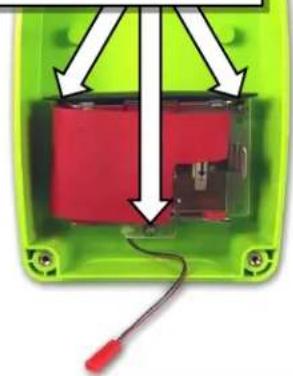
natural_image
Green electronic device with red internal components and a cable, no visible text or symbols②
Using the center pilot hole, drill a 31/64 inch hole for the cable and Heyco strain relief/water seal.

natural_image
Green plastic container with bolt holes and a white arrow pointing to a small hole (no text or symbols)③
Install the Heyco strain relief as shown. Thread the 6-conductor cable through from the inside.
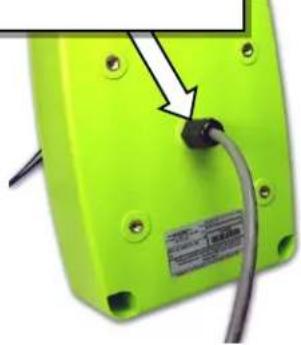
natural_image
Close-up of a green electronic device with a black connector and cable, no visible text or symbols④
Pull the 6-conductor through as shown until there is less than 14 inch of the gray sleeve showing through the strain relief. Use the Inside Retaining Nut to tighten to case, then tighten the Cable Sealing Nut.
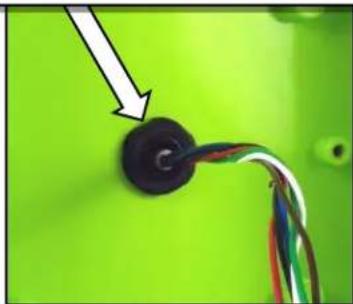
natural_image
Close-up of a black circular component connected to wires against a green background, with an arrow pointing to it (no text or symbols visible)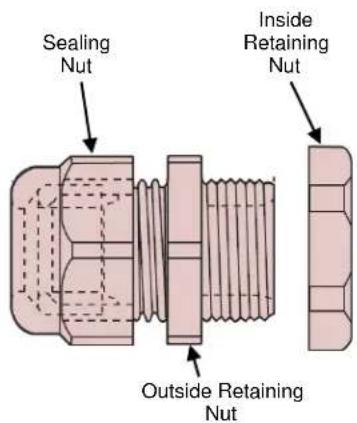
text_image
Sealing Nut Inside Retaining Nut Outside Retaining Nut⑤
Carefully route the 6-conductor cable toward the inside left edge of the case as shown.

natural_image
Green plastic electronic component with black and white wires, no visible text or symbols⑥
Use the Cable Tie to secure the 6-conductor cables to the battery holder as shown. The 6-conductor cables will run beneath the battery holder. Do not tighten the Cable Tie at this time.

natural_image
Close-up of a red plastic component inside a green safety enclosure, with no visible text or symbols.WARNING! Be sure the wires are not trapped between the battery holder and the molded plastic mounting stud! Wires are routed below the stud as shown.
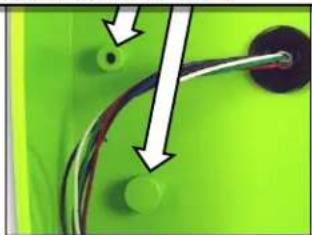
natural_image
Close-up of a green surface with two small circular features and a curved black line, no visible text or symbols.⑦
Secure the battery holder to the case back with the three T10 Torx mounting screws and washers. The 6-conductor cables are routed beneath the battery holder as shown.
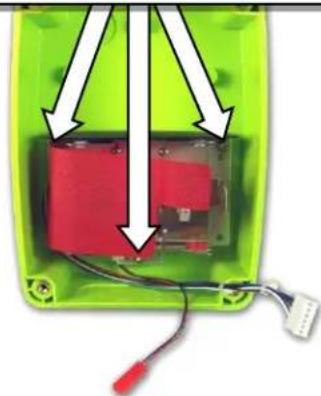
natural_image
Green electronic device with red internal components and wiring, no visible text or symbols⑧
Tighten the Tie Wrap after the battery holder is installed. Connect the 6-Conductor cable to the RQX DMR-Series radio.
HOW TO FIELD PROGRAM THE DMR-SERIES CALLBACK FOR GATEGUARD® OPERATION ....
The DMR-Series Callbox can be field programmed for basic GateGuard® operation, or PC programmed to suit your unique requirements. The instructions in this section apply only to Field Programmable features. If PC programming software has been used to set DMR decode (receive) or other optional GateGuard® features, operation may not be as described here.
Follow these steps to program the DMR-Series Callbox for GateGuard® operation:
- Program the frequency codes per the "HOW TO FIELD PROGRAM FREQUENCY CODES".
- Program the Primary Control ID code per "HOW TO FIELD PROGRAM DMR ID AND COLOR CODES"
- Program the mailbox for GateGuard ^® Momentary Operation per the “HOW TO FIELD PROGRAM DMR RELAY AND LISTEN-IN OPERATION”.
The DMR-Series Callbox will now operate in GateGuard® mode as follows:
- The Callbox will be in "Automatic Turn-Off" mode. The ON/PTT button must first be pressed as described in "OPERATING THE DMR-SERIES CALLBACK WITH FACTORY DEFAULT SETTINGS" section before normal two-way communications can be established.
- If the Callbox does not send or receive a signal for more than 10 seconds the Callbox will automatically turn off. The ON/PTT button must be pressed to turn the Callbox back on and receive a call.
- When the Callbox receives and decodes the correct DMR Primary Control ID code the Callbox Switch Output will momentarily CLOSE the switch for 1 second. The Callbox will also automatically transmit a confirmation tone back to the senders radio notifying them that the correct DMR Primary ID code has been decoded at the DMR-Series Callbox.
OPTIONAL GATEGUARD® SETTING/FEATURES
The DMR-Series Callbox can be Field Programmed, or PC programmed using special software, for customized GateGuard® applications.
Automatic Turn-Off....(Field or PC Programmable)
This is ENABLED as the Factory Default setting. The mailbox will turn OFF when the RQX Reset Time has expired. The Reset Time is a pre-programmed amount of time of "no activity" (no calls transmitted, no calls received) before the mailbox turns OFF in order to conserve battery life. The mailbox can be turned back ON when the ON/PTT button is pressed. This is the recommended mode of operation for all battery only powered applications.
If Automatic Turn-Off is NOT selected the callback does NOT completely turn OFF, but remains in the Intercom mode, allowing the callback to receive calls at any time.
Operating the mailbox with Automatic Turn-Off DISABLED significantly increases battery drain, and is therefore NOT recommended for battery only powered applications. Battery life can be increased using the Battery Saver Enable feature detailed in this section.
RQX Reset Time....(Field or PC Programmable)
This is set from the factory for 10 seconds, but can be Field Programmed to 9 different times ranging from 5 seconds to 4 minutes, and PC programmed for 5-255 seconds. A shorter RQX Reset Time will result in increased battery life. In standard Automatic Turn-Off operation a longer inactivity timer will allow more time for a response before the callbox turns OFF.
External +12 VDC Power Fail Alert Tone ....(PC or Field Programmable)
By selecting the +12 VDC Power Fail Alert Tone feature the checkbox will look for a loss of the +12 VDC power source. The checkbox will immediately transmit an Alert Tone to notify personnel that the +12 VDC source has been lost and is now operating on battery back-up. The checkbox will transmit an Alert Tone once every hour until the +12 VDC power source is restored or until the back-up batteries are exhausted. Even if this feature is NOT selected, it will always revert to Back-up Battery power.
NOTE: In applications where external power is available, we recommend using the RPS-EXPO Cube Power Supply.
OPTIONAL GATEGUARD® SETTING/FEATURES (CONTINUED) ......
Send Call Tone....(Field or PC Programmable)
The Factory Default setting has the Call Tone feature ON (refer to "HOW TO FIELD PROGRAM FEATURE CODES")
The callbox can be programmed to transmit a Call Tone if the Reset Time has expired and the ON/PTT button is pressed. This will alert system users that the call is originating from the callbox.
Ring Tone ....(Field or PC Programmable)
This will sound an alert tone on the callbox speaker, similar to a telephone ring tone, whenever the correct DMR Primary Control ID code has been successfully decoded. This feature is used to alert the Callbox user that the gate is being opened or closed. Ring Tone is enabled from the factory.
GateGuard ^® – Toggle ....(Field or PC Programmable)
Will alternately open and close the Switch Output when it receives a unique DMR Primary Control ID code. After the Primary Control ID code is received the checkbox will transmit a single beep if the switch has been opened and a double beep if the switch has been closed. The switch will open when the checkbox turns off if it is programmed for Automatic Turn-Off.
GateGuard® On Code / Off Code ....(Field or PC Programmable)
This operation allows programming of separate ON and OFF DMR Control ID codes. The DMR-Series Callbox will CLOSE the Switch Output upon receiving the ON code, and OPEN the Switch Output upon receiving the OFF code.
Relay Polarity
The relay switch output can be set for a normally-open or normally-closed condition depending on the position of the Relay Polarity Jumper. (See FIG-1)
Sensor/Contact Closure Input
The Sensor Input will detect a logic level and transmit an Alert tone when a change in logic level is detected. Separate alert tones are used for OPEN (logic level high) tone and CLOSED (logic level low) tone. Additionally, the Sensor Input can be used to turn on the RQX Callbox with the Sensor Input Jumper in place.
Busy Channel TX Inhibit ....(Field or PC Programmable)
This will not allow you to transmit when another user is already transmitting on your radio frequency, even if they are using a different tone code. The radio will beep a series of long, low tones (like a busy signal) while the ON/PTT button is held down.
FCC Licensing
Except for the five (5) MURS frequencies, the FCC requires the owners of radios operating on these frequencies to obtain a station license before using them.
The station licensee is responsible for ensuring that transmitter power, frequency and deviation are within the limits specified by the station license. The station licensee is also responsible for proper operation and maintenance of the radio equipment. This includes checking the transmitter frequency and deviation periodically, using appropriate methods.
To get an FCC license for VHF or UHF frequencies, submit FCC application Form 601. Your Ritrori ^® dealer can help you with this process.
How to Obtain an FCC Radio License
Because your Ritron ^® radio operates on Private Land Mobile frequencies, it is subject to the Rules and Regulations of the FCC, which requires all operators of these frequencies to obtain a station license before operating their equipment. Make application for your FCC license on FCC Forms 601, Schedules D and H, and Fee Remittance Form 159.
To have forms and instructions faxed to you by the FCC, call the FCC Fax-On-Demand system at 202-418-0177 from your fax machine; request Document numbers 3000159, 3060001, 3060003, and 3060006.
To have Document numbers 3000159, 3060001, 3060003, and 3060006 mailed to you, call the FCC Forms Hotline at 800-418-FORM (800-418-3676).
For help with questions concerning the license application, contact the FCC at 888-CALL-FCC (888-225-5322) or log on at www.fcc.gov
You must decide which radio frequency(ies) you can operate on before filling out your application.
For help determining your frequencies, call Ritron ^® at 800-USA-1-USA (800-872-1872).
INDUSTRY CANADA Regulations
Industry Canada requires the owners of the radios to obtain a radio license before using them.
Application forms can be obtained from the nearest Industry Canada District office.
- Fill in the items per the instructions. If you need additional space for any item, use the reverse side of the application.
- Use a typewriter or print legibly.
- Make a copy for your files.
- Prepare a check or money order to "Receiver General for Canada", for the amount listed at http://www.ic.gc.ca/eic/site/smt-gst.nsf/eng/sf01027.html. (Licenses are renewed annually on April 1st. Refer to the calculation for application fees for each month.)
- Mail the completed application, along with your check or money order, to the closest Industry Canada District Office.
Notes: Fees are subject to change without notice.
Safety Standards
The FCC (with its action in General Docket 79-144, March 13, 1985) has adopted a safety standard for human exposure to radio frequency electromagnetic energy emitted by FCC regulated equipment. Ritron® observes these guidelines and recommends that you do also:
- DO NOT hold the radio so that the antenna is very close to or touching exposed parts of the body, especially the face or eyes, while transmitting. Keep the radio vertical, eight inches away while talking into the front panel.
- DO NOT press the Push-To-Talk except when you intend to transmit.
- DO NOT operate radio equipment near electrical blasting caps or in an explosive atmosphere.
- DO NOT allow children to play with any radio equipment that contains a transmitting device.
- Repair of Ritron® products should be performed only by Ritron® authorized personnel.
Service
Federal law prohibits you from making any internal adjustments to the transmitter, and / or from changing transmit frequencies unless you are specifically designated by the licensee.
If your radio equipment fails to operate properly, or you wish to have the radio programmed, contact your local authorized dealer or Ritron®.
U.S. Manufacturer:
RITRON, INC. - Repair Department
505 West Carmel Drive,
Carmel, Indiana 46032 USA
Phone: 317-846-1201
FAX: 317-846-4978
Email: customer_service@ritron.com
RITRON, INC. LIMITED WARRANTY
WHAT THIS WARRANTY COVERS:
RITRON, INC. ("RITRON") provides the following warranty against defects in materials and/or workmanship in RITRON Radios and Accessories under normal use and service during the applicable warranty period (as stated below). "Accessories" means antennas, holsters, chargers, earphones, speaker/microphones and items contained in the programming and programming/service kits.
WHAT IS COVERED FOR HOW LONG WHAT RITRON WILL DO
DMR-Series Callbox 1 year* During the first year after date of purchase, RITRON® will repair or replace the defective product, at RITRON's option, parts and labor included at no charge.
Accessories
90 days*
*After date of purchase
WHAT THIS WARRANTY DOES NOT COVER:
- Any technical information provided with the covered product or any other RITRON products;
• Installation, maintenance or service of the product, unless this is covered by a separate written agreement with RITRON; - Any products not furnished by RITRON which are attached or used with the covered product, or defects or damage from the use of the covered product with equipment that is not covered (such as defects or damage from the charging or use of batteries other than with covered product);
- Defects or damage, including broken antennas, resulting from:
- misuse, abuse, improper maintenance, alteration, modification, neglect, accident or act of God,
- the use of covered products other than in normal and customary manner or,
- improper testing or installation;
- Defects or damages from unauthorized disassembly, repair or modification, or where unauthorized disassembly, repair or modification prevents inspection and testing necessary to validate warranty claims;
- Defects or damages in which the serial number has been removed, altered or defaced.
- Batteries if any of the seals are not intact.
IMPORTANT: This warranty sets forth the full extent of RITRON's express responsibilities regarding the covered products, and is given in lieu of all other express warranties. What RITRON has agreed to do above is your sole and exclusive remedy. No person is authorized to make any other warranty to you on behalf of RITRON. Warranties implied by state law, such as implied warranties of merchantability and fitness for a particular purpose, are limited to the duration of this limited warranty as it applies to the covered product. Incidental and consequential damages are not recoverable under this warranty (this includes loss of use or time, inconvenience, business interruption, commercial loss, lost profits or savings). Some states do not allow the exclusion or limitation of incidental or consequential damages, or limitation on how long an implied warranty lasts, so the above limitations or exclusions may not apply to you. Because each covered product system is unique, RITRON disclaims liability for range, coverage, or operation of the system as a whole under this warranty.
WHO IS COVERED BY THIS WARRANTY: This warranty is given only to the purchaser or lessee of covered products when acquired for use, not resale. This warranty is not assignable or transferable.
HOW TO GET WARRANTY SERVICE: To receive warranty service, you must deliver or send the defective product, delivery costs and insurance prepaid, within the applicable warranty period, to RITRON, INC., 505 West Carmel Drive, Carmel, Indiana 46032, Attention: Warranty Department. Please point out the nature of the defect in as much detail as you can. You must retain your sales or lease receipt (or other written evidence of the date of purchase) and deliver it along with the product. If RITRON chooses to repair or replace a defective product, RITRON may replace the product or any part or component with reconditioned product, parts or components. Replacements are covered for the balance of the original applicable warranty period. All replaced covered products, parts or components become RITRON's property.
RIGHTS TO SOFTWARE RETAINED : Title and all rights or licenses to patents, copyrights, trademarks and trade secrets in any RITRON software contained in covered products are and shall remain in RITRON. RITRON nevertheless grants you a limited non-exclusive, transferable right to use the RITRON software only in conjunction with covered products. No other license or right to the RITRON software is granted or permitted.
YOUR RIGHTS UNDER STATE LAW: This warranty gives you specific legal rights, and you may also have other rights which vary from state to state.
WHERE THIS WARRANTY IS VALID: This warranty is valid only within the United States, the District of Columbia and Puerto Rico.