
LED-6500T - Flash Genaray - Free user manual and instructions
Find the device manual for free LED-6500T Genaray in PDF.


| Product Type | LED Flash Light |
| Model | LED-6500T |
| Brand | Genaray |
| Color Temperature | 6500K (Daylight) |
| Brightness | Adjustable 0-100% |
| Number of LEDs | 600+ |
| Power Source | AC Adapter or NP-F Battery |
| Power Consumption | 80W |
| Dimensions | 30 x 30 x 5 cm |
| Weight | 2.1 kg |
| Mounting | Standard 5/8" receiver |
| Controls | Rotary dial with digital display |
| Cooling | Passive (No fan) |
| Safety Features | Overheating protection, fuse |
| Included Accessories | AC adapter, battery plate, carrying case |
| Maintenance | Clean with dry cloth, avoid liquids |
| Repairability | Replaceable battery plate, LED board serviceable |
| Expected Lifespan | 50,000 hours |
Frequently Asked Questions - LED-6500T Genaray
User questions about LED-6500T Genaray
0 question about this device. Answer the ones you know or ask your own.
Ask a new question about this device
Download the instructions for your Flash in PDF format for free! Find your manual LED-6500T - Genaray and take your electronic device back in hand. On this page are published all the documents necessary for the use of your device. LED-6500T by Genaray.
USER MANUAL LED-6500T Genaray
natural_image
Black and white photo of a LED array light fixture with grid pattern, mounted on stand against golden background (no text or symbols visible)
genaray™
LED-6500T INTRODUCTION
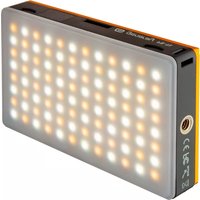
Thank you for choosing the Genaray LED-6500T On-Camera Light. This product will provide you with powerful, portable and dependable illumination that can be used in a variety of settings. Featuring a super-bright 209 LED lamp count, 3200K-5600K variable color temperature, flicker-free dimmable features and a removable magnetic diffuser with advanced light dispersion capabilities, the Genaray LED-6500T On-Camera Light is the perfect choice for professional photographers and videographers alike.
KEY FEATURES PRODUCT CONTENTS
- 3200K-5600K Variable Color Temperature
· Lightweight Design With Powerful 209 Lamp Count - Compact Profile & Case For Easy Transport
- Removable Snap-On Magnetic Diffuser
• Built-In Battery Life Indicator - Vertically Stackable
· 209 LED Light
- Magnetic Diffuser
- NP-F550 Battery
- AC/DC Battery Charger
- AC Adapter
- Car Adapter
- Ball Head Mount
- Carrying Case
- Manual
SAFETY WARNINGS
- Do not attempt to disassemble, repair or perform any unauthorized modifications on device
- Do not handle with wet hands, immerse in liquids or expose to water and rain; electric shock or fire may result
• Device contains small parts which may pose a choking hazard; keep out reach of children -
Do not operate device in presence of flammable gas or vapors
-
Do not use product if it emits smoke or a strange odor; disconnect power source immediately to avoid personal injury and contact place of purchase
- Observe caution when handling batteries; only use batteries approved by the manufacturer of this product
- Batteries are prone to leakage when fully discharged; to avoid damaging product be sure to remove batteries when leaving product unattended
- Do not intentionally stare or gaze at
LED light for prolonged periods while device is on
- During operation, do not cover the ventilation grille found at the rear of device and ensure light is cool before storing
- Do not use or leave device in conditions of extreme heat, severe cold or high humidity
- Unit will display a decrease in brightness when the battery runs
low; be sure to replace battery when necessary to avoid affecting recording quality
- When cleaning the device, use only a mild detergent solution and quickly wipe dry with a soft cloth
- Dispose of used batteries, packaging and old devices in accordance with appropriate environmental regulations
PRODUCT OVERVIEW


MOUNTING LIGHT UNIT DIRECTLY ON TRIPOD
- For tripod installation, simply insert 1/4 20 screw found on tripod head into the 1/4 20 threading mount found on bottom of unit; then tighten securely
Note
Light can also be fastened to included ball head mount, which can then be installed on cold shoe found on cameras or similar devices; see ball head mounting instructions
MOUNTING LIGHT UNIT ON BALL HEAD MOUNT
- Included ball head mount is designed to provide user with a 180° tilt/360° rotating angle feature that can be used on both cameras and other devices featuring a cold shoe
- Begin by inserting 1/4 20 screw found atop ball head mount into the 1/4 20 threading found on bottom of LED light unit and fasten securely
- Tighten adjustment locking knob so light unit does not wobble during remainder of mounting process
- Ensure cold shoe foot is firmly secured to ball head mount device and loosen locking collar found on base of ball head device
- Slide entire male cold shoe into female cold shoe of camera or other mounting device; then fasten locking collar securely
INTERLOCKING WITH OTHER LED DEVICES
- Loosen adjustment locking knob by twisting counterclockwise and rotate ball head mount to position light at desired angle; twist locking knob clockwise to hold light unit firmly in position
Note
Cold shoe mount can also be removed to reveal an integrated1/4 20 threading mount
- To reveal ball head mount's integrated 1/4 20 threading mount for fastening to tripod, twist locking ring resting above cold shoe counterclockwise until entire shoe comes out; insert 1/4 20 screw found on tripod head into the 1/4 20 threading mount; then tighten securely
- Slide stacking rail slots into expansion slots of another compatible Genaray LED light device; click into place securely
- Up to 3 compatible Genaray LED light devices can be mounted to each other in a vertical format for increased illumination; disengage stacked devices by pressing release button
POWERING DEVICE
- Begin by holding fully-charged battery in position over mounting area, leaving only a small gap between conductor contacts found on battery and metal prongs found on unit
- Push battery down and lock into place by sliding it inwards along grooves until an audible click is heard
- Twist the power & dimming switch clockwise to turn LED lights on
- Press the built-in battery level indicator button to instantly view the power remaining in the battery; each indicator circle represents approximately 25% of battery capacity; the showing of 4 lit
circles combined will represent a fully charged battery
Note
For an accurate reading of battery levels, it is best to turn off light unit before using battery level indicator feature
- Rechargeable battery can be removed by firmly pushing down on the battery release button
- The DC input found on rear of device connects directly to the included AC power adapter or car charger and can provide continuous power when battery is low or not working
ADJUSTING FEATURES
- To adjust the 3200K-5600K variable color temperature range, simply rotate color variation knob until desired effect is achieved
- To adjust the flicker-free dimmable features, simply rotate the power & dimming knob until desired effect is achieved
- To install magnetic snap-on diffusion filter, hold diffuser over LED panel with silver magnetized posts facing inwards; then quickly snap it into place
PRODUCT SPECIFICATIONS
Bulb Type: 110 Daylight and 99 Tungsten LED
Brightness: 900 lux @ 3'
Color Temperature: 3200K - 5600K
Voltage: 7.4 - 14.8V
Weight: 0.58 lbs
Dimension: 6" × 4" × 2"
CUSTOMER SUPPORT
For more information about this product or to contact the Genaray Customer Support Center with any questions, please send your email correspondence to: info@Genaray.com.
ONE-YEAR LIMITED WARRANTY
This GENARAY product is warranted to the original purchaser to be free from defects in materials and workmanship under normal consumer use for a period of one (1) year from the original purchase date or thirty (30) days after replacement, whichever occurs later. Genaray's responsibility with respect to this limited warranty shall be limited solely to repair or replacement, at Genaray's discretion, of any product that fails during normal use of this product in its intended manner and in its intended environment. Inoperability of the product or part(s) shall be determined by Genaray. If the product has been discontinued, Genaray reserves the right to replace it with a model of equivalent quality and function.
This warranty does not cover damage or defect caused by misuse, neglect, accident, alteration, abuse, improper installation or maintenance. EXCEPT AS PROVIDED HEREIN, GENARAY MAKES NEITHER ANY EXPRESS WARRANTIES NOR ANY IMPLIED WARRANTIES, INCLUDING BUT NOT LIMITED TO ANY IMPLIED WARRANTY OF MERCHANTABILITY OR FITNESS FOR A PARTICULAR PURPOSE. This warranty provides you with specific legal rights, and you may also have additional rights that vary from state to state.
To obtain warranty coverage, contact the Genaray Customer Service Department to obtain a return merchandise authorization ("RMA") number, and return the defective product to Genaray along with the RMA number and proof of purchase. Shipment of the defective product is at the purchaser's own risk and expense.
For more information, or to arrange service, visit www.genaray.com or contact us at info@genaray.com.
© 2014 Genaray LLC. All Rights Reserved
6 genaray™

- LED-6500T INTRODUCTION
- KEY FEATURES PRODUCT CONTENTS
- SAFETY WARNINGS
- PRODUCT OVERVIEW
- MOUNTING LIGHT UNIT DIRECTLY ON TRIPOD
- Note
- MOUNTING LIGHT UNIT ON BALL HEAD MOUNT
- INTERLOCKING WITH OTHER LED DEVICES
- POWERING DEVICE
- ADJUSTING FEATURES
- PRODUCT SPECIFICATIONS
- CUSTOMER SUPPORT
- ONE-YEAR LIMITED WARRANTY
Brand : Genaray
Model : LED-6500T
Category : Flash