Smart-1 405 - Uncategorized Check Point - Free user manual and instructions
Find the device manual for free Smart-1 405 Check Point in PDF.


| Product Type | Security Management Server |
| Brand | Check Point |
| Model | Smart-1 405 |
| Form Factor | 1U Rackmount |
| Dimensions (W x D x H) | 43.0 x 43.0 x 4.4 cm (16.9 x 16.9 x 1.7 in) |
| Weight | Approx. 10 kg (22 lbs) |
| Power Supply | Dual redundant, 100-240V AC, 50-60Hz |
| Power Consumption | 200W typical |
| Processor | Intel Xeon quad-core |
| Memory | 16 GB RAM |
| Storage | 2 x 1 TB SATA HDD RAID 1 |
| Network Interfaces | 2 x Gigabit Ethernet management ports |
| Main Functions | Centralized security policy management, logging, monitoring, SmartConsole, Gaia OS |
| Supported Software | Check Point R80.x and higher Management |
| Operating Temperature | 5°C to 40°C (41°F to 104°F) |
| Operating Humidity | 10% to 85% non-condensing |
| Compliance | FCC, CE, UL |
| Maintenance | Regular firmware updates via SmartUpdate; backup configuration regularly. |
| Cleaning | Use a dry, lint-free cloth. Do not use liquids or sprays. |
| Safety Notes | Ensure proper airflow; do not block vents. Use only included power cords. |
| Repair & Spare Parts | Contact Check Point support for authorized repairs and genuine parts. |
Frequently Asked Questions - Smart-1 405 Check Point
User questions about Smart-1 405 Check Point
0 question about this device. Answer the ones you know or ask your own.
Ask a new question about this device
Download the instructions for your Uncategorized in PDF format for free! Find your manual Smart-1 405 - Check Point and take your electronic device back in hand. On this page are published all the documents necessary for the use of your device. Smart-1 405 by Check Point.
USER MANUAL Smart-1 405 Check Point
natural_image
Front view of a black electronic device labeled 'Check Point' against a pink background (no readable text beyond branding)
WARNING! Before you begin with the appliance installation, read all the safety instructions. Search for Smart-1 405/410 Appliance Getting Started Guide. http://downloads.checkpoint.com/dc/download.htm?ID=55885

Latest Software: We recommend that you install the most recent software release to stay up-to-date with the latest functional improvements, stability fixes, security enhancements, and protection against new and evolving attacks.
Thank you for choosing the Check Point Smart-1 405/410 Security Management Appliance, part of the Check Point Infinity consolidated architecture. You are now minutes away from setting up the most advanced security platform designed to prevent the most sophisticated threats today and in the future.
Should you have any questions about your purchase, please don't hesitate to contact Check Point support services.
1
POWER UP YOUR CHECK POINT APPLIANCE
- Connect the power cable to the power port on the Smart-1 appliance rear panel and plug it into a power outlet.
- Turn the power on.
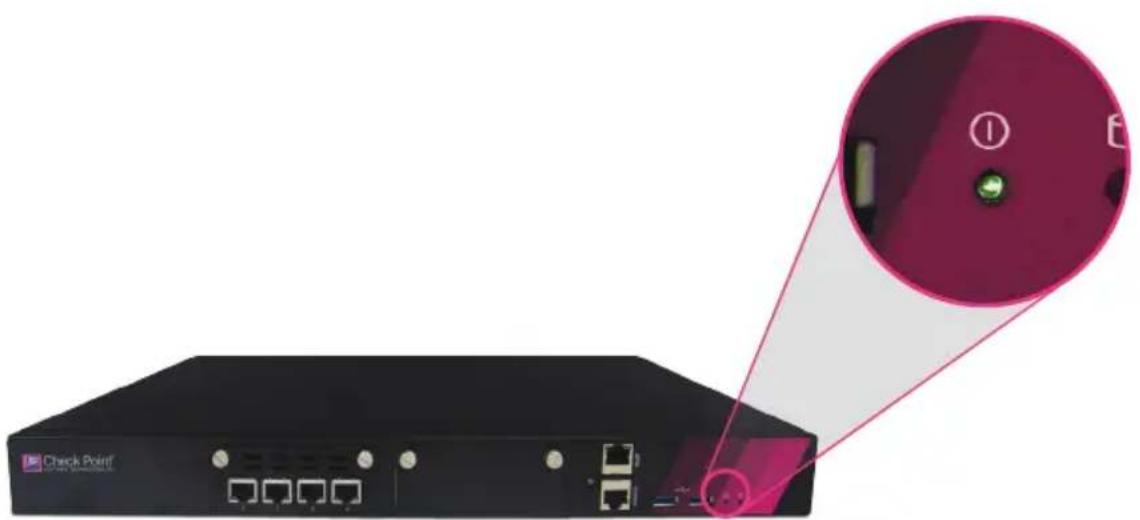
natural_image
Front view of a black network switch device with ports and a highlighted circular button (no text or symbols on the device itself)2
CONNECT YOUR PC FOR INITIAL SETUP
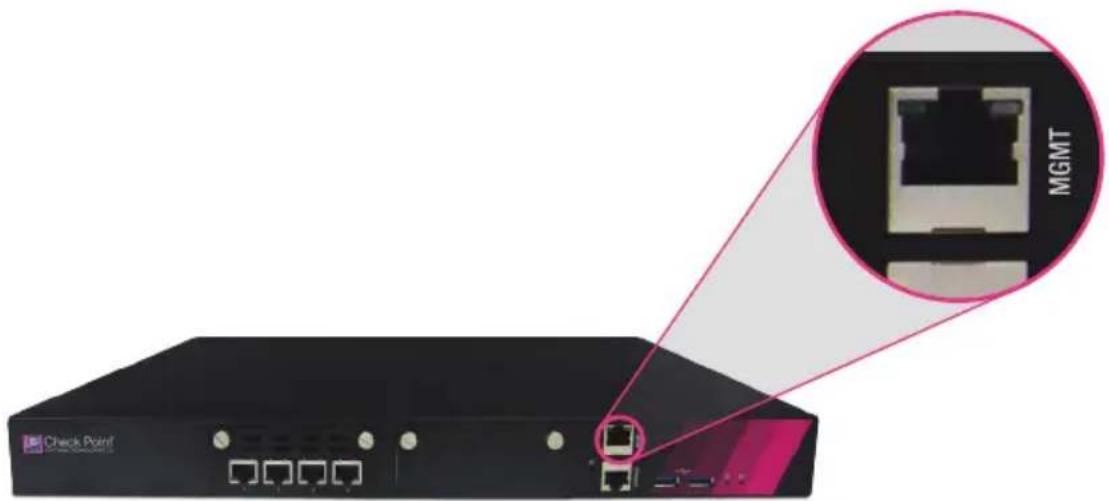
- Initial setup must be done from a PC connected to the appliance's management interface via the included Ethernet cable. Management interface is marked as MGMT on the appliance front panel.
Windows 7, 8, and 10 configuration:
- Right-click on the network adapter you want to assign an IP address and click Properties.
Select Internet Protocol Version 4 (TCP/IPv4) and click the Properties button.
• In the IP address field, enter 192.168.1.2.
• In the Subnet mask field, enter 255.255.255.0. - Leave the Default gateway and DNS settings fields empty.
- Click OK and close the dialog boxes.
• After completing the initial connection, the First Time Configuration Wizard will guide you through the process of configuring the appliance.
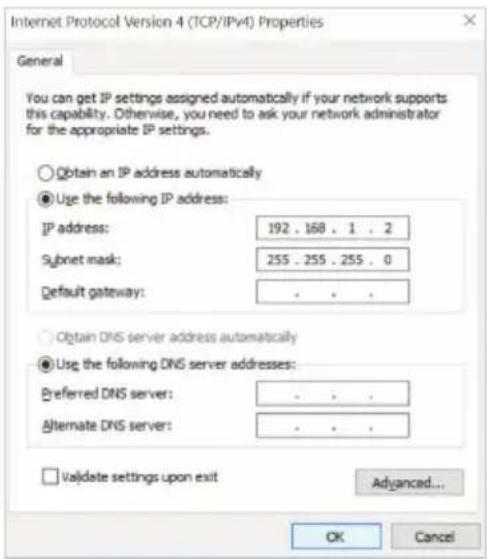
Figure 1 Internet Protocol (TCP/IP) Properties

CONFIGURE YOUR APPLIANCE
- Launch the Web browser and enter https://192.168.1.1 in the address bar.
Note – You might receive a certificate error page due to a known, unresolved browser conflict. Click Continue to this Web site. - Log in with the default system administrator login name/password, admin/admin, and click Login.
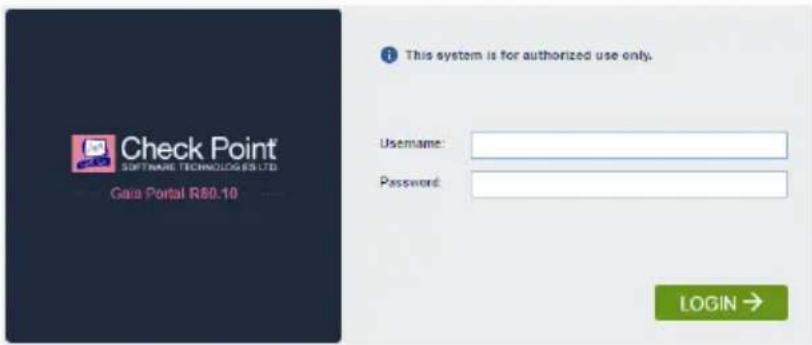
Figure 2
Appliances Login Page
Note - Popups must always be allowed on https://
- The First Time Configuration Wizard will begin automatically (Fig. 3).
- The wizard will guide you through the connection setup process. Fill in the parameters as required.
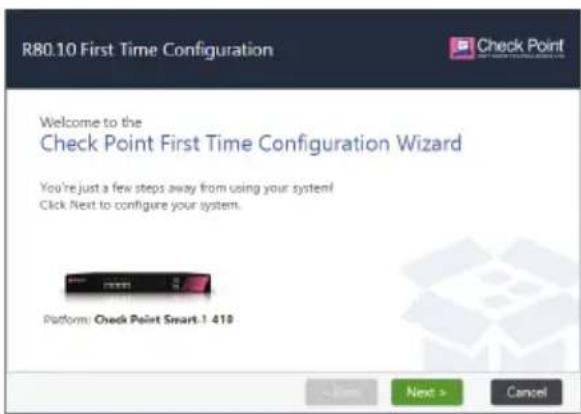
Figure 3
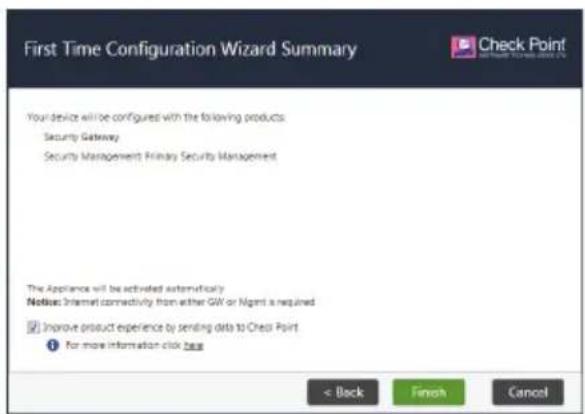
Figure 4
First Time Configuration Wizard - Welcome Page First Time Configuration Wizard - Summary Page
For additional information regarding setting up your appliance, search for Smart-1 405/410 Appliance Getting Started Guide http://downloads.checkpoint.com/dc/download.htm?ID=55885
For more information, visit the Check Point appliance Support page. Search for Check Point Smart-1 405/410 Appliance. http://supportcontent.checkpoint.com/solutions?id=sk117578
TECHNICAL SUPPORT
For further information about the appliance, search for Check Point User Center: https://usercenter.checkpoint.com/usercenter/login/cpapp
For technical assistance, contact Check Point 24 hours a day, seven days a week at:
+1 972-444-6600 (Americas)
+972 3-611-5100 (International)

WELCOME
TO THE FUTURE OF
CYBER SECURITY
CLOUD • MOBILE • THREAT PREVENTION

Check Point
SOFTWARE TECHNOLOGIES LTD.
WWW.CHECKPOINT.COM
©2017 Check Point Software Technologies Ltd. All rights reserved.
Check Point and Check Point logo are trademarks or registered trademarks of Check Point Software Technologies Ltd. or its affiliates. All other product names mentioned herein are trademarks or registered trademarks of their respective owners. The products described in this document are protected by U.S. Patent No. 5,606,668, 5,835,726, 6,496,935, 6,873,988, and 6,850,943 and may be protected by other U.S. Patents, foreign patents, or pending applications.