GNA-260 - Humidifier GOTIE - Free user manual and instructions
Find the device manual for free GNA-260 GOTIE in PDF.


| Product Type | Ultrasonic Humidifier |
| Model | GNA-260 |
| Brand | GOTIE |
| Dimensions (W x D x H) | 8.5 x 8.5 x 10.2 inches |
| Weight | 2.5 lbs |
| Water Tank Capacity | 1.5 liters |
| Power Supply | AC 100-240V, 50/60Hz |
| Power Consumption | 25 Watts |
| Mist Output | Up to 200 ml/hour |
| Coverage Area | Up to 300 sq ft |
| Noise Level | < 30 dB |
| Main Functions | Humidity control, auto shut-off, timer, night light |
| Humidity Control | Adjustable mist levels with continuous or intermittent mode |
| Auto Shut-Off | When water tank is empty |
| Timer | 1-12 hours |
| Night Light | LED with optional color changing |
| Maintenance | Clean weekly with vinegar or descaling solution |
| Filter Type | Demineralization cartridge (replace every 2-3 months) |
| Safety Features | Overheat protection, tip-over switch |
| Spare Parts | Replacement tank, filter, and nozzle available |
| Repairability | User-replaceable components; professional service for electrical issues |
| Material | ABS plastic, BPA-free |
| Certifications | CE, RoHS |
| Package Contents | Humidifier, power adapter, user manual |
Frequently Asked Questions - GNA-260 GOTIE
User questions about GNA-260 GOTIE
0 question about this device. Answer the ones you know or ask your own.
Ask a new question about this device
Download the instructions for your Humidifier in PDF format for free! Find your manual GNA-260 - GOTIE and take your electronic device back in hand. On this page are published all the documents necessary for the use of your device. GNA-260 by GOTIE.
USER MANUAL GNA-260 GOTIE
INSTRUCTION MANUAL
SPECIFICATION
• Power supply: 220-240V 50/60Hz
- Heating power: 80W
• Humidify power: 30W
- Total power: 110W
• Water tank capacity: 6L
• Evaporation Rate: ≥300ml/H
- Noise level: ≤ 35dB(A)
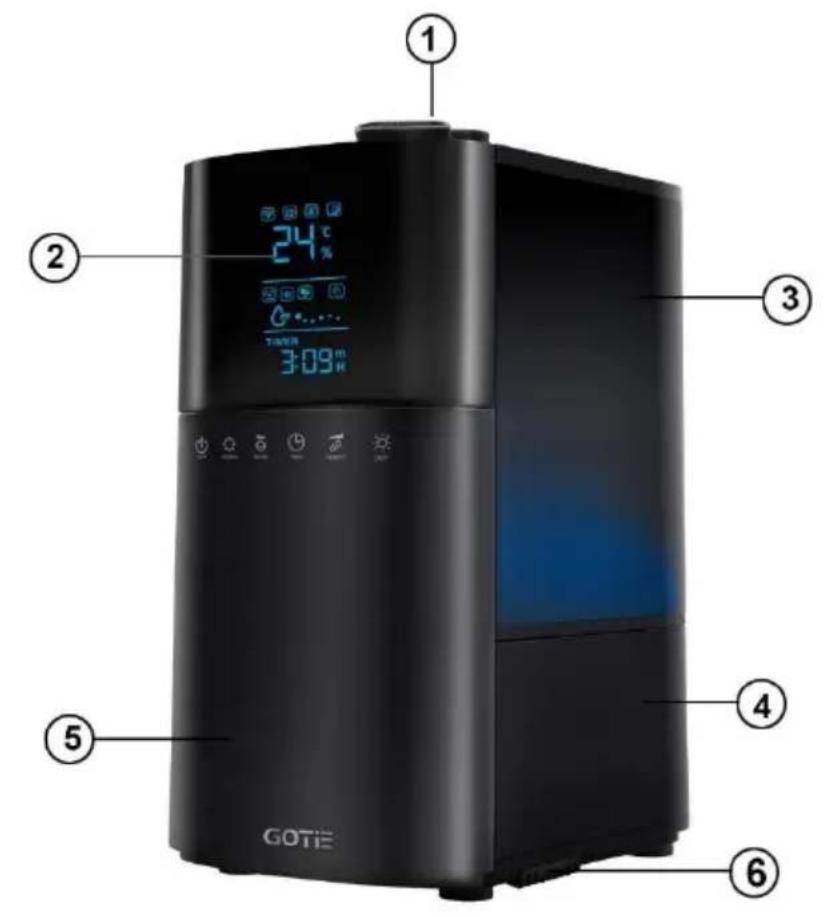
ELEMENTS
Pictures are for reference only
-
Nozzle
-
Base
A. Filter
-
LCD display
-
Front panel
B. Filler
-
Water tank
-
Aroma box
PRODUCTS FEATURES
• Large humidifying capacity
- Cool and warm mist function
- Plasma function
- Microprocessor control
- Touch-sensitive buttons
- LCD display
- Remote controller
• Automatic humidity control
- Aromatherapy
- Wired humidity sensor and thermometer
- 12-hour timer
• 3 humidification levels
- Night mode
- Softlight illumination
• Automatic power-off when empty
- Ion exchange resin filter
- Noiseless operation
WORKING PRINCIPLE
Ultrasonic Humidifier uses the ultrasonic high-frequency oscillator to break up water into tiny water particles with the diameter of about 1-5 m. The ventilation system blows out this water into the dry air where they evaporate to give the required humidity. The clearly visible smooth and even fog can be seen out of the unit.
SAFETY NOTES
- Never disassemble the base unit without consulting qualified personnel.
- If the supply cord is damaged, it must be replaced by the manufacture in order to avoid a hazard.
- Do not add detergents or chemical solutions into the unit.
- Unplug appliance during filling, cleaning and maintenance.
- Keep detergents and chemical solutions away from children.
- If any abnormal smell appears during normal operation, please switch off and disconnect power supply and have qualified personnel amend.
- Never touch water in the water basin or components in the water when the unit is working.
- Never switch on when there is no water in the water basin.
- Never scrape transducer with sharp tools.
- Never clean transducer with agressive detergents or chemical solutions.
- Never let water splash into inner base unit to avoid components damage.
- Care should be taken when using the appliance due to emission of hot water vapor.
- Before cleaning and maintenance, the appliance must be disconnected from the power supply.
- This appliance can be used by children aged from 8 years and above if they have been given supervision or instruction concerning use of the appliance in a safe way and if they understand the hazards involved. Cleaning and user maintenance shall not be made by children unless they are older than 8 and supervised. Keep the appliance and its cord out of reach of children aged less than 8 years. Cleaning and user maintenance shall not be made by children without supervision.
-
Children should be supervised to ensure that they do not play with the appliance.
-
Indoor use only.
- Check the voltage carefully to ensure your home power voltage fits the product.
- Take out the plug with hand instead of dragging the wire.
- Do not use the product in wet environment, such as a bathhouse and a bathroom, as it can cause electric shock and fire.
- Do not put any appliances on the product.
- Do not clean your machine when it is on or just after swithing off as hot water or elements can hurt you.
- Remove the water tank before moving the device.
- Do not use the machine exposing to sunshine or close to the heater
- Do not touch the plug or wire with wet hands to avoid electric shock.
- Do not touch the warm mist, especially warm.
- Keep the machine out of reach of children.
SAVE THESE INSTRUCTIONS!
IMPORTANT
- The working environment for humidifier is when temperature is between 5 to 40 degrees Celsius, and relative humidity is lower than 80%RH.
- Use clean water with temperature lower than 40^ C (distilled water is recommended).
- Clean water tank and water filter when using again after a long time.
- Soak the water filter for 24 hours before first use.
FUNCTION DESCRIPTION
Relative Humidity
- The percentage of water mist in a given space with a given air temperature is named as relative humidity, usually marked as %RH, i.e. 45%RH. The air contains water mist more or less. The proportion of water mist to the air varies according to different air temperatures. The higher the temperature, the more water mist inhaled in the air.
- In the winter, the cold air outside enters the room and becomes warmer by the higher temperature in the room. As a result, the relative humidity decreases. If you want to keep the healthy environmental humidity, we need to increase the mist volume in the air. The humidifier can do that for us.
- Relative humidity in different environments suitable for people:
○ Bedroom, living room: 45-64%RH
○ Patient's room: 40-55RH
- Room with computer, experiment equipments: 45-60%RH
○ Room with piano: 40-60%RH
o Museum, exhibition hall, and library: 40-50%RH
Water filter:
- Cation exchange resin filter soften the hard water.
- Cation exchange resin filter demineralize the water.
OPERATION PROCEDURE
- Put the machine on a flat surface and take off the cover.
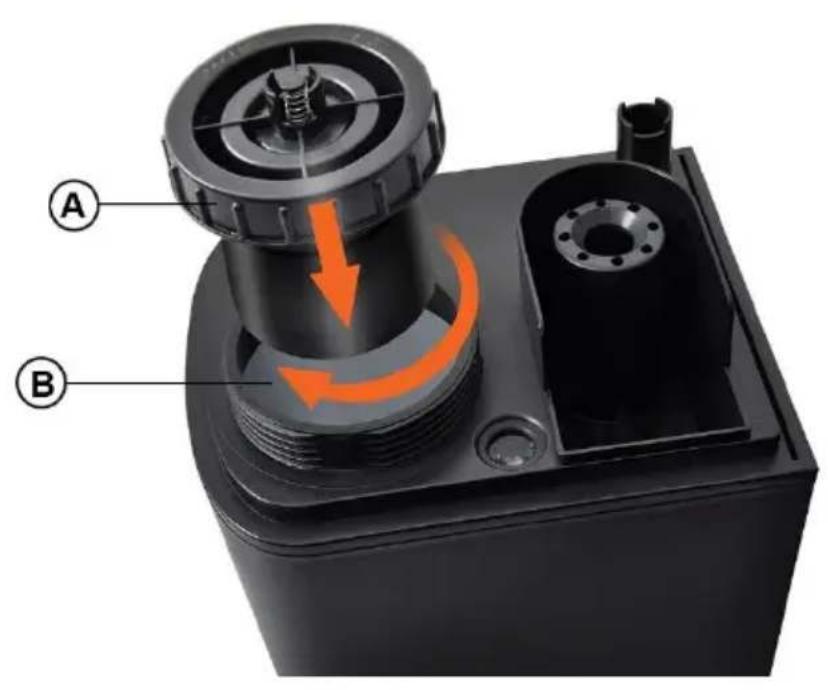
- Lift the water tank, turn upside down and unscrew the water filter.
- Fill the water into the water tank by the filler located on the bottom of the tank.
- After pouring the water, screw the cap with the filter tightly and place tank on the base of the device. Part of the water overflows from the water tank into the water container in the device base.
- Put the cover on water tank.
- Check if the rated voltage meets the input voltage and plug into the socket. Display shows the symbol POWER ⏻
- Touch the symbol POWER on the machine; the background LED light will be on. The machine will begin to work in AUTO mode.
Display shows AUTO symbol and shows current humidity and current temperature alternately in 30 seconds. After 15 seconds without any operation, the display will become dim, touch any key except power key to wake up the display.
In Auto mode, the device determines the optimal humidity according to current temperature and starts to achieve it at maximum power. When the current humidity is lower than the humidity showed in the table, it is in high speed operation. When the humidity is reached, the machine will be in low speed operation. The device checks the accordance of the temperature level and the humidity level every 1 minute.
| Air temperature (°C) | Humidity (%) |
| ≤19 | 65 |
| 20 | 60 |
| 21 | 58 |
| 22 | 57 |
| 23 | 55 |
| 24 | 53 |
| 25 | 50 |
| 26 | 48 |
| 27 | 45 |
| 28 | 43 |
| 29 | 40 |
| 30 | 38 |
| 31 | 36 |
| 32 | 35 |
| 33 | 34 |
| 34 | 32 |
| 35 | 31 |
| 36 | 30 |
| 37 and more | 25 |
- Timer setting: There are 12 timer settings. Touch the symbol TIME, the LED display will show the desired setting timer. Touch till “--:--” display on the LED, timer setting is cancelled. The timer shows the rest operation time and decreases by 1 minute, i.e., if the timer is set at 12 hours, LED display shows 11:30 after 30 minutes. To know what time have been set, just to touch any key except power key to wake up the display and then touch TIMER symbol. Touch again, to set timer again.
There is a shortcut for timer setting. Touching the symbol TIMER to increase timer, meanwhile touching symbol MAX/MIN can reduce timer.
- Touch the symbol MAX / MIN AUTO mode is cancelled and the mist output is in the first speed. You may select 3 desired levels of mist volume. The corresponding mist output symbol
shows on the display with different running speed.

In mist output level 1, the is running in low speed,
level 2 is running in middle speed, level 3 is running in high speed. Touch the symbol again, to choose AUTO mode.
- Constant humidity: Before you touch the symbol HUMIDITY, LED display shows the current humidity. You may set the humidity arranged from 40%RH to 75%RH. Touch once, it will increase by 5%RH. When it reaches 75%RH, touch again, it will show “Co” and flash for 3 seconds to exit humidity setting function and back to Auto mode. After you set the expected humidity, the display shows the
symbol, the machine will keep the memory and confirm after 5 seconds. 5 seconds later, the symbol %RH will blink and LED display shows the current humidity. Touch again, it shows the expected humidity setting. If the expected humidity is less than the current humidity, the machine will be in sleeping state. But if the expected humidity is 3% higher than the current humidity, the humidify function will work. Mist output speed cannot be setting during the constant humidity model.
There is a shortcut for humidity setting. Touching the symbol HUMIDITY is to increase humidity, meanwhile touching symbol MAX / MIN can reduce humidity.
- First touch the symbol DEGERMING 🎨, the warm mist will come out after 10\~15 minutes. On the LED display, it shows the Heating symbol 🎨. Second touch, the Plasma generator works as well.
On the LED display, it shows both the Plasma symbol and Heating symbol. Third touch, Heating function will off. Fourth touch to stop both functions.
- Touch the symbol LIGHT, the brightness of blue decoration light in the bottom and the water tank indication light dimmed. Touch
again, become dimmer. Touch 3^rd time, will be turned off.
- Long press the symbol

Blue decoration light in the bottom and the water tank indication

light are off, LED display turns off, leaving the symbol on the
display only. After 5 seconds without any operation, the symbol will become dim, press any key except power key to wake up the
display. Then long press symbol again to stop the function.
- Auto Shut-Off: When the water tank is empty, the machine will automatically stop working. LED shows the shape of lack of water

. Refill the water, and the machine will restart. If you don't refill water within 15 minutes, the machine will automatically power off.
- On the remote controller, the related symbol controls the corresponding function.
- Regardless of the working mode, if there is no operation in about 15 seconds, the display will turn dim.
- Aroma function:
a) Take out aroma box
b) Use water-soluble aroma oil to drop into the sponge
c) Put the aroma box back into the machine, the aroma function will be on automatically
d) To stop the aroma function or when the machine is not in use for a long time, take out the sponge in the aroma box and clear it, then put it back to the machine.
CLEANING
Before cleaning, disconnect the plug!
1) Transducer
- The water in some places is hard and the transducer surface will be covered by a limescale. You need to clean transducer with cleaning agent.
- Add a little of cleaning agent or a vinegar on the transducer surface, then infuse water into the sink to soak the sink fully for 10-15 min.
- Clean with soft brush or cloth until limescale is gone.
- Flush twice with clean water.
Do not clean transducer by any sharp material or scrape it to avoid any damage
2) Water tank
- Remove the cover from the water tank.
- Lift the water tank from the base of the device.
- Turn the tank upside down and unscrew the screw cap.
- Pour water into the tank with a small amount of dishwashing liquid.
- After pouring water, screw the cap tightly and shake the tank, holding it with both hands.
- Unscrew the bottle cap and pour the water out of the container and then rinse it thoroughly.
- Don't put acid, alkalescence, blencher scour into water tank to avoid damage
3) Water sink – limescale
- Take out the water in sink, Clean the scale by brush, then wipe by a damp cloth. Flush it with water.
4) Water filter
- Soak the water filter for 24 hours in a solution of water and vinegar.
PROBLEM SOLUTION
If the machine doses not work appropriately, please check as following before turn to maintenance service.
| Problem | Possible reasons | Solutions |
| No steam | Unplugged | Plug into socket |
| Limescale on the transducer | Clean the transducer | |
| No water in tank | Add water | |
| Water is dirty or stood too long in the tank | Clean the water tank, pour fresh water | |
| Unpleasant smell of mist | New machine | Take off the tank and place it in cool and dry place for 12 hours |
| Water is dirty or stood too long in the tank | Clean the water tank, pour fresh water | |
| Noise | The device is standing on unstable surface. | Put the device on a flat surface |
| Low water level | Add water | |
| Uneven level for machine | Place it on even flat or ground | |
| A steam release outside the nozzle | Plugged nozzle | Clean the nozzle |
If the machine is not working after checking the possible reasons above, it may have other faults. Contact with our service center.
IMPORTANT INFORMATION FOR CORRECT DISPOSAL OF THE PRODUCT IN ACCORDANCE WITH EC DIRECTIVE 2002/96/EC.
At the end of its working life, the product must not be disposed of as
urban waste. It must be taken to a special local authority differentiated waste collection centre or to a dealer providing this service. Disposing of a household appliance separately avoids possible negative consequences for the environment and health deriving from inappropriate disposal and enables the constituent materials to be recovered to obtain significant savings in energy and resources. As a reminder of the need to dispose of household appliances separately, the product is marked with a crossed-out wheeled dustbin.
INSTRUKCJA OBSŁUGI
DANE TECHNICZNE
Better Product Sp. z o.o.
Tel.: +48 32 7202219