F6606 - Watch FESTINA - Free user manual and instructions
Find the device manual for free F6606 FESTINA in PDF.


| Product Type | Watch |
| Brand | Festina |
| Model | F6606 |
| Movement | Quartz |
| Case Material | Stainless Steel |
| Case Diameter | 40 mm |
| Case Thickness | 10 mm |
| Water Resistance | 5 ATM (50 meters / 165 feet) |
| Crystal | Mineral |
| Strap Material | Stainless Steel |
| Strap Width | 20 mm |
| Weight | 80 g |
| Battery Type | SR626SW |
| Functions | Hours, Minutes, Seconds, Date |
| Warranty | 2 Years |
| Manual | PDF available for download |
| Maintenance | Clean with soft cloth; avoid exposure to strong magnetic fields |
Frequently Asked Questions - F6606 FESTINA
User questions about F6606 FESTINA
0 question about this device. Answer the ones you know or ask your own.
Ask a new question about this device
Download the instructions for your Watch in PDF format for free! Find your manual F6606 - FESTINA and take your electronic device back in hand. On this page are published all the documents necessary for the use of your device. F6606 by FESTINA.
USER MANUAL F6606 FESTINA
- Be sure to Alarm switch OFF and pull the crown to the 1st Click Position.
- Turn the crown clockwise to set the date.
- After the date has been set, push the crown back to the normal position.
* The date will be changed in the period from around 12:00 a.m. to around 3:30a.m. Pay attention since the date will not change when the setting of the alarm is checked and alarm time is set in this time zone.
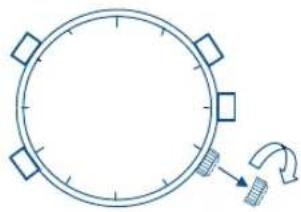
natural_image
Simple line drawing of a circular clock with four square buttons and a curved arrow indicating rotation (no text or symbols)Pull the crown to the 2nd Click Position and turn the crown clockwise to set the time.
- Second: If the crown is pulled out to the 2nd Click Position, the second hand will instantaneously move to the O position. When the second hand stands at between 0 and 29 seconds, the minute display will remain as before. When the second hand stands at between 30 and 59 seconds, the minute display will increase by 1 minute.
* In case the second hand does not move to the O position even if the crown is pulled out to the 2nd Click Position, set the second hand to the O position by pushing the button A with the crown pulling out to the 2nd Click position. (A push of the button A m overs the second hand by one second scale.)
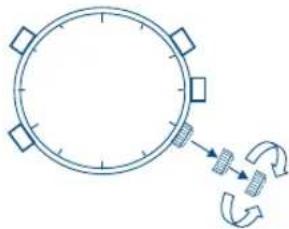
natural_image
Simple line drawing of a circular clock with directional arrows indicating motion (no text or symbols)IFM3S10IFM3S10
SETTING THE NORMAL TIME
- Hour & Minute: If the crown is turned clockwise, the hands will go round counterclockwise. If the crown is turned counterclockwise, the hands will go round clockwise. Quick setting of time is possible by quickly turning the crown. If you want to stop the quick setting, turn the crown slowly.
* Setting should be made so that the hands stands at the O position. - The time can be set accurately by returning the crown to the normal position in synchronization with a time signal.
CHRONOGRAPH
[Display changeover between normal time and chronograph]
If the button e is pressed in the normal time display, the confirming "beep" signal will sound and he second hand be returned to O position bringing about its switch-over to the state of chronograph time indication.
If the button e is pressed in this condition, the confirming "beep" signal will sound, and the respective hand for 2/100 second, minute and hour of each chronograph be returned to O position.
Then the second hand will give a changeover to the state of daily time indication. Even during this operation, the function of the daily time indication is progressing. Turn the crown clockwise to set the date. After the date has been set, push the crown back to the normal position.
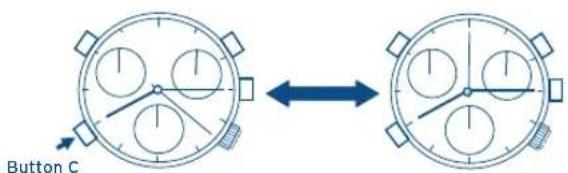
[Normal time display] [Chronograph display]
IFM3S10IFM3S10
[How to use chronograph]
Max. measuring period of time : 11 hours 59 minutes 59 seconds 98.
![FESTINA F6606 - [How to use chronograph] - 1](/content/2026/05/1051034/images/399e3d0ce3f9905b170ca0e52f0bf8a428dcf6842cd346bbc8e83f52195b09a0.jpg)
flowchart
graph LR
    A["Start"] --> B["Button A Button A Button B"]
    B --> C["Return to O pos"]
- Start: If the button A is pressed in the state of chronograph indication, the chronograph hands for 2/100 second, second, minute and hour will move with a confirmation sound. The chronograph 2/100 second hand alone will stop when three minutes pass after it starts, but it will continue to measure the time.
-
Stop: If the button A is pressed, all the hands will stop with a confirmation sound. The chronograph 2/100 second hand which has stopped will move and indicate the measured time.
-
Return to the O position: If the button B is pressed, all the chronograph and second hands will return to zero position and stop.
[Use as time integrator]
![FESTINA F6606 - [How to use chronograph] - 2](/content/2026/05/1051034/images/3e1f645a705619a1f7b00cf5349d0fcdf96d19261821e2b7cdfdb2064c2d5eb9.jpg)
flowchart
graph LR
    A["Start"] --> B["Return"] --> C["Stop"] --> D["Stop"]
    style A fill:#f9f,stroke:#333
    style B fill:#f9f,stroke:#333
    style C fill:#f9f,stroke:#333
    style D fill:#f9f,stroke:#333
The chronograph is changed over between Stop and Restart any number of times by repeatedly pressing the button A during measuring. Therefore use it as a measuring time integrator.
IFM3S10IFM3S10
[Zero position adjustment for chronograph 2/100 second hand]
If the chronograph 2/100 second hand should not return to zero position in the RESET state, take the following action.
- Pull out the crown to the 2nd Click Position.
- Push the button B and set the chronograph 2/100 second hand at its zero position.
* The hand will advance by one graduation whenever the button A is pressed. If it continues to be pressed, the hand will quickly be forwarded..
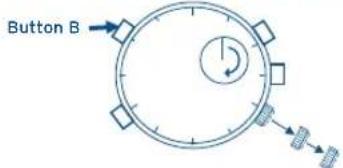
USE AS ALARM
Both normal time and alarm time are displayed using the same hour and minute hands.
[Display changeover between normal time and alarm time]
- If the alarm switch is pulled to ON and the crown is pulled at 1st Click Position, the hour & minute hands will run clockwise.
- The position at which the running hands stop, indicates the set alarm time. A confirming "beep" signal will sound twice.
- If the crown is pushed back to the normal position, the hour and minute hands will quickly get back to the normal time position. At this moment, a confirming "beep" signal will sound twice.
* Even during this operation, the function of the daily time indication is progressing.
IFM3S10IFM3S10
[Display changeover between normal time and alarm time] [Setting of the alarm time]
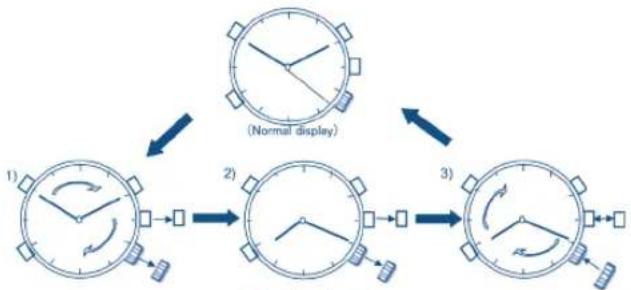
flowchart
graph TD
    A["1) Clock with square indicators"] --> B["2) Clock with arrow and square indicators"]
    B --> C["3) Clock with square indicators and directional arrows"]
Alarm switch : ON
● Crown : the 1st Click Position
(Alarm time display)
Alarm switch : ON
● Crown : the 1st Click Position
Alarm switch : ON or OFF
Crown: the normal position
Time can be set on a 1-minute basis
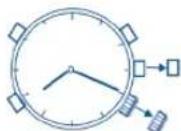
●Alarm switch : ON
● Crown : the 1st Click Position
To set the alarm time, turn the crown in the same way as the setting of the normal time. If the crown is turned slowly, the minute hand can be set on a 1-minute basis. If the crown is pushed back to normal position, the indication will be returned to the normal time with confirmation "beep" sound.
[Alarm switch ON/OFF]
When the alarm switch is ON, the alarm will sound for 20 seconds twice a day. If the alarm switch is pulled out, the alarm is ON, and if pressed back, the alarm is OFF. To stop the alarm sound, push back the switch.
USE AS COUNTER
This function is available in the normal time display. It can count the number up to 50.
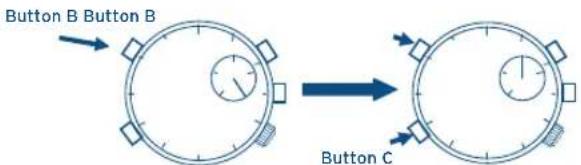
- Whenever the button B is pressed, the chronograph 2/100 second hand will advance by one scale each time, displaying 50 at its maximum.
- After the counter is used, make su reto return the chronograph 2/100 second hand to the O position by pushing the button B once or keeping pushing the button C.
USE AS TIMER
This function is available in the normal time display. The residual time up to 49 minutes can be measured.
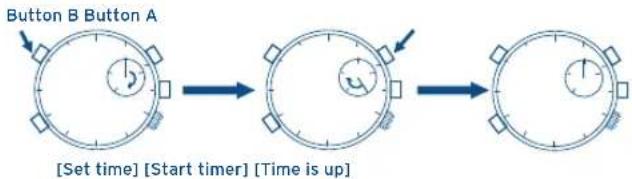
flowchart
graph LR
    A["Start Time"] --> B["Step 1: [Set time"] [Start timer] [Time is up]]
    B --> C["Step 2: [Time is up"]]
- Set time: Set the chronograph 2/100 second hand at any desired residual time in the same way as the counter.
- Start timer: Press the button A and the hand will start with a confirmation sound. The timer runs on a basis of 1-minute. When the residual time is within 50 seconds, the hand runs on a 1-second basis.
- Time is up: When the hand comes to zero position, a confirmation "beep" signal will sound 10 seconds.
* Stopping timer halfway.
- When it is working as a timer, press the button A and the hand will stop with a confirmation sound.
- When it is not used as a timer, make su reto return the chronograph 2/100 second hand to the O position as per instruction [Use as counter].

By virtue of the regulations pursuant to the handling of waste products deriving from electronic and electrical equipment, end of lifecycle watch making products must be selectively collected for processing. You may therefore dispose of your quartz watch making products at any of our retail outlets or any other authorized collection point. The selective collection, processing, rating and recycling of these products helps contribute to safeguarding the environment and protecting our health.