F6561 - Watch FESTINA - Free user manual and instructions
Find the device manual for free F6561 FESTINA in PDF.


| Product Type | Analog quartz watch |
| Brand | Festina |
| Model | F6561 |
| Case Diameter | Approx. 40 mm |
| Case Thickness | Approx. 9 mm |
| Weight | Approx. 85 g (with metal bracelet) |
| Case Material | Stainless steel |
| Strap Material | Stainless steel bracelet |
| Dial Type | Analog with date window |
| Movement | Japanese quartz |
| Battery | SR626SW or equivalent |
| Battery Life | Approx. 2-3 years |
| Water Resistance | 30 meters (3 ATM) |
| Functions | Hour, minute, second hands; date display |
| Crown Position | Screw-down or pull-out (depending on model) |
| Crystal | Mineral crystal |
| Clasp Type | Fold-over buckle with safety clasp |
| Warranty | 2 years international |
| Care Instructions | Avoid extreme temperatures and magnetic fields; clean with soft cloth |
| Spare Parts Availability | Battery and bracelet links available from authorized service centers |
Frequently Asked Questions - F6561 FESTINA
User questions about F6561 FESTINA
0 question about this device. Answer the ones you know or ask your own.
Ask a new question about this device
Download the instructions for your Watch in PDF format for free! Find your manual F6561 - FESTINA and take your electronic device back in hand. On this page are published all the documents necessary for the use of your device. F6561 by FESTINA.
USER MANUAL F6561 FESTINA
Names of Components 4
Mode (Display Function) Switching 5
Before Using 6
*O Position Correction 6
Setting the Time [TME] 8
Setting the Calendar [CAL] 10
Use of Quick Set Alarm [AL-1] 11
Use of Daily Alarm [AL-2] 11
Use of Chronograph [CHR] 15
Use of Timer [TMR] 17
Setting Local Time [L-TM] 19
What do to when the following occur 21
*All Reset Procedure 11
Use of the Rotating Bezel 22
Precautions and Long Term Use 23
Specifications 24
1. NAMES OF COMPONENTS
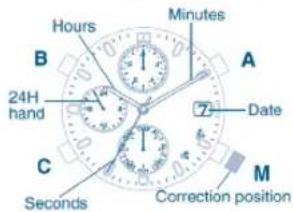
Refer to the diagram of the watch inside the front cover when reading this section on components. The design may differ depending on the model.
| Mode Name | Time | Alarm 1 | Alarm 2 | Chronograph |
| 1: Mode hand | TME | AL-1 | AL-2 | CHR |
| 2: Function hand | Always stopped at the 0 position (12:00) | Chronograph minutes, 1/20th seconds | ||
| 3: Date | Always indicates the current date | |||
| 4: Hour hand | Hours | Alarm hour | Time hour display | |
| 5: Minute hand | Minutes | Alarm minute | Time minute display | |
| 6: Second hand | Seconds | ON/sec (OFF) | ON/OFF | Chronograph seconds |
| 7: 24H hand | Always displays 24-hour time in coordination with hour and minute hands | |||
| M : Button M | Used during mode switching and when changing to correction state of each mode | |||
| A : Button A | Seconds correction | Alarm monitor, alarm cancel | Alarm monitor, alarm ON/OFF | Chronograph start/stop |
| B : Button B | Time correction in clockwise direction | Correction of alarm time in clockwise direction | Reading in 1/20th second units | |
| C : Button C | Time correction in counterclockwise direction | Correction of alarm time in counterclockwise direction | Chronograph split/reset | |
IFM6W70IFM6W70
| Mode Name | 0-Position Check | Timer | Local Time | Calendar |
| 1: Mode hand | ▶0◀ | TMR | L-TM | CAL |
| 2: Function hand | Stops at 0 position | Timer minutes | Stops at 0 position | |
| 3: Date | Displays 1 (date) | Displays current date | Displays date of local time | Displays current date |
| 4: Hour hand | 0 (24) hours | Hours of current time | Hours of local time | Hours of current time |
| 5: Minute hand | 00 minutes | Minutes of current time | Minutes of local time | Minutes of current time |
| 6: Second hand | 00 seconds | Timer seconds | Seconds of local time | Displays current month |
| 7: 24H hand | Always displays 24-hour time in coordination with hour and minute hands | |||
| M : Button M | Used during mode switching and when changing to correction state of each mode | |||
| A : Button A | Correction of second hand | Timer start/stop | —— | Correction of month in clockwise direction |
| B : Button B | Correction of function hand | Correction of timer minutes in clockwise direction | Correction of time difference in clockwise direction | Date correction |
| C : Button C | Correction of hour, minute and 24H hands | Timer repeat, reset | Correction of time difference in counterclockwise direction | —— |
2. SWITCHING THE MODE DISPLAY FUNCTION 3. BEFORE USING
This watch is equipped with 8 modes consisting of time, alarm 1, alarm 2, chronograph, 0-position check, timer, local time and calendar modes. The mode changes each time the M button is pressed. The current mode can be confirmed with the mode hand.
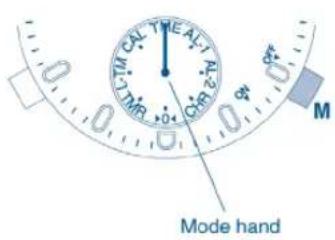
| Display | Mode |
| TME | Current time |
| AL-1 | Alarm 1 |
| AL-2 | Alarm 2 |
| CHR | Chronograph |
| ▶0◀ | 0-Position Check |
| TMR | Timer |
| L-TM | Local Time |
| CAL | Calendar |
Before using your watch, check that the functions of the watch operate properly by performing the following procedure (0-position check).
O-Position: This refers to the base position of each hand that enables the watch to function properly.
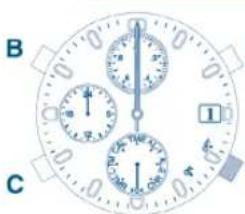
- Press button M to switch the watch to the position check mode ▶O▶. The hour hand, minute hand, 24H hand, second hand, date and function hand will advance rapidly to the O-position (base position).
Hour, minute and 24H hands 00:00 (24:00) Second hand 00 seconds....
Date 1st Function hand 0-position (12:00 position)
* Perform the "O-Position Correction" procedure when any hand is not at the O position. If this O-position is not correct, the hands will not show the correct position (such as not returning to "OO" when resetting the chronograph).
When one of buttons A, B or C is pressed while in the O-position check mode, the hour, minute, second and function hands will move to the left and right following a demonstration program [O-Position Correction Procedure]
-
Pull button M out while in the O-position check mode.
-
Press buttons A, B or C to correct the 0-position of each hand. The second hand can be corrected by pressing button A. The date and function hand can be corrected by pressing button B. *The date will be corrected by one day when the function hand completes 4 revolutions. The 12:00 position, immediately after the date has changed to "I," is the 0-position. The hour, minute and 24H hands can be corrected by pressing button C. Corrections can be made rapidly by holding down any of the buttons.
-
Push button M in to the normal position.
* After correcting the 0-position of each hand, switch to each mode to reset the time, calendar, alarms and so forth.
4. SETTING THE TIME [TIME]
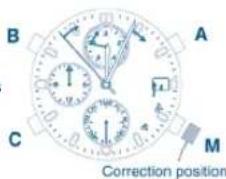
Press button M to switch to the time mode [TME].
* When setting the time, be careful that AM and PM are set correctly by referring to the 24H hand
- Pull button M out.
- Press buttons A to reset seconds. Simultaneous to pressing button A. the second hand will return to the 0 seconds position and then start to move.
- Press buttons B or C to correct the hour, minute and 24H hands. Corrections can be made one minute at a time in the clockwise direction each time button C is pressed. Corrections can be made one minute at a time in the counterclockwise direction each time button C is pressed. Corrections can be made rapidly by holding button B or C down. Correct the time by moving the hands in the closest direction to the correct time.
- Push in button M in to the normal position.
S. SETTING THE CALENDAR (CAL)
Press button M to switch to the calendar mode [CAL].
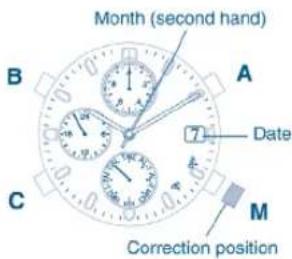
- Pull button M out.
- Press button A to correct the month number. Correction can be made by advancing by one month each time button A is pressed. The month number can be read directly from the normal hour positions. (Example: 3:00 → March, 1:00 → January) Correction can be made rapidly by holding button A down.
- Press button B to correct the date. Correction can be made by advancing one day each time button B is pressed. Correction can be made rapidly by holding button B down.
- Push button M in to the normal position.
* Since the date and function hand are synchronized with each other, the function hand will turn at when correcting the date.
* Date correction at the end of each month is not required. However, since February is set at 28 days, date correction must be performed for February only in leap years.
6. USE OF QUICK SET ALARM (AL-1)
The quick set alarm function uses a 24-hour clock. When the alarm set time is reached, an alarm sounds for 10 seconds. Once the alarm has stopped sounding, the alarm set time is canceled automatically (alarm off). The alarm can be stopped by pressing any of buttons A, B or C.
[Quick Set Alarm ON Display]
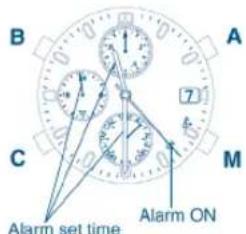
Press button M to switch to the alarm 1 [AL-1] mode.
- When the second hand is stopped at the ON position (23 second position), it indicates that the alarm is set (alarm ON). The hour, minute and 24H hands indicate the alarm set time.
- When the second hand is moving, it indicates that the alarm has been canceled (alarm OFF). The hour, minute and 24H hands indicate the time of the TME mode.
[Setting the Alarm Time]
Press button B or C to move the hour, minute and 24H hands to the time at which the alarm is desired to be set.
- Correction can be made one minute at a time, in the clockwise direction, each time button B is pressed.
- Correction can be made one minute at at time, in the counterclockwise direction, each time button C is pressed. Correction can be made rapidly by holding button B or C down. Correct the alarm set time by moving the hands in the closest direction to the desired alarm time.
- When setting the alarm time, be careful that AM and PM are set correctly by referring to the 24 H hand.
[Canceling Alarm Set Time]
The alarm set time is canceled by pressing button A when the alarm is ON.
[Alarm Monitor]
The alarm sound can be monitored by pressing button A in the alarm 1 mode when the alarm is OFF.
IFM6W70IFM6W70
7. USE OF DAILY ALARM (AL-2)
The daily alarm also uses a 24-hour clock. Once the alarm is set, the alarm sounds for 15 seconds at the alarm set time, once a day. The alarm sound can be stopped by pressing any of buttons A, B or C.
[Quick Set Alarm ON Display]
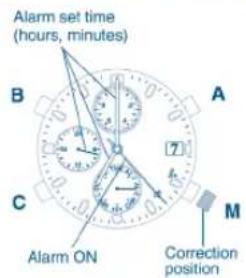
Press button M to switch to the alarm 2 [AL-2] mode.
The second hand will indicate either ON (23 second position) or OFF (19 second position).
In both cases, the hour, minute and 24H hands will indicate the alarm set time.
[Setting the Alarm Time]
- Pull button M out. The second hand will indicate the ON position.
-
Press buttons B or C to move the hour, minute and 24H hands to the time at which the alarm is desired to be set.
-
Correction can be made one minute at a time, in the clockwise direction, each time button B is pressed.
-
Correction can be made one minute at at time, in the counterclockwise direction, each time button C is pressed. Correction can be made rapidly by holding button B or C down. Correct the alarm set time by moving the hands in the closest direction to the desired alarm time.
-
Push button M in to the normal position.
* When setting the alarm time, be careful that AM and PM are set correctly by referring to the 24H hand
[Switching Between Alarm ON and OFF]
The alarm will switch between ON and OFF each time button A is pressed with button M pulled out. [Alarm Monitor]
The alarm sound can be monitored by pressing button A in the alarm 2 mode when M button is in the normal position.
IFM6W70IFM6W70
7. USE OF CHRONOGRAPH (CHR)
The chronograph is able to measure time up to a maximum of 59 minutes, 59 and 19/20th seconds in 1/20th second increments after which the chronograph returns to the chronograph reset display and stops. This chronograph is also able to measure split time. In the chronograph mode, the hour, minute and 24H hands as well as date indicate the current time and date.
[Chronograph Reset] [During Chronograph Measurem]
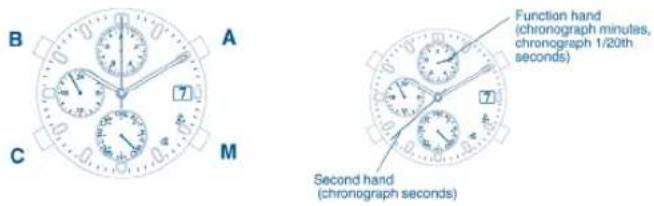
[Explanation of Display]
Chronograph minutes: Read the function hand.
Chronograph seconds: Read the second hand.
Chronograph 1/20 seconds: The function hand will change to the 1/20th second display when button is pressed C during the stop or split display. The value for 1/20th seconds is read at that time.
[Use of Accumulated elapsed Time Measurement]
- The chronograph is started and stopped by pressing button A (Starting and stopping the chronograph can be repeated as many times as desired.)
- The chronograph is reset by pressing button C when it is stopped.
A confirmation beep will sound when either the start, stop or split operation is selected.
![FESTINA F6561 - [Use of Accumulated elapsed Time Measurement] - 1](/content/2026/05/1051029/images/997374735800762b2dbc771f5862f610d82877910169e9a5919e88479bfa2e21.jpg)
flowchart
graph TD
    A["Reset"] -->|A| B["Measurement"]
    B -->|A| C["Stop"]
    C --> D["C"]
    D --> A
[Use of Split Time Measurement]
- The chronograph is started and stopped by pressing button A.
- Pressing button C, during measurement, displays the split time for 10 seconds. The next split time is displayed when button C is pressed again during display of split time.
- The chronograph is reset by pressing button C when it is stopped.
- The chronograph automatically returns to the measuring state after displaying the split time for 10 seconds.
A confirmation beep tone will sound when either the start, stop or split operation is selected.
* Measurement will continue internally even when the watch is switched to a different mode during chronograph measurement. Measurement will be shown continuing when the watch is again returned to the chronograph mode. However, it returns to the reset display when 60 minutes have elapsed.
![FESTINA F6561 - [Use of Split Time Measurement] - 1](/content/2026/05/1051029/images/cdf1ac44075cf5022dea2552893bd6ab2e6723c49451e382d8df86e9c9a5b720.jpg)
flowchart
graph TD
    A["Reset"] --> B["Measurement"]
    B --> C["Stop"]
    C --> A
    B --> D["Split"]
    D --> E["Automatically returns to measuring state after 10 seconds"]
    E --> B
    B --> F["A"]
    F --> C
    style A fill:#f9f,stroke:#333
    style B fill:#ccf,stroke:#333
    style C fill:#cfc,stroke:#333
    style D fill:#fcc,stroke:#333
    style E fill:#cff,stroke:#333
    style F fill:#ffc,stroke:#333
9. USE OF TIMER [TMR]
The timer can be set over a range of 1 to 59 minutes in 1 minute increments. When measurement of the set time is completed, the watch beeps for 5 seconds indicating that the time is up. After the set time has elapsed, the timer will automatically return to the same set time. In the timer mode, the hour, minute and 24H hands as well as the date indicate the current time and date.
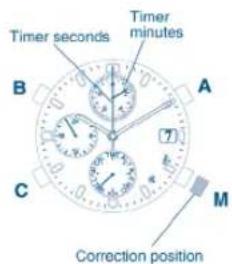
[Timer Setting Procedure]
Press button M to switch to the timer mode [TMR].
- Pull button M out.
- Press button B or C to set the timer to the desired time. Correction can be made one minute at a time in the clockwise direction each time button B is pressed. Correction can be made one minute at a time in the counterclockwise direction each time button C is pressed. The hands can be advanced rapidly by holding button B or C down.
- Push button M in to the normal position.
[Measuring Procedure]
- The timer is started and stopped by pressing button A. When button A is pressed after the timer is stopped, timer measurement will continue from the time remaining on the timer when it was stopped.
- Pressing button C, when the timer is stopped, returns the timer to the set time.
![FESTINA F6561 - [Measuring Procedure] - 1](/content/2026/05/1051029/images/3f4a4974c42523c9259c7e321570a45a3636032f9f5e9a474f462dad1ad3e596.jpg)
flowchart
graph TD
    A["Set time"] --> B["Measurement"]
    B --> C["Stop"]
    C --> A
    B --> D["Set time is up"]
    D --> A
    B --> E["A"]
    E --> A
    C --> F["A"]
    F --> B
    style A fill:#f9f,stroke:#333
    style B fill:#ccf,stroke:#333
    style C fill:#cfc,stroke:#333
    style D fill:#fcc,stroke:#333
    style E fill:#ffc,stroke:#333
    style F fill:#fcc,stroke:#333
When button C is pressed during timer measurement, the timer returns to the set time and restarts (timer flyback (restart) function).
A confirmation beep will sound when each of the timer start, stop, reset and repeat operations is selected.
The local time function enables the time in a different time zone to be set separately from the current time. Local time is set by performing a time difference correction in 1 hour units based on the current time (time of the TME mode). The minute and second hands move in coordination with the current time.
[Time Difference Correction]
Press button M to switch to the local time mode [L-TM].
- Pull button M out.
-
Press button B or C to correct the time difference.
-
Correction can be made one hour at a time in the clockwise direction each time button B is pressed.
-
Correction can be made one hour at a time in the counterclockwise direction each time button C is pressed. Correction can be made rapidly by holding button B or C down.
-
Push button M in to the normal position.
* The range over which the time difference can be corrected is from +23 hours to -23 hours based on the current time (time of the TME mode).
11. WHAT DO TO WHEN THE FOLLOWING OCCUR
[The hands do not indicate the correct positions in each mode]
- The hand base positions may shift after the watch has been subjected to a strong impact and so forth. When this happens, refer to [3. Before Using] and perform the "O-Position Correction" procedure.
[The watch exhibits an abnormal display or operation]
- In extremely rare situations, the watch may exhibit an abnormal display or erroneous operation (such as the alarm continuing to sound, or the hands turning continuously) as a result of being subjected to the effects of static electricity or strong impact and so forth. When this happens, perform the "All-Reset" procedure while referring to the following page.
[After Replacing the Battery]
- After the battery has been replaced, always make sure to perform the "All-Reset" procedure described on the following page. The watch may not run properly if this operation is not performed.
[All-Reset Procedure]
The all-reset procedure can be performed in any mode.
-
Pull button M out.
-
Simultaneously press buttons A, B and C. (The confirmation beep sounds at this time.)
-
Return button M to the normal position.
* After performing the all-reset procedure, always make sure to perform the "O-position correction" procedure while referring to [3. Before Using] before resetting the watch to the correct time.
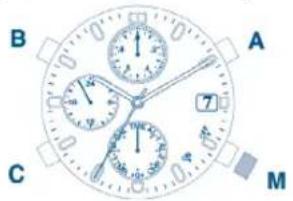
12. USE OF THE ROTATING BEZEL
Some watches are not equipped with a bezel, depending on the model.
- Tachymeter (non-rotating bezel type).
-
Directional (rotating bezel type).
-
Tachymeter
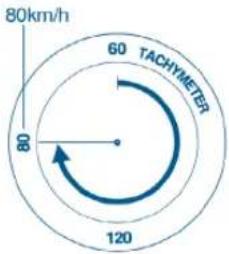
If your watch is provided with a tachymeter: The tachymeter is a feature that measures the speed of an automobile. Measuring how many seconds a car travels over a distance of 1km enables the tacymeter scale to show the approximate average speed per hour during a journey (if this 1km is covered within a maximum of 60 seconds.) If the chronograph is started at the beginning of the distance measurement, and stopped after 1km, the average speed per hour can be determined by the position of the chronograph second hand. If 1km is covered in 45 seconds, the average speed will be about 80km/h.
IFM6W70IFM6W70
2. Directional rotating bezel (Northern hemisphere)
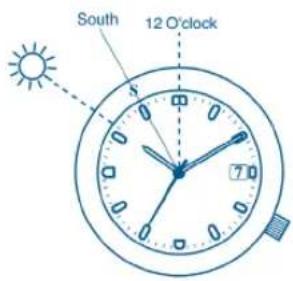
If your watch is provided with a compass bezel: The compass feature on this watch is based on the position of the sun. This compass should only be used as an approximate direction finder. Changes in latitude and the seasons may also cause directional misreadings.
One of the features of this watch is a directional rotating bezel for use in the Northern Hemisphere. By aligning the hour hand with the position of the sun in the sky, the point halfway between this position and 12
O' clock will be South. Align the "S" mark on the rotating bezel with this halfway point to determine all other points of the compass.
IFM6W70IFM6W70
- PRECAUTIONS AND LONG TERM USE
| Indication | Specification | Water-related use | |||||
| Dial | Case black | Washing face or gelting well in the rain that is when polished over the watch and no water pressure is applied to it. |  | Swimming and general washing work (kitchen working) washing etc.) | Water sports at skin during 10 min (link)  | Scuba (10min x link)  | |
| WATER RESIST (ANT) | 3bar water resistant watch | OK NO NO NO NO | |||||
| WATER RESIST 5bar or no indication | WATER RESIST (ANT) | 5bar water resistant watch | OK OK NO NO NO | ||||
| WATER RESIST 10bar/20bar or no Indication | WATER RESIST (ANT) | 10/20bar water resistant watch | OK OK OK NO NO | ||||
1. Water resistance
Check the chart to determine the water-resistant properties of this watch.
• Always set the crown in the normal position.
WATER RESISTANT may sometimes be abbreviated as WATER RESIST.
IFM6W70IFM6W70

CAUTION Precautions
2. Avoid extreme temperatures
Avoid leaving your watch in extremely warm or cold locations for a long period of time.
3. Avoid strong shocks
4. Avoid strong magnetic fields
5. Avoid chemicals and corrosive gases
Avoid wearing this watch in the presence of chemicals and corrosive gases. If mercury or any chemical (such as fuel gasoline, thinner, alcohol, spray liquids of cosmetics or the like,) makes contact with the watch, discoloration, deterioration or damage to the case, band or other components may occur.
6. Avoid static electricity
The integrated circuits used in the watch are sensitive to static electricity. If exposed to intense static electricity, the watch's display may lose its accuracy.
7. Keep the watch clean
It may become difficult to pull the crown out due to dirt and dust getting caught between the crown and the case when the watch is worn for long periods of time. To prevent this from happening, turn the crown freely back and forth occasionally while it is in the normal position. Any dirt left on the case or band may cause skin rash. A watchband will easily become soiled with dust and perspiration because it is in direct contact with the skin. Even a stainless or gold-plated band may begin to corrode if it has not been cleaned for a long period of time.
8. Periodic inspection
Getting your watch checked once every two years or three is recommended to ensure long use and trouble-free operation.
9. Be sure to keep the battery away from infants or small children :
Should accidental ingestion occur, consult a doctor at once.
IFM6W70IFM6W70
14. SPECIFICATIONS
- Type: Multi-hand, analog quartz watch.
- Accuracy: Within + 20 seconds per month at normal temperatures (5°C\~35°C/41°F\~95°F)
-
Operating Temperature Range: -10°C to +60°C (14°F to 140°F)
-
Functions:
• Time .... Hours, minutes, seconds, 24-hour clock
- Alarm ....Quick set alarm (alarm duration: approx. 10 seconds)
Daily alarm (alarm duration: approx. 15 seconds)
- Chronograph 60 minute measurement, 1/20th second increments, split time measurement function
- Timer .... 1 minute increments, can be set to a maximum of 59 minutes
- Local time ..... Time difference correction in 1 hour units
• Calendar ...... Month, date
- Battery: 280-44 (SR927W).
- Battery Life: Approx. 2 years.
This battery life is based on the following conditions of use.
• Alarm 1: 10 seconds/day
• Alarm 2: 15 seconds/day
• Chronograph measurement: 1 hour/day
• Timer measurement: 59 minutes/day - Product specifications are subject to change without notice.

By virtue of the regulations pursuant to the handling of waste products deriving from electronic and electrical equipment, end of lifecycle watch making products must be selectively collected for processing. You may therefore dispose of your quartz watch making products at any of our retail outlets or any other authorized collection point. The selective collection, processing, rating and recycling of these products helps contribute to safeguarding the environment and protecting our health.