HURVBTR35 - Vibrating platform Hurtle - Free user manual and instructions
Find the device manual for free HURVBTR35 Hurtle in PDF.


User questions about HURVBTR35 Hurtle
0 question about this device. Answer the ones you know or ask your own.
Ask a new question about this device
Download the instructions for your Vibrating platform in PDF format for free! Find your manual HURVBTR35 - Hurtle and take your electronic device back in hand. On this page are published all the documents necessary for the use of your device. HURVBTR35 by Hurtle.
USER MANUAL HURVBTR35 Hurtle
VIBRATION FITNESS MACHINE
USER MANUAL
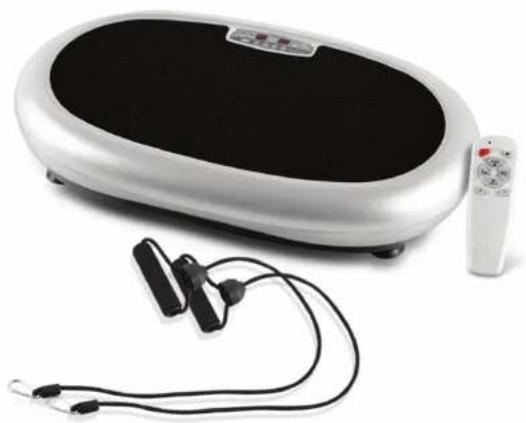
natural_image
White electrozoelectric device with black and white casing, connected to a remote control and ear clips (no text or symbols visible)HURVBTR35
HURTLE
Thank you for your purchase of this product. To ensure proper operation of the Product, please read this USER MANUAL carefully before using, and pay special attention to the safety precautions.
Please keep this USER MANUAL properly for further reference.
Contents
Safety Precautions 1-2
Name and Function of the Product 3
Name and Function of Controller 4
Using Method 5
Moving Method 6
Cleaning and Maintenance 7
Common Problems and Solutions 8
Technical Specification 9
Technical Specification
Product name:: VIBRATION FITNESS MACHINE
Rated voltage: □100-120VAC
Rated power: 200W
Rated frequency: 50/60Hz
Common Problems & Solutions:
| S/N | Problems | Causes | Solutions |
| 1 | The Product can not be started | The plug is not in place | Insert the plug |
| The power switch is off | Turn switch on, the indicator | ||
| Th fuse is burnt | Replace with a new fuse of the same mode! | ||
| 2 | Sound like phew or Da-da is heard during working | Normal sound generated by the motor or from the abrasion between mechanical units | No additional treatment is required |
| 3 | Operate the controller, but the Product no action | The electricity of batteries is worn out | Replace batteries |
| The controller is too far away from the Product | The effective distance of infrared signal is 2.5M | ||
| 4 | Sudden stop | Default working time is up | Restart it after 10 minutes' interval |
| 5 | Can not operation | Too many commands sent to the Product and they can not be responded in time | Power off and then restart |
Safety Precautions Environmentfor use
Do not use the Product in humid or dusty environment to avoid electric shock or breakdown of the mechanical parts.
Do not use the Product when indoor temperature is over 40°C.
Do not use the Product in the oper air or under the direct sunlight. Please the Product on flat floor.
⚠️Please wait for one hour before using the Product when it is moved from low to high temperature, so as to prevent water vapor from condensing on the machine and resulting in any failure.
People under these conditions below are not suggested to use the Product
It is strongly advised to consult your doctor before use
Patients who are under treatment or feel not good;
Patients with malignant tumor;
Pregnant women or women in menstrual period;
People with heart disease;
Osteoporosis patients;
People with heart pacemaker or other medical electronic instrument implanted;
People with artificial limb;
People who are sensitive to vibration and strenuous exercise.
⊗Notices during Operation
Before use, please undress watch, bangle, cell phone or other valua-
ble objects, and keys, knife or other incisive objects, soas to avoid damage or body injury.
Do not smoke while using the Product.
Please do not use the Product together with other medical equipments.
Please do not use the Product for medical treatment purpose.
Do not use the Product right after a meal or drink.
During use, please keep child or pet away from the Product. It is forbid-
den to put fingers or other foreign bodies into the gap between the middle cover and base cover.
Supervision is needed for child under 10 years and the aged over 60 years during using the Product.
The load capability of the Product is 100KGS; people over this weight are not suggested to use the Product.
This product is only limited for one-person use.
Warning:
Unauthorized dismantle, disassembly or renovation is not allowed to prevent electrical shock or any malfunctions. Please contact manufacture or local dealer immediately if there is any service work needed.
Stop using the Product under the Product under below conditions, then power off and remove the plug from power supply
Water or other liquid is accidentally splashed onto the Product or controller.
Any accessory is found damaged or internal component is exposed. Feel abnormal or severe pain during use.
Power failure.
Thundering or lighting weather.
Plug and power cord
Check if the voltage complies with the one specified for the Product. Do not retract the power plug with wet hand to prevent electric shock. Hold the plug rather than the power cord to pull out the power cord. Turn off the power switch and remove the plug from the power supply in case of electrical failure of not in use for a long time. Stop using the Product if the power cord has any damage, turn off the power switch, pull out the plug, and contact technicians for repair.
Storage and Maintenance Surface cleaning
Before cleaning, ensure the power switch is turned off, and the attaching plug is pulled out of the socket
The rubber pedal and covers can be cleaned with a wet cloth containing detergent, and the detergent should be removed with a cloth
Notice
Do not clean the Product with corrosive detergent such as benzene or thinner, as it may cause fading, corrosion or crack on the Product. Do not splash water into the Product to avoid short circuit.
Controller
As wet cloth may cause malfunction of the controller, only dry cloth can be used
Storage and Maintenance
Make sure that the power switch is turned off and the plug is removed from the power supply Clean off the dust and dirt on the Product and keep it clean and away from places with high temperature or high humidity If the Product is not in use for a long period, a dustproof cover (buy it yourself) should be applied on the Product to prevent the entry of dust
Moving method
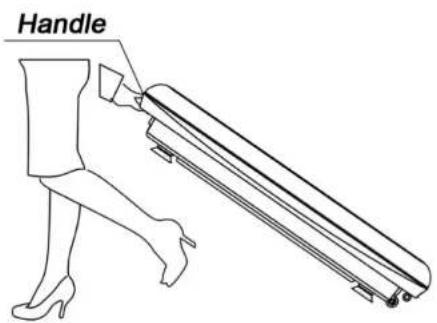
Two handles are designed on both ends of the middle cover. When moving the Product, lift the end opposite of the castor, grasp the handle and move the Product to the desired place.
Name and Function of the Product
Upper cover
Middle cover
Base cover
Rubber pedal
Infrared receiving window
Roller
AC Socket
Foot pad
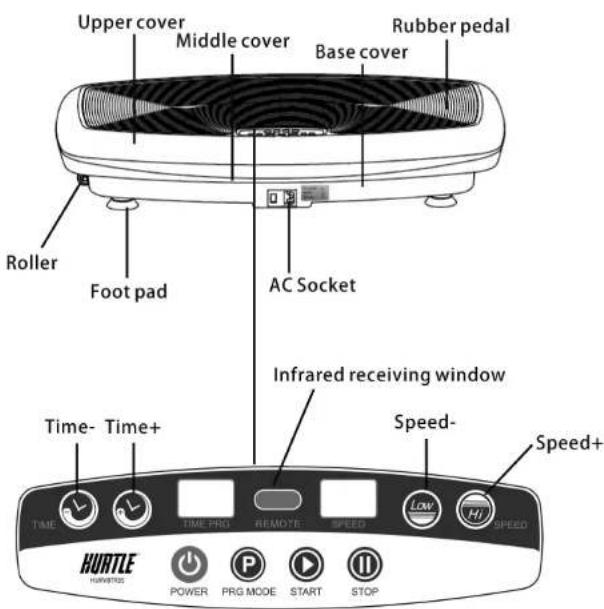
Name and Function of Controller
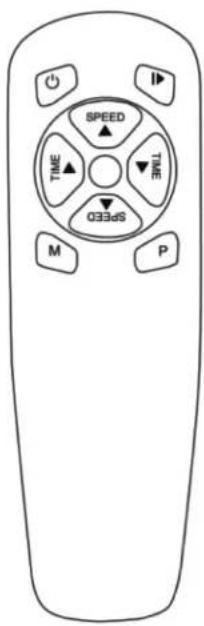
Start/Stop: Insert the power plug, switch on power, then press the button to start the product. In the operation of the machine, press this button to stop working.
Time-: Time decrease: the default working time is 10 minutes, divided into 10 levels, press this button to decrease time.
Speed+: Speed increase: Manual 1-20. Press this button to increase the speed when the machine is operating.
Time+: Time increase: the default working time is 10 minutes, divided into 10 levels, press this button to increase time.
Speed-: Speed decrease: Manual 1-20. Press this button to decrease the speed when the machine is operating.
M: QUICK BUTTON for Levels 16 10 6, press once for Level 16 and twice for Level 10 and 3 times for Level 6 repeatedly.
Auto/Mode: Auto / Mode: Default to manual mode, automatic mode is activated once pressing this button. Press the button repeatedly to cycle through the 'P1' P2' P3' automatic operating mode or '88' manual mode. Auto mode, humanized programming, automatically adjusting vibration frequency. In automatic mode, speed and time is not adjustable. In the manual mode, the standby can adjust the time, the speed is not adjustable; when operating, speed adjustable, but time is not adjustable.
Note: The effective reception range of the remote control signal is 2.5 meters, the infrared emission indicator of the controller should be aligned the infrared receiving window on the product..
Use method
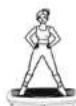
- Stand upright on the Product, with two legs apart, the distance of two legs is mostly the same as width of shoulder. This position can exercise waists and buttocks to relieve stress on waists and sculpture beautiful curve of buttocks
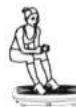
- Stand on the Product with two legs apart and knees bent. The posture can exercise thighs to sweep pain and soreness, improve blood circulation, and reduce fat deposits
- Seat on chair or sofa, with feet put on the Product. This posture can exercise both thigh and calf.
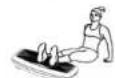
- Seat on carpet, with two legs put on the Product. This posture can exercise leg.
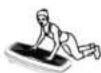
- Kneel on the carpet, put hands onto the Product, with body lean forward, this posture can exercise shoulder joint and arms

Functions and features:
Body beauty: By reposeful and high-frequency vibration and sway, combined with various exercise postures, this machine can deeply stimulate muscle tissue, lower fat accumulation, rehabilitate elasticity of muscle, sculpture beautiful body shape, then make users vitalized and feel confident.
Exercise: Borrow health and fitness ideas from Chinese traditional culture like Kung Fu, Buddhism, Taoism, it advocates passive exercise, which allow you to exercise indoor in a relatively static manner to get mind and body relaxed, pain and soreness relieved, fatigue swept away, inner circulation improved, then make you stronger and healthier.