JB096B9 - Oven JUNO - Free user manual and instructions
Find the device manual for free JB096B9 JUNO in PDF.


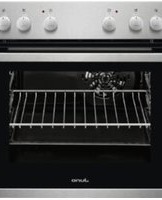
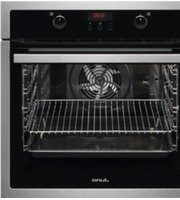
| Product Type | Built-in Electric Oven |
| Brand | JUNO |
| Model | JB096B9 |
| Energy Class | A+ |
| Oven Capacity | 71 Liters |
| Number of Functions | 8 |
| Temperature Range | 50°C - 250°C |
| Control Type | Rotary Knobs with Digital Display |
| Dimensions (H x W x D) | 595 x 595 x 548 mm |
| Weight | Approximately 35 kg |
| Power Supply | 220-240 V, 50 Hz |
| Power Consumption (Conventional) | 0.89 kWh |
| Power Consumption (Fan Forced) | 0.69 kWh |
| Main Functions | Bake, Grill, Fan-Forced, Defrost, Pizza, Bottom Heat, Top Heat, Rotisserie |
| Cleaning | Enamel Interior, Easy-to-Clean Door |
| Safety Features | Child Lock, Automatic Shut-off, Cool Touch Door |
| Spare Parts Availability | Authorized Service Centers |
| Installation Type | Built-in |
| Door Type | Drop-down with 2-layer glass |
| Interior Light | Yes |
| Cooling System | Integrated Cooling Fan |
| Warranty | 2 Years |
Frequently Asked Questions - JB096B9 JUNO
User questions about JB096B9 JUNO
0 question about this device. Answer the ones you know or ask your own.
Ask a new question about this device
Download the instructions for your Oven in PDF format for free! Find your manual JB096B9 - JUNO and take your electronic device back in hand. On this page are published all the documents necessary for the use of your device. JB096B9 by JUNO.
USER MANUAL JB096B9 JUNO
Safety instructions 3
Product description 6
Control panel 7
Before first use 7
Daily use 8
Clock functions 9
Using the accessories 10
Additional functions 11
Hints and tips 12
Care and cleaning 21
Troubleshooting 24
Installation 26
Energy efficiency 28
Subject to change without notice.
⚠ SAFETY INFORMATION
Before the installation and use of the appliance, carefully read the supplied instructions. The manufacturer is not responsible for any injuries or damages that are the result of incorrect installation or usage. Always keep the instructions in a safe and accessible location for future reference.
Children and vulnerable people safety
- This appliance can be used by children aged from 8 years and above and persons with reduced physical, sensory or mental capabilities or lack of experience and knowledge if they have been given supervision or instruction concerning the use of the appliance in a safe way and understand the hazards involved.
- Children between 3 and 8 years of age and persons with very extensive and complex disabilities shall be kept away unless continuously supervised.
- Children of less than 3 years of age should be kept away unless continuously supervised.
- Do not let children play with the appliance.
- Keep all packaging away from children and dispose of it appropriately.
- Keep children and pets away from the appliance when it operates or when it cools down. Accessible parts are hot.
- If the appliance has a child safety device, it should be activated.
- Children shall not carry out cleaning and user maintenance of the appliance without supervision.
General Safety
- Only a qualified person must install this appliance and replace the cable.
- WARNING: The appliance and its accessible parts become hot during use. Care should be taken to avoid touching heating elements.
- Always use oven gloves to remove or put in accessories or ovenware.
- Before carrying out any maintenance, disconnect the appliance from the power supply.
- Ensure that the appliance is switched off before replacing the lamp to avoid the possibility of electric shock.
- Do not use a steam cleaner to clean the appliance.
- Do not use harsh abrasive cleaners or sharp metal scrapers to clean the glass door since they can scratch the surface, which may result in shattering of the glass.
- If the mains power supply cable is damaged, it must be replaced by the manufacturer, its Authorised Service Centre or similarly qualified persons to avoid an electrical hazard.
- Excessive spillage must be removed before the pyrolytic cleaning. Remove all parts from the oven.
- To remove the shelf supports first pull the front of the shelf support and then the rear end away from the side walls. Install the shelf supports in the opposite sequence.
SAFETY INSTRUCTIONS
Installation

WARNING! Only a qualified person must install this appliance.
- Remove all the packaging.
- Do not install or use a damaged appliance.
- Follow the installation instructions supplied with the appliance.
• Always take care when moving the appliance as it is heavy. Always use safety gloves and enclosed footwear.
- Do not pull the appliance by the handle.
- Keep the minimum distance from other appliances and units.
• Install the appliance in a safe and suitable place that meets installation requirements.
- The appliance is equipped with an electric cooling system. It must be operated with the electric power supply.
Electrical connection

WARNING! Risk of fire and electric shock.
- All electrical connections should be made by a qualified electrician.
• The appliance must be earthed. - Make sure that the parameters on the rating plate are compatible with the electrical ratings of the mains power supply.
• Always use a correctly installed shockproof socket. - Do not use multi-plug adapters and extension cables.
- Make sure not to cause damage to the mains plug and to the mains cable. Should the mains cable need to be replaced, this must be carried out by our Authorised Service Centre.
- Do not let mains cables touch or come near the appliance door, especially when the door is hot.
- The shock protection of live and insulated parts must be fastened in such a way that it cannot be removed without tools.
- Connect the mains plug to the mains socket only at the end of the installation. Make sure that there is access to the mains plug after the installation.
- If the mains socket is loose, do not connect the mains plug.
- Do not pull the mains cable to disconnect the appliance. Always pull the mains plug.
- Use only correct isolation devices: line protecting cut-outs, fuses (screw type fuses removed from the holder), earth leakage trips and contactors.
- The electrical installation must have an isolation device which lets you disconnect the appliance from the mains at all poles. The isolation device must have a contact opening width of minimum 3 mm.
- Fully close the appliance door, before you connect the mains plug to the mains socket.
- This appliance complies with the E.E.C. Directives.
Use

WARNING! Risk of injury, burns and electric shock or explosion.
- This appliance is for household use only.
- Do not change the specification of this appliance.
- Make sure that the ventilation openings are not blocked.
- Do not let the appliance stay unattended during operation.
- Deactivate the appliance after each use.
- Be careful when you open the appliance door while the appliance is in operation. Hot air can release.
- Do not operate the appliance with wet hands or when it has contact with water.
- Do not apply pressure on the open door.
- Do not use the appliance as a work surface or as a storage surface.
- Open the appliance door carefully. The use of ingredients with alcohol can cause a mixture of alcohol and air.
- Do not let sparks or open flames to come in contact with the appliance when you open the door.
- Do not put flammable products or items that are wet with flammable products in, near or on the appliance.

WARNING! Risk of damage to the appliance.
- To prevent damage or discoloration to the enamel:
– do not put ovenware or other objects in the appliance directly on the bottom.
– do not put aluminium foil directly on the bottom of cavity of the appliance.
– do not put water directly into the hot appliance.
- do not keep moist dishes and food in the appliance after you finish the cooking. - be careful when you remove or install the accessories.
- Discoloration of the enamel or stainless steel has no effect on the performance of the appliance.
- Use a deep pan for moist cakes. Fruit juices cause stains that can be permanent.
- This appliance is for cooking purposes only. It must not be used for other purposes, for example room heating.
• Always cook with the oven door closed. - If the appliance is installed behind a furniture panel (e.g. a door) make sure the door is never closed when the appliance is in operation. Heat and moisture can build up behind a closed furniture panel and cause subsequent damage to the appliance, the housing unit or the floor. Do not close the furniture panel until the appliance has cooled down completely after use.
Care and cleaning

WARNING! Risk of injury, fire, or damage to the appliance.
- Before maintenance, deactivate the appliance and disconnect the mains plug from the mains socket.
- Make sure the appliance is cold. There is the risk that the glass panels can break.
- Replace immediately the door glass panels when they are damaged. Contact the Authorised Service Centre.
- Be careful when you remove the door from the appliance. The door is heavy!
- Clean regularly the appliance to prevent the deterioration of the surface material.
- Clean the appliance with a moist soft cloth. Only use neutral detergents. Do not use any abrasive products, abrasive cleaning pads, solvents or metal objects.
- If you use an oven spray, follow the safety instruction on it's packaging.
- Do not clean the catalytic enamel (if applicable) with any kind of detergent.
Pyrolytic cleaning

WARNING! Risk of Injury / Fires / Chemical Emissions (Fumes) in Pyrolytic Mode.
- Before carrying out a Pyrolitic self-cleaning function or the First Use please remove from the oven cavity:
- any excess food residues, oil or grease spills / deposits.
- any removable objects (including shelves, side rails etc., provided with the product) particularly any non-stick pots, pans, trays, utensils etc.
- Read carefully all the instructions for Pyrolytic cleaning.
- Keep children away from the appliance while the Pyrolytic cleaning is in operation. The appliance becomes very hot and hot air is released from the front cooling vents.
- Pyrolytic cleaning is a high temperature operation that can release fumes from cooking residues and construction materials, as such consumers are strongly advised to:
– provide good ventilation during and after each Pyrolytic cleaning.
– provide good ventilation during and after the first use at maximum temperature operation.
- Unlike all humans, some birds and reptiles can be extremely sensitive to potential fumes emitted during the cleaning process of all Pyrolytic Ovens.
- Remove any pets (especially birds) from the vicinity of the appliance location during and after the Pyrolytic cleaning and first use maximum temperature operation to a well ventilated area.
- Small pets can also be highly sensitive to the localized temperature changes in the vicinity of all Pyrolytic Ovens when the Pyrolytic self cleaning program is in operation.
• Non-stick surfaces on pots, pans, trays, utensils etc., can be damaged by the high temperature Pyrolytic cleaning operation of all Pyrolytic Ovens and can be also a source for low level harmful fumes.
- Fumes released from all Pyrolytic Ovens / Cooking Residues as described are not harmful to humans, including infants or persons with medical conditions.
Internal lighting

WARNING! Risk of electric shock.
- The type of light bulb or halogen lamp used for this appliance is for household appliances only. Do not use it for house lighting.
- Before replacing the lamp, disconnect the appliance from the power supply.
PRODUCT DESCRIPTION
General overview

Accessories
- Wire shelf
For cookware, cake tins, roasts.
- Only use lamps with the same specifications.
Service
• To repair the appliance contact an Authorised Service Centre.
- Use original spare parts only.
Disposal

WARNING! Risk of injury or suffocation.
- Disconnect the appliance from the mains supply.
- Cut off the mains electrical cable close to the appliance and dispose of it.
- Remove the door catch to prevent children or pets from becoming trapped in the appliance.
1 Control panel
2 Knob for the heating functions
3 Display
4 Control knob (for the temperature)
5 Air vents for the cooling fan
6 Heating element
7 Lamp
8 Fan
9 Shelf support, removable
10 Shelf positions
- Baking tray
For cakes and biscuits.
CONTROL PANEL
Buttons
| Sensor field / Button Function Description | |
 | MINUS To set the time. |
 | CLOCK To set a clock function. |
 | PLUS To set the time. |
Display

A. Timer / Temperature
B. Heat-up and residual heat indicator
C. Core temperature sensor (selected models only)
D. Door lock (selected models only)
E. Hours / minutes
F. Demo mode (selected models only)
G. Clock functions
BEFORE FIRST USE

WARNING! Refer to Safety chapters.

To set the Time of day refer to "Clock functions" chapter.
Initial Cleaning
Remove all accessories and removable shelf supports from the oven.

Refer to "Care and cleaning" chapter.
Clean the oven and the accessories before first use.
Put the accessories and the removable shelf supports back to their initial position.
Preheating
Preheat the empty oven before first use.
- Set the function .Set the maximum temperature.
- Let the oven operate for 1 hour.
- Set the function .Set the maximum temperature.
- Let the oven operate for 15 minutes.
- Set the function ☐. Set the maximum temperature.
- Let the oven operate for 15 minutes.
- Turn off the oven and let it cool down. Accessories can become hotter than usual. The oven can emit an odour and smoke. Make sure that the airflow in the room is sufficient.

WARNING! Refer to Safety chapters.
Retractable knobs
To use the appliance press the knob. The knob comes out.
Heating functions
| Oven func-tion | Application |
| [55Y]Off position | The oven is off. |
 True Fan Cooking True Fan Cooking | To bake on up to three shelf positions at the same time and to dry food.Set the temperature 20 - 40 °C lower than for Con-ventional Cooking. |
 Conventional Cooking (Top / Bottom Heat) Conventional Cooking (Top / Bottom Heat) | To bake and roast food on one shelf position. |
 Grilling Grilling | To grill flat food and to toast bread. |
 Fast Grilling Fast Grilling | To grill flat food in large quantities and to toast bread. |
 Turbo Grilling Turbo Grilling | To roast larger meat joints or poultry with bones on one shelf posi-tion. To make gratins and to brown. |
 Bottom Heat Bottom Heat | To bake cakes with crispy bottom and to pre-serve food. |
| Oven function | Application |
 Pizza Setting Pizza Setting | To bake pizza. To make intensive browning and a crispy bottom. |
 Moist Fan Baking Moist Fan Baking | This function is designed to save energy during cooking. For the cooking instructions refer to "Hints and tips" chapter, Moist Fan Baking. The oven door should be closed during cooking so that the function is not interrupted and to ensure that the oven operates with the highest energy efficiency possible. When you use this function, the temperature in the cavity may differ from the set temperature. The residual heat is used. The heating power may be reduced. For general energy saving recommendations refer to "Energy Efficiency" chapter, Energy Saving. This function was used to comply with the energy efficiency class according to EN 60350-1. When you use this function the lamp automatically turns off after 30 seconds. |
 Defrost Defrost | To defrost food (vegetables and fruit). The defrosting time depends on the amount and size of the frozen food. |
 Pyrolysis Pyrolysis | To turn on the pyrolytic cleaning of the oven. This function burns off residual dirt in the oven. |
Setting a heating function
- Turn the knob for the heating functions to select a heating function.
- Turn the control knob to select the temperature.
The lamp turns on when the oven operates.
- To turn off the oven, turn the knob for the heating functions to the off position.
CLOCK FUNCTIONS
Clock functions table
| Clock function | Application |
| TIME OF DAY | To show or change the time of day. You can change the time of day only when the oven is off. |
| |→| DURATION | To set how long the oven works. Use only when a heating function is set. |
| →| END | To set when the oven turns off. Use only when a heating function is set. |
| |→|→| TIME DELAY | Combination of DURATION and END function. |
| MINUTE MINDER | Use to set a countdown time. This function has no effect on the operation of the oven. You can set the MINUTE MINDER at any time, also if the oven is off. |
Heat-up indicator
When the oven function operates, the bars in the display appear one by one when the temperature in the oven increases, and disappear when it decreases.
| Clock function | Application |
| 00:00 COUNT UP TIMER | If you do not set any other clock function the COUNT UP TIMER automatically monitor how long the oven works. It is on immediately when the oven starts to heat. The Count Up Timer cannot be used with the functions: DURATION, END. |
Setting and changing the time
After the first connection to the mains, wait until the display shows and "12:00". "12" flashes.
-
Press or to set the hours.
-
Press to confirm and set the minutes.
The display shows a red the set hour. "00" flashes.
-
Press or to set the current minutes.
-
Press ⚠️ to confirm or the set time of day will be saved automatically after 5 seconds.
The display shows the new time.
To change the time of day press 🙏 again and again until the indicator for the time of day ⏻ flashes in the display.
Setting the DURATION function
- Set a heating function.
- Press again and again until | starts to flash.
- Press or to set the minutes and then the hours. Press to confirm.
When the set Duration time ends the signal sounds for 2 minutes. and time setting flash in the display. The oven turns off automatically. - Press any button or open the oven door to stop the signal.
- Turn the knob for the heating functions to the off position.
Setting the END function
- Set a heating function.
- Press ① again and again until →| starts to flash.
- Press + or - to set the hours and then the minutes. Press ⓣ to confirm.
At the set End time the signal sounds for 2 minutes. → and time setting flash in the display. The oven turns off automatically. - Press any button or open the oven door to stop the signal.
- Turn the knob for the heating functions to the off position.
Setting the TIME DELAY function
- Set a heating function.
- Press ① again and again until starts to flash. |→|
- Press or to set the minutes and then the hours for DURATION time.
Press to confirm.
The display shows flashing →
USING THE ACCESSORIES

WARNING! Refer to Safety chapters.
- Press or to set the hours and then the minutes for END time. Press
① to confirm. The display shows and the set temperature.
Oven turns on automatically later on, works for the set DURATION time and stops at the set END time.
At the set END time the signal sounds for 2 minutes. → and time setting flash in the display. The oven turns off.
-
Press any button or open the oven door to stop the signal.
-
Turn the knob for the heating functions to the off position.
Setting the MINUTE MINDER
Minute minder can be both set when the oven is turned on and off.
- Press again and again until starts to flash.
- Press or to set the seconds and than the minutes.
When the time you set is longer than 60 minutes, hr flash in the display. - Set the hours.
- The MINUTE MINDER starts automatically after 5 seconds. After 90% of the set time the signal sounds.
- When the set time ends the signal sounds for 2 minutes. "00:00" and flash in the display. Press any button to stop the signal.
COUNT UP TIMER
To reset the Count Up Timer, press and hold and . The timer starts to count up again.
Inserting the accessories
Wire shelf:
Push the shelf between the guide bars of the shelf support and make sure that the feet point down.

natural_image
Technical line drawing of a mechanical assembly with two circular inset views showing internal components (no text or symbols)Baking tray:
Push the baking tray between the guide bars of the shelf support.

natural_image
Pure technical line drawing of a mechanical component or bracket (no text or symbols)ADDITIONAL FUNCTIONS
Using the Child Lock
When the Child Lock is on the oven cannot be turned on accidentally.
- Ensure the knob for the oven functions is in the off position.
- Press and hold and at the same time for 2 seconds.
The signal sounds. SAFE and appear on the display. The door is locked.

The symbol ☐ appear on the display also when Pyrolysis function operates.
To turn off the Child Lock, repeat step 2.
Wire shelf and baking tray together:
Push the baking tray between the guide bars of the shelf support and the wire shelf on the guide bars above.

natural_image
Technical line drawing of a structural component with a magnified inset showing internal details (no text or symbols)
Small indentation at the top increase safety. The indentations are also anti-tip devices. The high rim around the shelf prevents cookware from slipping of the shelf.
Residual heat indicator
When you turn off the oven, the display shows the residual heat indicator if the temperature in the oven is more than 40 °C. Turn the knob for the temperature left or right to check the oven temperature.
Automatic Switch-off
For safety reasons the oven turns off automatically after some time if a heating function operates and you do not change the oven temperature.
| Temperature (°C) | Switch-off time (h) |
| 30 - 115 12.5 | |
| 120 - 195 8.5 | |
| 200 - 245 5.5 | |
| 250 1.5 |
After an automatic switch-off, press any button to operate the oven again.

The Automatic switch-off does not work with the functions: Light, Duration, End.
Cooling fan
When the oven operates, the cooling fan turns on automatically to keep the
HINTS AND TIPS

WARNING! Refer to Safety chapters.

The temperature and baking times in the tables are guidelines only. They depend on the recipes and the quality and quantity of the ingredients used.
Cooking recommendations
The oven has four shelf positions.
Count the shelf positions from the bottom of the oven floor.
Your oven may bake or roast differently to the oven you had before. The below tables provide you with the standard settings for temperature, cooking time and shelf position.
If you cannot find the settings for a special recipe, look for the similar one.
The oven has a special system which circulates the air and constantly recycles the steam. With this system you can cook in a steamy environment and keep the
surfaces of the oven cool. If you turn off the oven, the cooling fan can continue to operate until the oven cools down.
Safety thermostat
Incorrect operation of the oven or defective components can cause dangerous overheating. To prevent this, the oven has a safety thermostat which interrupts the power supply. The oven turns on again automatically when the temperature drops.
food soft inside and crusty outside. It decreases the cooking time and energy consumption.
Baking cakes
Do not open the oven door before 3/4 of the set cooking time is up.
If you use two baking trays at the same time, keep one empty level between them.
Cooking meat and fish
Leave the meat for approximately 15 minutes before carving so that the juice does not seep out.
To prevent too much smoke in the oven during roasting, add some water into the deep pan. To prevent the smoke condensation, add water each time after it dries up.
Cooking times
Cooking times depend on the type of food, its consistency, and volume.
Initially, monitor the performance when you cook. Find the best settings (heat setting, cooking time, etc.) for your cookware, recipes and quantities when you use this appliance.
Baking and roasting
Cakes
| Food Top / Bottom Heat True Fan Cooking Time | (min) | Comments | ||||
| Temper- ature (°C) | Shelf po- sition | Temper- ature (°C) | Shelf po- sition | |||
| Whisked recipes | 170 2 160 | 2 (1 and | 3) | 45 - 60 In a cake mould | ||
| Short- bread dough | 170 2 160 | 2 (1 and | 3) | 24 - 34 In a cake mould | ||
| Butter- milk cheese cake | 170 1 160 | 2 60 - 80 In a | 26 | cm cake mould | ||
| Apple cake (Ap- ple pie) | 170 1 160 | 2 (1 and | 3) | 100 - 120 In two 20 cm cake moulds on a wire shelf | ||
| Strudel 175 | 2 150 | 2 60 - 80 In a bak- | ing tray | |||
| Jam-tart | 170 2 160 | 2 30 - 40 In a | 26 | cm cake mould | ||
| Fruit cake | 170 2 155 | 2 60 - 70 In a | 26 | cm cake mould | ||
| Sponge cake (Fatless sponge cake) | 170 2 160 | 2 35 - 45 In a | 26 | cm cake mould | ||
| Christ- mas cake / Rich fruit cake | 170 2 160 | 2 50 - 60 In a | 20 | cm cake mould | ||
| Plum cake1) | 170 2 160 | 2 50 - 60 In a | bread tin | |||
| Small cakes | 170 3 160 | 3 (1 and | 3) | 20 - 30 In a bak- ing tray | ||
| Biscuits 1) | 150 3 150 | 3 20 - 30 In a bak- | ing tray | |||
| Merin- gues | 100 3 100 | 3 90 - 120 In a bak- | ing tray | |||
| Buns 1) | 190 3 180 | 3 15 - 20 In a bak- | ing tray | |||
| Choux 1) | 190 3 180 | 3 25 - 35 In a bak- | ing tray | |||
| Plate tarts | 180 3 170 | 2 45 - 70 In a 20 | cm cake mould | |||
| Victoria sandwich | 180 1 or 2 | 170 2 (left | and right) | 40 - 55 Left + right in a 20 cm cake mould | ||
1) Preheat the oven for 10 minutes.
Bread and pizza
| Food Top / Bottom Heat True Fan Cooking Time | (min) | Comments | ||||
| Temper- ature (°C) | Shelf po- sition | Temper- ature (°C) | Shelf po- sition | |||
| White bread 1) | 190 1 190 | 1 60 - 70 1 - 2 | pieces, 500 gr one piece | |||
| Rye bread | 190 1 180 | 1 30 - 45 In a | bread tin | |||
| Bread rolls 1) | 190 2 180 | 2 (1 and | 3) | 25 - 40 6 - 8 | rolls in a bak- ing tray | |
| Pizza 1) | 190 1 190 | 1 20 - 30 On a | deep pan | |||
| Scones 1) | 200 3 190 | 2 10 - 20 In a bak- | ing tray | |||
1) Preheat the oven for 10 minutes.
Flans
| Food Top / Bottom Heat True Fan Cooking Time | (min) | Comments | ||||
| Temper- ature (°C) | Shelf po- sition | Temper- ature (°C) | Shelf po- sition | |||
| Pasta flan | 180 2 180 | 2 40 - 50 In a | mould | |||
| Vegeta- ble flan | 200 2 175 | 2 45 - 60 In a | mould | |||
| Quiches 190 1 190 1 40 - 50 In a | mould | |||||
| Lasagne 200 2 200 2 25 - 40 In a | mould | |||||
| Cannello- ni | 200 2 190 | 2 25 - 40 In a | mould | |||
| Yorkshire pudding 1) | 220 2 210 | 2 20 - 30 6 pud- | ding mould | |||
1) Preheat the oven for 10 minutes.
Meat
| Food Top / Bottom Heat True Fan Cooking Time | (min) | Comments | ||||
| Temper- ature (°C) | Shelf po- sition | Temper- ature (°C) | Shelf po- sition | |||
| Beef 200 2 | 190 2 50 - 70 | On a wire | shelf and a deep pan | |||
| Pork 180 2 | 180 2 90 - 120 | On a wire | shelf and a deep pan | |||
| Veal 190 2 | 175 2 90 - 120 | On a wire | shelf and a deep pan | |||
| English roast beef rare | 210 2 200 | 2 44 - 50 On a wire | shelf and a deep pan | |||
| English roast beef me- dium | 210 2 200 | 2 51 - 55 On a | wire | shelf and a deep pan | ||
| English roast beef well done | 210 2 200 | 2 55 - 60 On a | wire | shelf and a deep pan | ||
| Shoulder of pork | 180 2 170 | 2 120 - 150 On a | deep pan | |||
| Shin of pork | 180 2 160 | 2 100 - 120 2 | pieces | on a deep an | ||
| Lamb 190 2 190 2 110 - 130 Leg | ||||||
| Chicken 200 2 200 2 70 - 85 Whole on | a deep pan | |||||
| Turkey 180 1 160 1 210 - 240 Whole on | a deep pan | |||||
| Duck 175 2 160 2 120 - 150 Whole on | a deep pan | |||||
| Goose 175 1 160 1 150 - 200 Whole on | a deep pan | |||||
| Rabbit 190 2 175 2 60 - 80 Cut in | pieces | |||||
| Hare 190 2 175 2 150 - 200 Cut in | pieces | |||||
| Pheasant 190 2 175 2 90 - 120 Whole on | a deep pan | |||||
Fish
| Food Top / Bottom Heat True Fan Cooking Time | (min) | Comments | ||||
| Temper- ature (°C) | Shelf po- sition | Temper- ature (°C) | Shelf po- sition | |||
| Trout / Sea bream | 190 2 175 2 (1 and | 3) | 40 - 55 3 - 4 | fishes | ||
| Tuna fish / Sal- mon | 190 2 175 2 (1 and | 3) | 35 - 60 4 - 6 fil- lets | |||
Grilling
Set the temperature to 250^ .
Preheat the oven for 10 minutes.
Use the third position.
| Food Quantity Time (min) | Pieces Quantity(kg) | 1st side 2nd side | ||
| Fillet steaks 4 0.8 12 - 15 12 - 14 | ||||
| Beef steaks 4 0.6 10 - 12 6 - 8 | ||||
| Sausages 8 - | 12 - 15 10 - 12 | |||
| Pork chops | 4 0.6 12 - 16 12 - 14 | |||
| Chicken (cut in 2) | 2 1 | 30 - 35 25 - 30 | ||
| Kebabs | 4 - | 10 - 15 10 - 12 | ||
| Breast of chicken | 4 0.4 12 - 15 12 - 14 | |||
| Hamburger | 6 0.6 20 - 30 - | |||
| Fish fillet | 4 0.4 12 - 14 10 - 12 | |||
| Toasted sandwiches 4 - 6 | - | 5 - 7 | - | |
| Toast | 4 - 6 | - | 2 - 4 | 2 - 3 |
Turbo Grilling
Use the third shelf position.
Set the maximum temperature of 200^ .
| Food Quantity Time (min) | ||
| Pieces (kg) 1st side 2nd side | ||
| Rolled joints (turkey) | 1 1 30 - 40 20 - 30 | |
| Chicken (cut in two) | 2 1 25 - 30 20 - 30 | |
| Chicken drum-sticks | 6 - 15 - 20 15 - 18 | |
| Quail 4 0.5 25 - 30 20 - 25 | ||
| Vegetable gra-tin | -- 20 - 25 - | |
| Scallops -- 15 - 20 - | ||
| Mackerel 2 - 4 - 15 - 20 10 - 15 | ||
| Fish slices 4 - 6 0.8 12 - 15 8 - 10 | ||
Moist Fan Baking

For best results follow suggestions listed in the table below.
| Food Accessories | Tempera- | ture (°C) | Shelf position | Time (min) |
| Sweet rolls, 12 pieces | baking tray or dripping pan | 180 2 | 35 - 40 | |
| Rolls, 9 pieces | baking tray or dripping pan | 180 2 | 35 - 40 | |
| Pizza, frozen, 0.35 kg | wire shelf | 220 2 | 35 - 40 | |
| Swiss roll | baking tray or dripping pan | 170 2 | 30 - 40 | |
| Brownie | baking tray or dripping pan | 180 2 | 30 - 40 | |
| Soufflè, 6 pieces | ceramic ramekins on wire shelf | 200 3 | 30 - 40 | |
| Sponge flan base | flan base tin on wire shelf | 170 2 | 20 - 30 | |
| Victoria Sandwich | baking dish on wire shelf | 170 2 35 - 45 | ||
| Poached fish, 0.3 kg | baking tray or dripping pan | 180 3 35 - 45 | ||
| Whole fish, 0.2 kg | baking tray or dripping pan | 180 3 35 - 45 | ||
| Fish fillet, 0.3 kg | pizza pan on wire shelf | 180 3 35 - 45 | ||
| Poached meat, 0.25 kg | baking tray or dripping pan | 200 3 40 - 50 | ||
| Shashlik, 0.5 kg | baking tray or dripping pan | 200 3 25 - 35 | ||
| Cookies, 16 pieces | baking tray or dripping pan | 180 2 20 - 30 | ||
| Macaroons, 20 pieces | baking tray or dripping pan | 180 2 40 - 45 | ||
| Muffins, 12 pieces | baking tray or dripping pan | 170 2 30 - 40 | ||
| Savory pastry, 16 pieces | baking tray or dripping pan | 170 2 35 - 45 | ||
| Short crust biscuits, 20 pieces | baking tray or dripping pan | 150 2 40 - 50 | ||
| Tartlets, 8 pieces | baking tray or dripping pan | 170 2 20 - 30 | ||
| Poached vegetables, 0.4 kg | baking tray or dripping pan | 180 3 35 - 40 | ||
| Vegetarian omelette | pizza pan on wire shelf | 200 3 30 - 45 | ||
| Vegetables, mediterrean 0.7 kg | baking tray or dripping pan | 180 4 35 - 40 |
Pizza
Use the Pizza setting function.

Preheat the empty oven for 10 minutes before cooking.
| Food Temperature (°C) | Time (min) Shelf position Comments |
| Pizza, large 200 15 – 25 1 In a baking tray | |
| Pizza, small 200 10 – 20 1 In a baking tray | |
| Bread rolls 200 15 – 25 1 In a baking tray |
Defrost
| Food Quantity (kg) | Defrosting time (min) | Further defrost- ing time (min) | Comments |
| Chicken 1.0 100 - 140 20 - 30 Place the chicken on an upturned saucer placed on a large plate. Turn halfway through. | |||
| Meat 1.0 100 - 140 20 - 30 Turn halfway through. | |||
| Meat 0.5 90 - 120 20 - 30 Turn halfway through. | |||
| Trout 0.15 25 - 35 10 - 15 - | |||
| Strawberries | 0.3 30 - 40 10 - 20 - | ||
| Butter | 0.25 30 - 40 10 - 15 - | ||
| Cream | 2 x 0.2 | 80 - 100 10 - 15 Cream can also be whip- ped when still slightly fro- zen in places. | |
| Gateau | 1.4 60 | 60 | - |
Information for test institutes
Tests according to IEC 60350-1.
| Food | Function | Accessories | Shelf position | Temperature (°C) | Time (min) | Comments |
| Small cake | Conventional Cooking | Baking tray | 3 | 170 | 20 - 30 | Put 20 small cakes per one baking tray. |
| Apple pie | Conventional Cooking | Wire shelf | 1 | 170 | 80 - 120 | Use 2 tins (20 cm diameter), diagonally shifted. |
| Food Function Acces- | sories | Shelf position | Tempera-ture (°C) | Time (min) Comments | |
| Sponge cake | Conven-tional Cooking | Wire shelf | 2 170 35 - 45 Use a cake | mould (26 cm di-ameter). | |
| Short bread | Conven-tional Cooking | Baking tray | 3 150 20 - 35 Preheat the | oven for 10 mi-nutes. | |
| Toast 4 - 6 pieces | Grilling Wire | shelf | 3 max. 2 - 4 minutesfirst side; 2 - 3 minutessecond side | Preheat the oven for 3 mi-nutes. | |
| Beef burger 6 pieces, 0.6 kg | Grilling Wire | shelf and dripping pan | 3 max. 20 - 30 Put the wire | shelf on the third level and the dripping pan on the second level of the oven. Turn the food halfway through the cooking time.Preheat the oven for 3 mi-nutes. |
CARE AND CLEANING

WARNING! Refer to Safety chapters.
Notes on cleaning
Clean the front of the oven with a soft cloth with warm water and a mild cleaning agent.
To clean metal surfaces, use a dedicated cleaning agent.
Clean the oven interior after each use. Fat accumulation or other food remains may result in a fire.
Clean all accessories after each use and let them dry. Use a soft cloth with warm
water and a cleaning agent. Do not clean the accessories in the dishwasher.
Clean stubborn dirt with a special oven cleaner.
If you have nonstick accessories, do not clean them using aggressive agents, sharp-edged objects or a dishwasher. It can cause damage to the nonstick coating.
Moisture can condense in the oven or on the door glass panels. To decrease the condensation, operate the oven for 10 minutes before cooking. Clean the moisture from the cavity after each use.
Stainless steel or aluminium ovens
Clean the oven door with a damp cloth or sponge only. Dry it with a soft cloth.
Do not use steel wool, acids or abrasive materials as they can damage the oven surface. Clean the oven control panel with the same precautions.
Removing the shelf supports
To clean the oven, remove the shelf supports.

CAUTION! Be careful when you remove the shelf supports.
- Pull the front of the shelf support away from the side wall.

natural_image
Line drawing of a hand holding a tool near a vertical panel (no text or symbols)- Pull the rear end of the shelf support away from the side wall and remove it.

Install the removed accessories in the opposite sequence.
Pyrolysis

CAUTION! Remove all accessories and removable shelf supports.

Do not start the Pyrolysis if you did not fully close the oven door. In some models, the display shows "C3" when this error occurs.

WARNING! The appliance becomes very hot. There is a risk of burns.

CAUTION! If there are other appliances installed in the same cabinet, do not use them at the same time as the Pyrolysis function. It can cause damage to the appliance.
- Remove the worst dirt manually.
- Clean the inner side of the door with hot water, so that the residues do not burn from the hot air.
- Set the Pyrolysis function. Refer to "Oven functions".
|→| flashes. - You can use the End function to delay the start of the cleaning procedure.
- Press turn the knob for the temperature clockwise to start the cleaning procedure.
Time of the procedure: 2 h.
During the Pyrolysis the oven lamp is off.
When the oven is at its set temperature, the door locks. The display shows the symbol and the bars of the heat indicator until the door unlocks.
Cleaning reminder
To remind you that the pyrolysis is necessary, PYR flashes in the display for 10 seconds after each activation and deactivation of the oven.

The cleaning reminder goes out:
• after the end of the pyrolysis.
- if you press and at the same time while PYR flashes in the display.
Removing and installing door
The oven door has four glass panels. You can remove the oven door and the internal
glass panels to clean them. Read the whole "Removing and installing door" instruction before you remove the glass panels.

The oven door may close if you try to remove the glass panels before you remove the oven door.

CAUTION! Do not use the oven without the glass panels.
- Open the door fully and hold both hinges.

natural_image
Technical diagram of a mechanical assembly with an inset showing a close-up of a bracket component (no text or symbols present)- Lift and turn the levers fully on both hinges.

natural_image
Technical line drawing of a mechanical clamp or bracket assembly with an arrow indicating rotation (no text or symbols present)- Close the oven door halfway to the first opening position. Then lift and pull forward and remove the door from its seat.

natural_image
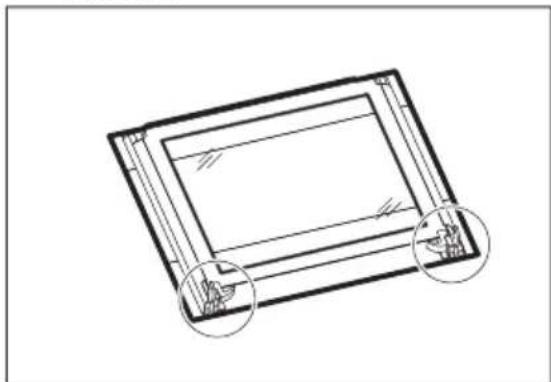
Line drawing of a hand holding a car seatbelt, showing structural components and motion arrows (no text or symbols)- Put the door on a soft cloth on a stable surface.
natural_image
Technical line drawing of a rectangular frame with two circular annotations highlighting corner features (no text or symbols present)- Release the locking system to remove the glass panels.

natural_image
Line drawing of a hand using a tool to adjust or install a component, with an arrow indicating rotation (no text or symbols present)- Turn the two fasteners by 90^ and remove them from their seats.

- First lift carefully and then remove the glass panels one by one. Start from the top panel.

- Clean the glass panels with water and soap. Dry the glass panels carefully. Do not clean the glass panels in the dishwasher.
When the cleaning is completed, install the glass panels and the oven door.
Make sure that you put the glass panels (A, B and C) back in the correct sequence. Check for the symbol / printing on the side of the glass panel, each of the glass panels looks different to make the disassembly and assembly easier.
When installed correctly the door trim clicks.
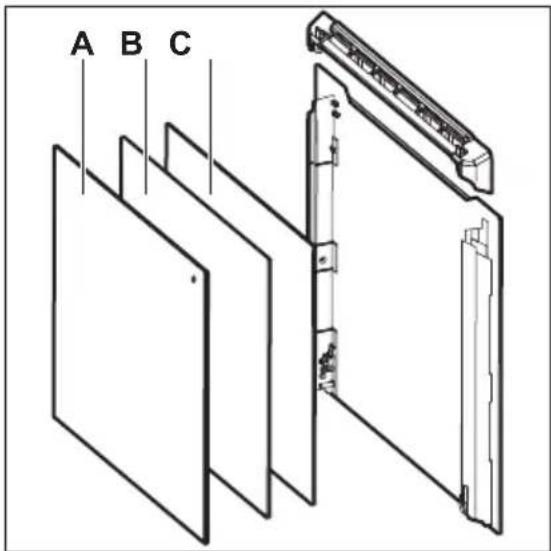
Make sure that you install the middle panel of glass in the seats correctly.

Replacing the lamp

WARNING! Risk of electric shock.
The lamp can be hot.
- Turn off the oven.
Wait until the oven is cooled down. - Disconnect the oven from the mains.
- Put a cloth on the bottom of the cavity.
The back lamp
- Turn the lamp glass cover to remove it.
- Clean the glass cover.
- Replace the lamp with a suitable 300 °C heat-resistant lamp.
- Install the glass cover.
TROUBLESHOOTING

WARNING! Refer to Safety chapters.
What to do if...
| Problem Possible cause Remedy | ||
| You cannot activate or operate the oven. | The oven is not connected to an electrical supply or it is connected incorrectly. | Check if the oven is correctly connected to the electrical supply (refer to the connection diagram if available). |
| The oven does not heat up. The oven is deactivated. Activate the oven. | ||
| The oven does not heat up. The clock is not set. Set the clock. | ||
| The oven does not heat up. The necessary settings are not set. | Make sure that the settings are correct. | |
| The oven does not heat up. The automatic switch-off is activated. | Refer to "Automatic switch-off". | |
| The oven does not heat up. The Child Lock is on. Refer to "Using the Child Lock". | ||
| The oven does not heat up. The fuse is blown. Make sure that the fuse is the cause of the malfunction. If the fuse is blown again and again, contact a qualified electrician. | ||
| The lamp does not operate. The lamp is defective. Replace the lamp. | ||
| It takes too long to cook the dishes or they cook too quickly. | The temperature is too low or too high. | Adjust the temperature if necessary. Follow the advice in the user manual. |
| Steam and condensation settle on the food and in the cavity of the oven. | You left the dish in the oven for too long. | Do not leave the dishes in the oven for longer than 15 - 20 minutes after the cooking process ends. |
| The display shows "C3". The cleaning function does not operate. You did not fully close the door, or the door lock is defective. | Fully close the door. | |
| The display shows "F102". • You did not fully close the door.• The door lock is defective. | • Fully close the door.• Deactivate the oven with the house fuse or the safety switch in the fuse box and activate it again.• If the display shows "F102" again, contact the Customer Care Department. | |
| Problem Possible cause Remedy | ||
| The display shows an error code that is not in this table. | There is an electrical fault. • Deactivate the oven with the house fuse or the safety switch in the fuse box and activate it again.• If the display shows the error code again, contact the Customer Care Department. | |
| The appliance is activated and does not heat up. The fan does not operate. The display shows "Demo". | The demo mode is activated. | 1. Deactivate the oven.2. Press and hold the button+3. The first digit on the display and Demo indicator start to blink.4. Enter the code 2468 by pressing the buttons+or to change the values and press to confirm.5. The next digit starts to blink.6. Demo mode deactivates when you confirm the last digit and the code is correct. |
Service data
If you cannot find a solution to the problem yourself, contact your dealer or an Authorised Service Centre.
The necessary data for the service centre is on the rating plate. The rating plate is
on the front frame of the oven cavity. Do not remove the rating plate from the oven cavity.
| We recommend that you write the data here: | |
| Model (MOD.) | |
| Product number (PNC) | |
| Serial number (S.N.) | |
INSTALLATION

WARNING! Refer to Safety chapters.
Building In


Securing the appliance to the cabinet

Electrical installation

The manufacturer is not responsible if you do not follow the safety precautions from the Safety chapters.
This appliance is supplied with a main plug and a main cable.
Cable
Cable types applicable for installation or replacement:
H07 RN-F, H05 RN-F, H05 RRF, H05 VV-F, H05 V2V2-F (T90), H05 BB-F
For the section of the cable refer to the total power on the rating plate. You can also refer to the table:
| Total power (W) Section of the cable (mm2) |
| maximum 1380 3 x 0.75 |
| maximum 2300 3 x 1 |
| maximum 3680 3 x 1.5 |
The earth cord (green / yellow cable) must be 2 cm longer than phase and neutral cables (blue and brown cables).
Product Fiche and information according to EU 65-66/2014
| Supplier's name Juno | |
| Model identification JB096B9 | |
| Energy Efficiency Index 81.0 | |
| Energy efficiency class A+ | |
| Energy consumption with a standard load, conventional mode | 0.87 kWh/cycle |
| Energy consumption with a standard load, fan-forced mode | 0.64 kWh/cycle |
| Number of cavities 1 | |
| Heat source Electricity | |
| Volume 57 l | |
| Type of oven Built-In Oven | |
| Mass 33.6 kg |
EN 60350-1 - Household electric cooking appliances - Part 1: Ranges, ovens, steam ovens and grills - Methods for measuring performance.
Energy saving

The oven contains features which help you save energy during everyday cooking.
General hints
Make sure that the oven door is closed properly when the oven operates. Do not open the door too often during cooking. Keep the door gasket clean and make sure it is well fixed in its position.
Use metal dishes to improve energy saving.
When possible, do not preheat the oven before you put the food inside.
When the cooking duration is longer than 30 minutes, reduce the oven temperature to minimum 3 - 10 minutes before the end of the cooking time, depending on the
duration of the cooking. The residual heat inside the oven will continue to cook.
Use the residual heat to warm up other dishes.
Keep breaks between baking as short as possible when you prepare few dishes at one time.
Cooking with fan
When possible, use the cooking functions with fan to save energy.
Residual heat
If a programme with the Duration or End Time selection is activated and the cooking time is longer than 30 minutes, the heating elements automatically deactivate earlier in some oven functions.
The fan and lamp continue to operate.
Keep food warm
Choose the lowest possible temperature setting to use residual heat and keep a meal warm. The residual heat indicator or temperature appears on the display.
Moist Fan Baking
Function designed to save energy during cooking.
When you use this function the lamp automatically turns off after 30 seconds.
ENVIRONMENTAL CONCERNS
Recycle materials with the symbol 🌐 Put the packaging in relevant containers to recycle it. Help protect the environment and human health by recycling waste of electrical and electronic appliances. Do
not dispose of appliances marked with the symbol ☒ with the household waste.
Return the product to your local recycling facility or contact your municipal office.
INHALTSVERZEICHNIS
natural_image
Technical line drawing of a mechanical assembly with two circular insets showing internal components (no text or symbols)Backblech:
natural_image
Pure technical line drawing of a mechanical component or bracket (no text or symbols)natural_image
Technical line drawing of a structural component with an inset magnified detail (no text or symbols)
natural_image
Line drawing of a hand holding a tool against a vertical panel (no text or symbols)natural_image
Technical diagram of a mechanical assembly with an inset showing a close-up of a bracket component (no text or symbols present)natural_image
Line drawing of a mechanical clamp or bracket assembly with an arrow indicating rotation (no text or symbols present)natural_image
Line drawing of a hand adjusting a door handle mechanism with rotation arrows (no text or symbols)natural_image
Technical line drawing of a rectangular frame with two circular annotations highlighting the sides (no text or symbols present)natural_image
Line drawing of a hand using a tool to adjust or install a component, with an arrow indicating rotation (no text or symbols present)
- ⚠ SAFETY INFORMATION
- Children and vulnerable people safety
- General Safety
- SAFETY INSTRUCTIONS
- Installation
- Electrical connection
- Use
- Care and cleaning
- WARNING! Risk of injury, fire, or damage to the appliance.
- Pyrolytic cleaning
- WARNING! Risk of Injury / Fires / Chemical Emissions (Fumes) in Pyrolytic Mode.
- Internal lighting
- PRODUCT DESCRIPTION
- General overview
- Accessories
- Service
- Disposal
- CONTROL PANEL
- Buttons
- Display
- BEFORE FIRST USE
- Initial Cleaning
- Preheating
- Retractable knobs
- Setting a heating function
- CLOCK FUNCTIONS
- Heat-up indicator
- Setting and changing the time
- Setting the DURATION function
- Setting the END function
- Setting the TIME DELAY function
- USING THE ACCESSORIES
- Setting the MINUTE MINDER
- COUNT UP TIMER
- Inserting the accessories
- ADDITIONAL FUNCTIONS
- Using the Child Lock
- Residual heat indicator
- Automatic Switch-off
- Cooling fan
- HINTS AND TIPS
- Cooking recommendations
- Safety thermostat
- Baking cakes
- Cooking meat and fish
- Cooking times
- Baking and roasting
- Grilling
- Turbo Grilling
- Moist Fan Baking
- Pizza
- Information for test institutes
- Notes on cleaning
- Stainless steel or aluminium ovens
- Removing the shelf supports
- Pyrolysis
- Cleaning reminder
- Removing and installing door
- Replacing the lamp
- The back lamp
- TROUBLESHOOTING
- What to do if...
- Service data
- Electrical installation
- Cable
- Energy saving
- General hints
- Cooking with fan
- Residual heat
- Keep food warm
- ENVIRONMENTAL CONCERNS
- INHALTSVERZEICHNIS
Brand : JUNO
Model : JB096B9
Category : Oven