EGSPV 593 910 - Dishwasher AMICA - Free user manual and instructions
Find the device manual for free EGSPV 593 910 AMICA in PDF.


User questions about EGSPV 593 910 AMICA
0 question about this device. Answer the ones you know or ask your own.
Ask a new question about this device
Download the instructions for your Dishwasher in PDF format for free! Find your manual EGSPV 593 910 - AMICA and take your electronic device back in hand. On this page are published all the documents necessary for the use of your device. EGSPV 593 910 by AMICA.
USER MANUAL EGSPV 593 910 AMICA
natural_image
Simple line icon of a shopping bag with rings, no text or symbols present
ONLY USE THE APPLIANCE WHEN YOU
HAVE READ AND UNDERSTAND
THE OPERATING INSTRUCTIONS
IO-DWS-1734
(01.2023/1)
CONTENTS
WE ARE ENVIRONMENTALLY FRIENDLY 3
BASIC INFORMATION 5
SAFETY INSTRUCTIONS 6
INSTALL THE APPLIANCE 13
DESCRIPTION OF THE APPLIANCE 16
CLEANING AND MAINTENANCE 33
INSTALL THE APPLIANCE IN A CABINET 38
WE ARE ENVIRONMENTALLY FRIENDLY
For many years, Amica has consistently pursued pro-ecological policy.
Concern for the environment is as important for us as the use of modern technology.
The development of technology has enabled our factories to become more environmentally friendly – we use less and less water, electricity and less waste water and solid waste is generated in the production.
A lot of attention is paid to materials used in production. We strive to use only those that do not contain harmful substances and make recycling and safe disposal possible after use.
Dear customer!
Thank you for choosing an Amica product. For years we have delivered high-quality appliances, so that household chores become a real pleasure. Before being packaged and leaving the manufacturer, this appliance was thoroughly checked with regard to safety and functionality. We also endeavour to make sure that modern technology in Amica products always goes hand in hand with a unique design.
Before using the appliance, please carefully read these Operating Instructions Follow these instruction to avoid improper use and ensure long and reliable operation of the appliance. Learn the principles of the safe use to avoid accidents.
Store these operating instructions in a safe place to use them for reference whenever needed. These Operating Instructions contain all the necessary information that will make the use of your Amica appliance simple and fun. We also encourage you to find out more about other Amica appliances.
We hope using your new appliance is a pleasure.
Amica
BASIC INFORMATION
Carefully read the operating instructions before plugging dishwasher to a power outlet and using the appliance. Operating instruction include tips that will help you avoid the risk of injury and damage to the appliance. Keep dishwasher documentation in a safe place for possible future use.
These operating instructions have been prepared for a range of appliances and some features described herein may not apply to your appliance.
MANUFACTURER'S DECLARATION
The manufacturer hereby declares that this product meets the requirements of the following European directives:
■ Low Voltage Directive 2014/35/EU,
■ Electromagnetic Compatibility (EMC) Directive 2014/30/EE,
■ Eco-design Directive2009/125/EU,
■ RoHS Directive2011/65/EU,
and has been marked with the C symbol and issued with a declaration of compliance made available to market regulators.
| Before you install the appliance | Check the appliance for transport damage. Never install or use a damaged appliance. If in doubt, contact your seller. | |
| Before first use See installation notes (below). | ||
| Before first use This appliance | ance can be used by children aged 8 years and older or persons with physical, mental or sensory handicaps, or those who are inexperienced or unfamiliar with the appliance, provided they are supervised or have been instructed how to safely use the appliance and are familiar with the associated risks. Ensure that children do not play with the appliance. Children should not be allowed to clean or maintain the appliance. | |
| Children less than 3 years of age shall be kept away unless continuously supervised. | ||
| Child safety Do not allow ch | ldren to play with the appliance. | |
| Dishwashing detergents can be caustic and irritate the eyes, mouth and throat. Read the safety notes from detergent manufacturer. | ||
| Never leave children unsupervised when the appliance is open. It can contain residue detergent. | ||
| Child safety Dishwasher water | ter is not suitable for drinking. Danger of injury from the caustic chemicals. | |
| When you open the door during a programme, be careful as water temperature is high. | ||
| To avoid injury always place long and sharp/pointed items (e.g. forks, knives) in the cutlery basket, pointing down, or flat on the top basket. | ||
| Daily maintenance Use the | appliance for household dishwashing only. | |
| Do not use solvents in the appliance as there is a risk of explosion. | ||
| Do not sit or stand on the open door and do not place any objects on it. The device may overturn. | ||
| Do not open the door when the appliance is operating. Hot water or steam can be released. | ||
| Do not leave the door open, because they it can pose a hazard. | ||
| In case of problems Refer re | repair and modifications of the appliance to qualified technicians only. | |
| In the event of problems or repairs, unplug the appliance from the wall outlet: | ||
| Unplug the appliance by pulling the plug, | ||
| Turn off the circuit breaker. | ||
| Do not pull the power cord, pull the plug only. Close the water supply. | ||
| Recommendations To save | energy and water, rinse food residue of the dishes before loading the dishes into the dishwasher. Run the dishwasher with full load. | |
| Do not put dishes with food leftovers in the appliance. | ||
| Use pre-wash programme only when needed. | ||
| Load bowls, cups and mugs bottom facing up. | ||
| Do not load in the appliance any dishes that are not dishwasher safe and do not load too many dishes. | ||
| Dishes and utensils that are not suitable for dish-washers. | Ashtrays, candles, cleaning pastes, paints, chemicals, ferro-alloys; | |
| Forks, spoons and knives with a handle made of wood, ivory or Nacre, glued items, items contaminated with abrasive powders, acid or base | ||
| Plastic dishes that are not resistant to high temperature, containers made of copper or tin; | ||
| Aluminium and silver items (may be stained or loose lustre) | ||
| Some delicate types of glass, porcelain with decorative prints, as prints may fade even after the first wash; some crystal dishes as they may lose their transparency, glued silverware sensitive to high temperatures, lead crystal glass, chopping boards, items made with synthetic fibres; | ||
| Absorbent objects such as a sponge or kitchen cloths are not suitable for the dishwasher. | ||
| Before buying dishes in the future make sure they are dishwasher safe. | ||
DISPOSAL OF OLD APPLIANCE
natural_image
Symbol of a trash bin crossed out by two diagonal lines (no text or labels)
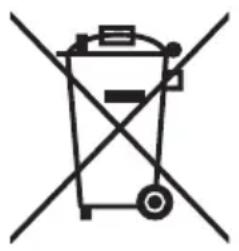
In accordance with European Directive 2012/19/EU and local legislation regarding used electrical and electronic goods, this appliance is marked with the symbol of the crossed-out waste container. This marking indicates that the appliance must not be disposed of together with other household waste after it has been used.
The user is obliged to hand it over to waste collection centre collecting used electrical and electronic goods. The collectors, including local collection points, shops and local authority departments provide recycling schemes.
Proper handling of used electrical and electronic goods helps avoid environmental and health hazards resulting from the presence of dangerous components and the inappropriate storage and processing of such goods.
UNPACKING

natural_image
Simple line drawing of a three chasing recycling symbol (no text or labels)During transportation, protective packaging was used to protect the appliance against any damage. After unpacking, please dispose of all elements of packaging in a way that will not cause damage to the environment.
All materials used for packaging the appliance are environmentally friendly; they are 100% recyclable and are marked with the appropriate symbol.
Important! Packaging materials (bags, polyethylene, polystyrene, etc.) should be kept away from children during unpacking.
INSTALL THE APPLIANCE
PLACE YOUR APPLIANCE
When choosing the place of installation, make sure you will be able to easily load and remove dishes and utensils from the dishwasher.
Do not place the appliance in a room where the temperature can fall below 0^ C.
Before installing unpack the appliance following the instructions on the packaging.
When you move the appliance do not handle it by the door or control panel.
Leave some room on all sides to have convenient access to the dishwasher when cleaning.
■ Make sure that when you set the dishwasher you do not crush the water supply and drain hose. Also, make sure that the appliance is not places on the power cord.
Level the appliance using the adjustable legs. Proper level ensures trouble-free opening and closing the dishwasher doors.
If the dishwasher door will not close properly, check that the appliance stands firmly on the floor, if not, adjust using the adjustable legs.
WATER SUPPLY CONNECTION
Make sure that domestic water supply system is suitable for the dishwasher. It is recommended to install a filter in the water supply line to avoid damage to the appliance due to impurities (such as sand, clay, rust, etc.) that occasionally occur in water. This will also prevent accumulation of sediment after dishwashing.

Note: When connecting to drinking water make sure that you connect the appliance using a safety device against drinking water contamination through backflow (according to DIN EN 1717). We recommend that installation, including water supply and electrical connections, and repairs are carried out by a qualified technician.
WATER SUPPLY HOSE
natural_image
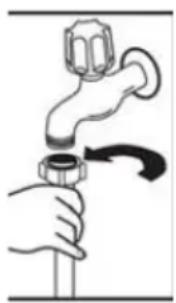
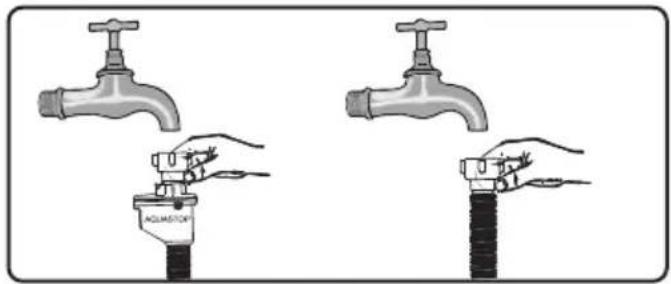
Illustration of a hand holding a pipe with a valve, no text or symbols presentDo not use the water supply hose from the old dishwasher. Use the new water supply hose provided with the appliance. Before connecting, rinse the hose with water. Connect the water supply hose directly to the water feed valve. The domestic water system pressure should be at least 0.03 MPa and up to 1 MPa. If the water pressure exceeds 1 MPa, install pressure reducing valve.
When the connection is ready, open the valve completely and check for leaks. For safety reasons, close the water supply tap after every wash.

NOTE: Aquastop water supply is used in some dishwasher models. Dangerous voltage could occur with Aquastop. Do not cut the Aquastop water supply. Do not allow it to bend or twist
text_image
ACOLATION
Note: For safety reasons, close the water tap after every wash
THE DRAIN HOSE
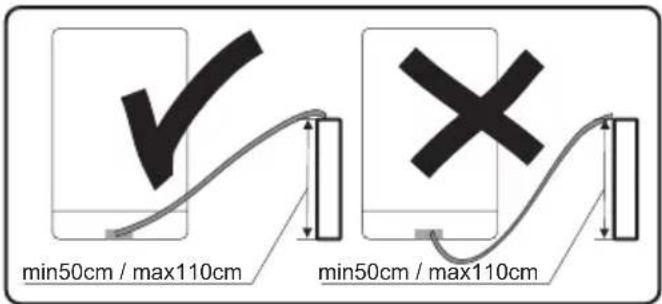
The drain hose can be connected directly to a water drain or kitchen sink stub pipe. You can also drain the water directly into the sink using the special bracket (if available), placing the drain hose outlet on the kitchen sink edge. The drain hose connection should be made at least 50 cm and up to 110 cm from the floor.
text_image
min50cm / max110cm min50cm / max110cm
If the drain hose is longer than 4 m, dishes may not be washed properly. The manufacturer will not be held responsible.
ELECTRICAL CONNECTION
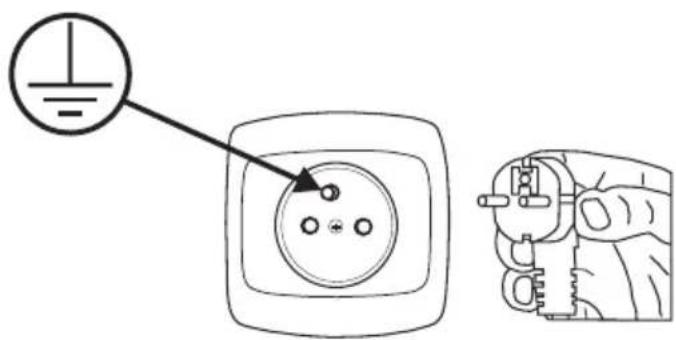
Grounded plug must be connected to a grounded power outlet with a proper voltage. If there is no grounding, refer this to a qualified electrician. If you operate the appliance without proper grounding, the manufacturer does not assume any liability for the possible resulting damage.

Domestic electrical system must be protected with a 10-16A fuse. The appliance must be supplied with 220-240 V AC. If the supply voltage is 110 V, use 3000W, 110/220 V set-up transformer to connect the appliance. Do not connect the appliance during installation.

Always use the plug provided with the appliance. When you operate the appliance at lower voltage the dishwashing efficiency will deteriorate and may damage the appliance.
The power cord may only be replaced by authorized service or a qualified electrician. Failure to comply with these rules may lead to an accident.
For safety reasons, you should always unplug the appliance after you have finished using it.
In order not to avoid electric shock, do not remove the plug from the wall outlet with wet hands.
When you unplug the appliance from the wall outlet, always pull the plug. Never pull the power cord.
text_image
Diagram showing a hand holding an electrical socket with a power symbol and a magnified view of the socket's internal structure.FEATURES AND COMPONENTS
DESCRIPTION OF THE APPLIANCE
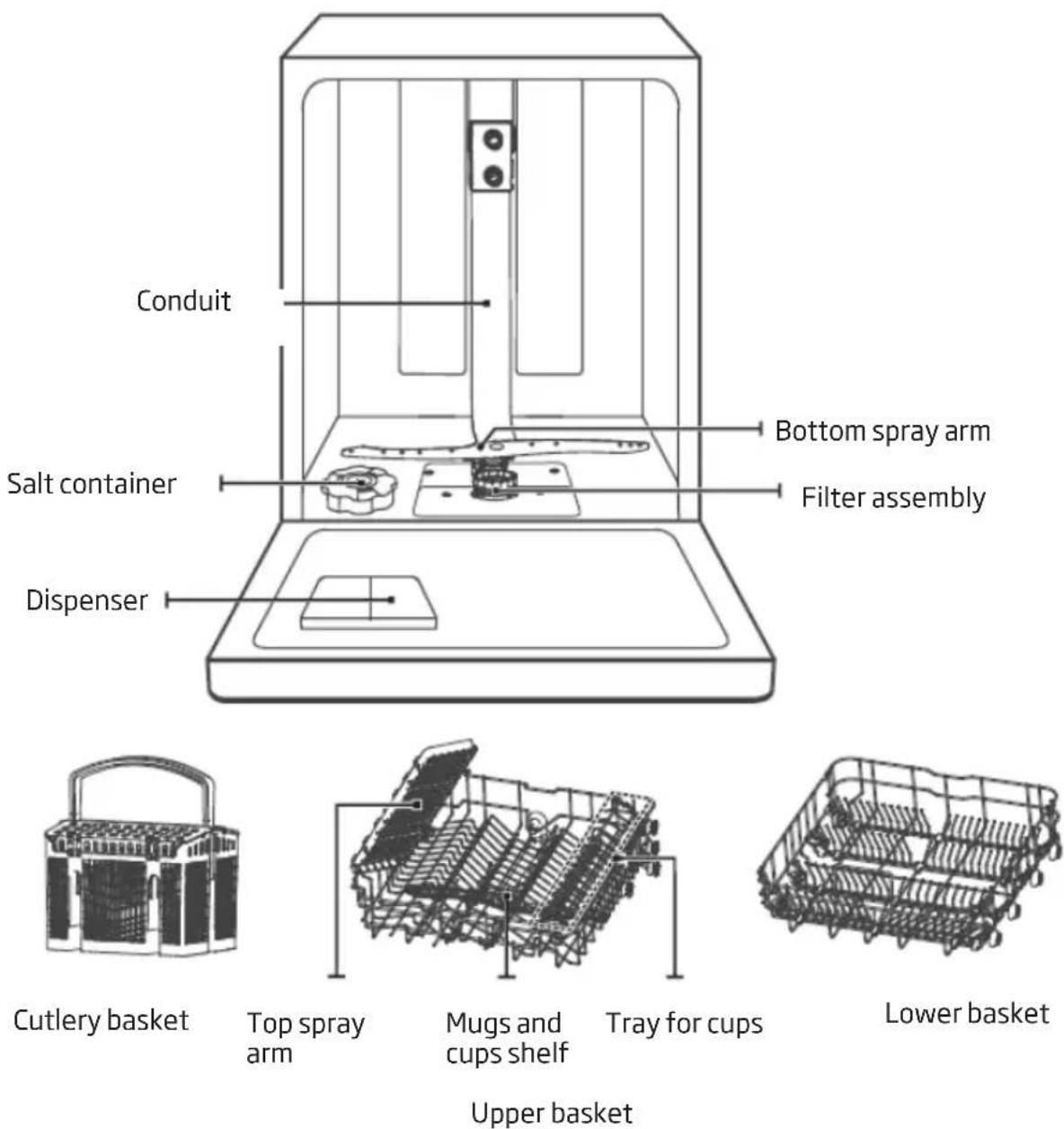
The features and components of the appliance (fig. 1):

NOTE:
Figures are for illustrative purposes only Individual models may vary.
* on selected models: When you open the dishwasher door, the interior light will turn on automatically. The appliance interior is well lit.
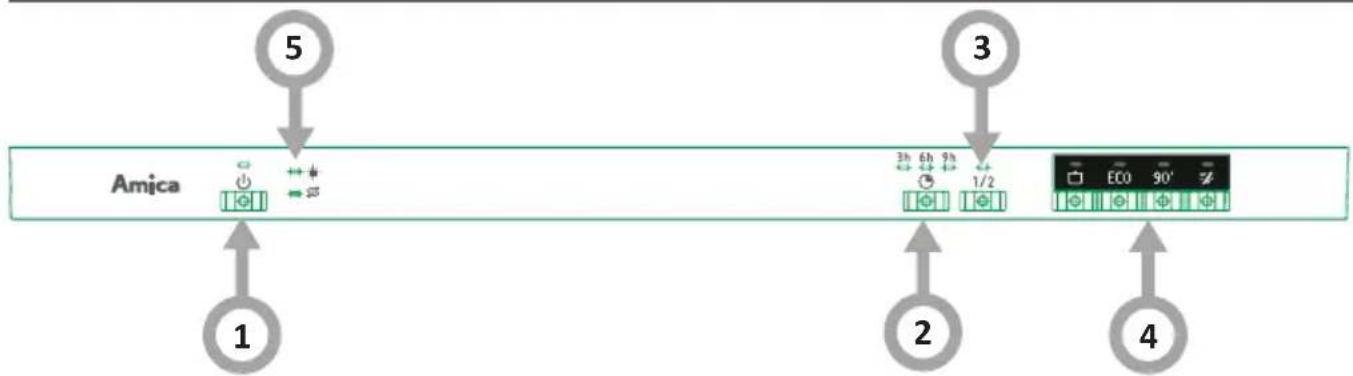
DISPLAY AND CONTROL PANEL
flowchart
graph TD
    A["1"] --> B["Amica"]
    C["2"] --> D["3"]
    E["4"] --> F["End"]
    G["5"] --> H["Arrow 5"]
    I["3"] --> J["Arrow 3"]
    K["2"] --> L["Arrow 2"]
| Device operation (buttons) | |
| 1. On / Off | Press the button to turn on the dishwasher, the display will light up. |
| 2. Delay Press this button to | set the delayed hours for washing. You can delay the start of washing up to 24 hours. One press on this button delays the start of washing by one hour. |
| 3. Half-load In the case of a | small number of dishes, for energy saving can only be washed in the upper or lower basket. Each press of the Half load button switches between washing only in the lower or upper basket. |
| 4. Program indicator | IntensiveHeavily soiled dishes, including pots and pans with dried food leftovers.ECOThis is a standard washing programme for normally soiled crockery, such as pots, plates, glasses and lightly soiled pans.90 minFor normally soiled loads that need quick wash.RapidShort washing cycle suitable for lightly soiled dishes that do not require drying. |
| 5. Warning indicator | Rinse aidThe indicator shows a low level of rinse aid in the dispenser. Add rinse aid.Special saltThe indicator shows a low level of special salt in the dispenser. Add special salt. |
PREPARE THE APPLIANCE FOR OPERATION
1
Before first use
Before using the appliance, verify that the data given on the rating plate matches that of local power outlets.
■ Remove all packing materials from inside of the appliance.
Prepare special salt (water softener).
Pour water into the special salt dispenser and then add about 1.5 kg of special salt (dishwasher salt).
Pour rinse aid into the dispenser.
2
The importance of water descaling
A dishwasher requires soft water (with low calcium content) to operate efficiently. Otherwise, white residue main remain on the dishes and inside the appliance. This has a negative impact on the quality of dishwashing, rinsing and drying. When the water flows through the softener, ions responsible for the water hardness are removed, and the water becomes soft, for best dishwashing results. Depending on the degree of water hardness, the ions responsible for water hardness accumulate quickly inside the water softener. Therefore, the water softener must be regenerated to operate with the same efficiency during the next wash. This is why special salt is used in the dishwasher.
3
Add special salt
Only use special salt intended for dishwashers.
Any other type of salt that is not intended for use in a dishwasher, especially regular kitchen salt, will damage the water softener. In the event of damage caused by the use of the wrong salt, the manufacturer's warranty is void and we will not be liable for damage. Fill with special salt before running the washing programme.
This will prevent spilled special salt or salty water from remaining on the bottom of the device, which may cause corrosion.
flowchart
graph LR
    A["Person mixing a salt container"] --> B["Add salt"]
    B --> C["Salt container with salt"]
    C --> D["Add liquid into a container"]
    D --> E["Add liquid into another container"]
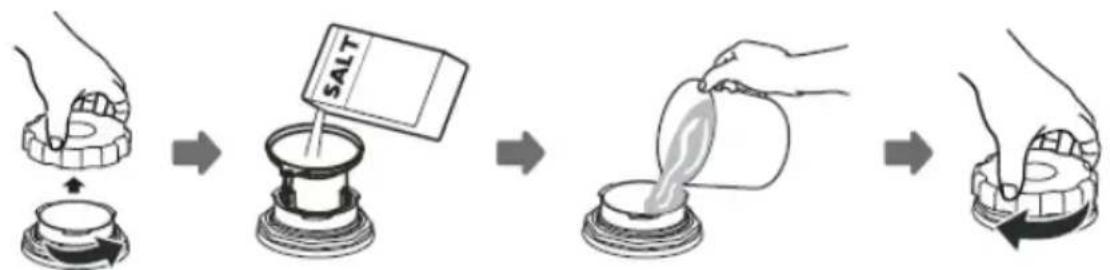
- Remove the lower basket from the appliance and unscrew the special salt dispenser cap.
- Place the end of the funnel (included) in the hole and pour about 1.5 kg of salt.
- Pour water into the dispenser until full. It is normal that a small amount of water spills out of the special salt dispenser.
- After you fill the dispenser, screw the cap on.
- When you fill the dispenser with special salt, the add salt indicator goes out.
- Start the washing programme immediately after filling the dispenser with special salt (the quick wash is recommended). Otherwise, salty water can damage the filters, the pump or other important appliance components This is not covered by the warranty.
NOTE:
Fill the special salt dispenser when the special salt indicator on the control panel lights up. Depending on the rate of salt dissolution, the special salt indicator may still be on even after filling the dispenser.
If there is no special salt indicator on the control panel (on some models), you can estimate when to top up the dispenser based on the number of wash cycles performed.
If some special salt spills, run the soaking programme or a quick wash programme.


4
The test strip
The dishwashing effectiveness is linked to water hardness. Therefore, the appliance is equipped with a system to reduce the hardness of the water supply. The dishwashing effectiveness is improved when the system is set correctly. To check water hardness contact the municipal water company or determined the water hardness using test strip (if available).
| a | b 1 min. | c↓1 second | d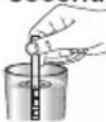 | e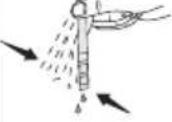 | f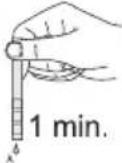 | Level 1 - no calciumLevel 2 - very small calcium contentLevel 3 - small calcium contentLevel 4 - medium calcium contentLevel 5 - high calcium contentLevel 6 - very high calcium content |
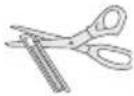 |  | |||||
| Open the test strip package | Open the water tap for 1 min. | Immerse the test strip in the water for 1 second | Once removed shake off the residual water | Wait 1 min. | Set the dishwasher water hardness in accordance with the measurement made |
5
Fill the detergent dispenser
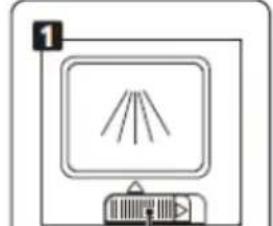
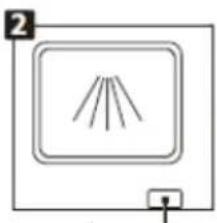
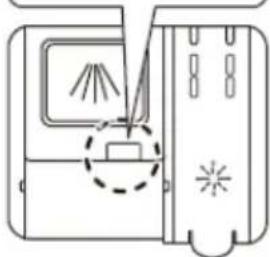
Open the detergent dispenser flap by pressing the detergent dispenser tab to release the lock as shown in the figure. The detergent dispenser features volume marking. Using these markings (lines) you can measure the correct amount of detergent. The dispenser can accommodate a maximum of 30g of detergent.
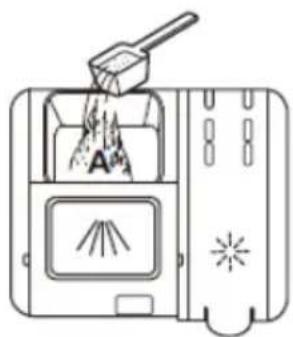
Open the pack with dishwasher detergent and in the case of heavily soiled dishes pour 25 cm ^3 detergent into the main wash compartment (A) or 15 cm ^3 for less soiled dishes (B). If the dishes remained unwashed for an extended period of time or if food has dried, pour 5 cm ^3 detergent into the pre-wash compartment and start the dishwasher. Depending on the amount of soil and the water hardness you may need to add more detergent.
natural_image
Simple line drawing of a monitor with three rays and a power button, no text or symbols present.Sliding it to the left
natural_image
Simple line drawing of a fan or vent with three blades, no text or symbols presentPress down
natural_image
Diagram of a sewing machine with a foot and blade, showing no text or symbols1 Please choose an open way according to the actual situation.
- Open the cap by sliding the release catch.
- Open the cap by pressing down the release catch.
text_image
Diagram of a chemical reaction setup showing powder being poured into a container with labeled components A and B, including a slide and explosion effect.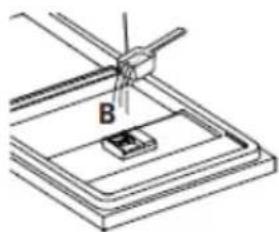
natural_image
Diagram of a mechanical setup with a central component labeled B, no text or symbols present2 Add detergent into the larger cavity (A) for the main wash cycle.
For better cleaning result, especially if you have very dirt items, pour a small amount of detergent onto the door. The additional detergent will activate during the pre-wash phase.
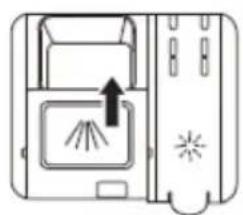
natural_image
Diagram of a device with a tray and fan, showing an arrow pointing to a screen (no text or symbols present)3 Close the flap by sliding it to the front and then pressing it down.

Please note that the setting may be different depending on the water contamination. Follow the manufacturer's instructions on the detergent packaging.
6
Multi-component (multitab) detergents (eg. 2-in-1, 3-in-1, etc.)
There are three types of detergents:
- Containing phosphates and chlorine,
- Containing phosphates and no chlorine,
- Containing no phosphates and no chlorine.
The latest tablets are generally phosphate-free. Since phosphates have water softening properties, we recommend adding salt to the container even if the water hardness is only 6°dH. If you use phosphate-free detergent where water is hard, white residue may be visible on the dishes.
You can prevent this by increasing the amount of detergent. Chlorine-free detergents have less bleaching effect. Stains may not be entirely removed. Select the programme with a higher wash temperature.
Generally, using multi-component detergents suitable results are obtained only under certain conditions. Such detergents contain rinse aid and/or special salt in a specific amount. It is recommended to use special salt when using multi-component tablets.
7
What you should pay attention to when using these tablets.
■ Always check the type of detergent used and whether it is a multi-component product.
■ Make sure that the detergent used is appropriate for tap water hardness.
■ Follow the instructions on the product packaging.
If the detergent is in the form of tablets, never place it the cutlery basket. Always place the tablet in the detergent dispenser compartment.
The use of these detergents yields good results only in certain applications. Using this type of detergent you should contact the manufacturer for information about proper use.
If you use the detergent properly and dishwasher settings are correct you can save on salt and/or rinse aid.
If dishwashing results while using 2-in-1 or 3-in-1 detergents are not satisfactory (traces of lime scale on the dishes), please contact the detergent manufacturer. The warranty does not cover complaints due to the use of multi-component detergents.

Recommended use: For best results using multi-component cleaning agents, add special salt and rinse aid in the dishwasher and set the water hardness and amount of rinse aid to the lowest setting.
The solubility of the detergent tablets made by different manufacturers can vary with regard to temperature and time. It is therefore not recommended to use detergent tablets in quick programmes. It is recommended to use powder detergents in quick programmes.

Always store detergents in a dry, cool place, out of reach of children. Add detergent to the dispenser immediately before using the appliance.
Warning: If encounter another problem when using a multi-component detergent, please contact the detergent manufacturer.
Stop using multi-component detergents
■ Add special salt and rinse aid to dispensers.
■ Set the water hardness to the highest level (6) and run an empty dishwasher.
■ Adjust the water hardness.
■ Adjust rinse aid setting.
Add rinse aid to the dispenser and adjust setting
Use rinse aid to prevent the formation of white water drops, lime scale spots, white streaks that may occur on the dishes, as well as to improve the drying process. Contrary to popular belief, it not only serves to obtain a shiny dishes, but also to facilitate drying. For this reason, make sure there is always sufficient amount of rinse aid in the dispenser.
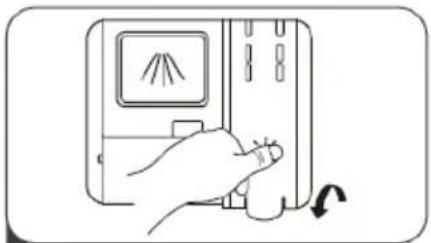
If the rinse aid indicator on the control panel lights up, add rinse aid to the dispenser. To add rinse aid remove the dispenser lid by unscrewing it. Add rinse aid until the level indicator becomes dark. Replace the lid and turn it until markings align. Use rinse aid level indicator to make sure the level is sufficient. Dark colour indicates sufficient rinse aid level in the dispenser, and the light colour indicates you need to add rinse aid to the dispenser.
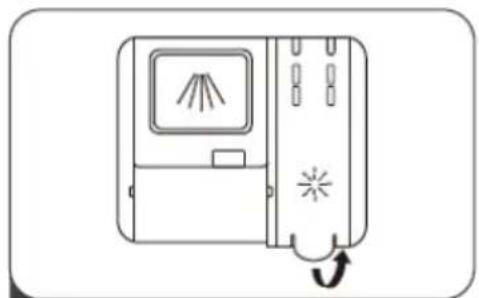
natural_image
Line drawing of a device with a screen and directional arrow, no text or symbols present1 Remove the rinse reservoir cap by lifting up the handle.
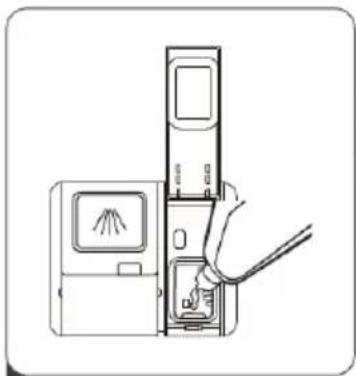
natural_image
Line drawing of a hand inserting a device into a device with a screen and cable (no text or symbols)2 Pour the rinse aid into the dispenser, being careful not to overfill.
natural_image
Line drawing of a hand pressing down on a device with a scroll arrow indicating rotation (no text or symbols)3 Close the cap after all.
Water hardness table
| Water hard-ness | German degrees [dH] | French degrees [dF] | British degrees [dE] | Water hardness level indicator | Special salt consumption [g/cycle] |
| 10~5 | 0~9 0~6 | H1 Rapid 0 | |||
| 26-11 | 10-20 7-14 | H2 90 Min | 9 | ||
| 312-17 | 21-30 15-21 | H3 90 Min; | Rapid 12 | ||
| 418-22 | 31-40 22-28 | H4Eco | 20 | ||
| 5 | 23-34 | 41-60 | 29-42 | H5 Eco; Rapid | 30 |
| 6 | 35-55 | 61-98 | 43-69 | H6 Eco; 90 Min | 60 |
If the water hardness is higher than the maximum values given in the table above, or if you use water from a deep well, it is recommended to use filters and water treatment equipment.
NOTE: The factory settings are for the water hardness level 3.
- Switch on the appliance;
- Press the Rapid button for more than 5 seconds to start the water softener set model within 60 seconds after the appliance was switched on;
- Press the Rapid button to select the proper set according to your local environment, the sets will change in the following sequence: H1->H2->H3->H4->H5->H6;
- Press the Power button to end the set up model.
The use of detergents
Use a detergent for domestic dishwashers. On the market you can find detergent intended for dishwashers in the form of powder, gel and tablets. The detergent must be placed in the dispenser before starting the dishwasher. Store detergent in a cool and dry place, out of reach of children. Do not overfill the detergent dispenser, otherwise the detergent may not dissolve completely and leave streaks on the dishes. If you need more information on the detergent used, please contact the manufacturer directly.
LOAD DISHES INTO DISHWASHER
1
Upper basket
text_image
Technical diagram of a mechanical assembly with numbered components, likely a gear or pump mechanism.EN50242
text_image
Technical diagram of a mechanical assembly with numbered components, likely a gear or cam mechanism.EN60436
2
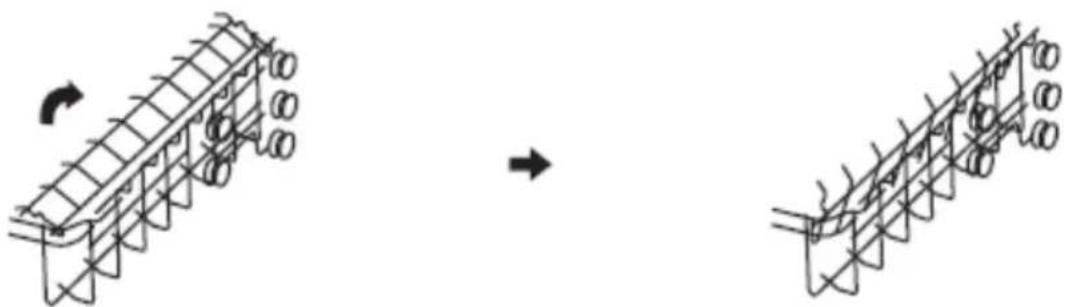
Fold the mugs and cups shelves
Fold the shelves to increase the capacity of the upper basket. You can place the glasses and mugs on the shelves. Raise the cup shelf to make more space in the basket for taller items. You can then lean the taller glasses against the shelf. It can also be removed if it is not needed.
natural_image
Diagram showing structural deformation of a truss bridge with circular elements, before and after (no text or symbols)3
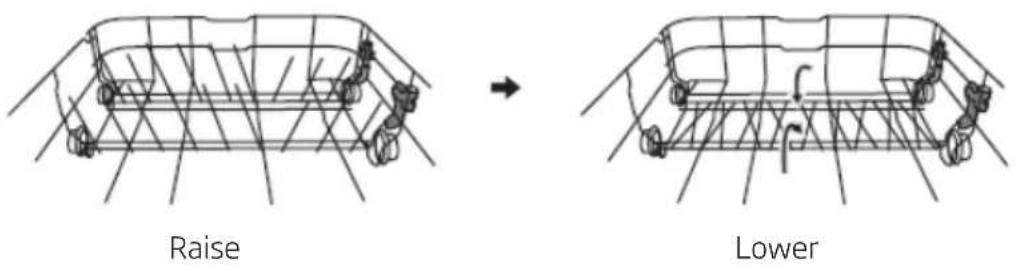
Fold the dishwasher basket spikes
The spikes are used to hold the plates. They can be folded, making more room for large dishes.
text_image
Raise Lower4
Tips for using the dishwasher basket:
Adjust the upper basket
Type 1:
The height of the upper basket can be easily adjusted to accommodate tall pots and pans in the upper or lower basket.
To adjust the height of the upper basket:
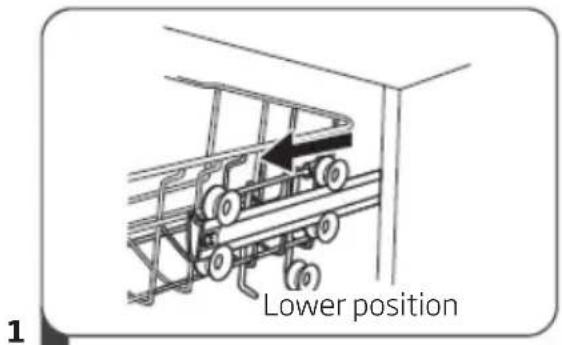
text_image
Lower position 1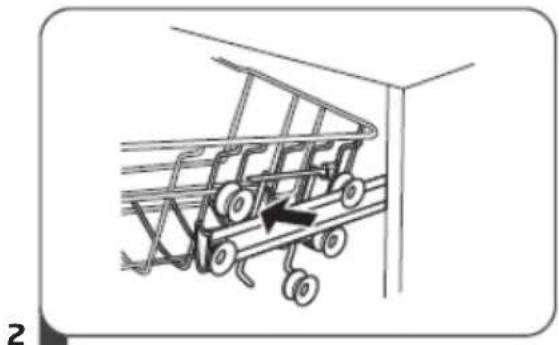
natural_image
Diagram of a shopping cart with wheels and an arrow indicating direction (no text or symbols)- Extend the upper basket.
- Remove the upper basket.
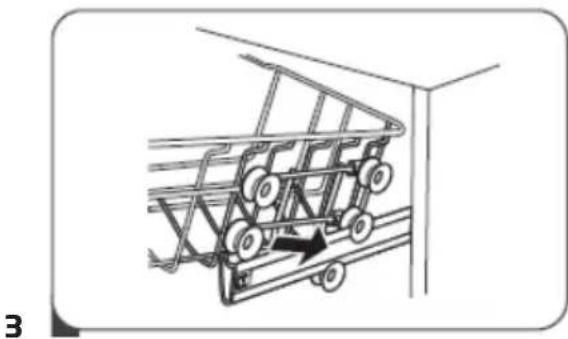
natural_image
Diagram of a car with wheels and an arrow indicating motion, no text or symbols present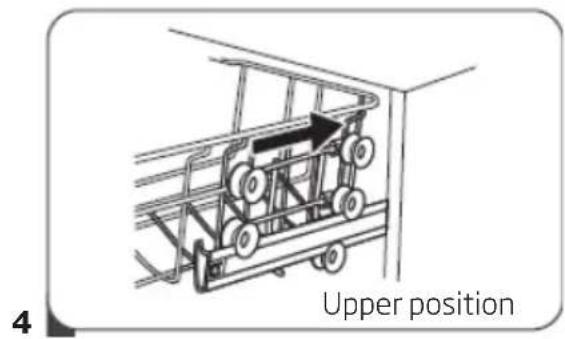
text_image
4 Upper position- Mount the basket on the upper or lower rollers.
- Insert the upper basket.
Type 2:
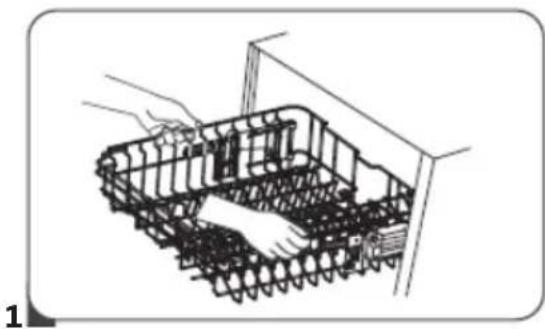
natural_image
Diagram of a robotic platform with chains and sensors, no text or symbols present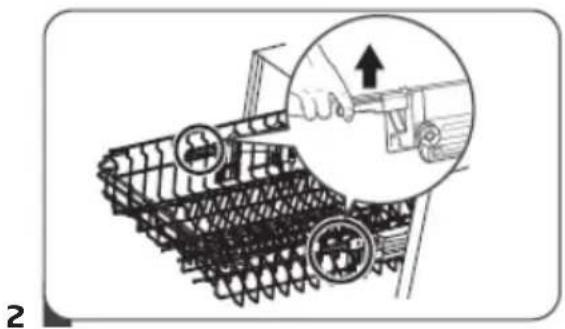
natural_image
Illustration of a tracked vehicle with a hand operating a tool, showing mechanical components and a magnified inset (no text or symbols)- To raise the basket to the upper position, raise it until it is at the same height on both sides. Make sure it is securely attached to the rails.
- To lower the basket, push down and release the handles.
5
Lower basket
Put plates, bowls, pots, etc. in the lower basket. Make sure that dishes in the lower basket do not block the spray arm and it can rotate freely. Place large pans and heavily soiled items such as pots, pans, lids, dishes, etc. in the lower basket. Place dishes upside down, so that water does not collect inside.

Place the dishes in such a way that they do not block the spray arm.
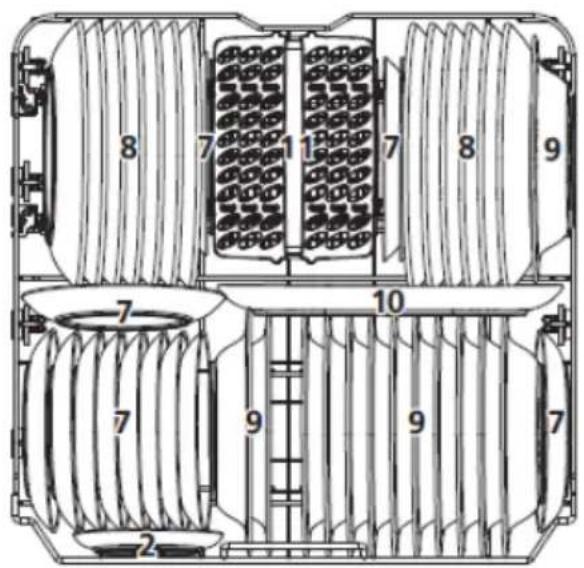
text_image
8 7 1 7 8 9 7 10 7 9 7 2EN50242
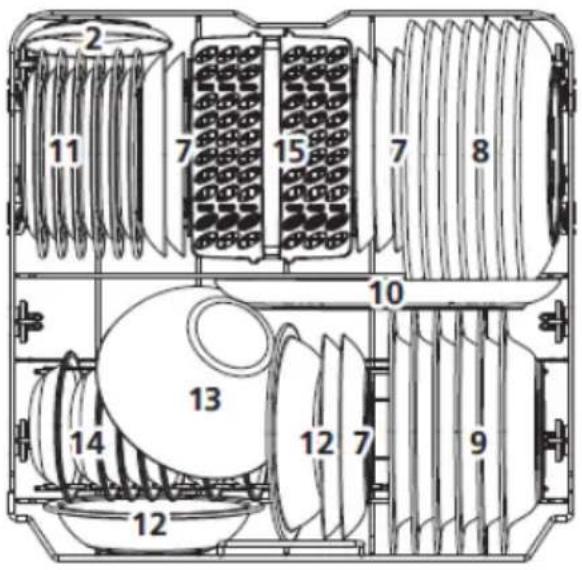
text_image
2 11 7 15 7 8 10 13 14 12 12 7 9EN60436
6
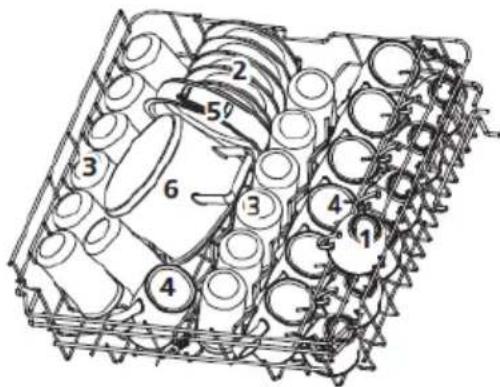
The standard load and test results
Capacity:
The upper and lower basket: 13 place settings. Set the upper basket to the upper position. Place the cups on the shelves.
Detergent/rinse aid
5+32g, in accordance with the EN 50242, IEC 436 international standards/rinse aid dose: max
Test programme
Eco, in accordance with the EN 50242 international standard
Upper basket
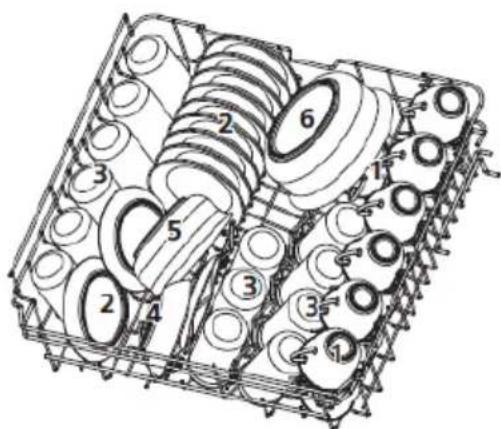
text_image
Technical diagram of a mechanical assembly with numbered components, likely a valve or pump mechanism.Lower basket
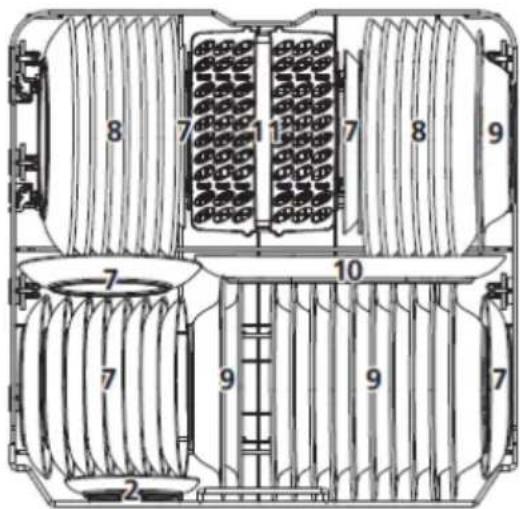
text_image
8 7 1 7 8 9 7 10 7 9 7 2| Item Cookware | |
| 1 Cups | |
| 2 Saucers | |
| 3 Glasses | |
| 4 Small salad bowls | |
| 5 Medium salad bowls | |
| 6 Large salad bowls | |
| 7 Dessert plates | |
| 8 Dinner plates | |
| 9 Soup plates | |
| 10 Oval platter | |
| 11 | Cutlery basket |
Cutlery holder
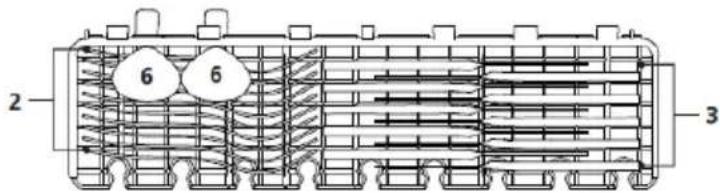
text_image
2 6 6 3Tests specification according to EN 50242
Capacity -13 standard place settings
Upper basket setting – lower position
Programme - ECO
Rinse dose setting – max
Water hardness setting - H3
Cutlery basket
Place knives and forks separately from each other, and make sure they do not touch as this may cause poor washing results.
For best washing results place knives and forks in the cutlery basket, and make sure: they do not touch and place objects in the middle.
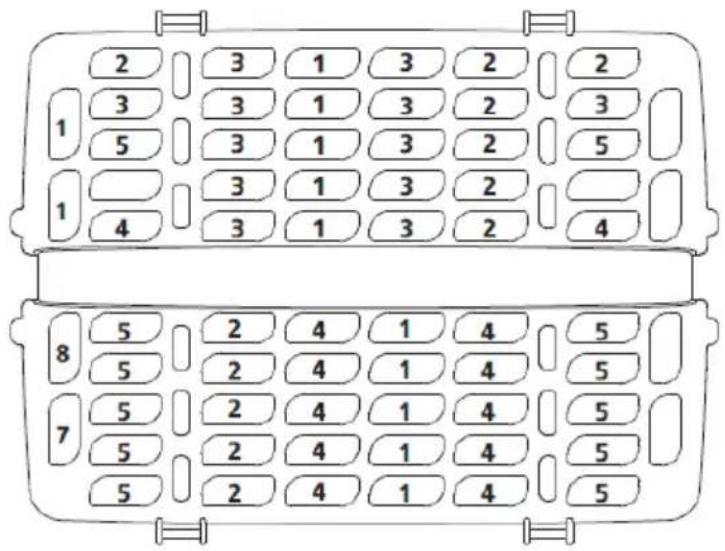
text_image
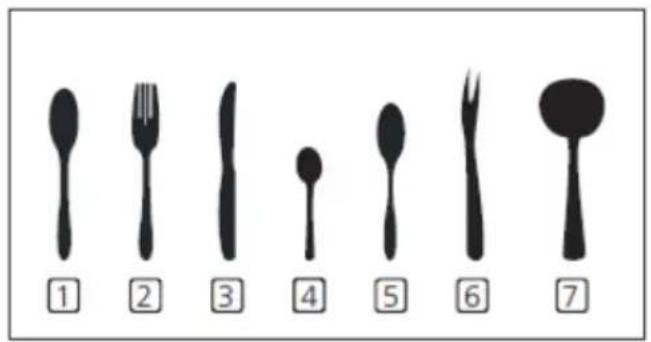
2 3 1 3 2 2 3 3 1 3 2 3 5 3 1 3 2 5 1 3 1 3 2 4 3 1 3 2 4 8 5 2 4 1 4 5 5 2 4 1 4 5 7 5 2 4 1 4 5 5 2 4 1 4 5| Item Cutlery | |
| 1 Soup spoons | |
| 2 Forks | |
| 3 Knives | |
| 4 Tea spoons | |
| 5 Dessert spoons | |
| 6 Serving spoons | |
| 7 Forks for serving | |
| 8 Spoons for sauces | |
text_image
① ② ③ ④ ⑤ ⑥ ⑦6
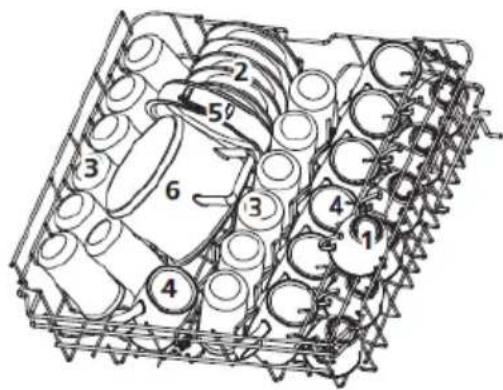
The standard load and test results
Capacity:
The upper and lower basket: 13 place settings. Set the upper basket to the upper position. Place the cups on the shelves.
Detergent/rinse aid
4+21g, in accordance with the EN 60436, IEC 436 international standards/rinse aid dose: max
Test programme
Eco, in accordance with the EN 60436 international standard
Upper basket
text_image
Technical diagram of a mechanical assembly with numbered components, likely a gear or spring mechanism.Lower basket
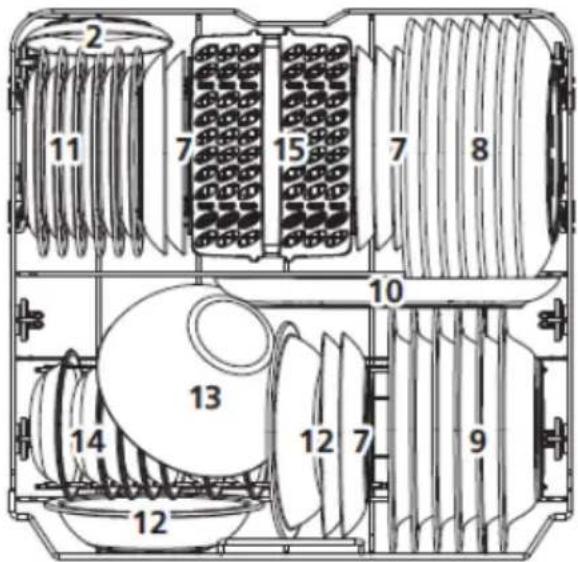
text_image
2 11 7 15 7 8 10 13 14 12 12 7 9| Item Cookware | |
| 1 Cups | |
| 2 Saucers | |
| 3 Glasses | |
| 4 Mugs | |
| 5 Oven pot | |
| 6 Small pot | |
| 7 Dessert plates | |
| 8 Dinner plates | |
| 9 Soup plates | |
| 10 Oval platter | |
| 11 Melamine dessert plates | |
| 12 Melamine bowls | |
| 13 Glass bowl | |
| 14 Dessert bowls | |
| 15 Cutlery basket | |
text_image
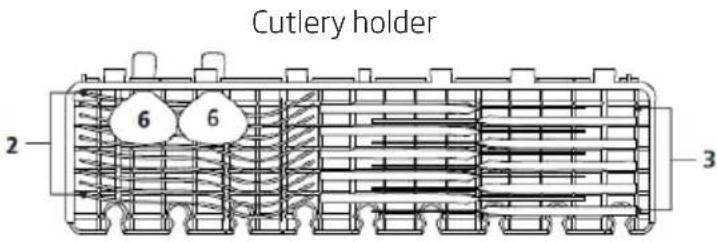
Cutlery holder 2 6 6 3Tests specification according to EN 60436
Capacity -13 standard place settings
Upper basket setting – lower position
Programme - ECO
Rinse dose setting – max
Water hardness setting - H3
Cutlery basket
Place knives and forks separately from each other, and make sure they do not touch as this may cause poor washing results.
For best washing results place knives and forks in the cutlery basket, and make sure: they do not touch and place objects in the middle.
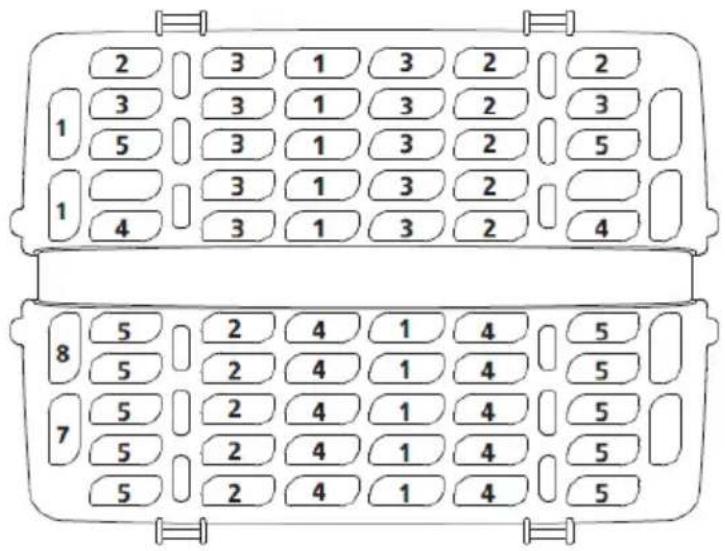
text_image
2 3 1 3 2 2 3 3 1 3 2 3 5 3 1 3 2 5 1 3 1 3 2 4 3 1 3 2 4 8 5 2 4 1 4 5 5 2 4 1 4 5 7 5 2 4 1 4 5 5 2 4 1 4 5| Item Cutlery | |
| 1 Soup spoons | |
| 2 Forks | |
| 3 Knives | |
| 4 Tea spoons | |
| 5 Dessert spoons | |
| 6 Serving spoons | |
| 7 Forks for serving | |
| 8 Spoons for sauces | |
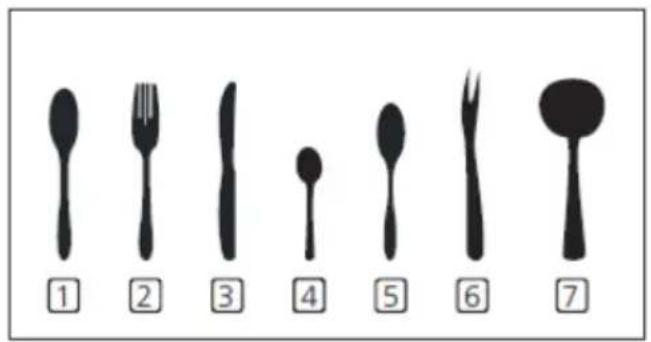
text_image
① ② ③ ④ ⑤ ⑥ ⑦TURN ON THE APPLIANCE AND SELECT PROGRAMME
1
Turn on the appliance
- Slide out the upper and lower the basket, place the dishes inside and slide baskets back in the dishwasher.
It is recommended to first load the lower basket and then the upper basket. - Pour detergent.
- Insert the plug into the wall outlet. Power data can be found on the product sheet. Make sure that the water supply is turned on and set to the maximum pressure.
- Open the door, press the on/off button.
- Select the desired programme and its indicator will light up. Close the door. Dishwasher will start.
2
Change programme
You can change the programme only if it runs for a short time. Otherwise the detergent is already dissolved in water and the water could be pumped out. In this case, refill the dispenser with detergent and start the washing program from the beginning. To reset your dishwasher, please follow the instructions below:
- Open the door to stop the washing program. You can open the door completely when spray arms come to a stop.
- Press and hold the Programme button for more than 3 seconds The appliance will go into standby.
- Now you can select your desired programme.
3
Add dishes during the programme:
You can add extra dishes at any time before detergent is released. In this case, follow the instructions below:
- Open the door to stop the washing program.
- You can open the door completely when spray arms come to a stop.
- Add the dishes.
- Close the door.
- The dishwasher will start.

WARNING!
Be careful when opening the door during the dishwashing programme as hot steam can be released and cause scalding.
4
The dishwashing programme completes
Press on/off button to turn off the appliance. Close water supply tap and open the dishwasher door. Wait a few minutes before unloading the dishwasher. Allow dishes to cool. Hot dishes are more susceptible to breakage. Also the dishes will dry.
Turn off the dishwasher
The programme is completed only when the programme indicator is on, but not flashing.
- Press On/Off button to turn off the appliance.
- Close water supply tap!
Open the door carefully.
Hot dishes are more susceptible to breakage. Before unloading the dishwasher leave the dishes to cool for about 15 minutes.
Open the dishwasher door, leave it ajar and wait a few minutes before removing the dishes.
This will allow the dishes to cool and dry.
Unload the dishwasher
It is normal that the dishwasher interior is wet.
First remove dishes from the lower basket and then from the upper basket. This will avoid water dripping from the upper basket on the dishes in the lower basket.
CLEANING AND MAINTENANCE
1
Clean external surfaces
Door and door seal
To remove food residue, clean the door gasket regularly with a soft, moist cloth. When loading dishes into the dishwasher, food and drink residue may deposit on the sides of the dishwasher door. These surfaces are outside the dishwasher compartment and the water from the spray arms does not reach them. Remove any residue before closing the door.
Control Panel
Wipe the control panel ONLY with a soft, damp cloth.

WARNING
Do NOT use any spray cleaner to prevent water ingress into the door lock and electrical components.
Do not use any abrasive detergents or sharp cleaners on external surfaces. Some paper towels may also leave scratches or marks on the surface.
2
Clean internal surfaces Filter system
The filter system at the bottom of the dishwasher compartment stops coarse residue during wash cycle. This residue can cause clogging of the filters. Regularly check the condition of the filters and rinse them under running water, if necessary. Clean the filters as follows.

NOTE:
Figures are for illustrative purposes only Filter systems and spray arms may vary in individual models.
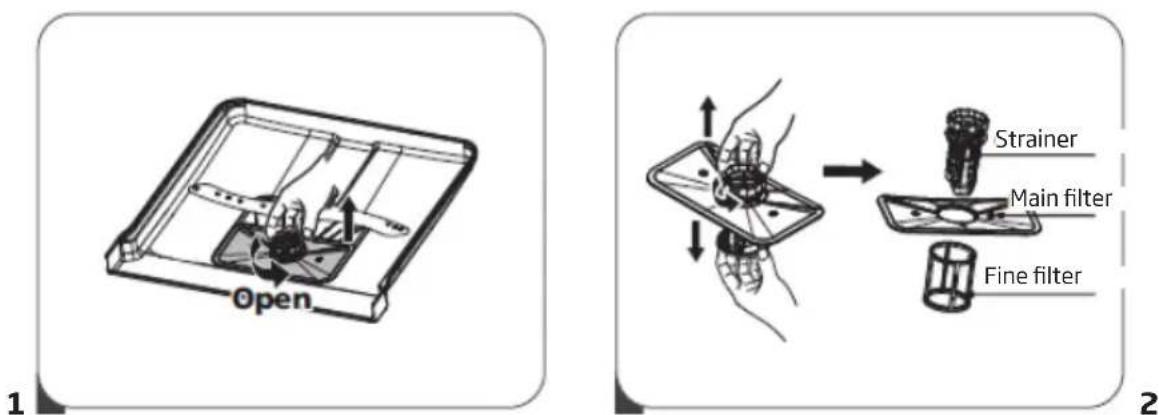
text_image
Open 1 Strainer Main filter Fine filter 2- Hold the strainer and turn it counter clockwise to unscrew. Lift the filter up and remove it from the dishwasher.
- The fine filter can be removed from the bottom of the filter assembly. The strainer can be disengaged from the main filter by gently squeezing the edges and pulling.
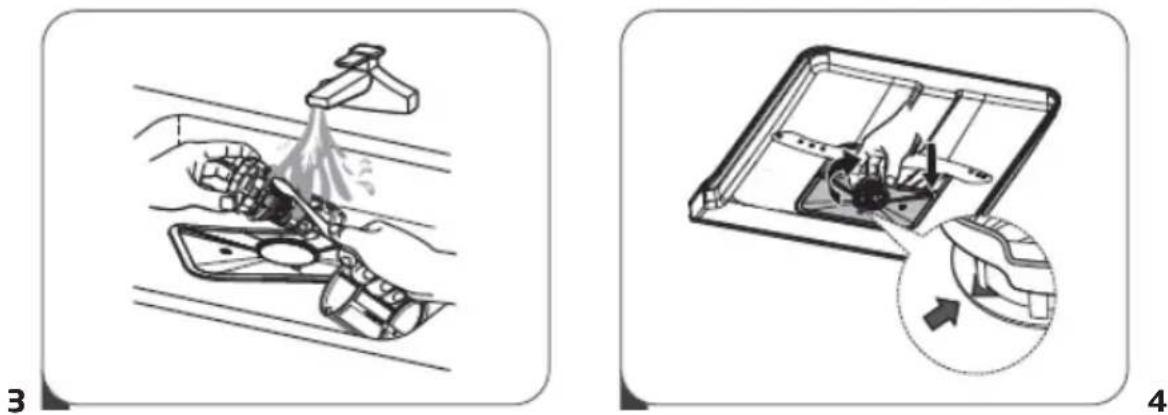
- Larger residues can be rinsed under running water. Clean the filter completely with a soft, clean brush.
- Install the filters in reverse order, place the filter insert and turn clockwise as indicated by the arrow.

WARNING
Do not overtighten the filters. Carefully replace the filters and install in place. Otherwise, contaminants can enter the dishwasher's systems and cause clogging.
NEVER use the dishwasher without the filter assembly. Incorrect filter replacement can reduce the appliance effectiveness and cause damage to the dishes and cutlery.
3
Spray arms
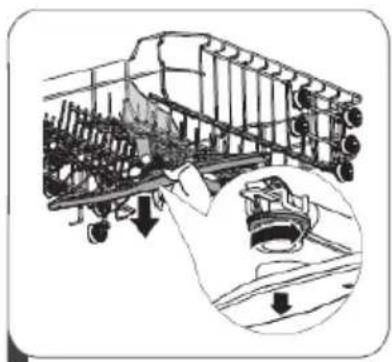
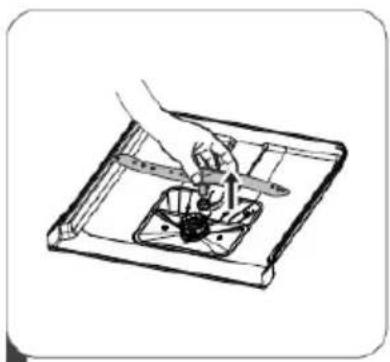
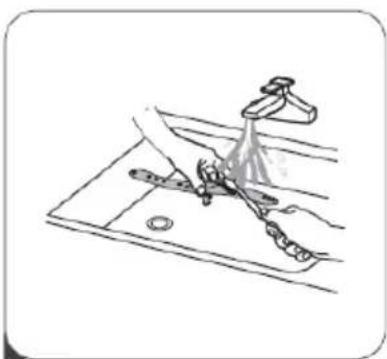
Clean the spray arms regularly. Hard water and detergents can clog the nozzles and the spray arm slide rings.
Clean spray arms:
natural_image
Technical line drawing of a mechanical assembly with internal components and an inset close-up showing a component detail (no text or symbols)2
natural_image
Illustration of a hand using a tool to adjust or install a component on a tray (no text or symbols visible)3
natural_image
Line drawing of a kitchen sink with faucet and water spray (no text or symbols)- To remove the upper spray arm, hold the nut in place and turn the arm counter clockwise.
- To remove the lower spray arm, pull the arm up.
- Clean the spray arms with a soft brush in warm soapy water. Rinse the arms and install in the appli-ance.
4
Clean the dishwasher
Frost protection
In winter, the dishwasher must be protected against freezing temperature. After each wash:
- Disconnect the dishwasher from power.
- Turn off the water supply and disconnect the water inlet hose from the water valve.
- Drain the water from the inlet hose and the water valve. (Collect the water in a bowl)
- Reconnect the water inlet hose to the water valve.
- Remove the filter and use a sponge to collect the water from the bottom of the dishwasher.
After each wash
After each wash, close the water supply to the appliance and leave the door slightly ajar, so that moisture and odours are not trapped inside.
Unplug the appliance
Unplug the appliance from the wall outlet before any cleaning and maintenance.
Do not use solvents or abrasive detergents.
Do not use solvents or abrasive detergents to clean the outer parts and the rubber seals of the dishwasher. Use only cloths and warm soapy water.
To remove stains from the inside use a cloth dampened with water and a little vinegar or cleaning detergent intended specifically for dishwashers.
If the dishwasher is not used for a long time
It is recommended to run the washing programme with an empty dishwasher, then unplug the appliance from power, close the water supply and leave the door slightly ajar. This protects the gaskets and prevents the formation of unpleasant odours in the appliance.
Move the appliance
If the appliance needs to be moved, try to keep it in an upright position. If absolutely unavoidable, you can rest the appliance on the back wall.
ERROR CODES AND TROUBLESHOOTING
In the event of a fault, the dishwasher displays error codes that identify the problem:
| ERROR CODE | DESCRIPTION OF THE FAULT | ACTION |
| Rapid Longer water inlet time. | Tap is closed or water intake is re-stricted, or water pressure is too low | |
| 90mins+Rapid | The required temperature has not been reached. | Malfunction of heating element. |
| ECO Overflow Some dishwasher element leaks. | ||
| The short program, intensive and the ECO displays flash quickly | Communication error between the main board and display board. | Interruption or disruption of cabling for communication. |
WARNING!
If overflow occurs, turn off the main water valve before calling for service.
If there is water in the bottom tray due to overflow or a small leak, empty the water before starting the dishwasher.
| Problem Possible cause | Solution | |
| The dishwasher will not start | The dishwasher will not start | The dishwasher door is open — close the door. |
| The appliance is not connected to the mains power The Delay start function is selected | Close the door carefully, make sure it is closed fully | |
| Child Lock is enabled (selected models) | Turn off the Child Lock | |
| The dishwasher beeps at the end of the wash cycle | It indicates the end of the wash programme and emits a beep | |
| The rinse aid indicator is on | The LED display shows "Lsb" | Add rinse aid |
| The wash cycle takes too long | The dishwasher is connected to hot water | Check the dishwasher, make sure it is properly connected to hot water |
| The duration of the wash programme varies depending on how soiled the dishes are | When heavy soil is detected, auto and normal programmes, automatically extend the wash cycle duration | |
| The disinfection option has been selected | When you select the disinfection option, the wash cycle time will be extended to reach the disinfection temperature | |
| The dishes are not clean enough | The water pressure is temporarily low | Use a dishwasher when the pressure is normal |
| The temperature of the inlet water is low | Ensure that the dishwasher is connected to hot water. Try not to use the dishwasher if hot water is used elsewhere in the household | |
| The dishes are arranged too close together. The detergent is used incorrectly | Rearrange the dishes in accordance with the instructions. Use the amount of detergent suitable for the water hardness and the selected wash programme. Use a new/different detergent | |
| The selected wash programme is not suitable for the level of soil on the dishes | Select a different, more intensive/longer wash programme | |
| The spray arm rotation is blocked | Make sure that the spray arm rotates freely | |
| The dishwasher will not start | The dishwasher will not start | Close the door carefully, make sure it is closed fully |
| The appliance is not connected to the mains power The Delay start function is selected | Check the connection to the power supply | |
| To change the setting, refer to the Start Delay section in the operating instructions | ||
| Child Lock is enabled (selected models) | Deactivate the Child Lock function, refer to the Child Lock section in the operating instructions. | |
| The dishes are not dry enough | The detergent dispenser is empty | Fill the rinse aid dispenser or increase the dispensed amount |
| Dishes placed incorrectly in the dishwasher | Rearrange the dishes in accordance with the instructions. | |
| The selected programme dose not include the drying stage | Select the wash program that includes drying | |
| Stains and deposits on dishes | Water too hard In the case of very hard water, a water softener should be installed | |
| Dishes placed incorrectly in the dishwasher | Rearrange the dishes in accordance with the instructions. | |
| An old rinse aid was used | Use new rinse aid | |
| Rinse aid dispenser is empty | Add rinse aid to the dispenser | |
| Too much detergent Use less detergent if water is soft | ||
| The temperature of water supplied to the dishwasher exceeds 70°C | Reduce the temperature of the water supply | |
| The detergent was not fully released from the dispenser | The detergent may be too old | Use a new/different detergent |
| The spray arm rotation is blocked | Rearrange the dishes making sure that the spray arm rotation is not restricted | |
| The detergent dispenser will not close | The lid of the detergent dispenser is malfunctioning | Add detergent and rinse aid according to the instructions |
| The water was not drained from the dish-washer | The previous programme was not completed or was interrupted | For information on how to select a suitable wash programme, please refer to the operating instructions |
| The dishwasher does drain the water properly | The drain is clogged Check | the air trap. |
| The drain hose is bent | Make sure that the drain hose is correctly connected to the drain | |
| Foam in the dishwasher | The wrong detergent was used | Make sure that the detergent used is suitable for dishwashers |
| The dishwasher is leaking | The use of the wrong detergent resulted in a deposit | Make sure that the detergent used is suitable for dishwashers |
| The dishwasher is not levelled | Level the dishwasher | |
| Black or grey streaks on the dishes | The aluminium dishes rubbed against the plates. | Rearrange the dishes |
| The interior of the dishwasher is stained | Coffee and tea grounds Use | a certified stain removal agent |
| A reddish stain Load the dishes and run the rinsing programme which will reduce the stain formation | ||
| Noise Noise of the detergent | dispenser lid opening or water drain pump operating | This is normal. |
| A hard object in the dishwasher's system. When the object drops to bottom, the noise should stop | If the noise continues after the full wash cycle, call service. | |
| The appliance does not fill with water | The water tap is shut off | Check that the water tap is open |
| The door lock may not be engaged | Make sure that the door is closed. | |
INSTALL THE APPLIANCE IN A CABINET
1
1. Place your appliance
Place the appliance in the desired location. The back should rest against the wall and the sides should be against adjacent cabinets or walls. The dishwasher is equipped with water supply and drainage hoses, which can be placed on the right or left side to facilitate the installation.
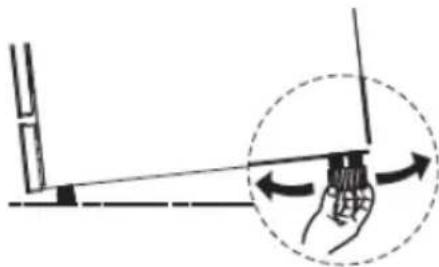
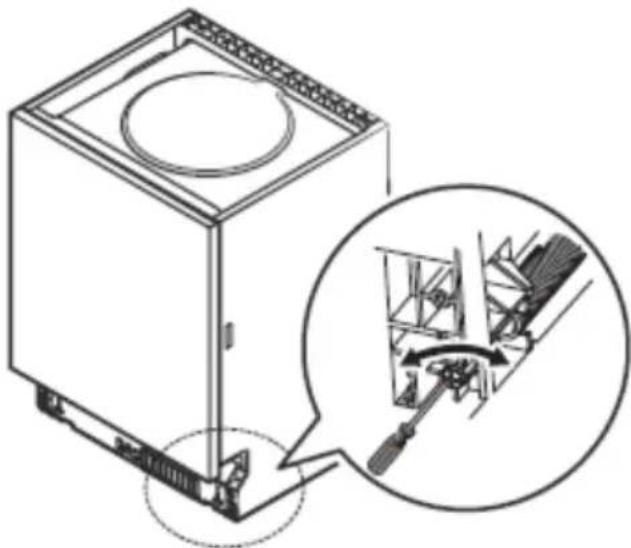
Level the appliance
When you place the appliance you can use the adjustable feet to level the appliance.
natural_image
Diagram showing a hand holding a tool with an arrow indicating motion, enclosed in a dashed circle (no text or symbols)
NOTE:
Applies only to a free-standing dishwasher.
Install a free-standing appliance
Place the appliance between cabinets
The height of the dishwasher is 815 mm which is the same as height of cabinets in modern kitchens and allowing the dishwasher to be placed between the cabinets. Adjustment feet allow you to set the correct height and level the appliance.
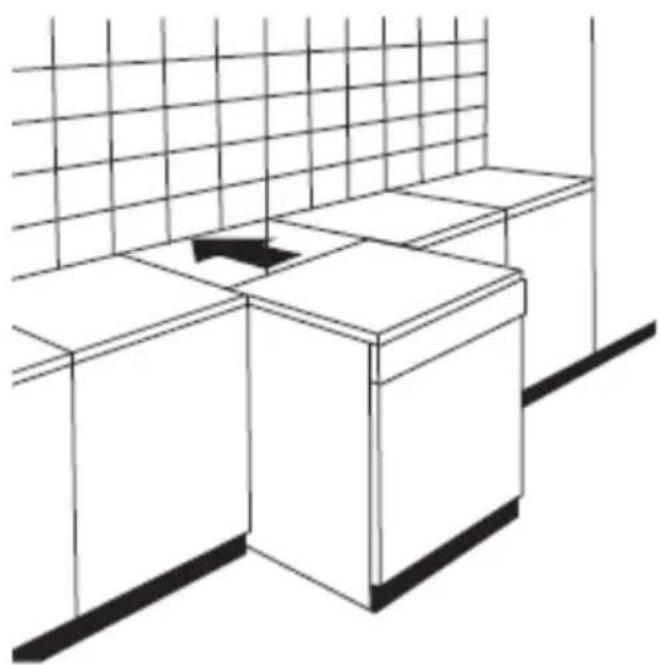
natural_image
Line drawing of a minimalist kitchen sink with a grid-patterned wall and side table (no text or symbols)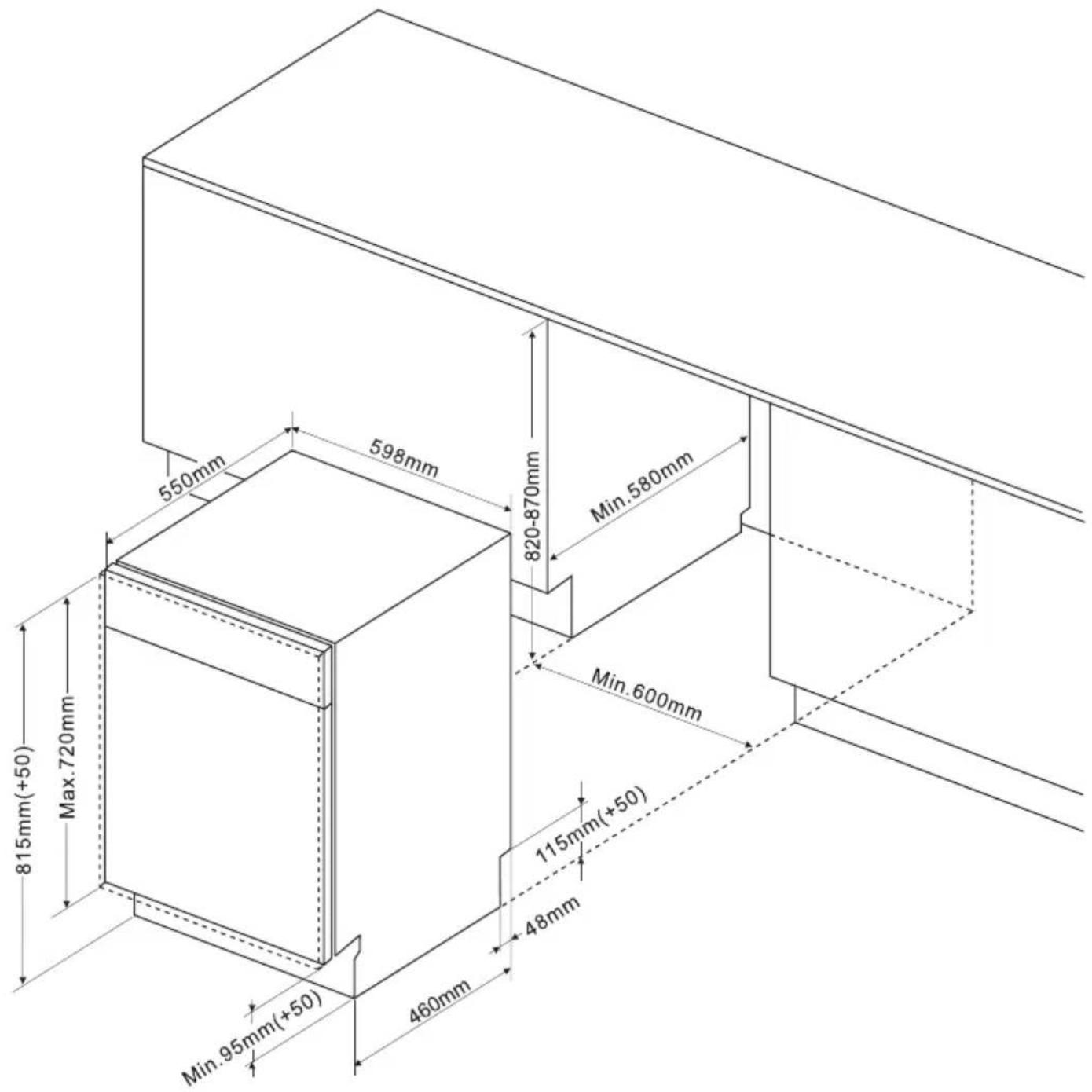
text_image
550mm 598mm 820-870mm Min.580mm 815mm(+50) Max.720mm 460mm 115mm(+50) 48mm Min.95mm(+50)Recommended weight of front panel:
*For appliances 45 cm in width with completely covered front door panel - ≤3,2-5kg
*For appliances 45 cm in width with revealed front control panel – ≤3,2-5kg
Recommended weight of front panel:
*For appliances 60 cm in width with completely covered front door panel - ≤3,2-7kg
*For appliances 60 cm in width with revealed front control panel - ≤3,2-6kg
Please note that for appliances with sliding door, recommended weight of front panel - ≤3,2-10kg
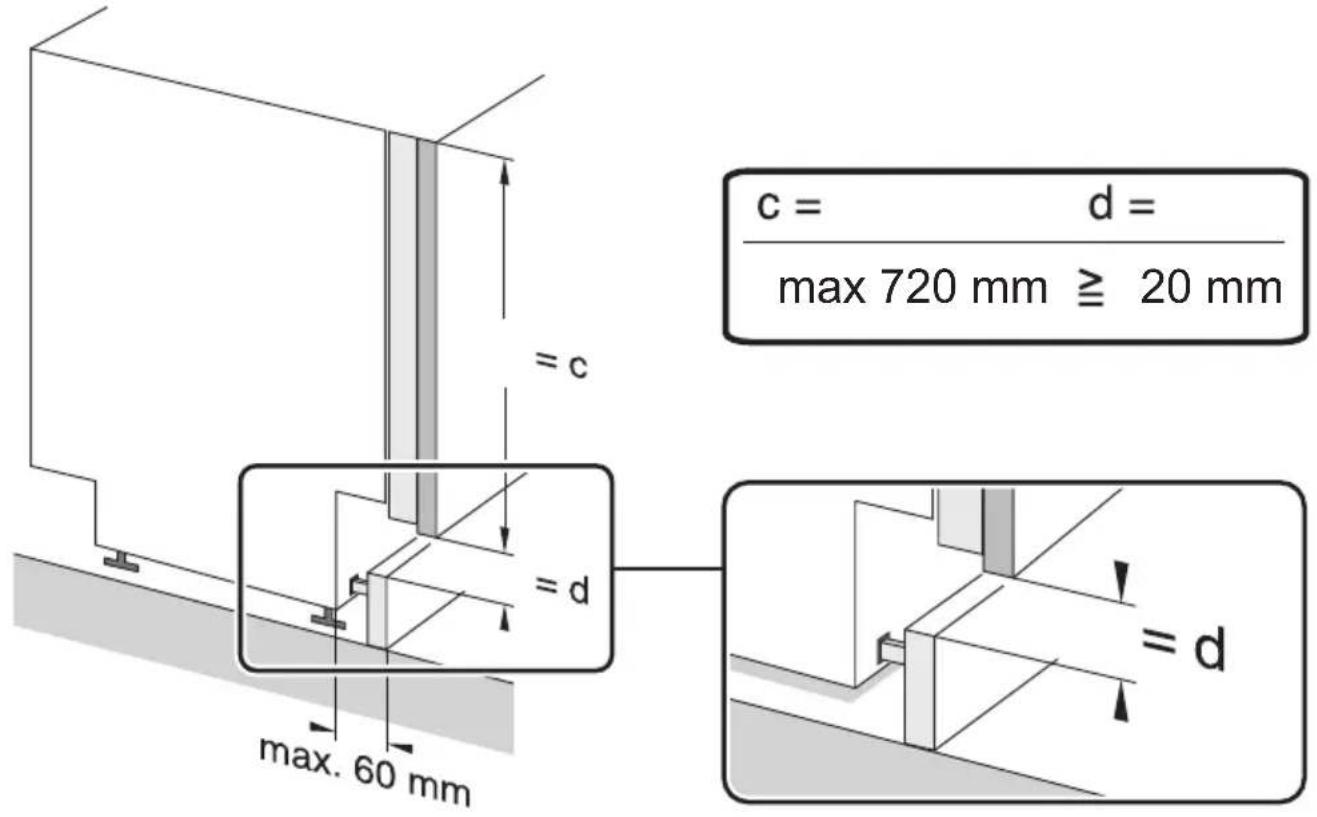
text_image
c = d = max 720 mm ≥ 20 mm = c = d max. 60 mm = d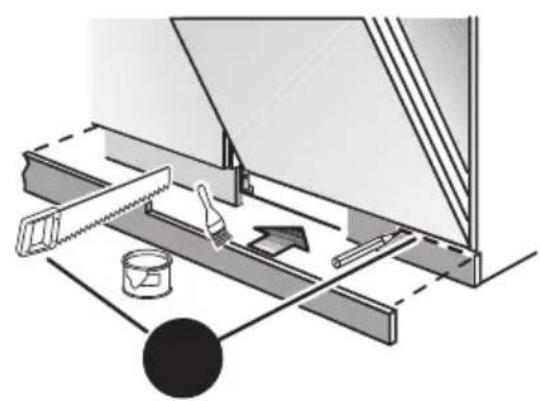
natural_image
Technical diagram of a mechanical assembly with tool, wash, and paint components (no text or labels)NOTE: Due to the design of some built-in furniture you may need to trim the base strip.
2
Install the appliance under the counter
(Install the appliance under the counter) In most modern kitchens there is worktop under which all the electrical appliances and cabinets are arranged. In this case, remove the dishwasher worktop by undoing the bolts under the rear edge of the worktop (a).
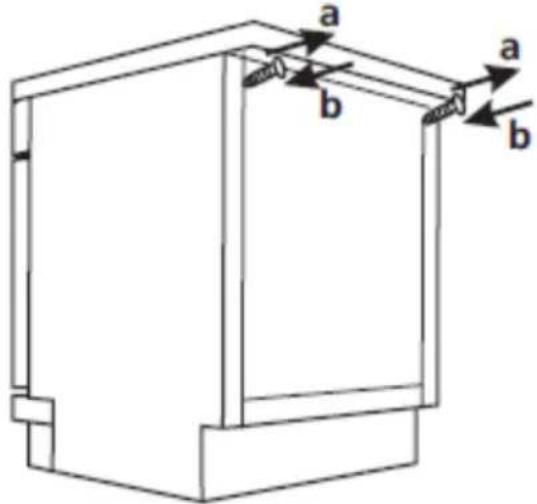
text_image
a b a b
Note
When you remove the countertop, the bolts MUST be screwed under the rear edge of the worktop (b).
The appliance height is reduced to 815 mm. The dishwasher fits perfectly under the kitchen worktop
Built-on installation (for built-in models)
Step 1. Choose the optimal location for your dishwasher
The best location to install the dishwasher is near the water tap, the drainage inlet and an electrical wall socket.
For details, please see the figure presenting cabinet dimensions and dishwasher place of installation.
- A clearance of 5 mm between the top of the dishwasher and the cabinet, and the door flush the cabinet.
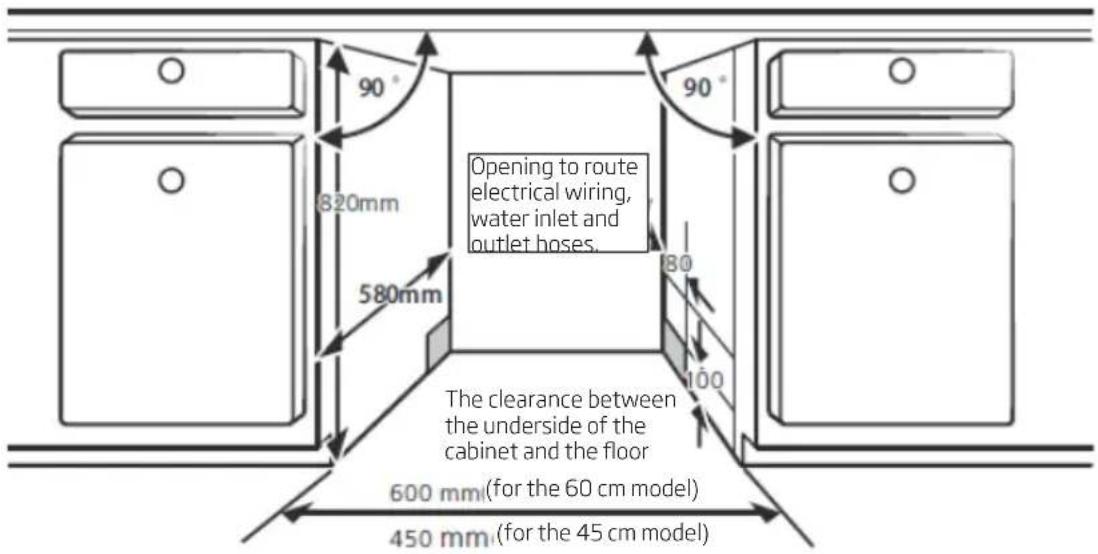
text_image
90° 820mm 580mm Opening to route electrical wiring, water inlet and outlet hoses. The clearance between the underside of the cabinet and the floor 600 mm (for the 60 cm model) 450 mm (for the 45 cm model)- When installing the dishwasher in the corner cupboard, leave room for the door to open.
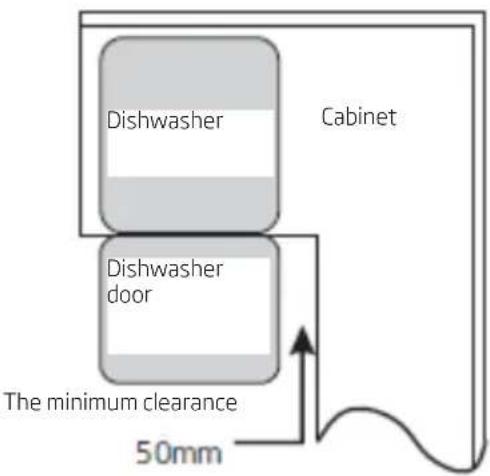
text_image
Dishwasher Cabinet Dishwasher door The minimum clearance 50mm\*NOTE:
Depending on the location of the wall electrical socket, you may need to cut the opening in the cabinet rear wall.
Depending on the location of the wall electrical socket, you may need to cut the opening in the cabinet rear wall.
Step 2. The cabinet door dimensions, install cabinet door
The cabinet door should be installed in accordance with the installation drawing.
Semi-built-in model
Tapes A and B should be separated. Tape A on the wooden door and felt tape B on the dishwasher door (see figure A). After adjusting the wooden door, fasten it to the dishwasher door using screws and bolts (see figure B)
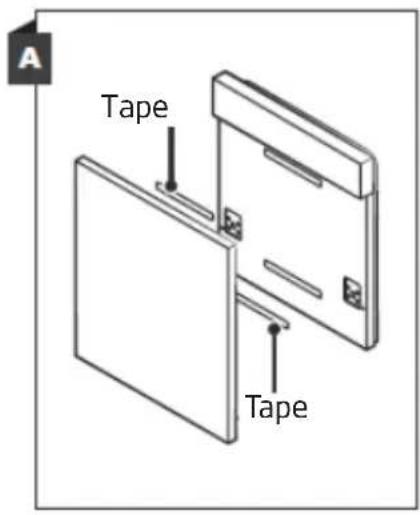
text_image
A Tape Tape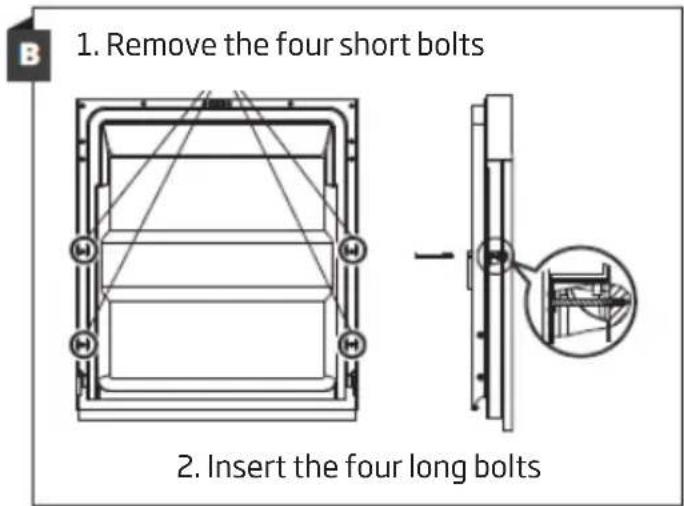
text_image
1. Remove the four short bolts 2. Insert the four long bolts\*Step 2. The cabinet door dimensions, install cabinet door
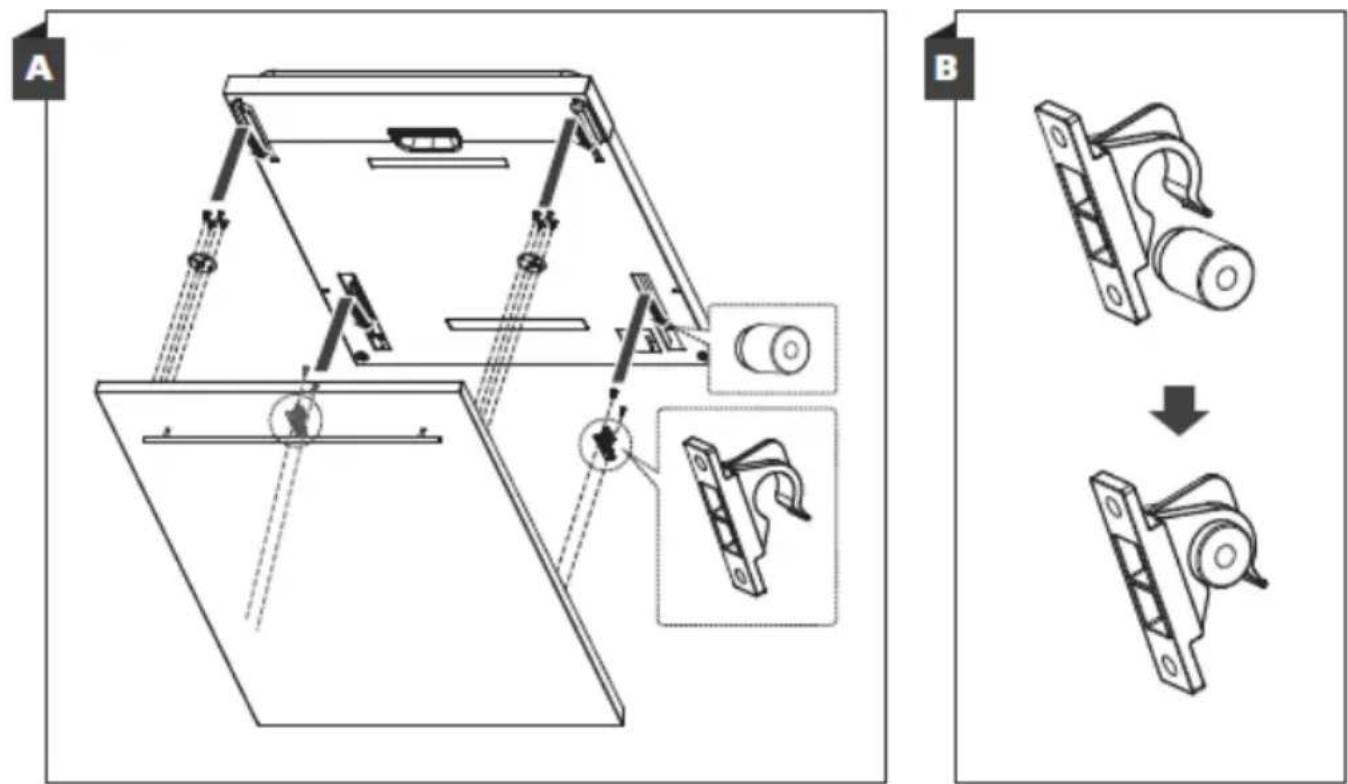
The cabinet door should be installed in accordance with the installation drawing. Install the hook on the decorative wooden panel (see figure 4A) and place the hook in the socket on the dishwasher door (see Figure 4B). When the panel is aligned, press it from the top so that the plastic hooks snap shut.
text_image
A B\*Built-in model
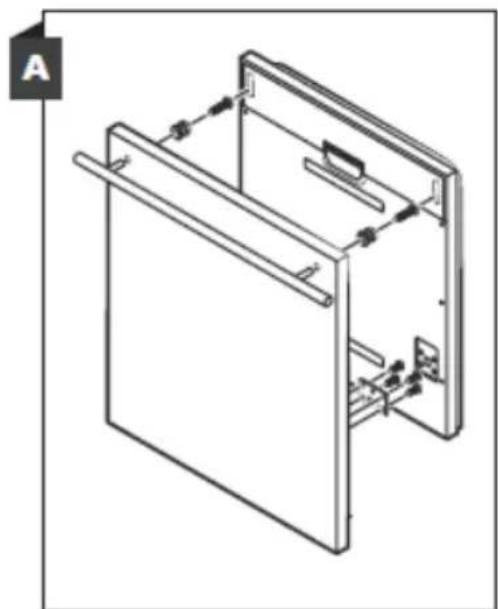
Install the hook on the decorative wooden panel and place the hook in the socket on the dishwasher door (see Figure A). After adjusting the wooden door, fasten it to the dishwasher door using screws and bolts (see figure B).
natural_image
Technical line drawing of a mechanical assembly with no visible text or symbols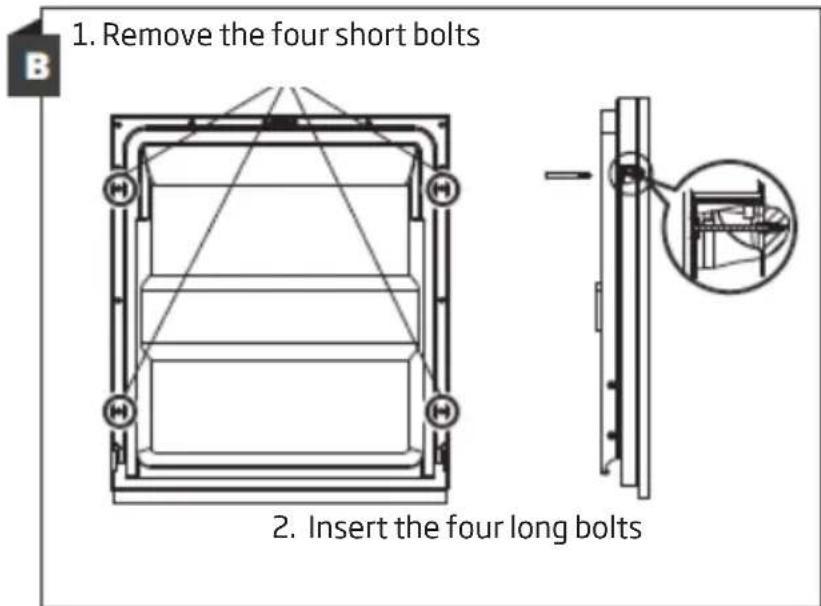
text_image
1. Remove the four short bolts 2. Insert the four long bolts\*Step 3. Adjust the door spring tension
- The dishwasher door spring tension is factory-set. After installing the decorative wooden panel, adjust the door spring tension.
Turn the adjusting bolt to loosen or tension the steel cable. - The door spring tension is optimal when the door is horizontal after opening, but it can easily be lifted with your finger.
natural_image
Technical line drawing of a washing machine with an inset close-up showing internal components (no text or symbols)Step 4. Dishwasher installation steps
For other installation steps please see the installation instruction drawings
-
Place the condensation strip under the cabinet worktop. Make sure that the condensation strip is flush with the edge of the worktop. (Step 2).
-
Connect the water supply hose to the cold water tap.
-
Connect the water drainage hose.
-
Connect the power supply cord.
-
Place the dishwasher in place. (Step 4)
-
Level the dishwasher. The rear feet can be adjusted from the front of the dishwasher by using the wrench to turn the hex screw in the centre of the dishwasher base. In order to adjust the front feet, use a flat head screwdriver and rotate the front feet until the dishwasher is level.
-
Attach the furniture door to the dishwasher door.
-
Adjust the tension of the door springs using the Allen key. Tighten the spring to the left. Failure to make the adjustments can damage the dishwasher.
-
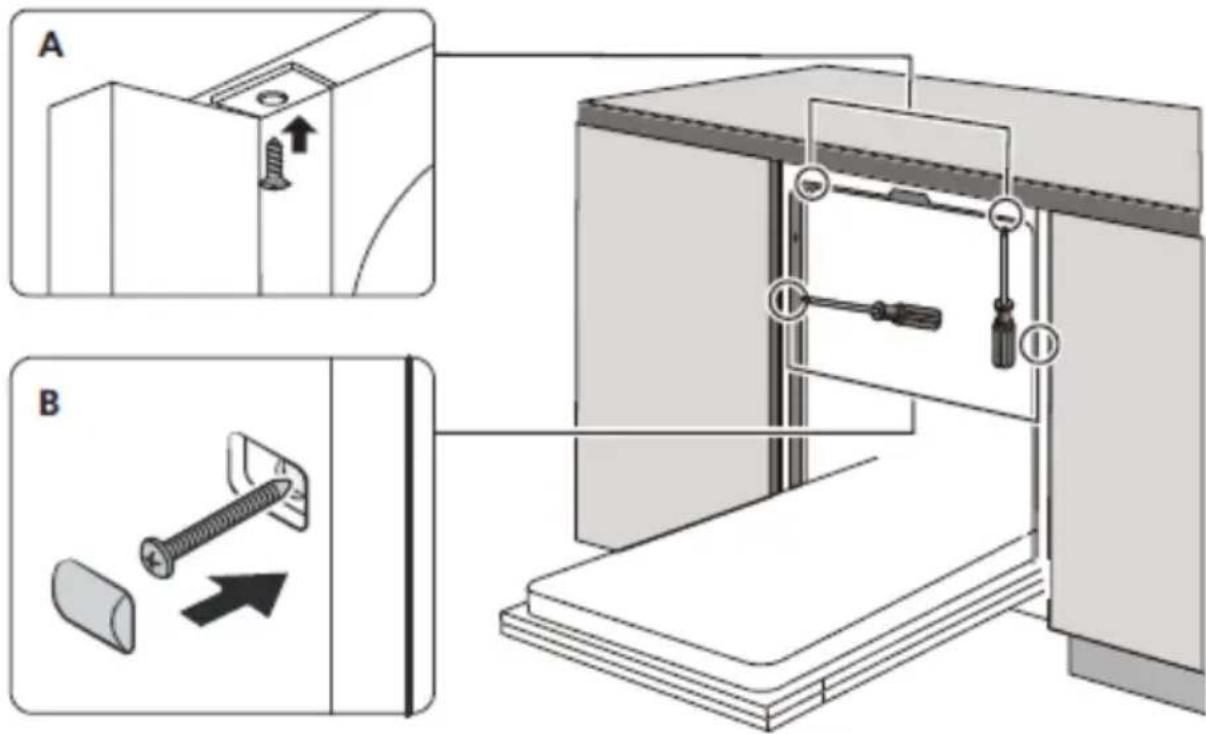
The dishwasher must be fixed. This can be done in two ways:
A. MDF Worktop: Insert the mounting hook into the hole on the side panel and fix it to the worktop with screws.
B. Worktop made of marble or granite: Attach the side with the screw.
text_image
Technical diagram showing two-step installation of a mechanical device with screw fasteners and a close-up view of the component being inserted.*In selected dishwasher models there are gaskets to be installed around the appliance (optional).
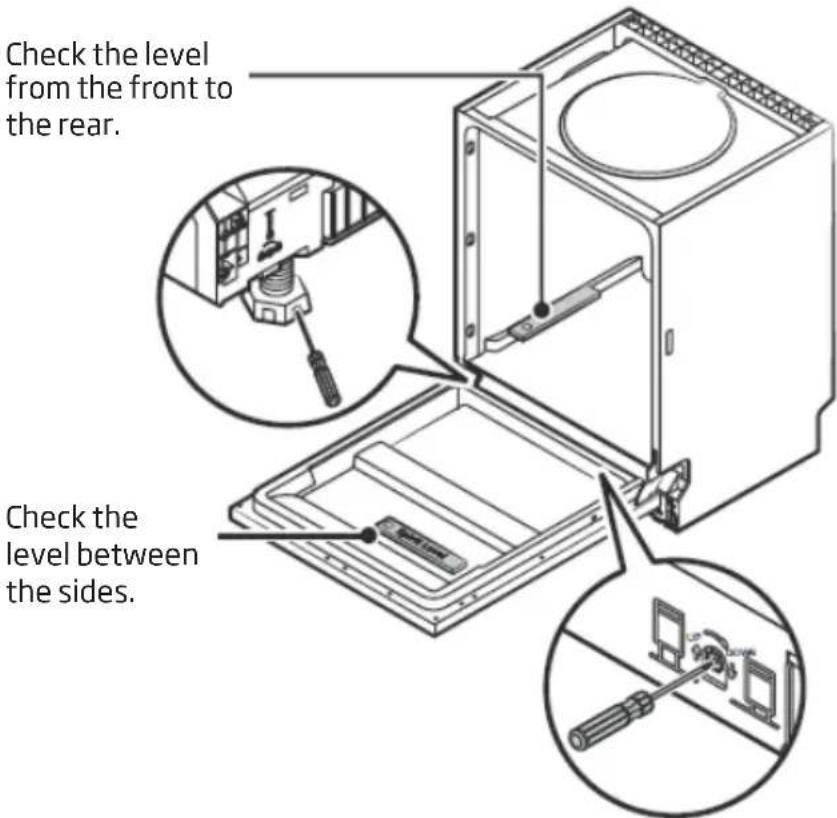
Step 5. Level the dishwasher
The dishwasher must be properly levelled to operate correctly.
Place the spirit level on the door and the basket guides inside the dish washer to ensure the unit is level.
Level the dishwasher by adjusting the three levelling feet separately.
Be careful not to topple the dishwasher when levelling.
text_image
Check the level from the front to the rear. Check the level between the sides.
NOTE:
The height adjustment range of the feet is 50 mm.
text_image
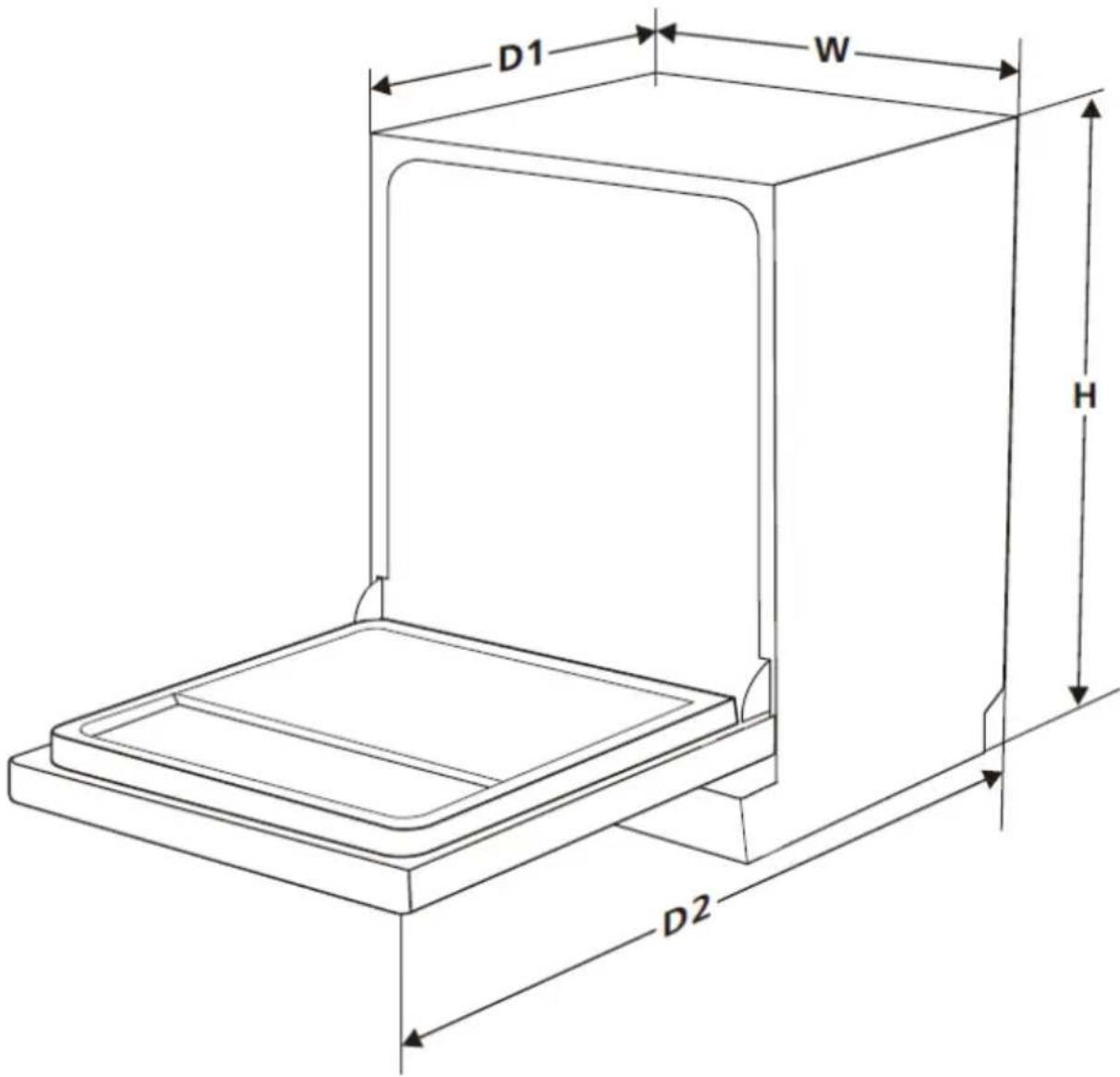
D1 W H D2| Height [mm] [H] 815 mm | |
| Width [mm] [W] 598 mm | |
| Depth [mm] [D1] 570 mm (with doors closed) | |
| Depth [mm] [D2] 1170 mm (with 90° doors open) | |
For more information about the product, please refer to the EU EPREL Product Database at https://eprel.ec.europa.eu. For more information, please use your mobile device to scan the QR code on the energy label or enter the product model listed on the energy label in the EPREL search engine https://eprel.ec.europa.eu/
WARRANTY AND AFTER SALES SERVICE
Warranty
Warranty service as stated on the warranty card. The manufacturer shall not be held liable for any damage caused by improper use of the product.
Service
- The manufacturer recommends that all repairs and adjustments be carried out by the Factory Service Technician or the Manufacturer's Authorized Service Point. For safety reasons, repairs should be referred to professionals.
- Repairs carried out by unqualified persons may seriously endanger the appliance user.
- Pursuant to Commission Regulation (EU) 2019/2022, the minimum availability period for spare parts necessary to repair the appliance is 7 or 10 years depending on the type and purpose of the spare part.
- The list of spare parts and the ordering procedure are available on the websites of the manufacturer, importer or an authorized representative.
- The minimum warranty period for the appliance offered by the manufacturer, importer or authorized representative is given in the warranty card.
- The warranty shall be void if you make any independent adaptations or alterations, tamper with seals or other appliance safety devices or its parts or interfere with the appliance contrary to operating instructions.
In the event of appliance malfunction, request assistance or repair.
If your appliance needs repair, please contact the service centre. Please see warranty card for address and contact details of our service centre. Before contacting us, please have ready the appliance serial number, which can be found on the identification sticker: For your convenience, please write it down below:

natural_image
Collection of kitchen utensils and kitchenware icons arranged in rows (no text or symbols)AMICA S.A.
UL. MICKIEWICZA 52
64-510 WRONKI
TEL. 67 25 46 100
FAX 67 25 40 320
WWW.AMICA.PL