
D32H472E4CW-W - Television TELEFUNKEN - Free user manual and instructions
Find the device manual for free D32H472E4CW-W TELEFUNKEN in PDF.


| Product type | LED Television |
| Brand | Telefunken |
| Model | D32H472E4CW-W |
| Screen size | 32 inches (80 cm) |
| Resolution | HD 1366 x 768 pixels |
| Aspect ratio | 16:9 |
| Backlight | LED |
| Tuner | DTT (DVB-T2), Satellite (DVB-S2), Cable (DVB-C) |
| Connectivity | 2x HDMI, 1x USB, 1x VGA, 1x PC audio input, 1x Optical digital audio output, 1x Headphone jack, 1x Antenna, 1x Ethernet |
| Power supply | 220-240 V ~ 50 Hz |
| Power consumption (operation) | 45 W (typical) |
| Power consumption (standby) | < 0.5 W |
| Weight (with stand) | 4.2 kg |
| Weight (without stand) | 4.0 kg |
| Dimensions (with stand) | 73.5 x 46.0 x 18.0 cm |
| Dimensions (without stand) | 73.5 x 43.5 x 8.5 cm |
| Main features | Program guide, Parental control, USB recording, Timer, Hotel mode |
| Energy class | F (former A+) |
| Repairability index | 7.4 / 10 |
| Maintenance and cleaning | Use a soft, dry cloth. Do not use abrasive products. |
| Safety | Stability, ventilation, surge protection |
Frequently Asked Questions - D32H472E4CW-W TELEFUNKEN
User questions about D32H472E4CW-W TELEFUNKEN
0 question about this device. Answer the ones you know or ask your own.
Ask a new question about this device
Download the instructions for your Television in PDF format for free! Find your manual D32H472E4CW-W - TELEFUNKEN and take your electronic device back in hand. On this page are published all the documents necessary for the use of your device. D32H472E4CW-W by TELEFUNKEN.
USER MANUAL D32H472E4CW-W TELEFUNKEN
natural_image
Black-and-white family photo of a family watching movies, with no visible text or symbolsBEDIENUNGSANLEITUNG
INSTRUCTION MANUAL
MODE D'EMPLOI
ISTRUZIONI PER L'USO
Inhalt
| 56Hz 60Hz 66Hz 70Hz 72Hz 75Hz | ||||||
| <640x400 | X | |||||
| <640x480 | X | X | X | X | ||
| <800x600 | X | X | X | X | X | |
| <832x624 | X | |||||
| <1024x768 | X | X | X | X | X | |
| <1152x864 | X | X | X | |||
| <1152x870 | X | |||||
| <1280x768 | X | X | ||||
| <1360x768 | X | |||||
| <1280x960 | X | X | ||||
| <1280x1024 | X | X | ||||
| <1400x1050 | X | X | ||||
| <1440x900 | X | X | ||||
| <1600x1200 | X | |||||
| <1680x1050 | X | |||||
| <1920x1080 | X | |||||
Konnektivität
natural_image
Illustration of a network device with wireless signal waves and a globe icon, connected to a monitor (no text or symbols)Markings on the Product.... 2
Environmental Information.... 3
Features 3
Accessories Included.... 4
Standby Notifications....4
TV Control Switch & Operation.... 4
Using Main TV Menu 5
Inserting the Batteries into the Remote 5
Power Connection....5
Antenna Connection....6
License Notification 6
Disposal Information....6
Specification 7
Remote Control 8
Connections....9
Switching On/Off....10
First Time Installation.... 10
Using Satellite Channel Table Feature.... 11
Media Playback via USB Input 11
Media Browser.... 11
FollowMe TV....12
CEC....12
E-Manual 13
Settings Menu Contents 14
General TV Operation 19
Using the Channel List.... 19
Configuring Parental Settings....19
Electronic Programme Guide 19
Teletext Services....20
Software Upgrade.... 20
Troubleshooting & Tips....20
PC Input Typical Display Modes....21
AV and HDMI Signal Compatibility 21
Supported File Formats for USB Mode 22
Video File Formats 22
Picture File Formats 22
Audio File Formats 22
Subtitle File Formats.... 23
Supported DVI Resolutions 23
Connectivity....24
Wired Connectivity.... 24
Wireless Connectivity 24
Wake ON 25
Wireless Display 25
Connectivity Troubleshooting 26
Using Audio Video Sharing Network Service......26
Apps 27
Internet Browser 27
HBBTV System.... 27
Smart Center 28
Safety Information

CAUTION
RISK OF ELECTRIC SHOCK DO NOT OPEN

CAUTION: TO REDUCE THE RISK OF ELECTRIC SHOCK DO NOT REMOVE COVER (OR BACK). NO USER-SERVICEABLE PARTS INSIDE. REFER SERVICING TO QUALIFIED SERVICE PERSONNEL
In extreme weather (storms, lightning) and long inactivity periods (going on holiday) disconnect the TV set from the mains.
The mains plug is used to disconnect TV set from the mains and therefore it must remain readily operable. If the TV set is not disconnected electrically from the mains, the device will still draw power for all situations even if the TV is in standby mode or switched off.
Note: Follow the on screen instructions for operating the related features.
IMPORTANT - Please read these instructions fully before installing or operating
WARNING: This device is intended to be used by persons (including children) who are capable / experienced of operating such a device unsupervised, unless they have been given supervision or instruction concerning the use of the device by a person responsible for their safety.
- Use this TV set at an altitude of less than 2000 meters above the sea level, in dry locations and in regions with moderate or tropical climates.
- The TV set is intended for household and similar general use but may also be used in public places.
- For ventilation purposes, leave at least 5cm of free space around the TV.
- The ventilation should not be impeded by covering or blocking the ventilation openings with items, such as newspapers, table-cloths, curtains, etc.
- The power cord plug should be easily accessible. Do not place the TV, furniture, etc. on the power cord. A damaged power cord/plug can cause fire or give you an electric shock. Handle the power cord by the plug, do not unplug the TV by pulling the power cord. Never touch the power cord/plug with wet hands as this could cause a short circuit or electric shock. Never make a knot in the power cord or tie it with other cords. When damaged it must be replaced, this should only be done by qualified personnel.
- Do not expose the TV to dripping or splashing of liquids and do not place objects filled with liquids, such as vases, cups, etc. on or over the TV (e.g., on shelves above the unit).
-
Do not expose the TV to direct sunlight or do not place open flames such as lit candles on the top of or near the TV.
-
Do not place any heat sources such as electric heaters, radiators, etc. near the TV set.
- Do not place the TV on the floor and inclined surfaces.
- To avoid danger of suffocation, keep plastic bags out of the reach of the babies, children and domestic animals.
- Carefully attach the stand to the TV. If the stand is provided with screws, tighten the screws firmly to prevent the TV from tilting. Do not over-tighten the screws and mount the stand rubbers properly.
- Do not dispose of the batteries in fire or with hazardous or flammable materials.
WARNING - Batteries must not be exposed to excessive heat such as sunshine, fire or the like.
WARNING - Excessive sound pressure from earphones or headphones can cause hearing loss.
ABOVE ALL - NEVER let anyone, especially children, push or hit the screen, push anything into holes, slots or any other openings in the case.
 Caution Caution | Serious injury or death risk |
 Risk of electric shock Risk of electric shock | Dangerous voltage risk |
 Maintenance Maintenance | Important maintenance component |
Markings on the Product
The following symbols are used on the product as a marker for restrictions and precautions and safety instructions. Each explanation shall be considered where the product bears related marking only. Note such information for security reasons.

Class II Equipment: This appliance is designed in such a way that it does not require a safety connection to electrical earth.

Hazardous Live Terminal: The marked terminal(s) is/are hazardous live under normal operating conditions.

Caution, See Operating Instructions: The marked area(s) contain(s) user replaceable coin or button cell batteries.

Class 1 Laser Product: This product contains Class 1 laser source that is safe under reasonably foreseeable conditions of operation.
WARNING
Do not ingest the battery, Chemical Burn Hazard This product or the accessories supplied with the product may contain a coin/button cell battery. If the coin/button cell battery is swallowed, it can cause severe internal burns in just 2 hours and can lead to death.
Keep new and used batteries away from children. If the battery compartment does not close securely, stop using the product and keep it away from children.
If you think batteries might have been swallowed or placed inside any part of the body, seek immediate medical attention.
Never place a television set in unstable or inclined locations. A television set may fall, causing serious personal injury or death. Many injuries, particularly to children, can be avoided by taking simple precautions such as;
- Using cabinets or stands recommended by the manufacturer of the television set.
- Only using furniture that can safely support the television set.
- Ensuring the television set is not overhanging the edge of the supporting furniture.
- Not placing the television set on tall furniture (for example, cupboards or bookcases) without anchoring both the furniture and the television set to a suitable support.
- Not standing the television set on cloth or other materials placed between the television and supporting furniture.
- Educating children about the dangers of climbing on furniture to reach the television set or its controls. If your existing television set is being retained and relocated, the same considerations as above should be applied.
Apparatus connected to the protective earthing of the building installation through the MAINS connection or through other apparatus with a connection to protective earthing – and to a television distribution system using coaxial cable, may in some circumstances create a fire hazard. Connection to a television distribution system has therefore to be provided through a device providing electrical isolation below a certain frequency range (galvanic isolator)
WALL MOUNTING WARNINGS
- Read the instructions before mounting your TV on the wall.
- The wall mount kit is optional. You can obtain from your local dealer, if not supplied with your TV.
- Do not install the TV on a ceiling or on an inclined wall.
- Use the specified wall mounting screws and other accessories.
- Tighten the wall mounting screws firmly to prevent the TV from fall. Do not over-tighten the screws.
Environmental Information
This television is designed to be environment friendly. To reduce energy consumption, you can follow these steps:
If you set the Energy Saving to Minimum, Medium, Maximum or Auto the TV will reduce the energy consumption accordingly. If you like to set the Backlight to a fixed value set as Custom and adjust the Backlight (located under the Energy Saving setting) manually using Left or Right buttons on the remote. Set as Off to turn this setting off.
Note: Available Energy Saving options may differ depending on the selected Mode in the Settings>Picture menu.
The Energy Saving settings can be found in the Settings>Picture menu. Note that some picture settings will be unavailable to be changed.
If pressed Right button or Left button consecutively, "Screen will be off in 15 seconds." message will be displayed on the screen. Select Proceed and press OK to turn the screen off immediately. If you don't press any button, the screen will be off in 15 seconds. Press any button on the remote or on the TV to turn the screen on again.
Note: Screen Off option is not available if the Mode is set to Game.
When the TV is not in use, please switch off or disconnect the TV from the mains plug. This will also reduce energy consumption.
Features
- Remote controlled colour TV
- Fully integrated digital terrestrial/cable/satellite TV (DVB-T-T2/C/S-S2)
- HDMI inputs to connect other devices with HDMI sockets
- USB input
- OSD menu system
- Back AV inputs for external devices (such as DVD Players, PVR, video games, etc.)
-
Stereo sound system
-
Teletext
• Headphone connection
• Automatic programming system - Manual tuning
• Automatic power down after up to eight hours - Sleep timer
- Child lock
• Automatic sound mute when no transmission - NTSC playback
• AVL (Automatic Volume Limiting) - PLL (Frequency Search)
- PC input
• Game Mode (Optional)
• Picture off function - Ethernet (LAN) for Internet connectivity and service
• 802.11 a/b/g/n built in WLAN Support
• Audio Video Sharing
• HbbTV
Accessories Included
- Remote Control
- Batteries: 2 × AAA
- Instruction Book
Standby Notifications
If the TV does not receive any input signal (e.g. from an aerial or HDMI source) for 3 minutes, it will go into standby. When you next switch-on, the following message will be displayed: "TV switched to stand-by mode automatically because there was no signal for a long time."
The Auto TV OFF option(in the Settings>System >More menu) could have been set to a value between 1 and 8 hours by default. If this setting is not set as Off and the TV has been left on and not been operated during the set time, it will switch into standby mode after the set time has expired. When you next switch-on the TV, the following message will be displayed. "TV switched to stand-by mode automatically because no operation was made for a long time." Before the TV switches into standby mode a dialogue window will be displayed. If you do not press any button the TV will switch into the standby mode after a waiting period of about 5 minutes. You can highlight Yes and press OK to switch the TV into standby mode immediately. If you highlight No and press OK, the TV will remain on. You can also choose to cancel the Auto TV OFF function from this dialogue. Highlight Disable and press OK, the TV will remain on and the function will be cancelled. You can enable this function again by changing the setting of the Auto TV OFF option from the Settings>System>More menu.
TV Control Switch & Operation

- Up direction
- Down direction
- Volume / Info / Sources List selection and Standby-On switch
The Control button allows you to control the Volume / Programme / Source and Standby-On functions of the TV.
To change volume: Increase the volume by pushing the button up. Decrease the volume by pushing the button down.
To change channel: Press the middle of the button in, the information banner will appear on the screen. Scroll through the stored channels by pushing the button up or down.
To change source: Press the middle of the button in twice(for the second time in total), the source list will appear on the screen. Scroll through the available sources by pushing the button up or down.
To turn the TV off: Press the middle of the button in and hold it down for a few seconds, the TV will turn into standby mode.
To turn on the TV: Press the middle of the button in, the TV will turn on.
Notes:
If you turn the TV off, this cycle starts again beginning with the volume setting.
Main menu OSD cannot be displayed via control button.
Operation with the Remote Control
Press the Menu button on your remote control to display main menu. Use the directional buttons and OK button to navigate and set. Press Return/Back or Menu button to quit a menu screen.
Input Selection
Once you have connected external systems to your TV, you can switch to different input sources. Press the Source button on your remote control consecutively to select the different sources.
Changing Channels and Volume
You can change the channel and adjust the volume by using the Programme +/- and Volume +/- buttons on the remote.
Using Main TV Menu
When the Menu button is pressed, the main TV menu will appear at the bottom of the screen. You can navigate through the menu items using the directional buttons on the remote. To select an item or see the sub-menu options of the highlighted menu press OK button. When you highlight a menu option some of the sub-menu items of this menu may appear on the upper side of the menu bar for quick access. To use a quick access item highlight it, press OK and set as desired using the Left/Right directional buttons. When finished press OK or Back/Return button to exit.
Press Exit button to close the main menu.
1. Home
When main menu is opened Home menu bar will be highlighted. The content of the Home menu can be customised by adding options from other menus. Just highlight an option and press the Down direction button on the remote. If you see Add to Home option you can add it to the Home menu. Same way you can delete or change the position of any item in the Home menu. Press the Down direction button and select Delete or Move option and press OK. In order to move a menu item use the Right and Left direction buttons to select the position that you want the item to move to and press OK.
2. TV
2.1. Guide
You can access the electronic programme guide menu using this option. Refer to Electronic Programme Guide section for more information.
2.2. Channels
You can access the Channels menu using this option. Refer to Using the Channel List section for more information.
2.3. Timers
You can set timers for future events using the options of this menu. You can also review the previously created timers under this menu.
To add a new timer select the Add Timer tab using the Left/Right buttons and press OK. Set the sub-menu options as desired and when finished press OK. A new timer will be created.
To edit a previously created timer, highlight that timer, select the Edit Selected Timer tab and press OK. Change the sub-menu options as desired and press OK to save your settings.
To cancel an already set timer, highlight that timer, select Delete Selected Timer tab and press OK. A
confirmation message will be displayed. Highlight Yes and press OK to proceed. The timer will be cancelled. It is not possible to set timers for two or more events that will broadcast in different channels at the same time interval. In this case you will be asked to choose one of these timers and cancel others. Highlight the timer you want to cancel and press OK, Options menu will be displayed. Then highlight Set/Cancel and press OK to cancel that timer. You will have to save changes after that. In order to do that press OK, highlight Save Changes and press OK again.
3. Settings
You can manage the settings of your TV using the options of this menu. Refer to Settings Menu Contents section for more information.
4. Apps
When your TV is connected to the Internet related contents will also be available, including Apps related contents. Using the Apps menu you can access and manage your applications. You can add new apps from the market or delete the existing ones. Refer to Apps section for more information.
5. Sources
You can manage your input source references using the options of this menu. To change the current source highlight one of the options and press OK.
5.1. Source Settings
Edit the names, enable or disable selected source options.
Inserting the Batteries into the Remote
Remove the back cover to reveal the battery compartment. Insert two size AAA batteries. Make sure the (+) and (-) signs match (observe correct polarity). Do not mix old and new batteries. Replace only with same or equivalent type. Place the cover back on.
A message will be displayed on the screen when the batteries are low and must be replaced. Note that when the batteries are low, the performance of the remote control may be impaired.
Batteries should not be exposed to excessive heat such as sunshine, fire or the like.
Power Connection
IMPORTANT: The TV set is designed to operate on a 220-240V AC, 50 Hz supply. After unpacking, allow the TV set to reach the ambient room temperature before you connect the set to the mains. Plug the power cable to the mains socket outlet.
Antenna Connection
Connect the aerial or cable TV plug to the AERIAL INPUT (ANT-TV) socket or satellite plug to the SATELLITE INPUT (ANT SAT) socket located on the rear side of the TV.
Rear side of the TV

- Satellite
- Aerial or cable

If you want to connect a device to the TV, make sure that both the TV and the device are turned off before making any connection. After the connection is done, you can turn on the units and use them.
License Notification
The terms HDMI and HDMI High-Definition Multimedia Interface, and the HDMI Logo are trademarks or registered trademarks of HDMI Licensing Administrator, Inc. in the United States and other countries.

Manufactured under license from Dolby Laboratories. Dolby, Dolby Audio and the double-D symbol are trademarks of Dolby Laboratories.
YouTube and the YouTube logo are trademarks of Google Inc.
This product contains technology subject to certain intellectual property rights of Microsoft. Use or distribution of this technology outside of this product is prohibited without the appropriate license(s) from Microsoft.
Content owners use Microsoft PlayReady™ content access technology to protect their intellectual property, including copyrighted content. This device uses PlayReady technology to access PlayReady-protected content and/or WMDRM-protected content. If the device fails to properly enforce restrictions on content usage, content owners may require Microsoft to revoke the device's ability to consume PlayReady-protected content. Revocation should not affect unprotected content or content protected by other content access technologies. Content owners may require you to upgrade PlayReady to access their content. If you decline an upgrade, you will not be able to access content that requires the upgrade.
The "CI Plus" Logo is a trademark of CI Plus LLP.
This product is protected by certain intellectual property rights of Microsoft Corporation. Use or distribution of such technology outside of this product is prohibited without a license from Microsoft or an authorized Microsoft subsidiary.
Disposal Information
[European Union]
These symbols indicate that the electrical and electronic equipment and the battery with this symbol should not be disposed of as general household waste at its end-of-life. Instead, the products should be handed over to the applicable collection points for the recycling of electrical and electronic equipment as well as batteries for proper treatment, recovery and recycling in accordance with your national legislation and the Directive 2012/19/EU and 2013/56/EU.
By disposing of these products correctly, you will help to conserve natural resources and will help to prevent potential negative effects on the environment and human health which could otherwise be caused by inappropriate waste handling of these products.
For more information about collection points and recycling of these products, please contact your local municipal office, your household waste disposal service or the shop where you purchased the product.
Penalties may be applicable for incorrect disposal of this waste, in accordance with national legislation.
[Business users]
If you wish to dispose of this product, please contact your supplier and check the terms and conditions of the purchase contract.
[Other Countries outside the European Union]
These symbols are only valid in the European Union.
Contact your local authority to learn about disposal and recycling.
The product and packaging should be taken to your local collection point for recycling.
Some collection points accept products free of charge.
Note: The sign Pb below the symbol for batteries indicates that this battery contains lead.

- Products
- Battery
Specification
| TV Broadcasting | PAL BG/I/DKSECAM BG/DK |
| Receiving Channels | VHF (BAND I/III) - UHF(BAND U) - HYPERBAND |
| Digital Reception | Fully integrated digital terrestrial-cable-satellite TV(DVB-T-C-S)(DVB-T2, DVB-S2 compliant) |
| Number of Preset Channels | 11 000 |
| Channel Indicator On Screen Display | |
| RF Aerial Input 75 Ohm (unbalanced) | |
| Operating Voltage 220-240V AC, 50Hz. | |
| Audio German+Nicam Stereo | |
| Audio Output Power (WRMS.) (10% THD) | 2 x 6 W |
| Power Consumption (W) 65 W | |
| Networked Standby (W) < 3 | |
| TV Dimensions DxLxH (with stand) (mm) | 185 x 735 x 494 mm |
| TV Dimensions DxLxH (without stand) (mm) | 78/90 x 735 x 438 mm |
| Display 32" | |
| Operation temperature and operation humidity | 0°C up to 40°C, 85% humidity max |
Wireless LAN Transmitter Specifications
| Frequency Ranges Max Output Power | |
| 2400 - 2483,5 MHz (CH1-CH13) < 100 mW | |
| 5150 - 5250 MHz (CH36 - CH48) < 200 mW | |
| 5250 - 5350 MHz (CH52 - CH64) < 200 mW | |
| 5470 - 5725 MHz (CH100 - CH140) | < 200 mW |
Country Restrictions
This device is intended for home and office use in all EU countries (and other countries following the relevant EU directive) without any limitation except for the countries mentioned below.
| Country Restriction | |
| Bulgaria | General authorization required for outdoor use and public service |
| France In-door use only for 2454-2483.5 MHz | |
| Italy | If used outside of own premises, general authorization is required |
| Greece | In-door use only for 5470 MHz to 5725 MHz band |
| Luxembourg | General authorization required for network and service supply(not for spectrum) |
| Norway | Radio transmission is prohibited for the geographical area within a radius of 20 km from the centre of Ny-Ålesund |
| Russian Federation | In-door use only |
The requirements for any country may change at any time. It's recommended that user checks with local authorities for the current status of their national regulations for both 2.4 GHz and 5 GHz wireless LAN's.
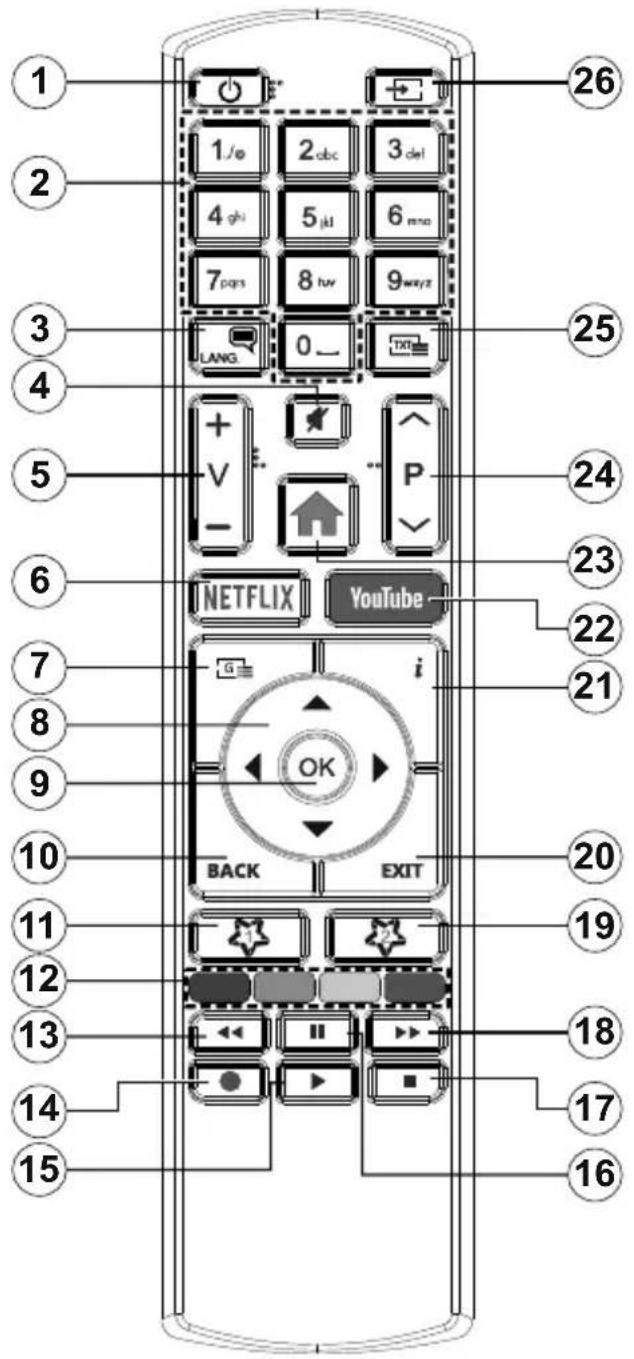
(\*) MY BUTTON 1 & MY BUTTON 2:
These buttons may have default functions depending on the model. However you can set a special function to these buttons by pressing on them for five seconds when on a desired source or channel. A confirmation message will be displayed on the screen. Now the selected My Button is associated with the selected function.
Note that if you perform First Time Installation, My Button 1&2 will return to their default function.
- Standby: Switches On / Off the TV
- Numeric buttons: Switches the channel, enters a number or a letter in the text box on the screen.
- Language: Switches among sound modes (analogue TV), displays and changes audio/subtitle language and turns subtitles on or off (digital TV, where available)
- Mute: Completely turns off the volume of the TV
- Volume +/-
- Netflix: Launches the Netflix application
- Guide: Displays the electronic programme guide
- Directional buttons: Helps navigate menus, content etc. and displays the subpages in TXT mode when pressed Right or Left
- OK: Confirms user selections, holds the page (in TXT mode), views Channels menu (DTV mode)
- Back/Return: Returns to previous screen, previous menu, opens index page (in TXT mode)
- My Button 1 (*)
- Coloured Buttons: Follow the on-screen instructions for coloured button functions
- Rewind: Moves frames backwards in media such as movies
- No function
- Play: Starts to play selected media
- Pause: Pauses the media being played
- Stop: Stops the media being played
- Fast Forward: Moves frames forward in media such as movies
- My Button 2 (*)
- Exit: Closes and exits from displayed menus or returns to previous screen
- Info: Displays information about on-screen content, shows hidden information (reveal - in TXT mode)
- YouTube: Launches the YouTube application
- Menu: Displays TV menu
- Programme +/-
- Text: Displays teletext (where available), press again to superimpose the teletext over a normal broadcast picture (mix)
- Source: Shows available broadcast and content sources
| Connector Type Cables Device | |||
 | VGA Connection (back) |  |  |
AUDIO IN  | PC/YPbPr Audio Connection (back) | 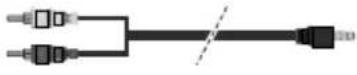 YPbPr/PC Audio Cable YPbPr/PC Audio Cable |  |
 | HDMI Connection (side&back) | 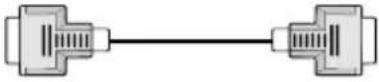 |  |
SPDIF  | SPDIF (Optical Out) Connection (back) |  |  |
BACK AV  | Back AV (Audio/Video) Connection (back) |  Audio Video Cable Audio Video Cable |  |
HEADPHONE  | Headphone Connection (side) |  | |
YPBPR  | YPbPr Video Connection (back) |  PC to YPbPr Connection Cable PC to YPbPr Connection Cable |  |
 | USB Connection (side) |  | 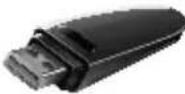 |
 | CI Connection (side) |  |  |
LAN  | Ethernet Connection (back) |  LAN / Ethernet Cable LAN / Ethernet Cable |  |
HEADPHONE

If you want to connect a device to the TV, make sure that both the TV and the device are turned off before making any connection. After the connection is done, you can turn on the units and use them.
Switching On/Off
To Switch the TV On
Connect the power cord to a power source such as a wall socket (220-240V AC, 50 Hz).
Note: Main switch position may differ depending on the model.
To switch on the TV from standby mode either:
- Press the Standby button, Programme +/- or a numeric button on the remote control.
- Press the middle of the side function switch on the TV in.
To Switch the TV Off
Press the Standby button on the remote control or press the middle of the side function switch on the TV in and hold it down for a few seconds, the TV will switch into standby mode.
To power down the TV completely, unplug the power cord from the mains socket.
Note: When the TV is switched into standby mode, the standby LED can blink to indicate that features such as Standby Search, Over Air Download or Timer is active. The LED can also blink when you switch on the TV from standby mode.
First Time Installation
When turned on for the first time, the language selection screen is displayed. Select the desired language and press OK. In the following steps of the installation guide, set your preferences using the directional buttons and OK button.
On the second screen set your country preference. Depending on the Country selection you may be asked to set and confirm a PIN at this point. The selected PIN cannot be 0000. You have to enter it if you are asked to enter a PIN for any menu operation later.
You can activate Store Mode option in the next step. This option will configure your TV's settings for store environment and depending on the TV model being used, the supported features of it may be displayed on the side of the screen as an info banner. This option is intended only for store use. It is recommended to select Home Mode for home use. This option will be available in Settings>System>More menu and can be turned off/on later. Make your selection and press OK to continue.
Depending on the model of your TV and the country selection Privacy Settings menu may appear at this point. Using this menu you can set your privacy privileges. Highlight a feature and use Left and Right directional buttons to enable or disable. Read the related explanations displayed on the screen for each highlighted feature before making any changes. You can use Programme +/- buttons to scroll up and down to read the entire text. You will be able to change your preferences at any time later from the Settings>System>Privacy Settings menu. If the Internet Connection option is disabled Network/Internet Settings screen will be skipped and not displayed. If you have any questions, complaints or comments regarding this privacy policy or its enforcement, please contact by email at smarttvsecurity@vosshub.com.
Highlight Next and press OK button on the remote control to continue and the Network/Internet Settings menu will be displayed. Please refer to Connectivity section to configure a wired or a wireless connection. If you want your TV to consume less power in standby mode, you can disable the Wake On option by setting it as Off. After the settings are completed highlight Next and press OK button to continue.
On next screen you can set broadcast types to be searched, set your encrypted channel searching and time zone (depending on the country selection) preferences. Additionally you can set a broadcast type as your favourite one. Priority will be given to the selected broadcast type during the search process and the channels of it will be listed on the top of the channel list. When finished, highlight Next and press OK to continue.
About Selecting Broadcast Type
To turn a search option for a broadcast type highlight it and press OK. The checkbox next to the selected option will be checked. To turn the search option off clear the checkbox by pressing OK after moving the focus on the desired broadcast type option.
Digital Aerial: If D. Aerial broadcast search option is turned on, the TV will search for digital terrestrial broadcasts after other initial settings are completed.
Digital Cable: If D. Cable broadcast search option is turned on, the TV will search for digital cable broadcasts after other initial settings are completed. A message will be displayed before starting to search asking if you want to perform cable network search. If you select Yes and press OK you can select Network or set values such as Frequency, Network ID and Search Step on the next screen. If you select No and press OK you can set Start Frequency, Stop Frequency and Search Step on the next screen. When finished, highlight Next and press OK button to continue.
Note: Searching duration will change depending on the selected Search Step.
Satellite: If Satellite broadcast search option is turned on, the TV will search for digital satellite broadcasts after other initial settings are completed. Before satellite search is performed some settings should be made. Antenna Type menu will be displayed first. You can select Antenna Type as Direct, Single Satellite Cable or DiSEqC switch by using Left or Right buttons. After selecting your antenna type press OK to see the options to proceed. Continue, Transponder list and Configure LNB options will be available. You
can change the transponder and LNB settings using the related menu options.
- Direct: If you have a single receiver and a direct satellite dish, select this antenna type. Press OK to continue. Select an available satellite on the next screen and press OK to scan for services.
- Single Satellite Cable: If you have multiple receivers and a single satellite cable system, select this antenna type. Press OK to continue. Configure settings by following instructions on the next screen. Press OK to scan for services.
- DiSEqC switch: If you have multiple satellite dishes and a DiSEqC switch, select this antenna type. Then set the DiSEqC version and press OK to continue. You can set up to four satellites (if available) for version v1.0 and sixteen satellites for version v1.1 on the next screen. Press OK button to scan the first satellite in the list.
Analogue: If Analogue broadcast search option is turned on, the TV will search for analogue broadcasts after other initial settings are completed.
After the initial settings are completed TV will start to search for available broadcasts of the selected broadcast types.
While the search continues current scan results will be displayed at the bottom of the screen. After all the available stations are stored, Channels menu will be displayed. You can edit the channel list according to your preferences using the Edit tab options or press the Menu button to quit and watch TV.
While the search continues a message may appear, asking whether you want to sort channels according to the LCN(*). Select Yes and press OK to confirm.
(*) LCN is the Logical Channel Number system that organizes available broadcasts in accordance with a recognizable channel number sequence (if available).
Note: Do not turn off the TV while initializing first time installation. Note that, some options may not be available depending on the country selection.
Using Satellite Channel Table Feature
You can perform these operations using the Settings>Installation>Satellite Settings>Satellite Channel Table menu. There are two options regarding to this feature.
You can download or upload satellite channel table data. In order to perform these functions a USB device must be connected to the TV.
You can upload current services and related satellites & transponders in TV, to a USB device.
Additionally you can download one of the satellite channel table files stored in USB device, to the TV.
When you select one of these files, all services and related satellites and transponders in the selected file will be stored in the TV. If there are any installed terrestrial, cable and/or analogue services, they will be kept and only satellite services will be removed.
Afterwards, check your antenna settings and make changes if necessary. An error message stating "No Signal" may be displayed if the antenna settings are not configured properly.
Media Playback via USB Input
You can connect 2.5" and 3.5" inch (HDD with external power supply) external hard disk drives or USB memory stick to your TV by using the USB inputs of the TV.
IMPORTANT! Back up the files on your storage devices before connecting them to the TV. Manufacturer will not be responsible for any file damage or data loss. Certain types of USB devices (e.g. MP3 Players) or USB hard disk drives/memory sticks may not be compatible with this TV. The TV supports FAT32 and NTFS disk formatting.
Wait a little while before each plugging and unplugging as the player may still be reading files. Failure to do so may cause physical damage to the USB player and the USB device itself. Do not pull out your drive while playing a file.
You can use USB hubs with your TV's USB inputs. External power supplied USB hubs are recommended in such a case.
It is recommended to use the TV's USB input(s) directly, if you are going to connect a USB hard disk.
Note: When viewing image files the Media Browser menu can only display 1000 image files stored on the connected USB device.
Media Browser
You can play back music and movie files and display photo files stored on a USB storage device by connecting it to your TV. Connect a USB storage device to one of the USB inputs located on the side of the TV.
After connecting a USB storage device to your TV Media Browser menu will be displayed on the screen. You can access the content of the connected USB device any time later from the Sources menu. Select the related USB input option from this menu and press OK. Then select the file of your choice and press OK to display or play it back.
You can set your Media Browser preferences by using the Settings menu. Settings menu can be accessed via the information bar which is displayed on the bottom of the screen when pressed the Info button while playing back a video file or displaying a picture file. Press the Info button, highlight the gear wheel symbol positioned on the right side of the information bar and press OK. Picture Settings, Sound Settings, Media Browser Settings and Options menus will be available. The contents of these menus may change according to the type of the currently open media file. Only Sound Settings menu will be available while playing back audio files.
| Loop/Shuffle Mode Operation | |
Start playback and activate  | All files in the list will be continuously played in original order |
Start playback and activate  | The same file will be played continuously (repeat) |
Start playback and activate  | All files in the list will be played once in random order |
Start playback and activate  | All files in the list will be continuously played in the same random order |
To use the functions on the information bar highlight the symbol of the function and press OK. To change the status of a function highlight the symbol of the function and press OK as much as needed. If the symbol is marked with a red cross, that means it is deactivated.
FollowMe TV
With your mobile device you can stream the current broadcast from your smart TV using the FollowMe TV feature. Install the appropriate Smart Center application to your mobile device. Start the application.
For further information on using this feature refer to the instructions of the application you use.
Note: Depending on model, your TV may not support this function. The application may not be compatible with all mobile devices. UHD (4K, Ultra HD) channels are not supported and both of the devices must be connected to the same network.
CEC
This function allows to control the CEC-enabled devices, that are connected through HDMI ports by using the remote control of the TV.
The CEC option in the Settings>System>More menu should be set as Enabled at first. Press the Source button and select the HDMI input of the connected CEC device from the Sources List menu. When new CEC source device is connected, it will be listed in source menu with its own name instead of the connected HDMI ports name(such as DVD Player, Recorder 1 etc.).
The TV remote is automatically able to perform the main functions after the connected HDMI source has been selected. To terminate this operation and control the TV via the remote again, press and hold the "0-Zero" button on the remote control for 3 seconds.
You can disable the CEC functionality by setting the related option under the Settings>System>More menu accordingly.
The TV supports ARC (Audio Return Channel). This feature is an audio link meant to replace other cables between the TV and an audio system (A/V receiver or speaker system).
When ARC is active, the TV does not mute its other audio outputs automatically. You will need to decrease TV volume to zero manually if you wish to hear the ARC audio only (same as optical or co-axial digital audio outputs). If you want to change connected device's volume level, you should select that device from the source list. In that case volume control keys are directed to connected audio device.
Note: ARC is supported only via the HDMI2 input.
System Audio Control
Allows an Audio Amplifier/Receiver to be used with the TV. The volume can be controlled using the remote control of the TV. To activate this feature set the Speakers option in the Settings>System>More menu as Amplifier. The TV speakers will be muted and the sound of the watched source will be provided from the connected sound system.
Note: The audio device should support System Audio Control feature and CEC option should be set as Enabled.
E-Manual
You can find instructions for your TV's features in the E-Manual.
To access the E-Manual, enter Settings menu, select Manuals and press OK. For quick access press Menu button and then Info button.
By using the directional buttons select a desired category. Every category includes different topics. Select a topic and press OK to read instructions.
To close the E-Manual screen press the Exit or Menu button.
Note: Depending on model, your TV may not support this function. The contents of the E-Manual may vary according to the model.
Settings Menu Contents
| Picture Menu Contents | ||
| Mode | You can change the picture mode to suit your preference or requirements. Picture mode can be set to one of these options: Cinema, Game(optional), Sports, Dynamic and Natural. | |
| Contrast | Adjusts the light and dark values on the screen. | |
| Brightness | Adjusts the brightness values on the screen. | |
| Sharpness | Sets the sharpness value for the objects displayed on the screen. | |
| Colour | Sets the colour value, adjusting the colours. | |
| Energy Saving | For setting the Energy Saving to Custom, Minimum, Medium, Maximum, Auto, Screen Off or Off.Note: Available options may differ depending on the selected Mode. | |
| Backlight | This setting controls the backlight level. The backlight function will be inactive if the Energy Saving is set to an option other than Custom. | |
| Advanced Settings | ||
| Dynamic Contrast | You can change the dynamic contrast ratio to desired value. | |
| Noise Reduction | If the signal is weak and the picture is noisy, use the Noise Reduction setting to reduce the amount of noise. | |
| Colour Temp | Sets the desired colour temperature value. Cool, Normal, Warm and Custom options are available. | |
| White Point | If the Colour Temp option is set as Custom, this setting will be available. Increase the 'warmth' or 'coolness' of the picture by pressing Left or Right buttons. | |
| Picture Zoom | Sets the desired image size format. | |
| Picture Shift | This option may be available depending on the Picture Zoom setting. Highlight and press OK, then use directional buttons to shift the picture upwards or downwards. | |
| Film Mode | Films are recorded at a different number of frames per second to normal television programmes. Turn this feature on when you are watching films to see the fast motion scenes clearly. | |
| Skin Tone | Skin tone can be changed between -5 and 5. | |
| Colour Shift | Adjust the desired colour tone. | |
| HDMI Full Range | While watching from a HDMI source, this feature will be visible. You can use this feature to enhance blackness in the picture. | |
| PC Position | Appears only when the input source is set to VGA/PC. | |
| Autoposition | Automatically optimizes the display. Press OK to optimize. | |
| H Position | This item shifts the image horizontally to the right hand side or left hand side of the screen. | |
| V Position | This item shifts the image vertically towards the top or bottom of the screen. | |
| Dot Clock | Dot Clock adjustments correct the interference that appear as vertical banding in dot intensive presentations like spreadsheets or paragraphs or text in smaller fonts. | |
| Phase | Depending on the input source(computer etc.) you may see a hazy or noisy picture on the screen. You can use phase to get a clearer picture by trial and error. | |
| Reset | Resets the picture settings to factory default settings (except Game mode). | |
| While in VGA (PC) mode, some items in Picture menu will be unavailable. Instead, VGA mode settings will be added to the Picture menu while in PC mode. | ||
| Sound Menu Contents | ||
| Volume | Adjusts the volume level. | |
| Equalizer | Selects the equalizer mode. Custom settings can be made only when in User mode. | |
| Balance | Adjusts whether the sound comes from the left or right speaker. | |
| Headphone | Sets headphone volume.Please ensure before using headphones that the headphone volume is set to a low level, to prevent damage to your hearing. | |
| Sound Mode | You can select a sound mode (If the viewed channel supports). | |
| AVL (Automatic Volume Limiting) | Sets the sound to obtain fixed output level between programmes. | |
| Headphone/Lineout | When you connect an external amplifier to your TV using the headphone jack, you can select this option as Lineout. If you have connected headphones to the TV, set this option as Headphone.Please ensure before using headphones that this menu item is set to Headphone. If it is set to Lineout, the output from the headphone socket will be set to maximum which could damage your hearing. | |
| Dynamic Bass | Enables or disables the Dynamic Bass. | |
| Surround sound | Surround sound mode can be changed as On or Off. | |
| Digital Out | Sets digital out audio type. | |
| Network Menu Contents | ||
| Network Type | Disable the network connection or change the connection type. | |
| Scan Wireless Networks | Start a search for wireless networks. This option will be available if the Network Type is set as Wireless Device. | |
| Press WPS on your wifi router | If your modem/router device has WPS, you can directly connect to it using this option. Highlight this option and press OK. Go to your modem/router device and press the WPS button on it to make the connection. This option will be available if the Network Type is set as Wireless Device. | |
| Internet Speed Test | Start a speed test to check your connection bandwidth. The result will be displayed on the screen when finished. | |
| Advanced Settings | Change the IP and DNS configurations of your TV. | |
| Wake On | Enable or disable this feature by setting it as On or Off. | |
| Note: For detailed information on the options of this menu refer to the Connectivity section. | ||
| Installation Menu Contents | |
| Automatic channel scan (Retune) | Displays automatic tuning options. D. Aerial: Searches and stores aerial DVB stations. D. Cable: Searches and stores cable DVB stations. Analogue: Searches and stores analogue stations. Satellite: Searches and stores satellite stations. |
| Manual channel scan | This feature can be used for direct broadcast entry. |
| Network channel scan | Searches for the linked channels in the broadcast system. D. Aerial: Searches for aerial network channels. D. Cable: Searches for cable network channels. Satellite: Searches for satellite network channels. |
| Analogue fine tune | You can use this setting for fine tuning analogue channels. This feature is not available if no analogue channels are stored and if currently watched channel is not an analogue channel. |
| Satellite Settings | Displays satellite settings. Satellite list: Displays available satellites. You can Add, Delete satellites or Edit satellite settings on the list. Antenna installation: You can change satellite antenna settings and/or start a satellite scan. Satellite Channel Table: You can upload or download satellite channel table data using the related options. |
| Installation Settings (optional) | Displays installation settings menu. Standby Search (*): Your TV will search for new or missing channels while in standby. Any new found broadcasts will be shown. Dynamic Channel Update(*): If this option is set as Enabled, the changes on the broadcasts such as frequency, channel name, subtitle language etc., will be applied automatically while watching. (*) Availability depends on model. |
| Clear Service List | Use this setting to clear channels stored. This setting is visible only when the Country option is set to Denmark, Sweden, Norway or Finland. |
| Select Active Network | This setting allows you to select only the broadcasts within the selected network to be listed in the channel list. This feature is available only for the country option of Norway. |
| Signal Information | You can use this menu item to monitor signal related information such as signal level/ quality, network name etc for available frequencies. |
| First time installation | Deletes all stored channels and settings, resets TV to factory settings. |
| System Menu Contents | ||
| Conditional Access | Controls conditional access modules when available. | |
| Language | You may set a different language depending on the broadcaster and the country. | |
| Privacy Settings (*) | Manage your privacy privileges for smart TV related applications. Press OK to enter the menu and set according to your preferences. | |
| Parental | Enter correct password to change parental settings. You can easily adjust Menu Lock, Maturity Lock, Child Lock or Guidance in this menu. You can also set a new PIN or change the Default CICAM PIN using the related options.Note: Some menu options may not be available depending on the country selection in the First Time Installation. Default PIN could have been set to 0000 or 1234. If you have defined the PIN(is requested depending on the country selection) during the First Time Installation use the PIN that you have defined. | |
| Date/Time | Sets date and time. | |
| Sources | Edit the names, enable or disable selected source options. | |
| Accessibility | Displays accessibility options of the TV. | |
| Hard of Hearing | Enables any special feature sent from the broadcaster. | |
| Audio Description | A narration track will be played for the blind or visually impaired audience. Press OK to see all available Audio Description menu options. This feature is available only if the broadcaster supports it. | |
| Netflix | If this feature is supported by your TV, you can view your ESN(*) number and deactivate Netflix.(*) ESN number is an unique ID number for Netflix, created especially to identify your TV.Note: For 4K video streaming, a minimum 25Mb/s internet connection speed is required – For an example of the requirements for streaming 4K content you may find more information on the Netflix website (https://help.netflix.com/en/node/13444). When you start to stream video content via the internet the quality of your connection will be analysed and the full HD or 4K quality may take a short time to be realised, or in the event of a slow connection not be possible. You should check your internet capabilities with your internet provider if you are at all unsure. | |
| More | Displays other setting options of the TV. | |
| Menu Timeout | Changes timeout duration for menu screens. | |
| Standby LED | If set as Off the standby LED will not light up when the TV is in standby mode. | |
| HBBTV (*) | You can enable or disable this feature by setting it as On or Off. | |
| Software Upgrade | Ensures that your TV has the latest firmware. Press OK to see the menu options. | |
| Application Version | Displays current software version. | |
| Subtitle Mode | This option is used to select which subtitle mode will be on the screen (DVB subtitle / Teletext subtitle) if both is available. Default value is DVB subtitle. This feature is available only for the country option of Norway. | |
| Auto TV OFF | Sets the desired time for the TV to automatically go into standby mode when not being operated. This option can be set from 1 to 8 hours in steps of 1 hour. You can also disable this option by setting as Off. | |
| Biss Key | Biss is a satellite signal scrambling system that is used for some broadcasts. If you need to enter Biss key on a broadcast, you can use this setting. Highlight Biss Key and press OK to enter keys on the desired broadcast. | |
| Store Mode | Select this mode for store display purposes. Whilst Store Mode is enabled, some items in the TV menu may not be available. | |
| AVS (Audio Video Sharing) | AVS feature allows you to share files stored on your smartphone or tablet pc. If you have a compatible smartphone or tablet pc and the appropriate software is installed, you can share/play photos on your TV. See instructions of your sharing software for more information. | |
| Power Up Mode | This setting configures the power up mode preference. Last State and Standby options are available. | |
| Virtual Remote | Enable or disable the virtual remote feature. | |
| CEC | With this setting you can enable and disable CEC functionality completely. Press Left or Right button to enable or disable the feature. | |
| CEC Auto Power On | This function allows the connected HDMI-CEC compatible device to turn on the TV and switch to its input source automatically. Press Left or Right button to enable or disable the feature. | |
| Speakers | To hear the TV audio from the connected compatible audio device set as Amplifier. You can use the remote control of the TV to control the volume of the audio device. | |
| Show All Cookies (*) | Displays all saved cookies. | |
| Delete All Coo-kies (*) | Deletes all saved cookies. | |
| OSS | Displays Open Source Software license information. | |
| (*) These features may not be available depending on the model of your TV and the selected country in the First Time Installation. | ||
General TV Operation
Using the Channel List
The TV sorts all stored stations in the channel list. You can edit this channel list, set favourites or set active stations to be listed by using the Channels menu options. Press the OK button to open the channel list. You can filter the listed channels or make advanced changes in the current list using the Filter and Edit tab options. Highlight the tab you want and press OK to see available options.
Managing the Favourite Lists
You can create four different lists of your favourite channels. Enter the TV>Channels menu or press the OK button in order to open the Channels menu. Highlight the Edit tab and press OK to see the editing options and select the Tag/Untag channel option. Select the desired channel on the list by pressing the OK button while the channel is highlighted. You can make multiple choices. You can also use the Tag/Untag all option to select all channels on the list. Then press Back/Return button to return to the Edit menu options. Select Add/Remove Favourites option and press the OK button again. Favourite channel list options will be displayed. Set the desired list option to On. The selected channel/s will be added to the list. In order to remove a channel or channels from a favourite list follow the same steps and set the desired list option to Off.
You can use the filtering function in the Channels menu to filter the channels in the channel list permanently according to your preferences. For instance, using the options of the Filter tab, you can set one of your four favourite lists to be displayed every time the channel list is opened.
Configuring Parental Settings
The Parental menu options can be used to prohibit users from viewing of certain programmes, channels and using of menus. These settings are located in the Settings> System>Parental menu.
To display parental lock menu options, a PIN should be entered. After coding the correct PIN, Parental menu will be displayed.
Menu Lock: This setting enables or disables access to all menus or installation menus of the TV.
Maturity Lock: If this option is set, TV gets the maturity information from the broadcast and if this maturity level is disabled, prohibits access to the broadcast.
Note: If the country option in the First Time Installation is set as France, Italy or Austria, Maturity Lock's value will be set to 18 as default.
Child Lock: If this option is set to On, the TV can only be controlled by the remote control. In this case the control buttons on the TV will not work.
Internet Lock: If this option is set to ON, the internet using applications will be disabled. Set to OFF to release these applications again.
Set PIN: Defines a new PIN number.
Default CICAM PIN: This option will appear as greyed out if no CI module is inserted into the CI slot of the TV. You can change the default PIN of the CI CAM using this option.
Note: Default PIN could have been set to 0000 or 1234. If you have defined the PIN(is requested depending on the country selection) during the First Time Installation use the PIN that you have defined.
Some options may not be available depending on the model and/or on the country selection in the First Time Installation.
Electronic Programme Guide
By means of electronic programme guide function of your TV you can browse the event schedule of the currently installed channels on your channel list. It depends on the related broadcast whether this feature is supported or not.
To access the programme guide, press the Guide button on your remote. You can also use the Guide option under TV menu.
There are 2 different types of schedule layouts available, Timeline Schedule and Now/Next. To switch between these layouts highlight the tab with the name of the alternative layout on the upper side of the screen and press OK.
Use the directional buttons to navigate through the programme guide. Use the Back/Return button to use the tab options on the upper side of the screen.
Timeline Schedule
In this layout option, all events of the listed channels will be displayed by timeline. You can use the directional buttons to scroll through the list of the events. Highlight an event and press OK to display event options menu.
Press Back/Return button to use available tab options. Highlight Filter tab and press OK to see the filtering options. To change the layout highlight Now/Next and press OK. You can use the Previous Day and Next Day options to display the events of the previous and next day.
Highlight Extras tab and press OK to access below options.
Highlight Genre: Displays Highlight Genre menu. Select a genre and press OK. The events in the programme guide matching the selected genre will be highlighted.
Guide Search: Displays searching options. Using these options, you can search the programme guide database in accordance with the selected criteria. Matching results will be listed.
Now: Displays current event of the highlighted channel.
Zoom: Highlight and press OK to see events in a wider time interval.
Now/Next Schedule
In this layout option, only the current and next events of the listed channels will be displayed. You can use the directional buttons to scroll through the list of the events.
Press Back/Return button to use available tab options. Highlight Filter tab and press OK to see the filtering options. To change the layout highlight Timeline Schedule and press OK.
Event Options
Use the directional buttons to highlight an event and press OK button to display Options menu. The following options are available.
Select Channel: Using this option, you can switch to the selected channel in order to watch it. The programme guide will be closed.
More Info: Display detailed information on the selected event. Use up and down directional buttons to scroll through the text.
Set Timer on Event / Delete Timer on Event: Select Set Timer on Event option and press OK. You can set timers for future events. To cancel an already set timer, highlight that event and press the OK button. Then select Delete Timer on Event option. The timer will be cancelled.
Notes: You cannot switch to any other channel while there is an active timer on the current channel.
It is not possible to set timer for two or more individual events at the same time interval.
Teletext Services
Press the Text button to enter. Press again to activate mix mode, which allows you to see the teletext page and the TV broadcast at the same time. Press once more to exit. If available, sections in the teletext pages will become colour-coded and can be selected by pressing the coloured buttons. Follow the instructions displayed on the screen.
Digital Teletext
Press the Text button to view digital teletext information. Operate it with the coloured buttons, cursor buttons and the OK button. The operation method may differ depending on the contents of the digital teletext. Follow the instructions displayed on the digital teletext screen. When the Text button is pressed again, the TV returns to television broadcast.
Software Upgrade
Your TV is capable of finding and updating the firmware automatically via the broadcast signal or via Internet.
Software upgrade search via user interface
On the main menu select Settings>System and then More. Navigate to Software upgrade and press the OK button. Then select Scan for upgrade and press OK button to check for a new software upgrade.
If a new upgrade is found, it starts to download the upgrade. After the download is completed, a warning will be displayed, press OK button to complete software upgrade process and restart TV.
3 AM search and upgrade mode
Your TV will search for new upgrades at 3:00 o'clock if Automatic scanning option is set to Enabled and if the TV is connected to an aerial signal or to Internet. If a new software is found and downloaded successfully, it will be installed at the next power on.
Note: Do not unplug the power cord while led is blinking during the reboot process. If the TV fails to come on after the upgrade, unplug, wait for two minutes then plug it back in.
All updates are automatically controlled. If a manual search is carried out and no software is found then this is the current version.
Troubleshooting & Tips
TV will not turn on
Make sure the power cord is plugged in securely to a wall outlet. Press the Power button on the TV.
Poor picture
- Check if you have correctly tuned the TV.
- Low signal level can cause picture distortion. Please check antenna connections.
- Check if you have entered the correct channel frequency if you have performed manual tuning.
No picture
- TV is not receiving any signal. Make sure the correct source has been selected.
• Is the antenna connected properly?
• Is the antenna cable damaged? - Are suitable plugs used to connect the antenna?
- If you are in doubt, consult your dealer.
No sound
- Check if the TV sound is muted. Press the Mute button or increase the volume to check.
- Sound may be coming from only one speaker. Check the balance settings from Sound menu.
Remote control - no operation
- The batteries may be exhausted. Replace the batteries.
- The batteries maybe inserted incorrectly. Refer to the section "Inserting the Batteries into the Remote".
No signal on an input source
- It is possible that no device is connected.
- Check the AV cables and connections from your device.
- Check the device is switched on.
PC Input Typical Display Modes
The following table is an illustration of some of the typical video display modes. Your TV may not support all resolutions.
| Index | Resolution | Frequency |
| 1 | 0x480 60Hz | |
| 2 | 0x480 75Hz | |
| 3 | 0x600 56Hz | |
| 4 | 0x600 60Hz | |
| 5 | 00x600 72Hz | |
| 6 | 0x600 75Hz | |
| 7 | 24x768 60Hz | |
| 8 | 24x768 70Hz | |
| 9 | 24x768 75Hz | |
| 10 | 52x864 75Hz | |
| 11 | 80x768 60Hz | |
| 12 | 60x768 60Hz | |
| 13 | 80x960 60Hz | |
| 14 | 80x1024 60Hz | |
| 15 | 280x1024 75Hz | |
| 16 | 00x1050 60Hz | |
| 17 | 40x900 60Hz | |
| 18 | 40x900 75Hz | |
| 19 | 20x1080 60Hz |
AV and HDMI Signal Compatibility
| Source Supported Signals Available | |||
| Back AV | PAL O | ||
| SECAM | O | ||
| NTSC4.43 | O | ||
| NTSC3.58 | O | ||
| YPbPr | 480i, 480p | 60Hz | O |
| 576i, 576p | 50Hz | O | |
| 720p | 50Hz,60Hz | O | |
| 1080i | 50Hz,60Hz | O | |
| HDMI | 480i, 480p | 60Hz | O |
| 576i, 576p | 50Hz | O | |
| 720p | 50Hz,60Hz | O | |
| 1080i | 50Hz,60Hz | O | |
| 1080p | 24Hz, 25Hz, 30Hz, 50Hz, 60Hz | O | |
(X: Not Available, O: Available)
In some cases a signal on the TV may not be displayed properly. The problem may be an inconsistency with standards from the source equipment (DVD, Set-top box, etc.). If you do experience such a problem please contact your dealer and also the manufacturer of the source equipment.
Supported File Formats for USB Mode
Video File Formats
Extension Video Codec Max. Resolution & Frame Rate & Bit Rate
| .mpg, .mpeg, .dat, .vob | MPEG1/2, H.264, VC1 | H.264: 1080Px2@30fps - 50Mbps, 1080P@60fps - 50Mbps Other: 1080P@60fps - 50Mbps |
| .ts, .trp, .m2ts | ||
| .avi MPEG1/2, MPEG4, H.264, MJPEG | ||
| .mp4, .m4a, .m4v, .mov, .qt, .3gp, .3g2, .3gpp | MPEG1/2, H.263, MPEG4, H.264 | |
| .mkv MPEG 1/2, MPEG4, H.264 | ||
| .flv Sorenson Sp, MPEG4, H.264 | ||
| .ogm, .ogg MPEG1/2, MPEG4 | ||
| .asf, .wmv MPEG4, WMV3, VC1 | ||
| .rm, .rmvb RV30, RV40 | ||
| .webm VP9, VP8 | ||
| .mp4, .mov, .3gpp, .3gp, MPEG transport stream, .ts, .trp, .tp, .mkv | HEVC/H.265 |
Picture File Formats
| Extension Specification Resolution (width x height) | ||
| .jpg, .jpeg | Baseline 8192 x 8192 | |
| Progressive 3000 x 3000 | ||
| .bmp | RGB 1/4/8/16/24/32 bit | 8192 x 8192 |
| RLE 4/8 bit | ||
| .gif | 87a | |
| 89a (Only 1 picture at animation format) | ||
| .png | Grayscale, 24/32 bit per pixel | |
| Interlace format | ||
| Progressive | ||
| .tiff, .tif Tagged image file format | ||
| .webp | Lossy compression VP8 key frame version number support 0~3 | |
| Lossless compression | ||
Audio File Formats
| Extension Format | |
| .mp3 .mp3 | |
| .ac3 | .ac3 |
| .aac | .AAC |
| .wma | .WMA |
| .amr | .AMR-NB, .AMR-WB |
| .wav | . MPEG La, .AAC, .PCM |
| .flac | . FLAC |
Subtitle File Formats
| External Subtitles | |
| Extension Specification | |
| .ssa SubStation Alpha | |
| .ass Advanced SubStation Alpha | |
| .srt Subripper | |
| .sub Micro DVD / SubViewer | |
| .sub + .idx VOBSub | |
| .txt Micro DVD / TMPlayer / MPL2 | |
| .mpl MPL2 | |
| .smi Sami | |
| .jss JACOSUB | |
| .ttml TTML | |
| .txt / .sub DVDSUBTITLE | |
| .lrc - | |
| Internal Subtitles | |
| Extension | Specification |
| .mkv VOBSub | |
| .mkv ASS / SSA / TEXT | |
| .dat, .mpg, .mpeg, .vob DVD | Subtitle |
| .mp4 DVD Subtitle, TEXT | |
Supported DVI Resolutions
When connecting devices to your TV's connectors by using DVI converter cable(DVI to HDMI cable - not supplied), you can refer to the following resolution information.
| 56Hz 60Hz 66Hz 70Hz 72Hz 75Hz | ||||||
| 640x400 | X | |||||
| 640x480 | X | X | X | X | ||
| 800x600 | X | X | X | X | X | |
| 832x624 | X | |||||
| 1024x768 | X | X | X | X | X | |
| 1152x864 | X | X | X | |||
| 1152x870 | X | |||||
| 1280x768 | X | X | ||||
| 1360x768 | X | |||||
| 1280x960 | X | X | ||||
| 1280x1024 | X | X | ||||
| 1400x1050 | X | X | ||||
| 1440x900 | X | X | ||||
| 1600x1200 | X | |||||
| 1680x1050 | X | |||||
| 1920x1080 | X | |||||
Connectivity
Wired Connectivity
To Connect to a Wired Network
- You must have a modem/router connected to an active broadband connection.
- Connect your TV to your modem/router via an Ethernet cable. There is a LAN port at the rear (back) of your TV.

- Broadband ISP connection
- LAN (Ethernet) cable
- LAN input on the rear side of the TV
To configure wired settings refer to the Network section in the Settings menu.
- You might be able to connect your TV to your LAN depending on your network's configuration. In such a case, use an Ethernet cable to connect your TV directly to the network wall outlet.

- Network wall socket
- LAN input on the rear side of the TV
Configuring Wired Device Settings
Network Type
The Network Type can be selected as Wired Device, Wireless Device or Disabled, in accordance with the active connection to the TV set. Select this as Wired Device if you are connecting via an Ethernet cable.
Internet Speed Test
Highlight Internet Speed Test and press the OK button. TV will check the internet connection bandwidth and display the result when complete.
Advanced Settings
Highlight Advanced Settings and press the OK button. On the next screen you can change the IP and DNS settings of the TV. Highlight the desired one and press Left or Right button to change the setting from Automatic to Manual. Now you can enter the Manual IP and / or Manual DNS values. Select the related item in the drop down menu and enter the new values using the numeric buttons of the remote. Highlight Save and press the OK button to save settings when complete.
Wireless Connectivity
To Connect to a Wireless Network
The TV cannot connect to the networks with a hidden SSID. To make your modem's SSID visible, you should change your SSID settings via the modem's software.

natural_image
Illustration of a network device with wireless signal waves and global connectivity, connected to a monitor (no text or symbols)1. Broadband ISP connection
A Wireless-N router (IEEE 802.11a/b/g/n) with simultaneous 2.4 and 5 GHz bands is designed to increase bandwidth. These are optimized for smoother and faster HD video streaming, file transfers and wireless gaming.
- The frequency and channel differ depending on the area.
-
The transmission speed differs depending on the distance and number of obstructions between the transmission products, the configuration of these products, the radio wave conditions, the line traffic and the products that you use. The transmission may also be cut off or may get disconnected depending on the radio wave conditions, DECT phones or any other WLAN 11b appliances. The standard values of the transmission speed are the theoretical maximum values for the wireless standards. They are not the actual speeds of data transmission.
-
The location where the transmission is most effective differs depending on the usage environment.
- The Wireless feature of the TV supports 802.11 a,b,g & n type modems. It is highly recommended that you should use the IEEE 802.11n communication protocol in order to avoid any possible problems while watching videos.
- You must change your modem's SSID when there are any other modems around with the same SSID. You can encounter connection problems otherwise. Use a wired connection if you experience problems with a wireless connection.
Configuring Wireless Device Settings
Open the Network menu and select Network Type as Wireless Device to start connection process.
Highlight Scan Wireless Networks option and press OK to start a search for available wireless networks. All found networks will be listed. Highlight your desired network from the list and press OK to connect.
Note: If the modem supports N mode, you should set N mode settings.
If the selected network is password-protected, enter the correct key by using the virtual keyboard. You can use this keyboard via the directional buttons and the OK button on the remote control.
Wait until the IP address is shown on the screen.
This means that the connection is now established. To disconnect from a wireless network, highlight Network Type and press Left or Right buttons to set as Disabled.
If your router has WPS, you can directly connect to the modem/router without entering a password or adding the network first. Highlight Press WPS on your wifi router option and press OK. Go to your modem/router device and press the WPS button on it to make the connection. You will see a connection confirmation on your TV once the devices have paired. Select OK to proceed. No further configuration is required.
Highlight Internet Speed Test and press the OK button to check your internet connection speed. Highlight Advanced Settings and press the OK button to open the advanced setting menu. Use directional and numeric buttons to set. Highlight Save and press the OK button to save settings when complete.
Other Information
The status of the connection will be displayed as Connected or Not Connected and the current IP address, if a connection is established.
Connecting to your mobile device via WLAN
- If your mobile device has WLAN feature, you can connect it to your TV via a router, in order to access the content in your device. For this, your mobile device must have an appropriate sharing software.
Connect your TV to your router following the steps mentioned in the sections above.
Afterwards, connect your mobile device to the router and then activate the sharing software on your mobile device. Then, select files that you want to share with your TV.
If the connection is established correctly, you will be able to access the shared files installed on your mobile device via the AVS(audio video sharing) feature of your TV.
Highlight the AVS option in the Sources menu and press OK, available media server devices in the network will be displayed. Select your mobile device and press the OK button to continue.
- If available, you can download a virtual remote controller application from the server of your mobile device application provider.
Note: This feature may not be supported on all mobile devices.
Wake ON
Wake-on-LAN (WoL) and Wake-on-Wireless LAN (WoWLAN) are standards that allow a device to be turned on or woken up by a network message. The message is sent to the device by a program executed on a remote device connected to the same local area network, such as a smartphone.
Your TV is WoL and WoWLAN compatible. This feature might be disabled during the First Time Installation process. To enable this feature set the Wake On option in the Network menu as On. It is necessary that both the device, from which the network message will be sent to the TV, and the TV are connected to the same network. Wake On feature is only supported for Android OS devices and can only be used via YouTube and Netflix applications.
In order to use this feature the TV and the remote device should be connected at least once while the TV is on. If the TV is powered off, the connection should be re-established, the next time it is switched on. Otherwise this feature will be unavailable. This does not apply, when the TV is switched into the standby mode.
The performance of some devices in the market, may vary due to the software architecture. In order to use Wake On feature with a better performance, please make sure that your device has latest firmware version. If you want your TV to consume less power in standby mode, you can disable this feature by setting the Wake On option as Off.
Wireless Display
Wireless Display is a standard for streaming video and sound content. This feature provides the ability to use your TV as wireless display device.
Using with mobile devices
There are different standards which enable sharing of screens including graphical, video and audio content between your mobile device and TV.
Plug the wireless USB dongle to TV first, if the TV doesn't have internal WLAN feature.
Then press the Source button on the remote and switch to Wireless Display source.
A screen appears stating that the TV is ready for connection.
Open the sharing application on your mobile device. These applications are named differently for each brand, refer to the instruction manual of your mobile device for detailed information.
Scan for devices. After you select your TV and connect, the screen of your device will be displayed on your TV.
Note: This feature can be used only if the mobile device supports this feature. If you experience problems with the connection check if the operating system version you use supports this feature. There may be incompatibility problems with the operating system versions which are released after the production of this TV. Scanning and connecting processes differ according to the programme you use.
Connectivity Troubleshooting
Wireless Network Not Available
- Ensure that any firewalls of your network allow the TV wireless connection.
- Try searching for wireless networks again, using the Network menu screen.
If the wireless network does not function properly, try using the wired network in your home. Refer to the Wired Connectivity section for more information on the process.
If the TV does not function using the wired connection, check the modem (router). If the router does not have a problem, check the internet connection of your modem.
Connection is Slow
See the instruction book of your wireless modem to get information on the internal service area, connection speed, signal quality and other settings. You need to have a high speed connection for your modem.
Disruption during playback or slow reactions
You could try the following in such a case:
Keep at least three meters distance from microwave ovens, mobile telephones, bluetooth devices or any other WLAN compatible devices. Try changing the active channel on the WLAN router.
Internet Connection Not Available / Audio Video Sharing Not Working
If the MAC address (a unique identifier number) of your PC or modem has been permanently registered, it is possible that your TV might not connect to the internet. In such a case, the MAC address is authenticated each time when you connect to the internet. This is a precaution against unauthorized access. Since your TV has its own MAC address, your internet service provider cannot validate the MAC address of your TV. For this reason, your TV cannot connect to the internet. Contact your internet service provider and request information on how to connect a different device, such as your TV, to the internet.
It is also possible that the connection may not be available due to a firewall problem. If you think this causes your problem, contact your internet service provider. A firewall might be the reason of a connectivity and discovery problem while using the TV in Audio Video Sharing mode or while browsing via Audio Video Sharing feature.
Invalid Domain
Ensure that you have already logged on to your PC with an authorized username/password and also ensure that your domain is active, prior to sharing any files in your media server program on your PC. If the domain is invalid, this might cause problems while browsing files in Audio Video Sharing mode.
Using Audio Video Sharing Network Service
Audio Video Sharing feature uses a standard that eases the viewing process of digital electronics and makes them more convenient to use on a home network.
This standard allows you to view and play photos, music and videos stored in the media server connected to your home network.
1. Server Software Installation
The Audio Video Sharing feature cannot be used if the server programme is not installed onto your PC or if the required media server software is not installed onto the companion device. Prepare your PC with a proper server programme.
2. Connect to a Wired or Wireless Network
See the Wired/Wireless Connectivity chapters for detailed configuration information.
3. Enable Audio Video Sharing
Enter the Settings>System>More menu and enable the AVS option.
4. Play Shared Files via Media Browser
Highlight the AVS option in the Sources menu by using the directional buttons and press OK. Available media server devices in the network will be listed. Select one and press OK to continue. The media browser will then be displayed.
Refer to the Media Browser menu section for further information on file playback.
If a problem occurs with the network, switch your television off at the wall socket and back on again. Trick mode and jump are not supported with the Audio Video Sharing feature.
PC/HDD/Media Player or any other devices that are compatible should be used with a wired connection for higher playback quality.
Use a LAN connection for quicker file sharing between other devices like computers.
Note: There may be some PC's which may not be able to utilize the Audio Video Sharing feature due to administrator and security settings (such as business PC's).
Apps
You can access the applications installed on your TV from Apps menu. Highlight an app and press OK to launch.
In order to manage the apps installed on your TV, add new apps from the market or to see all available apps in full screen mode highlight the Add More option and press OK. Using this menu option you can add an installed app to Home menu, launch or remove it. Removed apps will no longer be accessible from Apps menu. You can also add new apps from the market. In order to enter the market highlight the shopping basket logo located on the upper left side of the screen and press OK. Available apps in the market will be displayed. Use directional buttons to highlight an app and press OK. Highlight Add to Apps option and press OK again to add the selected app to Apps menu.
For quick access to Add More menu you can press the Internet button on the remote, if this button is available.
Notes:
Possible application dependent problems may be caused by the content service provider.
Third party internet services may change, be discontinued or restricted at any time.
Internet Browser
To use the internet browser, enter the Apps menu first. Then launch the internet browser application which has an orange coloured logo with earth symbol on it.
In the initial screen of the browser, the thumbnails of the predefined (if any) links to web sites available will be displayed as Speed Dial options along with the Edit Speed Dial and the Add to Speed Dial options.
To navigate the web browser, use the directional buttons on the remote or a connected mouse. To see the browser options bar, move the cursor to the top of the page or press the Back/Return button. History, Tabs and Bookmarks options and the browser bar which contains previous/next buttons, the refresh button, the address/search bar, the Speed Dial and the Vewd buttons are available.
To add a desired website to the Speed Dial list for quick access, move the cursor to the top of the page or press the Back/Return button. The browser bar will appear. Highlight the Speed Dial - 📄 button and press the OK button. Then select Add to Speed Dial option and press the OK button. Fill in the blanks for Name and Address, highlight OK and press the OK button to add. Whilst you are on the site you wish to add to the Speed Dial list, highlight the Vewd button and press the OK button. Then highlight Add to Speed Dial option in the submenu and press the OK button again. Name and Address will be filled automatically according to the site you are visiting. Highlight OK and press the OK button to add.
You can also use the Vewd menu options to manage the browser. Highlight the Vewd button and press the OK button to see available page specific and general options.
There are various ways to search or visit websites using the web browser.
Enter the address of a website(URL) into the search/address bar and highlight the Submit button on the virtual keyboard and press the OK button to visit the site.
Enter keyword/s into the search/address bar and highlight the Submit button on the virtual keyboard and press the OK button to start a search for the related websites.
Highlight a Speed Dial thumbnail and press the OK button to visit the related website.
Your TV is compatible with USB mice. Plug your mouse or wireless mouse adaptor into the USB input of your TV for easier and quicker navigation.
Some web pages include flash content. These are not supported by the browser.
Your TV does not support any download processes from the internet via the browser.
All sites on the internet might not be supported. According to the site; content problems may occur. In some circumstances video contents might not be able to be played.
HBBTV System
HbbTV (Hybrid Broadcast Broadband TV) is a new industry standard that seamlessly combines TV services delivered via broadcast with services delivered via broadband and also enables access to Internet only services for consumers using connected TVs and set-top boxes. Services delivered through HbbTV include traditional broadcast TV channels, catch-up services, video-on-demand, electronic programme guide, interactive advertising, personalisation, voting, games, social networking and other multimedia applications.
HbbTV applications are available on channels where they are signalled by the broadcaster (currently various channels on Astra broadcast HbbTV applications). The broadcaster marks one application as "autostart" and this one is started by the platform automatically. The autostart applications are generally launched with a small red button icon to notify the user that there is an HbbTV application on that channel. Press the red
button to open the application page. After the page is displayed you can go back to the initial red button icon state by pressing the red button again. You can toggle between the red button icon mode and full UI mode of the application via pressing red button. It should be noted that the red button switching capability is provided by the application and some application may behave differently.
If you switch to another channel while an HbbTV application is active (either in red button icon mode or full UI mode), the following scenarios can occur.
- The application can continue running.
- The application can be terminated.
- The application can be terminated and another autostart red button application can be launched.
HbbTV allows the applications to be retrieved both from broadband or broadcast. The broadcaster may enable both ways or one of them. If the platform does not have an operational broadband connection, the platform can still launch applications transmitted on broadcast.
The autostart red button applications generally provide links to other applications. An example of this is shown below. The user then can switch to other applications by using the links provided. The applications should provide a way to terminate themselves, usually Exit button is used for this.

Figure b: Electronic programme guide application, broadcast video is shown on the left bottom, can be terminated by pressing 0.
HbbTV applications use keys on the remote control to interact with the user. When an HbbTV application is launched, the control of some keys are owned by the application. For example, numeric channel selection may not work on a teletext application where the numbers indicate teletext pages.
HbbTV requires AV streaming capability for the platform. There are numerous applications providing VOD (video on demand) and catch-up TV services. The user can use play, pause, stop, forward, and rewind keys on the remote control to interact with the AV content.
Note: You can enable or disable this feature from the More menu in Settings>System menu. Depending on the model of your TV and the selected country option in the First Time Installation this feature might be available in the Settings>System>Privacy Settings menu instead of the Settings>System>More menu.
Smart Center
Smart Center is a mobile application running on iOS and Android platforms. With your tablet or phone, you can easily stream your favourite live shows and programmes from your smart TV. Also; you can launch your applications, use your tablet as a remote control for your TV and share media files.
Note: Being able to use all functions of this application depends on the features of your TV.
Getting Started
To be able to use internet based features, your modem/router must be connected to the internet.
IMPORTANT: Make sure the TV and mobile device are connected to the same network.
For media sharing feature Audio Video Sharing option should be enabled(if available). Press the Menu button on the remote, select Settings>System>More menu and press OK. Highlight AVS and change as Enabled. Your TV is ready to connect to your mobile device now. Install the Smart Center application onto your mobile device.
Start the Smart Center application. If all connections are configured properly, you will see your TV's name on your mobile device. If your TV's name doesn't appear on the list, wait a while and tap on the Refresh widget. Select your TV from the list.
Mobile Device screen
On the main screen you can find tabs to access various features.
The application retrieves actual channel list from TV first when it starts.
MY CHANNELS: The programmes of first four channels from the channel list retrieved from the TV are shown. You can change the listed channels. Press on the channel thumbnail and hold. A list of channels will be displayed and you can choose your desired channel to be replaced.
TV: You can watch content through the TV tab. In this mode you can navigate through the channel list
retrieved from your TV and click on thumbnails to view the detail pages.
RECORDINGS: You can view your active recordings(if available) and reminders through this tab. To delete any item, simply press on the delete icon found on each row.
EPG(Electronic programme guide): You can view the broadcast schedules of selected channel lists through this tab. You can also navigate through channels by pressing on the selected channel on the EPG grid. Please note that updating / refreshing the EPG information may take a while depending on your network and web service quality.
Note: Internet connection is required for WEB based EPG information.
SETTINGS: Configure the application to your liking. You can change;
Auto-lock (Only in IOS): The screen of the device automatically turns off after a certain amount of time. Default is off, which means the screen will always stay on.
Auto-enable FollowMeTV: FollowMeTV function (if available) will start automatically when this setting is enabled. Default is disabled.
Auto-connection to TV: When enabled, your mobile device will automatically connect to last connected TV and skips the TV search screen.
Change TV (Only in IOS): Shows the currently connected TV. You can press on this setting to go to the "TV search" screen and change to a different TV.
Edit custom channel list: You can edit your custom channel list using this setting.
Choose channel list source: You can choose the channel list source to be used in the application. The options are "TV List" and "Custom List". Additionally you can activate "Remember my choice" option to set the selected channel list source as a constant choice. In this case if the selected source is available it will be used in the application.
Version No: Displays the current version of the application.
Detail Page
To open detail page tap on a programme. On the detail page screen you can get detailed information of the programmes you select. There are “Details”, “Cast&Crew” and “Videos” tabs to find on this page.
DETAILS: This tab provides summary and information about the selected programme. Also there are links to Facebook and twitter pages of the programme selected.
CAST&CREW: Shows all the people contributed to the current programme.
VIDEOS: Provides videos on YouTube related to the selected programme.
Note: For some functions an internet connection may be required.
FollowMe TV Feature (if available)
Tap on the FOLLOW ME TV widget located at the bottom left of the screen of your mobile device to change the layout for FollowMe TV feature.
Tap the play icon to start streaming of the content from the TV to your mobile device. Available if your device is in your routers operation range.
Mirror Mode
This mode of FollowMe TV feature is enabled by default and allows streaming the content from any other selected TV sources and Media Browser.
Notes:
Note that only digital(DVB-T/C/S) SD and HD channels are supported.
Multilanguage audio support and subtitle on/off features are not functional.
The streaming performance may change depending on the quality of your connection.
Media Share Page
To access the Media Share widget tap on the Up-arrow on the bottom left side of the screen.
If the Media Share widget is pressed, a screen is displayed where you can select the media file type to share with your TV.
Note: Not all image file formats are supported. This function will not work if Audio Video Sharing feature is not supported.
Smart Remote Feature
You can use your mobile device as a remote control for your TV once it has connected to the TV. To use smart remote's full features tap on the Up-arrow on the bottom left side of the screen.
Voice Recognition
You can tap on the Microphone(0) widget and manage your application, giving voice commands such as "Volume Up/Down!", "Programme Up/Down!".
Note: This feature is only for android based devices available.
Keyboard Page
The keyboard page can be opened in two ways; by pressing the Keyboard(☐) widget on the application screen or automatically by receiving a command from the TV.
Requirements
- Smart TV
- Network connection
-
Mobile Device based on Android or iOS platform (Android OS 4.0 or higher; IOS 6 or higher version)
-
Smart Center app.(to be found on online application stores based on Android and iOS platforms)
- Router modem
- USB storage device in FAT32 format (required for USB Recording feature, if available)
Notes:
For Android devices, Normal(mdpi), Large(hdpi) and Extra Large(xhdpi) screen sizes are supported. Devices with 3" or smaller screen sizes are not supported.
For iOS devices, all screen sizes are supported.
User interface of the Smart Center application is subject to change according to version installed on your device.
Table des matières
natural_image
Illustration of a network device with wireless signal waves and a globe icon, connected to a monitor (no text or symbols)- Satellite
- Antenna o cavo

natural_image
Illustration of a network device with wireless signal waves and a globe icon, connected to a monitor (no text or symbols)| A | Product Fiche | ||
| B | Commercial Brand:TELEFUNKEN | ||
| C | Product No. 10120418 | ||
| D | Model No. D32H472E4CW-W | ||
| E | Energy efficiency class A+ | ||
| F | Visible screen size (diagonal,approx.) (inch/cm) | 32 inches 81 cm | |
| G | On mode average power consumption (Watt) | 31,0 | |
| H | Annual energy consumption (kWh/annum) (*) | 45 | |
| I | Standby power consumption (Watt) | 0,50 | |
| J | Off mode power consumption (Watt) | N/A | |
| K | Display resolution (px) 1366x768 | ||
| A | B | C | D | E | F | ||
| English Product Fiche Commercial Brand Product No. Model No. Energy efficiency class Visible screen size(diagonal,approx.) (inch/cm) | |||||||
| Deutsch | Produkt-Datenblatt | Markenzeichen | Produkt-Nr. | Modell-Nr. | Energieeffizienzklasse | Sichtbare Bildschirmgröße (diagonal.ca) (Zoll /cm) | |
| عربية | قابس امتح | العلاامة التجارية: تليونكن | رقم امتح | رقم الموديل | قيمة فعلية الطاقة | الب (%/م) | |
| Български | Справочен лист с техническитеданни | Търговска марка | Продукт No | Модел No | Клас на енергийна ефективност | Видим размер на екрана (диагонал прибл.) (инча /см) | |
| čeština | Produklový list | Značka výrobce | Číslo produktu | Model č. | Energetická třída | Viditelná velikost obrazovky (úhló fíčka p fibl. l/p alcú /cm) | |
| Dansk | Produktoplysningsskema | Varemærke | Produktnr. | Model nr. | Energieffektivitetsklasse | Synlig skærmstørrelse (diagonalt,ca.) (HK/cm) | |
| Suomi | Tuote fiche | Kaupallinen merkki | Tuote nro. | Malli nro. | Virran tehokkuusluokka | Nakyván kuvaruudun koko (diag onaalinen.n.) ( tuumaa/cm2) | |
| Françals | Fiche du produit | Marque commerciale | Produit N° | Modèle N° | Classe d'efficacité énergétique | Taille d'écran visible (diagonale,approx.) (pouces/cm) | |
| Hrvatski | SAŽETAK PROIZVODA | Trgovačka marka | Br. proizvoda | Br. modela | Klasa energetske učinkovitosti | Vidljva veličina ekraná (diag onalna.ribližno) (inča/cm) | |
| Nederlands | Productfiche | Commercieel merk. | Productnr. | Modelnr. | Energie efficiëntie klasse | Zichtbare schermgrootte (diag onaal ca.) (inches/cm) | |
| Español | Ficha del Producto | Marca Comercial | No de Producto | No de Modelo | Clasificación Energética | Tamaño de pantalla visible (diag onalap rox. (p ul)adas/cm) | |
| Svenska | Produktspecifikation | Varumärke | Produktnr. | Modellnr. | Energiklass | Synlig skärmstorlek (diag onalun efärln) ( tum/cm) | |
| Italiano | Scheda prodotto | Marchio commerciale | Numero prodotto | Numero modello | Classe di efficienza energetica | Dimensioni visibili dello schermo (diag onale circàp ollici/cm) | |
| Polski | KARTA PRODUKTU | Marka produktu | Nr produktu | Nr modelu | Klasa efektywności energetycznej | Widoczny obraz ekranu (przeką tna okolo)(cali/cm) | |
| Magyar | Termékismertető adatlap | Kereskedelmi marka | Termékszám | Modellszám | Energiahatékonysági osztály | Látható képtartomány (diagonális,kb.) (inches/cm) | |
| Norsk | Produktinformasjon | Kommersiell merkevare | Produkt nr. | Modell nr. | Energieffektivitet klasse | Synlig skjermstørrelse (diagonal,ca.) (tommer/cm) | |
| Português | Ficha do produto | Marca Comercial | Produto N° | Modelo N° | Classificação eficiência energética | Tamanho ecrá visível (diagonal,aprox.) (poleg adas/cm) | |
| Română | Fişá produs | Marcă comercială | Nr. Produs | Nr. Model | Clasa de eficiență energetică | Dimensiunea ecranului vizibil (diag onală p rox.) (inch/cm) | |
| Русский | Справочный листок технических данных изделия | Торговая марка | Номер изделия | Номер модели | Класс энергопотребления | Видимый размер экрана (по диагонали,Около) (дюймов/см) | |
| беларуская | Справочный листок технических данных изделия | Торговая марка | Номер изделия | Номер модели | Класс энергопотребления | Видимый размер экрана (по диагонали,Около)(дюймов/см) | |
| македонски | Технички податоци | Комерциjalна марка | Производ бр. | Модел бр. | Класа на енергетска ефикасност | толемина на видлив екран (диј агонала околу) (инчи/cm) | |
| украинський | Техничні дані | Кормецина марка | Артикул | Модель | Клас енергоспоживання | Видимии розмір екрана (диагональ,Гр иблизано (д юймів/см) | |
| Srpski | Tehnicke odlike | Komercijalna marka | Proizvod br. | Model br. | Klasa energetske efikasnosti | Velicina vidljivog ekraná (diagonala, tokom) ( inča/cm) | |
| Slovencina | Produktovy list | Znacka vyrobcu | Číslo produktu | Model č. | Energeticka trieda | Viditerna velikost obrazovky (uhlop riečka zhruba) (palcov/cm) | |
| Slovenscina | Opis izdelka | Komercialna znamka | Št. Izdelka | Št. Modela | Razred energetske ucinkovitosti | Vidna velikost zaslona (diagonala, pribl.) (p alcev/cm) | |
| Елляnvika | Деллю проилют | Емпорико ощма | Ар. Проилют | Ар. Монтелов | Катиopia евгерейджих атдоооц | Орато мугецов одових (дюяумы,тар), (витог /см) | |
| Bosanski | Tennicki podaci | Komercijalna marka | Produkt br. | Model br. | Klasa energetske efikasnosti | Vidljiva velicina ekraná (diagonala, približno, Y inča/cm) | |
| نام | نامن عو“ن” | نامن نامن | نامن ’ن’ | دят ’ن’ | نامن نامن نامن نامن | (одыж) (подыж,подыж) (подыж) | |
| Türkçe | Ürün fisì | Ticari Marka | Ürün No. | Model No. | Enerji verimiliği sinifi | Görulen ekran boyutu (çapraz, yakışk.) (inc /cm) | |
| Shqip | Te dhénat e produktit | Marka tregtare | Nr. i produktit. | Nr. i modelit. | Klasa e eficiencès se energjisë | Madhesia e ekranit të dukshèm (diag onal afërsisht / inc /cm) | |
| Lietuvlu | Gaminio etiketê | Gamintojas | Gaminio Nr. | Modelio Nr. | Energetinio efektyvumo klasé | Matomas ekrano dydis (jstrižainė,approx) (col) /cm) | |
| Latviešu | Produkta apraksts | Marka | Produkta nr. | Modela nr. | Energoefektivitätes klase | Ekraña izmërs (pa diognali, apmçram) (collas/cm) | |
| Eesti | TOOTEKIRJELDUS | Tootja firma | Toote nr. | Mudeli nr. | Energiaklass | Vaadatava ekraani suurus (diagonaal, umbe§ (tolli/cm) | |
| فرمسي | مشخصات محصول | مارک تجاری | 朦اءه محصول | 朦اءه Montreal | کروه کار ابی آترزی | (انداره صفحه قابل مشاهده (هندستی، تروبي) (ابنج) (س lanternی متر) | |
| G | H | I | J | K | |
| English On mode average power consumption (Watt) | Annual energy consumption (kWh/annum) | Standby power consumption (Watt) | Off mode power consumption (Watt) | Display resolution (px) | |
| Deutsch | Durchschnittlicher Stromverbrauch im einreschaltetem Zustand (Watt) | Jährlicher Energieverbrauch (kWh/Jahr) | Standby-Stromverbrauch (Watt) Stromverbrauch im ausgeschaltetem Zustand (Watt) | Standby-Stromverbrauch im ausgeschaltetem Zustand (Watt) | Display-Auflösung (px) |
| عربية | (متوسط لستهلاك الطاقة عند اشْتَّلِيُأُوْفُطُ) | (الاستهلاك السُواي تُطْقَانِّكِير وَاسْبُّلَّمَّادُ) | (استهلاك الطاقة في وَضَمِ الْاسَجْتَادِ) | (استهلاك الطاقة في رَضْمِ الْإِغْمُّدُ) | (رَضْمِ الْشَّلَّمَّابِكِيل) |
| Български | Средна консумация на електроенергия във включено състояние (Watt) | Годишка консумация на електроенергия (kWh/Годишка) | Консумация на електроенергия в режим на готовност (Watt) | Консумация на електроенергия в изключено състояние (Watt) | Разделителна способност на дисплея(пиксела) |
| čeština | Průměrná spotřeba elektrické energie v zap nutém režimu(Wattú) | Roční spotřeba energie (kWh/Roční) | Spotřeba elektrické energie v pohotovostním režimu (Wattú) | Spotřeba elektrické energie ve vponutém režimu (Wattú) | Rozlíšení displeje (px) |
| Dansk | Gennemsníligt stromförbrug i tændt tilstand(Watt) | Arligt energiforbrug (kWh/Arligt) | Stromförbrug (standby)(Watt) | Stromförbrug i slukket tilstand (Watt) | Skærmoplesning (px) |
| Suomi | Păällă-tilan koskimâäräinen virrankulutus(Wattia) | Vuosittainen sähkönkulutu (kWh/Vuosittainen) | Vakiovirran kulutus (Wattia) Pois-tilan v | Virrankulutus (Wattia) Năytön erottelukyky | (pikselia) |
| Français | Consommation énergétique moyenne en mode "marche" (Watt) | Consommation énergétique annuelle (kWh/annuel) | Consommation d'énergie en veille (Watt) | Consommation d'énergie en mode arrêt" (Watt) | Résolution de l'écran (px) |
| Hrvatski | Prosječna potrošnja el. energije kada je proizvod uključen (Watta) | Godišnja potrošnja el. Energije (kWh/Godišn j) | Potrošnja el. energije u modu prişavnosti (Watta) | Potrošnja el. energije kada je proizvod ski jučen(Watta) | Rezolucija zaslona (piksela) |
| Nederlands | Aan-modus gemiddeld stroomverbruik (Watt) | Jaarlijks energieverbruik (kWh/Jaarilj ks) | Stand-by stroomverbruik (Watt) Uit-modus stroomverbruik (Watt) Schermresolutne | stroomverbruik (Watt) Schermresolutne | (px) |
| Español | Consumo eléctrico medio, en funcionamiento ( Vatiq) | Consumo eléctrico anual (kWh/anaal) | Consumo en modo en espera (Vatio) | Consumo eléctrico modo apagado (Vatiq) | Resolución de pantalla (px) |
| Svenska | Strömkonsumtion i PA-läge (Watt) Energ | konsumtion per år (kWh/Arlin) | Strömkonsumtion i viloläge (Watt) Strömkonsumtion i AV-läge (Watt) Skärmupplösing (pixlar) | ||
| Italiano | Consumo di corrente medio da accesa (Watt) | Consumo annuale de energia (kWh/annuo) | Consumo di corrente in modalità standb v Watt | Consumo di corrente da spenta (Watt) R | soluzione del display (px) |
| Polski | Srednie zużycie energii w trybie wczzony m Watów) | Roczne zużycie energii (kWh/Roczne) | Srednie zużycie energii w trybie pczekiwania Watów ) | Zużycie energii w trybie wyłączonym Watów | Rozdzielczość obrazu (pikseli) |
| Magyar | Energiafogyasztás bekapcsolva hagyit üzemmodban (Watt) | Eves energiafogyasztás (kWh/Eves) | Energiafogyasztás standby izemmódban (Watt) | Energiafogyasztás kikapcsolt izemmódban (Watt) | Képernyőfelbontás (px) |
| Norsk | Pamodus gjennomsnítlig stromförbruk (Watt) | Arlig stromförbruk (kWh/Arlig) Hvillem | modus stromförbruk (Watt) Av-modus stromförbruk (Watt) Skjermoplopsning (piksel) | ||
| Português | Consumo energia em modo medio (Watt) | Consumo annual energia (kWh/anaal) | Consumo energia em stand-by (Watt) | consumo energia em modo alimenta fão (Watt) | Resolução do visor (pixel) |
| Română | Consumo electric mediu în modul pornit (Wa I) | Consum anual de energie (kWh/anaal) | Consum electric în stare de repaus (Wa J) | Consum electric în modul oprit (Waji) | Rezolutja ecranului (pixel) |
| Русский | Средний расход энергии в режиме работы (Вт) | Ежегодный расход энергии (кВтч/Год.) | Расход энергии в режиме ожидания Вт | Расход энергии в выключенном режиме (Вт) | Разрешение экрана (пикселей) |
| беларуская | Средний расход энергии в режиме включения ьатт ) | Ежегодный расход энергии (kWh/ал авое) | Расход энергии в режиме ожидания ьатт ) | Расход энергии в режиме выключении ьатт ) | Разрешение экрана (пикселей) |
| македонски | Просечна потрошувачка кога е включен | Годишка потрошувачка на энергия (kWh/Голишнай) | Тотрошувачка во мирување (вати) | Тотрошувачка кога е исклучен (вати) | Резолушија на екран (пиксели) |
| український | Середня споживана потужність у робочумур ежими (Вт) | Середньорична споживана потужністы (kWh/Pчне) | Споживана потужність у режимі очіу Azerbaijan (Вт) | Споживана потужність у вимікненому стані (Вт) | Роздільна здатність екрана (пикселів) |
| Srpski | Prosečna potrošnja kada je uključeni (Vati) | Godišnja potrošnja energije (kWh/Godišnja) | Potrošnja tokom mirovanja (Vati) | Potrošnja kada je isključeni (Vati) | Rezolucija displeja (piks.) |
| Slovenčina | Priemerná spotreba elektrickej energie v zaprotom rezime' (Wattov) | Ročná spotreba energie (kWh/Ročná) | Spotreba elektrickej energie v pohotovostnom rezime(Wattov ) | Spotreba elektrickej energie vo yprnutom rezime (Wattov) | Rezlíšenie displeja (pixl.) |
| Slovenščina | Poraba elektricne energije v ровр成čnem načinu (Wattov) | Letna poraba energije (kWh/Letna) | Poraba energije v stanju prigravljenosti (Wattov) | Poraba energije nacinu izklopa (Wattov) | Resolucija zastiona (piks.) |
| Елляnvıća | Μεση κατανάλωση ρεύματος λειτοφγ ἐς (Watt) | εἰτήσια κατανάλωση ενέργειας (kWh/Erj αἰσ) | Κατανάλωση ρεύματος στην αναμονή (Watt) | Κατανάλωση ρεύματος στην αναμονή (Watt) | Ανάλυση οθόνης (Πίξελ) |
| Bosanski | Prosjecna potrošnja kada je uključen (Watt) | Godišnja potrošnja energije (kWh/Godišnja) | Potrošnja tokom mirovanja (Watt) | Potrošnja kada je isključen (Watt) | Rezolucija ekrana (piks.) |
| Түйкçe | (оки)"зүйкөз аэгүз аэгүз аэгүз аэгүз аэгүз аэгүз аэгүз аэгүз аэгүз аэгүз аэгүз аэгүз аэгүз аэгүз аэгүз аэгүз аэгүз аэгүз аэгүз аэгүз аэг | ||||
| Türkçe | Açık moddaki ortalama güç tüketimi (Watt) | Yillik enerji tüketimi (kWh/yillik) | Sokleme durumunda enerji tüketimi (Watt) | Kapali moddaki güç tüketimi (Watt) Ekran | çözünürlüğü (piks.) |
| Shqip | Konsumi mesatar i energijse si i ndezur (Watt) | Konsumi vjetor i energijse (kWh/vjetof) | Konsumi i energijse si né gatishméri (Watt) | Konsumi i energijse si i likur (Watt) Rezouciuni i ekranit (piks.) | Çözünürlüğü (piks.) |
| Lietuvių | Vidutines energijos sąnaudos jungus (Vatal) | Metines energijos sąnaudos (kWh/Metines) | Energijos sąnaudos budejimo rezimu (Vata) | Energijos sąnaudos isjungus (Vatal) | Ekrano skiriamoji geba (pikselių) |
| Latvlešu | Energijas patērīns aktívā rezīmā (Vati) | Gada energijas patērīns (kWh/g ad)a | Energijas patērīns gaidīśanas rezīmā (Vat) | Energijas patērīns izslēgta stāvokīr | Displeja rezolucija (pikseliem) |
| Eesti | Keskmine energiakulu töörezimil (Vatti) | Aastane energiakulu (kWh/aastane) | Energiakulu ooterežimil (Vatti) | Energiakulu valjalulitalud olekus (Vatti) | Ekraani resolutsioon (pikslit) |
| ‘کارسی’ | (مYZAN موزیح مص口服 برق در حامت فعل (وات) | (مYZAN نازی مص口服 بزیکیلیکی) | (م Azure بزیکیلیکی) | (م Azure مص口服 بزیکیلیکی) | (مززیم بزیکیلیکی) |
(*) English
(*) Deutsch
(*) عربى
(*) Български
(*) čeština
W. D. and
(*) Dansk
(*) Suomi
(*) Français
[Non-Text]
(*) Hrvatski
(*) Nederlands
(4) Empirical
(*) Español
(*) Svenska
(1) µ (2)
(*) Italiano
(*) Polski
(*) Magyar
(*) Norsk
(*) Português
(*) Română
(*) Русский
、7、5
(*) беларуская
......
(*) македонски
“ ”
(*) український
[Non-Text]
(*) Srpski
(*) Slovenčina
(*) Slovenščina
(*) Ελληνικό
(7) 2014, No. 3
(*) Bosansk
(*) כְרִי
(*) Türkce
(1) Parityo
(2) Shain
( ) Shqip
(*) Lietuvių
(3) 1.1.5
(*) Latviesu
(*) Eesti
(٢) فارسی
Energy consumption kWh per year, based on the power consumption of the television operating 4 hours per day for 365 days. The actual energy consumption will depend on how the television is used.
Energieverbrauch kWh/Jahr, auf der Grundlage eines täglich vierstündigen Betriebs des Fernsehgerätes an 365 Tagen. Der tatsächliche Energieverbrauch hängt von der Art der Nutzung des Fernsehgerätes ab.
استهلاك الطاقة كيل واط سنريا kWWh، بناء على استهلاك طاقة ن Pfizerن بعمل 4 ساعات يوميا لمند 365 يوم يعتد الاستهلاك الغلى للطاقة على طريقة استخدام الجهاز
м 365 дни. Действително консумираната энергия ще зависи от начина на употреба на телевизора.
(*) čeština Sootřeba elektrické enerale kWh za rok vycházeiící ze spotřebv elektrické enerale televizního prílimače, kter v je v provozu 4 hodiny denně po dobu 365 dní. Skutečná spotřeba elektrické enerale závisí na způsobu
pužiti televizniho přjmače.
(*) Dansk Energiforbrug: kWh om året, beregnet som fjernsynets effektforbrug, hvis det er tændt 4 timer om dagen i 365 dage. Det faktiske energiforbrug vil bero på, hvordan fjernsynet bruges.
(*) Suomi Energiankulutus kWh:a vuodessa, kun oletetaan, että televisiota käytetään 4 tuntia päivässä 365 päivän ajan. Todellinen energiankulutus rippuu television käyttötavasta.
(*) Français Consommation d'énergie de kWh par an, sur la base de la consommation électrique d'un téléviseur fonctionnant quatre heures par jour pendant trois cent solxante-cinq jours. La consommation réelle dépend des
conditions d'utilisation du téléviseur.
(*) Hrvatski Utrošak energije iznosi kWh godišnje na temelju utroška energije televizora koji radi četiri sala dnevno 365 dana u godini. Stvarni utrošak energije ovisit će o tome kako se upotrebljava televizor.
(*) Nederlands Energieverbruik kWh per jaar, gebaseerd op het elektriciteitsverbruik van de televisie wanneer deze gedurende 365 dagen 4 uur per dag aanstaat. Het feitelijke energieverbruik is afhankelijk van de manier waarop
de televisie wordt gebruikt.
(*) Español Consumo de energía: kWh al año, suponiendo cuatro horas de funcionamiento diario durante 365 días. El consumo efectivo dependerá de las condiciones reales de uso de la televisión.
(*) Svenska Energiförbrukning kWh per år, beräknad utifrån effektförbrukningen för en tv-mottagare som används fyra timmar per dvan under 365 dvan. Den faktiska eneralförbrukningen kommer all bero på hur tv-mottagaren
används.
(*) Italiano Consumo di energia kWh/anno calcolato sulla base del consumo di un televisore in funzione per 4 ore al giorno per 365 giorni. Il consumo effettivo di energia dipende dall'utilizzo reale del televisore.
(*) Polski Zużycie enerąj kWh/rok na podstawie zużycia enerąj przez telewizor działaiacy 4 odziny dziennie przez 365 dni. Rzeczywiste zużycie enerąj zależy od sposobu użytkowania telewizora.
(*) Magyar A televiziökészülék napi 4 órás üzem mellett az év 365 napjára vetitve évente kWh mennyiség ü energiát fogyaszt. A tényleges energiafogyasztás a készülék üzemeltetési modjától függ.
(*) Norsk Enerolforbruk kWh per år. strømforbruket er basert på bruk av TV-en for 4 timer per dao for 365 dazer. Det faktiske enerolforbruket vil være avhenolo av hvordan TV-en brukes.
(*) Português Consumo de energia de kWh por ano, baseado no consumo, em termos de potência, do televisor a funcionar 4 horas por dia durante 365 dias. O consumo de energia real dependerá do modo como o televisor é
(*) Română Consumul de energie de kWh pe an, pe baza putenii consumate de aparatul TV alunci c and este în funcțiune 4 ore pe zi timp de 365 de zile ; consumul real de energie depinde de condițiile de utilizare a aparatului
(*) Русский Энергопотребление кВт-ч в год приводится из расчета потребления энергии телевизором при работе 4 часа в день на протяжении 365 дней. Фактическое потребление электроэнергии будет зависеть
от того, как используется телевизор.
(*) беларуская Энергаспажыванне квт-г у год приводзіща з разліку спажывання энергії тэлевізарам пры працы 4 гадзіны ў дзень на працягу 365 дз ён. Фактычнае спажыванне электраэнергії будзе залежаць ад таго, як
выкарыстоўваецца тэлевізар.
(*) македонски Евенргетската потрошувачка е kWh годишно, врз основа на потрошувачката на телевизиски уред што работи 4 часа дневно, 365 денови. Реалната енергетска потрошувачка – ke зависи од тоа како се
користи телевизискис
(*) український Значення енергоспоживання кВт-год на рік базується на потужності, споживаної телевізором, що працює протягом 4 годин на день впродовж 365 днів. Фактичне споживання електроенерпії залежить від
способу використання телевізора.
(*) Srpski Potrašnja struje od kWh na godišnjem nivou zasnovana je na potrošnji televizora koji je uključen 4 sata dnevno 365 dana godišnje. Stvarna potrošnja struje zavisiće o načina korišćenja televizora.
(*) Slovenčina Spotreba energie kWh za rok na základe spotreby elektrickej anergie televizora, ktor v je v činnosti 4 hodiny denne počas 365 dni. Skutočná spotreba energie závisí od loho, ako sa televizor použiva.
(*) Slovenščina Poraba energije je kWh na leto, glede na napajalno energije televizorja, ki deluje 4 ure na dan v vseh 365 dneh. Dejanska poraba energije je odvisna od načina uporabe televizorja.
(3) Ελληνικά Κατανάλωση ενέονειας kWh ανά έτος. ιε. Βάση την κατανάλωση ισινύος από την τολεόσαιση νια τετοώωση λειτουανία ανά πιέσα επί 365 πιέσες. Η πρανυωτική κατανάλωση ενέονειας εξασατάται από τον τοόπο
χούπες της αυμκευός
(*) Bosanski Energetska potrošnja je XYZ kWh na godišnjem nivou, na osnovu potrošnie TV-a koji radi 4 h dnevno, 365 dana. Stvarna energetska potrošnia zavisi od toga koliko e TV koristi.
ת הַרְפָה אַרְפָה אַרְפָה אַרְפָה אַרְפָה אַרְפָה אַרְפָה אַרְפָה אַרְפָה אַרְפָה אַרְפָה
(*) Türkçe 365 gün boyunca günde 4 saat çalı şan televizyonun tükeltliği güç referans alınarak yılda kWh enerji tüketimi. Güncel enerji tüketimi televizyonun nasıl kullanıldığına bağlı olacaktır.
(A) Shain Konsumi i energiisë kWh në vit. bazuar në konsumin e energiisë së televizorit kur punon për 4 ore në dite për 365 dite. Konsumi aktual i energiisë varet nga mënyra e përdorimit të televizorit.
(*) Lietuviu kWh eneraiios sunaudoiimas per metus nurodomas atsižvelous i tai. kiek eneraiios sunaudoiama televizoriui veikiant 4 valandas per diena 365 dienas iš eilės. Faktini eneraiios sunaudoiima lems tai. kiek laiko bus
naudojamas televizorius.
(*) Latviešu Energijas patariņš kWh gadā, įemot vārā televizora elektroenerģijas patāriņu, darbojoties 365 dienas, četras stundas dienā. Faktiskais energijas patāriņš būs atkarīgs no tā, kā televizors tiks izmantots.
(*) Eesti Energiatarbimine kWh aastas, eeldusel et televisor töötab neli tundi päevas ia 365 päeva aastas. Teogelik energiatarbimine oleneb televisori kasutusviisist.
میزان مصرف اززی به میزان 4 ساعت در روز برای 365 روز سال. میزان لصلی مصرف اززی به میزان استفاده از تلیزین بستگی دارد. در هر سال بر اسلا میزان مصرف تلیزین به میزان 4 کWh
| A | VESA WALL MOUNT MEASUREMENTS | ||
| B | Hole Pattern Sizes (mm) | W | H |
| 200 100 | |||
| C | Screw Sizes | ||
| D | Length (X) | min. (mm) | 5 |
| max. (mm) | 8 | ||
| E | Thread (Y) | M4 | |

| A B C D E | |||||
| English | VESA WALL MOUNT MEASUREMENTS | Hole Pattern Sizes (mm) Screw Sizes Length (X) Thread (Y) | |||
| Deutsch | MASSANGABEN FÜR VESA-WANDMONTAGE | Lochmustergrößen (mm) | Schraubengrößen | Länge (X) | Gewinde (Y) |
| Français | DIMENSIONS DU SUPPORT DE FIXATION MURALE VESA | Dimensions des modèles de trous de montage (mm) | Dimensions des vis | Longueur (X) | Filetage (Y) |
| Italiano | Misurazioni installazione a parete VESA | Dimensioni schema foro (mm) | Dimensioni vite | Lunghezza (X) | Filettatura (Y) |
| Português | MEDIÇÕES DE MONTAGEM MURAL VESA | Dimensões do molde de furação (mm) | Tamanhos do parafuso | Comprimento (X) | Rosca (Y) |
| Español | MEDIDAS DEL MONTAJE DE PARED VESA | Tamaños de patrón para agujero (mm) | Tamaños de tornillo | Longitud (X) | Rosca (Y) |
| Türkçe | VESA DUVARA MONTAJ APARATI ÖLÇÜLERİ | Açılacak Delik Ölçüleri (mm) | Vida Ölçüleri | Uzunluk (X) | Yüzey (Y) |
| Ελληνικ | ΔΙΑΣΤΑΣΕΙΣ ΒΑΣΗΣ ΤΟΙΧΟΥ VESA | Μεγέθη σχήματος οπών (mm) | Μεγέθη Βιδών | Μήκος (X) | Σπείρωμα (Y) |
| Polski | WYMIARY DO MONTAŻU NAŚCIENNEGO VESA | Rozmiary szablonu otworów (mm) | Rozmiary wkrętów | Długość (X) | Gwint (Y) |
| čeština | ROZMĚRY DRŽÁKU NA ZEŐ VESA | Rozměry velikosti děr (mm) | Rozměry śroubú | Délka (X) | Závit (Y) |
| Magyar | VESA FALI TARTÓ MÉRETEK | Lyukak méretének nagysága(mm) | Csavar méret | Hossz (X) | Menet (Y) |
| Română | MĂSURĂTORI SUPORT PERETE VESA | Dimensiuni tipar gaură (mm) | Dimensiuni şuruburi | Lungime (X) | Filet (Y) |
| Svenska | VESA VÄGGMONTERINGSMÄTT | Hålmönsterstorlear (mm) | Skruvstorlekar | Längd (X) | Träd (Y) |
| Nederlands | VESA WANDMONTAGE METINGEN | Grootte booropening (mm) | Schroefgroote | Lengte (X) | Draad (Y) |
| Suomi | VESA-SEINÄASENNUKSEN MITAT | Reikäkuvion koot (mm) | Ruuvinkoot | Pituus (x) | Kierre (Y) |
| Norsk | VESA VEGGMONTERINGSMÄL | Hullmønster størrelser (mm) | Skruestørrelser | Lengde (x) | Träd (Y) |
| Dansk | VESA VÄGGMONTERINGS-MÄL | Hullmønster-størrelser (mm) | Skruestørrelser | Længde(X) | Träd (Y) |
| Русский | РАЗМЕРЫ НАСТЕННОГО КРЕПЛЕНИЯ VESA | Размеры системы отверстий | Размеры винтов | Длина(X) | Резьба (Y) |
| беларуская | ПАМЕРЫ НАСЦЕННАГА МАЦАВАННЯ VESA | Памеры сістэмы адтулін | Памеры вінтоў | Даўжыня (X) | Разьба (Y) |
| македонски | МЕРКИ ЗА МОНТИРАЊЕ НА СИД ЗА „BECA“ | Шема на големини на дупката (мм) | Големина на шрафот | Должина (X) | Навој (Y) |
| українська | РОЗМИРИ НАСТИННОГО КРИПЛЕННЯ VESA | Відстань між кріпильними отворами, мм | Розміри гвинтів | Довжина (X) | Діаметр різьби (Y) |
| Srpski | DIMENZIJE VESA ZIDNOG NOSAČA | Dimenzije šablona za bušenje | Dimenzije zavrtnjeva | Dužina (X) | Navoj (Y) |
| Slovenčina | ROZMERY DRŽIAKA NA STENU VESA | Rozmery velkosti dier (mm) | Rozmery skrutiek | Dĺžka (X) | Závit (Y) |
| Slovenščina | MERE STENSKEGA NOSILCA VESA | Velikosti vzorca lukenj (mm) | Velikosti vijakov | Dolžina (X) | Navoj (Y) |
| Hrvatski | VESA MJERE ZIDNOG DRŽAČA | Veličine uzorka otvora (mm) | Veličine vijka | Dužina (X) | Navoji (Y) |
| Bosanski | DIMENZIJE VESA ZIDNOG NOSAČA | Dimenzije šablona za bušenje | Dimenzije vijaka | Dužina (X) | Navoj (Y) |
| Български | РАЗМЕРИ ЗА КОМПЛЕКТ ЗА МОНТАЖ НА СТЕНА VESA | Размери на отвора (mm) | Размер на болта | Дължинат (X) | Резба (Y) |
| Lietuvių | VESA TVIRTINIMO PRIE SIENOS MATAVIMAI | Angos šablono dydis (mm) | Varžtu dydis | Igis (X) | Sriegis (Y) |
| Latviešu | VESA SIENAS STIPRINĀJUMA IZMĚRI | Caurumu šablona izměrs (mm) | Skrůvju izměri | Garums (X) | Vitne (Y) |
| Eesti | VESA SEINALE KINNITAMISE MÕÕDUD | Kruvi suuruse mõõt (mm) | Kruvi suurus | Kõrgus(x) | Keere (Y) |
| Shqip | PËRMASAT E NJËSISË SË MONTIMIT NË MUR VESA | Madhësitë modele të vrimave (mm) | Madhësitë e vidhave | Giatësia (X) | Filetimi (Y) |
| عربي | مQLAISS mountains VESA للتشیت على الجدار | (م) أ '+ح妄ال Confوب | (م) أ '+ح妄ال Брагي | (X) اTPLOL | (Y) ا### |
| لاوي | VESA للاوي تلاوي تلاوي تلاوي تلاوي | (م) أ '+أ'تلاوي تلاوي تلاوي | (م) أ '+أ'تلاوي تلاوي | (X) ا### | (Y) ا### |
| فارسی | VESA للاوي تلاوي تلاوي تلاوي | (م) أ '+أ'تلاوي تلاوي تلاوي | (م) أ '+أ'تلاوي تلاوي | (X) ا### | (Y) ا### |
TR: İşbu belgede; VESTEL Elektronik Sanayi ve Ticaret A.Ş., telsiz ekipmanı tipi TFT IDTV'nin 2014/53/AB sayılı direktife uygun olduğunu beyan eder. AB uygunluk beyanının tam metni internet adresinde mevcuttur: doc.vosshub.com
EN: Hereby, VESTEL Elektronik Sanayi ve Ticaret A.Ş., declares that the radio equipment type TFT IDTV is in compliance with Directive 2014/53/EU. The full text of the EU declaration of conformity is available at the following internet address: doc.vosshub.com
BG: С настоящото VESTEL Elektronik Sanayi ve Ticaret A.Ş., декларира, че този тип радиосъоръжение TFT IDTV е в съответствие с Директива 2014/53/EC. Цялостният текст на ЕС декларацията за съответствие може да се намери на следния интернет адрес: doc.vosshub.com
CZ: Tímto VESTEL Elektronik Sanayi ve Ticaret A.Ş., prohlašuje, že typ rádiového zařízení TFT IDTV je v souladu se směrnicí 2014/53/EU. Úplné znění EU prohlášení o shodě je k dispozici na této internetové adrese: doc.vosshub.com
DA: Hermed erklærer VESTEL Elektronik Sanayi ve Ticaret A.Ş., at radioudstyrstypen TFT IDTV er i overensstemmelse med direktiv 2014/53/EU. EU-overensstemmelseserklæringens fulde tekst kan findes på følgende internetadresse: doc.vosshub.com
DE: Hiermit erklärt VESTEL Elektronik Sanayi ve Ticaret A.Ş., dass der Funkanlagentyp TFT IDTV der Richtlinie 2014/53/EU entspricht. Der vollständige Text der EU-Konformitätserklärung ist unter der folgenden Internetadresse verfügbar: doc.vosshub.com
EL: Με την παρούσα ο/η VESTEL Elektronik Sanayi ve Ticaret A.Ş., δηλώνει ότι ο radioεξοπλισμός TFT IDTV πληροί την οδηγία 2014/53/ΕΕ. Το πλήρες κείμενο της δήλωσης συμμόρφωσης ΕΕ διατίθεται στην ακόλουθη ιστοσελίδα στο διαδίκτυο: doc.vosshub.com
ES: Por la presente, VESTEL Elektronik Sanayi ve Ticaret A.Ş., declara que el tipo de equipo radioeléctrico TFT IDTV es conforme con la Directiva 2014/53/UE. El texto completo de la declaración UE de conformidad está disponible en la dirección Internet siguiente: doc.vosshub.com
ET: Käesolevaga deklareerib VESTEL Elektronik Sanayi ve Ticaret A.Ş., et käesolev raadioseadme tüüp TFT IDTV vastab direktiivi 2014/53/EL nõuetele. ELi vastavusdeklaratsiooni täielik tekst on kättesaadav järgmisel internetiaadressil: doc.vosshub.com
FI: VESTEL Elektronik Sanayi ve Ticaret A.Ş., vakuuttaa, että radiolaitetyppi TFT IDTV on direktiivin 2014/53/EU mukainen. EU-vaatimustenmukaisuusvakuutuksen täysimittainen teksti on saatavilla seuraavassa internetosoitteessa: doc.vosshub.com
FR: Le soussigné, VESTEL Elektronik Sanayi ve Ticaret A.Ş., déclare que l'équipement radioélectrique du type TFT IDTV est conforme à la directive 2014/53/UE. Le texte complet de la déclaration UE de conformité est disponible à l'adresse internet suivante: doc.vosshub.com
HR: VESTEL Elektronik Sanayi ve Ticaret A.Ş., ovime izjavljuje da je radijska oprema tipa TFT IDTV u skladu s Direktivom 2014/53/EU. Cjeloviti tekst EU izjave o sukladnosti dostupan je na sljedećoj internetskoj adresi: doc.vosshub.com
HU: VESTEL Elektronik Sanayi ve Ticaret A.Ş., igazolja, hogy a TFT IDTV típusú rádióberendezés megfelel a 2014/53/EU irányelvnek. Az EU-megfelelőségi nyilatkozat teljes szövege elérhető a következő internetes címen: doc.vosshub.com
IT: Il fabbricante, VESTEL Elektronik Sanayi ve Ticaret A.Ş., dichiara che il tipo di apparecchiatura radio TFT IDTV è conforme alla direttiva 2014/53/UE. Il testo completo della dichiarazione di conformità UE è disponibile al seguente indirizzo Internet: doc.vosshub.com
LT: Aš, VESTEL Elektronik Sanayi ve Ticaret A.Ş., patvirtinu, kad radijo įrenginių tipas TFT IDTV atitinka Direktyvą 2014/53/ES. Visas ES atitikties deklaracijos tekstas prieinamas šiuo interneto adresu: doc.vosshub.com
LV: Ar šo VESTEL Elektronik Sanayi ve Ticaret A.Ş., deklarē, ka radioiekārta TFT IDTV atbilst Direktīvai 2014/53/ES. Pilns ES atbilstības deklarācijas teksts ir pieejams šādā interneta vietnē: doc.vosshub.com
MT: B'dan, VESTEL Elektronik Sanayi ve Ticaret A.Ş., niddikjara li dan it-tip ta' taghmir tar-radju TFT IDTV huwa konformi mad-Direttiva 2014/53/UE. It-test kollu tad-dikjarazzjoni ta' konformità tal-UE huwa disponibbli f'dan l-indirizz tal-Internet li ğej: doc.vosshub.com
NL: Hierbij verklaar ik, VESTEL Elektronik Sanayi ve Ticaret A.Ş., dat het type radioapparatuur TFT IDTV conform is met Richtlijn 2014/53/EU. De volledige tekst van de EU-conformiteitsverklaring kan worden geraadpleegd op het volgende internetadres: doc.vosshub.com
PL: VESTEL Elektronik Sanayi ve Ticaret A.Ş., niniejszym oświadcza, że typ urządzenia radiowego TFT IDTV jest zgodny z dyrektywą 2014/53/UE. Pełny tekst deklaracji zgodności UE jest dostępny pod następującym adresem internetowym: doc.vosshub.com
PT: O(a) abaixo assinado(a) VESTEL Elektronik Sanayi ve Ticaret A.Ş., declara que o presente tipo de equipamento de rádio TFT IDTV está em conformidade com a Diretiva 2014/53/UE. O texto integral da declaração de conformidade está disponível no seguinte endereço de Internet: doc.vosshub.com
RO: Prin prezenta, VESTEL Elektronik Sanayi ve Ticaret A.Ş., declară că tipul de echipamente radio TFT IDTV este în conformitate cu Directiva 2014/53/UE. Textul integral al declarației UE de conformitate este disponibil la următoarea adresă internet: doc.vosshub.com
SK: VESTEL Elektronik Sanayi ve Ticaret A.Ş., týmto vyhlasuje, že rádiové zariadenie typu TFT IDTV je v súlade so smernicou 2014/53/EÚ. Úplné EÚ vyhlásenie o zhode je k dispozícii na tejto internetovej adrese: doc.vosshub.com
SL: VESTEL Elektronik Sanayi ve Ticaret A.Ş., potrjuje, da je tip radijske opreme TFT IDTV skladen z Direktivo 2014/53/EU. Celotno besedilo izjave EU o skladnosti je na voljo na naslednjem spletnem naslovu: doc.vosshub.com
SV: Härmed försäkrar VESTEL Elektronik Sanayi ve Ticaret A.Ş., att denna typ av radioutrustning TFT IDTV överensstämmer med direktiv 2014/53/EU. Den fullständiga texten till EU-försäkran om överensstämmelse finns på följande webbadress:doc.vosshub.com
Herstellergarantie
D
natural_image
Close-up of a woman wearing a headset, smiling (no visible text or symbols)SERVICE-HOTLINE (FESTNETZPREIS)
089 21129 666
natural_image
Black and white portrait of a woman wearing a headset, smiling (no text or symbols visible)SERVICE-HOTLINE
0800 563 679
natural_image
Portrait of a woman wearing a headset, smiling (no visible text or symbols)HOTLINE
0800 563 679
natural_image
Black and white portrait of a woman wearing a headset, smiling (no visible text or symbols)HOTLINE
0800 563 679
natural_image
Portrait of a woman wearing a headset, smiling (no visible text or symbols)SERVICE-HOTLINE
0800 29 78 52
1 TELEFUNKEN licensed by:
TELEFUNKEN Licenses GmbH
Imported by: Vestel Germany GmbH,
D-85748 Garching/Munich
- Inhalt
- Konnektivität
- Safety Information
- CAUTION
- IMPORTANT - Please read these instructions fully before installing or operating
- Markings on the Product
- WARNING
- WALL MOUNTING WARNINGS
- Environmental Information
- Features
- Accessories Included
- Standby Notifications
- TV Control Switch & Operation
- Notes:
- Operation with the Remote Control
- Input Selection
- Changing Channels and Volume
- Using Main TV Menu
- Home
- TV
- Guide
- Channels
- Timers
- Settings
- Apps
- Sources
- Source Settings
- Inserting the Batteries into the Remote
- Power Connection
- Antenna Connection
- License Notification
- Disposal Information
- [European Union]
- [Business users]
- [Other Countries outside the European Union]
- Country Restrictions
- (\*) MY BUTTON 1 & MY BUTTON 2:
- Switching On/Off
- To Switch the TV On
- To Switch the TV Off
- To power down the TV completely, unplug the power cord from the mains socket.
- First Time Installation
- About Selecting Broadcast Type
- Using Satellite Channel Table Feature
- Media Playback via USB Input
- Media Browser
- FollowMe TV
- CEC
- System Audio Control
- E-Manual
- General TV Operation
- Using the Channel List
- Managing the Favourite Lists
- Configuring Parental Settings
- Electronic Programme Guide
- Timeline Schedule
- Now/Next Schedule
- Event Options
- Teletext Services
- Digital Teletext
- Software Upgrade
- Software upgrade search via user interface
- AM search and upgrade mode
- Troubleshooting & Tips
- TV will not turn on
- Poor picture
- No picture
- No sound
- Remote control - no operation
- No signal on an input source
- PC Input Typical Display Modes
- Supported File Formats for USB Mode
- Video File Formats
- Subtitle File Formats
- Supported DVI Resolutions
- Connectivity
- Wired Connectivity
- To Connect to a Wired Network
- To configure wired settings refer to the Network section in the Settings menu.
- Configuring Wired Device Settings
- Network Type
- Internet Speed Test
- Advanced Settings
- Wireless Connectivity
- To Connect to a Wireless Network
- Broadband ISP connection
- Configuring Wireless Device Settings
- Other Information
- Connecting to your mobile device via WLAN
- Wake ON
- Wireless Display
- Using with mobile devices
- Connectivity Troubleshooting
- Wireless Network Not Available
- Connection is Slow
- Disruption during playback or slow reactions
- Internet Connection Not Available / Audio Video Sharing Not Working
- Invalid Domain
- Using Audio Video Sharing Network Service
- Server Software Installation
- Connect to a Wired or Wireless Network
- Enable Audio Video Sharing
- Play Shared Files via Media Browser
- Apps
- Internet Browser
- HBBTV System
- Smart Center
- Getting Started
- Mobile Device screen
- Detail Page
- FollowMe TV Feature (if available)
- Mirror Mode
- Media Share Page
- Smart Remote Feature
- Voice Recognition
- Keyboard Page
- Requirements
- Table des matières
- Herstellergarantie
- SERVICE-HOTLINE (FESTNETZPREIS)
- 21129 666
- SERVICE-HOTLINE
- 563 679
- HOTLINE
- 29 78 52
Brand : TELEFUNKEN
Model : D32H472E4CW-W
Category : Television