
ES-LV54 - Razor PANASONIC - Free user manual and instructions
Find the device manual for free ES-LV54 PANASONIC in PDF.


| Product Type | Shaver |
| Brand | Panasonic |
| Model | ES-LV54 |
| Power Source | Rechargeable Li-Ion battery |
| Charging Time | 1 hour |
| Usage Time | Approximately 45 minutes |
| Voltage | 100-240 V (automatic voltage adjustment) |
| Motor | Linear motor |
| Cutting System | 30° nano blades with multi-fit foil |
| Trimmer | Pop-up precision trimmer |
| Wet/Dry Use | Yes, can be used with shaving cream or gel |
| Washable | Yes, water-resistant with sonic cleaning mode |
| Display | LED indicator for remaining battery and cleaning |
| Dimensions | 1.7 x 2.4 x 6.1 inches (approx.) |
| Weight | 5.5 ounces (approx.) |
| Travel Lock | Yes, prevents accidental operation |
| Accessories | Charging stand, cleaning brush, protective cap |
| Replacement Foil | Model WES-9068 (recommended every 12 months) |
| Replacement Blade | Model WES-9153 (recommended every 24 months) |
Frequently Asked Questions - ES-LV54 PANASONIC
User questions about ES-LV54 PANASONIC
0 question about this device. Answer the ones you know or ask your own.
Ask a new question about this device
Download the instructions for your Razor in PDF format for free! Find your manual ES-LV54 - PANASONIC and take your electronic device back in hand. On this page are published all the documents necessary for the use of your device. ES-LV54 by PANASONIC.
USER MANUAL ES-LV54 PANASONIC
natural_image
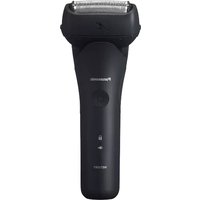
Black electric shaver with visible brand mark and brand name (no text or symbols on the device itself)


2
ES-LV54_CH.indb 2 2013/07/22 9:45:05

Panasonic®
女
使用说明书
(家用) 电动剃须刀
型号 ES-LV54
目录
natural_image
Illustration of a person using a handheld device to interact with a tool (no text or symbols present)注意

中文
▶ 使用短刷清洁
环境保护与资源回收
此剃须刀使用锂电池。
如果您的国家有相关规定,请务必在指定处
对旧电池进行统一处理。
规格
Operating Instructions
(Household) AC/Rechargeable Shaver
Model No. ES-LV54
Contents
Safety precautions 20
Intended use ......24
Parts identification .....24
Charging the shaver 25
Using the shaver....26
Cleaning the shaver .....28
Troubleshooting ....30
Battery life 32
Removing the built-in rechargeable battery....32
Specifications ....33
Thank you for purchasing this Panasonic product.
Before operating this unit, please read these instructions completely and save them for future use.
Safety precautions
To reduce the risk of injury, loss of life, electric shock, fire, malfunction, and damage to equipment or property, always observe the following safety precautions.
Explanation of symbols
The following symbols are used to classify and describe the level of hazard, injury, and property damage caused when the denotation is disregarded and improper use is performed.
| ⚠️ DANGER | Denotes a potential hazard that will result in serious injury or death. |
| ⚠️ WARNING | Denotes a potential hazard that could result in serious injury or death. |
| ⚠️ CAUTION | Denotes a hazard that could result in minor injury. |
The following symbols are used to classify and describe the type of instructions to be observed.
| This symbol is used to alert users to a specific operating procedure that must not be performed. |
| This symbol is used to alert users to a specific operating procedure that must be followed in order to operate the unit safely. |


WARNING

Always unplug the AC adaptor from a household outlet when cleaning.
-Failure to do so may cause electric shock or injury.

Always ensure the appliance is operated on an electric power source matched to the rated voltage indicated on the AC adaptor. Fully insert the power plug.
- Failure to do so may cause fire or electric shock.

Regularly clean the power plug and the appliance plug to prevent dust from accumulating.
-Failure to do so may cause fire due to insulation failure caused by humidity.
Disconnect the adaptor and wipe with a dry cloth.

Immediately stop using and remove the adaptor if there is an abnormality or failure.
- Using it in such conditions may cause fire, electric shock, or injury.
- The main unit, adaptor or cord is deformed or abnormally hot.
- The main unit, adaptor or cord smells of burning.
• There is abnormal sound during use or charging of the main unit, adaptor or cord.
- Immediately request inspection or repair at an authorized service center.

WARNING

If you experience skin irritation anywhere on the body, stop using immediately and contact a physician.
- Failure to follow this instruction may result in physical injury or injury to the skin.
If oil is consumed accidentally, do not induce vomiting, drink a large amount of water and contact a physician.

If oil comes into contact with eyes, wash immediately and thoroughly with running water and contact a physician.
- Failure to follow these instructions may result in physical problems.
This appliance is not intended for use by persons (including children) with reduced physical, sensory or mental capabilities, or lack of experience and knowledge, unless

they have been given supervision or instruction concerning use of the appliance by a person responsible for their safety. Children should be supervised to ensure that they do not play with the appliance.
- Failure to do so may cause an accident or injury.

The supply cord cannot be replaced. If the cord is damaged, the AC adaptor should be scrapped.
- Failure to do so may cause an accident or injury.

Properly dispose the package of the appliance, keep the package away from infants.
- Failure to do so may cause suffocation of infants from happening.

This shaver has a built-in rechargeable battery. Do not throw into fire, apply heat, or charge,
use, or leave in a high temperature environment.
- Doing so may cause overheating, ignition, or explosion.

Do not connect or disconnect the adaptor to a household outlet with a wet hand.
- Doing so may cause electric shock or injury.

Do not immerse the AC adaptor in water or wash with water.
- Doing so may cause electric shock or fire due to a short circuit.

Never use the AC adaptor in the bathroom or shower room.
- Doing so may cause electric shock or fire due to a short circuit.

Never disassemble except when disposing of the product.
- Doing so may cause fire, electric shock, or injury.

Do not use anything other than the supplied AC adaptor. Also, do not charge any other product with the supplied AC adaptor.
- Doing so may cause burn or fire due to a short circuit.


WARNING
Do not modify or repair.
- Doing so may cause fire, electric shock, or injury. Contact an authorized service center for repair (battery change etc).
Do not store within reach of children or infants. Do not let them use it.
- Putting the inner blades and/or the cleaning brush in the mouth or drinking the oil may cause accidents and injury.
Never use the appliance if the AC adaptor is damaged or if the power plug fits loosely in a household outlet.
- Doing so may cause electric shock or fire due to a short circuit.
Do not damage, modify, or forcibly bend, pull, or twist the cord.
Also, do not place anything heavy on or pinch the cord. - Doing so may cause electric shock or fire due to a short circuit.
Do not use in a way exceeding the rating of the household outlet or the wiring.
- Exceeding the rating by connecting too many plugs to one household outlet may cause fire due to overheating.

Do not shave with soap or clean it with water when operating with the AC adaptor.
- Doing so may cause electric shock or fire due to a short circuit.

CAUTION
Disconnect the adaptor from the household outlet when not using.
- Failure to do so may cause electric shock or fire due to electrical leakage resulting from insulation deterioration.
Check the system outer foil for cracks or deformations before use.
- Failure to do so may cause injury to the skin.
shaver when carrying around or storing. - Failure to do so may cause injury to skin or reduce the life of the system outer foil.
Disconnect the adaptor or the appliance plug by holding onto the adaptor or the appliance plug instead of the cord.
-Failure to do so may cause electric shock or injury.
power plug or the appliance plug.
- Doing so may cause electric shock or fire due to a short circuit.

CAUTION

Do not use excessive pressure to apply the system outer foil to your lip or other part of your face. Do not apply the system outer foil directly to blemishes or injured skin.
- Doing so may cause injury to the skin.

Do not forcefully press the system outer foil. Also, do not touch the system outer foil with fingers or nails when in use.
- Doing so may cause injury to skin or reduce the life of the system outer foil.

Do not touch the blade section (metallic section) of the inner blade.
- Doing so may cause injury to your hands.

Do not use this product for hair on head or any other part of the body.
- Doing so may cause injury to skin or reduce the life of the system outer foil.

Do not share your shaver with your family or other people.
- Doing so may result in infection or inflammation.

Do not drop or subject to shock.
- Doing so may cause injury.

Do not wrap the cord around the adaptor when storing.
- Doing so may cause the wire in the cord to break with the load, and may cause fire due to a short circuit.
▶ Disposing of the rechargeable battery

DANGER
The rechargeable battery is exclusively for use with this shaver. Do not use the battery with other products.
Do not charge the battery after it has been removed from the product.
- Do not throw into fire or apply heat.
- Do not hit, disassemble, modify, or puncture with a nail.
- Do not let the positive and negative terminals of the battery get in contact with each other through metallic objects.
- Do not carry or store the battery together with metallic jewelry such as necklaces and hairpins.
- Do not charge, use, or leave the battery where it will be exposed to high temperatures, such as under direct sunlight or near other sources of heat.
- Never peel off the tube.
- Doing so may cause overheating, ignition, or explosion.

WARNING
After removing the rechargeable battery, do not keep it within reach of children and infants.

- The battery will harm the body if accidentally swallowed.
If this happens, consult a physician immediately.

WARNING
If the battery fluid leaks out, take the following procedures. Do not touch the battery with your bare hands.
- The battery fluid may cause blindness if it comes in contact with your eyes.

Do not rub your eyes. Wash immediately with clean water and consult a physician.
- The battery fluid may cause inflammation or injury if it comes in contact with the skin or clothes.
Wash it off thoroughly with clean water and consult a physician.
Intended use
- Keep both the inner blades inserted. If only one of the inner blades is inserted, the shaver may be damaged.
- If you clean the shaver with water, do not use salt water or hot water. Do not soak the shaver in water for a long period of time.
- Clean the housing only with a soft cloth slightly dampened with tap water or soapy tap water. Do not use thinner, benzine, alcohol or other chemicals.
• Store the shaver in a place with low humidity after use. - Do not store the shaver where it will be exposed to direct sunlight or other heat sources.

Parts identification
A

B

©

D


A Main body
① Protective cap
② System outer foil
③ Foil frame
④ Foil frame release buttons
⑤ Finger rest
⑥ Power switch
⑦ Lock ring
⑧ Shaving sensor lamp (45)
⑨ Battery capacity lamp
⑩ Charge status lamp (→)
⑪ Appliance socket
⑫ Outer foil section
⑬ System outer foil release buttons
⑭ Inner blades
⑮ Trimmer
⑯ Trimmer handle
B AC adaptor (RE7-59)
⑰ Adaptor
⑱ Power plug
⑲ Cord
⑳ Appliance plug
Accessories
© Travel case
D Cleaning brush
E Oil

Using the lock ring
Use the lock ring to lock or unlock the power switch.
Rotate the lock ring until it clicks.

Rotate the lock ring to "☐" to unlock the power switch:
Used when shaving, washing the shaver, lubricating the shaver.

Rotate the lock ring to "☐" to lock the power switch:
Used when carrying the shaver.
While charging

The charge status lamp (→) glows.
The number of the battery capacity lamp will increase as charging progresses.
After charging is completed
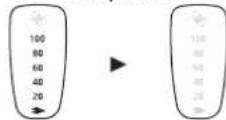
All the lamps will light up and then turn off after 5 seconds.
Charging the shaver
1 Insert the appliance plug into the shaver.
- Turn the shaver off before inserting.
2 Plug in the adaptor into a household outlet.
- Check that the charge status lamp (→) glows.
- Charging is completed after approx. 1 hour. The charging time may decrease depending on the charging capacity.
- Wipe off any water droplets on the appliance socket.
- Check that the outer foil is not deformed or damaged when you are attaching the shaver.

Abnormal charging
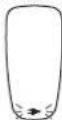
The charge status lamp ( ) will blink twice every second.
- Recommended ambient temperature for charging is 10 – 35 °C. It may take longer to charge or the battery may fail to charge properly in extremely high or low temperatures. Charge the shaver within the recommended ambient temperature range.
- When charging the shaver for the first time or when it has not been in use for more than 6 months, the charge status lamp (→) may not glow. It will eventually glow if kept connected.
3 Disconnect the adaptor after charging is completed.
- Charging the battery for more than 1 hour will no affect battery performance.
Using the shaver
1 Rotate the lock ring to unlock the power switch. (See page 25.)
2 Press the power switch to select the desired shaving mode.
- Each time you press the power switch, the shaving mode changes from "Shaving sensor mode" "Normal mode" "OFF".
| Shaving mode | Shaving sensor mode | Normal mode | OFF |
| Description | Beard thickness is automatically sensed and the power is automatically adjusted when shaving. | The power level is constantly maintained while shaving. | — |
| Operation |  | ||
| Shaving sensor lamp | [47Kx]The shaving sensor lamp blinks. | —The shaving sensor lamp turns off. | —The shaving sensor lamp turns off. |
- The shaving sensor may not respond when the remaining battery capacity is low. If this happens, recharge the shaver.
3 Hold the shaver as illustrated and shave.
- Start shaving by applying gentle pressure to your face. Stretch your skin with your free hand and move the shaver back and forth in the direction of your beard. You may gently increase the amount of pressure as your skin becomes accustomed to this shaver. Applying excessive pressure does not provide a closer shave.

▶ Cord shaving
If you insert the appliance plug to the shaver and plug in the adaptor into a household outlet, you can use it even if the battery capacity is low.
- If the shaver does not work, continue charging it for approx. 1 minute.
▶ Switching the shaver head
You can change the pivot action.
FREE
You can move the shaver head.
LOCK
You can lock the shaver head.

▶ Using the trimmer
Slide the trimmer handle up to the "mm" position so that the trimmer stands upright.

Press and hold the lock release button (a) and slide the trimmer handle down to lower the trimmer.

Trimming sideburns
Slide the trimmer handle up. Turn the shaver on and place at a right angle to your skin and move downwards to trim your sideburns.

Pre-shave
The trimmer can be used for a pre-shave of long beards.


natural_image
Illustration of a person using a tool to apply or prepare a hair tool (no text or symbols present)Notes
- If you press the power switch for more than 2 seconds, the sonic vibration cleaning mode is activated. (See page 28.) You cannot shave in this mode.
- Do not place your fingers on the power switch while using the shaver. This may cause the shaver to switch the mode or turn off. Place your fingers on the finger rest while using the shaver.
- We recommend using the shaver in an ambient temperature range of 5 – 35 °C. If used outside this range, the appliance may stop operating.
Reading lamps when using
While using

Approximate amount of battery charge is displayed as 20 - 100.
- It will turn off approximately 5 seconds after operating the switch.
- The charge status lamp (glows when using cord shaving.
When the battery capacity is low

"20" blinks when operating the shaver.
- You can shave 2 to 3 times after "20" appears. (This will differ depending on usage.)
- A full charge will supply enough power for approx. 14 shaves of 3 minutes each. (This will differ depending on usage.)
Cleaning the shaver
- Disconnect the cord from the shaver.
- Apply some hand soap and some water to the system outer foil.
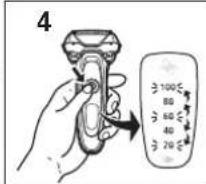
- Rotate the lock ring to unlock the power switch.
- Press the power switch for more than 2 seconds to activate the sonic vibration cleaning mode.
• The battery capacity lamps blink in order.
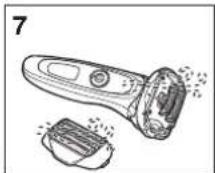
• After about 20 seconds, it will be automatically turned off, or you can turn it off by pressing the power switch. - Remove the outer foil section and press the power switch for more than 2 seconds to activate the sonic vibration cleaning mode and clean it with running water.
- Wipe off any drops of water with a dry cloth.
- Dry the outer foil section and the shaver completely.
- Attach the outer foil section to the shaver.
- Lubricate the shaver.


The mark on the left means suitable for cleaning under an open water tap.
Warning Disconnect the cord from the shaver before cleaning it in water to prevent electric shock.
Lubrication
To maintain shaving comfort for a long time, it is recommended that the oil provided with the shaver is used.
- Switch off the shaver.
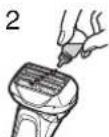
- Apply one drop of oil to each of the outer foils.
- Raise the trimmer and apply a drop of oil.
-
Switch the shaver on, and run it for approximately five seconds.
-
Switch off the shaver, and wipe off any excess oil from the outer foils with a soft cloth.

Cleaning with the brush
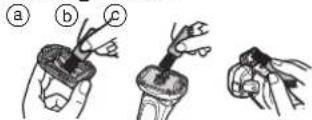
▶Cleaning with the long brush
Clean the system outer foil (a), the shaver body (b) and the trimmer (c) using the long brush.
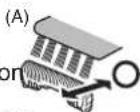
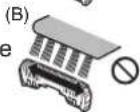
▶ Cleaning with the short brush
Clean the inner blades using the short brush by moving it in direction (A).
- Do not move the short brush in direction (B) as it will damage the inner blades and affect their sharpness.
- Do not use the short brush to clean the outer foils.
Replacing the system outer foil and the inner blades
system outer foil once every year inner blades once every two years
▶Removing the outer foil section
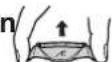
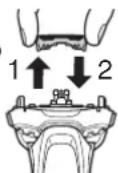
Press the foil frame release buttons and lift the outer foil section upwards.
▶ Attaching the outer foil section
After turning the foil frame mark ( ) to the front, securely attach the outer foil section to the shaver until it clicks.


▶Replacing the system outer foil
- Press the system outer foil release buttons and pull down the system outer foil.
-
Align the foil frame mark ( × ) and the system outer foil mark ( ) and securely attach together.
-
The system outer foil cannot be reversely attached.
• Always insert the system outer foil to the foil frame when attaching to the shaver.
▶ Replacing the inner blades
- Remove the inner blades one at a time.
- Do not touch the edges (metal parts) of the inner blades to prevent injury to your hand.
- Insert the inner blades one at a time until they click.
▶ Replacement parts
Replacement parts are available at your dealer or Service Center.
| Replacement parts for ES-LV54 | System outer foil WES9173 |
| Inner blades WES9170 |

Troubleshooting
| Problem Action | |
| Trimmed hairs fly all over. | This can be improved by cleaning every time after shaving. |
| Clean the inner blades with the brush. | |
| Apply oil after cleaning with water and leaving to dry thoroughly. | |
| System outer foil gets hot. | Apply oil.(See page 29.) |
| Replace the system outer foil if it is damaged or deformed.(See page 30.) | |
| The power switch cannot be pressed. | Unlock the power switch. |
| Operating time is short even after charging. | Apply oil. |
| When the number of operations per charge starts to decrease, the battery is nearing the end of its life. |
| ProblemAction | ProblemAction | ||
| Makes a loud sound. | Apply oil.Confirm that the blades are properly attached.The shaver makes a high-pitched sound due to the linear motor drive. This does not indicate a problem.Clean the system outer foil with the brush. | The shaving sensor does not respond. | The shaving sensor may not respond when the remaining battery capacity is low. If this happens, recharge the shaver.Depending on the beard thickness, the shaving sensor may not react and the driving sound may not change. This is not abnormal. |
| The odor is getting stronger. | This can be improved by cleaning every time after shaving. | Apply oil. The shaving sensor may not respond when there is not enough oil on the blades. | |
| You do not get as close a shave as before. | This can be improved by cleaning every time after shaving.Replace the system outer foil and/or inner blades.Expected life of system outer foil and inner blades:System outer foil: Approximately 1 yearInner blades: Approximately 2 yearsApply oil. | The shaving sensor responds even though the shaver is not in contact with the skin. | Clean the beard trimmings from the shaver.When the shaver is extremely dirty, remove the foil frame and wash with water.(See page 28.)Replace the system outer foil and/or inner blades.Expected life of system outer foil and inner blades:System outer foil: Approximately 1 yearInner blades: Approximately 2 years |
English
| Problem Action | |
| The shaver cannot be charged. | The recommended temperature for charging is 10 – 35 °C. If charged at a temperature other than the recommended temperature, the shaver may take longer to charge or may not charge at all. |
| Shaver stopped functioning. | Recommended ambient temperature for operation is 5 – 35 °C. The shaver may stop functioning when out of recommended ambient temperature range. |
| The battery has reached the end of its life. | |
| The driving sound changes while shaving. | While the shaving sensor lamp glows, the shaving sensor is operating. The sound changes depending on the beard thickness. |
| The power will not switch to OFF. | Press the power switch twice while using in the shaving sensor mode. |
If the problems still cannot be solved, contact the store where you purchased the unit or a service center authorised by Panasonic for repair.
Battery life
The life of the battery is 3 years if charged approximately once every two weeks. The battery in this shaver is not intended to be replaced by consumers. Have the battery replaced by an authorized service center.
Removing the built-in rechargeable battery
Remove the built-in rechargeable battery before disposing of the shaver.
Please make sure that the battery is disposed of at an officially designated location if there is one.
This figure must only be used when disposing of the shaver, and must not be used to repair it. If you dismantle the shaver yourself, it will no longer be waterproof, which may cause it to malfunction.
- Remove the shaver from the AC adaptor.
-
Press the power switch to turn on the power and then keep the power on until the battery is completely discharged.
-
Perform steps ① to ④ and lift the battery, and then remove it.
- Please take care not to short-circuit the battery.

For environmental protection and recycling of materials
This shaver contains a Lithium-ion battery.
Please make sure that the battery is disposed of at an officially assigned location, if there is one in your country.
Specifications
| Product name Rechargeable Shaver | |
| Product model ES | -LV54 |
| Rated input | 100-240 V~ 50-60 Hz180 mA |
| Rated output | 5.4 V--- 1.2 A |
| Charging time Approx. | 1 hour |
| Place of origin | Main body: JapanAC adaptor: China |
| Date of production | See engraving on the commodity. |
| Execution standard | GB4706.1 appendix BGB4706.9 |
This product is intended for household use only.
MEMO


MEMO
制造商:松下电器产业株式会社
日本大阪府门真市大字门真1006番地
进口商:松下电器(中国)有限公司
- Panasonic®
- 目录
- 注意
- 中文
- ▶ 使用短刷清洁
- Contents
- Safety precautions
- Explanation of symbols
- WARNING
- CAUTION
- ▶ Disposing of the rechargeable battery
- DANGER
- Intended use
- Parts identification
- A Main body
- Using the lock ring
- While charging
- After charging is completed
- Charging the shaver
- Insert the appliance plug into the shaver.
- Plug in the adaptor into a household outlet.
- Abnormal charging
- Disconnect the adaptor after charging is completed.
- Using the shaver
- Hold the shaver as illustrated and shave.
- ▶ Cord shaving
- ▶ Switching the shaver head
- FREE
- LOCK
- ▶ Using the trimmer
- Trimming sideburns
- Pre-shave
- Notes
- Reading lamps when using
- While using
- When the battery capacity is low
- Cleaning the shaver
- Lubrication
- Cleaning with the brush
- ▶Cleaning with the long brush
- ▶ Cleaning with the short brush
- Replacing the system outer foil and the inner blades
- ▶Removing the outer foil section
- ▶ Attaching the outer foil section
- ▶Replacing the system outer foil
- ▶ Replacing the inner blades
- ▶ Replacement parts
- Battery life
- Removing the built-in rechargeable battery
- Remove the built-in rechargeable battery before disposing of the shaver.
- For environmental protection and recycling of materials
- MEMO
Brand : PANASONIC
Model : ES-LV54
Category : Razor