PANASONIC

VL-SW102BX - Intercom PANASONIC - Free user manual and instructions

Find the device manual for free VL-SW102BX PANASONIC in PDF.
📄 64 pages English EN Download 💬 AI Question 10 questions ⚙️ Specs
Notice PANASONIC VL-SW102BX - page 1
Pick your language and provide your email: we'll send you a specifically translated version.
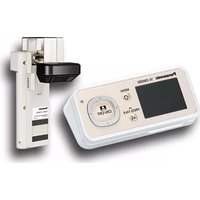
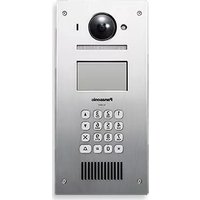
Product Type Video Door Phone (Intercom) Outdoor Unit
Brand Panasonic
Model VL-SW102BX
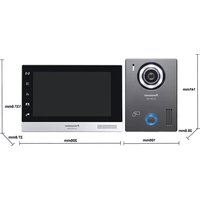
Dimensions (Approx.) 86 mm (W) x 86 mm (H) x 30 mm (D)
Weight (Approx.) 200 g
Power Supply 12 V DC (from indoor monitor)
Camera 1/4-inch CMOS with 170° viewing angle
Night Vision Yes, infrared LEDs
Audio Full-duplex hands-free communication
Call Button Illuminated call button
Weather Resistance IP55 rated
Wiring 2-wire connection to indoor monitor
Operating Temperature -10°C to 50°C
Mounting Wall-mounted (surface or flush mount)
Compatibility Panasonic VL-SW series indoor monitors
Color White
Cleaning Wipe with a soft, dry cloth. Do not use abrasive cleaners.
Safety For outdoor use. Keep away from direct rain and splash.
Spare Parts Contact Panasonic service center for replacement parts.

Frequently Asked Questions - VL-SW102BX PANASONIC

How do I connect the VL-SW102BX to my indoor monitor?
Connect using the provided 2-wire cable. Follow the wiring diagram in the manual: terminal '+' to monitor's 'A' and terminal '-' to 'B'. Ensure polarity is correct.
What should I do if the night vision is not working?
Check if the infrared LEDs are blocked. Also ensure the unit is receiving power (12V DC). The night vision activates automatically in low light.
Can I use the VL-SW102BX with a different brand of intercom?
No, it is designed exclusively for Panasonic VL-SW series indoor monitors. Using other brands may damage the unit or cause malfunction.
How do I adjust the volume of the door chime?
Volume is adjusted on the indoor monitor, not on the outdoor unit. Refer to your monitor's manual for volume settings.
What is the maximum cable length between the door station and monitor?
Maximum recommended cable length is 100 meters using 0.5 mm² wire. For longer distances, use thicker wire (1.0 mm²).
How do I reset the VL-SW102BX to factory settings?
The outdoor unit does not have a reset button. To reset, disconnect power from the indoor monitor for 10 seconds, then reconnect.
The image is blurry, what can I do?
Clean the camera lens with a soft cloth. Adjust the camera angle if necessary. If problem persists, check cable connections.
Can I paint the door station to match my wall?
Painting is not recommended as it may block the camera, microphone, or call button. Use only approved covers.
Is the VL-SW102BX weatherproof?
Yes, it has an IP55 rating, meaning it is protected against dust and water jets. However, avoid installing it in direct downpour.
How do I test the door station before final installation?
Connect the unit temporarily to the indoor monitor using a short cable. Press the call button to verify audio and video.

User questions about VL-SW102BX PANASONIC

0 question about this device. Answer the ones you know or ask your own.

Ask a new question about this device

The email remains private: it is only used to notify you if someone responds to your question.

No questions yet. Be the first to ask one.

Download the instructions for your Intercom in PDF format for free! Find your manual VL-SW102BX - PANASONIC and take your electronic device back in hand. On this page are published all the documents necessary for the use of your device. VL-SW102BX by PANASONIC.

USER MANUAL VL-SW102BX PANASONIC
natural_image Three electronic devices with control panels and buttons, shown from different angles (front, side, and front) without any visible text or symbols.

PANASONIC VL-SW102BX - 1

natural_image Interior view of a modern living room with striped sofas, potted plants, and framed artwork (no visible text or symbols)
  1. Patient's questions are here in the context

الفهرس

77 alفهرس

(١) أ sending him going about the Psychology else fini Saudi Arabia must be in. It is to play the American Aggression and should be in. I think that you want to play the Psychology, and let them go to play the Psychology.

① الكاميرا

السماعة 10

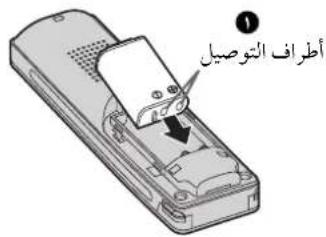
natural_image Illustration of a remote control device with a circular dial and an arrow pointing to it (no text or symbols)

Technical diagram showing a mechanical assembly with labeled parts, including a tool and a base platform.

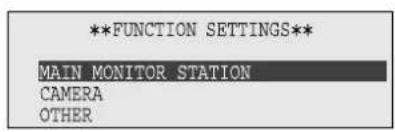
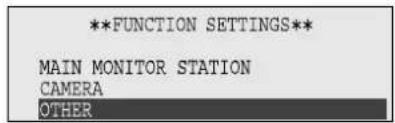
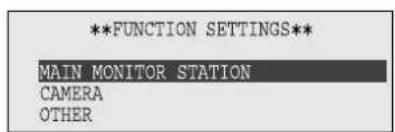
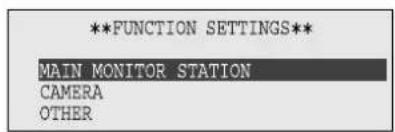
**FUNCTION SETTINGS** MAIN MONITOR STATION CAMERA OTHER

**FUNCTION SETTINGS** MAIN MONITOR STATION CAMERA OTHER

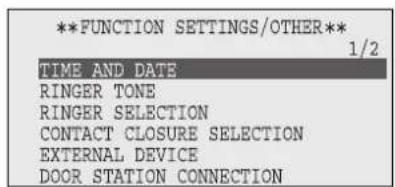
**FUNCTION SETTINGS/OTHER** 1/2 TIME AND DATE RINGER TONE RINGER SELECTION CONTACT CLOSURE SELECTION EXTERNAL DEVICE DOOR STATION CONNECTION

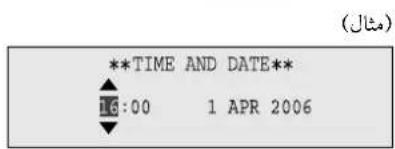
**TIME AND DATE** 16:00 1 APR 2006 (مثال)

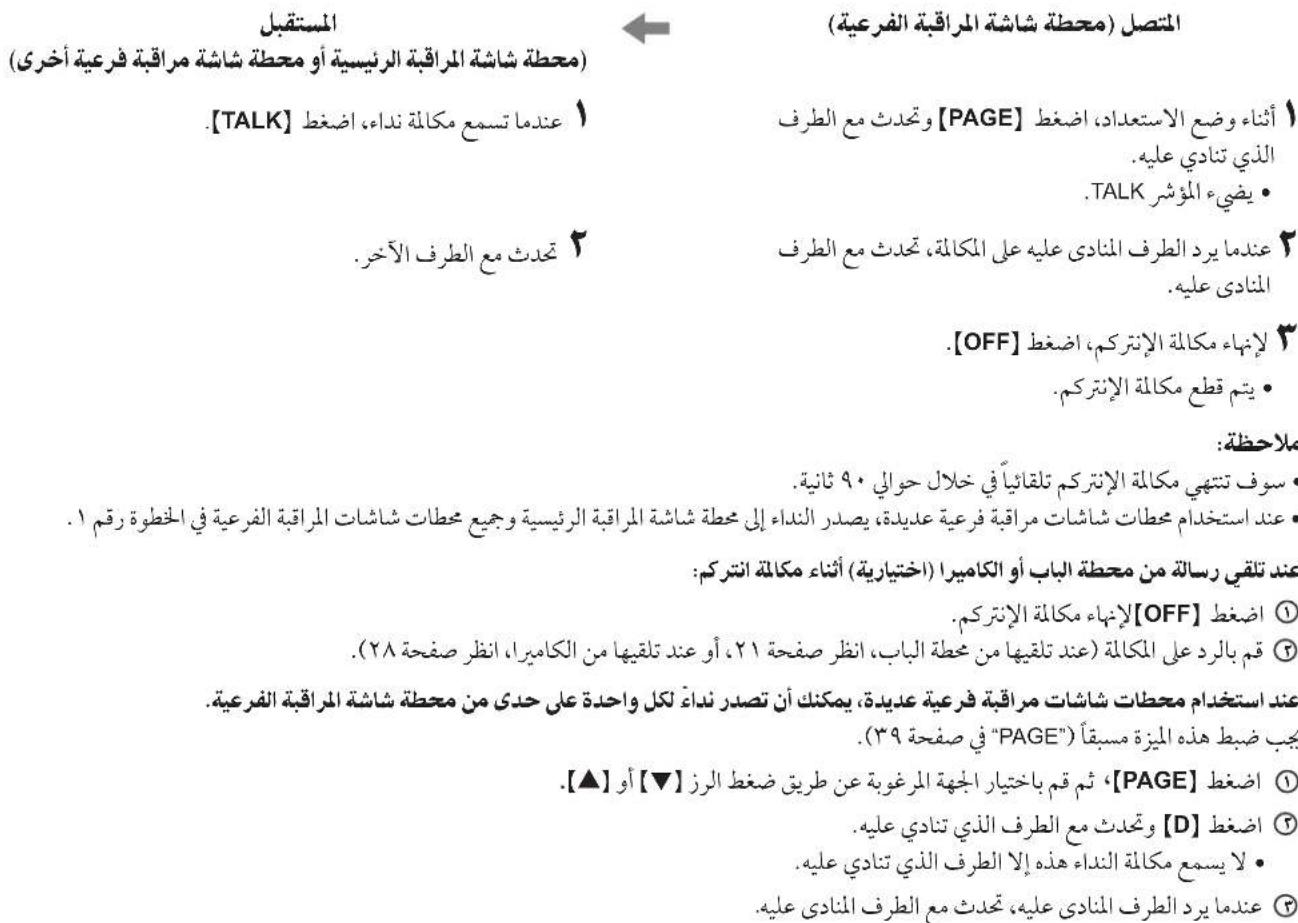
[BRIGHT] [▼] [▲] [OFF] TALK [TALK] المؤشر

[OFF] [PAGE] TALK [TAK] [TAK]

لتقي مكالة محولة:

PANASONIC VL-SW102BX - الفهرس - 8

ل'Eحويال المكلمة:

[DOOR] [CAMERA] [OFF] [TALK]

flowchart
graph TD
    A["1"] --> B["2"]
    B --> A

ملاحظة:

[CAMERA] [BRIGHT] [▼] [▲] [OFF] [TALK]

[CAMERA] ا Compact

[CAMERA] [BRIGHT] [▼] [▲] [OFF] [TALK]

[DOOR] [CAMERA] [OFF] [TALK]

[◀] [▶] [▼] [▲] [D] [OFF]

. 【▼】، و concentrates the source of the source.

ملاحظة:

[◀] [D] [OFF]

(مُسْتَقِبْل (مُسْتَقِبْل) (مُسْتَقِبْل) (مُسْتَقِبْل) (مُسْتَقِبْل) (مُسْتَقِبْل) (مُسْتَقِبْل) (مُسْتَقِبْل) (مُسْتَقِبْل) (مُسْتَقِيْرِ) [1] [TALK] [2] [3] [4] [5] [6] [7] [8] [9] [10] [11] [12] [13] [14] [15] [16] [17] [18] [19] [20] [21] [22] [23] [24] [25] [26] [27] [28] [29] [30] [31] [32] [33] [34] [35] [36] [37] [38] [39] [40] [41] [42] [43] [44] [45] [46] [47] [48] [49] [50] [51] [52] [53] [54] [55] [56] [57] [58] [59] [60] [61] [62] [63] [64] [65] [66] [67] [68] [69] [70] [71] [72] [73] [74] [75] [76] [77] [78] [79] [80] [81] [82] [83] [84] [85] [86] [87] [88] [89] [90] [91] [92] [93] [94] [95] [96] [97] [98] [99] [100] أُنْنَاء وَضَعَ الْاِسْتَعَدَادِ، اَضَغَطٍ (PAGE) وَجَجَدَّث مِعِ الْطَرَفٍ الَّذِي تَنَادِي عَلِيهٍ. . يُضِيٍهُ المُؤْشُرٍ . يُضِيٍهُ مِكَالَةٍ الْإِنْتَرِكُم، اَضَغَطٍ . تَجَدَّث مِعِ الْطَرَفٍ الْأَنْدِي عَلِيهٍ عَلِيُهُ عَلِيُهُ لِكَالِكَالَةٍ، تَجَدَّث مِعِ الْطَرَفٍ . تَجَدَّث مِعِ الْطَرَفٍ الْأَنْدِي عَلِيهٍ. . تَجَدَّث مِعِ الْطَرَفٍ الْأَنْدِي عَلِيُهُ لِكَالِكَالَةٍ، تَجَدَّث مِعِ الْطَرَفٍ . تَجَدَّث مِعِ الْطَرَفٍ الْأَنْدِي عَلِيُهُ لِكَالِكَالَةٍ، تَجَد·مَا مِكَالَةٍ الْإِنْتَرِكُم، اَضْغَطٍ . يُتم قُطْع مِكَالَةٍ الْإِنْتَرِكُم، . يُتم قُطْع مِكَالَةٍ الْإِنْتَرِكُم . يُتم قُطْع مِكَالَةٍ الْإِنْتَرِكُم . يُتم قُطْع مِكَالَةٍ الْإِنْتَرِكُم . يُتم قُطْع مِكَالَةٍ الْإِنْتَرِكُم . يَتم قُطْع مِكَالَةٍ الْإِنْتَرِكُم . يُتم قُطْع مِكَالَةٍ الْإِنْتَرِكُم . يُتم قُطْع مِكَالَةٍ الْإِنْتَرِكُم . يُتم قُصْتٌ مِكَالَةٍ الْإِنْتَرِكُم تُلْقًا يًّاً فِي خَلَا لِحَا لِحَا لِحَا لِحَا لِحَا لِحَا لِحَا لِحَا لِحَا لِحَا لِحَا لِحَا لِحَا لِحَا لِحَا لِحَا لِحَا لِحَا لِحَا لِحَا لِحَا لِحَا لِحَا لِحَا لِحَا لِنَا نَا نَا نَا نَا نَا نَا نَا نَا نَا نَا نَا نَا نَا نَا نَا نَا نَا نَا نَا نَا نَا نَا نَا نَا نَا نَا نَا نَا نَا نَا نَا نَا نَا نَا نَا نَا نَا نَا نَا نَا نَا نَا نَا نَا نَا نَا نَا نَا نَا نَا nǚ nǚ nǚ nǚ nǚ nǚ nǚ nǚ nǚ nǚ nǚ nǚ nǚ nǚ nǚ nǚ nǚ nǚ nǚ nǚ nǚ nǚ nǚ nǚ nǚ nǚ nǚ nǚ nǚ nǚ nǚ nǚ nǚ nǚ nǚ nǚ nǚ nǚ nǚ nǚ nǚ nǚ nǚ nǚ nǚ nǚ nǚ nǚ nǚ nǚ nǔ nǔ nǔ nǔ nǔ nǔ nǔ nǔ nǔ nǔ nǔ nǔ nǔ nǔ nǔ nǔ nǔ nǔ nǔ nǔ nǔ nǔ nǔ nǔ nǔ nǔ nǔ nǔ nǔ nǔ nǔ nǔ nǔ nǔ nǔ nǔ nǔ nǔ nǔ nǔ nǔ nǔ nǔ nǔ nǔ nǔ nǔ nǔ nǔ nǔn mǐng yìng yìng yìng yìng yìng yìng yìng yìng yìng yìng yìng yìng yìng yìng yìng yìng yìng yìng yìng yìng yìng yìng yìng yìng yìng yìng yìng yìng yìng yìng yìng yìng yìng yì ng yìng yìng yìng yìng yìng yìng yìng yìng yìng yìng yìng yìng yìng yìng yìng yìng yìng yìng yìng yìng yìng yìng yìng yìng yìng yìng yìng yìng yìng yìng yìng yìng yìngyìng yìng yìng yìng yìng yìng yìng yìng yìng yìng yìng yìng yìng yìng yìng yìng yìng yìng yìng yìng yìng yìng yìng yìng yìng yìng yìngyīng yīngyīngyīngyīngyīngyīngyīngyīngyīngyīngyīngyīngyīngyīngyīngyīngyīngyīngyīngyīngyīngyīngyīngyīngyīngyīngyīngyīngyīngyīngyīngyīngyīngyīngyānghyīnghyīnghyīnghyīnghyīnghyīnghyīnghyīnghyīnghyīnghyīnghyīnghyīnghyīnghyīnghyīnghyīnghyīnghyīnghyīnghyīnghyīnghyīnghyīnghyīnghyānghyīnghyīnghyīnghyīnghyīnghyīnghyīnghyīnghyīnghyīnghyīnghyīnghyīnghyīnghyīnghyīnghyīnghyīnghyīnghyīnghyīnghyānghyānghyānghyānghyānghyānghyānghyānghyānghyānghyānghyānghyānghyānghgānghgānghgānghgānghgānghgānghgānghgānghgānghgānghgānghgānghgānghgānghgānghgānghgānghgānghgānghgānghgānghgānghgānghgānghgānghggānghgānghgānghgānghgānghgānghgānghgānghgānghgānghgānghgānghgānghgānghgānghgānghgānghgānghgānghgānghgānghgānghgānghgānghgānghhagmamamamamamamamamamamamamamamamamamamamamamamamamamamamamamamamamamamamamamamamamamamamamamamamamamamamamamamamamamamamamamamamamamamamamamamamamamamamamamamamamamamamamamamamamamamamamamamamamamamamamumomomomomomomomomomomomomomomomomomomomomomomomomomomomomomomomomomomomomomomomomomomomomomomomomomomomomomomomomomomomomomomomomomomomomomomomomomomomomomomomomomomomomomomomomomomomomomomomomomomomomonmumonmumonmumonmumonmumonmumonmumonmumonmumonmumonmumonmumonmumonmumonmumonmumonmumonmumonmumonmumonmumonmumonmumonmumonmumonmumonmumonmumonmumonmumonmumonmumonmumonmumonequnmumonmumonmumonmumonmumonmumonmumonmumonmumonmumonmumonmumonmumonmumonmumonmumonmumonmumonmumonmumonmumonmumonmumonmumonmumonmumonmumonmumonmumonmumonmumonmumonmumon murnoqunmumon murnoqunmurnoqunmurnoqunmurnoqunmurnoqunmurnoqunmurnoqunmurnoqunmurnoqunmurnoqunmurnoqunmurnoqunmurnoqunmurnoqunmurnoqunmurnoqunmurnoqunmurnoqunmurnoqunmurnoqunmurnoqun [1] ① اضْغُطٍ (OFF) ② اضْغُطٍ (D) ③ اضْغُطٍ (D) ④ اضْغُطٍ (D) ⑤ اضْغُطٍ (D) ⑥ اضْغُطٍ (D) ⑦ اضْغُطٍ (D) ⑧ اضْغُطٍ (D) ⑨ اضْغُطٍ (D) ⑩ اضْغُطٍ (D) ⑪ اضْغُطٍ (D) ⑫ اضْغُطٍ (D) ⑬ اضْغُطٍ (D) ⑭ اضْغُطٍ (D) ⑮ اضْغُطٍ (D) ⑯ اضْغُطٍ (D) ⑰ اضْغُطٍ (D) ⑱ اضْغُطٍ (D) ⑲ اضْغُطٍ (D) ⑳ اضْغُطٍ (D) ㉑ اضْغُطٍ (D) ㉒ اضْغُطٍ (D) ㉓ اضْغُطٍ (D) ㉔ اضْغُطٍ (D) ㉕ اضْغُطٍ (D) ㉖ اضْغُطٍ (D) ㉗ اضْغُطٍ (D) ㉘ اضْغُطٍ (D) ㉙ اضْغُطٍ (D) ㉚ اضْغُطٍ (D) ㉛ اضْغُطٍ (D) ㉜ اضْغُطٍ (D) ㉝ اضْغُطٍ (D) ㉞ اضْغُطٍ (D) ㉟ اضْغُطٍ (D) ㉞ اضْغُطٍ (D) ㉟ اضْغُطٍ (D) ㉟ اضْغُطٍ (D) ㉟ اضْغُطٍ (D) ㉟ اضْغُطٍ (D) ㉟ اضْغُطٍ (D) ㉟ اضْغُطٍ (D) ㉟ اضْغُطٍ (D) ㉟ ا Justinى بزىم بزىم بزىم بزىم بزىم بزىم بزىم بزىم بزىم بزىم بزىم بزىم بزىم بزىم بزىم بزىم بزىم بزىم بزىم بزىم بزىم بزىم بزىم بزىم بزىم بزىي

[▼] [▲] [D] [OFF] [SET]

【▲】[D] [▶] [▶] [▶] [▶] [▶] [▶] [▶] [▶] [▶] [▶] [▶] [▶] [▶] [▶] [▶] [▶] [▶] [▶] [▶] [▶] [▶] [▶] [▶] [▶] [▶] [▶] [▶] [▶] [▶] [▶] [▶] [▶] [▶] [▶],
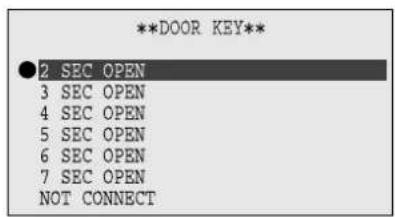
**DOOR KEY** ● 2 SEC OPEN 3 SEC OPEN 4 SEC OPEN 5 SEC OPEN 6 SEC OPEN 7 SEC OPEN NOT CONNECT

[D] اضغط

【▲】【D】【###】【▼】【###】【###】【###】【###】【###】【###】【###】【###】【###】【###】【###】【###】【###】【###】【###】【###】【###】【###】【###】【###】【###】【###】【###】【###】【###】【###】【###】【###】【###】【###】【###】【###】【###】【###}}
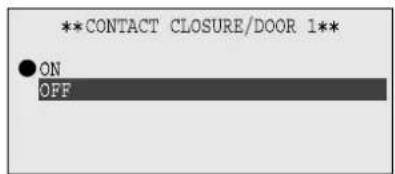
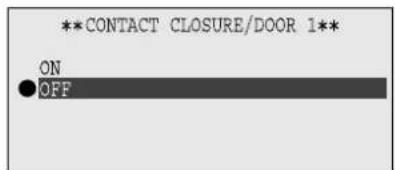
**CONTACT CLOSURE/DOOR 1** ● ON OFF

【▲】【▼】【D】【###】【###】【###】【###】【###】【###】【###】【###】【###】【###】【###】【###】【###】【###】【###】【###】【###】【###】【###】【###】【###】【###】【###】【###】【###】【###】【###】【###】【###】【###】【###】【###】【###】【###}}

**CONTACT CLOSURE/DOOR 1** ON OFF

.[D] ا Compact 7

[OFF] [VOICE CHANGER] [SET] [▼] [▲] [D]

[OFF] [VOICE CHANGER] [SET] [▼] [▲] [D]

**FUNCTION SETTINGS** MAIN MONITOR STATION CAMERA OTHER

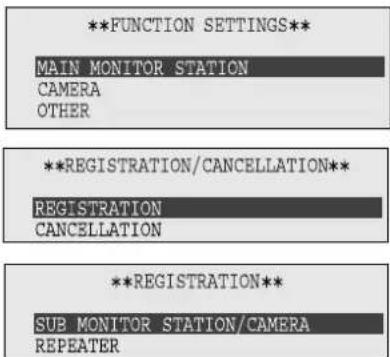
**FUNCTION SETTINGS** MAIN MONITOR STATION CAMERA OTHER **REGISTRATION/CANCELLATION** REGISTRATION CANCELLATION **REGISTRATION** SUB MONITOR STATION/CAMERA REPEATER

[OFF] [VOICE CHANGER] [SET] [▼] [▲] [D]

**FUNCTION SETTINGS** MAIN MONITOR STATION CAMERA OTHER

【▲】【D】【###】【###】【###】【###】【###】【###】【###】【###】【###】【###】【###】【###】【###】【###】【###】【###】【###】【###】【###】【###】【###】【###】【###】【###】【###】【###】【###】【###】【###】【###】【###】【###】【###】【###}}

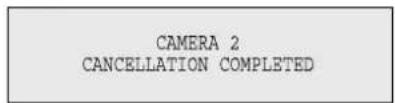
CAMERA 2 CANCELLATION COMPLETED

.[D] ا Compact

[OFF] [VOICE CHANGER] [SET] [▼] [▲] [D]

[OFF] [VOICE CHANGER] [SET] [▼] [▲] [D]

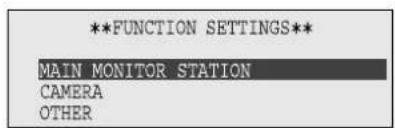
**FUNCTION SETTINGS** MAIN MONITOR STATION CAMERA OTHER

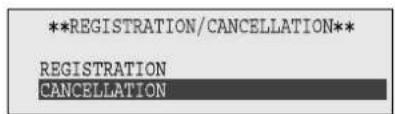
**REGISTRATION/CANCELLATION** REGISTRATION CANCELLATION

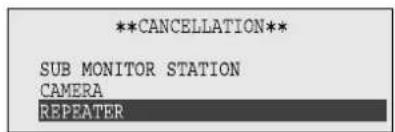
**CANCELLATION** SUB MONITOR STATION CAMERA REPEATER

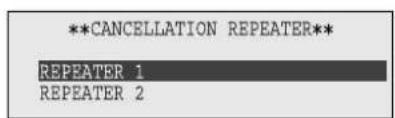
**CANCELLATION REPEATER** REPEATER 1 REPEATER 2

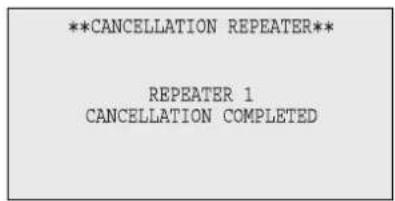
**CANCELLATION REPEATER** REPEATER 1 CANCELLATION COMPLETED

natural_image Illustration of a remote control device with a circular button and directional arrow (no text or symbols)
natural_image Illustration of a remote control device with a scroll wheel and ventilation slots (no text or symbols)

Panasonic Communications Co., Ltd.

1-62, 4-chome, Minoshima, Hakata-ku, Fukuoka 812-8531, Japan

حقوق الطبع:

Table of contents Click a title to access it
Manual assistant
Powered by Anthropic
Waiting for your message
Product information

Brand : PANASONIC

Model : VL-SW102BX

Category : Intercom