USER MANUAL WH-UD12CE5A PANASONIC
Panasonic®
Operating Instructions Air-to-Water Heatpump
Model No.
Indoor Unit Outdoor Unit
WH-SDC07C3E5 WH-UD07CE5-A
WH-SDC09C3E5 WH-UD09CE5-A
WH-SDC12C6E5 WH-UD12CE5-A
WH-SDC14C6E5 WH-UD14CE5-A
WH-SDC16C6E5 WH-UD16CE5-A

ENGLISH
2 ~ 11
Before operating the unit, read these operating instructions thoroughly and keep them for future reference.
Before operating the unit, make sure the installation has been carried out correctly by authorized dealer correctly and precisely following the installation instructions given.
FRANÇAIS
12 ~ 21
Thank you for purchasing Panasonic Product
TABLE OF CONTENTS
SAFETY PRECAUTIONS
2~3
CONTROL PANEL
4~8
INDOOR UNIT
9
TROUBLESHOOTING
10
11
NOTE
The illustrations in this manual are for explanation purposes only and may differ from the actual unit. It is subjected to change without notice for future improvement.
OPERATION CONDITION
| Water outlet Temperature (°C) | Indoor |
| HEATING | Max. | 55 |
| Min. | 25 |
| COOLING | Max. | 20 |
| Min. | 5 |
| Ambient Temperature (°C) | Outdoor |
| HEATING | Max. | 35 |
| Min. | -20 |
| COOLING | Max. | 43 |
| Min. | 16 |
NOTE: When the outdoor temperature is outside the above temperature range, the heating capacity will drop significantly and the outdoor unit may stop for protection control.
SAFETY PRECAUTIONS
- Panasonic Air-to-Water Heat Pump is a split system consisting of an indoor unit and an outdoor unit. This system is designed for combination with a Panasonic Tank Unit. If a non-Panasonic Tank Unit is used with the Panasonic Air-to-Water Heat Pump System, Panasonic cannot guarantee proper operation or reliability of the system.
- This manual describes how to operate the heat pump system between indoor and outdoor units only.
- For other operations such as water tank, radiator, external thermostat controller, and underfloor system, please refer to the respective manufacturer's operation manuals.
To prevent personal injury, injury to others, or property damage, please comply with the following.
Incorrect operation due to failure to follow the instructions below may cause harm or damage, the seriousness of which is classified as below:

WARNING
This sign warns of death or serious injury.

CAUTION
This sign warns of injury or damage to property.
The instructions to be followed are classified by the following symbols:

This symbol denotes an action that is PROHIBITED.


These symbols denote an action that is COMPULSORY.

WARNING
INDOOR UNIT AND OUTDOOR UNIT
This appliance is not intended for use by persons (including children) with reduced physical, sensory or mental capabilities, or lack of experience and knowledge, unless they have been given supervision or instruction concerning use of the appliance by a person responsible for their safety. Children should be supervised to ensure that they do not play with the appliance.
Please consult authorized dealer or specialist to repair, install, remove and reinstall the unit. Improper installation and handling will cause leakage, electric shock or fire.

Do not install the unit in a potentially explosive or flammable atmosphere. Failure to do so could result in fire.
Do not insert your fingers or other objects into the indoor or outdoor unit, rotating parts may cause injury.

Do not touch the outdoor unit during lightning, it may cause electric shock.
Do not attempt to repair the unit by yourself. Otherwise, it may cause injury if it is mishandling.
Do not install the indoor unit at outdoor. This is designed for indoor installation only.
 WARNING WARNING |
| POWER SUPPLY |
| Do not use modified cord, joint cord, extension cord or unspecified cord to prevent overheating and fire. |   |
| Do not share the same power outlet with other equipment to prevent overheating and fire. |
| Do not operate with wet hands to prevent electric shock. |
| If the supply cord is damage, it must be replaced by the manufacturer, its service agent or similarly qualified persons in order to avoid a hazard. |
| This unit is equipped with Residue Current Circuit Breaker (RCCB). It is strongly recommended to check the operation of the RCCB after installation and periodically after servicing or maintenance by authorized dealer to ensure it is in good working order. Otherwise, it may cause electrical shock or fire in case of malfunction. |
| It is strongly recommended to be installed with Earth Leakage Circuit Breaker (ELCB) or Residual Current Device (RCD) to prevent electric shock or fire. |
| It is recommended to wear gloves during servicing or maintenance in order to avoid hazard. |
| This equipment must be earthed to prevent electrical shock or fire. |
| Prevent electric shock by switching off the power supply when:- Before cleaning or servicing.- Extended non-use.- Abnormally strong lightning activity. |
| This appliance is for multiple uses. All power supply circuits must be turn off before access to any of the terminals in the indoor unit, to avoid electrical shock, burn or fatal injury. |
| Stop using the product when any abnormality/failure occurs and disconnect the power plug or turn off the power switch and breaker. (Risk of smoke/fire/electric shock) |
| Examples of abnormality/failure | The RCCB switches off by itself.Burning smell, abnormal noise or vibration sound is observed when the unit is in use.Hot water keeps on coming off the unit. |
| Contact immediately your local dealer for maintenance/repair. |

CAUTION


CONTROL PANEL

CONTROL PANEL
- Some functions described in this manual may not be applicable to your unit.
- Consult your nearest authorized dealer for further information.
- For normal operation, the RESET, FORCE and PUMPDW buttons are not in use.
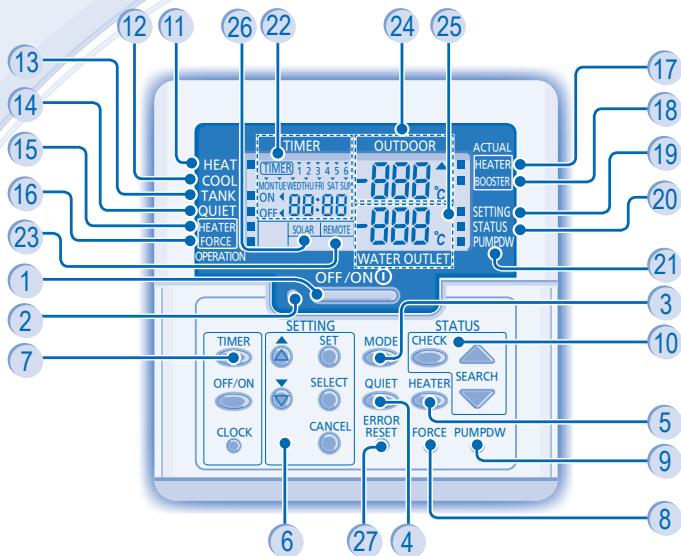
1 OFF/ON Button 2 Operation LED 3 Operation Mode Button 4 Quiet Operation Button 5 Indoor Unit Backup Heater Operation Button 6 System Setting Mode Buttons 7 Timer Setting Group Buttons 8 Force Heater Mode Button 9 System Pumpdown Mode Button 10 System Status Check Mode Buttons 11 Heat Mode OFF/ON Indicator 12 Cool Mode OFF/ON Indicator 13 Tank Mode OFF/ON Indicator
14 Quiet Operation OFF/ON Indicator 15 Backup Heater Request OFF/ON Indicator 16 Force Heater Request OFF/ON Indicator 17 Backup Heater Actual Operation (OFF/ON) Indicator 18 Booster Heater Actual Operation (OFF/ON) Indicator 19 System Setting Mode OFF/ON Indicator 20 System Status Check Mode OFF/ON Indicator 21 System Pumpdown Mode OFF/ON Indicator 22 Timer/Clock Setting Display 23 Remote Display 24 Outdoor Ambient Temperature Display 25 Water Outlet Temperature Display 26 Solar Display 27 Error Reset Button
CONTROL PANEL PREPARATION
Setting Current Day and Time
- Press

- Press


- Press

- Repeat steps 2 and 3 to set the current time.
Notes:
- The current day and time need to be set when:
- The power is turned on for the first time.
- After a long time has elapsed since the power was last turned on.
- The current time that has been set will be the standard time for all the Timer operations.
SETTING UP THE SPECIAL FUNCTIONS
• After initial installation, you can manually adjust the settings. The initial setting remains active until the user changes it. - The control panel can be used for multiple installations. Some functions may not be applicable to your unit. - Ensure the operation LED is in OFF condition before setting.

SELECT FUNCTIONS AND SET YOUR DESIRED TIMER
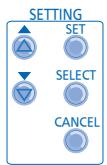
- Press SET and CHECK simultaneously for 5 seconds to enter special setting mode. "SETTING" and "STATUS" indicators are ON.
- Press ▲ or ▼ to browse functions.
- Press SELECT to enter the function.
- Press ⬆ or ⬇ to enable YES or disable NO function, or set your desired day and time.
- Press SET to confirm.
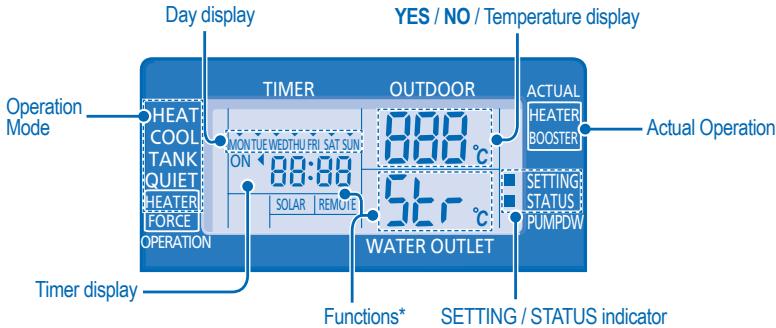
| Function * | Operation Mode/ Actual Operation | Description |
| con | ro on | External Thermo Controller (YES / NO)To set external thermo controller connection. |
| con | TANK | Tank Connection (YES / NO)To set tank connection. |
| Pry | SOLAR | Solar Priority (YES / NO)To choose the solar use for water tank heat up. |
| Pry | HEAT | Heating Priority (YES / NO)To choose the heat pump only use for Heating side during HEAT + TANK mode . |
| int | HEAT | Heating Heat-up Interval SetTo set timer for Heating during HEAT + TANK mode (0.5hour ~ 10hours). |
| int | TANK | Tank Heat-up Interval SetTo set timer for Tank during HEAT + TANK mode (5minutes ~ 1hour 35minutes). |
| dly | BOOSTER | Booster Heater Delay Time SetTo set delay timer for booster heater to ON if tank temperature is not reached (20minutes ~ 1hour 35minutes). |
| Fun | Strl | Sterilization (YES / NO)To set sterilization, if required. |
| Str | | Sterilization Day & Time SetTo set timer for sterilization (only once a week). |
| bo | Strl | Sterilization Temperature SetTo set temperature for sterilization function ( 40°C 75°C ). |
| oPr | Str | Sterilization Continue TimeTo set timer to maintain heating temperature in order to complete the sterilization function (5minutes ~ 1hour). |

TO TURN ON OR OFF THE UNIT
- When unit is ON, operation LED is lit and the actual temperature for water outlet and outdoor ambient are shown on the control panel display.

- To turn ON or OFF the panel/floor heating operation.
- In this mode, the outdoor unit will provide heating capacity to the indoor unit.
- HEAT + TANK MODE
- In this mode, the outdoor unit will provide heating capacity to the sanitary tank and indoor unit.
- This operation is not used when the sanitary water tank is not installed.
• TANK MODE
- To turn ON or OFF the sanitary tank operation.
- In this mode, the outdoor unit will provide heating capacity to the sanitary tank.
- COOL MODE
- To turn ON or OFF the panel operation.
- In this mode, the outdoor unit will provide cooling capacity to the indoor unit.
- COOL + TANK MODE
- In this mode, the outdoor unit will provide cooling capacity to the indoor unit.
- Indoor unit will control booster heat in sanitary tank.

TO ENJOY QUIET ENVIRONMENT
- This operation reduces outdoor unit noise. In this condition, it may cause decrease in heating/cooling capacity.

- The backup heater provides extra heating capacity during cold outdoor temperature and only can operate at heat mode operation for indoor unit.
- The backup heater will automatically turn ON when the setting conditions is fulfilled.
- To cancel the Heater operation manually, press the respective button again.
SYSTEM STATUS CHECK MODE
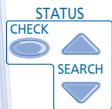
- Press CHECK for 5 seconds to enter STATUS mode.
- Press ▲ or ▼ to check the Water Inlet Temperature, Tank Temperature, Compressor Running Frequency or Error History.
CANCEL
- Press to exit STATUS mode.
- Once STATUS mode is entered, the "STATUS" indicator is ON.
- STATUS mode cannot be activated when the "SETTING" indicator is ON.
ADVANCED OPERATION
- It is strongly recommended to contact the nearest authorized dealer to change the water temperature range. Using the control panel could set the temperature range for water outlet temperature and outdoor ambient temperature.
SYSTEM SETTING MODE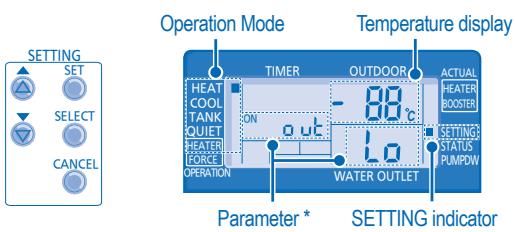
- Press SET for 5 seconds to enter "SETTING" mode. The "SETTING" indicator is ON.
- Press ▲ or ▼ to choose a parameter.
- After selecting the desired parameter, press SELECT to enter the parameter.
- Press ▲ or ▼ to set the desired temperature.
- Press SET again to confirm the setting.
- Repeat steps 2 to 5 to set other parameters.
Operation Mode Parameter * Description
| HEAT | out Lo | Outdoor ambient set temperature at low water outlet temperature (-15°C ~ 15°C). |
| HEAT | out Hi | Outdoor ambient set temperature at high water outlet temperature (-15°C ~ 15°C). |
| HEAT | H20 Lo | Water outlet set temperature at low outdoor ambient temperature (25°C ~ 55°C). |
| HEAT | H20 Hi | Water outlet set temperature at high outdoor ambient temperature (25°C ~ 55°C). |
| HEAT | OFF | Set temperature for turning OFF heating operation (5°C ~ 35°C). |
| HEATER | out ON | Outdoor ambient set temperature for turning ON heater operation (-15°C ~ 20°C). |
| COOL | SET | Water set temperature during cool mode (5°C~20°C) |
| TANK | SET | Sanitary tank set temperature (40°C ~ 75°C). |
WATER TEMPERATURE THERMO SHIFT SETTING
- Press SET within 5 seconds.
- Repeat steps 3 to 5 to set the desired shift temperature (-5°C to 5°C).
Notes:
- Press CANCEL or wait 30 seconds to exit "SETTING" mode.
- The setting temperature will be stored in the system once confirmed.
- "SETTING" mode cannot be activated when the "PUMPDW" and "STATUS" indicators are ON.
Timer Display

| Function | Step |
| Enter timer mode | Timer. |
| Set day & time | Pressorto select your desired day.Pressto confirm"1" will be blinking, pressto set program 1.Pressto select ON or OFF timer.Pressorto select your desired time.If you want to set the timer together with other operations, pressMODEandQUIET.Pressto confirm program 1. The selected day will be highlighted withAfter 2 seconds, the display will move to the next program.Repeat steps 4 to 7 to set programs 2 to 6.During timer setup, if no button is pressed within 30 seconds, or if thebutton is pressed the setting at that moment is confirmed and timer setup is ended. |
| Add/Modify timer | Repeat the steps above. |
| Disable timer | Timer, then pressCANCEL. |
| Enable timer | Timer, then pressSET. |
| Check timer | 1. PressTIMER.2. Pressoruntil your desired day is shown, pressto confirm your selection.Pressorto check the set programs. |
| Cancel timer | 1. PressTIMER.2. Pressoruntil your desired day is shown.SELECTo enter program setting.Pressoruntil your desired program is shown.CANCEL5. Pressto cancel the program. |
Notes:
- You can set the Timer for each day of the week (Monday to Sunday) with 6 programs per day.
- When the unit is switched on by the ON TIMER, it will use the previously set temperature to control the room temperature.
- The same timer program cannot be set for the same day.
- You may also select collective days with the same timer setting.
- Promotes energy saving by allowing you to set up to 6 programs in any given day.

CAUTION
- Switch off the power supply before cleaning.
CLEANING INSTRUCTIONS
- Do not use benzene, thinner or scouring powder.
- Use only soap (≈ pH7) or neutral household detergent.
- Do not use water hotter than 40°C .
HINT
- To ensure optimal performance of the unit, cleaning maintenance has to be carried out at regular intervals. Please consult authorized dealer.

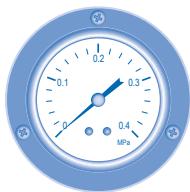
WATER PRESSURE GAUGE


- Do not press or hit the glass cover with hard, pointed objects. This may damage the unit.
- Ensure that the water pressure is between 0.05 to 0.2MPa.
- In case the water pressure is out of the above range, please consult authorized dealer.
INDOOR UNIT & CONTROL PANEL
- Do not splash water directly.
- Wipe the unit gently with a soft, dry cloth.
EXTERNAL FILTER
- Please clean the external filter at least once a year. Fail to do so might cause filter clogged, consequent system breakdown. Please consult authorized dealer.
OUTDOOR UNIT
- Do not obstruct the air inlet and air outlet vents; this may cause low performance or breakdown. Please remove obstacles to ensure proper ventilation.
- During winter, clean and remove snow near the outdoor unit so that snow does not cover the air inlet and air outlet vents.
INSPECTION
- In order to ensure optimal performance of the unit, seasonal inspections on the unit, external filter, and field wiring have to be carried out at regular intervals. This maintenance should be carried out by an authorized dealer.
- Clear any obstruction at the air inlet and air outlet vents of the outdoor unit.
FOR EXTENDED NON-USE
- Turn off the power supply.
NON-SERVICEABLE CRITERIA
TURN OFF POWER SUPPLY, then please consult an authorized dealer under the following conditions:
• Abnormal noise during operation. • Water/foreign particles have entered the control panel. • Water leaks from the indoor unit. • Circuit breaker switches off frequently. • Power cord becomes unnaturally warm.
The following symptoms do not indicate malfunction.
| SYMPTOM | CAUSE |
| Flowing sound during operation. | Refrigerant flow inside the unit. |
| Operation is delayed a few minutes after restart. | The delay is a protection to the unit's compressor. |
| Outdoor unit emits water/steam. | Condensation or evaporation occurs on pipes. |
| Outdoor unit emits steam during heating mode. | This is due to defrost operation happens at the heat exchanger. |
| Outdoor unit does not operate. | When the outdoor temperature is out of the operation condition range, the heatpump system enter protection control. |
| Air-to-Water Heatpump system operation will turn off. | If indoor unit water inlet temperature is lower than 20°C. Backup heater power will turn on to heat up the water. |
| System difficult to heat-up. | When heating is operated by indoor unit together with floor heating or panel heater simultaneously, there may be case where warm water temperature is getting lower and cause floor heating or panel heater heat-up is weaken.When outdoor air temperature is low, it may be difficult to get warm.Is the snow pile blocking the discharge outlet or intake inlet of outdoor unit.When water outlet set temperature is low, it may be difficult to get warm. |
| System cannot get warm instantly. | Due to the nature of the heatpump system, it may take some time to heat-up the water if the unit is operated from cold-start. |
| Operation starts after power resumes. | Unit is operates under auto restart function. |
Check the following before calling for servicing.
| SYMPTOM | CHECK |
| Heating/cooling operation is not working efficiently. | Set the temperature correctly.Is the panel heater/cooler valve closed.Clear any obstruction at the air inlet and air outlet vents of outdoor unit. |
| Noisy during operation. | Check if the unit has been installed at an incline or the cover is not closed properly. |
| The unit does not work. | Check if the circuit breaker is tripped. |
| Operation LED is no lit or control panel display is blank. | Is the power supply off or power failure. |
The operation LED blinks and an error code appears on the control panel display.
| TIMER |
| 1 | 2 | 3 | 4 | 5 | 6 | |
| MON | TUE | WEDTHU | FRI | SAT | SUN | |
| ON | ← | 88 | · | 88 | | |
| OFF | ← | | | | | |
Force Heater Mode Button
| FORCE | In case of a failure of the Air-to-Water Heatpump system, the backup heater can be used to heat up the heating water. Press FORCE to switch on the backup heater.Press OFF/ON to stop the force heater operation.During Force Heater mode, all other operations are not allowed. |
These symbols on the products, packaging, and/or accompanying documents mean that used electrical and electronic products should not be mixed with general household waste.
For proper treatment, recovery and recycling of old products, please take them to applicable collection points, in accordance with your national legislation and the Directives 2002/96/EC and 2006/66/EC.
By disposing of these products correctly, you will help to save valuable resources and prevent any potential negative effects on human health and the environment which could otherwise arise from inappropriate waste handling.
For more information about collection and recycling of old products, please contact your local municipality, your waste disposal service or the point of sale where you purchased the items.
Penalties may be applicable for incorrect disposal of this waste, in accordance with national legislation.

For business users in the European Union
If you wish to discard electrical and electronic equipment, please contact your dealer or supplier for further information.
These symbols are only valid in the European Union. If you wish to discard these items, please contact your local authorities or dealer and ask for the correct method of disposal.
WATER PRESSURE GAUGE


MANOMETER FOR WATER PRESSURE


INDOOR UNIT AND OUTDOOR UNIT
WATER PRESSURE MANOMETER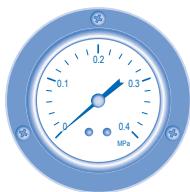


WATER PRESSURE GAUGE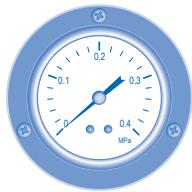

INDOOR UNIT & CONTROL PANEL
WATER PRESSURE GAUGE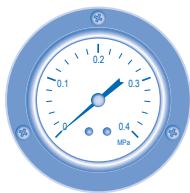


WATER PRESSURE RANGE


Pursuant to the directive 2004/108/EC, article 9(2)
Panasonic Testing Centre
Panasonic Service Europe, a division of
Panasonic Marketing Europe GmbH
Winsbergring 15, 22525 Hamburg, F.R. Germany