
PMP238 - Smartwatch OREGON SCIENTIFIC - Free user manual and instructions
Find the device manual for free PMP238 OREGON SCIENTIFIC in PDF.


| Product Type | Smartwatch |
| Brand | Oregon Scientific |
| Model | PMP238 |
| Dimensions (approx.) | 45 x 38 x 12 mm |
| Weight (approx.) | 50 g |
| Display Type | LCD touchscreen |
| Power Source | Rechargeable lithium-ion battery (250 mAh) |
| Charging Method | USB magnetic charging cable |
| Battery Life | Up to 7 days on typical use |
| Main Functions | Step counter, heart rate monitor, sleep tracking, notifications, timer, stopwatch, alarm |
| Connectivity | Bluetooth 5.0 |
| Compatibility | Android 6.0+ / iOS 12.0+ |
| Water Resistance | IP68 (splash and dust proof, not for swimming) |
| Strap Material | Silicone |
| Care and Cleaning | Wipe with a soft dry cloth; avoid solvents or abrasive cleaners |
| Safety Precautions | Do not expose to extreme temperatures; keep away from magnetic fields |
| Spare Parts | Replacement straps and charging cables available from manufacturer |
| Repairability | Battery replacement by authorized service center |
| General Information | User manual available for free download at notice-facile.com |
Frequently Asked Questions - PMP238 OREGON SCIENTIFIC
User questions about PMP238 OREGON SCIENTIFIC
0 question about this device. Answer the ones you know or ask your own.
Ask a new question about this device
Download the instructions for your Smartwatch in PDF format for free! Find your manual PMP238 - OREGON SCIENTIFIC and take your electronic device back in hand. On this page are published all the documents necessary for the use of your device. PMP238 by OREGON SCIENTIFIC.
USER MANUAL PMP238 OREGON SCIENTIFIC
Pillbox Timer with Pulsemeter
Model: PMP238
User Manual
使用指南
PILLBOX TIMER WITH PULSEMETER
MODEL: PMP238
INSTRUCTION MANUAL
INTRODUCTION
Congratulations on your purchase of the easy-to-use Pillbox timer with Pulsemeter (PMP238).
This product combines several unique features to assist individuals when taking medication. Features include a medication timer with alarm, a touch-sensitive pulsemeter, a digital clock and electro-luminescent (EL) back light.
The PMP238's trouble-free qualities are enhanced through the product's small size, it's lightweight, and pillbox design.
FEATURES
- Pillbox storage
- User select 12 or 24-hour clock
- Pulse monitor
- Countdown timer
- Timer alarm
-
12 /24 hr. real-time clock
-
EL back light
- Low-battery indicator
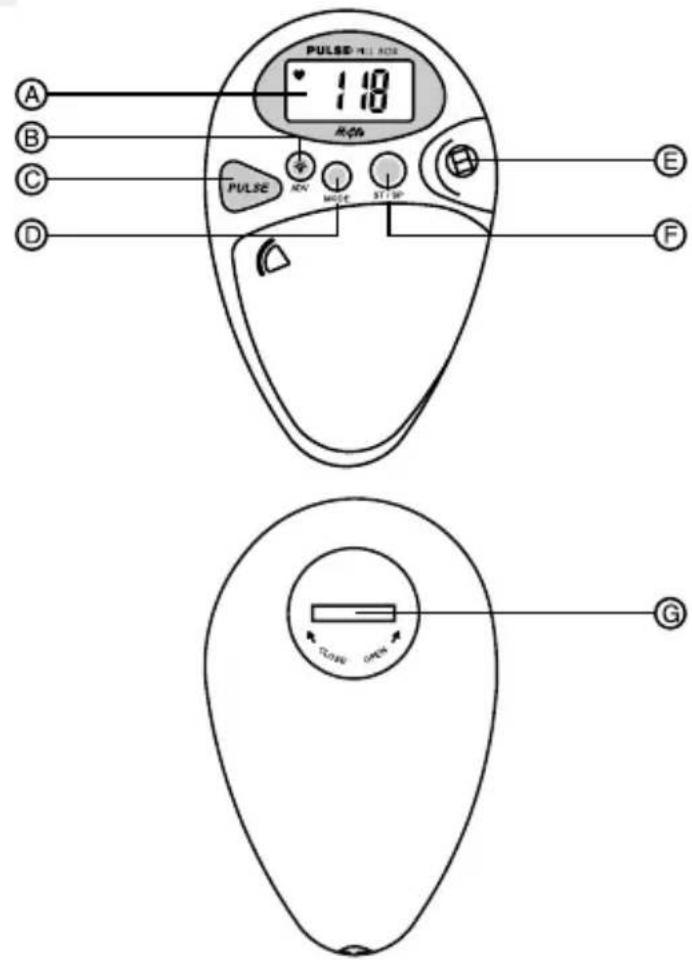
DESCRIPTION AND FUNCTION OF PARTS [FIG. A]
A.LCD
- Multi-function display
B. [ ◎ ADV] Button
- Activates EL back light
- Increases values when setting the clock or timer
C. [PULSE] Button
- Sets the unit in pulse-display mode
- Returns unit to a previous mode from Pulse mode
D. [MODE] Button
- Alternates between clock and timer displays
- Initiates settings changes
E. Pulse Sensor
- Detects and displays a person's pulse rate
F. [ST/SP] Button
- To start or stop the timer
G. Battery Compartment
- One (1) CR2032 3V lithium cell
GETTING STARTIED
BATTERYINSTALLATION
- Using a coin, carefully twist open the back panel.
- Insert one (1) CR2032 3V lithium cell or equivalent

flowchart
graph TD
    A["CR2032"] --> B((+))
    B --> C["Device with Pin 1"]
    C --> D["Device with Pin 2"]
    D --> E["Device with Pin 3"]
    style A fill:#fff,stroke:#000
    style B fill:#fff,stroke:#000
    style C fill:#fff,stroke:#000
    style D fill:#fff,stroke:#000
- Replace the battery compartment door.
Once batteries are inserted into the unit, the user will hear a beeping sound and all segments of the LCD will briefly illuminate. The display will be set to factory values which is 12:00:00AM for time and 0:00:00 for the timer. The current time will require manual setting.
A low-battery icon [∞] indicates that the batteries require changing.

Note: If not disposed properly, batteries can be harmful. Protect the environment by taking exhausted batteries to authorized disposal stations.
MEDICATION STORAGE
This device has a pillbox. Use the compartment for storing medication.
WEARING THE PILLBOX
Using the attached cord, the device can be secured to clothing.
GENERAL OPERATION
ABOUT DISPLAY MODES
This unit has a display for the time, a display for a timer and a pulsemeter display.

Timer Display

Pulse Display
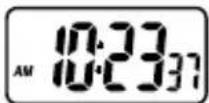
Clock Display
To alternate between the clock and timer display: Press MODE.
To access the pulse display:
Press PULSE.
To exit the pulse display:
Press PULSE.
THE CLOCK
In clock display the unit will show the time. The time can be displayed in a 12-hour or 24-hour format as hours, minutes and seconds.
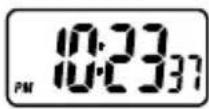
12-hour Display

24-hour Display
To set the current time:
- Enter clock display.
Note: If the countdown timer is displayed, press [MODE] to enter the clock mode. From pulse mode, press [PULSE] to exit pulse mode followed by [MODE] to toggle between clock and timer display.
-
In clock mode, press and hold [MODE] for two seconds. The 12-hour value will flash.
-
Press [ ⚙ ADV] to make a selection between 12-hour and 24-hour format.
- Press [MODE] the hour digits will flash.
- Press [ ⚙ ADV] to advance the numbers until the appropriate hour digit is displayed.
Note: Holding down the button will increase the value rapidly.
- Press [MODE], the minute digits will flash.
- Again, press [ ◎ ADV] to advance the numbers until the appropriate minute digit is displayed.
- Press [MODE], the "seconds" will flash.
- To adjust the "seconds" to zero, press [ ◦ ADV].
- Press [MODE] to exit the setting mode.
The clock is now set.
Note: If no buttons are pressed for 60-seconds during the clock-setting function, the unit will automatically exit the clock-setting mode.
THE TIMER
The timer can count down from a pre-set time. The unit will count down from a maximum time of 29-hours, 59-minutes to zero. In count-down timer mode, once the unit reaches zero it will stop and an alarm will sound.
To indicate that the unit is in timer mode a [☒] timer icon will be displayed.
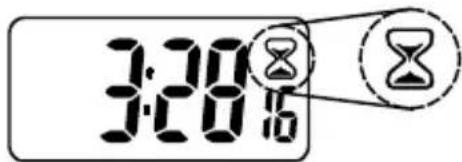
To set the timer:
- Enter timer display.
Note: If the clock is displayed, press [MODE] to enter the timer mode. From pulse mode, press [PULSE] to exit followed by [MODE] to toggle between clock and timer displays.
- To set the timer, press and hold [MODE] for 2 seconds. The hour digits will flash.
- Press [ ◎ ADV] to advance the hour digits to the desired time.
-
Press [MODE] and the minute digits will flash.
-
Press [✿ ADV] to advance the minute digits to the desired time.
The timer is now set.
Note: If no buttons are pressed for 60-seconds during the timer-setting function, the unit will automatically exit the timer-setting mode.
To start the timer:
- Press [ST / SP]. The timer will start.
Note:
- When the timer reaches 0:00:00 a beeping alarm will activate to indicate that the timer has completed its cycle. The alarm will last for one (1) minute. After one minute, the alarm will continue to make one short beeping sound once every two-minutes. To stop the alarm, press any button and the timer will automatically reset to the original timer setting.
- When the timer is active, the timer icon will appear and be flashing on the pulse-mode display and the clock display.
To stop the timer:
- Press [ST / SP]. The timer will pause until [ST / SP] is pressed again.
To clear the timer:
- Press and hold [MODE] for 2-seconds. The digits will return to zero and the hour digits will flash.
- Without entering a number for the hours, press [MODE] again. The Minute digits will flash.
- Press [MODE] a final time to exit the timer-setting mode.
The timer is now cleared.
To reset the timer to its originally set time:
- Press and hold [ST / SP] for 2-seconds. The display will return to its originally set time.
THE PULSEMETER
A person's pulse rate indicates the number of times that the heart beats within a given amount of time. This unit calculate how many times a heart will beat in one minute. Monitoring pulse rate can be useful for determining appropriate medication.
How to use the pulsemeter:
- In either clock or timer display, press [PULSE], the display will show a heart.

natural_image
Simple black heart symbol inside a rounded rectangle (no text or labels)- Position your right index finger so that the padded portion over the pulse sensor.

-
Maintain a steady position, holding too forcefully or too lightly may result in an incorrect reading.
-
Running bars will be displayed first to show detection in progress. After several seconds a pulse rate will be displayed.
Note: When your finger is positioned properly, the heart icon on the display will flash. This indicates that the unit is reading a pulse. The unit will display the number of beats per minute of your heart.
If, for some reason, the unit cannot read a pulse, it will automatically return to the previous display mode after 2 minutes.
Press [PULSE] and try taking your pulse again.
- To exit pulse-mode display, press [PULSE] followed by [MODE] to toggle between clock and count-up / down timer modes.
THE ELECTRO-LUMINESCENT BACKLIGHT
The electro-luminescent (EL) back light illuminates the LCD for easy nighttime viewing.
For nighttime viewing:
Press [ -ADV]. The LCD will illuminate for approximately 5-seconds.
Note: During the 5-second interval when the EL backlight is active, press any button and the back light will remain on. The light will remain for 5- seconds from the last press.
TIPS TO TAKE ACCURATE MEASUREMENT
- Make sure the fingertip has covered the sensor area.
- Rest lightly the fingertip on the sensor. Avoid seeing fingernail turns white that means you are pressing too hard on the sensor.
-
Allow 10-15 seconds to get stable measurement.
-
Rest at least five minutes before taking measurement. Even slight motion may cause biased result.
- Keep calm during measurement.
- Ring, etc. on the finger may restrict normal blood circulation. Remove such object before measurement.
- Avoid using the device in the environment with strong light sources (e.g. direct sunlight) or electromagnetic emitting units (motor, TV, car engine, mobile phone etc).
- Too cold, dry or wet fingertip will cause inaccurate measurement.
- Always keep the fingertip clean before measurement. Grease or dirt on the fingertip will cause inaccurate measurement.
- Person who has thick fingertip skin, severe arrhythmia, arteriosclerosis or other circulatory problems will have biased result using the device. These users are not advised to make reference from the reading.
MAINTENANCE
- Do not immerse the unit in water. If the unit comes in contact with water, dry it immediately with a soft lint-free cloth.
- Do not clean the unit with abrasive or corrosive materials. Abrasive cleaning agents may scratch the plastic parts and corrode the electronic circuit.
- Do not subject the unit to excessive: force, shock, dust, temperature, or humidity. Such treatment may result in malfunction, a shorter electronic life span, damaged batteries, or distorted parts.
- Do not tamper with the unit's internal components. Doing so will terminate the unit's warranty and may cause damage. The unit contains no user-serviceable parts.
- Only use new batteries as specified in this instruction manual.
- Read this instruction manual thoroughly before operating the unit.
SPECIFICATIONS
Operating modes : Clock mode, timer mode and pulse mode
Real -time clock : 12 hour / 24 hour with hour, minute and second display
Timer : Maximum, 29 hours, 59 minutes
Pulse range : 40 to 237 bpm
Power source : 1 x CR2032 3V lithium cell
Dimensions : 16 (D) x 56 (W) x 88 (L) mm
Weight : 37.5 g (approximate)
CAUTION
- The content of this manual is subject to change without further notice.
- Due to printing limitation, the displays shown in this manual may differ from the actual display.
- The contents of this manual may not be reproduced without the permission of the manufacturer.
脉搏测试保健计时药盒
型号:PMP238
说明书
介绍
Oregon Scientific Inc.
Tualatin, Oregon USA
欧西亚中国授权制造商
展科电子(深圳)有限公司
制造地:中国深圳宝安臣田工业区

脈搏測量保健計時藥盒
型號:PMP238
用戶手冊
介紹
natural_image
Simple diagram with a black heart inside a rounded rectangle (no text or symbols)- 把右手食指放在脈跳感應器的塑墊上。

- PILLBOX TIMER WITH PULSEMETER
- INTRODUCTION
- FEATURES
- DESCRIPTION AND FUNCTION OF PARTS [FIG. A]
- A.LCD
- [ ◎ ADV] Button
- [PULSE] Button
- [MODE] Button
- Pulse Sensor
- [ST/SP] Button
- Battery Compartment
- GETTING STARTIED
- BATTERYINSTALLATION
- MEDICATION STORAGE
- WEARING THE PILLBOX
- GENERAL OPERATION
- ABOUT DISPLAY MODES
- THE CLOCK
- To set the current time:
- THE TIMER
- To set the timer:
- To start the timer:
- Note:
- To stop the timer:
- To clear the timer:
- To reset the timer to its originally set time:
- THE PULSEMETER
- How to use the pulsemeter:
- THE ELECTRO-LUMINESCENT BACKLIGHT
- For nighttime viewing:
- TIPS TO TAKE ACCURATE MEASUREMENT
- MAINTENANCE
- SPECIFICATIONS
- CAUTION
- 脉搏测试保健计时药盒
- 介绍
- 脈搏測量保健計時藥盒
- 介紹
Brand : OREGON SCIENTIFIC
Model : PMP238
Category : Smartwatch