
StorageWorks RDX320 USB 3.0 - Disk array HP - Free user manual and instructions
Find the device manual for free StorageWorks RDX320 USB 3.0 HP in PDF.


| Product Type | Removable Disk Backup System (Disk Array) |
| Model | HP StorageWorks RDX320 USB 3.0 |
| Interface | USB 3.0 (backward compatible with USB 2.0) |
| Transfer Rate (Native) | Up to 650 GB/hour (uncompressed); 100 MB/s sustained |
| Supported Cartridge Capacities | 320 GB, 500 GB, 1 TB |
| Internal Docking Station Dimensions (HxWxD) | 1.63 x 5.78 x 6.72 in (4.14 x 14.68 x 17.07 cm) |
| External Docking Station Dimensions (HxWxD) | 2.04 x 4.32 x 7.00 in (5.18 x 10.98 x 17.75 cm) |
| Cartridge Dimensions (HxWxD) | 0.92 x 3.39 x 4.68 in (2.34 x 8.66 x 11.9 cm) |
| Internal Dock Weight | 1.40 lb (635 g) |
| External Dock Weight | 1.19 lb (540 g) |
| Cartridge Weight | 0.38 lb (173 g) |
| Power Requirements (Internal) | +5V ±5% @1.1A, +12V ±10% @0.4A |
| Power Requirements (External) | 100–240 VAC, 50–60 Hz, auto-ranging |
| Power Consumption | 6.6W typical / 20W peak |
| Software Included | HP RDX Continuous Data Protection Software |
| Compatibility | HP ProLiant servers, workstations; Windows, Linux; leading backup software |
| Cartridge Durability | Over 5,000 load/unload cycles |
| Dock Durability | Over 10,000 load/unload cycles |
| Warranty | 1-year, next-day parts exchange, 9x5 phone support |
| Included Accessories | Docking station, HP RDX 320GB cartridge, USB cable, power cord, CDs |
Frequently Asked Questions - StorageWorks RDX320 USB 3.0 HP
User questions about StorageWorks RDX320 USB 3.0 HP
0 question about this device. Answer the ones you know or ask your own.
Ask a new question about this device
Download the instructions for your Disk array in PDF format for free! Find your manual StorageWorks RDX320 USB 3.0 - HP and take your electronic device back in hand. On this page are published all the documents necessary for the use of your device. StorageWorks RDX320 USB 3.0 by HP.
USER MANUAL StorageWorks RDX320 USB 3.0 HP
Need a simple, inexpensive and reliable way to protect the data and systems critical to your small business?
The HP RDX Removable Disk Backup System delivers an easy-to-use, affordable and rugged data protection solution for workstations and servers. Backups are simple and pain-free with drag and drop file access. Protect your entire system with the "hands-free" HP RDX Continuous Data Protection Software. Reduce cost of ownership with long lasting removable disk cartridges and a forward and backward compatible docking station that does not require a costly upgrade for future, higher capacity cartridges. The RDX Removable Disk Backup System offers fast disk-based performance with the ability to store 320 GB, 500 GB or 1 TB of data on a single removable disk cartridge at speeds of up to 650 GB/hr with USB 3.0. Portable, durable and rugged removable disk cartridges simply and securely store your backups off site for complete data protection and peace of mind.
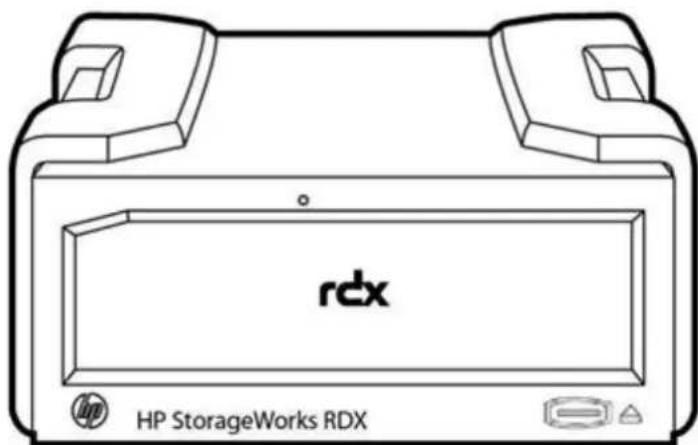
HP RDX Removable Disk Backup System
What's New
The new HP RDX Removable Disk Backup System USB 3.0 provides transfer rates up to 650 GB/hour with random access to file retrieval, while maintaining backwards compatibility with USB 2.0. HP now offers docking stations for the external, internal and Gen8 DL server module.
Features
Key Features
- Drag and drop file backup and restore
- "Hands free" HP RDX Continuous Data Protection Software
- Up to 650 GB/hour* transfer rate (uncompressed data) - * Where 1KB = 1,000 Bytes
- Fast disk based random access file retrieval
- Choice of 320 GB, 500 GB or 1TB capacity removable disk cartridges (interchangeable in any HP RDX docking station)
- Compatibility with leading ISV backup software applications
- Disk cartridges designed for long usage life - over 5,000 load/unload insertions
- Compatible with future higher capacity cartridges and mobile 2.5 inch Hard Disk Drive technology roadmap
- Portable, durable, and shock-proof cartridges
- Easy to install (USB 3.0 plug and play) and compact (half-height 5.25-inch form-factor) internal or external docking station for removable cartridges
- Choice of half-height external, internal, or rack-mount models to fit both servers and workstations
- HP RDX Removable Disk Backup System DL Server Module provides integrated data protection inside HP ProLiant DL380/DL385 G6/G7 rack-optimized servers. The new HP RDX 1TB USB 3.0 Gen8 DL Server Module provides integrated data protection for the HP ProLiant DL380p/DL385p Gen8 rack-optimized servers. The RDX 1TB USB 3.0 Gen8 DL Server Module is the only RDX DL server module that integrates with the HP ProLiant DL380p/DL385p Gen8 rack-optimized servers.
- Broad compatibility with a wide range of servers and operating systems
- Supporting tools -- HP StorageWorks LT&T available as a download with the drive to make installation, performance tuning, and troubleshooting even easier
Customer Benefits
The simple way to protect your business data
- Drag and drop file access makes backup as easy and convenient as the click of a mouse
- Protect your entire system with "hands free" HP RDX Continuous Data Protection Software
- Less time spent on backups with fast disk-based file transfer/retrieval performance
- Flexibility to meet budget and capacity requirements with choice of cartridge capacities
- Usage model fits traditional backup architecture (e.g., ISV software) if required
Reduces total cost of protecting your business data
- Long usage life span of cartridges lowers media replacement costs
- No need to replace docking station when future higher capacity cartridges are available.
Simply and securely store backups off-site for complete data protection.
- Portable/durable disk cartridges enable easy off-site archiving and disaster recovery.
- Rugged cartridge protects data from drops, ESD, and harsh environmental conditions for secure archiving, transportation, and storage.
- Plug and play USB dock allows flexible media rotation and easy future scalability.
Product Highlights
Product Highlights
| Combines the best of tape and disk | The HP RDX Removable Disk Backup System is based on removable disk technology that handles and operates like a traditional tape drive and media, yet has all of the advantages of disk-to-disk backup. The HP RDX Removable Disk Backup System allows backups to be accomplished with "hands free" HP RDX Continuous Data Protection Software, standard ISV backup applications or data can be dragged and dropped directly to the rugged removable storage media. To the host computer, the HP RDX Removable Disk Cartridge appears as a Windows drive letter with the high performance benefits of a disk based backup system. |
| Easy to implement and use | Many small business customers have limited time, knowledge, experience or desire to dedicate to backup and therefore currently have no or very rudimentary backup processes in place. The HP RDX Removable Disk Backup System offers these customers a complete backup solution that is simple to implement and easy to use.Installation is an easy and quick process of connecting the industry standard form factor HP RDX Removable Disk Backup System USB docking station either internally to a server or rack-mount kit or externally as a tabletop. The new HP RDX Removable Disk Backup System DL Server Module provides integrated data protection for HP ProLiant DL380/385 G6/G7 servers. The new HP RDX 1TB USB 3.0 Gen8 DL Server Module provides integrated data protection for the HP ProLiant DL380p/DL385p Gen8 rack-optimized servers. The RDX 1TB USB 3.0 Gen8 DL Server Module is the only RDX DL server module that integrates with the HP ProLiant DL380p/DL385p Gen8 rack optimized servers.Backing up is a simple matter of inserting a removable disk cartridge into the docking station. The cartridge will automatically show up as a letter drive in Windows explorer with no extra formatting or extra steps required. Simply select the files that need to be protected and drag them into the removable drive folder. To restore files, just reverse the process.For a hands free backup experience use the HP RDX Continuous Data Protection Software designed for ease of use and complete workstation and server backup protection. Key features of the HP RDX Continuous Data Protection Software include continuous data protection, file deduplication, bare metal restore, seamless cartridge rotation and archiving support, simple file recovery, complete backup coverage (unlimited file versions, open files, application data user settings and the complete operating system are all automatically backed up), and comprehensive backup status updates. Scheduled backups can be performed through support for standard ISV backup applications. |
| Fast backup and restore | Staff productivity and thus customer service can be negatively impacted by the lengthening backup window and restore/recovery times associated with optical backup solutions. The HP RDX Removable Disk Backup System provides a backup solution that backs up and retrieves data quickly and reliably thus optimizing application availability and staff productivity.Data can be backed up to HP RDX Removable Disk Cartridges at hard drive speeds (up to 360 GB/hour). HP RDX Removable Disk Cartridges are randomly accessed and read so critical single files and selected file stores can be restored in seconds instead of hours. |
Product Highlights
| Affordable cost of ownership | Many small business customers have limited IT budget available for data protection with business owners wanting to reduce IT capital and operational expenditure and protect IT investments to optimize business profitability. The HP RDX Removable Disk Backup System provides a complete backup solution that has low initial acquisition costs and low on-going media and upgrade costs.Total cost of ownership is lowered by the fact that HP RDX Removable Disk Cartridges are specified for 5,000 insertion/removal cycles, so HP RDX Removable Disk Cartridges will not wear out (and therefore need to be replaced) over the typical life cycle of the solution. Upgrade and obsolescence costs are also reduced and investment protection guaranteed by the fact that HP RDX Removable Disk Backup System docking stations are compatible with all current and future higher capacity HP RDX Removable Disk Cartridges. Customers will not need to purchase a new docking station when next generation higher capacity HP RDX Removable Disk Cartridges are released. Similarly, today's HP RDX Removable Disk Cartridges are compatible with all current and future HP RDX docking stations. Customer's existing HP RDX Removable Disk Cartridges will work with next generation HP RDX docking stations when they are released. |
| Removability and portability | To ensure complete data protection against all types of data loss - including on-site system/site destruction or natural disaster - small businesses need the ability to remove their backup and archive data off-site. The HP RDX Removable Disk Backup System provides a backup solution that enables on-site backup data to be removed, stored and rotated off-site in an easy, safe and secure way.HP RDX Removable Disk Cartridges are portable (palm size), durable (2.5 inch disk drive features include ramp loading heads, fluid dynamic bearings, inactive state spin down) and rugged. The robust HP RDX Removable Disk Cartridge is also designed to protect data from potentially damaging Electrostatic Discharge (ESD) and as well as prolonged exposure to heat, dust and other environmental contaminants. |
| Reliability | The HP RDX Removable Disk Backup System provides a docking station specified for more than 10,000 loads and unloads and an HP RDX cartridge specified for over 5,000 load and unloads and long life expectancy. |
| Easy scalability and expandability | Many growing small businesses are experiencing storage capacity growth that is outstripping the capacity/performance of current optical backup solutions. The HP RDX Removable Disk Backup System provides a backup solution that scales easily as capacity needs grow. Adding capacity is a simple matter of adding cartridges to an existing HP RDX Removable Disk Backup System USB docking station. The HP RDX Removable Disk Backup System docking Station will work with all current as well future higher capacity cartridges as they are introduced. The product's roadmap leverages the industry standard mobile 2.5" hard disk drive roadmaps with new higher capacity cartridges expected to be introduced regularly. |
Compatibility
Compatibility
The HP extensive compatibility testing program assures that your HP RDX Removable Disk Backup System works with leading servers, operating systems, and backup applications. For the latest list of servers, workstations, operating systems, and backup software that support the HP RDX Removable Disk Backup System, check the HP RDX Removable Disk Backup System compatibility pages on our web site at: http://www.hp.com/go/connect or www.hp.com/storage/spock.
USB 3.0 is backwards compatible with USB 2.0; however, if the host device does not have a USB 3.0 port, the user will not be able to experience the full transfer rate performance that their RDX USB 3.0 system offers. HP recommends the following controller for a user who currently only has USB 2.0: Startech 2 port PCI Express SuperSpeed USB 3.0 card. HP USB 3.0 controllers do not support this product.
HP Server and Workstation Compatibility
The HP RDX Removable Disk Backup System is compatible with HP ProLiant servers and HP workstations. HP RDX Removable Disk Backup System is supported on the following classes of HP systems:
• HP ProLiant DL servers
Including the HP ProLiant DL380/385 G6/G7 servers for all HP RDX Disk Systems, with the exception of the new HP RDX 1TB USB 3.0 Gen8 DL Server Module (B7B70A), which integrates only with the HP ProLiant DL380p/DL385p Gen8 rack-optimized servers.
• HP ProLiant ML servers • HP Personal Workstations
For details of which HP RDX Removable Disk Backup System models work with which systems, including third-party systems, visit: http://www.hp.com/go/connect or www.hp.com/storage/spock for the latest hardware compatibility information.
NOTE: HP recommends that no more than one HP RDX Removable Disk Backup System be connected to a system at a time.
OS Support
Microsoft® Windows®, Linux (various distributions)
NOTE: Please visit: http://www.hp.com/go/connect or www.hp.com/storage/spock for the latest compatibility information.
Backup Software Support
HP RDX Continuous Data Protection Software, HP Data Protector Express, CA BrightStor ARCServe Backup, Symantec Backup Exec, and other backup applications that support removable disk media
NOTE: Please visit: http://www.hp.com/go/connect or www.hp.com/storage/spock for the latest compatibility information.
Service and Support, HP Care Pack, and Warranty Information
Warranty and Services Included with the Product
Hewlett-Packard provides a 1-year, next-day, parts exchange, limited warranty for the HP RDX Removable Disk Backup System, plus 9x5 phone support for the duration of the warranty.
HP warrants only that the Storage software media will be free of physical defects for a period of ninety (90) days from delivery.
For more information about HP's Global Limited Warranty and Technical Support, visit: www.hp.com/storage/warranty
HP Care Pack Information
For increased uptime, productivity and ROI - HP Care Pack packaged services for Storage
These days, you need to get the most out of your storage investment - you can't afford not to. When you buy HP storage products and solutions, it's also a good time to think about what levels of service and support you may need. To help take the worry out of deploying, designing, maintaining, and managing your environment, we've designed a portfolio of service options that are as flexible, reliable and scalable as your storage. Unlike storage-only vendors, we take a holistic approach to your entire environment, bridging storage, servers, blades, software and network infrastructures with our HP Care Pack packaged services for Storage.
Protect your business beyond the warranty
When it comes to robustness and reliability, standard warranties on today's computing equipment have matured just as the technologies have matured. Good news on some fronts - but also a source of potential problems and subsequent consequences that come from depending on standard warranties alone. Standard warranty protects against product defects and some causes of downtime - but not the business. By using a standard approach to warranty uplifts, such as HP Care Pack Services, you can reduce downtime risks and be more certain of operational consistency for both mission-critical and standard business computing. Simply put, HP Care Pack Services normalize the warranty of combined products - helping you proactively guard against unplanned downtime.
Extending warranties with HP Care Pack Services
For cost-effective upgrading or extending your standard warranty, HP Care Pack Services offer a suite of standard reactive hardware and software support services that are sold separately, or combined as with our Support Plus and Support Plus 24 services. The portfolio also provides a combination of proactive and reactive services, such as Proactive 24 Service and Critical Service. In addition, with HP Proactive Select we offer an innovative approach to service delivery that gives you the flexibility to acquire the specific proactive services you need today, then add services as your needs evolve. HP Proactive Select offers a broad set of technical or per-event type service options - including server, storage, and network, SAN device, and software, environment, installation and education services. Services that you can mix and match depending on your specific requirements, from preliminary planning and equipment delivery to installation, configuration, integration, and testing, through every level of ongoing support. Our HP Care Pack packaged services for Storage assures help when you need it most. And for many products, post-warranty HP Care Pack Services are available when your original warranty has expired.
HP Storage Services: Offering reliability, flexibility and value - just like your storage
HP Storage Services offers a full spectrum of customer care, from technology support to complex migrations to completely managed services. HP Factory Express provides customization, integration and deployment services for turnkey solutions. HP Education offers flexible, comprehensive training on storage networking, disk storage systems, and storage software to help your IT staff get the most out of your investments. And HP Financial solutions extend innovative financing and asset
Service and Support, HP Care Pack, and Warranty Information
management programs to cost-effective buy, manage and eventually retire your older equipment.
HP Storage Services, the trusted business technology experts who manage your technology in action, because when technology works, business works. http://www.hp.com/services/storage
NOTE: Care Pack Services availability may vary by product and country.
HP Care Pack Services are sold by HP and HP Authorized Service Partners:
- Services for customers purchasing from HP or an enterprise reseller are quoted using HP order configuration tools.
- Customers purchasing from a commercial reseller can find HP Care Pack Services at http://www.hp.com/go/lookuptool
Recommended Support
For a higher return on your storage investment, HP Support Plus 24 provides integrated hardware and software support services designed specifically for your technology. Available 24x7, this 3-year combined reactive support option delivers onsite hardware support and over-the-phone software support around-the-clock. Leverage the full strength of HP Technology Services – customers can trust the services professionals at HP to work collaboratively with them, putting our strategic and technical know-how to work across their entire infrastructure.
- Improve uptime with responsive hardware and software services
- Enjoy consistent service coverage across geographically dispersed sites
- Update HP party software at a predictable cost
- Increase customer satisfaction-with no interoperability gaps
http://h20195.www2.hp.com/V2/GetPDF.aspx/5981-6638EN.pdf
Recommended Deployment
HP Installation Service.
For smooth startup and better business outcomes, HP Hardware Installation - this service provides initial hardware installation of your product into your technology environment (system configuration is not included).
Service Features:
- Installation in accordance with your business's configuration requirements
- The ability to achieve more effective data management
http://h71028. www7.hp.com/ERC/downloads/5981-9356EN.pdf
Service and Support, HP Care Pack, and Warranty Information
Related HP Care Pack Services that will enhance your HP product experience
Related Services
For customers who need to improve IT performance and manageability through the use of cost effective flexible proactive services:
Proactive Select - increased flexibility, minimal complexity -- Select what works for you - your package
Delivery planning + Proactive Service Credits
• Credits are used to redeem proactive services - Three 'predefined' service credit levels - 30, 60,180 credits • Additional credits available • Available in 1,3, 4 & 5 year packages
Reactive
- Utilize existing reactive services products - ranging from Next Day, through 24x7, to 6 Hour Call to Repair
eSupport
HP eSupport is a portfolio of technology-based services that assist you with managing your business environment - from the desktop to the data center.
Support Portal
The HP support portal provides one-stop access to the information, tools and services you need to manage the daily operations of your IT environment.
Features include:
- Access to self-solve tools (including search technical knowledge base) • Efficient logging and tracking of support cases • Collaboration with other business and IT professionals
- Download of patches and drivers
- Access to diagnostic tools • Proactive notification of relevant information
Access to certain features of the support portal requires an HP service agreement. To access the support portal, visit: http://www.hp.com/support
Customer Technical Training
Consider education as an integral part of your strategy to get the best return on investment for your HP storage solution. HP offers a variety of training courses on storage software, networking, archiving and disk storage systems. Our classes are available in many delivery modalities from traditional instructor-led courses at one of our 80 training centers worldwide to on-site training customized to your needs or online. www.hp.com/learn/storage
Service and Support, HP Care Pack, and Warranty Information
HP Services Awards
HP Services continues to be recognized for service and support excellence by customers, partners, industry organizations and publications around the world. Recent honors and awards reflect our services team's dedication, technical expertise, professionalism and uncompromising commitment to customer satisfaction. For a list of all our awards, please visit http://h20219.www2.hp.com/services/cache/433028-0-0-225-121.html
Additional Services
Information
For more information about HP Care Pack Services for Storage, please visit: http://www.hp.com/services/storage If you have specific questions, contact your local HP representative. Contact information for a representative in your area can be found at "Contact HP" http://www.hp.com
Kit Contents
Kit Contents
| Model Name | Part Number |
| HP RDX320 USB3.0 Internal Disk Backup System | B7B62A |
| RDX Internal Docking Station, installation poster, HP StorageWorks CD (containing electronic user's guide and drivers), internal USB cable, HP RDX 320 GB Removable Disk Cartridge, HP RDX Continuous Data Protection Software CDNOTE: OD1 will appear after this part number on your sales order if factory integration is indicated. | |
| HP RDX320 USB3.0 External Disk Backup System | B7B63A |
| RDX External Docking Station, installation poster, HP StorageWorks CD (containing electronic user's guide and drivers), external USB cable, power cord/supply, HP RDX 320 GB Removable Disk Cartridge, HP RDX Continuous Data Protection Software CD | |
| HP RDX500 USB3.0 Internal Disk Backup System | B7B64A |
| RDX Internal Docking Station, installation poster, HP StorageWorks CD (containing electronic user's guide and drivers), internal USB cable, HP RDX 500 GB Removable Disk Cartridge, HP RDX Continuous Data Protection Software CDNOTE: OD1 will appear after this part number on your sales order if factory integration is indicated. | |
| HP RDX500 USB3.0 External Disk Backup System | B7B66A |
| RDX External Docking Station, installation poster, HP StorageWorks CD (containing electronic user's guide and drivers), external USB cable, power cord/supply, HP RDX 500 GB Removable Disk Cartridge, HP RDX Continuous Data Protection Software CD | |
| HP RDX1000 USB3.0 Internal Disk Backup System | B7B67A |
| RDX Internal Docking Station, installation poster, HP StorageWorks CD (containing electronic user's guide and drivers), internal USB cable, HP RDX 1 TB Removable Disk Cartridge, HP RDX Continuous Data Protection Software CDNOTE: OD1 will appear after this part number on your sales order if factory integration is indicated. | |
| HP RDX1000 USB3.0 DL Server Backup Module | B7B68A |
| RDX Removable Disk Backup System DL Server Module, installation poster/flyer, HP StorageWorks CD (containing electronic user's guide and drivers), internal USB cable, power cable, HP RDX 1TB GB Removable Disk Cartridge, HP RDX Continuous Data Protection Software CDNOTE: OD1 will appear after this part number on your sales order if factory integration is indicated. | |
| HP RDX1000 USB3.0 External Disk Backup System | B7B69A |
Kit Contents
RDX External Docking Station, installation poster, HP StorageWorks CD (containing electronic user's guide and drivers), external USB cable, power cord/supply, HP RDX 1 TB Removable Disk Cartridge, HP RDX Continuous Data Protection Software CD
HP RDX500 USB3.0 DL Server Backup Module B7B65A
RDX Removable Disk Backup System DL Server Module, installation poster/flyer, HP StorageWorks CD (containing electronic user's guide and drivers), internal USB cable, power cable, HP RDX 500 GB Removable Disk Cartridge, HP RDX Continuous Data Protection Software CD
NOTE: OD1 will appear after this part number on your sales order if factory integration is indicated.
HP RDX1000 USB3.0 Gen8 DL Server Module B7B70A
RDX Removable Disk Backup System DL Server Module, installation poster/flyer, HP StorageWorks CD (containing electronic user's guide and drivers), internal USB cable, power cable, HP RDX 1TB GB Removable Disk Cartridge, HP RDX Continuous Data Protection Software CD
NOTE: OD1 will appear after this part number on your sales order if factory integration is indicated.
HP RDX USB 3.0 Gen8 DL Server Module Docking Station C8S08A
RDX Removable Disk Backup System DL Server Module, installation poster/flyer, HP StorageWorks CD (containing electronic user's guide and drivers), internal USB cable, power cable, HP RDX Continuous Data Protection Software CD. Is backwards and forwards compatible with any RDX capacity media.
HP RDX USB 3.0 Internal Docking Station C8S06A
RDX Removable Disk Backup System Internal Docking Station installation poster/flyer, HP StorageWorks CD (containing electronic user's guide and drivers), internal USB cable, power cable, HP RDX Continuous Data Protection Software CD. Is backwards and forwards compatible with any RDX capacity media.
HP RDX USB 3.0 External Docking Station C8S07A
RDX Removable Disk Backup System External Docking Station installation poster/flyer, HP StorageWorks CD (containing electronic user's guide and drivers), external USB cable, power cable, HP RDX Continuous Data Protection Software CD. Is backwards and forwards compatible with any RDX capacity media.
| Media | HP RDX 320GB Removable Disk Cartridge | Q2041A |
| HP RDX 500GB Removable Disk Cartridge | Q2042A | |
| HP RDX 1TB Removable Disk Cartridge | Q2044A |
Kit Contents
Rack-Mount Options
HP StoreEver 1U USB Rack-mount Kit
A8007B
NOTE: 1U USB Rack-Mount Kit holds up to two internal HP RDX Removable Disk Backup Systems
NOTE: Please refer to the following web page for further information:
http://h18006.www1.hp.com/products/storageworks/1urackmount/index.html
Technical Specifications
| HP RDX 320 HP RDX 500 | HP RDX 1TB | HP RDX DL380/385 G6/G7 server module | HP RDX1TB USB3.0 Gen8 DL Server Module | |||
| Dimensions | Form Factor | Half-height, 51⁄4 in (internal module) | Half-height, 51⁄4 in (internal module) | Half-height, 51⁄4 in (internal module) | Module with Half-height, 51⁄4 inch internal RDX drive | Module with Half-height, 51⁄4 inch internal RDX drive |
| Physical (HxWxD) Internal Dock | 1.63 x 5.78 x 6.72 in (4.14 x 14.68 x 17.07 cm) | 1.63 x 5.78 x 6.72 in (4.14 x 14.68 x 17.07 cm) | 1.63 x 5.78 x 6.72 in (4.14 x 14.68 x 17.07 cm) | 3.36 x 7.00 x 6.72 in (8.535 x 17.791 x 17.072 cm) | 3.36 x 7.00 x 6.72 in (8.535 x 17.791 x 17.072 cm) | |
| Physical (HxWxD) External Dock | 2.04 x 4.32 x 7.00 in (including bezel) (5.18 x 10.98 x 17.75 cm (including bezel)) | 2.04 x 4.32 x 7.00 in (including bezel) (5.18 x 10.98 x 17.75 cm (including bezel)) | 2.04 x 4.32 x 7.00 in (including bezel) (5.18 x 10.98 x 17.75 cm (including bezel)) | N/A N/A | ||
| Physical (HxWxD) Removable Disk Cartridge | 0.92 x 3.39 x 4.68 in (2.34 x 8.66 x 11.9 cm) | 0.92 x 3.39 x 4.68 in (2.34 x 8.66 x 11.9 cm) | 0.92 x 3.39 x 4.68 in (2.34 x 8.66 x 11.9 cm) | 0.92 x 3.39 x 4.68 in (2.34 x 6.66 x 11.9 cm) | 0.92 x 3.39 x 4.68 in (2.34 x 8.66 x 11.9 cm) | |
| Shipping (HxWxD) Internal/External | 8.07 x 7.87 x 15.75 in (20.5 x 20.0 x 40 cm) | 8.07 x 7.87 x 15.75 in (20.5 x 20.0 x 40 cm) | 8.07 x 7.87 x 15.75 in (20.5 x 20.0 x 40 cm) | 8.07 x 7.87 x 15.75 in (20.5 x 2.0 x 40 cm) | 8.07 x 7.87 x 15.75 in (20.5 x 20.0 x 40 cm) | |
| Shipping (HxWxD) Removable Disk Cartridge | 3.35 x 5.32 x 7.99 in (8.50 x 13.5 x 20.3 cm) | 3.35 x 5.32 x 7.99 in (8.50 x 13.5 x 20.3 cm) | 3.35 x 5.32 x 7.99 in (8.50 x 13.5 x 20.3 cm) | 3.35 x 5.32 x 7.99 in (8.50 x 2.0 x 40 cm) | 3.35 x 5.32 x 7.99 in (8.50 x 13.5 x 20.3 cm) | |
| Weight | Out of box, Internal Dock | 1.40 lb (635 g) | 1.40 lb (635 g) | 3.29 lb (1494 g) | 3.29 lb (1494 g) | |
| Out of box, External Dock | 1.19 lb (540 g) | 1.19 lb (540 g) | N/A N/A | |||
| Out of box, Removable Disk Cartridge | 0.38 lb (173 g) | 0.41 lb (188 g) | 0.38 lb (173 g)/ 0.41 lb (188 g) | 0.38 lb (173 g)/ 0.41 lb (188 g) | ||
| Shipping, Internal Dock Shipping | 3.37 lb (1.53 kg) | 3.45 lb (1.57 kg) | 3.45 lb (1.57 kg) | 3.45 lb (1.57 kg) | ||
| External Dock | 3.5 lb (1.59 kg) | 3.58 lb (1.63 kg) | N/A N/A | |||
| Shipping, Removable Disk Cartridge | 0.77 lb (349 g) | 0.81 lb (367 g) | 0.77 lb (349 g)/ 0.81 lb (382 g) | 0.77 lb (349 g)/ 0.81 lb (382 g) | ||
| Orientation | Internal Dock | Horizontal +/- 90 degrees | Horizontal +/- 90 degrees | Horizontal +/- 90 degrees | Horizontal +/- 90 degrees | |
| External Dock | Horizontal +/- 90 degrees | Horizontal +/- 90 degrees | N/A N/A | |||
Technical Specifications
| Capacity | Native | 320 GB 500 GB | 500 TB | 1 TB | |
| Compressed(assumes 2:1 application based data compression) | 640 GB | 1 TB | 1TB | 2 TB | |
| Performance | Average sustained transfer rate, native | 100MBs 100MBs 100MBs 100MBs | |||
| Average sustained transfer rate, compressed(assumes 2:1 application based data compression) | 200MBs 200MBs 200MBs 200MBs | ||||
| Burst transfer rate(USB) | 600MBs 600MBs 600MBs 600MBs | ||||
| Data access time | 12 milliseconds 12 milliseconds 12 milliseconds 12 milliseconds | ||||
| Supported file systems | FAT32, NTFS, ext2,ext3 | FAT32, NTFS, ext2,ext3 | FAT32, NTFS, ext2,ext3 | FAT32, NTFS, ext2,ext3 | |
| Reliability | MTBF (Dock) | 550,000 hours@100% duty cycle | 550,000 hours@100% duty cycle | 550,000 hours@100% duty cycle | 550,000 hours@100% duty cycle |
| MTBF (cartridge) | 500,000 hours 500,000 hours 500,000 hours 500,000 hours | ||||
| Uncorrected Error Rate | 1 error per 1014 bits read | 1 error per 1014 bits read | 1 error per 1014bits read | 1 error per 1014 bits read | |
| Media | Docking StationLoad/Unload cycles | 10,000 (minimum) | 10,000 (minimum) | 10,000 (minimum) | 10,000 (minimum) |
| Cartridge Load/Unloadcycles | 5,000 (minimum) | 5,000 (minimum) | 5,000 (minimum) | 5,000 (minimum) | |
| Compatibility | Backwards and forwards compatibility to any current/future RDX removable disk cartridge | Backwards and forwards compatibility to any current/future RDX removable disk cartridge | Backwards and forwards compatibility to any current/future RDX removable disk cartridge | Backwards and forwards compatibility to any current/future RDX removable disk cartridge | |
| Interface | Interface type | USB 3.0 USB 3.0 USB 3.0 USB 3.0 | |||
| USB connector | USB standard series B receptacle | USB standard series B receptacle | USB standard series B receptacle | USB standard series B receptacle | |
| Power Specifications | Power requirements,Internal | +5V ± 5% (100mV Max ripple) @1.1A +12V ± 10% (150mV Max ripple) @0.4A | +5V ± 5% (100 mV Max ripple) @ 1.1 A +12V ± 10% (150 mV Max ripple) @ 0.4 A | +5V ± 5% (100 mV Max ripple) @ 1.1 A +12V ± 10% (150 mV Max ripple) @ 0.4 A | +5V ± 5% (100 mV Max ripple) @ 1.1 A +12V ± 10% (150 mV Max ripple) @ 0.4 A |
| Power requirements,External | 100 to 240 VAC, 50-60 Hz, auto-ranging | 100 to 240 VAC, 50-60 Hz, auto-ranging | 100 to 240 VAC, 50-60 Hz, auto-ranging | 100 to 240 VAC, 50-60 Hz, auto-ranging | |
| Power consumption | 6.6W/20 W (typical)/ (peak) | 6.6W/20 W (typical)/ (peak) | 6.6W/20 W (typical)/ (peak) | 6.6W/20 W (typical)/ (peak) | |
| Environmental Specifications (all | Temperature range | 5 to 45°C; 41 to 113°F (operating)-40 to 65°C; -40 to 149°F (non operating) | |||
Technical Specifications
| models) | Relative humidity | 20 to 80%, non condensing (operating), 10 to 90%, non-condensing (non operating) |
| Altitude | -50 ft to 10,000 ft (operational), -50 ft to 35,000 ft (non operational) | |
| Vibration | random vib(operational): 0.30Grms 5Hz to 500Hz, sine vib(non-op): 0.75g (0-peak) 5Hz to 500Hz, random(non-op): 2.41Grms 5Hz to 500Hz half sine 31G @2.6ms (operational), half sine 71G @ 2m (non operational) | |
| Shock: Cartridge non operating drop shock | 1 m (39.4 in) drop to tile over concrete floor |
Standards Compliance (all cURus Recognized (UL60950), TÜV EN60950 (IEC 60950), FCC and CE Declaration of Conformity, C-TICK models) Approved (AS/NZS CISPR22), VCCI Approved, RRL Approved, BSMI Approved, GOSH Approved
| Front Panel LEDIndicators and buttons(all models) | Eject Button/Power LED(on docking station) | Off | No Power |
| Green | Power is on and unit is working correctly | ||
| Blinking Green | Unit is ejecting the cartridge | ||
| Amber | Unit has detected a fault. For more information run a diagnostic application | ||
| Blinking Amber | Host computer is accessing the media, and the user has pressed the eject button. The unit will eject the cartridge after the host access completes | ||
| Activity LED (on cartridge) | Green | Cartridge is ready | |
| Blinking Green | Activity (Reading, writing, seeking) | ||
| Amber | Unit has detected a fault. For more information run a diagnostic application | ||
| Emergency Eject Hole | Emergency Eject Hole to eject the cartridge | ||
© Copyright 2013 Hewlett-Packard Development Company, L.P.
The information contained herein is subject to change without notice.
Microsoft and Windows NT are US registered trademarks of Microsoft Corporation. Intel is a US registered trademark of Intel Corporation.
The only warranties for HP products and services are set forth in the express warranty statements accompanying such products and services. Nothing herein should be construed as constituting an additional warranty. HP shall not be liable for technical or editorial errors or omissions contained herein.
For RDX drives and media, 1 GB = 1 billion bytes. Actual formatted capacity is less.



- WHAT'S NEW
- FEATURES
- KEY FEATURES
- CUSTOMER BENEFITS
- PRODUCT HIGHLIGHTS
- COMPATIBILITY
- HP SERVER AND WORKSTATION COMPATIBILITY
- OS SUPPORT
- BACKUP SOFTWARE SUPPORT
- SERVICE AND SUPPORT, HP CARE PACK, AND WARRANTY INFORMATION
- WARRANTY AND SERVICES INCLUDED WITH THE PRODUCT
- HP CARE PACK INFORMATION
- FOR INCREASED UPTIME, PRODUCTIVITY AND ROI - HP CARE PACK PACKAGED SERVICES FOR STORAGE
- PROTECT YOUR BUSINESS BEYOND THE WARRANTY
- EXTENDING WARRANTIES WITH HP CARE PACK SERVICES
- HP STORAGE SERVICES: OFFERING RELIABILITY, FLEXIBILITY AND VALUE - JUST LIKE YOUR STORAGE
- RECOMMENDED SUPPORT
- RECOMMENDED DEPLOYMENT
- RELATED HP CARE PACK SERVICES THAT WILL ENHANCE YOUR HP PRODUCT EXPERIENCE
- RELATED SERVICES
- REACTIVE
- ESUPPORT
- SUPPORT PORTAL
- FEATURES INCLUDE
- CUSTOMER TECHNICAL TRAINING
- HP SERVICES AWARDS
- ADDITIONAL SERVICES
- INFORMATION
- KIT CONTENTS
- HP RDX500 USB3.0 DL SERVER BACKUP MODULE B7B65A
- HP RDX1000 USB3.0 GEN8 DL SERVER MODULE B7B70A
- HP RDX USB 3.0 GEN8 DL SERVER MODULE DOCKING STATION C8S08A
- HP RDX USB 3.0 INTERNAL DOCKING STATION C8S06A
- HP RDX USB 3.0 EXTERNAL DOCKING STATION C8S07A
Brand : HP
Model : StorageWorks RDX320 USB 3.0
Category : Disk array