
FRS5010WML - Cooker Profilo - Free user manual and instructions
Find the device manual for free FRS5010WML Profilo in PDF.


Pick your language and provide your email: we'll send you a specifically translated version.
| Product Type | Freestanding Cooker |
| Brand | Profilo |
| Model | FRS5010WML |
| Width | 50 cm |
| Depth | 60 cm |
| Height | 85 cm |
| Weight | 45 kg |
| Energy Type | Gas (Natural Gas / LPG convertible) |
| Number of Gas Burners | 4 |
| Ignition | Automatic electric ignition |
| Oven Type | Gas oven with thermostat |
| Oven Capacity | 58 liters |
| Oven Features | Interior light, grill function |
| Control Type | Knobs |
| Safety Features | Flame failure device (thermocouple) on all burners |
| Cleaning | Removable pan supports, enameled oven interior |
| Spare Parts | Available via official distributors |
| Repairability | Repairable by qualified technician, spare parts available |
| Color | White |
Frequently Asked Questions - FRS5010WML Profilo
How do I ignite the gas burners?
Press and turn the knob to the ignition position while pressing the ignition button. If the burner does not light, check the gas supply and igniter.
What type of gas can I use?
The cooker is factory-set for natural gas but can be converted to LPG using the provided conversion kit. Refer to the manual for instructions.
How do I clean the oven?
Remove racks and wipe the interior with a damp cloth. Use mild detergent. Avoid abrasive cleaners. The oven has an enamel coating for easy cleaning.
What should I do if the oven does not heat?
Check the gas supply and that the oven knob is fully pressed when turning. If the problem persists, the thermocouple may need replacement. Contact a technician.
Can I install the cooker myself?
Installation must be performed by a qualified professional to ensure proper gas connection and ventilation. Incorrect installation may cause safety hazards.
What is the flame failure device?
It is a safety feature that automatically cuts off gas flow if the flame goes out, preventing gas leaks.
How do I replace the oven light bulb?
Disconnect the cooker from power. Remove the glass cover and replace the bulb with a high-temperature rated oven bulb (15W/300°C). Reassemble.
Why does the burner flame flicker?
Flickering can be due to drafts, clogged burner ports, or improper gas pressure. Clean the burner caps and ensure the gas supply is stable.
Is the appliance repairable?
Yes, spare parts such as burners, thermocouples, and knobs are available. Repairs should be done by an authorized service center.
What is the warranty period?
Typically 2 years for domestic use. Check your purchase documents or contact Profilo support for exact details.
User questions about FRS5010WML Profilo
0 question about this device. Answer the ones you know or ask your own.
Ask a new question about this device
No questions yet. Be the first to ask one.
Download the instructions for your Cooker in PDF format for free! Find your manual FRS5010WML - Profilo and take your electronic device back in hand. On this page are published all the documents necessary for the use of your device. FRS5010WML by Profilo.
USER MANUAL FRS5010WML Profilo

natural_image
Diagram of a device with an open drawer and a computer monitor, showing directional arrows indicating movement (no text or symbols present)natural_image
Illustration of a cooking pot on a gas stove (no text or symbols)natural_image
Pure mechanical diagram showing gear and shaft components without any text or symbolsnatural_image
Line drawing of a rectangular plate with horizontal slats (no text or symbols)Izgara
natural_image
Diagram of a celestial body with arrows and dotted trajectory lines, no text or symbols presentnatural_image
Abstract diagram with concentric circles, arrows, and a central graduation cap (no text or symbols)natural_image
Diagram of a circular object with internal lines and arrows, no readable text or symbols presentnatural_image
Simple line drawing of a circular object with a small square and a small rectangular mark on top (no text or symbols)natural_image
Illustration of hands holding a blank document with an upward arrow, next to a grid device (no text or symbols)natural_image
Technical line drawing of a mechanical device with wheels and a handle (no text or symbols)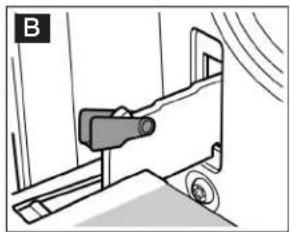
natural_image
Mechanical device with wheels and a sensor mounted on a bracket (no visible text or symbols)
natural_image
Mechanical device with a rotating lever and directional arrow, labeled 'A' (no text or symbols on the device itself)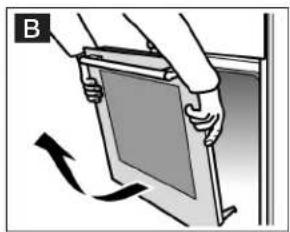
natural_image
Illustration of hands holding a tablet with an arrow indicating rotation (no text or symbols)natural_image
Diagram of a mechanical assembly with two plates and arrows indicating motion (no text or symbols)
natural_image
Diagram of a mechanical device with a downward arrow indicating motion or force, no text or symbols presentnatural_image
Diagram of a mechanical device with a curved arrow indicating motion, no text or symbols present
natural_image
Simple line drawing of a mechanical component with a rotating arrow (no text or symbols)natural_image
Two trays of rectangular containers with granular contents, placed on a metal grater (no text or symbols visible)Pastakalipları

Table of contents
Click a title to access it
Manual assistant
Powered by Anthropic
Waiting for your message
Product information
Brand : Profilo
Model : FRS5010WML
Category : Cooker