STV-24LEDGW9 - Television Shivaki - Free user manual and instructions
Find the device manual for free STV-24LEDGW9 Shivaki in PDF.


Pick your language and provide your email: we'll send you a specifically translated version.
| Product Type | LED Television |
| Screen Size | 24 inches (61 cm) |
| Resolution | 1366 x 768 pixels (HD Ready) |
| Display Technology | LED-backlit LCD |
| Aspect Ratio | 16:9 |
| Dimensions (with stand) | 55.5 x 39.5 x 18 cm |
| Dimensions (without stand) | 55.5 x 33.5 x 8 cm |
| Weight (with stand) | Approx. 3.8 kg |
| Power Supply | AC 100-240V, 50/60Hz |
| Power Consumption (typical) | 30 W |
| Standby Power Consumption | < 1 W |
| Tuner | DVB-T/T2/C (digital terrestrial and cable) |
| HDMI Inputs | 2 |
| USB Ports | 1 (supports media playback) |
| VGA Input | 1 |
| Composite AV Input | 1 (via adapter) |
| Headphone Output | 1 (3.5 mm jack) |
| Remote Control | Included (batteries not included) |
| VESA Mount | 100 x 100 mm (compatible with wall mount) |
| Operating Temperature | 0°C to 40°C |
| Cleaning Instructions | Use a soft, dry cloth; avoid water or chemicals |
| Safety Warnings | Do not block ventilation; keep away from moisture; use grounded outlet |
| Repairability | Spare parts available via authorized service centers |
Frequently Asked Questions - STV-24LEDGW9 Shivaki
How do I connect external devices like a set-top box or game console?
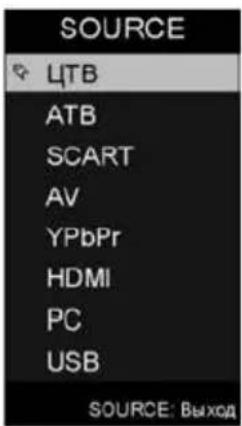
Use the HDMI ports (labeled HDMI 1 and HDMI 2) to connect HD devices. For older devices, use the AV input (requires a 3.5mm to RCA adapter, not included). Switch input source using the 'Source' button on the remote.
Can I mount this TV on a wall?
Yes, the TV supports VESA 100 x 100 mm wall mount. Use appropriate screws (not included) and ensure the wall can support the weight. Follow the instructions in the manual for safe mounting.
How do I perform a channel scan?
Press 'Menu' on the remote, go to 'Channel' or 'Tuning', select 'Auto Scan' or 'Auto Tuning'. The TV will search for digital and analog channels. Make sure the antenna is connected properly.
What should I do if the TV does not turn on?
Check the power cord connection and ensure the outlet is working. Press the power button on the TV or remote. If the standby light is off, try a different outlet. If still not working, contact support.
How can I clean the screen safely?
Use a soft, dry microfiber cloth to gently wipe the screen. Do not apply liquid or cleaning agents directly. For stubborn stains, slightly dampen the cloth with water and wring thoroughly before wiping.
Does this TV support USB media playback?
Yes, the USB port allows playback of photo, music, and video files. Connect a USB drive and select 'Media' from the source menu. Supported formats include MP4, AVI, JPEG, MP3, etc.
How do I reset the TV to factory settings?
Press 'Menu', go to 'Settings' or 'Setup', locate 'Factory Reset' or 'Default'. Confirm the action. All settings will be erased, and the TV will restart.
Why is the remote control not working?
Check if batteries are installed correctly and have charge. Ensure there are no obstacles between remote and TV sensor. Try pointing directly at the TV. If still not working, replace batteries or contact support.
Can I connect headphones?
Yes, plug headphones into the 3.5 mm headphone jack on the side of the TV. The internal speakers will mute automatically when headphones are connected.
What is the warranty period for this TV?
Shivaki typically offers a 1-year warranty for manufacturing defects. Check your purchase receipt or contact the retailer for specific warranty terms.
User questions about STV-24LEDGW9 Shivaki
0 question about this device. Answer the ones you know or ask your own.
Ask a new question about this device
No questions yet. Be the first to ask one.
Download the instructions for your Television in PDF format for free! Find your manual STV-24LEDGW9 - Shivaki and take your electronic device back in hand. On this page are published all the documents necessary for the use of your device. STV-24LEDGW9 by Shivaki.
USER MANUAL STV-24LEDGW9 Shivaki
Mini AV кабель




ПОДСОЕДИНЕНИЕ И НАСТРОЙКА
Sleep: Off
Brightness/Contrast/Sharpness/Saturation/Hue
Music (Музыка)
Table of contents
Click a title to access it
Manual assistant
Powered by Anthropic
Waiting for your message
Product information
Brand : Shivaki
Model : STV-24LEDGW9
Category : Television