
929-072 - Paper shredder Marquant - Free user manual and instructions
Find the device manual for free 929-072 Marquant in PDF.


| Product Type | Paper Shredder |
| Brand | Marquant |
| Model | 929-072 |
| Shred Type | Cross-Cut (P-4) |
| Sheet Capacity | 10 sheets (A4, 80 gsm) |
| Bin Capacity | 15 liters |
| Shred Size | 4 x 40 mm |
| Shred Speed | 3 m/min |
| Shred Width | 220 mm |
| Duty Cycle | 3 minutes on / 30 minutes off |
| Power Input | 180 W |
| Voltage | 220-240 V, 50/60 Hz |
| Material | ABS plastic, steel cutters |
| Dimensions (L x W x H) | 340 x 260 x 420 mm |
| Weight | 4.2 kg |
| Noise Level | 60 dB |
| Safety Features | Auto-start when paper inserted, auto-stop when bin full, reverse function, overload protection |
| Additional Functions | Shreds paper, staples, and paper clips |
| Maintenance | Oil blades every 2 months with shredder oil |
| Cleaning | Wipe exterior with damp cloth, empty bin regularly |
| Spare Parts Available | Yes (blades, motor, bin) |
| Repairability Index | 7/10 |
| Certifications | CE, RoHS |
| Warranty | 2 years |
Frequently Asked Questions - 929-072 Marquant
User questions about 929-072 Marquant
0 question about this device. Answer the ones you know or ask your own.
Ask a new question about this device
Download the instructions for your Paper shredder in PDF format for free! Find your manual 929-072 - Marquant and take your electronic device back in hand. On this page are published all the documents necessary for the use of your device. 929-072 by Marquant.
USER MANUAL 929-072 Marquant
Operating Instructions for Document Shredder
929-072

natural_image
Black and silver cylindrical trash bin with handle, no visible text or symbolsSV Bruksanvisning i original
NO Bruksanvisning i original
EN Operating instructions in original
Read the Operating Instructions carefully before use.
SAFETY INSTRUCTIONS
Read these instructions carefully before use.
Symbols used
DANGER: indicates an immediately dangerous situation that can lead to fatal or serious personal injury if the instructions are not followed. Only used for extremely dangerous situations.
WARNING: indicates a potentially dangerous situation that could lead to fatal or serious personal injury if the instructions are not followed.
IMPORTANT: indicates a potentially dangerous situation that could lead to minor personal injury if the instructions are not followed. It also warns of unsafe procedures.
Always take basic safety precautions when using electrical appliances to safeguard against the risk of fire, electric shock or personal injury.
Avoid the risk of electric shock.
- Only insert objects that are to be destroyed through the infeed opening. Keep your hair, clothing, hands, jewellery and other foreign objects away from the infeed opening.
- Check that the total power consumption for the power consumers connected to the circuit does not exceed the capacity of the circuit.
- Connect the machine to an easily accessible mains outlet near the machine.
- Keep children and pets at a safe distance from the machine when it is in use. The machine is not intended to be used by children.
- Never expose the machine to liquids or moisture.
IMPORTANT: Follow the instructions below to reduce the risk of personal injury or material damage.
- The machine is intended to be used indoors to shred paper and other things. Never use the machine outdoors. Never use the machine for anything other than its intended purpose.
- Remove paper clips and staples from the paper before feeding it into the machine.
- Empty the collection tray regularly for best performance.
- Only use the machine on a stable, level surface.
- Do not allow the power cord to hang over the edge of a table or worktop, or where there is a risk of tripping over it.
TECHNICAL DATA
| Shredding | Transverse | strips |
| Shredding capacity (A4, 80 g/m2) | 10 sheets 80 g/m ^2 | |
| Infeed width (mm) 220 | ||
| Feed speed 2.3 m/min | ||
| Weight | 4.25 | kg |
| Duty factor 2 min On/30 min Off | ||
| Noise level max 72 dB |
DESCRIPTION
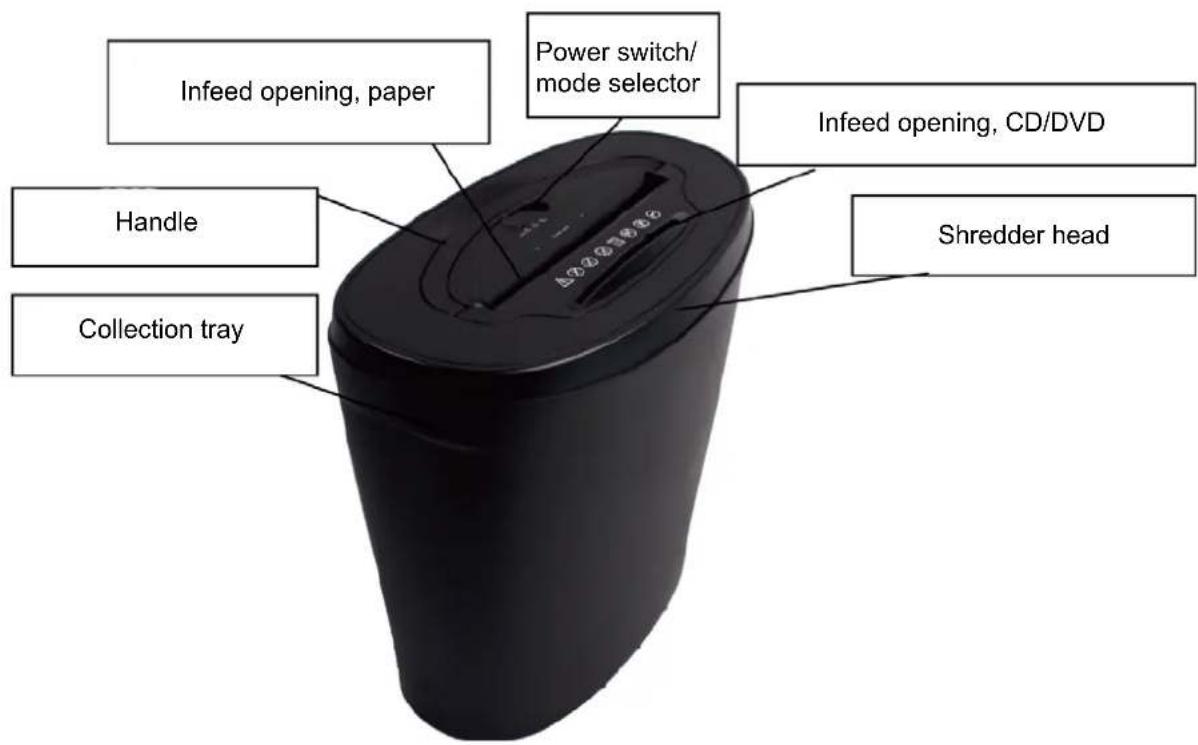
USE
Installation
- Place the upper part of the shredder firmly over the collection tray.
IMPORTANT: Never try to dismantle the machine. The machine does not contain any parts that can be repaired by the user.
WARNING:


- Never run paper through the machine while CD/DVD discs are being shredded, or the reverse.
- Keep your hair, clothing, hands, jewellery and other foreign objects away from the infeed opening.

- Remove paper clips and staples from the paper before feeding it into the machine.

- Keep children and pets at a safe distance from the machine when it is in use.

Do not use solvent-based detergents, aerosol products or other inflammable products on or near the machine.
WARNING: Check that the power switch/mode selector is in the OFF position before plugging in the power cord, otherwise there is a risk of serious personal injury.
- Set the power switch/mode selector to AUTO.
Use
There are three positions for the power switch/mode selector: AUTO, OFF and REV (reversing).
- In AUTO mode the machine starts when paper, credit cards or CD/DVDs are inserted in the infeed opening. The machine switches off when the complete object has passed through the opening.
- In OFF mode the machine is switched off. Set the power switch to OFF when the machine is not in use.
• REV mode is used to feed material that has jammed backwards through the infeed opening.
Shredding capacity
The machine can shred 10 sheets of paper 80 g/m ^2 or 1 credit card, or 1 CD/DVD.
Paper blockage and overloading
The machine is equipped with overheating protection. The overheating protection switches off the motor if the machine is run so long that the motor overheats. This is quite normal. The machine starts again when the motor has cooled.
The overheating protection will trip in the following situations.
- If the machine is run at maximum load continuously for 2 minutes or longer.
- If more that 10 sheets of paper 80g / m2 are fed in at once, or if the paper bundles are not fed straight into the machine.
This can cause the overheating protection to trip. Minor paper blockages can occur if the bundles of paper fed in are too thick, which in turn can trip the overheating protection and shorten the useful life of the machine. Remedy minor paper blockages by pulling out the paper through the infeed opening. Serious paper blockages can occur if very thick bundles of paper are fed in. Too much paper in the infeed opening will cause the motor to overheat and the overheating protection to trip, and will disconnect the power supply to the motor.
Minor paper blockage
- Set the power switch to the OFF position and unplug the power cord.
- Rip or cut away any paper that sticks out over the machine.
- Lift off the top and empty the collection tray. Replace the top on the collection tray and plug in the power cord.
- It may be necessary to remove more paper. Set the power switch/mode selector to REV mode to feed out the jammed paper. Set the power switch/mode selector to AUTO mode when all the paper has been fed out and the machine is no longer blocked.
- Resume working.
MAINTENANCE
WARNING: Switch off the machine and unplug the power cord before cleaning and/or servicing, and before moving the machine.
- Clean the casing with a damp cloth. Allow to completely dry before using.
- Never use liquids or abrasive detergents.
- Store in a dry and cool place.
• Lubricate the shredding blades regularly by using the lubrication paper.
Subject to printing errors and design changes over which we have no control. In the event of problems, please contact our service department.
www.jula.com

Care for the environment!
Must not be discarded with household waste! This product contains electrical or electronic components that should be recycled. Leave the product for recycling at the designated station e.g. the local authority's recycling station.
Brand : Marquant
Model : 929-072
Category : Paper shredder