
FT4913C - Television FUNAI - Free user manual and instructions
Find the device manual for free FT4913C FUNAI in PDF.


| Product Type | LED TV |
| Brand | Funai |
| Model | FT4913C |
| Screen Size (Diagonal) | 32 inches (81 cm) |
| Display Resolution | 1366 x 768 pixels (HD Ready) |
| Backlight Type | LED |
| Aspect Ratio | 16:9 |
| Power Consumption (Max) | 50 W |
| Power Supply | AC 100-240 V, 50/60 Hz |
| Weight (without stand) | Approx. 5.5 kg |
| Dimensions (without stand) | 73.5 x 43.5 x 8.0 cm (WxHxD) |
| VESA Mount Compatibility | 200 x 200 mm |
| Built-in Tuner | DVB-T/T2/C |
| HDMI Ports | 2 |
| USB Ports | 1 |
| Composite Video Input | 1 (shared with audio) |
| Audio Output | Headphone jack, Digital optical |
| Speaker Power | 2 x 8 W |
| Remote Control | Included (batteries not included) |
| Cleaning Instructions | Wipe with a soft, dry cloth; do not use liquid cleaners |
| Safety Warning | Do not block ventilation openings; unplug during lightning storms |
| Spare Parts Availability | Contact Funai support or authorized service centers |
| Repairability Index | 5.4 / 10 (estimated) |
Frequently Asked Questions - FT4913C FUNAI
User questions about FT4913C FUNAI
0 question about this device. Answer the ones you know or ask your own.
Ask a new question about this device
Download the instructions for your Television in PDF format for free! Find your manual FT4913C - FUNAI and take your electronic device back in hand. On this page are published all the documents necessary for the use of your device. FT4913C by FUNAI.
USER MANUAL FT4913C FUNAI
FUNAI CORPORATION LIMITED WARRANTY
FUNAI CORP. will repair this product, free of charge in the USA in the event of defect in materials or workmanship as follows:
DURATION: PARTS:
LABOR:
FUNAI CORP. will provide parts to replace defective parts without charge for one (1) year from the date of original retail purchase. Two (2) years for Picture Tube. Certain parts are excluded from this warranty. FUNAI CORP. will provide the labor without charge for a period of ninety (90) days from the date of original retail purchase.
LIMITS AND EXCLUSIONS:
This warranty is extended only to the original retail purchaser. A purchase receipt or other proof of original retail purchase will be required together with the product to obtain service under this warranty.
This warranty shall not be extended to any other person or transferee.
This warranty is void and of no effect if any serial numbers on the product are altered, replaced, defaced, missing or if service was attempted by an unauthorized service center. This FUNAI CORPORATION Limited warranty does not apply to any the product not purchased and used in the United States.
This warranty only covers failures due to defects in material or workmanship which occurs during normal use. It does not cover damage which occurs in shipment, or failures which are caused by repairs, alterations or product not supplied by FUNAI CORP., or damage which results from accident, misuse, abuse, mishandling, misapplication, alteration, faulty installation, improper maintenance, commercial use such as hotel, rental or office use of this product or damage which results from fire, flood, lightning or other acts of God.
THIS WARRANTY DOES NOT COVER PACKING MATERIALS, ANY ACCESSORIES (EXCEPT REMOTE CONTROL), ANY COSMETIC PARTS, COMPLETE ASSEMBLY PARTS, DEMO OR FLOOR MODELS.
FUNAI CORP. AND ITS REPRESENTATIVES OR AGENTS SHALL IN NO EVENT BE LIABLE FOR ANY GENERAL, INDIRECT OR CONSEQUENTIAL DAMAGES ARISING OUT OF OR OCCASIONED BY THE USE OF OR THE INABILITY TO USE THIS PRODUCT. THIS WARRANTY IS MADE IN LIEU OF ALL OTHER WARRANTIES, EXPRESS OR IMPLIED, AND OF ALL OTHER LIABILITIES ON THE PART OF FUNAI, ALL OTHER WARRANTIES INCLUDING THE WARRANTY OF MERCHANTABILITY, AND FITNESS FOR A PARTICULAR PURPOSE, ARE HEREBY DISCLAIMED BY FUNAI AND ITS REPRESENTATIVES IN THE UNITED STATES.
ALL WARRANTY INSPECTIONS AND REPAIRS MUST BE PERFORMED BY FUNAI AUTHORIZED SERVICE CENTER. THIS WARRANTY IS VALID WHEN THE UNIT IS CARRIED-IN TO FUNAI AUTHORIZED SERVICE FACILITY. WHEN YOU ARE RETURNING THE PRODUCT FOR SERVICE TO THE FACTORY SERVICE CENTER, PLEASE CONTACT THE FUNAI SERVICE DEPARTMENT TO RECEIVE A R.A. (RETURN AUTHORIZATION) NUMBER PRIOR TO SHIPPING. ANY POSTAGE, INSURANCE AND SHIPPING COST, INCURRED IN PRESENTING OR SENDING YOUR FUNAI/SYMPHONIC PRODUCT FOR SERVICE ARE SHIPPER'S RESPONSIBILITY.
CAREFULLY PACK WITH PROPER PACKING MATERIALS, PREFERABLY IN THE ORIGINAL CARTON, AND IF NEEDED DOUBLE BOX.
ATTACH WRITTEN DOCUMENTATION DETAILING THE COMPLAINT, TO THE OUTSIDE OR INSIDE OF THE CARTON.
THE PRODUCT MUST BE ACCOMPANIED BY A COPY OF THE ORIGINAL RETAIL PURCHASE RECEIPT. IF NO PROOF OF PURCHASE IS ATTACHED, THE WARRANTY WILL NOT BE HONORED AND REPAIRS COSTS WILL BE CHARGED.
IMPORTANT:
THIS LIMITED WARRANTY GIVES YOU SPECIFIC LEGAL RIGHTS, YOU MAY HAVE OTHER RIGHTS THAT VARY FROM STATE TO STATE, IF, AT ANY TIME DURING THE WARRANTY PERIOD, YOU ARE UNABLE TO OBTAIN SATISFACTION WITH THE REPAIR OF THIS PRODUCT, PLEASE CONTACT FUNAI CORP.
ATTENTION:
FUNAI CORP. RESERVES THE RIGHT TO MODIFY ANY DESIGN OF THIS PRODUCT WITHOUT PRIOR NOTICE. To locate your nearest FUNAI Authorized Service Center or general service procedure, please call 1-800-242-7158 or write to the following:
FUNAI CORPORATION
ctory Service Center
100 North Street; Teterboro, NJ 07608
Tel:1-800-242-7158
OEMN01596
Printed in Malaysia
L9719XV * * * * *
Owner's Manual

FUNAI
13 INCH
COLOR TELEVISION
99.9.14
石田
FT4913C
FEATURES
● Tinted, Bright Black Matrix Picture Tube
● 181 Channel Selection- All VHF/UHF channels plus up to 125 cable channels.
- PLL Frequency Synthesized Tuning- The latest PLL frequency synthesized electronic tuning system provides free and easy channel selection, and lets you tune directly to any channel using the channel number buttons (0\~9 and +100-key) on the remote control.
● On-Screen Function Display.
● Full-Function Remote Control
● Sleep Timer
- Closed Caption Decoder- You may view specially labeled (cc) TV programs, movies, news, prerecorded tapes, etc. with either a dialogue caption or text display added to the program.
● Auto Shut Off Function- If there is no air signal input from the antenna terminal and no operation for 15 minutes, the TV will turn itself off automatically.
● V-CHIP- Enables parents to prevent their children from watching inappropriate material on TV.
PRECAUTION
● Place your TV in a room with adequate ventilation.
- Keep your TV set away from sources of direct heat, such as heat registers or direct sunlight.
● Do not place your TV on soft surfaces, such as rugs or blankets.
● Leave enough room for air to circulate around the bottom, top and back of the set.
The serial number of this product may be found on the back of the TV. No others have the same serial number as yours. You should record the number and other vital information here and retain this book as a permanent record of your purchase to aid identification in case of theft.
| Date of Purchase | Dealer Phone No. | ||
| Dealer Purchase from | Model No. | ||
| Dealer Address | Serial No. |
This Owner's Manual is made of recycled paper.
IF YOU NEED ADDITIONAL ASSISTANCE FOR SET-UP OR OPERATING AFTER READING OWNER'S MANUAL PLEASE CALL TOLL FREE 1-800-242-7158
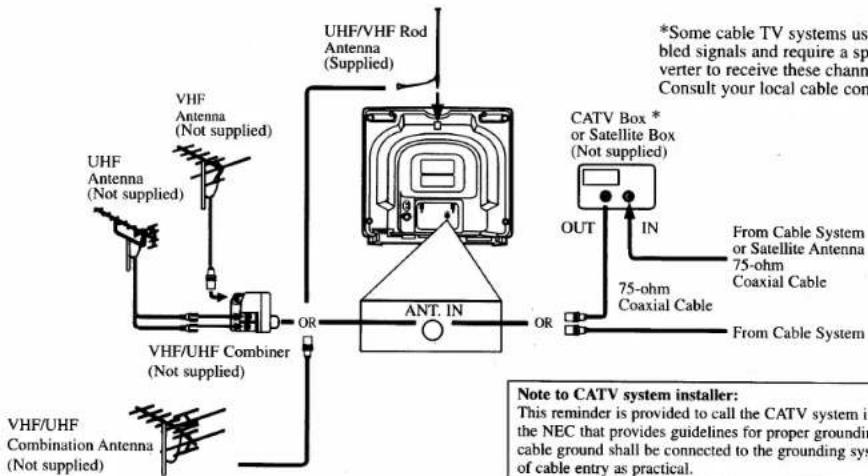
ANTENNA/CABLE CONNECTIONS
Before plugging the UHF/VHF Rod
Antenna into the ANT(enna). IN jack, check that the pin is not bent. If it is bent, straighten the pin as illustrated, then plug the pin into the ANT(enna). IN jack.
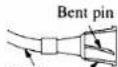
Cable
(Needs to be straightened)
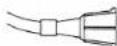
(Straight pin)
FCC WARNING- This equipment may generate or use radio frequency energy. Changes or modifications to this equipment may cause harmful interference unless the modifications are expressly approved in the instruction manual. The user could lose the authority to operate this equipment if an unauthorized change or modification is made.
Note to CATV system installer:
This reminder is provided to call the CATV system installer's attention to Article 820-40 of the NEC that provides guidelines for proper grounding and, in particular, specifies that the cable ground shall be connected to the grounding system of the building as close to the point of cable entry as practical.
CLOSED CAPTION
This TV can receive C1 and C2 of Caption and Text.
Caption Mode
(1) Characters can be displayed on the TV screen when the received broadcast signal contains the Caption Signals.
(2) Paint-on mode: Displays input characters on the screen immediately.
Pop-on mode: Once characters are stored in memory, it is displayed all at once.
Roll-up mode: Displays the characters continuously by scrolling (max. 4 lines)
Note: If the CAPTION C1 or C2 is selected but the caption signal is not included, characters will not be displayed.
Text Mode
(1) Displays the text on the screen by scrolling (max. 7 lines)
(2) If the received broadcast signal does not contain the caption or text signal, no change will occur.
Notes:
(1) When your TV receives a special effects playback signal (i.e., Search, Slow, Still) from a VCR's video output channel (CH3 or CH4), your TV may not display the correct caption or text.
(2) Captions and texts may not match the TV voice exactly.
(3) Interference may cause the closed caption system not to function properly.
(4) The caption or text characters will not be displayed while the menu display or function's display is shown.
(5) If you see this screen!!

If your TV displays a black box on the screen, this means that your TV is set to TEXT mode. To clear screen, select CAPTION C1, C2 or CAPTION [OFF].
WARNING:
TO REDUCE THE RISK OF FIRE OR ELECTRIC SHOCK, DO NOT EXPOSE THIS APPLIANCE TO RAIN OR MOISTURE.

CAUTION
RISK OF ELECTRIC SHOCK DO NOT OPEN

CAUTION: TO REDUCE THE RISK OF ELECTRIC SHOCK, DO NOT REMOVE COVER (OR BACK) NO USER SERVICEABLE PARTS INSIDE. REFER SERVICING TO QUALIFIED SERVICE PERSONNEL.

THIS SYMBOL INDICATES THAT DANGEROUS VOLTAGE CONSTI-TUTING A RISK OF ELECTRIC SHOCK IS PRESENT WITHIN THIS UNIT.

THIS SYMBOL INDICATES THAT THERE ARE IMPORTANT OPERATING AND MAINTENANCE INSTRUCTIONS IN THE LITERATURE ACCOMPANY-ING THE APPLIANCE.
The important note is located on the rear of the cabinet.
IMPORTANT SAFEGUARDS
- Read instructions-All the safety and operating instructions should be read before the appliance is operated.
- Retain Instructions-The safety and operating instructions should be retained for future reference.
- Heed Warnings-All warnings on the appliance and in the operating instructions should be adhered to.
- Follow Instructions-All operating and use instructions should be followed.
- Cleaning-Unplug TV from the wall outlet before cleaning. Do not use liquid cleaners or aerosol cleaners. Use a damp cloth for cleaning.
EXCEPTION: A product that is meant for uninterrupted service and, that for some specific reason, such as the possibility of the loss of an authorization code for a CATV converter, is not intended to be unplugged by the user for cleaning or any other purpose, may exclude the reference to unplugging the appliance in the cleaning description otherwise required in item 5.
- Attachments-Do not use attachments not recommended by the TV manufacturer as they may cause hazards.
- Water and Moisture-Do not use this TV near water, for example, near a bath tub, wash bowl, kitchen sink, or laundry tub, in a wet basement, or near a swimming pool, and the like.
- Accessories-Do not place this TV on an unstable cart, stand, tripod, bracket, or table. The TV may fall, causing serious injury to someone, and serious damage to the appliance. Use only with a cart, stand, tripod, bracket, or table recommended by the manufacturer, or sold with the TV.
Any mounting of the appliance should follow the manufacturer's instructions and should use a mounting accessory recommended

by the manufacturer. An appliance and cart combination should be moved with care. Quick stops, excessive force, and uneven surfaces may cause the appliance and cart combination to overturn.
- Ventilation-Slots and openings in the cabinet and the back or bottom are provided for ventilation and to ensure reliable operation of the TV and to protect it from overheating, these openings must not be blocked or covered. The openings should never be blocked by placing the TV on a bed, sofa, rug, or other similar surface. This TV should never be placed near or over a radiator or heat register. This TV should not be placed in a built-in installation such as a bookcase or rack unless proper ventilation is provided or the manufacturer's instructions have been adhered to.
- Power Sources-This TV should be operated only from the type of power source indicated on the marking label. If you are not sure of the type of power supply to your home, consult your appliance dealer or local power company. For TVs intended to operate from battery power, or other sources, refer to the operating instructions.
- Grounding or Polarization-This TV is equipped with a polarized alternating-current line plug(a plug having one blade wider than the other). This plug will fit into the power outlet only one way. This is a safety feature. If you are unable to insert the plug fully into the outlet, try reversing the plug. If the plug should still fail to fit, contact your electrician to replace your obsolete outlet. Do not defeat the safety purpose of the polarized plug.
- Power-Cord Protection-Power-supply cords should be routed so that they are not likely to be walked on or pinched by items placed upon or against them, paying particular attention to cords at plugs, convenience receptacles, and the point where they exit from the appliance.
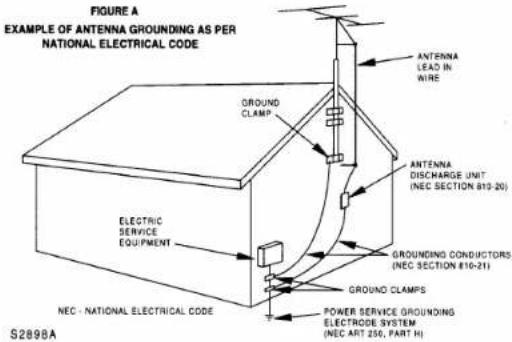
- Outdoor Antenna grounding-If an outside antenna or cable system is connected to the TV, be sure the antenna or cable system is grounded so as to provide some protection against voltage surges and built-up static charges. Article 810 of the National Electrical Code, ANSI/NFPA No. 70, provides information with respect to proper grounding of the mast and supporting structure, grounding of the lead-in wire to an antenna discharge unit, size of grounding conductors, location of antenna-discharge unit, connection to grounding electrodes, and requirements for the grounding electrode. (Fig. A)
- Lightning-For added protection for this TV receiver during a lightning storm, or when it is left unattended and unused for long periods of time, unplug it from the wall outlet and disconnect the antenna or cable system. This will prevent damage to the TV due to lightning and power-line surges.
- Power Lines-An outside antenna system should not be located in the vicinity of overhead power lines or other electric light of power circuits, or where it can fall into such power lines or circuits. When installing an outside antenna system, extreme care should be taken to keep from touching such power lines or circuits as contact with them might be fatal.
- Overloading-Do not overload wall outlets and extension cords as this can result in a risk of fire or electric shock.
-
Object and Liquid Entry-Never push objects of any kind into this TV through openings as they may touch dangerous voltage points or short out parts that could result in a fire or electric shock. Never spill liquid of any kind on the TV.
-
Servicing-Do not attempt to service this TV yourself as opening or removing covers may expose you to dangerous voltage or other hazards. Refer all servicing to qualified service personnel.
- Damage Requiring Service-Unplug this TV from the wall outlet and refer servicing to qualified service personnel under the following conditions:
a. When the power supply cord or plug is damaged or frayed.
b. If liquid has been spilled, or objects have fallen into the TV.
c. If the TV has been exposed to rain or water.
d. If the TV does not operate normally by following the operating instructions. Adjust only those controls that are covered by the operating instructions, as improper adjustment of other controls may result in damage and will often require extensive work by a qualified technician to restore the TV to its normal operation.
e. If the TV has been dropped or damaged in any way. f. When the TV exhibits a distinct change in performance—this indicates a need for service. - Replacement Parts-When replacement parts are required, be sure the service technician uses replacement parts specified by the manufacturer that have the same characteristics as the original part. Unauthorized substitutions may result in fire, electric shock, injury to persons or other hazards.
- Safety Check-Upon completion of any service or repairs to this TV, ask the service technician to perform routine safety checks to determine that the TV is in proper operating condition.
- Heat-This TV product should be situated away from heat sources such as radiators, heat registers, stoves, or other products (including amplifiers) that produce heat.
OPERATING CONTROLS AND FUNCTIONS
- FRONT PANEL -
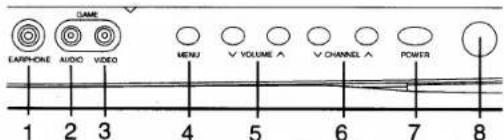
- REMOTE CONTROL -
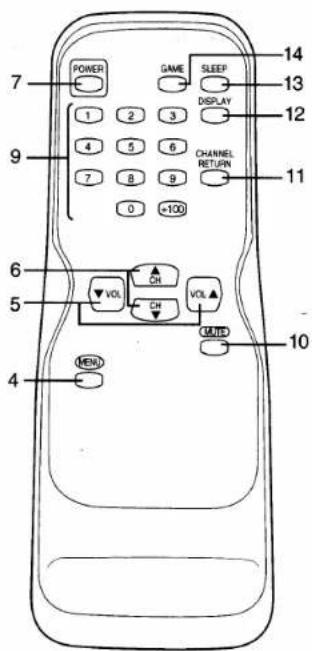
- EARPHONE jack- To connect earphone (not supplied) for personal listening.
- AUDIO (in) jack- Connect to the audio output jack of a video camera or VCR.
- VIDEO (in) jack- Connect to the video output jack of a video camera or VCR.
- MENU button- Press to display the menu on the TV screen.
- VOLUME ▲/▼ buttons- Press to control the volume level.
Press to determine a setting mode from the menu on the TV screen. (only the VOL ▲ button)
Press to select or adjust from a particular menu. (for example: Language Selection, Channel Presetting, Closed Caption Selection, Picture Adjustment, V-CHIP Set Up)
- CHANNEL ▲/▼ buttons- Press to select memorized channel.
Press to select a setting mode from the menu on the TV screen.
Press to select item you want to adjust in the picture control mode. - POWER button- Press to turn the TV ON and OFF.
- Infrared Sensor Window- Receives the infrared control signals from the remote control unit.
- CHANNEL NUMBER button- Press two digits to directly access the desired channel. Remember to press a "0" before a single digit channel.
+100 button- Press to select cable channels which are equal or greater than number 100.
- REAR PANEL -
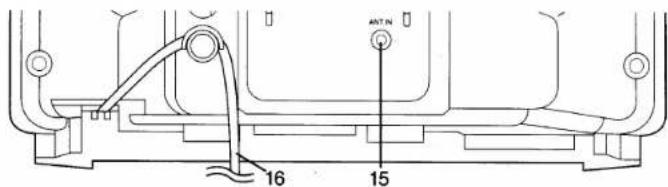
INSTALLING THE BATTERIES
10.MUTE button- Press the MUTE button to turn off the sound portion of the TV program. (Volume level display turns LIGHT RED from LIGHT BLUE.) Press the MUTE button again or press the VOL(ume) ▲ or ▼ button to restore sound.
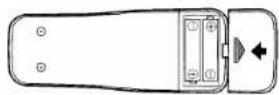
11.CHANNEL RETURN button- Press this button to go back to the previously viewed channel. For example, pressing the CHANNEL RETURN button once will change channel display from CH 3 (present channel) to CH 10 (previously viewed channel), and pressing it a second time will return from CH 10 to CH 3.
12.DISPLAY button- Press to display the channel number on the screen. If you press it again, the channel number will disappear.
13.SLEEP button- Press the SLEEP button to display the sleep timer and start the function. The shut off time can be determined by the number of times you press the button. (0, 10, 20, 30,..90, 0 minutes)
14. GAME button- Press to set the Game mode and external input mode at the same time. Press the GAME button again to exit the this mode.
15.ANT(enna). IN jack- Connect to an antenna, cable system, or satellite system.
16. AC cord- Connect to a standard AC outlet (120V/60Hz).
1
Slide the battery compartment cover on the remote unit.
2
Insert 2 "AA" penlight batteries into battery compartment in the direction as indicated by the polarity (+ / -) markings. Batteries installed with incorrect polarity may damage the remote unit.
3
Replace the cover.
LANGUAGE SELECTION
If you want to change the language of the on-screen menu, follow the procedure below.
1
Connect the power cord to a standard AC outlet.
2
Press the POWER button to turn on the TV.
3
Press the MENU button so that the menu display appears on the TV screen.
4
Press the CH(annel) ▲ or ▼ button to point to "[ENGLISH]".
5
Select "ENGLISH" or "ESPAÑOL" = Spanish by using the VOL(ume) ▲ or ▼ button.
6
Press the MENU button to exit the menu.
▶ PICTURE CHANNEL SET V-CHIP SET UP CAPTION [OFF] [ENGLISH]ESPAÑOL
PICTURE CHANNEL SET V-CHIP SET UP CAPTION [OFF] · [ENGLISH]ESPAÑOL
CHANNEL PRESETTING
To preset a channel or to change a preset channel, follow the procedure below.
1
Press the POWER button to turn on the TV.
2
Press the MENU button so that the menu display appears on the TV screen.
3
Press the CH(annel) ▲ or ▼ button to point to "CHANNEL SET". Then, press the VOL(ume) ▲ button.
▶ PICTURE CHANNEL SET V-CHIP SET UP CAPTION [OFF] [ENGLISH]ESPAÑOL
PICTURE CHANNEL SET V-CHIP SET UP CAPTION [OFF] [ENGLISH]ESPAÑOL
4
Press the CH(annel) ▲ or ▼ button to point to "AUTO MEMO". Then, press the VOL(ume) ▲ button.
The tuner scans and memorizes all active channels in your area.
● The TV distinguishes between standard TV channels and cable channels.
- When AUTO MEMO action is completed, the lowest memorized channel reappears on the screen.
- When you press the CH(annel) ▲ or ▼ button after selecting AUTO MEMO, the tuner will stop at the memorized channels only.
[ADD/DELETE FUNCTION]
1) Press the MENU button so that the menu display appears on the TV screen.
2) Press the CH(annel) ▲ or ▼ button to point to "CHANNEL SET". Then, press the VOL(ume) ▲ button.
3) Press the VOL(ume) ▲ button so that "ADD/DELETE" is selected.
4) Use the CH(annel) ▲ or ▼ button to select the channel you wish to put into memory or to erase from memory. Note: The display will return to the screen in about 10 seconds. Perform "ADD/DELETE" function while this display appears on the screen.
- Press the VOL(ume) ▲ or ▼ button to light up the channel number in LIGHT BLUE if you wish to add the channel into memory.
- Press the VOL(ume) ▲ or ▼ button to light up the channel number in LIGHT RED if you wish to erase the channel from memory.
5) Press the MENU button to exit the menu.
ADD/DELETE AUTO MEMO
PICTURE ▶ CHANNEL SET V-CHIP SET UP CAPTION [OFF] [ENGLISH]ESPAÑOL
▶ ADD/DELETE AUTO MEMO
OPERATIONS
WATCHING A TV PROGRAM
1) Press the POWER button to turn on the TV.
2) Select the desired channel with the CH(annel) ▲ or ▼ button.
3) Adjust the volume to the desired listening level using the VOL(ume) ▲ or ▼ button.
4) Adjust picture controls for a natural looking image. (See "PICTURE ADJUSTMENT".)
SETTING THE SLEEP TIMER
The sleep timer function enables you to shut off the power without pressing the POWER button after a desired time period.
1) Press the POWER button to turn on the TV and press the SLEEP button on the remote control.
2) You may change the sleep time with pressing the SLEEP button on the remote control repeatedly. The timer is set up to 90 minutes, 10 minutes each time the SLEEP button is pushed. (The timer display counts up and sleep timer will be displayed on the screen when you press the SLEEP button on remote control.)
Note: When you disconnect the unit from the AC outlet, or if you have a power failure, the sleep time will be lost.
CLOSED CAPTION SELECTION
You may view specially labeled (cc) TV programs, movies, news, prerecorded tapes, etc. with either a dialogue caption or text display added to the program.
←: Press the VOL(ume) ▲ or ▼ button.
1) Press the MENU button so that the menu display appears on the TV screen. 2) Press the CH(annel) ▲ or ▼ button to point to "CAPTION". 3) Press the VOL(ume) ▲ or ▼ button to select the mode you wish. 4) When done, press the MENU button to exit the menu.

flowchart
Diagram showing a sequence of picture channels and caption text mappings, each linked to a bilingual translation.PICTURE ADJUSTMENT
1) Press the MENU button so that the menu display appears on the TV screen.
2) Press the VOL(ume) ▲ button so that "PICTURE" is selected.
3) Select the feature you wish to adjust with the CH(annel) ▲ or ▼ button and adjust it with the VOL(ume) ▲ or ▼ button.
GAME MODE
Set to the most suitable position for TV
GAME.
BRIGHT
Adjust until the whitest parts of the picture are as bright as you prefer.
+ : increase brightness - : decrease brightness
CONTRAST
Adjust to increase or decrease contrast.
+ : increase contrast
-: decrease contrast
COLOR
Adjust to be brilliant or pale color.
Adjust to obtain natural skin tones.
+ : greenish tone
- : reddish tone
Notes:
● In the above steps, the picture adjustment display will disappear from the TV screen after about 10 seconds unless you press any
buttons, even though you may not be fin- ished. Press the MENU and VOL(ume) ▲ button so that "PICTURE" is selected. Then, press the CH(annel) ▲ or ▼ button repeat-
- If you adjust the other Picture control after you set the Game mode to [ON], the Game mode is set to [OFF] automatically.
[USING THE GAME BUTTON]
You may also set the Game mode and external input mode at the same time by pressing the GAME button on the remote control. "GAME" appears on the TV screen.
● To exit the Game mode and external input mode, press the GAME button on the remote control again.
● To cancel the Game mode only, adjust the picture control. In this case, "VIDEO" instead of "GAME" appears on the TV screen.
- When you press the GAME button if the TV is off, the TV turns on and will be in the Game mode and external input mode automatically.
- If you connect the audio input jack of this TV to the audio output jacks of a game equipment, you need to use the RCA pin plug adapter (supplied).
![FUNAI FT4913C - [USING THE GAME BUTTON] - 1](/content/2026/05/1047765/images/b92ea9076038cc1cc685f58f0c01f3e6734bf89339842c74d084597f7d06bbf0.jpg)
flowchart
graph LR
    A["Game MODE OFF"] --> B["BRIGHT ON"]
    B --> C["CONTRAST ON"]
    C --> D["COLOR ON"]
    D --> E["TINT ON"]
    E --> F["Press the CH (channel) ▲ or ▼ button."]
V-CHIP SET UP
V-CHIP enables parents to prevent their children from watching inappropriate material on TV. V-CHIP reads the ratings for programming (except for news and sports programs, unedited movies on premium cable channels, and Emergency Broadcast System signals), then denies access to programming if the program's rating meets the limitations you select. In this case, "PROTECTED PROGRAM by ..." message appears on the TV screen.
To block ratings, follow the steps below.
- Programming may be rated by the Motion Picture Association of America (MPAA) or according to the Television Parental Guidelines. In order to block any inappropriate programming, set your limits in both places (MPAA RATING and TV RATING).
- You cannot access the menu when the "PROTECTED PROGRAM by ..." message appears. In this case, change to the unblocked channel, then press the MENU button.
[MPAA RATING SET UP]
1
Press the MENU button so that the menu display appears on the TV screen.
2
Press the CH(annel) ▲ or ▼ button to point to "V-CHIP SET UP". Then, press the VOL(ume) ▲ button.
3
Press the CH(annel) ▲ or ▼ button to point to "MPAA RATING". Then, press the VOL(ume) ▲ button.
4
Press the CH(annel) ▲ or ▼ button to point to your desired item. Then, press the VOL(ume) ▲ button to select [BLOCK] or [VIEW].
| • G: | General Audience |
| • PG: | Parental Guidance suggested. |
| • PG-13: | Unsuitable for children under 13 |
| • R: | Restricted; under 17 requires accompanying parent or adult guardian |
| • NC-17: | No one under 17 admitted |
| • X: | Mature audience only |
![FUNAI FT4913C - [MPAA RATING SET UP] - 1](/content/2026/05/1047765/images/040a0352a714bf9dd6e4b51b9c11a658ac5e7eb800ddf1e4acef98b6aa27452f.jpg)
![FUNAI FT4913C - [MPAA RATING SET UP] - 2](/content/2026/05/1047765/images/111c96020b57004630b71bc6a5964ca77212abdfcc80cb3305df260f9a582c0c.jpg)
![FUNAI FT4913C - [MPAA RATING SET UP] - 3](/content/2026/05/1047765/images/d604144aed2d3f7f11fbd1cc380bd5cc4ba0512d888931104d24e65bf1ac9419.jpg)
- When you select the rating category and turn it [BLOCK], the higher rating will turn [BLOCK] automatically. Also, the lower rating will turn [VIEW] automatically.
- When you turn "G" to [BLOCK], the all ratings will turn to [BLOCK] automatically.
- When you turn "X" to [VIEW], the all ratings will turn to [VIEW] automatically.
5
Press the MENU button to exit the menu.
TROUBLESHOOTING GUIDE
Sometimes a performance problem can be easily solved by checking seemingly apparent but often overlooked possibilities. Before arranging for service, check these items. It could save your time and money.
| QUICK SERVICE CHECK LIST | PROBLEM | Remote Control Doesn't Work | Bars On Screen | Picture Disorted | Picture Rolls Vertically | No Color | Poor Reception on Some Channels | Weak Picture | Lines or Streaks in Picture | Ghosts in picture | Picture Blurred | Sound OK, Picture Poor | Picture OK, Sound Poor | No Picture or Sound |
| POSSIBLE REMEDY | ||||||||||||||
| Try a new channel, if OK, then possible station trouble. | X | X | X | X | X | X | X | X | X | X | X | |||
| Is TV plugged in?Power at outlet? | X | X | ||||||||||||
| Is TV's POWER button on? | X | |||||||||||||
| Is antenna connected to terminal on the back of the set? | X | X | X | X | X | X | ||||||||
| If outside antenna is being used, check for broken wire. | X | X | X | X | X | X | X | X | X | X | X | |||
| Check for local interference. | X | X | X | X | X | X | X | |||||||
| Turn off with POWER button and then turn it on after about a minute. | X | |||||||||||||
| Adjust COLOR control. | X | |||||||||||||
| Adjust CONTRAST & BRIGHT control. | X | X | ||||||||||||
| Check batteries in Remote Control. | X | |||||||||||||
| Closed Caption Problem | Possible Remedy |
| My TV is showing captions that are misspelled. | You are watching a live broadcast and spelling errors made by the closed captioning production company may pass through uncorrected. A prerecorded program will not show any misspelled words because of the normal time available for editing the captions. |
| My TV will not show the text in its entirety or there is a delay of what is being said. | Captions that are delayed a few seconds behind the actual dialogue are common for live broadcasts. Most captioning production companies can display a dialogue to a maximum of 220 words per minute. If a dialogue exceeds that rate, selective editing is used to insure that the captions remain up-to-date with the current TV screen dialogue. |
| My captions are scrambled with white boxes on the TV screen. | Interference caused by building, power lines, thunderstorms, etc. may cause scrambled or incomplete captions to appear. |
| My program guide listed a TV show as being closed captioned but none of the captions were displayed. | Broadcasters may at times use a time compression process to the actual program so that additional advertising time can be given. Since the decoder cannot read the compressed information, captions will be lost. |
| My prerecorded videotape does not show any captions. The tape box mentions it being closed captioned. | The videotape was either an illegal copying or the tape duplicating company accidentally left out the captioning signals during the copying process. |
| My TV screen shows a black box on certain channels. | You are in the TEXT mode. Select CAPTION mode or CAPTION [OFF]. |

As an ENERGY STAR® Partner, our company has determined that this product meets the ENERGY STAR® guidelines for energy efficiency. ENERGY STAR® is a U.S. registered mark.
[TV RATING SET UP]
1
Press the MENU button so that the menu display appears on the TV screen.
2
Press the CH(annel) ▲ or ▼ button to point to "V-CHIP SET UP". Then, press the VOL(ume) ▲ button.
3
Press the CH(annel) ▲ or ▼ button to point to "TV RATING". Then, press the VOL(ume) ▲ button.
4
Press the CH(annel) ▲ or ▼ button to point to your desired item. Then, press the VOL(ume) ▲ button to select [BLOCK] or [VIEW].
| • TV-Y: | Appropriate for all children |
| • TV-Y7: | Appropriate for children seven and older |
| • TV-G: | General Audience |
| • TV-PG: | Parental Guidance suggested. |
| • TV-14: | Unsuitable for children under 14 |
| • TV-MA: | Mature audience only |
![FUNAI FT4913C - [TV RATING SET UP] - 1](/content/2026/05/1047765/images/994f738461d79366f8345baa468701e7ce4a16e0f0a77759856ddb207eff7465.jpg)
![FUNAI FT4913C - [TV RATING SET UP] - 2](/content/2026/05/1047765/images/3e04ac7154e532cb5ddc3e0d30c821176e40076d882ce1069ac59672191ac9e5.jpg)
![FUNAI FT4913C - [TV RATING SET UP] - 3](/content/2026/05/1047765/images/d35d52d4d94a0419af19a4d8fad46d7f17b6d923edcb6305a40962665b590eba.jpg)
When you select TV-Y7, TV-PG, TV-14, or TV-MA and you press the VOL(ume) ▲ button, the sub-ratings will appear on the TV screen.
If you select the rating category (example: TV-PG) and turn it [BLOCK] or [VIEW], the sub-ratings (example: V for Violence) will turn [BLOCK] or [VIEW] automatically.
You can set the sub-ratings to [BLOCK] or [VIEW] individually when the rating category is set to [BLOCK]. To set the sub-ratings individually, follow the steps below.
● When you select [TV-Y7]:
Press the CH(annel) ▲ or ▼ button to select "FV" (Fantasy Violence). Then, press the VOL(ume) ▲ button to select [BLOCK] or [VIEW].
● When you select [TV-PG], [TV-14] or [TV-MA]:
Press the CH(annel) ▲ or ▼ button to select "D"(Suggestive Dialog), "L"(Coarse Language), "S"(Sexual Situation), or "V"(Violence). Then, press the VOL(ume) ▲ button to select [BLOCK] or [VIEW].
Note: When you select [TV-MA], "D" does not appear on the TV screen.
● The sub-ratings which set to [BLOCK] appears next to the rating category in the TV RATING menu.
5
Press the MENU button to exit the menu.
![FUNAI FT4913C - [TV RATING SET UP] - 4](/content/2026/05/1047765/images/049ba6d173b1c863d6df9a62380a9406c835b1b013eb0ce7a5e1b77b506d304b.jpg)
![FUNAI FT4913C - [TV RATING SET UP] - 5](/content/2026/05/1047765/images/7ae2181a447bc21ef4f11537b13a5b8f101851d83a12c082b4d6b06595ada94c.jpg)
![FUNAI FT4913C - [TV RATING SET UP] - 6](/content/2026/05/1047765/images/be1fc1d0fac3ecbeb145c99ee5fdd133ee1d196bb875cbd8b9590b860a94a952.jpg)
MAINTENANCE
CABINET CLEANING
● Wipe the front panel and other exterior surfaces of the TV with a soft cloth immersed in lukewarm water and wrung dry.
● Never use a solvent or alcohol. Do not spray insecticide liquid near the TV. Such chemicals may cause damage and discoloration to the exposed surfaces.
PICTURE TUBE CLEANING
Wipe the picture tube of the TV with a soft cloth. Before cleaning the picture tube, disconnect the power cord.
SUPPLIED ACCESSORIES
Remote control unit (N0281UD)
Batteries ("AA" x 2)

Rod Antenna (0EMN00673)

RCA pin plug adapter (UCPGRCALG001)
SPECIFICATIONS
GENERAL SPECIFICATIONS
Television system:
NTSC-M TV Standard
Closed Caption
§15.119/FCC
System:
Channel coverage
VHF:
UHF:
CATV:
2-13
14\~69
2\~13,A\~W,
W+1 \~ W+84.
A-5-A-1.5A
Tuning System
181 channel
frequency synthesized
tuning system
Channel access:
Direct access keyboard,
programmable
scan and up/down
Terminals
Antenna input:
VHF/UHF/CATV
75 ohm unbalanced
(F-type)
Video input:
RCA connector x 1
RCA connector x 1
Earphone
1/8" monaural (3.5mm)
ELECTRICAL SPECIFICATIONS
Sound output:
1W, 8 ohm
OTHER SPECIFICATIONS
Remote control:
Digital encoded
infrared light system
Operating
(一)本次股东大会的召集和召开情况
temperature:
5^ to 40^
(41°F\~104°F)
Power requirements:
AC120V, 60Hz
Power consum
52W
(Maximum):
53W
Picture tube:
13
Dimensions:
H:12-5/8"(320mm)
W: 14-1/8"(358mm)
D:13-15/16"(355mm)
19 lbs. (8.5kg)
: Remote Control unit
with 2"AA"batteries
: Owner's Manual
: Rod Antenna
: RCA pin plug ada
- Designs and specifications are subject to change without notice and without our legal obligation.
- If there is a discrepancy between languages, the default language will be English.
FUNAI CORPORATION
GARANTIA LIMITADA
Factory Service Center
100 North Street; Teterboro, NJ 07608
Tel :1-800-242-7158
L9719XV
MANUAL DEL USUARIO

FUNAI
TELEVISOR A COLOR
DE 13 PULGADAS
FT4913C
CARACTERÍSTICAS
▶ PICTURE CHANNEL SET V-CHIP SET UP CAPTION [OFF] [ENGLISH]ESPAÑOL
PICTURE CHANNEL SET V-CHIP SET UP CAPTION [OFF] → [ENGLISH]ESPAÑOL
- FUNAI CORPORATION LIMITED WARRANTY
- LIMITS AND EXCLUSIONS:
- IMPORTANT:
- ATTENTION:
- Owner's Manual
- FEATURES
- PRECAUTION
- ANTENNA/CABLE CONNECTIONS
- CLOSED CAPTION
- Caption Mode
- Text Mode
- WARNING:
- CAUTION
- RISK OF ELECTRIC SHOCK DO NOT OPEN
- IMPORTANT SAFEGUARDS
- OPERATING CONTROLS AND FUNCTIONS
- - FRONT PANEL -
- - REMOTE CONTROL -
- - REAR PANEL -
- INSTALLING THE BATTERIES
- LANGUAGE SELECTION
- CHANNEL PRESETTING
- [ADD/DELETE FUNCTION]
- OPERATIONS
- WATCHING A TV PROGRAM
- SETTING THE SLEEP TIMER
- CLOSED CAPTION SELECTION
- PICTURE ADJUSTMENT
- GAME MODE
- BRIGHT
- CONTRAST
- COLOR
- Notes:
- [USING THE GAME BUTTON]
- V-CHIP SET UP
- [MPAA RATING SET UP]
- TROUBLESHOOTING GUIDE
- [TV RATING SET UP]
- MAINTENANCE
- CABINET CLEANING
- PICTURE TUBE CLEANING
- SUPPLIED ACCESSORIES
- SPECIFICATIONS
- GENERAL SPECIFICATIONS
- ELECTRICAL SPECIFICATIONS
- OTHER SPECIFICATIONS
- FUNAI CORPORATION
- GARANTIA LIMITADA
- MANUAL DEL USUARIO
- CARACTERÍSTICAS
Brand : FUNAI
Model : FT4913C
Category : Television