ORH-022A - Humidifier ORION - Free user manual and instructions
Find the device manual for free ORH-022A ORION in PDF.


User questions about ORH-022A ORION
0 question about this device. Answer the ones you know or ask your own.
Ask a new question about this device
Download the instructions for your Humidifier in PDF format for free! Find your manual ORH-022A - ORION and take your electronic device back in hand. On this page are published all the documents necessary for the use of your device. ORH-022A by ORION.
USER MANUAL ORH-022A ORION
natural_image
Green and white stylized apple-shaped device with leaf, no visible text or symbols on the device itself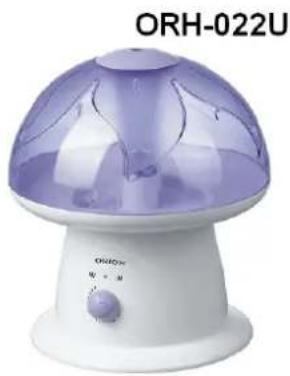
natural_image
ORH-022U vacuum cleaner with purple dome and control knob (no visible text or symbols on device body)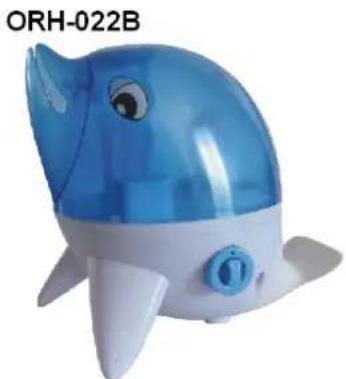
natural_image
Blue and white plastic whale toy with blue head, no visible text or symbols on the object itself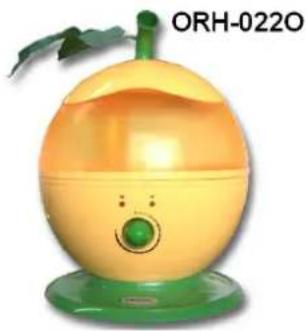
natural_image
Yellow and green fruit-shaped object with a leaf, no visible text or symbols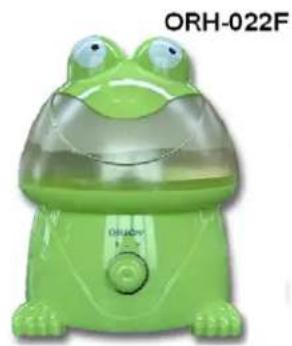
natural_image
Green baby frog-shaped device with water filter, labeled ORH-022F (no other text or symbols visible)DEAR CUSTOMERS!
MANY THANKS FOR BUYING ORION ULTRASONIC HUMIDIFIER!
We really believe you will get the greatest pleasure from using this device for the years!
Please, read the user's guide in detail before first using of this ultrasonic humidifier
SAFETY GUIDE
- Please, read the safety instructions before first use of this ultrasonic humidifier.
- Make sure, device's voltage suits to local mains voltage.
- Place the humidifier at the level and firm location, to keep the it firm..
- Keep the humidifier away from the stoves or the other heat source, and do not expose it at the sunshine directly.
- Keep the humidifier away from the other Home Appliance, to avoid the mist spray to the Home Appliance directly, and then make it moisten.
- When the humidifier is working, please do not touch the water in the Flume or any component under the water..
- Do not let the humidifier work when there have no water in the Flume.
- Do not use hardware to scrape the transducer.
- If there is exceptional noise or smell, please turn off the switch and pull out the power plug. If need repairing, it must repair by the professional person.
- Do not let the water get into the Base, it will damage the other inner part.
- Do not let the detergent into mouth and eyes, avoid to let the child touch detergent.
- Do not disassemble the pedestal of main body for repair or adjustment by yourself.
- If the supply cord is damaged, it must be replaced by the professional person.
- Please turn off and pull out the plug before clean or move the humidifier.
- Do not touch the plug with the wet hand, it will occur danger.
Notes:
- This machine only suits for water and its max water capability is: 3,9l.
- A warning of risk of scalding by steam.
- Advice to unplug the appliance during filling and cleaning.
- I the supply cord is damaged, it must be replaced by the professional person.
FUNCTIONS OF ULTRASONIC HUMIDIFIER
- Power/Humidity light indicator.
- Waterless light indicator.
- Mist output adjustment.
- Cute design to the out-look.
- Mechanical control.
- Humidified by ultrasonic with high frequency vibratory.
- Use the shaded pole motor and the advanced design for anti-noise airway to make it runs quite quietly.
- Safe to use. Self power off when waterless.
- Mist spray unit constructed with china and titanium alloy, increase its life time.
- Use antibiotic engineering plastics, anti-fungus, anti-bacteria.
- Easy to clean.
OPERATING METHOD
- Unscrew the water tank cap, fill the water tank with cold and clean water (do not use the hot water). Then screw tight the cap, locate the water tank on the pedestal stably.
- Connect the plug to power 220V/50Hz.
- Turn on the switch On/Off, the Power Indicator will light.
- Turn on the mist adjustment button by clockwise.
- Adjustment of the mist amount of humidifier, screw the mist adjustment button, it's convenient to adjust to the mist amount.
- When the Tank lack of water, the inner safety equipment will cut of the power automatically, the Waterless indicator will turn on.
7. If need to continue working, pull out the plug, and re-fill water into the Water Tank. PARTS OF ULTRASONIC HUMIDIFIER
Central body. Fig. 1.
- Central body.
- On/Off Switch.
- Power cord.
- Mist adjustment button.
- Humidity output indication.
- Red/Green power light.
Attention: Shape of central body depends on model.
Top of Water tank. Fig. 2.
- Vapor outlet channel.
- Water tank handle.
Water basin. Fig. 3.
-
Nebulizer.
-
Vaporization chamber.
- Fan vent.
- Water level float.
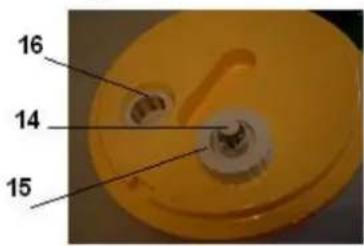
Bottom of Water tank. Fig. 4.
- Water tank valve.
- Water tank cap.
- Vapor outlet channel.
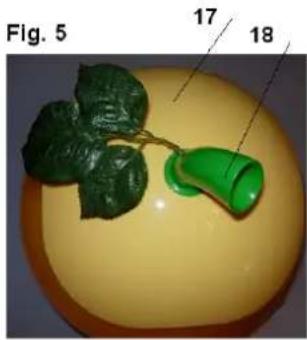
Vapor Outlet Lid. Fig. 5.
- Vapor outlet lid.
- Vapor outlet slots.
Attention: Shape of vapor outlet lid depends on model.
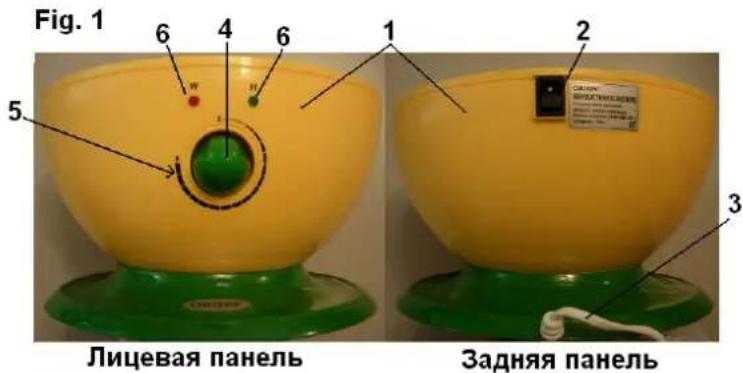
Fig. 2
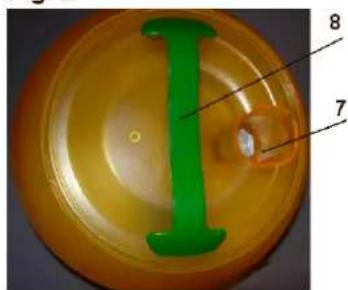
Fig.3 11
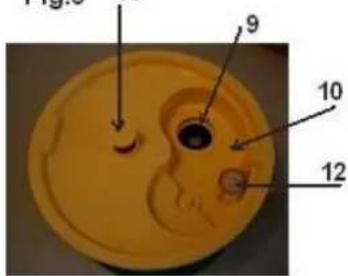
Fig. 4
MAINTENANCE AND SAFETY NOTES
Clean the transducer
If hard water in somewhere is used in this machine, some waste or water scale will be left onside the transducer, user need to clean the transducer with soft cloth:
- Clean it with soft cloth.
- Clean it two times with water.
Clean the inside part of water tank
- Drop some detergent into water tank, and load a half of water tank.
- Screw it with nut cap, shake it up and down several times, and then use water to wash it clean.
Clean the water flume
- If there is waste left in water flume, use a soft cloth to clean it.
- Clean the water flume with cleaning water.
Storage
If the machine has not been used for a long time, you should pour out all the remains which left in the water flume and the water tank. Please, wash cleaning, mash it, leave it dry and pack it in box for storage.
TROUBLES DISMISSING
If your humidifier is out of order, please, check it as following before you demands.
| Troubles Method of dismissing | |
| The Power Indicator Lamp is off, without wind or fog. | Connect the plug into the socket.Turn on the switch On/Off. |
| The Power Indicator Lamp is on, winding but without fog. | Lack of water. Fill water into the TankThe Sensor dobber has not been pressed tightly. Press the dobber tightly. |
| The Power Indicator Lamp is on but without wind or fog | The water into the flume is too high. Spill out some water and make the cover of the Tank tightly. |
| Strange smell with fog. | New machine. Clean the Tank and re-fill the clean water.The water is dirty. Clean the Tank and re-fill the clean water. |
| Small rated fog | The transducer is dirty. Clean it.The water is not clean. Change the water with the clean one. |
| Strange noise | The water tank do not placed properly. Set the water tank properly.The water in the water tank is too little to make noise. Add some water. |
TECHNICAL PERFORMANCE
| Model: | ORH-022A | ORH-022O | ORH-022U | ORH-022F | ORH-022B |
| Moisture capacity: >380ml/h | |||||
| Water tank volume: 4,5L 4,5L 4,2L 3,5L 3,5L | |||||
| Rated voltage: 220V, 50Hz | |||||
| Rated power: | 35W | ||||
| Net weight: | 1,61kg | 1,61kg | 1,05kg | 1,33kg | 1,1kg |
| Gross weight: | 2,07kg | 2,07kg | 1,35kg | 1,78kg | 1,43kg |
| Box size (mm): | 270x270x358 | 270x270x358 | 260x260x300 | 272x267x321 | 305x218x288 |
Extra information on ORION company web-site www.orion.ua
We take your opinion and offers by E-mail support@orion.ua