CR 1118 - Hi-Fi System CAMRY - Free user manual and instructions
Find the device manual for free CR 1118 CAMRY in PDF.


User questions about CR 1118 CAMRY
0 question about this device. Answer the ones you know or ask your own.
Ask a new question about this device
Download the instructions for your Hi-Fi System in PDF format for free! Find your manual CR 1118 - CAMRY and take your electronic device back in hand. On this page are published all the documents necessary for the use of your device. CR 1118 by CAMRY.
USER MANUAL CR 1118 CAMRY
natural_image
Black audio recorder with digital display and control panel, next to a remote control (no visible text or symbols)CR 1118
text_image
1 2 3 OUTPUT L R L R INPUT
text_image
4 12 5 6 7 8 9 10 11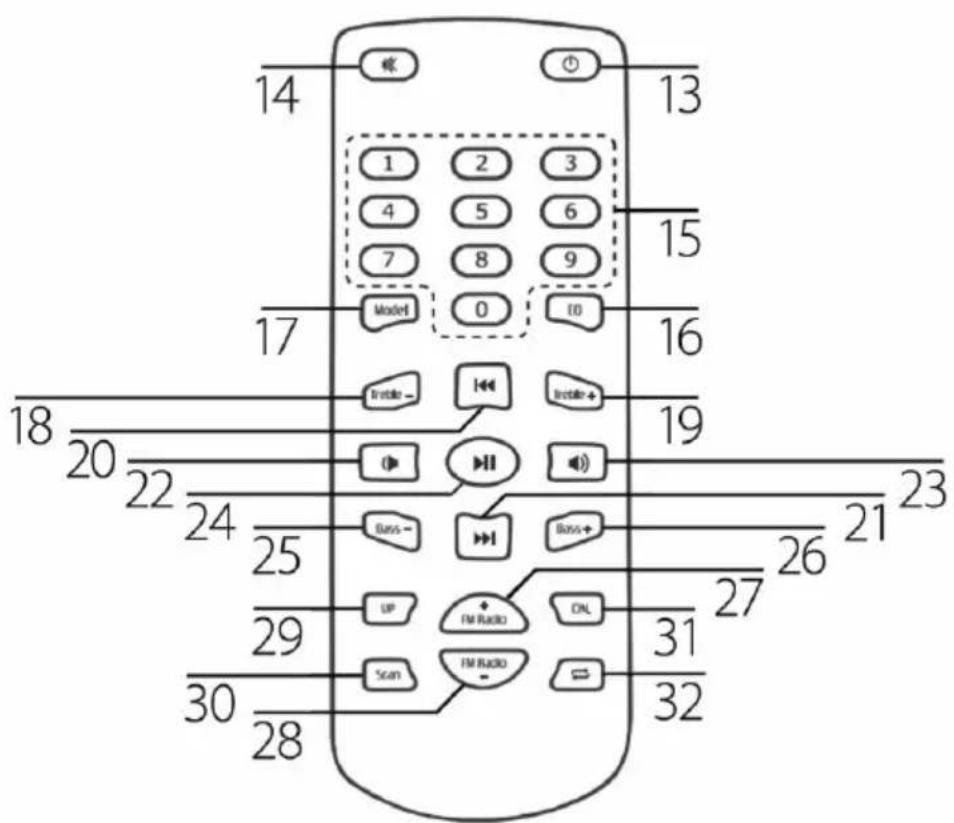
text_image
14 13 1 2 3 4 5 6 7 8 9 Model 0 ED 17 16 18 19 20 22 23 24 25 26 27 28 29 30 31 32 Scan FM RADIO SNL FM RADIO Basis+ UP Basis- Irride-GENERAL SAFETY CONDITIONS
IMPORTANT INSTRUCTIONS ON SAFETY OF USE PLEASE READ CAREFULLY AND KEEP FOR FUTURE REFERENCE
The warranty conditions are different, if the device is used for commercial purpose.
- Before using the product please read carefully and always comply with the following instructions. The manufacturer is not responsible for any damages due to any misuse.
- The product is only to be used indoors. Do not use the product for any purpose that is not compatible with its application.
- The applicable voltage is 230V, \~50Hz. For safety reasons it is not appropriate to connect multiple devices to one power outlet.
- Please be cautious when using around children. Do not let the children to play with the product. Do not let children or people who do not know the device to use it without supervision.
- WARNING: This device may be used by children over 8 years of age and persons with reduced physical, sensory or mental capabilities, or persons without experience or knowledge of the device, only under the supervision of a person responsible for their safety, or if they were instructed on the safe use of the device and are aware of the dangers associated with its operation. Children should not play with the device. Cleaning and maintenance of the device should not be carried out by children, unless they are over 8 years of age and these activities are carried out under supervision.
- After you are finished using the product always remember to gently remove the plug from the power outlet holding the outlet with your hand. Never pull the power cable!!!
- Never leave the product connected to the power source without supervision.
- Never put the power cable, the plug or the whole device into the water. Never expose the product to the atmospheric conditions such as direct sun light or rain, etc.. Never use the product in humid conditions.
- Periodically check the power cable condition. If the power cable is damaged the product should be turned to a professional service location to be replaced in order to avoid hazardous situations.
- Never use the product with a damaged power cable or if it was dropped or damaged in any other way or if it does not work properly. Do not try to repair the defected product yourself because it can lead to electric shock. Damaged device always turn to a professional service location in order to repair it. All the repairs can be done only by authorized service professionals. The repair that was done incorrectly can cause hazardous situations for the user.
- Never put the product on or close to the hot or warm surfaces or the kitchen appliances like the electric oven or gas burner.
- Never use the product close to combustibles.
- Do not let cord hang over edge of counter. The power cord must be protected from being stepped on or pulled by accident, especially near the outlet.
-
Always unplug the device after using and before cleaning.
-
The device may be wiped with a dry cloth only.
- Do not touch the device or power adaptor with wet hands.
- The device should be turned off by pressing the button in the back (1) each time.
- The device should be disconnected from power during storms.
- In order to provide additional protection, it is recommended to install residue current device (RCD) in the power circuit, with residual current rating not more than 30 mA. Contact professional electrician in this matter.
DESCRIPTION OF THE DEVICE
| 1. | ON/OFF | 17. | MODEL – changing the play mode (radio, USB, AUX) |
| 2. | AUX OUT (AUX output jack) | 18. | TREBLE – (reduce treble) |
| 3. | AUX IN (AUX input jack) | 19. | TREBLE + (increase treble) |
| 4. | RADIO ON/OFF | 20. | SKIP DOWN (forward rewind button) |
| 5. | PLAY/PAUSE | 21. | SKIP UP (back button) |
| 6. | SKIP DOWN (forward rewind button) | 22. | VOLUME DOWN (volume control) |
| 7. | SKIP UP (back button) | 23. | VOLUME UP (volume control) |
| 8. | REPEAT/ALL (changing the playback order of songs: ALL, ONE, RANDOM) | 24. | PLAY/PAUSE |
| 9. | INPUT (changing the play mode: | 25. | BASS – (reduce bass) |
| 10. | Headphones output | 26. | BASS + (increase bass) |
| 11. | USB port | 27. | FM RADIO + (radio frequency setting) |
| 12. | VOLUME (volume control) | 28. | FM RADIO – (radio frequency setting) |
| 13. | RADIO ON/OFF | 29. | UP (manual radio frequency tuning) |
| 14. | MUTE (sound mute button) | 30. | SCAN (automatic radio frequency tuning) |
| 15. | Buttons with consecutive numbers (from 1 to 10+) | 31. | DN (manual radio frequency tuning) |
| 16. | EQ (equalizer) | 32. | REPEAT/ALL (changing the song playback order: ALL, ONE, RANDOM) |
PREPARATION FOR USE
Before first use, unpack everything and remove all protective materials. Uncoil the power cord.
- Turn the device on by pressing the ON/OFF (1) button. Next, press the RADIO ON/OFF (4, 13) button.
- Use the PLAY/PAUSE (5) or SCAN (30) buttons to automatically tune the radio frequencies Press and hold the button for about 1-2 seconds to automatically search for all frequencies. Once they are found, the search stops.
- You can tune the radio frequency manually by pressing the FM RADIO +, FM RADIO - (27, 28).
- You can select the set programs by pressing the UP, DN (29, 30) buttons.
- You can adjust the volume by turning the volume control knob (12) or using the (22, 23) buttons on the remote control.
PLAYBACK OF MP3 FILES FROM USB/SD MEMORY
CAUTION: The device may not be compatible with all of the files due to coding differences. The device may not work will some USB memory types.
- Turn on the player with the ON/OFF (1) button. Next, press the RADIO ON/OFF (4, 13) button. Insert the memory key into the port (11).
- The device will read the memory and will start playing the first track.
- Press the PLAY/PAUSE (5, 24) buttons to pause and repeat the song playback.
- Use the SKIP DOWN (6, 20) and SKIP UP (7, 21) buttons to select playing the previous or next track.
- During playback, pressing the REPEAT/ALL (8, 32) buttons will arrange playback of the entire contents of the USB memory key. Press the REPEAT/ALL (8, 32) button again to activate the repetition of one song.
- Removing the USB memory key from the slot should be done after the device is turned off or switched to the radio mode ("FM") or an external device ("AUX") by pressing the INPUT (9, 17) button.
USING A DEVICE CONNECTED THROUGH THE AUX IN UNIVERSAL ENTRY PORT:
- Connect the external device to the player by the AUX IN port (14).
- Switch the player to the AUX IN mode by pressing the AUX button (20).
SOUND EQUALIZER
You can reduce or increase the intensity of the bass using the Bass - (25) and Bass + (26). You can reduce or increase the intensity of the treble using the Treble - (18) and Treble + (19).
CLEANING AND MAINTENANCE
- Disconnect the device from the mains power.
- The device may only be wiped with a dry cloth.
- The device should be kept in a dry room.
CAUTION: Do not use water for cleaning - this may damage the device.
Device is made in class II of isolation.
Device is compliant with EU directives:
- Low voltage directive (LVD)
- Electromagnetic compatibility (EMC)
Device marked CE mark on rating label
TECHNICAL DATA
Power source: 230V \~50Hz
RMS output power: 31W
Power: 60W

To protect your environment: please separate carton boxes and plastic bags and dispose them in corresponding waste bins. Used appliance should be delivered to the dedicated collecting points due to hazarsous components, which may effect the environment. Do not dispose this appliance in the common waste bin.