HME8760 - Microwaves BOSCH - Free user manual and instructions
Find the device manual for free HME8760 BOSCH in PDF.


User questions about HME8760 BOSCH
0 question about this device. Answer the ones you know or ask your own.
Ask a new question about this device
Download the instructions for your Microwaves in PDF format for free! Find your manual HME8760 - BOSCH and take your electronic device back in hand. On this page are published all the documents necessary for the use of your device. HME8760 by BOSCH.
USER MANUAL HME8760 BOSCH
natural_image
Illustration of two vintage air purifiers with control panels and display screens (no readable text or symbols)HMG 87.. HME 87..
BOSCH
As a contribution to the environment, we use chlorine-free bleached paper and recycled paper.
natural_image
Simple line drawing of a glass with a spoon inside, containing liquid and a spoon (no text or symbols)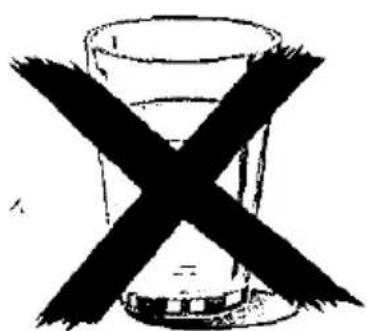
natural_image
Simple line drawing of a glass with a 'X' crossed out by it, no text or symbols present.text_image
Diagram of a device with labeled parts and numbered sequence, showing a circular component and layered structure.natural_image
Simple line drawing of a rectangular tray or baking pan (no text or symbols)natural_image
Line drawing of a rectangular tray with internal grating pattern (no text or symbols)natural_image
Simple line drawing of a rectangular tray or container with no text or symbolstext_image
Diagram of a storage or processing device with numbered components labeled 1 and 5This microwave combination oven will make it a pleasure to cook.
Please read the operating instructions carefully in order to take full advantage of all the technical features.
The operating instructions start off with a few important points on safety. You are then familiarized with the individual parts of your new appliance. We show you all it can do and how to operate it.
The charts are designed as a step-by-step guide to making settings. Here you will also find popular dishes, suitable utensils, shelf height and optimal settings. All of which have, of course, been tested in our culinary studio.
There are also a number of tips on maintenance and cleaning so that your appliance will keep smart for years to come.
Just in case there is a problem, at the back of the booklet you will find information on rectifying minor problems yourself.
If you do have any questions, first look carefully in the index. You will soon get your bearings.
And now go for it and enjoy thoroughly modern cooking with your new microwave combination oven.
Contents
Page
Points to remember
Disposing of packing material and your old appliance 51
Before connecting your new appliance 51
Safety advice 51
How to avoid damage to the appliance 53
Installation and connection 53
Setting the time 55
Your new appliance
The control panel 56
Heating modes 57
Oven and accessories 58
Before using for the first time 59
Alarm 59
Microwave 59
Utensils 60
Setting procedure 60
Quick-start feature 61
Charts for defrosting, heating and cooking 61
Tips on your microwave oven 66
Test dishes 67
Auto-programmes
Setting procedure 69
Defrosting chart 70
Cooking chart 71
Oven without microwave
Setting procedure
Oven to switch off manually 72
Microwave function switched on for a certain period during conventional cooking 72
Oven to switch off automatically 72
Oven to switch on and off automatically 73
Contents
Page
Oven and microwave combined
Setting procedure 73
Example: Noodle bake 74
Charts on baking, roasting and grilling
Meat, poultry and fish 75
Tips on roasting and grilling 78
Cakes and pastries 80
Bakes and gratins 84
Deep-frozen precooked foods 84
Additional possibilities 86
Baking tips 86
Care 88
Problems and repairs
What to do if there is a problem 90
Repair, E and FD numbers 91
Points to remember
Disposing of packing material and your old appliance
☐ Dispose of the packing material responsibly. Our products need good protective packing for transportation purposes. Any packing is, however, kept to an absolute minimum. All packing material used is environmentally friendly and is recyclable. Wooden parts are not chemically treated. 80 to 100% of the cardboard is made up of recycled paper. Wrapping is made of polyethylene (PE), banding of polypropylene (PP) and packing chips of CFC-free polystyrene foam (PS). Synthetic materials are pure hydrocarbon compounds and can be recycled. Processing and recycling mean that raw materials can be conserved and the volume of waste reduced. In Germany, you can return the packing to the dealer where the appliance was purchased.
Before disposing of your old appliance, it should be rendered unserviceable, after which it can be taken to the nearest recycling centre, the address of which can be obtained from your local authority.
Before connecting your new appliance
Before using your new appliance, you should read the operating instructions carefully. This booklet contains important information on safety as well as instructions on how to use and look after your appliance.
- Keep the operating instructions (as well as the assembly instructions in the case of built-in appliances) in a safe place for future reference or for a subsequent owner, as the case may be.
☐ Do not operate the appliance if it has been damaged in any way.
Safety advice General
☐ Only use the appliance for preparing food.
☐ The surfaces of heating and cooking appliances become hot when in use. The inside of the oven becomes very hot, as do the elements. Always keep children well away from the appliance.
☐ Make sure that the connection cords of electrical appliances never get caught in the hot oven door. The insulation may become damaged.
☐ If the oven door is damaged, do not use the oven until it has been repaired by an authorized service technician. There is a danger of exposure to microwave energy.
☐ In the event of a fault, pull out the plug or shut off power at the fuse.
☐ Do not store anything inflammable in the oven as it could ignite if the appliance is switched on inadvertently. Do not place any objects which may catch fire on the hob.
Points to remember
☐ Our appliances meet the appropriate safety requirements for electrical appliances. Repairs should only be carried out by service technicians trained by the manufacturer. Repair by unauthorized persons is extremely hazardous, both to the appliance and to the user.
Microwave
□ Danger of burns!
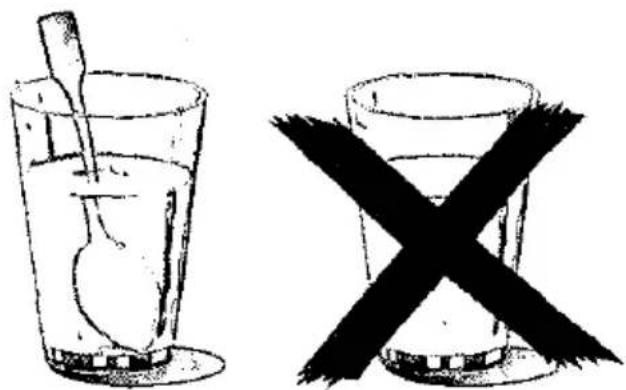
When heating up liquids, always place a teaspoon in the container to prevent delayed boiling, where boiling temperature is reached without any of the tell-tale bubbles. At the slightest movement of the container, the hot liquid can suddenly boil over or erupt. This can cause injury and burning.
natural_image
Two glassware illustrations: one with a spoon inside, the other with a black X symbol crossed out (no text or symbols present)☐ Baby food:
Never heat baby food in jars or bottles with the lid or teat on. After heating the baby food, stir or shake thoroughly to ensure that the heat is distributed evenly. Always check the temperature before giving the food to the child. There is a danger of burns.
☐ Never heat food or drinks in sealed containers as they can explode.
☐ Never overheat drinks containing alcohol as they can explode.
☐ Never heat food in insulated containers as there is a danger of combustion.
When heating foodstuffs in containers made of plastic, paper or other combustible materials, keep a close eye on them.
Food sealed in plastic film can burst open and the foil may melt.
☐ If you see any smoke in the oven, do not open the oven door. Switch off the appliance as well as switching off the oven at the mains.
Points to remember
How to avoid damage to the appliance
☐ Never cook eggs in their shells or heat up hard-boiled eggs as they can explode. This also applies to shellfish and crustaceans. In the case of both fried and poached egg, always prick the yolk beforehand.
☐ In the case of food with a non-porous skin such as apples, tomatoes, potatoes and sausages, always prick the skin before heating or it may burst.
☐ Whenever you are drying herbs, fruit, bread or mushrooms, always supervise the operation as they could catch fire if over-dried.
☐ Never heat cooking oil in the microwave oven as it could ignite.
☐ The handles and lids of porcelain or ceramic crockery may have miniscule holes in which moisture can become trapped, causing the part to burst.
□ Always use the microwave settings and times indicated in the operating instructions. If you use too high a setting or time, the food could ignite and damage the appliance.
☐ Do not place a baking tray on the floor of the oven or line it with aluminium foil as this will cause a build-up of heat. Baking and roasting times will be inaccurate and damage to the enamel may result.
☐ Never pour water directly into the hot oven as it can damage the enamel.
☐ Fruit juice dripping from the baking tray will leave permanent stains. It is always advisable to use the glass pan which is deeper.
☐ Do not prop yourself up against the oven door or sit on it when it is open.
☐ The oven door must shut tightly. Always keep the door sealing surfaces clean.
☐ Never switch on the microwave oven without any food in the oven compartment, as this would overload the appliance. The only exception to this is a short utensil test (see notes on utensils).
Installation and connection
☐ These operating instructions apply to built-in and table-top appliances.
☐ Place the table-top appliance on a firm, even surface. The vents at the rear and base of the appliance must be kept free.
☐ If the appliance is to be used as part of a built-in unit, please follow the special assembly instructions.
Points to remember
☐ The appliance is supplied with an integral plug and should only be connected to a correctly installed safety socket. There should be a 16 amp fuse (L/B auto). The mains voltage must correspond to the voltage given on the rating plate.
□ Always contact a qualified electrician if the outlet has to be moved or the lead changed. If the plug is no longer accessible after installation, there must be local means of isolation via an all-pole isolation switch with a minimum-contact gap of 3 mm.
☐ Never use multiple plugs, plug connectors or extension leads. This could cause overloading and ultimately fire.
Electrical connection. Warning! All appliances with a 3 core lead must be earthed.
In Great Britain appliances with a rated power consumption higher than 3,1 kW must have a permanent connection.
Please ensure that the voltage and current indicated on the rating plate agrees with the voltage of your electricity supply. 220/240 volts - (i.e., 220/240 V AC).
If your appliance has been equipped with a mains lead with a moulded-on type plug, you must comply with the following regulations: The plug moulded on to the cord incorporates a fuse. For replacement, use a 13 amp BS 1362 fuse. Only ASTA approved or certified fuses should be used. The fuse cover/carrier must be replaced in the event of changing the fuse. The plug must not be used if the fuse cover/carrier is lost. A replacement cover/carrier must be obtained from an electrical goods retailer. If the socket outlets in your home are not suitable for the plug fitted to the appliance, then the plug must be cut off and an appropriate one fitted. When fitting the plug please note the following points:
Important
The wires in the mains lead are coloured in accordance with the following code:
| Green and Yellow | Earth |
| Blue | Neutral . |
| Brown | Live |
As the colours of the wires in the mains lead of this appliance may not correspond with the coloured markings identifying the terminals in your plug, proceed as follows:
- The wire which is coloured GREEN and YELLOW must be connected to the EARTH terminal in your plug, which is marked with the letter E or by the earth symbol ⊕ or coloured GREEN, or GREEN and YELLOW.
Points to remember
- The wire which is coloured BROWN must be connected to the LIVE terminal which is marked with the letter L or coloured RED.
- The wire which is coloured BLUE must be connected to the neutral-terminal which is marked with the letter N or coloured BLACK.
When wiring the plug, ensure that all strands of wire are securely retained in each terminal. Do not forget to tighten the mains lead clamp on the plug.
Warning! A cut off plug inserted into a 13 amp socket is a serious shock hazard. Ensure that the cut off plug is disposed off safely.
Voltage 220/240 V AC
Fuse rating 13 amps
See rating plate for further information.
Pull off the protective foil from the operating panel.
Time

text_image
12.30 kg 180 360 MAX 600 90 MAX 90 180 360 600 P 1 2 3 4 5 6 7 8 9 0Once the appliance has been connected 3 zeros will flash on the display.
Setting the time:
- Press the button 90 and 600 simultaneously.
- Enter the time on the number pad, e.g. 12.30 press buttons 1 2 3 0 one after the other.
- Press the button 90 and 600 simultaneously again.
To correct:
Press the button 90 and 600 simultaneously and enter as per points 2 and 3.-
Important information:
☐ In the event of a power cut the time will be deleted.
The 3 zeros will flash.
Enter the time again.
☐ The oven will not heat up if the 3 zeros are flashing.
☐ Between the times of 10 p.m. and 6 a.m. the display will be dimmed.
Your new appliance
Control panel
BOSCH
text_image
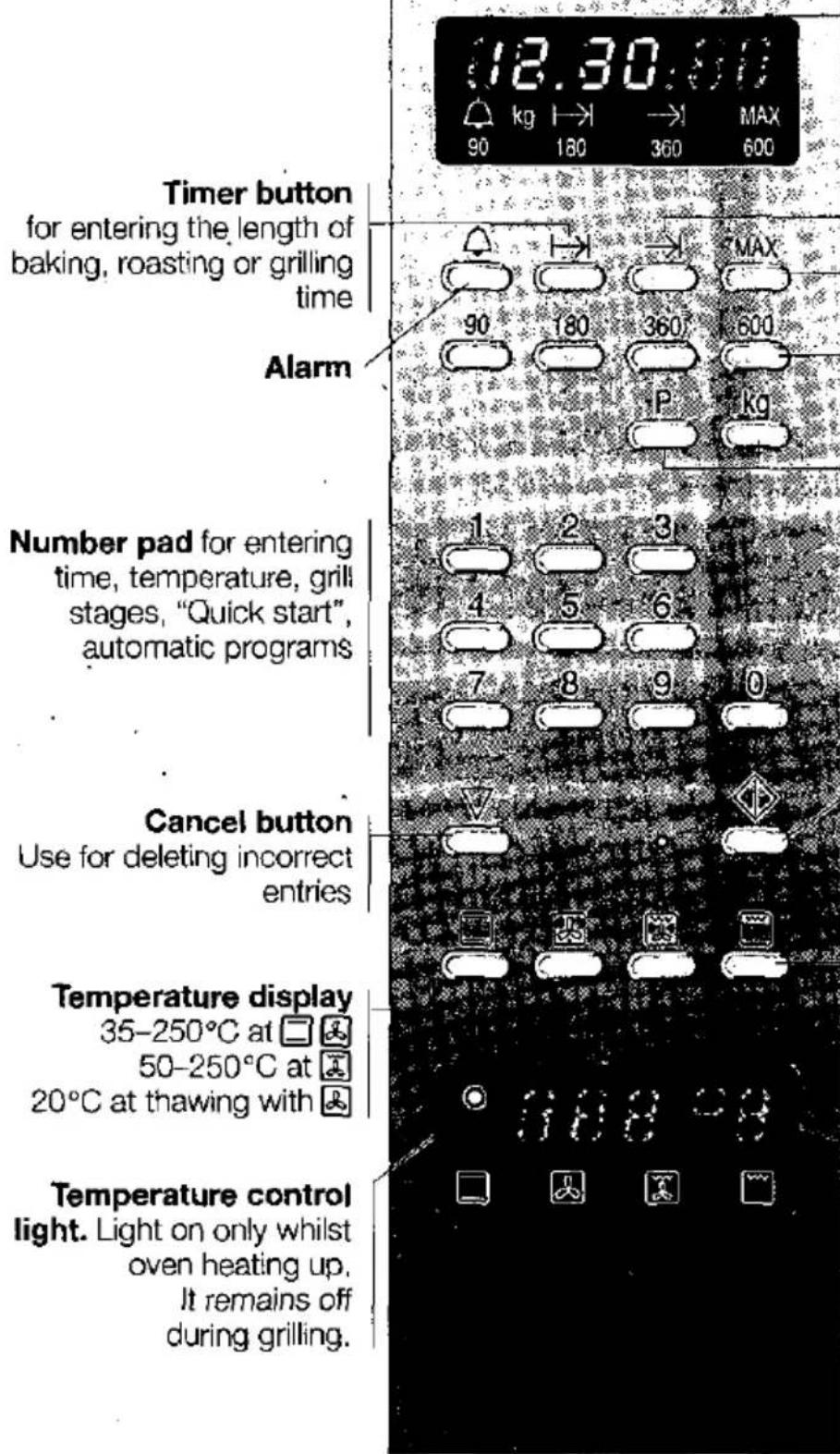
Timer button for entering the length of baking, roasting or grilling time Alarm Number pad for entering time, temperature, grill stages, "Quick start" automatic programs Cancel button Use for deleting incorrect entries Temperature display 35–250°C at □ 50–250°C at 20°C at thawing with Temperature control light. Light on only whilst oven heating up. It remains off during grilling.Display
Time in Hours = h
Minutes = min
Seconds = sec
End button
for entering the time when the oven should switch off.
Microwave power buttons
Automatic program buttons
Program button
Weight button
Start button with control lamp
Cooking method button
☐ Upper and lower heat
Hot air
Fan assisted hot air grill
Conventional grill
Grill level display
After selecting ☐ Grill level 3 will be displayed automatically.
Grill level:
3 = high
2 = medium
1 = low
This instruction manual is for use with both built-in and table top appliances.
Details may vary from appliance to appliance.
Your new appliance
Heating modes
Microwaves
Microwaves are converted into heat in the food.
Microwave is suitable for rapid defrosting, heating, melting and cooking.
Microwave settings:
MAX for heating liquids
600 W for heating and cooking food
360 W for cooking meat and warming delicate foods
180 W for defrosting and further cooking
90 W for defrosting delicate foods
Microwave and oven combined
In this mode, a heating system and the microwave function are engaged simultaneously. Food still turns crisp and brown, but it takes far less time and you save electricity.

Top and bottom heat
In this mode, the cake or roast is heated evenly from both top and bottom. This mode will also ensure optimal results with bread, sponge cake or a juicy fruit cake on one shelf. Top and bottom heat is also excellent for-roasting lean pieces of meat.

Hot air
A fan in the back panel distributes the top and bottom heat evenly in the oven. Hot air is ideal for baking on two shelves and for many cakes in tins. The required oven temperatures are lower than with top and bottom heat which means that you can save electricity. Hot air is excellent for defrosting.

Fan-assisted grilling
Grill elements and fan switch on and off alternately. When heating stops, the fan directs the heat emitted from the grill around the food, ensuring that the pieces of meat are crisp and brown on all sides.
Fan-assisted grilling is particularly suitable for large roasts as well as for poultry.

Flat grilling
The entire area beneath the grill element becomes hot, enabling you to grill steaks, sausages, fish or toast.
FUZZY Logic
The electronic system of your oven is equipped with FUZZY logic. FUZZY logic is an advanced form of control which gives you the advantage of being able to control the exact temperature. This opens up new possibilities such as being able to prepare yoghurt.
Your new appliance
Oven with accessories

text_image
Diagram of a device with labeled parts and numbered sequence, showing internal components and layered structure.You have a choice of five different positions for your accessories.
natural_image
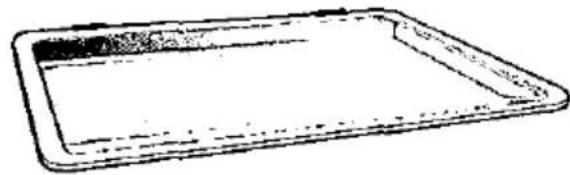
Simple line drawing of a rectangular tray or baking tray (no text or symbols)Baking tray (Special accessories with table appliance) for cakes and biscuits.

natural_image
Line drawing of a rectangular tray with internal grating (no text or symbols)Grid for crockery, cake tins, roasts and food for grilling. The grid can either be turned upwards or downwards.
Information on the built-in appliance
The appliance has a cooling fan which may continue running even if the oven is already switched off. As long as the fan is running, the oven light remains illuminated and the microwave transmitter behind the glass cover keeps turning. The microwave oven is switched off.
The fan keeps running in order to dry out any moisture and prevent the kitchen units from becoming damaged.
If you wish to switch off the fan, press the cancel button twice.
Whenever you open the oven door, the oven light will come on and the cooling fan will start up. When you close the door or press the cancel button, the cooling fan and oven light will switch off.
natural_image
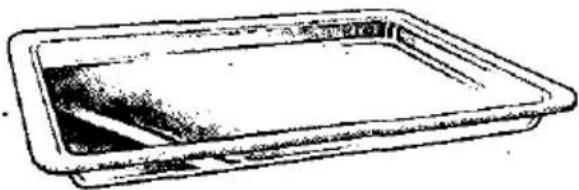
Simple line drawing of a rectangular tray or container with no text or symbolsGlass pan for large roasts, juicy cakes, bakes and gratins. It is also used as an anti-splash tray, if meat is to be grilled directly on the grid. Just insert the glass pan at shelf height 1.
Accessories are obtainable from any authorized dealer. Please quote your appliances E and FD numbers (product and manufacturing numbers).
Your new appliance/Microwave
| Before using for the first time | Heat the closed, empty oven up for 1 hour to get rid of the "new" smell. |
| Press button. | |
| Enter 250 on the number pad. | |
| Press the start button. | |
| Do not switch the microwave on. | |
| Once an hour is up, press the stop button twice. The oven will be switched off. | |
| The alarm | The alarm functions independently of all the other settings. It therefore has a distinct sound. You can defrost bread rolls in the microwave and set the alarm to time your eggs! The time will run down on the display for the microwave. |
| To begin: | Press the button. Enter the time on the number pad. Press the button again. A signal will sound at the end of the time. You can switch this off by pressing the button. To correct: Press the button twice and enter as mentioned in points 1-3. Important notes: If you want to know how long the alarm has to run, press the button. The period will appear on the display for 5 seconds. You can enter a time up to 23 hours, 59 minutes and 59 seconds. |
| The microwave oven | Try out the microwave oven rightaway. Warm up that coffee, for example, which has been left from breakfast - it tastes like it's just been made! Take a large cup without any gold or silver decoration and put a teaspoon in it. Position the grid in the oven at shelf height 1, with the cup in the middle of the grid. Now press MAX button. Enter 100 on the number pad for 1 minute. Press the start button. After a minute a signal will sound. Press the stop button. You will find many examples, other than this one, in the tables. |
Microwave
While you are drinking your cup of coffee, take time to read the safety instructions again at the beginning of this operating manual. They are very important.
Utensils
Use utensils made of glass, porcelain, ceramic material or heat-resistant plastic. These materials let microwaves through.
This is not so with metal utensils. Metal does not conduct microwaves and food will therefore stay cold in covered metal containers. You can, however, use open, flat metal containers such as aluminium trays. Make sure that no metal comes too close to the oven wall, otherwise sparking may occur.
In the case of metal oven accessories, no sparking will occur if you use it as indicated in the charts. Always place the utensil on a grid or in the glass pan.
In many cases, you can use serving dishes for heating the food. This will also make for less washing up.
Only use crockery decorated with gold or silver if the manufacturers guarantee that it is suitable for microwave cookery.
Heated food gives off heat to the utensil, which can become very hot as a result. For this reason, you should always use an oven cloth when removing food.
For information on your particular dish, please refer to the charts.
Utensil test
The microwave oven should not be switched on without food inside. The only exception to this is the following utensil test, which should be carried out if you are not sure whether your crockery is suitable for the microwave oven:
Place the empty utensil for 30 seconds to 1 minute into the appliance at MAX setting. Check how hot it is occasionally. The utensil should be cold or warm to the touch. If it is hot or there is any sparking, it is not suitable.
Setting procedure:
- Press the required power level for the microwave.
- Enter the time in hours, minutes and seconds on the number pad.
If necessary enter a second power level and a second time (points 1 and 2). - Press the start button.
If you have entered one or two power levels and times, the total time will appear on the display.
The time set will begin to elapse.
At the end of the period a signal will sound. You can switch this off by pressing the stop button.
Microwave
Information on the built-in appliance
The appliance has a cooling fan which may continue running even if the oven is already switched off. As long as the fan is running, the oven light remains illuminated and the microwave transmitter behind the glass cover keeps turning. The microwave oven is switched off.
The fan keeps running in order to dry out any moisture and prevent the kitchen units from becoming damaged.
If you wish to switch off the fan, press the cancel button twice.
Correction:
If the start button has not yet been pressed, you can correct entries at any time.
If the appliance is already in microwave mode, press the cancel.button twice and reset.
Cancel:
Press the cancel button twice. The time will reappear.
Please note:
☐ MAX microwave setting can be set for 30 minutes, '600 W for one hour and all other settings can be set for up to 1 hour and 30 minutes. You can enter up to 3 settings one after the other.
☐ If you have selected several settings, the total time appears in the display.
☐ If you should open the oven door during the set time, the microwave function will be interrupted. It will continue once the door has been shut again.
Microwave setting MAX "Quick-start"
for heating drink
You can enter power setting MAX for 1–9 minutes by pressing a single button.
To start:
Press buttons 1–9 for the required time and start.
Charts
The times indicated in the charts are approximate and depend on the quality and type of food.
The charts often refer to time ranges. Select the shortest time initially and then extend it if necessary.
Whenever quantities differ from those indicated in the charts, the general rule is as follows:
double the quantity - double the time, half the quantity - half the time.
Many dishes have to be stirred or turned while they are cooking. Whenever you open the oven door to do this, the microwave oven switches off immediately. It will continue running once you close the door.
Microwave
| Defrosting | Deep-frozen food is placed in as shallow a dish as possible or else on a plate.Cover any exposed parts such as chicken drumsticks and wings or fatty edges of roasts with small pieces of aluminium foil, making sure that the foil does not come into contact with the walls of the oven. You can remove the foil after half the defrosting time has elapsed.Turn the food half-way through the defrosting time. Large pieces of food should be turned several times.Leave the defrosted food to stand for a further 10 minutes approximately to allow the temperature to stabilize. In the case of poultry, you can then remove the giblets. |
| DefrostingGlass pan at shelf height 1Press the start button after setting | Amount | Select microwave setting (W)Set the length of time (minutes) |
| 1 chicken | 1 kg | 180 W, 10 min. + 90 W, 15-20 min. |
| 2 chickens | 1 kg each | 180 W, 20 min. + 90 W, 15-25 min. |
| 1 duck | 2 kg | 180 W, 20 min. + 90 W, 20-30 min. |
| meat joint | 750 g | 180 W, 5 min. + 90 W, 25-35 min. |
| 1 kg | 180 W, 10 min. + 90 W, 25-35 min. | |
| 2 steaks | 600 g | 180 W, 5 min. + 90 W, 10-15 min. |
| fish | 500 g | 180 W, 5 min. + 90 W, 10-15 min. |
| butter | 250 g | 180 W, 2 min. + 90 W, 3-5 min. |
| bread | 1 kg | 180 W, 10 min. + 90 W, 8-12 min. |
| rolls | 4 in no. | 90 W, 2-3 min. |
| cake | 500 g | 180 W, 7-11 min. |
| berries, stone-fruit | 250 g | 180 W, 6-8 min. |
Cream tarts should not be defrosted using the microwave.
Press the 📁 button, enter 20°C on the number pad and press the start button.
Microwave
| Preparing food with the microwave oven | Always cover the food.Remove precooked meals from their aluminium packaging and prepare them in a utensil suitable for use in the microwave oven. This will allow them to heat up more rapidly and evenly.If you warm up different foods at the same time, they will heat at different speeds.Stir or turn the food occasionally while it is cooking. This will allow it to heat up more rapidly and evenly.Leave the food to stand for a further 1 to 2 minutes after heating, to allow the temperature to stabilize. |
| Preparing food with micro-wave, Grid at shelf height 1Press the start button after setting | Amount | Select microwave setting (W)Set the length of time (minutes) | |
| Vegetables, add some liquid | |||
| Mushrooms, fresh | cook | 250 g | 600 W, 6-8 min. |
| Leek, fresh | cook | 500 g | 600 W, 5-7 min. |
| Peppers, fresh | cook | 500 g | 600 W, 8-10 min. |
| Mixed vegetables, deep-frozen | cook | 450 g' | 600 W, 10-12 min. |
| Vegetables, chilled | heat | 150 g | 600 W, 2-3 min. |
| Starch foods | |||
| Potatoes, add some liquid | boil | 250 g | 600 W, 6-8 min. |
| 500 g | 600 W, 8 min. + 180 W, 6-8 min. | ||
| Rice, add double the quantity of liquid | cook | 125 g | 600 W, 5 min. + 180 W, 15-17 min. |
| 250 g | 600 W, 8 min. + 180 W, 10-12 min. | ||
| Starch foods, chilled | heat | 250 g | 600 W, 2-3 min. |
| Coarse ground cereals*, add three times the quantity of liquid | cook | 100 g | 600 W, 4 min. + 90 W, 10-20 min. |
Microwave
| Preparing food with microwave, Grid at shelf height 1Press the start button after setting | Amount | Select microwave setting (W)Set the length of time (minutes) | |
| Grain*, e.g. wheat, spelt, unripe spelt grain, oats, barley. Add double the quantity of liquid | cook | 100 g | 600 W, 5 min. + 90.W, 15–25 min. |
* Depending on the type of cereal, grain and coarse-ground cereals should be allowed to soak for up to 30 min.
Soups and sauces
| Stew, deep-frozen | heat | 500 g | 600 W, 13–17 min. |
| Stew, chilled | heat | 500 g | 600 W, 5–7 min. |
| Consommé, deep-frozen | heat | 400 g | MAX, 7–10 min. |
| Sauce for mince, e.g. Bolognese, deep-frozen | heat | 300 g | 600 W, 8–11 min. |
| Sauce for mince, chilled | heat | 600 g | 600 W, 13–16 min. |
One-course dishes
| One-course dishes, deep-frozen | heat | 350–400 g | 600 W, 6 min. + 360 W, 5–10 min. |
| One-course dish, chilled | heat | 350–400 g | 600 W, 4–6 min. |
| Precooked meal, sterilized | heat | 350–450 g | 600 W, 6–10 min. |
Desserts
| Biancmange | cook | 500 g | 600 W, 6–8 min. |
| Stewed fruit | boil | 250 g | 600 W, 5–7 min. |
| 500 g | 600 W, 8–11 min. |
Baby food
heat up in an open container, stir and check the temperature
| In jar | heat | 200 g | 360 W, 2-21/2 min. |
| Feeding bottles (place bottle on a plate, and put a spoon in the bottle) | heat | 200 ml | MAX, 1/2-3/4 min. |
Microwave
| Preparing food with micro-wave, Grid at shelf height 1Press the start button after setting | Amount | Select microwave setting (W)Set the length of time (minutes) | |
| Miscellaneous foods | |||
| Butter, chilled | soften | 250 g | 90 W, 1-3 min. |
| Honey, crystallized | melt | 200 g | 180 W, 1-2 min. |
| Cake icing(take it out of the packet) | melt | 150 g | 600 W, 4-5 min. |
| Butter, chilled | melt | 50 g | 180 W, 4-5 min. |
| Drinksput a spoon in the container | |||
| Coffee, tea, milk, depending onrequired temperature | warm up | 150 ml300 ml 12 l1 l | MAX, 1-2 min.MAX, 2-3 min.MAX, 3-4 min.MAX, 7-8 min. |
Microwave
Microwave tips
There are no setting indications for the amount of food you are preparing.
Extend or reduce cooking times according to the following rule of thumb:
double the quantity = double the time
half the quantity = half the time
The food has become too dry.
Set a shorter cooking time or select a lower microwave setting. Cover the food and add more liquid.
The food has not yet defrosted, is not hot or is not cooked after the set time has elapsed.
Set a longer time. Select a higher microwave setting than indicated. Larger quantities need longer. Consider the depth of the food. Deeper foods need longer.
The food is overheated at the edges but not done in the middle after the set time has elapsed.
Stir the food occasionally and next time select a lower setting and a longer period of time.
After defrosting, the poultry or meat is partially cooked on the outside but has still not defrosted in the middle.
Select a lower microwave setting. Switch on hot air without selecting a temperature. Large amounts of food need to be turned frequently when defrosting.
Microwave/Test dishes
Test dishes
These dishes are used by testing institutes to test the quality and function of microwave appliances. The power output is measured with the grid at shelf height 2.
Test dishes in accordance with German Industrial Standard
| DIN 44566 | Weight | Setting, W | Time, minutes |
| Chicken, defrosting glass pan, shelf height 1 | 1 kg | 180 W+ 90 W. | 10-12 min.14-16 min. |
| Wrap aluminium foil around exposed parts (e.g. drumsticks, parson's nose). After the first stage of the cooking has elapsed, turn the chicken and remove the foil. Allow 10-15 minutes standing time at the end for it to defrost further. | |||
| Minced beef, defrosting glass pan, shelf height 1 | 500 g | 180 W+ 90 W | 5-7 min.11-13 min. |
| Turn the mince after the first stage of the cooking has elapsed. Allow 10-15 minutes standing time at the end for it to defrost further. | |||
| Raspberries, defrosting glass pan, shelf height 1 | 250 g | 180 W | 5-7 min. |
| Allow 5-10 minutes standing time for them to defrost further. | |||
| Goulash, defrosting and heating | 500 g | 600 W | 13-15 min. |
| Grid, shelf height 1, covered. Separate and stir the goulash after 11 minutes. | |||
| Spinach, defrosting and heating | 450 g | 600 W | 14-16 min. |
| Grid, shelf height 1, covered. Separate and stir the spinach after 11 minutes. | |||
| Haddock fillet, defrosting and cooking | 400 g | 600 W | 9-11 min. |
| Grid, shelf height 1, covered. | |||
| Peas, defrosting and cooking | 300 g | 600 W | 6-7 min. |
| Grid, shelf height 1, covered. | |||
| Lentil stew, heating | 1 kg | 600 W | 13-15 min. |
| Grid, shelf height 1, covered. | |||
| Meat loaf, cooking | 750 g | 600 W | 20-22 min. |
| Grid, shelf height 1. | |||
| Chicken, cooking | 850 g | 600 W | 17-19 min. |
| Grid, shelf height 1, covered. Turn after 8 minutes. Leave to stand in the appliance for a further 8 minutes after set time has elapsed. | |||
Microwave/Test dishes
Test dishes in accordance with IEC publication 705, second edition 1988
| Dish | Weight | Utensil | Setting, W | Time, minutes |
| Soufflée(Test A)Glass pan, height 2Allow to stand until cold | 1 kg | Pyrex 226 SArt.-No. 03.226.85 | 360 W | approx. 25 min. |
| Sponge mix(Test B)Glass pan, height 1Allow to stand until cold | 475 g | Pyrex 828 FArt.-No. 03.828.80 | 600 W | approx. 7 min. |
| Meat loaf(Test C)Glass pan, height 2Allow to stand for 5 minutes | 900 g | Pyrex 838 FArt.-No. 03.838.80 | 360 W | approx. 30 min. |
| Minced beefDefrostGlass pan, height 1Turn after 10 min. Allow to stand for 5 minutes. | 500 g | HP, Montabaur(manufacturer)Art.-No. 710 (top part only) | 180 W+ 90 W | approx. 5 min.approx. 10 min. |
| StrawberriesDefrostGlass pan, height 2Allow to stand for 5 minutes | 250 g | Reppel & Vollmann,Kierspe (manufacturer)Art.-No. 4100 | 180 W | approx. 6 min. |
Auto-programmes
Automatic program for defrosting and cooking
To start:
text_image
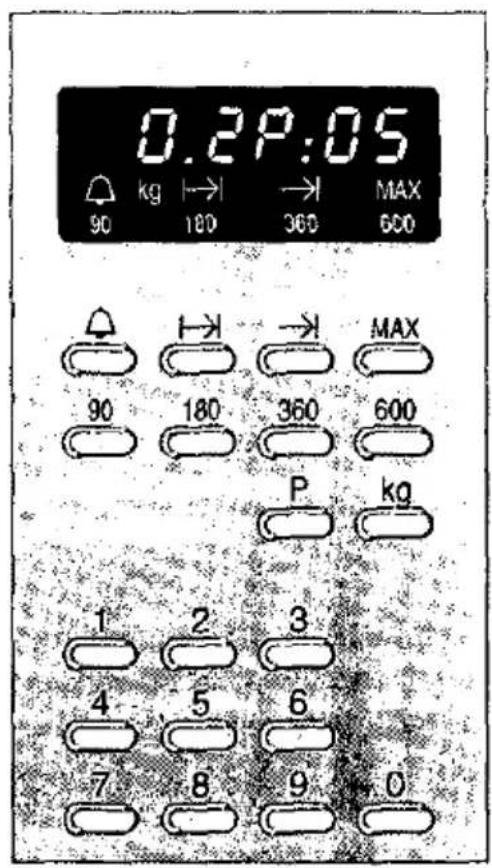
0.2P:05 kg 180 360 MAX 90 600 MAX 90 180 360 600 P kg 1 2 3 4 5 6 7 8 9 0Setting is very easy.
Enter the program number and the weight of the food. Everything else is done electronically. You will find the appropriate values in the "Automatic Program table".
- Press the program button. In the upper display P:00 will appear.
- Enter the number from the table on the number pad.
- Press the weight button. In the lower display the smallest possible programmable weight will appear.
- Enter the weight on the number pad.
E.g. 0.7 kg = button 0 and 7
1.5 kg = button 1 and 5 - Press the start button. The period appears on the display.
At the end of the period a signal will sound. You can switch this off by pressing the stop button.
To correct:
Press the stop button twice and start again.
Cancel:
Press the cancel button twice. The time will reappear.
Important notes:
☐ When you use a cooking programme, the temperature will also appear in the lower display.
During the Programme a short signal will sound. This indicates that the food can be turned if required.
☐ If you open the oven door during cooking, the programme will be interrupted. Once the door is closed again, the programme will continue automatically.
Auto-programmes
Auto-defrost programmes
Shallow-frozen foods is best suited for this programme.
Remove the deep-frozen food from the packing and weigh it.
The food is best defrosted on a glass plate or lid. At all events, a flat utensil suitable for microwave should be used, placed on the glass pan at shelf height 1.
Place poultry on the plate, breast facing upwards.
Only defrost the amount of bread required as it soon dries out.
After a certain period of time a signal will sound. You can then turn the food.
Once the food has defrosted, it should stand for a further 10 minutes (20 minutes in the case of large pieces of meat), in order for the temperature to stabilize.
| Food | Programme button | Programme number | Weight button | Weightrange (kg) | Start button |
| Pork, off the bone | × | 1 | × | 0.5–1.5 kg | × |
| Beef, off the bone | × | 2 | × | 0.5–1.5 kg | × |
| Poultry | × | 3 | × | 0.4–1.6 kg | × |
| Vegetable | × | 4 | × | 0.3–1.0 kg | × |
| Dry cake, slices of cake | × | 5 | × | 0.3–1.5 kg | × |
| Bread, slices of bread | × | 6 | × | 0.2–1.5 kg | × |
Auto-programmes
Cooking programme
Use a deep open container which is heat resistant and microwave safe. The grid should be placed on level 1.
We advise that a little liquid be added to smaller roasts.
The meat will be more succulent and the oven will remain cleaner.
You can also add some liquid to roast lamb. This will make it tender and succulent.
You can give your chicken a crispy, golden appearance by rubbing with butter or saltwater.
After a certain period of time a signal will sound. You can then turn the roast.
Once the roast is ready, leave it to stand in the oven for another 10 minutes.
Cover roast beef in aluminium foil and turn after 5 minutes.
This is particularly useful if you want to cut the meat cold.
| Meat | Programme button | Programme number | Weight button | Weight ranges in kg* | Start button |
| Pork with crackling | × | 7 | × | 0.5–2.5 | × |
| Pork without crackling | × | 8 | × | 0.5–2.5 | × |
| Roast Beef | × | 9 | × | 1.0–2.0 | × |
| Roast Lamb | × | 10 | × | 0.5–2.0 | × |
| Roast Veal | × | 11 | × | 0.5–2.0 | × |
| Chicken | × | 12 | × | 0.8–2.5 | × |
| Baguette (frozen) | × | 13 | × | 0.1–0.5 | × |
* Values outside the weight ranges cannot be entered.
Oven without microwave
Oven without microwave Setting procedure
Oven to switch off manually:
- Choose heating method.
- Enter the temperature or grill stage on the number pad.
- Press start button.
Switching off:
The oven will switch off if you press the stop button twice.
To correct:
Enter again and start.
Microwave function switched on for a certain period during conventional cooking:
You have made the settings and startet as described above. You want to switch on the microwave for a short time so that the meal you are preparing will be ready more quickly or because this is part of the recipe.
Press the microwave setting and enter time.
Press start button.
A signal will sound once the microwave function has finished.
You can switch this off by pressing a microwave button.
Do not switch the signal off by pressing the stop button or you will also switch the oven off.
Only press the stop button when the oven needs to be switched off.
Oven should switch off automatically:
If you enter the period required then the oven will switch off automatically.
To start:
- Select cooking method.
- Enter the temperature or grill stage on the number pad.
- Press the time button.
- Enter the time in hours and minutes on the number pad.
- Press the start button.
The oven will heat up. The time will appear again.
Once the cooking period is up a signal will sound. You can switch this off by pressing the stop button.
Cancel:
Press the cancel button twice. The time will reappear.
Oven and microwave combined
If you go out you can set the oven to switch on and off automatically:
Imagine, you have to go out but the meal should still be prepared on time – no problem. Set the oven as previously described but this time enter the time when the meal should be ready.
Please note that foods that spoil easily should not remain too long in the oven.
Set as previously described in points 1–4.
-
Press the end button →1.
The display will show the time when the meal will be ready. You can change this time to later. -
Tap in the new time on the number pad when the oven should switch off.
-
Press the start button.
The oven will switch on and off at the correct times.
To correct:
Press the stop button twice and enter again.
Important information:
☐ You can always find out how long the programme still has to run or when it will finish by pressing the |→| button or →|. The time will appear again after 3 seconds.
Oven and microwave combined
Microwave and oven to switch off at the same time.
- Choose the heating method.
- Enter the temperature or grill stage on the number pad.
- Press the button for the required microwave power setting.
- Enter the time in hours, minutes and seconds on the number pad.
Enter a second power setting and time if necessary. - Press the start button.
The time set will begin to elapse.
The microwave and oven will switch off together at the same time.
At the end of the period a signal will sound. You can switch this off by pressing the stop button.
Correction:
Press the cancel button twice and reset.
Cancel:
Press the cancel button twice. The time will reappear.
Oven and microwave combined
| Important notes:☐ If you open the oven door, the operation will be inter-rupted. On closing the door, the timer will carry on.☐ You can set the power levels 90, 180, 360 watts for up to 1 hour 30 minutes the power level 600 watts for up to 1 hour and the power level MAX for up to 30 minutes.You can enter a maximum of 3 power settings and 3 times one after the other. | |
| The oven and microwave function switch on and off automatically. | If you go out you can set the oven and microwave to switch on and off automatically.Set as previously described in points 1–4.5. Press the end button→].The display will show the time when the meal will be ready.You can change this to a later time.6. Tap in the new time the oven should switch off.7. Press the start button.The oven and microwave function will switch on and off automatically at the correct times. |
| Example:Noodle bakeTable: Bakes and Gratins | Place the soufflée dish on level 1.Close the oven door.1. Press the button [~].2. Tap in 1 for the grill level on the number pad.3. Press 360 watt button.4. Tap in 15 minutes on the number pad.5. Press the start button.The noodle bake will be ready in 15 minutes.It is 10.30 a.m. and you have something to do. You want the noodle bake to be ready at 12.00. No problem!Set as previously described in points 1–4.5. Press the end button→].10.45 will appear on the display, the time when the noodle bake will be ready.6. Tap 12.00 on the number pad.7. Press the start button.The microwave function and oven will switch on automati-cally at 11.45 and off at 12.00.You can now enjoy your meal. |
Charts
Charts
Meat, poultry and fish
What utensils can you use?
Basically, all heat-resistant utensils suitable for microwave cooking. Metal roasting tins are only suitable for roasting without the microwave oven. For large roasts of meat, you can also use the glass pan.
If the meat is placed directly onto the grid, the glass pan should also be used as an anti-splash tray.
Utensils can become very hot, so you should always use an oven-cloth to remove food from the oven.
When taking out the food, place any glass utensil on a piece of dry kitchen towel and not on a cold or wet surface as the glass could crack.
Roasting
The following information applies to roasting in a deep, open utensil whereby the meat will become brown and crisp. In closed utensils, the roast retains more of its juices and the oven stays clean. You have to set the temperature 10 to 20°C higher, however.
Grilling
text_image
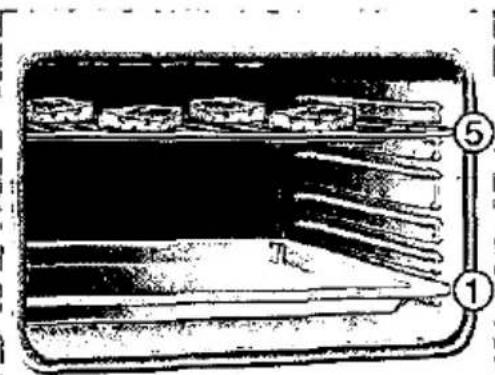
Diagram of a storage or processing unit with labeled components 1 and 5, showing internal compartments and flow paths.Always keep the oven door shut when grilling.
The food being grilled should be of the same thickness if possible (at least 2 to 3 cm), to ensure that it browns evenly and remains succulent. It should be placed directly onto the grid. Do not position the food for grilling in the middle of the grid. The grid can either be turned upwards or downwards, so that you can vary how far it is from the grill elements.
In order to catch the juices from the meat, position the glass pan at shelf height 1, as well.
The food being grilled should be turned after about two thirds of the time indicated in the charts.
You may notice that the grill element switches off and on automatically during grilling. This is normal. How often this occurs will depend on the setting you have selected.
Meat
| Meat | Weight | Utensil | Shelf height | Heating mode | Temp. °C Grill |
| Braised beef (e.g. prime rib) | 1 kg 1.5 kg 2 kg | closed | 2 2 2 | ☐ ☐ ☐ ☐ | 200-210 190-200 180-190 |
| Fillet of beef | 1 kg 1.5 kg 2 kg | open | 1 1 1 | ☐ ☐ ☐ ☐ | 210-230 200-220 190-210 |
| Roast beef, rare to medium | 1 kg | open | 2 | ☒ | 200-210 |
| Steaks, well-done Steaks, rare to medium | grid grid | 5 5 | ☐ ☐ ☐ | Setting 3 Setting 3 | |
| Pork without rind (e.g. neck) | 1 kg 1.5 kg 2 kg | open | 1 1 1 | ☒ ☒ ☒ ☒ | 180-190 170-180 160-170 |
| Pork with rind (e.g. shoulder, knuckle) | 1 kg 1.5 kg 2 kg | open | 2 2 2 | ☒ ☒ ☒ ☒ | 190-210 180-200 170-190 |
| Cured/smoked pork, on the bone | 1 kg | open | 2 | - | - |
| Meat loaf | 750 g | open | 1 | ☐ | Setting 1 |
| Sausages | approx. 750 g | grid and glass pan | 4 | ☐ | Setting 3 |
| Roast veal | 1 kg 2 kg | open | 1 1 | ☒ ☒ ☒ | 160-170 150-160 |
| Leg of lamb, off the bone | 1.5 kg | open | 2 | ☒ | 190-200 |
Meat
| Microwave setting (W)Length of time (minutes) | Startbutton | Total time,minutes | The chart applies to food beingplaced into a cold oven. |
| 360 W, 10 + 180 W, 35-45 min. | × | 45- 55 | Deep-frozen meat must be com- pletely defrosted. |
| 360 W, 10 + 180 W, 55-65 min. | × | 65- 75 | |
| 360 W, 20 + 180 W, 65-75 min. | × | 85- 95 | Turn roast beef half-way through the cooking time. After cooking, wrap in aluminium foil and allow to stand in the oven for 10 minutes. |
| - | × | 80 | When cooking pork, first cut into the rind and place the meat into the utensil with the rind-side down first, if it is to be turned. |
| - | × | 100 | |
| - | × | 120 | |
| 180 W, 20 + 90 W, 10-15 min. | × | 30- 35 | |
| - | × | 22- 25 | If you are roasting a lean piece of meat, add 2 to 3 tablespoons of liquid. |
| - | × | 18- 20 | |
| 90 W, 65-75 min. | × | 65- 75 | The meat is turned half-way through the roasting time. Large pieces of meat - 1.5 kg and above - should be turned twice. |
| 180 W, 35 + 90 W, 60-70 min. | × | 95-105 | |
| 180 W, 40 + 90 W, 60-70 min. | × | 100-110 | |
| - | × | 110-120 | When the roast is done, it should be left to stand for a further 10 minutes after the oven has been switched off. |
| - | × | 140-150 | |
| - | × | 160-170 | |
| 360 W, 40-45 min. | × | 40- 45 | |
| 600 W, 20-25 min. | × | 20- 25 | |
| - | × | 12- 17 | |
| 180 W, 25 + 90 W, 25-30 min. | × | 50- 55 | 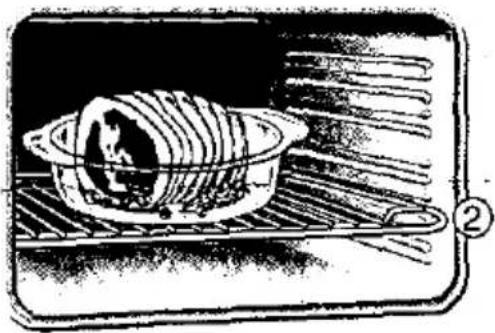 |
| 180 W, 45 + 90 W, 35-45 min. | × | 80- 90 | |
| 180 W, 10 + 90 W, 40-50 min. | × | 50- 60 |
Poultry/Fish
| Poultry | Weight | Utensil | Shelf height | Heating mode | Temp. °C Grill |
| 2 chicken halves | 400 g each | Grid and glass pan | 3 | Setting 2 | |
| Chicken pieces | 500 g | Grid and glass pan | 4 | Setting 2 | |
| 1 whole chicken | 1 kg | open | 2 | 230-240 | |
| 2 whole chickens | 1 kg each | 2 | 230-240 | ||
| Duck | 1.7 kg | open | 1 | 220-230 | |
| Goose | 3 kg | Grid and glass pan | 1 | 220-230 | |
| Fish | Weight | Utensil | Shelf height | Heating mode | Temp. °C Grill |
| Grilled fish | 300 g | Grid and glass pan | 3 | Setting 3 | |
| 1 kg | 2 | Setting 2 | |||
| Poached trout | 300 g | covered | 1 | - | - |
| Deep-frozen fish | 400 g | covered | 2* | - | - |
| Fish slices (e.g. steaks) | Grid and glass pan | 4 | Setting 3 |
Tips on roasting and grilling
The roast has become too dark. Check shelf height and oven temperature, and the crackling is burnt in places.
The roast looks good but the sauce is burnt. Next time, use a smaller roasting utensil or add more liquid.
Poultry/Fish
| Microwave setting (W)Length of time (minutes) | Start button | Total time, minutes | The chart is based on the poultry being placed into a cold oven. |
| 360 W, 20–25 min. | × | 20–25 | Deep-frozen poultry must be entirely defrosted. |
| 360 W, 10–15 min. | × | 10–15 | Whole birds must be turned at least once.With duck or goose, prick the skin under the wings so that the fat can escape. |
| 360 W, 25–30 min.360 W, 35–40 min. | ×× | 25–3035–40 | |
| 180 W, 15 + 90 W, 35–45 min. | × | 50–60 | The poultry will become an even crispier brown if you baste it several times with butter, salt water, chicken grease or orange juice. |
| 180 W, 20 + 90 W, 50–60 min. | × | 70–80 |
| Microwave setting (W)Length of time (minutes) | Start, button | Total time, minutes | The chart is based on the fish being placed into a cold oven. |
| 180 W, 12–15 min. | × | 12–15 |  |
| 360 W, 25–30 min. | × | 25–30 | |
| 600 W, 6–8 min. | × | 6–8 | |
| 600 W, 12–15 min. | × | 12–15 | |
| 180 W, 15–18 min. | × | 15–18 |
The roast looks good but the sauce is too light and watery.
The chart does not contain any information for the weight of your particular roast.
Next time, use a larger roasting utensil and less liquid.
Choose the nearest chart weight below the weight of what you are cooking and extend the time.
Cakes and pastries
Cakes and pastries What baking forms can you use?
Dark metal baking tins are the most suitable. With hot air you can also use light-coloured baking tins.
If the microwave oven is used as well, utensils should be used which let microwave through and are heat-resistant to a minimum temperature of 250^ C. You can also use spring forms if you put the form on the grid.
Charts:
The following charts indicate what heating mode you should best use, where to position the accessories and how to make the setting.
Combination mode is not suitable for baking at two shelf heights.
| Cakes in forms | Utensil | Shelf height | Heating mode | Temperature °C |
| Victoria sponge, plain* | Bowl, ring-shaped or oblong | 2 | ### | 150-170140-160 |
| Cakes base with short-pastry edge | Spring form | 2 | ### | 160-180 |
| Flan base | Flan tin | 2 | ### | 150-170 |
| Sponge cake | Spring form | 2 | ### | 170-190 |
| Nut cake | Spring form | 2 | ### | 170-180 |
| Fruit flan or cheesecake short pastry* | Dark spring form | 1 | ### | 170-190 |
| Fruit cake sponge mixture | Spring form bowl form | 21 | ### | 160-180160-180 |
| Savoury flans*(e.g. quiche or onion flan) | Spring form | 1 | ### | 170-180 |
* Allow cake to cool down in the appliance for approx. 20 minutes.
Cakes and pastries
The values in the charts are based on the food being put into a cold oven. This saves electricity. If, however, you prefer to preheat the oven, baking times should be reduced by 5 to 10 minutes. Temperature and cooking times will depend on the type and quantity of pastry. For this reason, the charts indicate ranges.
Start off by using the lower value and set it higher next time if necessary.
A lower temperature ensures more even browning.
| Microwave setting (W)Length of time (minutes) | Start button | Baking time, minutes | The values in the charts are based on the food being put into a cold oven. |
| - | × | 60-70 | Always place cake tins in the middle of the grid. |
| - | × | 60-70 | |
| - | × | 25-35 | |
| - | × | 25-35 | |
| - | × | 25-35 | |
| 90 W, 25-30 | × | 25-30 | |
| 360 W, 30-40 | × | 30-40 | 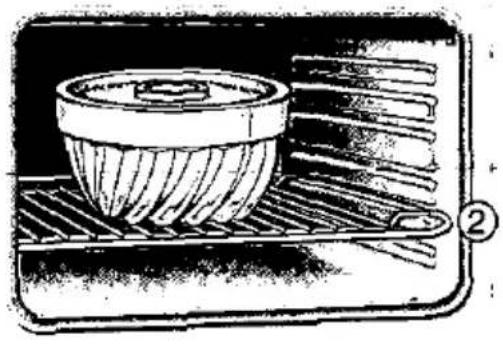 |
| 90 W, 30-35 | × | 30-35 | |
| 90 W, 30-35 | × | 30-35 | |
| 180 W, 30-40 | × | 30-40 |
Cakes and pastries
Push in the baking tray as far as it will go, with the slanting edge towards the oven door.
Baking trays are obtainable as special accessories from your dealer.
| Cakes on baking traysPress the start button after setting | Utensil | Shelf height | Heating mode | Temperature °C | Baking time, minutes |
| with a dry topping (sponge mixture) | 1 tray2 trays | 21+4 | 140-160130-150 | 30-4040-50 | |
| with a moist topping (e.g. yeast dough with apple crumble)* | 1 tray2 trays | 21+4 | 160-180150-170 | 40-5050-60 | |
| Swiss roll (preheat) | 1 tray | 1 | 190-210 | 15-20 | |
| Plaited bun with 500 g flour | 1 tray | 1 | 180-200 | 30-40 | |
| Stollen with 500 g flour | 1 tray | 2 | 170-190 | 60-70 | |
| Pizza | 1 tray2 trays | 11+4 | 170-190160-180 | 30-4045-55 | |
| Yeast bread with 1.2 kg flour** (preheat) | 1 tray | 2 | 170-190 | 60-70 |
* Use the glass pan for fruit cakes containing a lot of juice.
** Never pour water directly into the hot oven.
| Utensil | Height | Heating mode. | Temp. °C | Microwave setting (W) Length of time (min.) | Start button | |
| Sponge mixture with fruit | Glass pan | 3 | 160–180 | 90 W, 20–30 min. | × |
| Small baked itemsPress the start button after setting | Utensil | Shelf height | Heating mode | Temperature °C | Cooking time, minutes |
| Biscuits | 1 tray2 trays | 32+4 | 170-190140-160 | 10-2520-30 | |
| Shortbread biscuits | 1 tray1 tray2 trays | 221+4 | 160-180130-150130-150 | 25-3525-3035-45 |
Cakes and pastries
| Small baked itemsPress the start button after setting | Utensil | Shelf height | Heating mode | Temperature °C | Cooking time, minutes |
| Meringues | 1 tray | 2 | 60-80 | 120-150 | |
| Choux pastry | 1 tray | 2 | 170-190 | 30-40 | |
| Macaroons | 1 tray2 trays | 22+4 | 120-140.100-120 | 30-4035-45 | |
| Puff pastry | 1 tray2 trays | 12+4 | 170-190150-170 | 25-3535-45 | |
| Rolls (e.g. rye bread rolls) | 1 tray | 2 | 200-220 | 25-30 |
Bakes and gratins/Deep-frozen precooked foods
Bakes and gratins
| Utensil | Shelf height | Heating mode | Temp. °C Grill stage | |
| Baked sweets (e.g. baked quark with fruit), approx. 1 kg | soufflée dish | 2 | 180–190 | |
| Baked savouries made of cooked ingredients (e.g. macaroni cheese), approx. 1 kg | soufflée dish | 1 | Setting 1 | |
| Baked savouries made of raw ingredients (e.g. potato gratin) | soufflée dish* | 1 | Setting 1 | |
| Strudel, sweet | soufflée dish or glass pan | 2 | 190–200 | |
| Toast, browned, 9 pieces | grid | 5 | Setting 3 | |
| Toasties, 9 pieces | grid | 4 | Setting 3 |
* 1 kg raw potatoes
Deep-frozen precooked foods
| Utensil | Shelf height | Heating mode | Temp. °C Grill | |
| Strudel with fruit filling | baking tray* | 1 | 190-200 | |
| French fries | baking tray* | 3 | 220-230 | |
| Pizza | grid with baking paper | 2 | 170-180 | |
| Baguette-type pizza | grid with baking paper | 2 | 170-180 |
*Special accessories with table appliance
Bakes and gratins/Deep-frozen precooked foods
| Microwave setting (W)Length of time (minutes) | Start button | Total time, minutes | The values in the charts are based on the food being put into a cold oven. |
| 180 W, 25-30 min. | × | 25-30 | Place the bake on the grid in a utensil suitable for microwave cooking |
| 360 W, 15-25 min. | × | 15-25 | |
| 600 W, 25-30 min. | × | 25-30 | |
| 180 W, 25-30 min. | × | 25-30 | |
| - | × | 5-6 | |
| - | × | 5-8 | |
| Microwave setting (W)Length of time (minutes) | Start button | Total time, minutes | The values in the charts are based on the food being put into a cold oven. |
| 180 W, 15-20 min. | × | 15-20 | Follow the various manufacturers' instructions on the packets. Our values are approximate values. |
| - | × | 20-25 | |
| 180 W, 12-14 min. | × | 12-14 | Remove deep-frozen meals from the aluminium packing and place in a utensil suitable for microwave cooking, e.g. a soup bowl or a glass or ceramic soufflée dish. |
| 90 W, 14-17 min. | × | 14-17 |
Additional possibilities/Baking tips
Additional possibilities
| After making the setting press start button | Utensils | Level | Preheating | Heating mode | Temp. °C |
| Yoghurt from 1 litre milk | Cups on grid | 1 | × | 6038-40 | |
| Making yeast dough rise | Dish on grid | 1 | 40 | ||
| Drying fruit, e.g. apples | Baking tin* | 2 + 4 | 80 | ||
| Boiled fillet of beef 1.5 kg in gravy | Cooking pot | 1 | × | 20090 | |
| Fish whole 1.5 kg | Glass tray | 2 | × | 25095 |
*Special accessories with table appliance
Tips and advice on baking
| If you want to use one of your own baking recipes | Go by a similar type of cake or biscuit in the charts. |
| How to find out if the cake is done | About ten minutes before the end of the baking time, prick the deepest part of the cake with a thin wooden skewer.When the mixture no longer sticks to the skewer, you can switch off the oven and use the residual heat to finish cooking. |
| The cake sinks | Use less liquid next time or set the oven temperature 10°C lower. Make sure that you stir the mixture for long enough (see recipe). |
| The cake has risen in the middle but is lower at the edges | Do not grease the side of the spring-form. After baking, loosen the cake carefully from the sides with a knife. |
| The top of the cake is too dark | Position the cake at a lower shelf height. Select a lower temperature and bake the cake for slightly longer. Use dark metal tins. |
| The base of the cake is too dark | Position the cake at a higher shelf height and select a lower temperature next time. |
Additional possibilities/Baking tips
| Time | Instructions |
| 5 min.6-8 hrs. | PreheatBring milk (3.5 % fat) to the boil, allow to cool to 35°C, stir in 1 to 2 table-spoonfuls of yoghurt, pour into cups and place covered on the grid. |
| 6 min. | Allow the dough to rise in the unit when it is switched off for 20-30 minutes. |
| 3-4 hrs. | Line baking tins with greaseproof paper, separate dried fruit from the greaseproof paper immediately. |
| 10 min.3-5 hrs. | Bring water to the boil, put the fillet of beef into the water and place in the preheated oven. Simmer for 3-5 hours at 90°C. |
| 15 min.50-60 min. | Preheat until the light goes out. Brown lightly.Cook till done. |
The base of the fruit cake is too light in colour. The juice is running out
Use the glass pan as it is deeper.
The bread or cake (e.g. cheesecake) looks good but is soggy inside (run through with streaks of water)
Use a little less liquid next time and bake at a lower temperature for slightly longer. If the cakes are to have a moist topping, bake the base first, sprinkle it with ground almonds or breadcrumbs and then put on the topping. Always follow recipes and baking times.
You have used two shelf heights in baking. The food baked on the higher tray is darker than on the lower one
Select a slightly lower temperature to ensure that the cakes bake more evenly.
Trays which are put into the oven at the same time need not necessarily be ready at the same time. Leave the lower trays to bake for a further 5 to 10 minutes or put them in earlier.
The bake is far too dark on top
Remove the crust and brown the food briefly under the grill. Do not use parmesan cheese for browning as it browns too fast and tastes bitter. Next time, position the tin at a lower shelf height and reduce the temperature by 10°.
The biscuits do not come off the tray
Put the tray back into the oven briefly and then remove the biscuits immediately.
Baking tips/Care of your appliance
| The cake does not come out of the tin | Loosen the sides of the cake once again carefully with a knife. Turn the cake upside down again and cover the cake tin several times with a cold wet cloth. Grease the tin thoroughly next time, sprinkling on breadcrumbs as well. |
| Care | Do not clean with a steam jet or high-pressure cleaner. |
| Outside of the appliance: | All you need to do is to wipe the appliance with a damp cloth. Never use any harsh cleaning agents or abrasives as this will cause dull marks. |
| Air vent cover: | This can be removed and cleaned when the door is open. In the case of table-top appliances, you can only remove the air vent cover from white appliances. When replacing the cover, the notches should be facing upwards. |
| Oven: | Your oven will remain smart for years to come if you remember the following:Never use any hard abrasive pads or scourers.With very juicy cakes, do not try to cram too much onto the tray. It is better to use the glass pan as it is deeper. It is impossible to remove juice which has dropped from the baking tray, even with oven cleaning agent.The grill element is fixed and cannot be taken out. |
| For easier cleaning | you can switch on the oven light. Open the baking oven door for this. Caution: The cooling fan also starts running. This is by design. When you close the door or press the cancel button, the cooling fan and the baking oven lamp switch off. |
| Self-clean enamel | The back and roof (with table appliance only the back panel) of the oven are coated in a catalytic, self-clean enamel, which cleans automatically while the oven is being used. Occasionally, however, heavier stains will only disappear after using the oven several times. You can remove any residue from spices etc. with a soft brush or dry cloth.A slight discolouration of the enamel will not affect the self-clean feature.Never use any oven cleaners. |
Care of your appliance
| Cleaning the other enamel surfaces | Any light stains can be wiped away with hot soapy water or vinegar solution. If the enamel surfaces are heavily stained, it is best to use oven cleaner. Only use on a cold oven. □ Allow the cleaner to work. In the case of particularly stubborn stains, heat the oven up to 50°C for a maximum of two minutes before spraying it with oven cleaner. Do not exceed this period, otherwise the surface of the enamel will become discoloured. □ Wipe out the oven thoroughly. |
| Cleaning the door seal | The door seal can be removed and cleaned in hot soapy water (not in the dishwasher). When the door seal has been removed, close the oven door carefully in order to avoid any damage. |
| Cleaning the door sealing surfaces | Always keep the door sealing surfaces clean, in order to ensure that the oven door always shuts properly. |
| Cleaning the glass cover on the oven roof | Twist and remove the glass cover from its socket while the oven is cold (see illustration, white arrow). Clean any light stains on the glass cover with a detergent, and use a green scourer on more stubborn stains. When reinserting, make sure that the over screws firmly into place. |
 | |
| Accessories | Soak accessories immediately after use. You can then remove any remaining soiling easily with a brush or a washing-up sponge. The grid can be cleaned with stainless steel cleaners. The glass pan can be cleaned in the dishwasher. |
Problems and repairs
What to do, if ...
If the appliance develops a fault, this is usually caused by something minor. The table below lists a few useful hints:
| Fault | Possible cause | Hints/Help |
| The appliance will not work | Not plugged inFuse blownPower cut | Plug in the appliance.Make sure that the fuse is working.Check if the kitchen light is working. |
| On in put a short signal will sound.The display will show 0.00 | Numbers/Values which cannot be entered:☐ Temperatures:below 35°C at ☐below 50°C at ☐above 250°CException: Thawing with ☐is possible at 20°C.☐ Time of more than 23.59☐ Microwave power setting MAX for more than 30 minutes, 600 W for more than 1 hour. 90, 180 and 360 W for longer than 1 hour 30 minutes.☐ More than 3 microwave power settings one after the other or 2 settings the same one after the other.☐ The alarm time of more than 23 hours, 59 minutes, 59 seconds.☐ Time of more than 12 hours.☐ Grill stages other than 1, 2 or 3☐ Weights outside the parameters when using automatic programs. | Start again. |
| The microwave is not working | Door not closed properlyStart button has not been pressed | Check if anything is stuck to the door (Food etc.). Make sure that the door seals are clean. Check that the seal is not twisted.Press start button. |
Problems and repairs
| Fault | Possible cause | Hints/Help |
| Food takes longer than usual to heat up and cook | Too low a power level setting for the microwaveA larger amount than usual in the ovenThe food is colder than usual | Select a higher power level.A rule to follow – double amount – double time.Turn the food during cooking. |
| If the microwave does not switch off | Unplug the appliance or take out fuse. | |
| With the built-in appliance:The fan keeps running. The microwave transmitter beneath the glass cover keeps turning and the oven light remains illuminated, even though the microwave oven is switched off. | This does not mean that there is anything wrong with the appliance. See also the information on the built-in appliance under "oven and accessories". |
Repair
If the suggestions overleaf have not helped, you can turn to our customer service network. Repairs must only be carried out by authorized service technicians. If your appliance is not repaired properly, you could be putting yourself in considerable danger. You will find the addresses and telephone numbers of the nearest service centres in the telephone directory. The service centres named will also be pleased to tell you which is your nearest service centre.
Always quote your appliance's E number (product no.) and FD number (manufacturing no.) when contacting the service centre. You will find the rating plate with the numbers if you open the oven door.
In order that you do not have to spend a long time searching in the event of a problem, we would suggest that you enter your appliance data here rightaway.
E No.
FD No.
Français
natural_image
Two glassware illustrations: one with a straw and the other with a black X symbol (no text or labels)text_image
Diagram of a device with numbered labels pointing to its components, including a circular component and a grid-like structure.natural_image
Simple line drawing of a rectangular tray or baking tray (no text or symbols)natural_image
Line drawing of a rectangular tray with internal grating pattern (no text or symbols)natural_image
Simple line drawing of a rectangular tray or container with no text or symbolstext_image
Diagram of a storage or storage unit with labeled components, showing compartments and numbered parts.text_image
Illustration showing a glass with a straw and a cross symbol crossed out, indicating a warning or prohibition.Tijd in uren = h minuten = min seconden = sec
text_image
Diagram of an electronic device with numbered parts, showing internal components and wiring layoutnatural_image
Simple line drawing of a rectangular tray or tray with no text or symbolsnatural_image
Line drawing of a rectangular tray with internal grating (no text or symbols)natural_image
Simple line drawing of a rectangular tray or container with no text or symbolstext_image
Diagram of a storage or rack system with numbered components, likely illustrating a physical setup or storage mechanism.natural_image
Two glassware illustrations: one with a spoon and liquid, the other with a black X symbol crossed out (no text or symbols present)text_image
Diagram of a device with labeled parts and numbered sequence, showing internal components and layered structure.natural_image
Simple line drawing of a rectangular tray or baking tray (no text or symbols)natural_image
Line drawing of a rectangular tray with internal grating (no text or symbols)natural_image
Simple line drawing of a rectangular tray or container with no text or symbolstext_image
Diagram of a storage or processing unit with labeled components 1 and 5, showing internal compartments and flow paths.natural_image
Illustration of two glasses with a spoon and a crossed-out X symbol (no text or labels)text_image
Diagram of a device with labeled parts and numbered sequence, showing a circular component and grid-like structure.natural_image
Simple line drawing of a rectangular tray or tray with no text, numbers, or symbolsnatural_image
Line drawing of a rectangular tray with internal grating (no text or symbols)natural_image
Simple line drawing of a rectangular tray or container with no text or symbolstext_image
Diagram of a storage tray with labeled parts, showing numbered sections 1 and 5.text_image
Barcode image containing encoded digital informationU520094