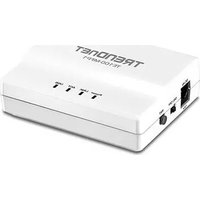
TE100-MFP1 - Print Server TRENDNET - Free user manual and instructions
Find the device manual for free TE100-MFP1 TRENDNET in PDF.


| Product Type | Print Server |
| Brand | TRENDnet |
| Model | TE100-MFP1 |
| Network Interface | 10/100 Mbps Ethernet (RJ-45) |
| Printer Connectivity | USB 2.0, Parallel (IEEE 1284) |
| Supported Protocols | TCP/IP, IPX/SPX, NetBEUI, AppleTalk |
| Management | Web-based, SNMP, Telnet |
| Dimensions (W x D x H) | 4.7 x 3.1 x 1.2 inches (120 x 80 x 30 mm) |
| Weight | 0.35 lbs (160 g) |
| Power Supply | 5V DC, 2A (external adapter) |
| Operating Temperature | 32°F to 122°F (0°C to 50°C) |
| Storage Temperature | -4°F to 140°F (-20°C to 60°C) |
| Humidity | 10% to 90% non-condensing |
| LED Indicators | Power, Link/Act, Status |
| Supported OS | Windows, macOS, Linux, UNIX |
| Print Server Functions | Connect USB and parallel printers to network |
| Setup | Plug-and-play, wizard-based software |
| Security | Password protection, IP filtering |
| Maintenance | Keep clean and dry; update firmware via web |
| Compliance | FCC, CE, RoHS |
Frequently Asked Questions - TE100-MFP1 TRENDNET
User questions about TE100-MFP1 TRENDNET
0 question about this device. Answer the ones you know or ask your own.
Ask a new question about this device
Download the instructions for your Print Server in PDF format for free! Find your manual TE100-MFP1 - TRENDNET and take your electronic device back in hand. On this page are published all the documents necessary for the use of your device. TE100-MFP1 by TRENDNET.
USER MANUAL TE100-MFP1 TRENDNET
1-Port Multi-Function USB Print Server
TE100-MFP1
- Quick Installation Guide (1)
1. Before You Start
Package Contents
• 1-Port Multi-Function USB Print Server
- Multi-Language Quick Installation Guide
• CD-ROM (Utility and User's Guide)
• Network Cable (1.5 m / 5 ft.)
• Power Adapter (12V DC, 1A)
Minimum Requirements
- Computer with an Ethernet port and Web browser
- Wired network (e.g. router or switch with DHCP server)
- Installed USB multi-function printer or USB printer
USB Port Software Utility Requirements
| Supported Operating Systems CPU | Memory | |
| Windows 7 (32/64-bit) | 1GHz or above | 1GB RAM or above |
| Windows Vista (32/64-bit) | 800MHz or above | 512MB RAM or above |
| Windows XP (32/64-bit) | 300MHz or above | 256MB RAM or above |
| Mac OS X (10.7) | 1.06GHz or above | 2GB RAM or above |
| Mac OS X (10.6) | 1.06GHz or above | 1GB RAM or above |
| Mac OS X (10.5) | 867MHz or above | 512MB RAM or above |
| Mac OS X (10.4) | 333MHz or above | 256MB RAM or above |
Note:
- Verify that any software required to operate your printer or multi-function printer is installed before installing the TE100-MFP1.
- Do not install the TRENDnet USB Control Center utility and connect your printer to the TE100-MFP1 until instructed to do so.
2. Installation
- Connect the print server to one of the ports on your wired network with the provided network cable.
- Plug in the power adapter and move the power switch to the "On" position.

- Connect your printer to the USB port on the print server.
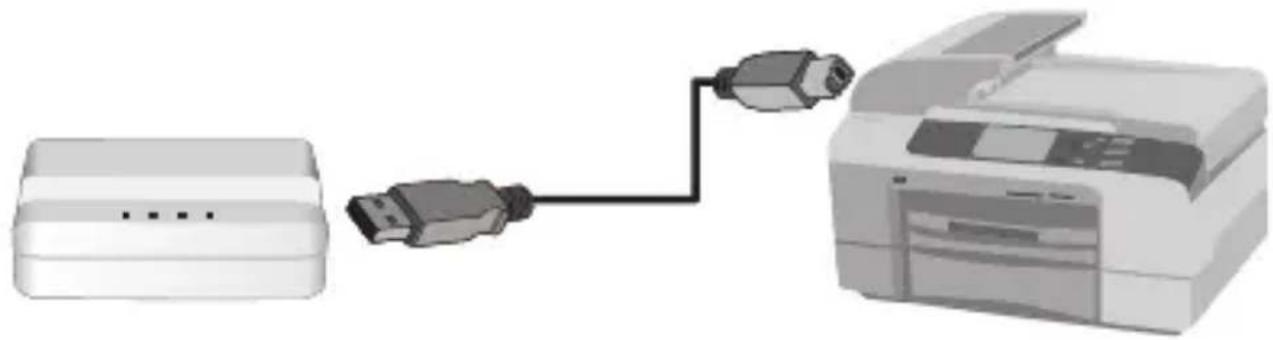
natural_image
Diagram showing a printer connected to a USB port, with no visible text or symbols- Power on the printer.
- Verify that the status LED indicators on the front of the print server to confirm that the device is active and communicating with your printer (Power, LINK, and USB port are solid green).

natural_image
White rectangular electronic device with three small dots on its side (no visible text or symbols)-
Install the Control Center utility for each computer that requires access to the print server by inserting the Utility CD on each computer.
-
Follow the InstallShield Wizard instructions. Then click Finish.

- Open utility by double clicking on the TRENDnet USB Control Center Utility icon.

- The utility will automatically find the print server and your printer.
-
If the print server and printer cannot be detected, verify your computer's network connection.
-
To save time and avoid manually connecting for every print request, select your printer and click Auto Connect Printer.

Note:
Please refer to the user's guide for advanced network setting instructions. In addition, refer to your printer's user's guide for additional information on the printer.
Company Information:
Company Name:
TRENDnet, Inc.
Company Address:
20675 Manhattan Place
Torrance, CA 90501
USA
Product Information:
Product Description:
1-Port Multi-Function USB Print Server
Model Number:
TE100-MFP1
Brand name:
TRENDnet

Technical Standards:
The product is herewith confirmed to comply with the requirements of Directive 2004/108/EC of the Council (European Parliament) on the EMC directive and Energy-related products Directive 2009/125/EC.
I hereby declare that the products and devices mentioned above are consistent with the standards and provisions of the guidelines.
Sonny Su
Full Name
October 17, 2011
Date
Director of Technology
Position/Title
GPL/LGPL General Information
This TRENDnet product includes free software written by third party developers. These codes are subject to the GNU General Public License ("GPL") or GNU Lesser General Public License ("LGPL"). These codes are distributed WITHOUT WARRANTY and are subject to the copyrights of the developers. TRENDnet does not provide technical support for these codes. The details of the GNU GPL and LGPL are included in the product CD-ROM.
Please also go to (http://www.gnu.org/licenses/gpl.txt) or (http://www.gnu.org/licenses/lgpl.txt) for specific terms of each license.
The source codes are available for download from TRENDnet's web site (http://trendnet.com/downloads/list_gpl.asp) for at least three years from the product shipping date.
You could also request the source codes by contacting TRENDnet. 20675 Manhattan Place, Torrance, CA 90501, USA. Tel: +1-310-961-5500 Fax: +1-310-961-5511
Product Warranty Registration
Please take a moment to register your product online. Go to TRENDnet's website at http://www.trendnet.com/register
Certifications
This equipment has been tested and found to comply with FCC and CE Rules.
Operation is subject to the following two conditions:
(1) This device may not cause harmful interference.
(2) This device must accept any interference received. Including interference that may cause undesired operation.



Waste electrical and electronic products must not be disposed of with household waste. Please recycle where facilities exist. Check with you Local Authority or Retailer for recycling advice.

NOTE: THE MANUFACTURER IS NOT RESPONSIBLE FOR ANY RADIO OR TV INTERFERENCE CAUSED BY UNAUTHORIZED MODIFICATIONS TO THIS EQUIPMENT. SUCH MODIFICATIONS COULD VOID THE USER'S AUTHORITY TO OPERATE THE EQUIPMENT.
ADVERTENCIA


Brand : TRENDNET
Model : TE100-MFP1
Category : Print Server