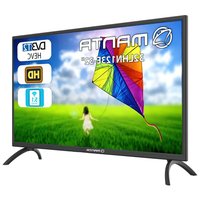
32LHN123E - Television Manta - Free user manual and instructions
Find the device manual for free 32LHN123E Manta in PDF.


Pick your language and provide your email: we'll send you a specifically translated version.
| Product Type | LED Television |
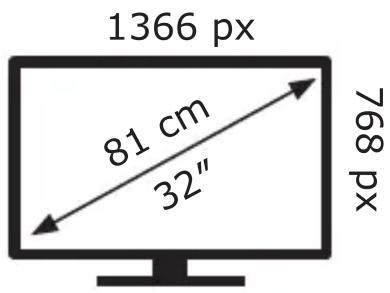
| Screen Size (Diagonal) | 32 inches (81 cm) |
| Resolution | 1366 x 768 (HD Ready) |
| Display Technology | LED |
| Refresh Rate | 60 Hz |
| Aspect Ratio | 16:9 |
| Brightness | 250 cd/m² (typical) |
| Contrast Ratio | 3000:1 (typical) |
| Smart TV | No |
| HDMI Inputs | 2 |
| USB Ports | 1 (USB 2.0) |
| Other Connections | VGA, Composite AV, Antenna, Audio Out, Headphone Jack |
| Power Consumption (Average) | 26 W |
| Standby Power Consumption | < 0.5 W |
| Energy Class | G (EU 2019/2013) |
| Dimensions (with stand) | 73.4 x 49.0 x 18.0 cm |
| Dimensions (without stand) | 73.4 x 43.5 x 8.5 cm |
| Weight (with stand) | 4.2 kg |
| VESA Mount Pattern | 200 x 200 mm |
| Included Accessories | Remote Control, Batteries, Power Cable, Stand |
| Warranty | 2 years |
| Recommended Cleaning | Wipe screen with a soft, dry cloth. Do not use chemical cleaners. |
Frequently Asked Questions - 32LHN123E Manta
How do I connect my TV to Wi-Fi?
This model is not a Smart TV and does not support Wi-Fi. Use an external streaming device via HDMI.
What is the screen resolution of the Manta 32LHN123E?
The screen resolution is 1366 x 768 pixels, which is HD Ready.
Can I wall mount this TV?
Yes, it supports VESA 200 x 200 mm wall mount brackets.
How do I set up the TV for the first time?
Connect the power cable, attach the stand or mount, then connect antenna or devices and turn on. Follow the on-screen guide to scan channels.
Why is there no sound?
Check if the volume is muted or too low. Ensure audio cables are connected securely or try different audio output settings.
How many HDMI ports does it have?
It has 2 HDMI ports.
How do I clean the screen?
Use a soft, dry microfiber cloth. Dampen slightly with water if needed. Never use alcohol or abrasive cleaners.
What is the power consumption?
Average power consumption is 26 W, with standby less than 0.5 W.
Does this TV have a built-in DVD player?
No, it does not have a built-in DVD player.
How can I reset the TV to factory settings?
Go to Menu > Settings > System > Factory Reset. Confirm with the remote.
User questions about 32LHN123E Manta
0 question about this device. Answer the ones you know or ask your own.
Ask a new question about this device
No questions yet. Be the first to ask one.
Download the instructions for your Television in PDF format for free! Find your manual 32LHN123E - Manta and take your electronic device back in hand. On this page are published all the documents necessary for the use of your device. 32LHN123E by Manta.
USER MANUAL 32LHN123E Manta
bar
| Category | Value | |---|---| | A | 10 | | B | 20 | | C | 30 | | D | 40 | | E | 50 | | F | 60 | | G | 70 |26 kWh/1000h
Manual assistant
Powered by Anthropic
Waiting for your message
Product information
Brand : Manta
Model : 32LHN123E
Category : Television