
HKS-SM15BK - Kitchen scale Heinner - Free user manual and instructions
Find the device manual for free HKS-SM15BK Heinner in PDF.


| Product Type | Kitchen Scale |
| Brand | Heinner |
| Model | HKS-SM15BK |
| Capacity | 15 kg |
| Power Supply | 2 x 1.5V AAA batteries (not included) |
| Display Type | LED |
| Measurement Units | g, kg, oz, ml (water/milk) |
| Tare Function | Inductive (hand wave above sensor) |
| Bluetooth | Yes, Bluetooth 4.0+ |
| App Compatibility | Nutribalan (iOS/Android) |
| Nutrient Tracking | Yes (calories, sodium, fat, protein, carbs, cholesterol, dietary fiber) |
| Volume Measurement | Water and milk |
| Auto-Off | Yes, after several minutes of inactivity |
| Overload Indication | "Err" on display |
| Low Battery Indication | "Lo" on display |
| Calibration | Not required (error code E01 for Bluetooth issues) |
| Material | Plastic |
| Cleaning Instructions | Wipe with damp cloth, do not immerse |
| Usage | Household only, not commercial |
| Package Contents | Scale, user manual, warranty certificate, declaration of conformity |
Frequently Asked Questions - HKS-SM15BK Heinner
User questions about HKS-SM15BK Heinner
0 question about this device. Answer the ones you know or ask your own.
Ask a new question about this device
Download the instructions for your Kitchen scale in PDF format for free! Find your manual HKS-SM15BK - Heinner and take your electronic device back in hand. On this page are published all the documents necessary for the use of your device. HKS-SM15BK by Heinner.
USER MANUAL HKS-SM15BK Heinner
natural_image
Black HEINER digital kitchen appliance with LCD display and touchless TARE control (no visible text or symbols on device body)- Kitchen scale
- Capacity: 15 kg
- Bluetooth function
1. INTRODUCTION
Please read the instructions carefully and keep the manual for future information.
This manual is designed to give all necessary instructions concerning installation, use and maintenance of the unit. In order to operate the unit correctly and safely, please read this instruction manual carefully before installation and use.
2. CONTENT OF YOUR PACKAGE
→ Kitchen scale
→ User manual
→ Certificate of warranty
→ Declaration of conformity
3. FEATURES
GENERAL
- With high precision load cell
- Indicate volume of water and milk
- Inductive tare function
- Low battery power / Overload indication
- Auto-off
- Bluetooth function
- Measure calories, sodium, fat, protein, carbohydrates, cholesterol, dietary fiber, and so on.
- History data can be recorded through the App, and trends can be viewed.
- You can view various nutrient intake analyses, daily nutrient intake analyses, and so on through the APP.
DISPLAY INDICATIONS

OVERLOAD INDICATION
When LED shows "Err", it is overloaded (Max capacity is shown on the product), please take off the loads to prevent damage to the scale.

LOW BATTERY INDICATION
When LED shows "Lo", battery power is low, please replace with new battery.

CALIBRATION
When LED shows "E01", it indicates that the Bluetooth communication is abnormal. Please take out the battery for 3 seconds and then reinstall the connection. If the problem persists, please contact your dealer.
AUTO OFF and MANUALLY SHUT OFF
If there is no operation or weight change in several minutes, the scale will be auto-off.
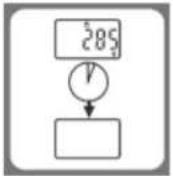
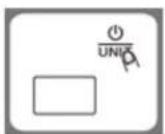
To maximize battery life, press and hold ①UBT For seconds to turn off the scale after using.
4. USING THE APPLIANCE

Negative value
Zero weight
T Tare weight
Weight mode
Water mode
M Milk mode
Bluetooth connection
oz Weight unit (oz)
LED display differs from one to another, so the above icons are indicative only.
BUTTONS FUNCTION

TARE BUTTON
Move your hand 3cm above the sensing area. The tare function will be activated after beeping.

POWER / UNIT CONVERSION BUTTON
When the scale is powered off, press the button shortly to turn it on. Please hold for seconds to turn it off. When the scale is powered on, press the button shortly for unit conversion.
WEIGHING
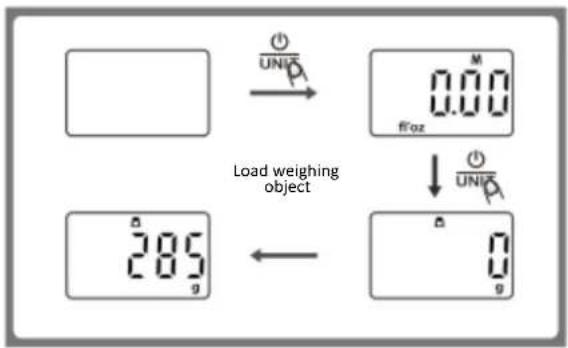
- Place the scale on a solid and flat surface. Put a bowl (if any) on the scale.
- Press button to turn on the scale.
- Press button ①② to convert to weighing mode.
- Load weighing object on scale(or bowl) to start weighing. LED will show the weight reading.
VOLUME MEASURING
- Place the scale on a solid and flat surface.
- Press button to turn on the scale.
- Press button to convert the mode to Water or Milk volume mode.
- Put a container on the scale.
- Move your hand 3cm above the sensing area to activate the Tare Function.
- Pour the liquid (water or milk) into the container, LED shows the volume of the liquid.

flowchart
graph TD
    A["Original Temperature Measurement"] --> B["Uniquitized Display"]
    B --> C["Uniquitized Display with Δ"]
    C --> D["Product with M in ml"]
    D --> E["Put a container"]
    E --> F["Product with M in ml"]
    F --> G["Pour the liquid"]
    G --> H["Final Product: 483 ml"]
TARE FUNCTION
You can weigh different loads consecutively without removing loads from the scale.
Put the first load on the scale, get the weight reading.
Move your hand 3cm above the sensing area, after beeping, the display will show "T" and "0g", means the Tare function is activated. Then you can add the next load. Max weight capacity is reduced by the total weight of current loads.
Remark: You can recall the total weight of current loads during the weighing, by moving your hand 3cm to the sensing area. If you want to continue the weighing, just follow the same operation to activate the Tare function again.

APP INSTRUCTION
1.Get the App
a. Scan the QR code on the right side to obtain the App.
b. At the "App Store" or "Google Play", search keyword "Nutribalan" to download.

APP: Nutribalan
- Bluetooth setting
a. Turn on the Bluetooth on the smart device
b. Turn on the scale.
-
Create a new user Run the App, finish the registration and personal profile.
-
Weigh and measure
a. Turn on the scale
b. Put the food on the scale, search the food in the App
c. Save the weight and nutrient of the food
d. If it fails to find the food in the App, you can customize it.
- Review history You can view the history data, various nutrient intake analyses, daily nutrient intake analysis and so on.
TO REPLACE BATTERY
1.5V(AA/AAA) batteries(excluded) Open the battery cover. Install new batteries by putting one side of the battery down first and pressing down the other side. (Please observe the polarity)

5. CLEAN AND CARE
- Clean the scale with a slightly damp cloth. DO NOT immerse the scale in water or use chemical/corrosive cleaner. Keep the scale in a cool dry place.
- All plastic parts should be cleaned immediately after contact with fats, spices, vinegar, and strongly flavored/colored foods. (Avoid contact with acid citrus juice.)
- Always use the scale on a solid, flat surface, keep the scale unmoved when weighing.
- This product is a precision instrument, please handle with care; Do not strike, shake or drop the scale.
- If fail to turn on, please check whether battery(ies) are installed, or battery power is low.
- Keep away from high temperature, do not strip the scale arbitrarily.
- This product can't be discarded as household garbage and should be sent to collection points for electrical and electronic equipment.
- Designed for family use only, not for commercial use.
6. TROUBLESHOOTING
The App can not synchronize the data from the scale.
- Please ensure the connection between smart device and scale is on
- Please ensure the Bluetooth function on the smart device is on
- Please ensure the scale is powered on and within the valid range of signal coverage
- Check whether the battery power is running low, please replace them with new batteries
- Relaunch the App
- Reboot the smart device and re-establish the connection with the scale
Bluetooth connection failed.
- Please ensure only one device is setting up connection with the scale
- Please ensure your device is equipped with Bluetooth 4.0 or above
CUSTOMER CARE AND SERVICE
Always use original spare parts.
When contacting our Authorised Service Centre, ensure that you have the following data available: Model and Serial Number.
The information can be found on the rating plate. Subject to change without notice.
TECHNICAL DATA
| Capacity | 15 kg |
| Power | Battery type: 2x1.5V AAA (not included) |
Thank you for purchasing this product. If you need support with your product, visit our website using the links below.
Get User manuals: https://www.heinner.ro
Get Service information: https://www.heinner.ro

Environment friendly disposal
You can help protect the environment!
Please remember to respect the local regulations: hand in the non-working electrical equipment's to an appropriate waste disposal center.

HEINNER is a registered trademark of Network One Distribution SRL. Other brands and product names are trademarks or registered trademarks of their respective holders.
No part of the specifications may be reproduced in any form or by any means or used to make any derivative such as translation, transformation, or adaptation without permission from NETWORK ONE DISTRIBUTION.
Copyright © 2013 Network One Distribution. All rights reserved.
www.heinner.com, http://www.nod.ro

This product is in conformity with norms and standards of European Community.

Importer: Network One Distribution
Marcel Iancu Street, 3-5, Bucharest, Romania
Tel: +40 21 211 18 56, www.heinner.com, www.nod.ro
CÂNTAR DE BUCĂTĂRIE INTELIGENT
Model:
HKS-SM15BK

natural_image
Black digital kitchen appliance with 'HENNER' branding and a digital display showing temperature reading (no readable text beyond branding)APP: Nutribalan
natural_image
Black digital kitchen appliance with 'HENNER' branding and a digital display showing temperature reading (no readable text beyond branding)- Кухненска везна
APP: Nutribalan
natural_image
Black digital kitchen appliance with a digital display showing temperature reading (no visible text or symbols on the device body)- Konyhai mérleg
APP: Nutribalan


- INTRODUCTION
- CONTENT OF YOUR PACKAGE
- FEATURES
- GENERAL
- DISPLAY INDICATIONS
- OVERLOAD INDICATION
- LOW BATTERY INDICATION
- CALIBRATION
- AUTO OFF and MANUALLY SHUT OFF
- USING THE APPLIANCE
- BUTTONS FUNCTION
- TARE BUTTON
- POWER / UNIT CONVERSION BUTTON
- WEIGHING
- VOLUME MEASURING
- TARE FUNCTION
- APP INSTRUCTION
- TO REPLACE BATTERY
- CLEAN AND CARE
- TROUBLESHOOTING
- The App can not synchronize the data from the scale.
- Bluetooth connection failed.
- CUSTOMER CARE AND SERVICE
- TECHNICAL DATA
- Environment friendly disposal
- CÂNTAR DE BUCĂTĂRIE INTELIGENT
Brand : Heinner
Model : HKS-SM15BK
Category : Kitchen scale