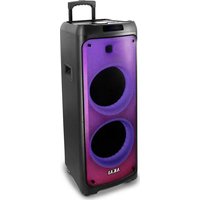
Party Speaker 1010 - Loudspeaker AKAI - Free user manual and instructions
Find the device manual for free Party Speaker 1010 AKAI in PDF.


| Product Type | Portable Party Speaker |
| Brand | AKAI |
| Model | Party Speaker 1010 |
| Dimensions (H x W x D) | Approx. 30 x 25 x 20 cm |
| Weight | Approx. 3.5 kg |
| Power Source | Built-in rechargeable battery (Li-ion) |
| Battery Capacity | 3600 mAh |
| Charging Time | 4-5 hours |
| Playback Time | Up to 6 hours at moderate volume |
| Connectivity | Bluetooth 5.0, USB, AUX, Microphone input |
| Bluetooth Range | Up to 10 meters |
| Speaker Configuration | 2-way: full-range driver + passive radiator |
| Total Power Output | 30 W RMS |
| Frequency Response | 60 Hz - 20 kHz |
| Additional Features | LED light effects, microphone included, USB playback |
| Controls | Power, Volume, EQ presets, Light mode, Play/Pause, Next/Prev |
| Maintenance & Cleaning | Wipe with a dry cloth. Avoid moisture and direct sunlight. |
| Safety Precautions | Do not expose to water. Keep away from heat sources. Use only supplied charger. |
| Spare Parts & Repairability | Contact AKAI support for replacement parts. Not user-serviceable. |
| General Information | Ideal for parties, karaoke, outdoor use. Carton packaging. |
Frequently Asked Questions - Party Speaker 1010 AKAI
User questions about Party Speaker 1010 AKAI
0 question about this device. Answer the ones you know or ask your own.
Ask a new question about this device
Download the instructions for your Loudspeaker in PDF format for free! Find your manual Party Speaker 1010 - AKAI and take your electronic device back in hand. On this page are published all the documents necessary for the use of your device. Party Speaker 1010 by AKAI.
USER MANUAL Party Speaker 1010 AKAI
Party Speaker 1010
Portable BT Speaker System
SAFETY PRECAUTIONS
Thank you for purchasing Party Speaker 1010
This is your assurance of quality, performance and value. Our engineers have included many useful and convenient features in this product. Please be sure to read this instruction Manual completely to make sure you are getting the maximum benefit from each feature.
This product was manufactured using the highest quality components and standards of workmanship. It was tested by inspectors and found to be in perfect working order before it left our factory. For future reference, record the serial number in the space provided.
TO PREVENT FIRE OR SHOCK HAZARD DO NOT EXPOSE THIS APPLIANCE TO RAIN OR MOISTURE.
Notes:
• The images appearing in this manual are for reference only.
• Due to continual revision and improvement on our products design and specifications are subject to change without further notice.
CHARGER AND BATTERY
When charging, connect a matched power adaptor to AC100-240V.
Charging time is approximately 4 to 6 hours. Once fully charged unplug the power supply as leaving a full battery on charge may cause damage to the battery.
BATTERY CHARGE INDICATOR
LED panel has battery status indicator. In the middle of the shape of the battery have four horizontal lines, each horizontal line represents 25% of electricity remaining. When no horizontal line in the shape of the battery or the shape flashes, please power of and promptly charge to avoid damage to the battery.
When charging, the battery indicator on LED display panel flashes.
The indicator stop blinking after full charged. Then please continue to charge the battery for 1-2 hours to extend the battery life.

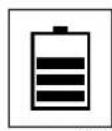

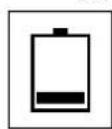
(50%)
WARNING!
If the battery is under voltage, please fully charge it within 48 hours.
If the speaker have to be left unused for a long time, please let the battery fully charged, otherwise it will cause damage to the battery.
TECHNICAL SPECIFICATION
MODEL
Rated Voltage:
Rated Power:
Input sensitivity:
Battery:
Charging time:
Working time:
Frequency response:
Audio S/N:
Bluetooth version
Bluetooth channel emission power BTH
Bluetooth Frequency
Bluetooth action range
FM frequency
Speakers
Microphone frequency
Product dimensions
Party Speaker 1010
AC100-240V\~,50Hz/60Hz
≤100W
500±50mV
12V 7Ah
4-6h
3-5h
50Hz-20KHz
≥80dB
5.0
2dbm
2,402 GHz- 2,480 GHz
10m
87.5-108 MHz
10inch*2pcs
201.6 MHz
360(L)*355(W)*1020(H)mm
Package Contents:
•1xPortable Bluetooth Speaker
•1xPower cable
-1xRemote control
•1xWireless microphone
AKAI
DECLARATIE DE CONFORMITATE UE
Nr.INT267
Certificat de conformitate eliberat in baza Certificatelor si Rapoartelor de Testari CTL2010097021-W; CTL2010097021-WS; CTL2010097021-WH; CTL2010097021-WE; CTL2010097021-WR; CTL21303057012-WR02; CTRL1906178031-R si U01602210127602E ale Shenzhen CTL Testing Technology Co., Ltd. Et-1-a, Baisha Technology Park, No.3011, Shahexi Road, Nanshan District si Shen Zhen UONE Test Co.,LTD. Unit 48, Building B4, China Merchants Guaoming Science Park, Tourist Road 3009, Guangming New District, Shenzhen, China.
Intervision Trading Ro SRL,
Semnatura:

Numele si functia: CIOBANU DORIN – DIRECTOR
EU DECLARATION OF CONFORMITY

Nr. INT267
We, INTERVISION TRADING RO SRL, default importer (manufacturer), with registered office in Mosoia Commune, Smeura Village, 8 Fagetului Alley, declare under sole responsibility that the following products:
Brand name:
PARTY SPEAKER 1010
Type:
ACTIVE SPEAKER
Descriptions:
2201F22000XXX
to which this declaration related is in conformity with the essential requirements of the following directives of the Council of the European Communities:
EUROPEAN COMMUNITY DIRECTIVE 2014/53/EU
EUROPEAN COMMUNITY DIRECTIVE 2014/35/EU
EUROPEAN COMMUNITY DIRECTIVE 2014/30/EU
EUROPEAN COMMUNITY DIRECTIVE 2011/65/EU AMD 2015/863/EU
The products are compliant with the following standards and safety regulations:
EN 62368-1:2014+A11:2017
EN 50663:2017
IEC 62321-5:2013 ;
EN 301 489-1 V2.2.3 (2019-11)
IEC 62321-6:2015 ;
EN 301 489-17 V3.1.1 (2017-02)
IEC 62321-7-1:2015 ;
EN 300 328 V2.2.2 (2019-07)
IEC 62321-7-2:2017 ;
EN 303 345-1 V1.1.1 (2019-06)
IEC 62321-8:2017
EN 303 345-3 V1.1.0 (2019-11)
IEC 62321-4:2013+AMD1:2017
IEC 62321-3-1:2013 ;
Certificate of conformity issued based on the CTL2010097021-W ; CTL2010097021-WS ; CTL2010097021-WH ; CTL2010097021-WE ; CTL2010097021-WR ; CTL2103057012-WR02 ; CTRL1906178031-R and UO1602210127602E of Shenzhen HUAK Testing Technology Co., Ltd. 1F, B2 Building, Junfeng Zhongcheng Zhizao Innovation Park, Heping Community, Fuhai Street, Bao'an District si Shenzhen SiCT Technology Co., Ltd. 4F, Building A, EDerH Industrial District, Fukang Community, Longhua Subdistrict, Longhua District, Shenzhen, Guangdong, China.
Intervision Trading Ro SRL,

Signature:
Printed name and Position:
CIOBANU DORIN - GENERAL MANAGER
Date: December 10 th , 2021
Place: Pitesti, Romania
90
DESCRIPTION OF REMOTE CONTROL
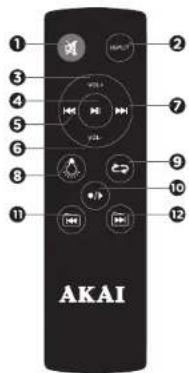

Start recording, long press it to play the recordings.

PREVIOUS FOLDER ( )
Change to the previous folder on USB or Micro SD input mode.

NEXT FOLDER ( )
Change to the next folder on USB or Micro SD input mode.

MUTE (OK)
Mute or restart the speaker.

INPUT (INPUT SELECTION)
Input selection(AUX input / Bluetooth / USB / Micro SD / FM function).

VOL+ (INCREASE VOLUME)
Increase the volume.

PLAY /PAUSE/SCAN (▶II)
In play mode, press to suspend playing songs. Press this
button again to continue play.
Scan and save radio stations in FM Radio input mode.

PREVIOUS ( )
Change to previous song.
Change to previous channel in FM Radio input mode.

VOL-(DECREASE VOLUME)
Decrease the volume.

NEXT (▶)
Change to next song.
Change to next channel in FM Radio input mode.

LED LIGHT CONTROT (▲)
Turn on/off the Led lights or change the Light mode.

REPEAT (↔)
Repeat folder/all/one.
DESCRIPTION OF CONTROLS
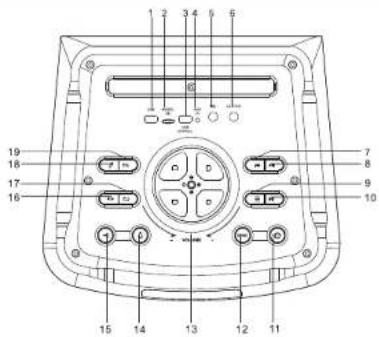

① USB SLOT
Insert USB, play the music.
② MICRO SD SLOT
Insert micro SD card, play the music.
③ USB CHARGE
Charge mobile device DC 5V
④ AUX INPUT
Could be connected with personal computers, mobile, DVD, VCD, CD, LD, TV, MP3, radio, electric piano and any devices which have audio output.
⑤ MIC SLOT
Use to connect the microphone jack.
6 GUITAR SLOT
Use to connect the guitar jack.
7 PREVIOUS
Change to previous song. Change to previous channel in FM radio mode.
8 NEXT
Charge to next song. Charge to next channel in FM radio mode.
⑨ MENU ≡
With a short press on the button, adjust treble / bass / microphone volume / microphone echo / guiter volume
10 PLAY / PAUSE / SCAN ▶II
In play mode, press to suspend playingsongs.
Press this button again to continue play.
Scan and save radio stations in FM radio mode.
11 POWER ON/OFF
Turn the speaker on or off
12 G-BASS
Adjust bass to influence bass sound
13 VOLUME
Adjust volume up or down.
14 LED LIGHT CONTROL (△)
Turn on/off the Led lights or change the Light mode.
15 INPUT (→)
With a short press on the button, select the input mode (AUX input / Bluetooth / Micro SD / USB / FM radio).
Start recording, long press it to play the recordings.
17 REPEAT (→)
Repeat single, repeat all, repeat folder.
18 MIC PRIORITY
When the "MIC PRIORITY" mode is on, the volume of music will be reduced when speaking into the microphone.
19 EQ
Adjust the effect of EQ.
20 AC IN
Connect power cord.
LIKVIDÁCIA ELEKTRICKÝCH A ELEKTRONICKÝCH ZARIADENÍ

LIKVIDÁCIA ELEKTRICKÝCH A ELEKTRONICKÝCH ZARIADENÍ
① MICROPHONE ON/OFF
② MUTE
3 LIGHT INDICATOR
FUNCTIONS
FM FUNCTION
Choose INPUT to switch to FM RADIO.
Search and tune automatically to radio stations by pressing ▶ on the remote control ro long press the
REPEAT/SCAN button on the speaker.
Switch channels, by pressing 🐎 and on ➞ the speaker or the remote control.
RECORDING FUNCTION
Press •/▶ to record the voice into the external memory like USB disk / Micro SD on the speaker.
If the external memory is first time used, the system will automatically built a new folder named VOICE, and recording files in it will benamed REC001, REC002, and so on.
In record mode, press •/► / INPUT to stop recording.
Long press* •/▶ * to play the recordings in the external memory, press PREV and NEXT to choose the recordings to play.
BLUETOOTH OPERATION
IMPORTANT:
Prior to use Bluetooth function, your speaker should be paired firstly with your Bluetooth device. ("Paring" means establish connection between Bluetooth devices such as MOBILE PHONE, TABLETS, PC, ETC).
- Press the INPUT button to switch into
the BT MODE(Bluetooth mode).
(fig.1)
- In BT MODE, a sound indication will
announce that Bluetooth pairing mode is ready.
Then the micro system will search
automatically for Bluetooth devices.
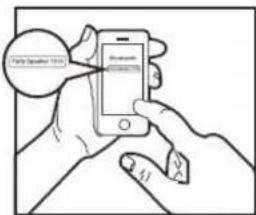
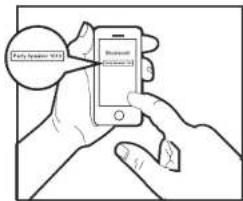
- Turn on Bluetooth functionality on
your device and make it discoverable (see your devices instructions to add or setup a Bluetooth device).
- Search for Bluetooth equipment:
Party Speaker 1010
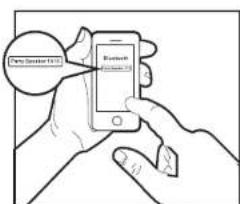
is your speaker identification. (fig.2)
A sound indication will announce that Bluetooth
devices are successfully paired. (During the pairing,
if a password is required, you need to input code "0000").
Your Bluetooth device stores the speaker unique identification at the same time.

Fig. 1

(fig. 2)
TWS FUNCTION
- Select the Bluetooth mode on the 2 speakers you wish to pair.
- Note: The 2 speakers need to be exactly the same in order to pair under TWS mode.
- Select any one of the speakers and long press the "NEXT" button.
- A sound will be heard and the main speaker display will indicate "HOST" confirming that the2 speakers are now Paired.
- The slave speaker display should indicate "BT" in a still mode.
- To disconnect the TWS function, simply press the "PREVIOUS" button on the main speaker.
- The slave speaker display indicator should indicate "BT" in a flashina mode.
- Long press the "PLAY/PAUSE" button to completely disconnect the Bluetooth connection with your mobile device.
PREVÁDZKA BLUETOOTH
DÔLEŽITÉ:
(fig. 1)
(FIG.2)
FUNKCIA TWS
1- ZAPNUTIE/VYPNUTIE MIKROFÓNU
2- TICHÝ
3- SVETELNÝ INDIKÁTOR
FUNKCIE
FM FUNKCIE
TROUBLE SHOOTING GUIDE
If a fault occurs, first check the points listed below before taking the speaker to repair.
Do not open the speaker as there is risk of electric shock.
If you are unable to remedy a problem by following these hints, consult your dealer or service center.
| SYMPTOM | CAUSE | CORRECTION |
| Sound | ||
| No sound | No input sound source. | Use a better music signal. |
| Volume is too low. | Adjust volume. | |
| Distortion of sound | Volume too high. | Turn down the volume. |
| Speaker may be damaged. | If speaker is damaged, repair or replace it. | |
| Karaoke | ||
| Karaoke does not work | Microphone plug is not fully inserted. | Plug microphone properly into the socket. |
| Microphone switch is not on. | Turn on microphone switch. | |
| Microphone volume knob is at the lowest position. | Adjust microphone volume properly. | |
| Wireless microphone has low battery. | Replace battery. | |
| MP3 | ||
| MP3 does not play | The song format in the USB disc is incorrect. | Transform song format into MP3 format. |
| Improper operation has caused a process disorder. | Reboot the machine. | |
| USB disk / Micro SD Card is disconnected. | Insert USB disc/Micro SD properly. | |
| Remote control | ||
| The remote control does not work properly | The remote control is too far from the unit. | Operate the remote control within about 6m. |
| There is an obstacle in the path of the remote control and the unit. | Remote the obstacle. | |
| The battery in the remote control is exhausted. | Replace the battery with new one. | |
WARNING!
Under no circumstances should you try to repair the set yourself, as this will invalidate the warranty.
DISPOSAL OF ELECTRICAL AND ELECTRONIC EQUIPMENT

DISPOSAL OF ELECTRICAL AND ELECTRONIC EQUIPMENT
This symbol on the product or packaging means that the product should not be treated as household waste.
Do not throw garbage at the end of its life, but take it to a collection center for recycling. in this way you will help to protect the environment
and be able to prevent any negative consequences that it would have on the environment and human health.
To find your nearest collection center:
-Contact local authorities
- Access the website: www.mmediu.ro
- Request additional information from the store where you purchased the product.
IMPORTATOR: SC INTERVISION TRADING-RO SRL
Bld. I.C Bratianu, nr. 48-52, corp A, etaj. 5,
camera 504-505, oras Pitesti, judet Arges, Romania
Cod postal: 110121
- MENU (三)
Krátko stlačte aby ste nastavili treble/bass/hlasitost' mikrofónu/ozveny mikrofónu /gitary.
- PREHRAČ/POZASTAVIČ/SKENOVAČ (▶II)

1. USB SLOT
Prenosný reproduktor 1010
Prenosný audio systém s Bluetooth
DESCRIEREA TELECOMENZII

- MUTE (咲)
1- PORNIRE/OPRIRE MICROFON
2-MUT
3- INDICATOR BEC
FUNCTII
FUNCTII FM
(fig. 1)
(fig. 2)
FUNKCE TWS
Fig. 1

(fig. 2)
FUNCTIA TWS
1- ZAPNUTÍ/VYPNUTÍ MIKROFONU
2- TICHÝ
3- SVĚTELNÝ INDIKÁTOR
FUNKCE
FM FUNKCE

1. USB SLOT
1- ВКЛЮЧВАНЕ/ИЗКЛЮЧВАНЕ НА МИКРОФОНА
2 - БЕЗ ЗВУК
3-ПОКАЗАТЕЛ КРУШКА
ФУНКЦИИ
FM ФУНКЦИИ

FUNKCJA TWS

1. USB-STECKPLATZ
(fig. 1)
(fig. 2)
TWS FUNKCIÓ
(fig. 1)
(fig. 2)
1 - MIKROFON BEKAPCSOLÁS/KIKAPCSOLÁS
2 - NÉMA
3 - JELZÖFÉNY
FUNKCIÓK
FM FUNKCIÓK

- Safety precautions
- Charger and battery
- Technical specification
- Model
- Package contents
- Akai
- Declaratie de conformitate ue
- Nr.INT267
- Eu declaration of conformity
- Nr. INT267
- Description of remote control
- Likvidácia elektrických a elektronických zariadení
- Functions
- Fm function
- Recording function
- Bluetooth operation
- Important
- Tws function
- Prevádzka bluetooth
- Dôležité
- Funkcia tws
- Funkcie
- Fm funkcie
- Trouble shooting guide
- Warning
- Disposal of electrical and electronic equipment
- Usb slot
- Prenosný reproduktor 1010
- Descrierea telecomenzii
- Functii
- Functii fm
- Funkce tws
- Functia tws
- Funkce
- Fm funkce
- Функции
- Fm функции
- Funkcja tws
- Usb-steckplatz
- Tws funkció
- Funkciók
- Fm funkciók
Brand : AKAI
Model : Party Speaker 1010
Category : Loudspeaker