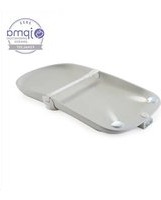
Glow - Table à langer bébé Contours - Free user manual and instructions
Find the device manual for free Glow Contours in PDF.


| Product Type | Nightlight |
| Brand | Contours |
| Model | Glow |
| Power Source | USB-C (5V, 1A) |
| Battery Capacity | 1800 mAh (rechargeable lithium-ion) |
| Light Source | LED (warm white) |
| Brightness Levels | 3 (low, medium, high) |
| Color Options | Single color (warm white) |
| Timer Function | Yes (30/60 minutes auto-off) |
| Dimensions | 4.5 x 4.5 x 2.2 inches (11.4 x 11.4 x 5.6 cm) |
| Weight | 0.5 lbs (225 g) |
| Material | BPA-free plastic, silicone base |
| Control Method | Touch sensor (tap to change modes) |
| Safety Certifications | ETL, FCC, CE |
| Indoor Use Only | Yes |
| Operating Temperature | 32°F to 104°F (0°C to 40°C) |
| Storage Temperature | -4°F to 140°F (-20°C to 60°C) |
| Cleaning Instructions | Wipe with a dry or slightly damp cloth; do not submerge |
| Battery Life | Up to 12 hours on low setting (varies by brightness) |
| Charging Time | Approx. 3 hours |
| Warranty | 1 year limited warranty |
| Spare Parts Availability | Contact manufacturer for replacement battery |
Frequently Asked Questions - Glow Contours
User questions about Glow Contours
0 question about this device. Answer the ones you know or ask your own.
Ask a new question about this device
Download the instructions for your Table à langer bébé in PDF format for free! Find your manual Glow - Contours and take your electronic device back in hand. On this page are published all the documents necessary for the use of your device. Glow by Contours.
USER MANUAL Glow Contours
MOTION SENSING LIGHT-UP CHANGING PAD

natural_image
3D rendering of a baby washing machine (no text or symbols visible)⚠ WARNING
- Read all instructions before assembly and use of the changing pad.
- Failure to follow these warnings and instructions could result in serious injury or death.
- For your child's safety, read the labels and the instructions before using product.
- Keep these instructions for future use.
- Do not use changing pad if it is damaged or broken.
- Do not use with child over 30 lb
- For technical support, call 1-888-226-4469 or email customerservice@contoursbaby.com
CHOKING HAZARD-Small parts. This package contains small parts which, before assembly, present a choking hazard to children under the age of three.
• Adult assembly required.
FALL HAZARD. Children have suffered serious injuries after falling from changing tables. Falls can happen quickly.
- STAY in arm’s reach of your child.
- ALWAYS secure this pad to the support surface by correctly using anchoring straps. See instructions. The non-secured anchoring strap shall be tucked under the changing pad.
- This pad is for use on a level, stable and structurally sound surface with minimum surface dimensions of 16.25 in. x 31.5 in.
- ALWAYS use restraint system when using this product.
SUFFOCATION HAZARD. Babies have suffocated while sleeping on changing pads. Changing Pads are not designed for safe sleep.
- NEVER allow child to sleep in changing area.
PARTS INCLUDED:
- Changing pad
- Screw
- Washer
NEEDED:
- Phillips screwdriver
• 3 "AA" batteries (not included)
CARE & MAINTENANCE
- Wipe clean with a damp cloth and mild soap.
- Do not submerge electronics.
PRODUCT REGISTRATION FOR SAFETY ALERT OR RECALL ONLY
We will use the information to contact you only if there is a safety alert or recall for this product. We will not sell, rent or share your personal information. To register your product, please visit our online registration at www.kolcraft.com/register
Contours® - North America
1100 W Monroe St
Chicago, IL 60607
1-888-226-4469
customerservice@contoursbaby.com

Love us ... leave a review!
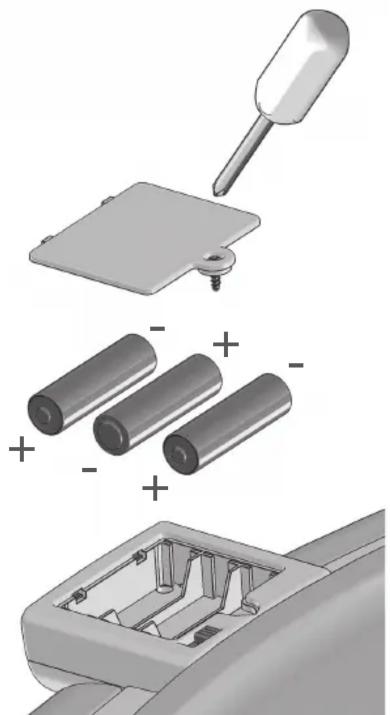
- Unscrew the battery door on the bottom of the electronic unit, with a Phillips screwdriver.
- Insert 3 new "AA" batteries as shown. Replace battery door and tighten the screw.
⚠️CAUTION
To prevent battery leaks, which can burn skin and eyes:
- Remove batteries when storing product for a long time.
- Dispose of used batteries immediately.
• Always replace the entire set of batteries at one time. - Never mix old and new batteries, or batteries of different brands or types.
natural_image
Exploded view of a battery assembly showing pin, battery pack, and internal components (no text or symbols)ATTACH CHANGING PAD TO SECURE SURFACE
Attach the changing pad to the changing surface by using the following instructions:
- Use a screwdriver to attach the anchoring strap to the back of the changing table or dresser or to the wall.
- Periodically check the anchoring strap to ensure it remains tight and securely attached to the changing table or dresser.
- To remove the pad from the changing table or dresser, unscrew the mounting screw and store in a safe place.
This pad includes two anchoring straps, one on either side of the changing pad, for fl exibility. Only one anchoring strap needs to be attached to a dresser, changing table or wall. Tuck the other anchoring strap underneath the changing pad.

natural_image
Mechanical assembly diagram showing a bracket with attached clamps, screw holes, and a screwdriver (no text or symbols)SECURELY RESTRAIN BABY ON CHANGING PAD
How to properly use the restraint system:
Align the restraint strap over baby's abdomen and buckle securely, adjusting and tightening for a snug fi t. Always use enclosed restraint strap and keep one hand on baby when using this changing pad.

natural_image
Line drawing of a baby wrapped in a medical device, lying inside a rounded rectangular basin (no text or symbols)CONTROL PANEL
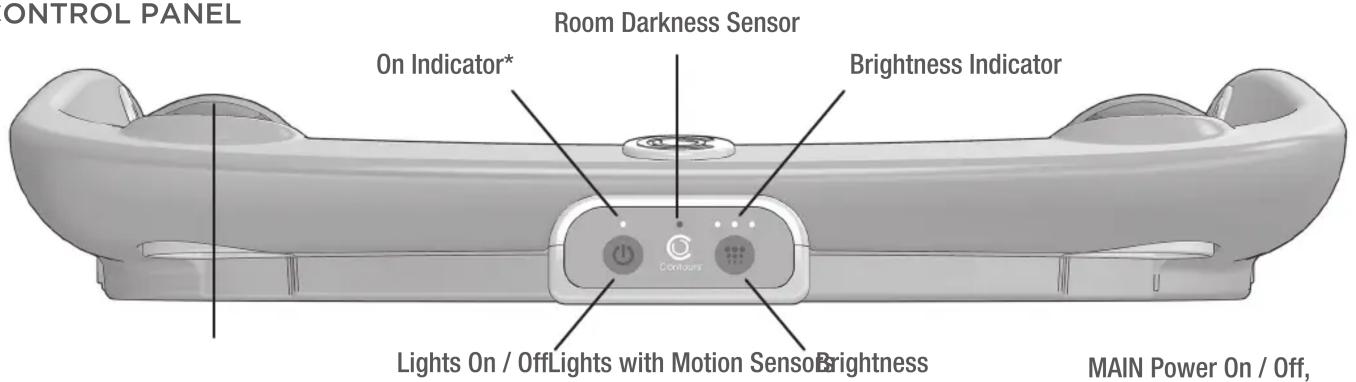
*Flashing red light indicates room is dark enough for lights to automatically turn on when baby is placed on pad.
If lights automatically turn on during the day or in a bright room, ensure that nothing is blocking the room darkness sensor.
OPERATION
| Function | Action |
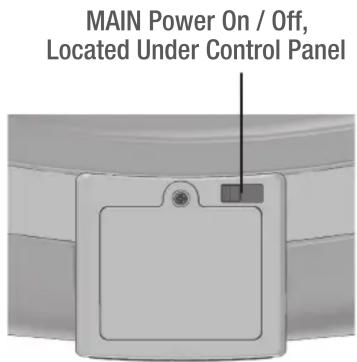
| Turn MAIN power on or off Slide the on/off switch located beside the battery door, underneath the control panel. | |
| Turn MAIN power off if not using pad for extended period of time to conserve battery life. | |
| Turn lights ON - Night Mode Pad will sense when baby is placed on pad(MAIN power on) - Lights turn ON automatically- Lights turn OFF automatically, about 45 seconds after baby is removed(Press ‘Lights On/Off’ button to turn off sooner) | |
Turn lights ON or OFF - Day Mode (MAIN power on) - Press “On/Off” button- Lights turn OFF after about 45 secondsOr press button again to turn OFF  | |
| Adjust brightness(low / medium / high) | Press “Brightness” button(default is “medium” setting) |
ENSURING OPTIMAL PERFORMANCE OF THE CONTOURS GLOW™ CHANGING PAD:
| If the pad’s lights turn on unexpectedly:sensorTry positioning any video monitors away from the pad’sroom darkness and/or motion sensors | Ensure that nothing is blocking the room darkness |
| If the pad’s lights do not turn on when expected:Ensure that 3 new, properly working ‘AA’ batteries areinstalled correctlyIf the pad is close to a light source (window, nightlight), ensure the pad’s room darkness sensor is facingaway from the light source | Check that the main power switch is turned ‘ON’ |
| If the On Indicator quickly flashes 6 times and thenlights no longer turn on when:then back on again to resume normal function.- Baby is placed on the pad- Or if any button on the control panel is pressed | It is time to change the batteries. After the batteriesare changed, be sure to turn the main power off and |
| For further assistance with your changing pad:or customerservice@contoursbaby.com.See ContoursBaby.com for the most up to dateinstructions. | Contact Contours customer service at 1-888-226-4469 |
WHEN MAIN POWER TURNED ON, PAD SENSES FOR BABY IN DARK ROOM

natural_image
Line drawing of a portable electronic device with ventilation slots and mounting feet (no text or symbols)LIGHT-UP MODES

natural_image
Illustration of a baby wrapped in a seatbelt inside a transparent car (no text or symbols)With Baby, Bright Room
*See page 3 to turn on

natural_image
Line drawing of a baby lying inside a baby's seat, with no text or symbols presentWith Baby, Darkened Room
Light Turns on Automatically

- ⚠ WARNING
- PARTS INCLUDED:
- NEEDED:
- CARE & MAINTENANCE
- PRODUCT REGISTRATION FOR SAFETY ALERT OR RECALL ONLY
- ⚠️CAUTION
- ATTACH CHANGING PAD TO SECURE SURFACE
- Attach the changing pad to the changing surface by using the following instructions:
- SECURELY RESTRAIN BABY ON CHANGING PAD
- How to properly use the restraint system:
Brand : Contours
Model : Glow
Category : Table à langer bébé