Grand Touring GTH400 - Receiver JBL - Free user manual and instructions
Find the device manual for free Grand Touring GTH400 JBL in PDF.


| Product Type | Car Stereo Receiver |
| Brand | JBL |
| Model | Grand Touring GTH400 |
| Dimensions (W x H x D) | 7.2 x 2.0 x 6.5 inches (183 x 51 x 165 mm) |
| Weight | 1.5 lbs (0.68 kg) |
| Power Supply | 12V DC (negative ground) |
| RMS Power Output | 22W x 4 channels |
| Peak Power Output | 50W x 4 channels |
| Tuner Bands | AM/FM with 30 presets |
| Playback Formats | CD, CD-R/RW, MP3, WMA |
| Front Inputs | 3.5mm AUX, USB |
| Display | Dot matrix LCD with white backlight |
| Remote Control | Included wired remote |
| Chassis Size | 1 DIN |
| Maintenance | Clean with a soft, dry cloth; avoid liquids |
| Safety | Do not expose to moisture or extreme temperatures |
| Spare Parts & Repairability | Contact JBL customer service for authorized service |
| General Information | Designed for car audio systems; manufactured by JBL |
Frequently Asked Questions - Grand Touring GTH400 JBL
User questions about Grand Touring GTH400 JBL
0 question about this device. Answer the ones you know or ask your own.
Ask a new question about this device
Download the instructions for your Receiver in PDF format for free! Find your manual Grand Touring GTH400 - JBL and take your electronic device back in hand. On this page are published all the documents necessary for the use of your device. Grand Touring GTH400 by JBL.
USER MANUAL Grand Touring GTH400 JBL
natural_image
Abstract grayscale graphic with curved shapes and triangular elements, no text or symbols presentGTH400
6/5/4/3 CHANNEL AUTOMOTIVE POWER AMPLIFIER OWNER'S MANUAL
JBL
04TH16
Table of Contents
- Introduction.... 3
1.1 Features.... 4
1.2 About Installation.... 4
-
Installation and use.... 5
-
System Design with the GTH400....6
3.1 Speaker Requirements 6
3.2 Typical Applications....7
- Installation and Use 9
4.1 Controls and Connectors....9
4.2 Internal Adjustments.... 12
Speaker-Level Input Impedance Adjustments.... 12
Crossover Frequency Adjustments.... 12
Custom Chip construction.... 13
Remote Chassis Installation 13
Unter-Dash Remote Installation.... 14
In-Dash remote Installation.... 14
Power Supply Connections 14
Simultaneous Speaker Stereo-Mono Connection Diagram..... 16
Speaker-Level Input Harness - Color Codes.... 17
- Adjusting the Gain .... 17
- Important Characteristics ...... 19
- In Case of Difficulty.... 21
- Specifications ...... 23
Owner's Warranty Information
Model Number
Serial Number
Dealer Name
City, State, Zip
Sales Receipt Number
Date of Purchase
JBL
1. Introduction
Thanks for purchasing your new GT series automotive multichannel amplifier. Your GT series amplifier will easily connect to virtually any car audio system, whether it is factory installed or one purchased separately. The GTH400 includes an abundance of unique features which are described in this manual. The most obvious feature of the GTH400 is its 6-channel, staggered-power design. This design provides the simplicity of driving an entire system with a single amplifier without compromise. The flexible design of the GTH400's built-in crossover circuitry also allows elaborate systems to be built more simply than with conventional components. For optimum performance, the power amplifier circuitry is a fully discrete design notable for its low distortion and unusually clean and clear sound quality.
In addition to conventional preamp-level inputs, the GTH400 features JBL's Universal Interface design, which facilitates simple connection to factory radios with the low distortion that is usually only associated with preamp level connection. In addition, when using a high-powered (BTL) radio through the speaker-level inputs, Common Sense turn-on circuitry senses the common-mode voltage present on the radio's speaker wires, turning the amplifier on without an additional remote wire.
1.1 Features
Theory of Operation – Virtual Center Image Enhancer
JBL's breakthrough "Virtual Center" circuitry is the result of the understanding of how the human ear responds to timing, frequency, and amplitude cues to determine the apparent direction of a sound source. Virtual Center circuitry manipulates the analog signal in real time to provide each of the driver's ears with the signal they would receive if the driver was seated in the center of the vehicle. This provides a stable, centered image to the driver much like that obtained with a dedicated center-channel loudspeaker.
To restore the spaciousness that is generally lost in the small confines of a car interior, the rear channels utilize differential-mode ambience recovery to restore the ambience information present in all conventional stereo recordings. Unlike DSP, the JBL circuitry does not add synthetic reverb, but recovers real information that is masked in conventional systems. As a result, the overall effect from the Virtual Center circuitry of the GTH400 is incredibly realistic, yet simple to adjust and use. Best of all, the “Virtual Center” and ambiance recovery circuits do not require specially encoded recordings and work with virtually all conventional stereo tapes, discs, and broadcasts.
1.2 About Installation
Although the GTH400 is designed to make installation as easy as possible, it is an extremely sophisticated product that requires proper installation and setup to realize its full performance potential. If you feel you do not have the necessary knowledge and skills, we strongly recommend that the installation be done by your authorized JBL dealer.
If you choose to install the GTH400 yourself, read all of the information in this manual before you start the installation. Pay particular attention to the safety precautions and notes.
JBL
2. Installation and use
Refer to the “Crossover Frequency Adjustments” and “Speaker-Level Input Impedance Adjustments” sections of this manual to see if you will need to make alterations to their factory settings.
- Disconnect the negative cable from the battery. Note: If the vehicle's radio features a code type security system, make certain you know the code before disconnecting the battery!
- Run a minimum AWG #8 power cable complete with a 60 amp fuse (not included) directly from the positive +12V battery terminal to the desired amplifier location. Keep the fuse within 6" of the battery terminal, and position it before the wire runs through any metal partition.
- Note: All wiring connections should be made either by soldering with heatshrink tubing insulation or with high quality crimp-type insulated connectors installed with a professional-type, articulated crimping tool. Soldering crimp-type terminals is recommended for additional security. Never use wire nuts, insulation-displacement connectors (i.e. ScotchLok type), or twist and tape connections. Do not use electrical tape; it will loosen with age and extreme temperatures.
- Mount amplifier in the desired location using the included screws.
-
Connect power wiring as shown in the Wiring Diagram on page 18.
-
Connect the outputs from the head unit to the appropriate inputs of the amplifier according to the Wiring Diagram (page 18) with either (or both) high quality low-level signal cables with RCA plugs, or the supplied speaker-level input connector.
- Install the remote control in the desired location. Connect and run the cable from the remote to the amplifier.
- Connect the speakers to the amplifier according to the Wiring Diagram on page 18.
- Turn the gain controls to the 1/4-position for all groups.
- Set the bass boost of each group to the desired position.
- Set the crossover switches for each group as desired.
- Set the Group 2 Input and Group 3 Input as desired.
- Set the mode switches to Stereo, Left + Right, or Left Input Only operation for each group.
- Double-check your switch settings. Reconnect the negative battery cable. Note: Incorrect switch settings can damage your speakers!
- Turn on the signal source at a low volume level, and check for the correct output from each speaker.
- Adjust the amplifier gain controls using the procedure described in the "Adjusting the Gain" section (page 25).
- Read the rest of the manual to get maximum use and enjoyment from your amplifier.
3. System Design Using the GTH400
3.1 Speaker Requirements
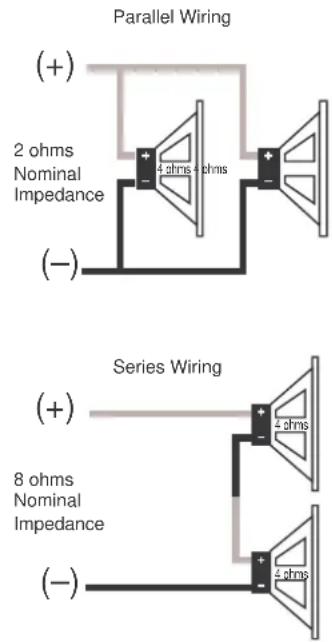
When used in the non-bridged mode a group-channel of the GTH400 can easily drive two 2-ohm speaker loads. When only one speaker is connected to the left and right outputs of a group, virtually any conventional speaker may be used. When two speakers are connected in parallel to a single output (left or right) of a given group, each speaker must have a minimum impedance of at least 4 ohms. This ensures that the combined load will not drop below 2 ohms. Although the amplifier will not be damaged, load impedances lower than 2 ohms will eventually cause the amplifier to overheat, activating the protection circuits and causing the unit to shut off until it cools down sufficiently.
When a group of the GTH400 is in bridged mode, the combined impedance of the speaker (or speakers) connected to the bridged channels should be at least 4 ohms. As in the example above, sustained operation of the GTH400 in bridged mode with less than 4 ohms will likely cause overheating.
The GTH400 must not be used with speakers that have either one of their input terminals wired to the frame of the speaker or to the chassis of the vehicle.
text_image
Parallel Wiring (+) 2 ohms Nominal Impedance 4 ohms + ohms (-) Series Wiring (+) 8 ohms Nominal Impedance 4 ohms (-)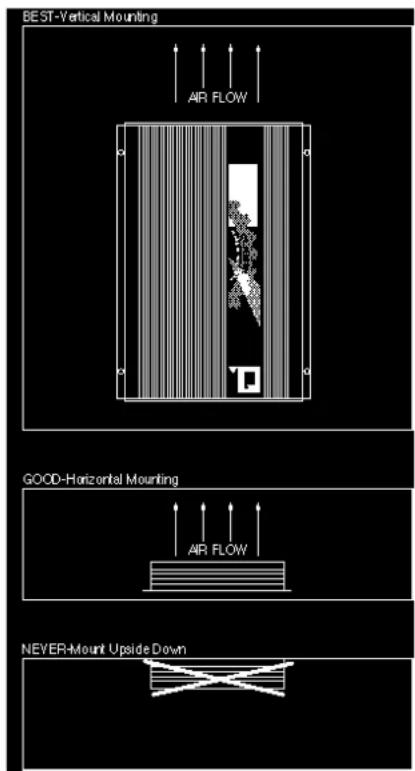
text_image
BEST-Vertical Mounting AIR FLOW GOOD-Horizontal Mounting AIR FLOW NEVER-Mount Upside DownJBL
3.2 Typical Applications
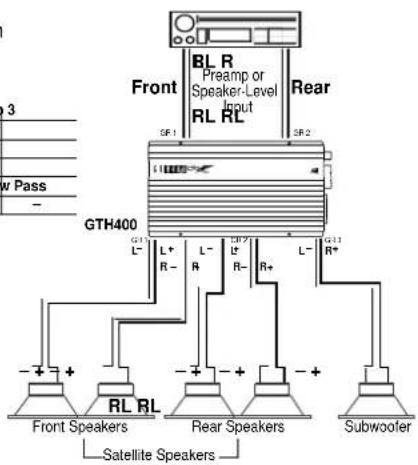
The diagrams on pages 8 & 9 show the most common basic system configurations of the GTH400. One or more of these building blocks may be combined to form elaborate system designs.
The GTH400 uses the terminology "Group 1," "Group 2" and "Group 3" to indicate the three main signal paths within the amplifier. Each "group" may consist of a mono bridged signal or a stereo pair of L+R signals depending on the system configuration.
Application 1
6-Channel Bi-Amplified System with Non-Fading Subwoofers
| Group 1 Group 2 Group 3 | |||
| Mode Stereo Stereo Stereo | |||
| Group 2 Input - GR 2 | |||
| Group 3 Input - GR 1+2 | |||
| Speaker Crossover | High Pass High Pass Low Pass | ||
| Preamp Crossover | - | - | - |

flowchart
graph TD
    A["Front"] --> B["GTH400"]
    B --> C["RL RL"]
    B --> D["RL RL"]
    B --> E["RL RL"]
    B --> F["RL RL"]
    B --> G["RL RL"]
    B --> H["RL RL"]
    B --> I["RL RL"]
    B --> J["RL RL"]
    B --> K["RL RL"]
    B --> L["RL RL"]
    B --> M["RL RL"]
    B --> N["RL RL"]
    B --> O["RL RL"]
    B --> P["RL RL"]
    B --> Q["RL RL"]
    B --> R["RL RL"]
    B --> S["RL RL"]
    B --> T["RL RL"]
    B --> U["RL RL"]
    B --> V["RL RL"]
    B --> W["RL RL"]
    B --> X["RL RL"]
    B --> Y["RL RL"]
    B --> Z["RL RL"]
    B --> AA["RL RL"]
    B --> AB["RL RL"]
    B --> AC["RL RL"]
    B --> AD["RL RL"]
    B --> AE["RL RL"]
    B --> AF["RL RL"]
    B --> AG["RL RL"]
    B --> AH["RL RL"]
    B --> AI["RL RL"]
    B --> AJ["RL RL"]
    B --> AK["RL RL"]
    B --> AL["RL RL"]
    B --> AM["RL RL"]
    B --> AN["RL RL"]
    B --> AO["RL RL"]
    B --> AP["RL RL"]
    B --> AQ["RL RL"]
    B --> AR["RL RL"]
    B --> AS["RL RL"]
    B --> AT["RL RL"]
    B --> AU["RL RL"]
    B --> AV["RL RL"]
    B --> AW["RL RL"]
    B --> AX["RL RL"]
    B --> AY["RL RL"]
    B --> AZ["RL RL"]
    B --> BA["RL RL"]
    B --> BB["RL RL"]
    B --> BC["RL RL"]
    B --> BD["RL RL"]
    B --> BE["RL RL"]
    B --> BF["RL RL"]
    B --> BG["RL RL"]
    B --> BH["RL RL"]
    B --> BI["RL RL"]
    B --> BJ["RL RL"]
    B --> BK["RL RL"]
    B --> BL["RL RL"]
    B --> BM["RL RL"]
    B --> BN["RL RL"]
    B --> BO["RL RL"]
    B --> BP["RL RL"]
    B --> BQ["RL RL"]
    B --> BR["RL RL"]
    B --> BS["RL RL"]
    B --> BT["RL RL"]
    B --> BU["RL RL"]
    B --> BV["RL RL"]
    B --> BW["RL RL"]
    B --> BX["RL RL"]
    B --> BY["RL RL"]
    B --> BZ["RL RL"]
    B --> CA["RL RL"]
    B --> CB["RL RL"]
    B --> CC["RL RL"]
Application 2
5-Channel Bi-Amplified System with Non-Fading Mono Subwoofer
| Group 1 Group 2 Group 3 | |||
| Mode Stereo Stereo | L+R | ||
| Group 2 Input – | GR 2 | – | |
| Group 3 Input – | – | GR 1+2 | |
| Speaker Crossover | High Pass High Pass Low Pass | ||
| Preamp Crossover | – | – | – |
text_image
BL R Preamp or Speaker-Level Input RL RL Front Rear GTH400 L+ L- L- R- R- R+ L- GTH400 L- R- R- L- R+ - + RL RL - + - + - + - + - + - + - + - + - + - + - + - + - + - + - + - + - + - + - + - + - + - + - + - + - + - + - + - + - + - + - + - + - + - + - + - + - + - + - + - + - + - + - + - + - + - + - + - + + - + + - + + - + + - + + - + + - + + - + + - + + - + + - + + - + + - + + - + + - + + - + + - + + - + + - + + - + + - + + - + + - + + - + + - + + - + + - + + - + + - + + - + + - + + - + + - + + - + +Application 3
4-Channel Full-Range or Bi-Amplified
4-Channel Full-Range
| Group 1 Group 2 Group 3 | |||
| Input Mode L L Stereo | |||
| Group 2 Input - GR 2 - | |||
| Group 3 Input -- GR 3 | |||
| Speaker Crossover | Flat Flat | Flat | |
| Preamp Output Crossover | -- | - | |
4-Channel Bi-Amplified with
Fading Mono Subwoofers
| Group 1 | Group 2 | Group 3 | |
| Input Mode L L L+R | |||
| Group 2 Input - GR 2 - | |||
| Group 3 Input -- GR 3 | |||
| Speaker Crossover | High Pass | High Pass | Low Pass |
| Preamp Crossover | -- | - |
* Stereo subwoofers may also be used by selecting "ST" on the group 3 input mode switch.
Note: Image Enhancement cannot be used in these applications.

flowchart
graph TD
    A["Front"] --> B["GTH400"]
    B --> C["Front Speakers"]
    B --> D["Rear Speakers or Subwoofer"]
    B --> E["Ground"]
    style A fill:#f9f,stroke:#333
    style B fill:#ccf,stroke:#333
    style C fill:#dfd,stroke:#333
    style D fill:#dfd,stroke:#333
    style E fill:#dfd,stroke:#333
Application 4
3-Channel Bi-Amplified
4-Channel Input (Fading Subwoofer)
| Group 1 | Group 2 | Group 3 | |
| Input Mode L L L+R | |||
| Group 2 Input - GR 2 - | |||
| Group 3 Input -- GR 3 | |||
| Speaker Crossover | High Pass | High Pass | Low Pass |
| Preamp Output Crossover | -- | - |
2-Channel Input (Mono Subwoofer)
| Group 1 | Group 2 | Group 3 | |
| Input Mode L L L+R | |||
| Group 2 Input | - GR 2 | - | |
| Group 3 Input | -- | GR 1+2 | |
| Speaker Crossover | High Pass | High Pass | Low Pass |
| Preamp Crossover | -- | - |
Note: Image Enhancement cannot be used in these applications.

text_image
Front RR L L RL 5R 1 GTH400 Use these when 4-channel output is available. Rear L R L R L R R3 L R3 L R3 L R3 L R3 L R3 L R3 L R3 L R3 L R3 L R3 L R3 L R3 L R3 L R3 L R3 L R3 L R3 L R3 L R3 L R3 Mai n Speakers SubwooferJBL
4. Installation and Use
4.1 Controls and Connectors
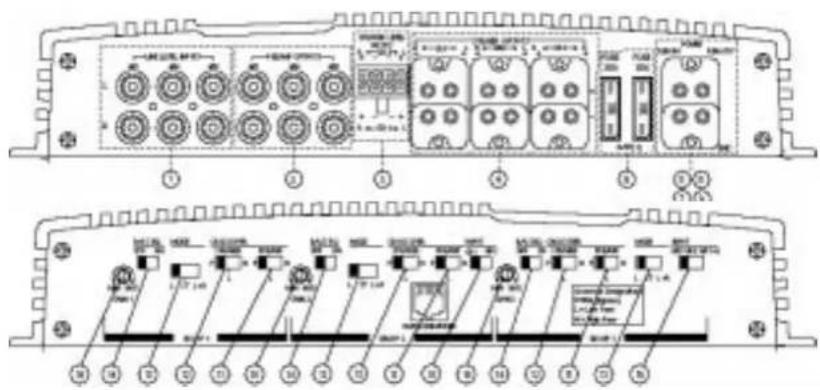
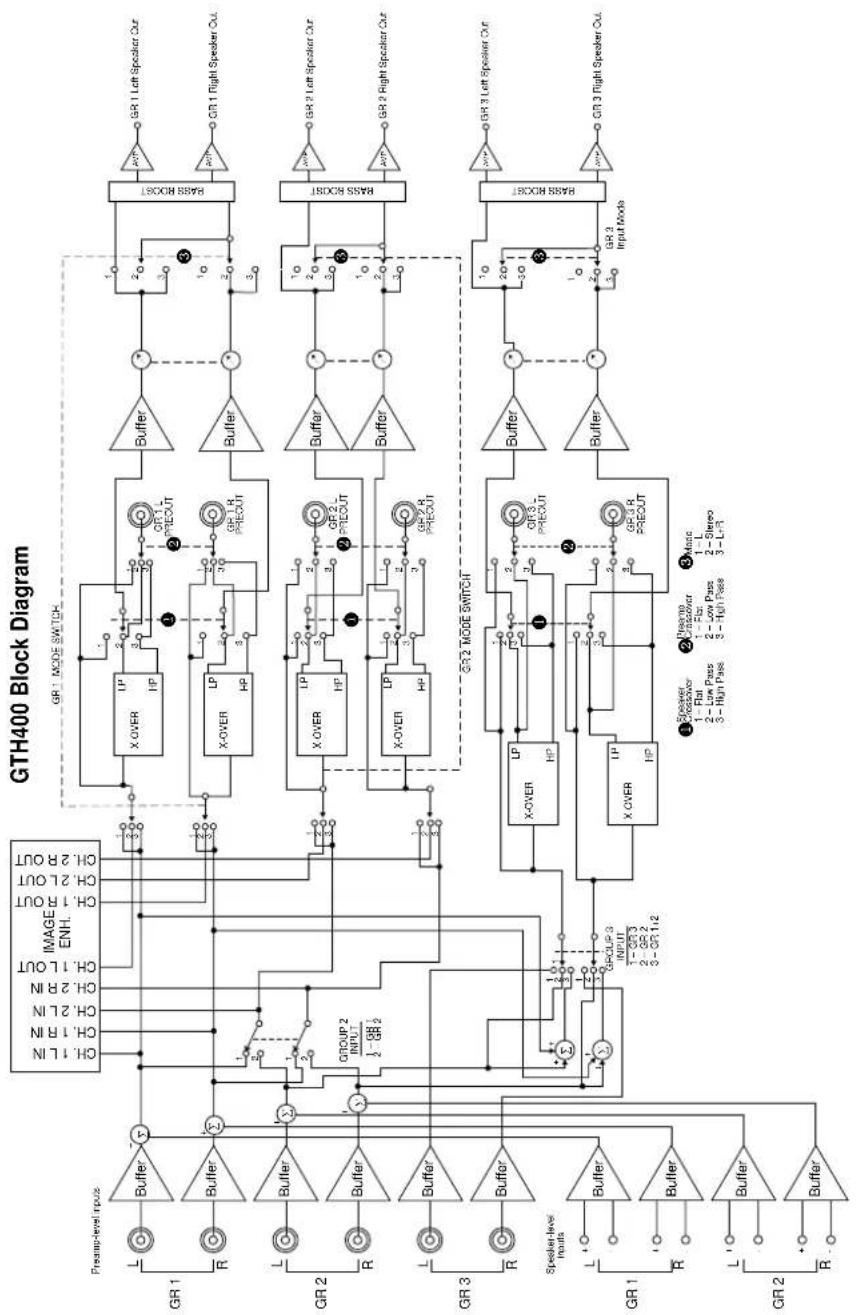
- Preamp-Level Input Connector – Use these connectors for line (pre-amp) level inputs to the amplifier.
- Preamp-Level Output Connector - Use these outputs to send signal to additional amplifiers.
- Speaker-Level Input Connector – Use this connector for speaker level input signals. A wire harness is supplied for use with this connector. See “Audio Input Connections” section (page 23) for wiring instructions. This input also includes JBL’s Common Sense input circuitry which turns the amplifier on as soon as the high powered head unit connected to this input is turned on.
- Speaker Output Connectors – Connect speaker wiring to these connectors. See wiring directions for more information.
5., 6., 7., 8. Power Connector – Connection for power wires. See wiring directions for information on proper connections. -
Fuses – Two 30 Amp ATC type fuses.
-
Gain Controls – Use these controls to adjust the gain of the amplifier channel group. See the "Adjusting the Gain" section (on page 25) for tips on proper setup.
- Preamp Crossover Switches – These switches control the built-in crossovers that are directed to the preamp-output connectors. Set the switch to F (flat) for full-band operation for that group. Set the switch to L (low) to activate the low-pass filter on the pre-amp output group (for subwoofer use or to use in conjunction with a high-pass filtered input signal to create a bandpass crossover for a midrange or midbass driver). Set the switch to High-Pass to activate the high-pass filter for use with satellite speakers or tweeters on the pre-amp output group.
- Speaker Crossover Switches – These switches control the built-in crossovers that are connected to each group's power amplifier circuitry. Set the switch to F (flat) for full band operation on a group. Set this switch to L (low) to activate the low-pass filter on the selected amplifier group for subwoofer use or
text_image
Technical diagram of an electronic device rear panel with labeled ports and internal componentsto use in conjunction with a high-pass filtered input signal to create a bandpass crossover (for a midrange or midbass driver). Set the switch to H (high) to activate the high-pass filter for use with satellite speakers or tweeters on an amplifier group.
- Mode Switches – These switches are used to set the input mode for both preamp and speaker-level inputs. Set the switch to ST(ereo) for normal operation on the group using individual left and right inputs. Set this switch to L to drive both the left and right outputs with only a single input on the left jack. Set the switch to L+R to sum the left and right inputs for a mono output on the group. These switches do not affect the preamp outputs.
- Bass EQ Switch – These switches activate a built-in Bass Boost circuit used to increase low-bass output on the selected group. These switches do not effect the preamp outputs.
- Group 2 Input Switch – This switch is used to select which inputs will drive Group 2 of the amplifier. Put the switch in position “GR 1” to allow Group 2 to be driven by the Group 1 inputs. Put the switch in the “GR 2” position to drive Group 2 with the Group 2 inputs.
- Group 3 Input Switch – This switch is used to select which inputs will drive Group 3 of the amplifier. Put the switch in position “GR 3” to allow Group 3 to be driven by the Group 3 inputs. Put the switch in the “GR 2” position to drive Group 3 with the Group 2 inputs. Put this switch in the “GR 1+2” position to drive Group 3 with the sum of Group 1 and 2 for a
non-fading subwoofer output on Group 3.
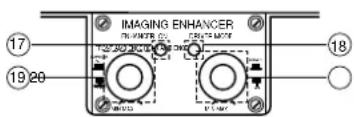
- Remote Bypass/On Indicator – This indicator is on when the Imaging Enhancer is engaged and off when the Imaging Enhancer is bypassed.
- Driver/All Optimizer Indicator – This indicator is on when the Virtual Center Channel circuitry is in “Driver” optimization mode and off when it is in the “All” passenger mode. Note: The enhancer on indicator must be on before driver’s mode can enabled.
- Front Ambience Control and On/Bypass Switch – Rotating this control adjusts the amount of ambience and front staging width produced by the Imaging Enhancer. Pulling the knob places the Imaging Enhancer in “Bypass” mode. Pushing in the knob places the Imaging Enhancer in “On” mode.
- Rear Ambience and Driver/All Optimizer Control – Rotating this knob controls the amount of rear-fill ambience and the “room size” of the acoustic environment when used in a system with rear speakers. Pulling the knob out places the Imaging Enhancer in “All” passengers optimization mode. Pushing the knob in places the unit in “Driver” optimization mode. Best results at the driver’s position will be achieved with the control in the “Driver” setting.
text_image
IMAGING ENHANCER IN CHAMOR OIL CRIPT MEATR 17 19 20 18Power Indicator LED (on amp chassis top) – LED steadily illuminates for normal operation. LED blinks when protection circuitry or muting is engaged.
JBL
flowchart
GTH400 Block Diagram for audio system, showing presamp-level inputs, group and speaker-level outputs with X/OVER, HP, and PR/EOUT components.4.2 Internal Adjustments
Speaker-Level Input Impedance Adjustments
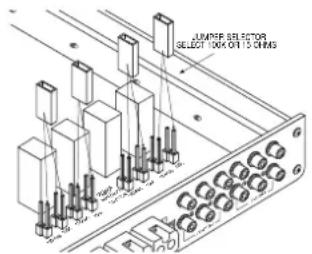
The speaker level inputs of the GTH400 come factory set with 100k ohm input impedance. This will provide the lowest distortion operation from the speaker outputs of most modern head units by reducing the power the amplifier in the head unit must deliver to practically nothing. On some older, or lower-priced head units, this load will not facilitate proper fader operation. To allow for this, we have provided the ability to change the input impedance of the speaker-level inputs to 15 ohms. This is accomplished by moving the jumpers
text_image
LUMBER SELECTORS SELECT TOCK ON 15 ONMSshown on the diagram above. This input is also capable of directly accepting signals, when in the 100k ohm setting, from many Balanced Line Drivers such as those sometimes used in competition vehicles. For best results, a Balanced Line Driver capable of at least 4V nominal output should be used.
If the head unit has 4 channels of built-in amplification and/or an electronic fader control, you should leave the jumpers in the factory set position.
If the head unit has 2 channels of amplification, with a speaker-level fader, the jumpers should be set to the 15-ohm position. This will always be a rotary-type control, not one controlled by electronic pushbuttons.
If you are not certain of the type of fader control your unit has, measure the resistance across one set of speaker outputs with an ohmmeter (with the head-unit off). Adjust the fader control through its entire adjustment range. If there is a change in the resistance as the control is adjusted, set the jumpers to the 15-ohm position. (See step 1, page 16 to remove bottom cover.)
Crossover Frequency Adjustments
The GTH400 amplifiers include built-in frequency selectable crossovers. One crossover is connected in series with the amplifier circuitry and the other crossover is connected to the preamp level output jacks. These crossovers can be set in either the F (full bandwidth operation), L (subwoofer operation), or H (satellite operation).
The crossover frequencies are set by chips inside the amplifier. These chips are simply a set of resistors, connected across the pins and molded into a single package. The crossover frequencies may be changed to any value desired by changing the resistor network.
Frequency Resistor JBL Part Value Number
| 50Hz 47k Ω 1-23-750 |
| 80Hz 33k Ω 1-23-817 |
| 120Hz 22k Ω 1-23-820 |
| 200Hz 12k Ω 1-23-821 |
| 250Hz 10k Ω 1-23-810 |
| 375Hz 6.8k Ω 1-23-822 |
| 500Hz 4.7k Ω 1-23-815 |
| 650Hz 3.9k Ω 1-23-823 |
| 2.5kHz 1k Ω 1-23-824 |
| 5kHz 470 Ω 1-23-816 |
JBL
Custom Chip Construction
Regardless of whether you build or buy it, the necessary resistor network has the following configuration:

natural_image
Pure electrical circuit lines without any symbols• Each resistor in the package has the same value.
- If you know the crossover frequency you want, you can calculate the resistor value necessary by solving the following equation:
Resistor
Value =
in ohms
2,500,000
Frequency in Hz
- Use the following equation if you have a resistor pack of a known value, and want to find its crossover frequency:
Frequency 2,500,000
in Hz
Resistor Value
in ohms
- To build chips from discrete resistors, solder the resistors to a standard 14-pin "DIP Header" according to the diagram. If a DIP Header is not available, you may bend the leads of 14 -watt resistors 90 degrees, trim them to 18 " -length, and insert them directly into the chip sockets.
To change the crossover frequency change the resistor network as follows:
- Remove the screws from the bottom panel as shown below.

natural_image
Pure technical diagram of a mechanical assembly with no text, numbers, or symbols- Select which resistor module, high pass or low pass, that you wish to change.
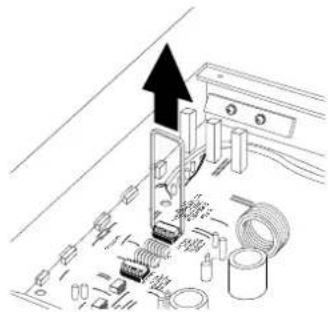
- A chip puller, which can be obtained from any electronics store, is recommended to remove the resistor chip. Pull the resistor chip from the socket as shown in the figure below.
natural_image
Diagram of a computer motherboard with connectors and cables, no text or symbols present- Place the new module in the socket making sure all pins are lined up with the socket holes. Press the module firmly into the socket.
- Replace the bottom lid.
For further information on how to use the speaker output and preamp output crossovers for system building see the "Typical Applications" and "Add-On and Upgrade Steps" sections.
Remote Chassis Installation
The wired remote of the GTH400 can be installed either in dash or under dash.
Under-Dash Remote Installation
- Set the GTH400 remote in the installation location and mark two mounting screw hole locations.
- Set the GTH400 remote aside and drill two pilot holes using a 1/16"- (1mm) bit. Be careful not to drill into any of the car's components.
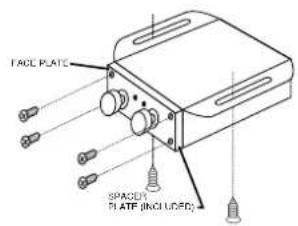
- Secure the spacer and faceplate (with the control labeling) to the front of the remote control panel using the four smaller screws included.
- Push the two adjustment knobs onto the metal shafts.
- Set the GTH400 remote back in place and secure it using two sheet metal screws. Continue to Step 6 in the "In-Dash Installation" section.
In-Dash Remote Installation
- Choose a location for the in-dash installation and use the template at the back of this manual to mark hole locations as shown on the template.
- Drill the holes indicated on the template.
- Using the diagram on page 15 as reference, install the remote behind the panel with the holes just drilled. Position the remote so the two knobs feed through panel and the LEDs are in alignment with the holes drilled.
- Place the trim panel with the control labeling over the two shafts and secure it in place with the 4 screws provided.
- Push the two adjustment knobs onto the metal shafts.
- Connect one end of the GTH400
remote control wire (included) to the connector on the back of the remote control box.
- Run the wire back to the GTH400 main chassis and plug the remote control wire into the "Remote In" connector on the main chassis. Note: a standard 6-pin telephone extension cord may be used if more wire is needed for remote control connection. These extension cords can be purchased at many electronics or hardware stores.
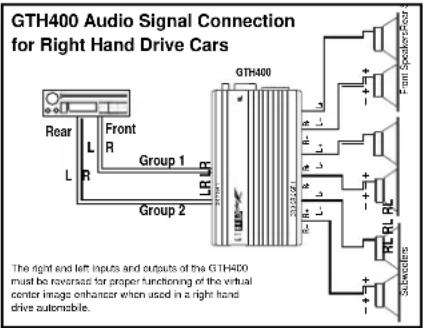
In countries with Right Hand Drive vehicles, the built-in Image Enhancer will not operate properly with standard wiring. To use the GTH400 with right hand drive vehicles, reverse both the input and output wiring as shown below.
text_image
GTH400 Audio Signal Connection for Right Hand Drive Cars Rear L R Front R Group 1 LR R Group 2 GTH400 33125/621 R L R L R L R L R L R L R L R L R L R L R L R L R L R L R L R L R L R L R L R L R L R L R L R L R L R R L R L R L R L R L R L R L R L R L R L R L R L R L R L R L R L R L R L R L R L R L R L R L R L R M L R L R L R L R L R L R L R L R L R L R L R L R L R L R L R L R L R L R L R L R L R L R L R L R L R L R L R L R L R L R L R L R L R L R L R L R L R L R L R L R L R L R L R L R L R L R L R L R L R L R L A M A M A M A M A M A M A M A M A M A M A M A M A M A M A M A M A M A M A M A M A M A M A M A M A M A M A M A M A M A M A M A M A M A M A M A M A M A M A M A M A M A M A M A M A M A M A M A M A M A M A F C C C C C C C C C C C C C C C C C C C C C C C C C C C C C C C C C C C C C C C C C C C C C C C C C C C C C C C C C C C C C C C C C C C C C C C C C C C C C CPower Supply Connections
The power input and remote turn-on wires are connected to the GTH400 via the power connector on the end of the amplifier.
+12V Battery Wire
- Connect a wire directly from the +12 volt terminal of the battery to the + Battery terminal on the amplifier. Use a minimum of AWG #8. Use wire that
JBL
text_image
FACE PLATE SPACE1 PLATE (INCLUDED)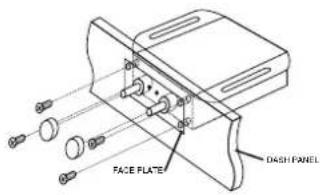
text_image
FACE PLATE DASH PANEL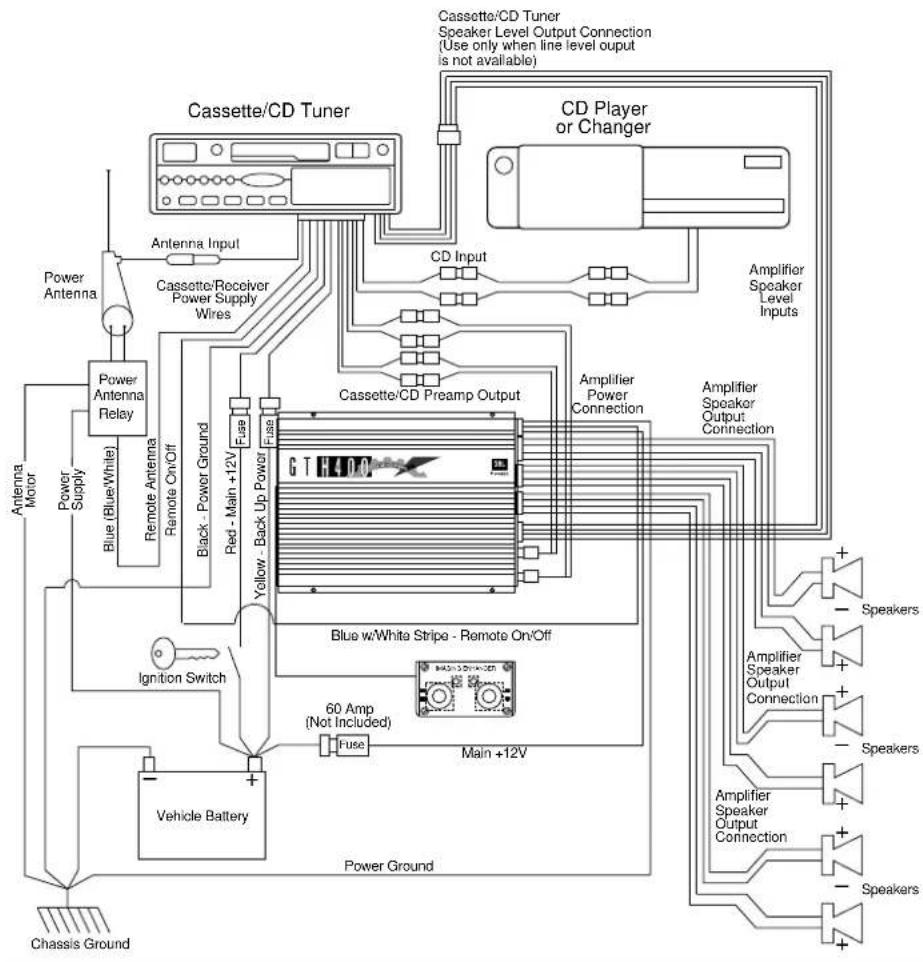
flowchart
graph TD
    A["Cassette/CD Tuner"] --> B["Antenna Input"]
    A --> C["Cassette/CD Preamp Output"]
    A --> D["CD Player or Changer"]
    B --> E["Power Antenna"]
    E --> F["Power Antenna Relay"]
    F --> G["Remote Antenna"]
    G --> H["Remote On/Off"]
    H --> I["Black - Power Ground"]
    H --> J["Red - Main +12V"]
    I --> K["Fuse"]
    J --> L["Fuse"]
    K --> M["Yellow - Back Up Power"]
    L --> N["Blue w/White Stripe - Remote On/Off"]
    M --> O["60 Amp (Not Included)"]
    N --> P["Main +12V"]
    O --> Q["Ignition Switch"]
    P --> R["Vehicle Battery"]
    Q --> S["Chassis Ground"]
    R --> T["Power Ground"]
    U["Cassette/CD Tuner Speaker Level Output Connection (Use only when line level output is not available)"] --> V["CD Input"]
    W["Amplifier Speaker Level Inputs"] --> X["Amplifier Power Connection"]
    Y["Blue w/White Stripe - Remote On/Off"] --> Z["60 Amp (Not Included)"]
    AA["Speaker"] --> AB["+"]
    AC["Speaker"] --> AD["+"]
    AE["Speaker"] --> AF["+"]
    AG["Speaker"] --> AH["+"]
is heat- and oil-resistant whenever running wires through the engine compartment. All wire-to-wire connections should be soldered and insulated with heat shrink tubing, or connected through a high-quality
insulated crimp-on connector or secure set-screw-type terminal blocks. Never leave bare wire exposed. Terminate wires with crimp-or solder-on lug terminals whenever appropriate.
Simultaneous Stereo-Mono Connection Diagrams
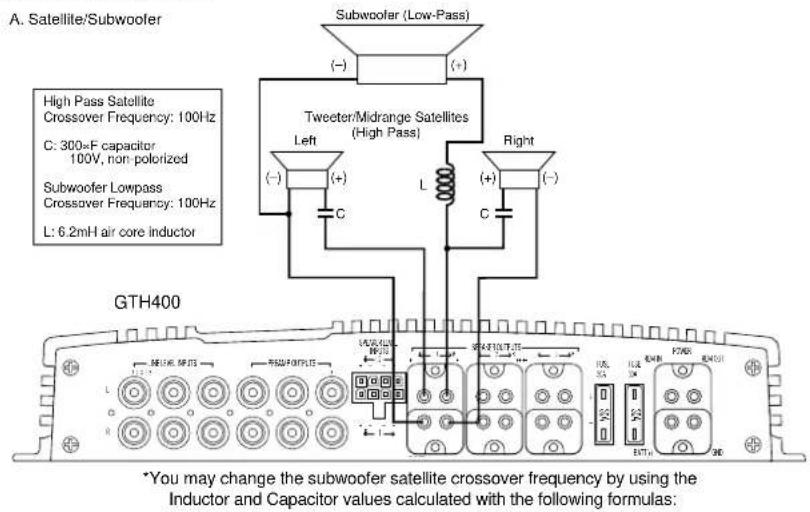
text_image
A. Satellite/Subwoofer Subwoofer (Low-Pass) (-) (+) High Pass Satellite Crossover Frequency: 100Hz C: 300=F capacitor 100V, non-polarized Subwoofer Lowpass Crossover Frequency: 100Hz L: 6.2mH air core inductor GTH400 Tweeter/Midrange Satellites (High Pass) Left (-) (+) C L Right (+) (-) C *You may change the subwoofer satellite crossover frequency by using the Inductor and Capacitor values calculated with the following formulas:High-Pass (Satellite Crossover): 30,000Desired crossover Frequency in Hz = New Capacitor Value in F Low-Pass(Subwoofer Crossover): 620Desired crossover Frequency in Hz = New Inductor Value in mH
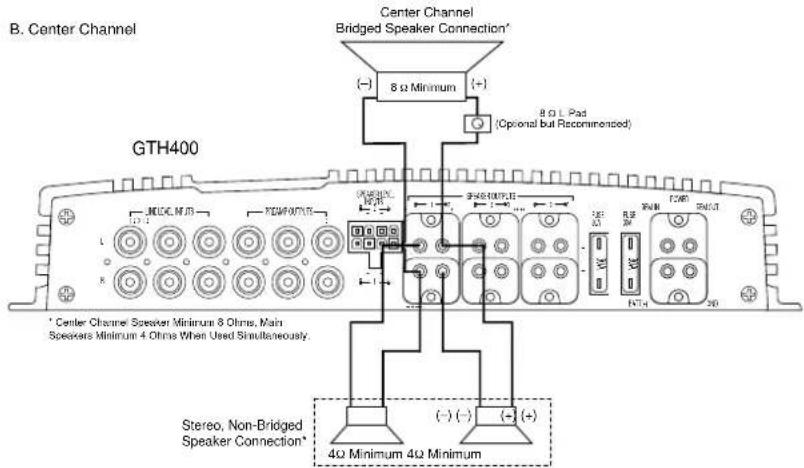
text_image
B. Center Channel Center Channel Bridged Speaker Connection* (−) 8 Ω Minimum (+) (+) 8.0 L Pad (Optional but Recommended) GTH400 * Center Channel Speaker Minimum 8 Ohms, Main Speakers Minimum 4 Ohms When Used Simultaneously. Stereo, Non-Bridged Speaker Connection* 4Ω Minimum 4Ω MinimumJBL
- The GTH400 will draw as much as 60 amps from the vehicle's electrical system, enough to overload conventional vehicle wiring. Therefore the +12 volt power supply must be taken directly from the positive side of the battery.
Do not connect to the vehicle's fuse block or to a wire feeding other accessories.
- To prevent electrical system damage or fire, a fuse holder and fuse (not included – maximum 60 Amp) must be installed in the power supply wire as close to the battery as possible, and before the wire travels through the firewall or other metal panel.
Ground Wire
- Proper grounding is extremely important. Use a heat- and oil-resistant stranded copper automotive wire equivalent to the size used for the +12V connection. Crimp or solder and insulate any wire-to-wire connections. Keep the ground wire as short as possible. A ground wire must be solidly connected to a major sheet metal structure of the vehicle such as a panel near the amp-mounting location. Scrape all paint and primer off the sheet metal at the grounding point to ensure a good electrical connection. Attach the wire to the grounding point with a nut, bolt and star washer. The high current demanded by high-powered amplifiers requires a more secure ground than the typical sheet-metal screw will provide.
The color code for the speaker-level input harness is as follows:
Speaker-Level Input Harness
Color Codes
Group 1 Left (+): White
Group 1 Left (−): White with Black Stripe
Group 1 Right (+): Gray
Group 1 Right (−): Gray with Black Stripe
Group 2 Left (+): Green
Group 2 Left (−): Green with Black Stripe
Group 2 Right (+): Purple
Group 2 Right (−): Purple with Black Stripe
5. Adjusting the Gain
Before operating the GTH400, recheck all wiring connections to make sure they are correct and secure. Be sure that a fuse (60 amps, not included) is installed in the +12V line near the battery. Reconnect the negative ground (−) terminal of the battery. Make sure that the mode switches, crossover switches, Group 2 & 3 Input switches, and crossover frequency modules, are properly set.
- The setting of the gain controls on the GTH400 is important to ensure proper performance, low noise levels, and maximum reliability in the system. As a general rule, controls on components at the front-end of the system (source, equalizers, electronic crossovers, etc.) should be set as high as possible, with the amplifier gain control set as low as possible while still providing adequate volume levels. Using a high signal level from the source and a low gain setting on the amplifier will help keep
background noise levels in the system low.
- To adjust a system using a single GTH400, start with all three of the amplifier gain controls fully counterclockwise and the Imaging Enhancer Remote set to "Bypass" mode. Some head units have additional output level controls or switches. Set those to their maximum position.
- Set the level controls on any associated equipment such as equalizers and electronic crossovers as recommended by their manufacturers. Set all Bass/ Treble or equalizer controls to their centered or bypassed positions. While listening carefully to the system output, adjust the volume control of the radio/tape deck to the point where you first begin to hear audible distortion. Use caution: excessive distortion can damage loudspeakers. Reduce the level just to the point where the distortion goes away. This is the maximum undistorted output level of your head unit and signal processors, and should not be exceeded during use. If audible distortion does not occur, continue to increase the level until the head unit is turned all the way up. If this setting does not provide adequate volume levels, gradually increase (turn clockwise) the gain control for the main (usually front) speaker groups on the GTH400 until the system plays as loud as necessary or when the first signs of distortion are heard.
- After adjusting the main speaker's gain control, you may then turn down
the head unit's volume control to a comfortable level, and adjust the remaining channels for the desired system balance. You will find this easiest to do by adjusting the channels in the following order: 1) front speaker Group, 2) rear speaker Group, 3) subwoofer speaker Group. Elaborate systems incorporating tri- or quad-amplification can be complex to adjust. Your local authorized JBL installation specialist is the best person to help with such adjustment.
Imaging Enhancer Setup
After the installation and set up is finished and all wiring is checked, proceed with the next few steps to set up the Imaging Enhancer on the GTH400.
Note: Since the Imaging Enhancer in the GTH400 is primarily designed to optimize the sound stage for the driver, all tests should be performed while sitting in the driver's seat.
- The Power Indicator LED on the GTH400 main chassis should light up when the head unit is turned on.
- Make sure the "Front-Ambience/Bypass/On" knob and "Rear-Ambience/Driver/All" knobs are pushed in and rotated completely counterclockwise.
- Play a selection which has vocals and good "center" information.
- Gently turn up the volume to a comfortable listening level. You should hear a very distinctive center image coming from the middle of your dashboard. If not, make sure the "Rear-Ambience/Driver/All" knob is pushed in to the "Driver"
JBL
position for driver-optimized sound stage.
- Proceed to push and pull the Rear-Ambience knob to hear the effects of "Driver" and "All" modes. You should hear imaging coming from the middle of the dashboard when the knob is pushed in ("Driver" mode). You should hear stereo with ambience recovery when the knob is pulled out ("All" mode). If you find that the center imaging in the "Driver" position is slightly offset to the left or right side of the dashboard, switch the car-size switch located inside of the GTH400 under the bottom cover as shown below. This switch optimizes the Imaging Enhancer for standard or large cars.

text_image
IMAGING ENHANCER REMOTE PLUG FRONT PLATE Imaging Enhancer Car Size Switch STANDARD ← Large IMAGE ENHANCER MODULE-
Slowly turn the "Front-Ambience" knob in the clockwise direction to increase ambience. You should begin to hear slight reverberation in the music and a sense of a widening front sound stage in both the "Driver" and "All" modes.
-
Slowly turn the "Rear-Ambience" knob in the clockwise direction to increase rear ambience (only in
systems with rear speakers). You should begin to hear an increase in reverberation and get a feeling of being in a very large auditorium. Note: The GTH400 converts the rear channels into true rear-fill surround channels which cancel all center information (vocals, lead instruments, etc.) and lets only true ambience information come out. This same process is used in more expensive “Surround Sound” systems used in theaters.
- Adjust the front and rear ambience as desired. For optimum center imaging, it is recommended that ambience be used sparingly on the front channels.
- To bypass the effects of the Imaging Enhancer in the GTH400, simply pull on the "Front-Ambience" knob until it clicks to the "Bypass" position. The "Enhancer On" LED on the remote control panel will turn off and your sound system should revert back to normal stereo sound without ambience enhancement. The Imaging Enhancer is also bypassed when the remote control is unplugged from the amplifier.
6. Important Characteristics
Overload Protection – The GTH400 incorporates elaborate protection circuitry to prevent damage to the amplifier circuitry and ensure reliable operation. This circuitry will turn the amplifier off in the event of overheating, a short circuit on the speaker output wiring, or improper power supply connections. If the amplifier cycles on
and off, or does not work at all, a problem in installation or an abnormal electrical condition is indicated. Check speaker wiring for short circuits or impedance loads significantly below 2 ohms (4 ohms in bridged mode). Check the power supply voltage at the input of the amplifier to be sure that it is normal; between 11 and 16 volts. Check that the power wires are not reversed.
7. In Case of Difficulty
Power-on light does not come on • Head unit not on; turn the head unit on.
- Ground wire is disconnected or defective; check for continuity with an ohmmeter between the amplifier's ground terminal and a known chassis ground point.
- Battery wire is disconnected or defective; check for approximately +12 volts between the amplifier's battery and ground terminals.
- Blown fuse; check amplifier's fuses located on the end panel near the power connector. If they are blown, replace them with an identical one. If the new fuses blow immediately, then check all the wiring connections. If no fault is found, consult your JBL dealer.
- Remote-on wire between the head unit and the amplifiers is disconnected or defective; check for +12 volts between amplifiers remote-on input terminal and the ground wire with the head unit on.
Power light is on, but no sound is heard • Incorrect switch settings; make sure from some or all of the speakers that all switches (mode, input and crossover) are in their correct positions for your system configuration.
- Incorrectly connected or shorted speaker wires; check for shorts in wiring.
- Defective or disconnected audio cables; check for continuity and replace if necessary.
- Incorrect gain adjustment; verify that the amplifier gain controls are not turned completely down. If they are, sound output level may be very low and may give the impression that the system (or part of the system) is dead.
Power light is on, but no sound is heard • Defective head unit or signal processor; from some or all of the speakers check each component for proper wiring and operation.
- Defective GTH400; If there is audio signal present at the inputs of the amplifier and there is no output, the GTH400 may be defective.
Alternator whine through the audio system • Ground loops; follow the wiring with the engine running suggestions in the section called
"Solving Noise Problems." Also, verify that the chassis grounding point you have chosen is true ground by checking for continuity between the chassis ground point and battery ground.
Bass output from speakers too low • Speaker wired out of phase; check for proper polarity on all speaker wiring (+ amp terminal to + speaker terminal and - amp terminal to - speaker terminal).
Amplifier Power Light is on and • Verify that the remote control is not set sound is heard from the front and rear in "BYPASS" mode by checking to see channels but the Imaging is not improved that the "ON" LED is lit.
with the image enhancer on
- Using the system configuration diagram, confirm that the audio connections are correct for signal path and polarity. Note that right hand drive car installations must have the Left and Right input and output connections reversed as shown in the wiring section on page 19.
- Perform the adjustments as directed in the Imaging Enhancer Setup section.
Power light is blinking and • Incorrectly connected or shorted speaker no sound is heard wires; check for shorts in wiring.
- Defective GTH400; if there is no short on the speaker outputs, the GTH400 may be broken. Consult your JBL dealer.
8. Specifications
GTH400
35 Watts x 4 + 70 Watts x 2 (4 ohms, 0.05% THD)
50 Watts x 4 + 100 Watts x 2 (2 ohms, 0.08% THD)
100 Watts x 2 (Bridged 4 ohms, 0.08% THD) +
70 Watts x 2 (4 ohms, 0.05% THD)
100 Watts x 2 (Bridged 4 ohms, 0.08% THD) +
200 Watts x 1 (Bridged 4 ohms, at 0.08% THD)
Signal to Noise Ratio 100dBA
Frequency Response 10Hz - 50kHz (+0, -1dB)
20Hz - 20kHz (+0, -0.1dB)
Damping Factor >200
Slew Factor >5
Line Level Input Sensitivity 100mV - 4V RMS
(For Rated Power)
Line Level Input Impedance 10k ohms
Speaker Level Input Impedance 15 ohm or 100k ohm
(Selectable by Internal Jumpers)
Speaker Level Input Sensitivity 200mV - 8V RMS
Preamp Output Sensitivity
Preamp Input: 4V in for 4V out
Speaker Input: 4V in for 2V out
Minimum Speaker Impedance
Single Ended (Non-Bridged) 2 ohms
Bridged 4 ohms
Built-in Electronic 18dB per Octave Low-Pass Filter,
Crossover Frequency and Slope Frequency Chips Available from 50–5kHz
Factory Setting 80Hz
18dB per Octave High-Pass Filter,
Frequency Chips Available from 50–5kHz
Bass Boost Frequency +4dB at 40Hz
and Magnitude
Power Requirement 11 to 16V DC Negative Ground
Fuse Size 30 Amp ATC Type Fuse (2 per Amplifier)
Size (L x W x H) 15-1/4" x 11-1/4" x 2" (387mm x 286mm x 51mm)
Weight 13 lbs 4 oz (6 kg)
Speaker Level Input Molex Mini-Fit Jr
Mating Connector #39-01-2080
Metal Pins: 39-00-0038
Remote Control Drilling Template
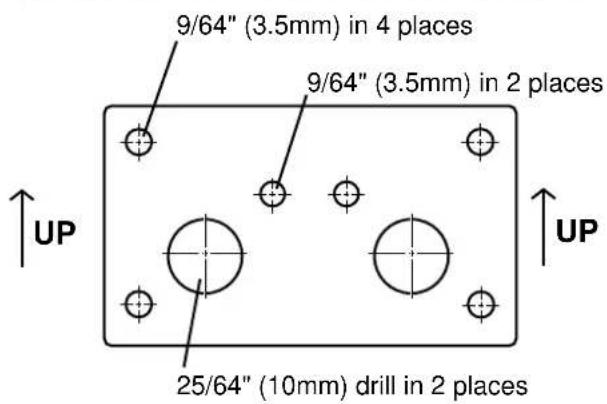
text_image
9/64" (3.5mm) in 4 places 9/64" (3.5mm) in 2 places 25/64" (10mm) drill in 2 placesStaple or clip your original bill of sale here. ▼