
AM018FNCDCH - Separator SAMSUNG - Free user manual and instructions
Find the device manual for free AM018FNCDCH SAMSUNG in PDF.


| Product Type | Split Air Conditioner (Séparateur) |
| Model | AM018FNCDCH |
| Brand | Samsung |
| Cooling Capacity (BTU/h) | 18,000 |
| Heating Capacity (BTU/h) | 18,000 (with heat pump) |
| Power Supply | 220-240V / 50Hz / 1Ph |
| Refrigerant | R32 |
| Energy Efficiency (SEER) | Up to 15.0 |
| Indoor Unit Dimensions (WxDxH) | 840 x 280 x 280 mm |
| Indoor Unit Weight | 9.5 kg |
| Outdoor Unit Dimensions (WxDxH) | 770 x 300 x 545 mm |
| Outdoor Unit Weight | 25.0 kg |
| Airflow (Cooling) | 600 m³/h |
| Noise Level (Indoor) | 28-40 dB(A) |
| Noise Level (Outdoor) | 50-55 dB(A) |
| Filter | Washable Fine Filter |
| Functions | Cooling, Heating, Dehumidification, Fan, Auto Mode |
| Timer | 24-hour On/Off Timer |
| Remote Control | Yes (Infrared) |
| Warranty | 2 years (parts and labor) |
Frequently Asked Questions - AM018FNCDCH SAMSUNG
User questions about AM018FNCDCH SAMSUNG
0 question about this device. Answer the ones you know or ask your own.
Ask a new question about this device
Download the instructions for your Separator in PDF format for free! Find your manual AM018FNCDCH - SAMSUNG and take your electronic device back in hand. On this page are published all the documents necessary for the use of your device. AM018FNCDCH by SAMSUNG.
USER MANUAL AM018FNCDCH SAMSUNG
features of your new air conditioner
• Cool Summer Offer
On those hot sweltering summer days and long restless nights, there is no better escape from the heat than the cool comforts of home. Your new air conditioner brings an end to exhausting hot summer days and lets you rest. This summer, beat the heat with your own air conditioner.
• Cost Efficient System
Your new air conditioner not only provides maximum cooling power in the summer, but can also be an efficient heating method in the winter with the advanced "Heat pump" system. This technology is up to 300% more efficient than electrical heating, so you can further reduce its running cost. Now, meet year-round needs with one air conditioner.
• A Look for Everywhere
The elegant and harmonious design gives priority to the esthetics of your space and complements any of your existing interior décor. With its soft color and rounded-edge shape, the new air conditioner adds class to any room. Enjoy what your air conditioner offers both functionally and esthetically.
- Flexible Installation
Your new air conditioner has couple of installation options. It can be installed on the floor just like other ordinary floor type air conditioner and also can be installed under the ceiling to provide cool and warm air from above. 6 different drain pipe options will also give you more flexible installation options. Have your air conditioner installed wherever you want to.

For easy future reference write the model and serial number down. You will find your model number on the right side of the air conditioner.
Model #____
Serial #____
safety information
To prevent electric shock, disconnect the power before servicing, cleaning, and installing the air conditioner.
SAFETY INFORMATION
Before using your new air conditioner, please read this manual thoroughly to ensure that you know how to safely and efficiently operate the extensive features and functions of your new appliance.
Because the following operating instructions cover various models, the characteristics of your air conditioner may differ slightly from those described in this manual. If you have any questions, call your nearest contact center or find help and information online at www.samsung.com.
Important safety symbols and precautions:
| WARNING | Hazards or unsafe practices that may result in severe personal injury or death. |
| CAUTION | Hazards or unsafe practices that may result in minor personal injury or property damage. |
| CAUTION | To reduce the risk of fire, explosion, electric shock, or personal injury when using your air conditioner, follow these basic safety precautions: |
| Do NOT attempt. | |
| Do NOT disassemble. | |
| Do NOT touch. | |
| Follow directions carefully. | |
| Unplug the power plug from the wall socket. | |
| Make sure the machine is grounded to prevent electric shock. | |
| Call the contact center for help. | |
| Note. | |
These warning signs are here to prevent injury to you and others. Please follow them carefully.
After reading this section, keep it in a safe place for future reference.

SEVERE WARNING SIGNS

Do not place the air conditioner near hazardous substances or equipment that releases open flames to avoid fire, explosions, or injuries.
- Potential risk of fire hazard or explosion.
Do not install the outdoor unit in an unstable place or on an elevated surface where there is a potential risk of falling.
- If the outdoor unit falls, it may cause personal injury or property damage.
Failure or damage may occur if any changes or modifications not stated in the installation manual are performed. In this case, the user will be responsible for the repair expenses.
Install the air conditioner away from direct exposure to sunlight, heating apparatus, and humid places.
- Hang curtains on windows to boost cooling efficiency and to avoid the risk of electric shock.
Do not cut the power plug and connect it to a different power cable.
Do not yank the power cable and touch the power plug with wet hands.
- Potential risk of fire or electric shock.
Never use a damaged or dusty power plug, power cable, or loose power receptacle.
- Potential risk of fire or electric shock.
Install a dedicated circuit breaker and short-circuit breaker for the air conditioner.
- Potential risk of electric shock or fire.
Do not insert anything such as fingers or branches into the air conditioner vents while the air conditioner is running.
- Keep children away from the air conditioner to prevent them from putting their fingers on the air conditioner. Potential risk of personal injury.
Ensure no water gets into the air conditioner.
- Potential risk of electric shock.
- If water gets into the air conditioner, stop and unplug the power source immediately.
Turn off the air conditioner using the provided remote control or control accessory (if provided). Do not unplug to turn off the unit (unless there is an immediate danger).
Do not run the air conditioner for an extended period of time in a room with the door closed or with babies, elderly, or disabled people.
- Open the door or windows to ventilate your room at least once an hour to prevent oxygen shortage.
The air conditioner is composed of moving parts. Keep children away from the unit to avoid physical injury.

Make sure that children take precautions against access to the air conditioner and do not play with the unit.
Do not clean the interior of the air conditioner on your own.
- You may damage parts, which could cause electric shock or fire.
- Contact the call center for cleaning the interior of the air conditioner.

Do not connect the air conditioner to a heating apparatus, and do not attempt to disassemble, modify, or repair it yourself.
- Risk of malfunction, electric shock, or fire. If repairs are needed, contact the call center.

Consult the place of purchase or contact center for installation, reinstallation, or disassembly of the air conditioner.
- Improper installation carries a risk of malfunction, water leakage, electric shock, or fire.
- If installing in special areas, such as a factory complex or saline coastal area, consult the place of purchase or contact center for specific installation details.
- The units must be installed according to the specified distances to allow access from each side, ensuring proper operation and maintenance or repair. The unit's parts must be reachable and removable under safe conditions (for people or property).
Consult a dealer regarding appropriate measures to prevent the allowable concentration from being exceeded.
- If refrigerant leaks and causes the concentration limit to be exceeded, hazards due to lack of oxygen in the room may result.
If the indoor unit gets wet, turn off the power immediately and contact your nearest call center.
- Risk of fire or electric shock.
Always ensure that the power supply complies with current safety standards. Always install the air conditioner in compliance with current local safety standards.
Verify that the voltage and frequency of the power supply comply with the specifications and that the installed power is sufficient to ensure the operation of any other household appliances connected to the same electrical lines.
Use a rated circuit breaker only.
Never use steel wires or copper wires as a circuit breaker. It may cause fire or unit malfunctions.
Do not put undue stress or place heavy objects on the power cable.
Do not bend the power cable excessively.
Potential risk of fire or electric shock.
To protect the product from water and possible shock, keep the power cable and the connection cord of the indoor and outdoor units in the protection tube.
When opening or closing the front panel, use a stable stool and watch your steps carefully.

Disconnect the air conditioner from power supply before it is repaired or disassembled.
Clean the air conditioner after the inner fan stops operating.
Potential risk of injury or electric shock.

SEVERE WARNING SIGNS (CONT'D)

Use a receptacle that has a ground terminal. The receptacle must be used exclusively for the air conditioner.
Improper electrical grounding may cause electric shock or fire.
Be sure to ground the unit. Do not connect the ground wire to gas or water pipes, lightning rods, or telephone grounding lines.
If the unit is not properly grounded, electric shock may result.

If you smell burning plastic, hear strange sounds, or see smoke coming from the unit, unplug the air conditioner immediately and call a contact center.
• Potential risk of fire or electric shock.

CAUTION SIGNS

Do not block or place items in front of the air conditioner. Do not step, hang onto, or place heavy items on the air conditioner.
• Potential risk of personal injury.
If failure or damage occurs due to improper use not following the installation manual, there will be an extra labor charge for installation and construction.
- Potential risk of malfunction, electric shock, or fire if repairs or installations are attempted by a non-qualified service technician.
Do not spray flammable gases such as insecticide near the air conditioner.
• Potential risk of electric shock, fire, or unit malfunction.
Do not open the front grille during operation.
• Potential risk of electric shock or unit malfunction.
Cool air should not flow directly towards people, pets, and plants.
• It is harmful to your health, pets, and plants.
Do not drink drain water coming out of the air conditioner.
• Potential risk of health hazard.
Do not allow children to climb on the air conditioner.
Do not use the air conditioner as a cooling precision instrument for food, pets, plants, cosmetics or machinery.
Do not pull or give excessive shock to the air conditioner.
- Potential risk of fire, or unit malfunction and there are risk of personal injury because unit may fall down.
Do not spray water directly on the air conditioner or use benzene, thinner or alcohol to clean the surface of the unit.
• Potential risk of electric shock or fire.
• Potential risk of damage to the air conditioner.
Do not place any objects, especially containers with liquid.

Do not touch the pipe connected to the air conditioner.

Install the indoor unit away from lighting apparatus using the ballast.
- If you use the wireless remote control, reception error may occur due to the ballast of the lighting apparatus.
Install the outdoor unit where operating noise and vibration will not disturb your neighbor and in a well-ventilated area with no obstacle.
• Potential risk of malfunction. - Operating noise may disturb your neighbor.
Make sure that there are no obstacles or covers that block the air conditioner.
Allow sufficient space for air circulation.
• Insufficient ventilation may result in poor performance.
If the power cable is damaged, the manufacturer or a qualified service technician must replace it.
If a power outage occurs while the air conditioner is working, turn off the power source immediately.
Max current is measured according to IEC standard for safety and current is measured according to ISO standard for energy efficiency.
Check for damage on delivery. If damaged, do not install the air conditioner and call the place of purchase immediately.
Keep indoor temperatures stable and not extremely cold, especially where there are children, elderly or disabled people.
The packaging material and used batteries of the remote controller (optional) must be disposed of in accordance with the national standards.
The refrigerant used in the air conditioner must be treated as chemical waste. Dispose the refrigerant following national standards.
Have a qualified service technician install the air conditioner and perform a trial operation.
Firmly connect the drain hose to the air conditioner for proper water drainage.
Check for damages on the outdoor unit installation pad at least once a year.
• Potential risk of personal injury or property loss.
When using a wireless remote control, the distance should not be more than 7 meters from the air conditioner.
If the remote control is not used for a long period of time, remove the batteries to prevent leakage of electrolyte.
When cleaning the outdoor unit, touch the heat exchanger radiator fins with extreme care.
Wearing thick gloves can protect your hands.
Make sure that the condensed water dripping from the drain hose runs out properly and safely.
The appliance is not intended for use by persons (including children) with reduced physical, sensory or mental capabilities, or lack of experience and knowledge, unless they have been given supervision or instruction concerning use of the appliance by a person responsible for their safety. Young children should be supervised to ensure that they do not play with the appliance.

CAUTION SIGNS (CONT'D)

Inspect the condition, electric connections, pipes and external case of the air conditioner regularly by a qualified service technician.
Do not open doors and windows in the room being cooled during operation unless necessary.
Do not block the air conditioner vents. If objects block the air flow, it may cause unit malfunction or poor performance.
Make sure there are no obstacles under the indoor unit.
Potential risk of fire or loss of property.
The air conditioner should be used only for the applications for which it has been designed: the indoor unit is not suitable to be installed in areas used for laundry.
Our units must be installed in compliance with the spaces indicated in the installation manual to ensure either accessibility from both sides or ability to perform routine maintenance and repairs. The units' components must be accessible and that can be disassembled in conditions of complete safety either for people or things.
For this reason, where it is not observed as indicated into the Installation Manual, the cost necessary to reach and repair the unit (in safety, as required by current regulations in force) with slings, trucks, scaffolding or any other means of elevation won't be considered in-warranty and charged to end user.

Ensure the off-on and protection switches are properly installed.
Do not use the air conditioner if damaged. If problems occur, immediately stop operation and disconnect the plug from the power supply.
If the air conditioner will not be used for an extended period of time (for example, over several months), unplug the power from the wall.

Call the place of purchase or a contact center if repairs are needed.
- Potential risk of fire or electric shock if disassembly or repairs are attempted by a non-qualified service technician.

State of California Proposition 65 Warning (US only)
- This product contains chemicals known to the State of California to cause cancer and reproductive toxicity.
SETTING UP YOUR AIR CONDITIONER BEFORE USE
10
10 Getting ready to set up the air conditioner 10 Selecting the best location
VIEWING YOUR AIR CONDITIONER
11
11 Checking the part
USING YOUR AIR CONDITIONER
12
12 Tips on using air conditioner 13 Adjusting the air flow direction 13 Horizontal air flow
CLEANING AND MAINTAINING THE AIR CONDITIONER
14
14 Cleaning the exterior 14 Cleaning the filter 16 Maintaining your air conditioner 16 Periodical checks 17 Internal protections via the unit control system
APPENDIX
18
18 Troubleshooting 20 Operation ranges
Setting up your air conditioner before use
Congratulations on the purchase of the air conditioner. We hope you will enjoy the features of your air conditioner and stay cool or warm with optimal efficiency. Please read the user manual to get started and to make the best use of the air conditioner.
GETTING READY TO SET UP THE AIR CONDITIONER
First select a location to set up the air conditioner.
Selecting the best location
You may set up your air conditioner under the ceiling or on the floor depending on your installation environment. Consider interior design, available space and the origin of cool or warm air to select the best location.
On the floor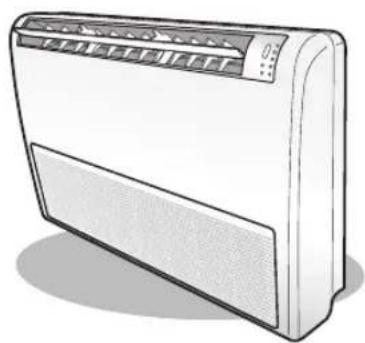
Under the ceiling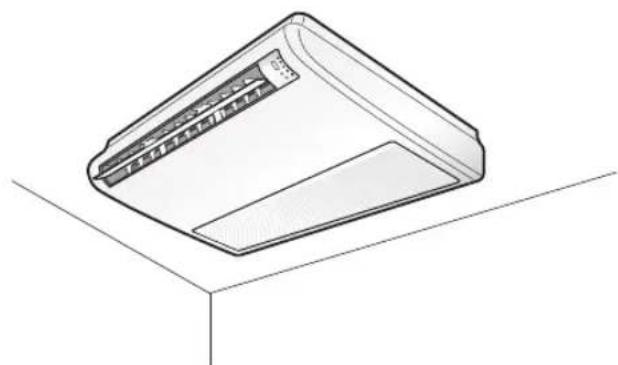
Viewing your air conditioner
Now that you have your new air conditioner set up, you are ready to enjoy the full features and functions of the appliance. Be sure to know about each part of your new air conditioner before use.
CHECKING THE PART
Main parts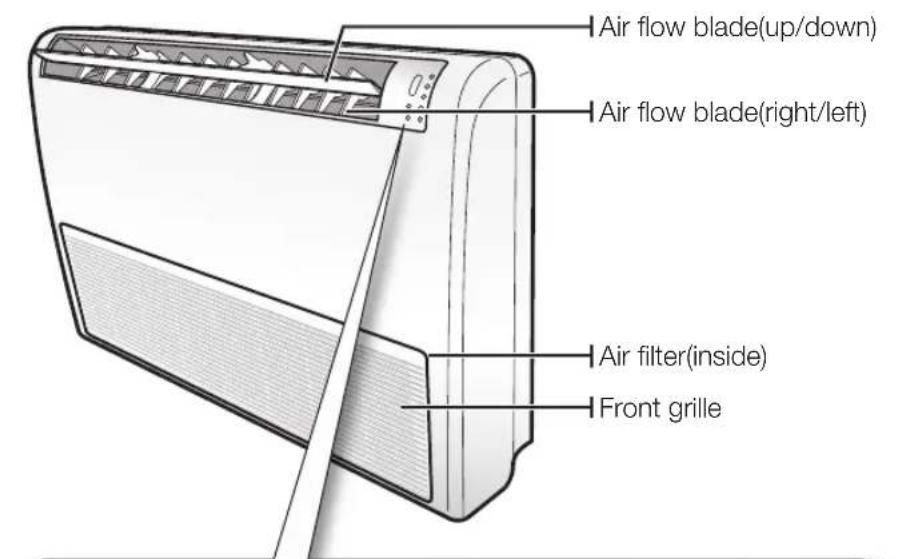
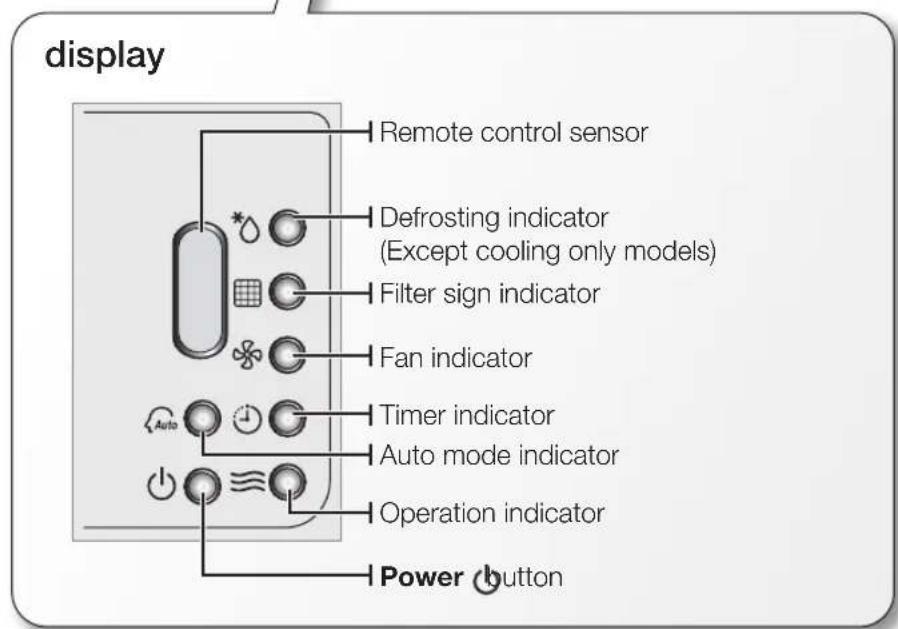
Your air conditioner and display may look slightly different from the illustration shown above depending on your model.
Using your air conditioner
Tips on using air conditioner
Here are some tips that you would follow when using your air conditioner.
| TOPICRECOMMENDATION | |
| Cooling • If current outside temperatures are much higher than the selected indoor temperature, it may take time to bring the inner temperature to the desired coolness. • Avoid drastically turning down the temperature. Energy is wasted and the room does not cool faster. | |
| Heating • Since the air conditioner heats the room by taking heat energy from outdoor air, the heating capacity may decrease when outdoor temperatures are extremely low. If you feel the air conditioner insufficiently heats, using an additional heating appliance in combination with the air conditioner is recommended. | |
| Frost & De-ice • When the air conditioner runs in Heat mode, due to temperature difference between the unit and the outside air, frost will form. If this happens: - The air conditioner stops heating. - The air conditioner will operate automatically in De-ice mode for 10 minutes. - The steam produced on the outdoor unit in De-ice mode is safe. No intervention is required; after about 10 minutes, the air conditioner operates again normally. The unit will not operate when it starts to de-ice. | |
| Fan • Fan may not operate for about 3~5 minutes at the beginning to prevent any cold blasts while the air conditioner is warming up. | |
| High indoor/outdoor temperatures | • If both indoor and outdoor temperatures are high and the air conditioner is running in Heat mode, the outdoor unit's fan and compressor may stop at times. This is normal; wait until the air conditioner turns on again. |
| Power failure | • If a power failure occurs during the operation of the air conditioner, the operating immediately stops and unit will be off. When power returns, the air conditioner will run automatically. |
| Protection mechanism | • If the air conditioner has just been turned on after operation stops or being plugged in, cool/warm air does not come out for 3 minutes to protect the compressor of the outdoor unit. |
Air flow can be directed to your desired position.
Horizontal air flow
You may set up your air conditioner under the ceiling or on the floor depending on your installation environment.
- Move each set of inner air flow blades left or right to keep the air flow direction in a constant position you prefer.
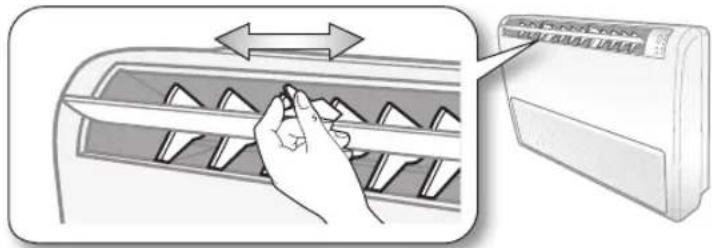

Be extremely careful with your fingers while adjusting the horizontal air flow direction. There is a potential risk of personal injury when the unit is mishandled.
Cleaning and maintaining the air conditioner
For the best performance from your air conditioner, clean it periodically. When cleaning, make sure to unplug the unit for user's safety.
Cleaning the exterior
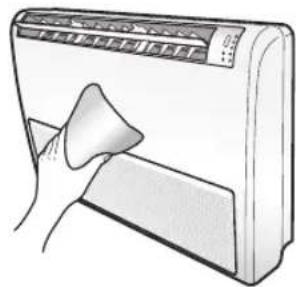
When cleaning the exterior, make sure to unplug the power from the unit. No special tools are needed to clean it.
- Wipe the surface of the unit with a slightly wet or dry cloth when needed. Wipe off dirt of odd-shaped areas by using a soft brush.
Do not use Benzene or Thinner. They may damage the surface of the air conditioner and can create a risk of fire.
CLEANING THE FILTER
When cleaning the filter, make sure to unplug the power from the unit. The washable foam-based air filter captures large particles from the air. The filter is cleaned with a vacuum or by hand washing.
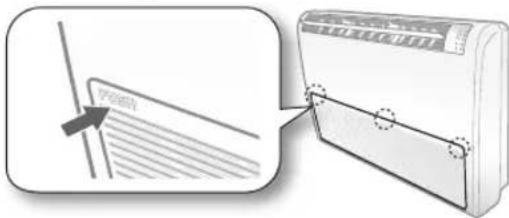
- Open the front grille.
Push the [PUSH] tabs located in 3 places to unlock the groove on the front grille.
- Detach the front grille.
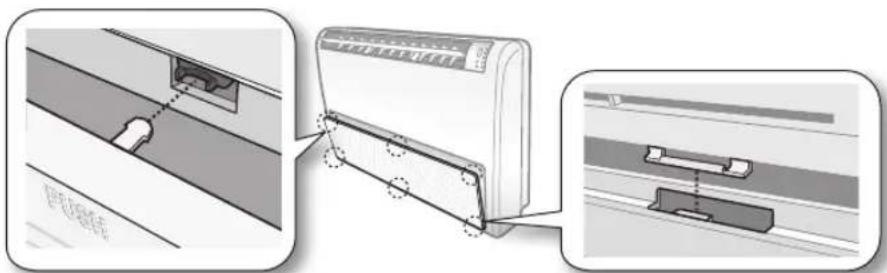
Hold the front grille at about a 45-degree angle. Push the bottom part of the grille to make sure it is unhooked. Then, lift up the front grille.
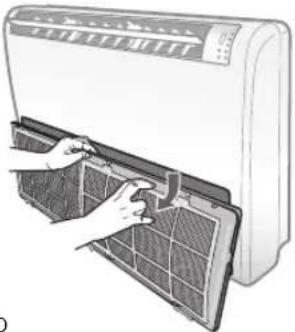
- Pull out the air filter.
Slightly press the air filter and then pull the air filter out.
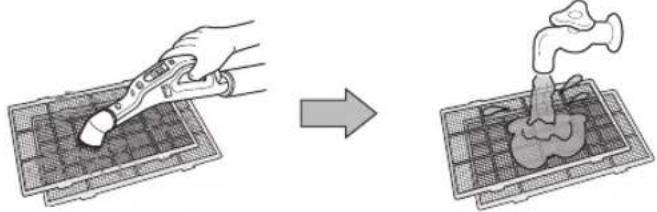
- Clean the air filter with a vacuum cleaner or soft brush. If dust is too heavy, then rinse it with running water and dry it in a ventilated area.
- Insert the air filter back in its original position.
- Close the front grille.

After cleaning the filter, press the Filter Reset button on the remote control for 2 seconds to reset the filter schedule.
• For best conditions, repeat every two weeks.
- If the Air filter dries in a confined (or humid) area, odors may generate. If it occurs, re-clean and dry it in a well-ventilated area.
Cleaning and maintaining the air conditioner
MAINTAINING YOUR AIR CONDITIONER
If the air conditioner will not be used for an extended period of time, dry the air conditioner to maintain it in best condition.
- Dry the air conditioner thoroughly by operating in Fan mode for 3 to 4 hours and disconnect the power plug. There may be internal damage if moisture is left in components.
- Before using the air conditioner again, dry the inner components of the air conditioner again by running in Fan mode for 3 to 4 hours. This helps remove odors which may have generated from dampness.
Periodical checks
Refer to the following chart to maintain the air conditioner properly.
| Type | Description Monthly | Every 4 months | Once a year | |
| Indoor unit | Clean the air filter (1) | ● | ||
| Clean the condensate drain pan (2) | ● | |||
| Thoroughly clean the heat exchanger (2) | ● | |||
| Clean the condensate drain pipe (2) | ● | |||
| Replace the remote control batteries (1) | ● | |||
| Outdoor unit | Clean the heat exchanger on the outside of the unit (2) | ● | ||
| Clean the heat exchanger on the inside of the unit (2) | ● | |||
| Clean the electric components with jets of air (2) | ● | |||
| Verify that all the electric components are firmly tightened (2) | ● | |||
| Clean the fan (2) | ● | |||
| Verify that all the fan assembly is firmly tightened (2) | ● | |||
| Clean the condensate drain pan (2) | ● |

The checks and maintenance operations described are essential to guarantee the efficiency of the air conditioner. The frequency of these operations varies according to the characteristics of the area, the amount of dust, etc.
(1) The described operations should be performed more frequently if the area of installation is very dusty.
(2) These operations must always be performed by qualified personnel. For more detailed information, see the Installation Manual.
Internal protections via the unit control system
This internal protection operates if an internal fault occurs in the air conditioner.
| Type Description | |
| Against cold air | The internal fan will be off to against cold air when the heat pump is heating. |
| De-ice cycle | The internal fan will be off to against cold air when the heat pump is heating. |
| Anti-protection of internal battery | The compressor will be off to protect internal battery when the air conditioner operates in Cool mode. |
| Protect compressor | The air conditioner does not start operating immediately to protect the compressor of the outdoor unit after it has been started. |
If the heat pump is operating in Heat mode, the De-ice cycle is actuated to remove frost from an outdoor unit that may have deposited at low temperatures.
The internal fan is switched off automatically and restarted only after the de-ice cycle is completed.
TROUBLESHOOTING
Refer to the following chart if the air conditioner operates abnormally. This may save time and unnecessary expenses.
| PROBLEMSOLUTION | |
| The air conditioner does not operate immediately after it has been restarted. | ·Because of the protective mechanism, the appliance does not start operating immediately to keep the unit from overloading.The air conditioner will start in 3 minutes. |
| The air conditioner does not work at all. | ·Check that the power plug is properly connected. Insert the power plug into the wall socket correctly.·Check if the circuit breaker is switched off.·Check if there is a power failure.·Check your fuse. Make sure it is not blown out. |
| The temperature does not change. | ·Check if you selected Fan mode.Press the Mode button on the remote control to select another mode. |
| The cool (warm) air does not come out of the air conditioner. | ·Check if the set temperature is higher (lower) than the current temperature. Press the Temperature button on the remote control to change the set temperature. Press the Temperature button to decrease or increase the temperature.·Check if the air filter is blocked by dirt. Clean the air filter every two weeks.·Check if the air conditioner has just been turned on. If so, wait 3 minutes. Cool air does not come out to protect the compressor of the outdoor unit.·Check if the air conditioner is installed in a place with a direct exposure to sunlight. Hang curtains on windows to boost cooling efficiency.·Check if the cover or any obstacle is not near the outdoor unit.·Check if the refrigerant pipe is too long.·Check if the air conditioner is only available in Cool mode.·Check if the remote control is only available for cooling model. |
| The fan speed does not change. | ·Check if you selected Auto or Dry mode.The air conditioner automatically adjusts the fan speed to Auto in Auto/Dry mode. |
| Timer function does not set. | ·Check if you press thePowerbutton on the remote control after you have set the time. |
| Odors permeate in the room during operation. | ·Check if the appliance is running in a smoky area or if there is a smell entering from outside. Operate the air conditioner in Fan mode or open the windows to air out the room. |
| The air conditioner makes a bubbling sound. | ·A bubbling sound may be heard when the refrigerant is circulating through the compressor. Let the air conditioner operate in a selected mode.·When you press thePowerbutton on the remote control, noise may be heard from the drain pump inside the air conditioner. |
| Water is dripping from the air flow blades. | ·Check if the air conditioner has been cooling for an extended period of time with the air flow blades pointed downwards. Condensation may generate due to the difference in temperature. |
| Remote control is not working. | ·Check if your batteries are depleted.·Make sure batteries are correctly installed.·Make sure nothing is blocking your remote control sensor.·Check that there are strong lighting apparatus near the air conditioner. Strong light which comes from fluorescent bulbs or neon signs may interrupt the electric waves. |
| The air conditioner does not turn on or off with the wired remote control. | ·Check if you set the wired remote control for group control. |
| The wired remote control does not operate. | ·Check if TEST indicator is displayed on the wired remote control. If so, turn off the unit and switch off the circuit breaker. Call your nearest contact center. |
| The indicators of the digital display flashes. | ·Press thePowerbutton on the remote control to turn the unit off and switch the circuit breaker off. Then, switch it on again. |
OPERATION RANGES
The table below indicates the temperature and humidity ranges the air conditioner can be operated within. Refer to the table for efficient use.
| MODE | OPERATIONAL TEMPERATURE | INDOOR HUMIDITY | IF OUT OF CONDITIONS | |
| INDOOROUTDOOR | ||||
| COOLING | 64°F to 90°F(18°C to 32°C) | 23°F to 118°F(-5°C to 48°C) | 80%or less | Condensation may occur on the indoor unit with risk to have either water blow off or drops on the floor. |
| HEATING | 81°F (27°C)or less | -4°F to 75°F(-20°C to 24°C) | - | Internal protection triggers and the air conditioner will stop. |
| DRYING | 64°F to 90°F(18°C to 32°C) | 23°F to 118°F(-5°C to 48°C) | - | Condensation may occur on the indoor unit with risk to have either water blow off or drops on the floor. |

The standardized temperature for heating is 45°F (7°C). If the outdoor temperature drops to 32°F (0°C) or below, the heating capacity can be reduced depending on the temperature condition.
If the cooling operation is used at over 90°F (32°C) (indoor temperature), it does not cool at its full capacity.
| COUNTRY CALL | OR VISIT US ONLINE AT | |
| CANADA | 1-800-SAMSUNG(726-7864) | www.samsung.com/ca (English)www.samsung.com/ca_fr (French) |
| MEXICO | 01-800-SAMSUNG(726-7864) www.samsung.com | |
| U.S.A- Consumer Electronics | 1-800-SAMSUNG(726-7864) www.samsung.com | |
| ARGENTINE | 0800-333-3733 www.samsung.com | |
| URUGUAY | 40543733 www.samsung.com | |
| PARAGUAY | 98005420001 www.samsung.com | |
| BRAZIL | 0800-124-4214004-0000 | www.samsung.com |
| CHILE | 800-SAMSUNG(726-7864)From mobile 02-24 82 82 00 | www.samsung.com/cl |
| BOLIVIA | 800-10-7260 www.samsung.com | |
| COLOMBIA | 01-8000 112 112Bogotá: 6001272 | www.samsung.com/co |
| COSTA RICA | 0-800-507-7267 | www.samsung.com/latin (Spanish)www.samsung.com/latin_en (English) |
| DOMINICA | 1-800-751-2676 | www.samsung.com/latin (Spanish)www.samsung.com/latin_en (English) |
| ECUADOR | 1-800-10-7267 | www.samsung.com/latin (Spanish)www.samsung.com/latin_en (English) |
| NICARAGUA | 00-1800-5077267 www.samsung.com | |
| HONDURAS | 800-7919267 www.samsung.com | |
| EL SALVADOR | 800-6225 | www.samsung.com/latin (Spanish)www.samsung.com/latin_en (English) |
| GUATEMALA | 1-800-299-0013 | www.samsung.com/latin (Spanish)www.samsung.com/latin_en (English) |
| HONDURAS | 800-27919267 | www.samsung.com/latin (Spanish)www.samsung.com/latin_en (English) |
| JAMAICA | 1-800-234-7267 www.samsung.com | |
| NICARAGUA | 00-1800-5077267 | www.samsung.com/latin (Spanish)www.samsung.com/latin_en (English) |
| PANAMA | 800-7267 | www.samsung.com/latin (Spanish)www.samsung.com/latin_en (English) |
| PERU | 0-800-777-08(Only from landline)336-8686 (From HHP & landline) | www.samsung.com |
| PUERTO RICO | 1-800-682-3180 www.samsung.com | |
| TRINIDAD & TOBAGO | 1-800-SAMSUNG (726-7864) www.samsung.com | |
| VENEZUELA | 0-800-100-5303 www.samsung.com | |
| PHILIPPINES | 1-800-10-SAMSUNG(726-7864) for PLDT1-800-3-SAMSUNG(726-7864) for Digitel1-800-8-SAMSUNG(726-7864) for Globe02-5805777 | www.samsung.com/ph |
Air Conditioner user manual

This manual is made with 100% recycled paper.


imagine the possibilities
Thank you for purchasing this Samsung product.
To receive more complete service, please register your product at
www.samsung.com/register

- FEATURES OF YOUR NEW AIR CONDITIONER
- COOL SUMMER OFFER
- COST EFFICIENT SYSTEM
- A LOOK FOR EVERYWHERE
- FLEXIBLE INSTALLATION
- SAFETY INFORMATION
- SEVERE WARNING SIGNS
- MAKE SURE THAT CHILDREN TAKE PRECAUTIONS AGAINST ACCESS TO THE AIR CONDITIONER AND DO NOT PLAY WITH THE UNIT
- DO NOT CONNECT THE AIR CONDITIONER TO A HEATING APPARATUS, AND DO NOT ATTEMPT TO DISASSEMBLE, MODIFY, OR REPAIR IT YOURSELF
- CONSULT THE PLACE OF PURCHASE OR CONTACT CENTER FOR INSTALLATION, REINSTALLATION, OR DISASSEMBLY OF THE AIR CONDITIONER
- CONSULT A DEALER REGARDING APPROPRIATE MEASURES TO PREVENT THE ALLOWABLE CONCENTRATION FROM BEING EXCEEDED
- IF THE INDOOR UNIT GETS WET, TURN OFF THE POWER IMMEDIATELY AND CONTACT YOUR NEAREST CALL CENTER
- ALWAYS ENSURE THAT THE POWER SUPPLY COMPLIES WITH CURRENT SAFETY STANDARDS. ALWAYS INSTALL THE AIR CONDITIONER IN COMPLIANCE WITH CURRENT LOCAL SAFETY STANDARDS
- VERIFY THAT THE VOLTAGE AND FREQUENCY OF THE POWER SUPPLY COMPLY WITH THE SPECIFICATIONS AND THAT THE INSTALLED POWER IS SUFFICIENT TO ENSURE THE OPERATION OF ANY OTHER HOUSEHOLD APPLIANCES CONNECTED TO THE SAME ELECTRICAL LINES
- DO NOT PUT UNDUE STRESS OR PLACE HEAVY OBJECTS ON THE POWER CABLE
- DO NOT BEND THE POWER CABLE EXCESSIVELY
- TO PROTECT THE PRODUCT FROM WATER AND POSSIBLE SHOCK, KEEP THE POWER CABLE AND THE CONNECTION CORD OF THE INDOOR AND OUTDOOR UNITS IN THE PROTECTION TUBE
- WHEN OPENING OR CLOSING THE FRONT PANEL, USE A STABLE STOOL AND WATCH YOUR STEPS CAREFULLY
- DISCONNECT THE AIR CONDITIONER FROM POWER SUPPLY BEFORE IT IS REPAIRED OR DISASSEMBLED
- SEVERE WARNING SIGNS (CONT'D)
- CAUTION SIGNS
- DO NOT TOUCH THE PIPE CONNECTED TO THE AIR CONDITIONER
- INSTALL THE INDOOR UNIT AWAY FROM LIGHTING APPARATUS USING THE BALLAST
- ALLOW SUFFICIENT SPACE FOR AIR CIRCULATION
- CAUTION SIGNS (CONT'D)
- SETTING UP YOUR AIR CONDITIONER BEFORE USE
- VIEWING YOUR AIR CONDITIONER
- USING YOUR AIR CONDITIONER
- CLEANING AND MAINTAINING THE AIR CONDITIONER
- APPENDIX
- GETTING READY TO SET UP THE AIR CONDITIONER
- SELECTING THE BEST LOCATION
- CHECKING THE PART
- TIPS ON USING AIR CONDITIONER
- HORIZONTAL AIR FLOW
- CLEANING THE EXTERIOR
- CLEANING THE FILTER
- MAINTAINING YOUR AIR CONDITIONER
- PERIODICAL CHECKS
- INTERNAL PROTECTIONS VIA THE UNIT CONTROL SYSTEM
- TROUBLESHOOTING
- OPERATION RANGES
- AIR CONDITIONER USER MANUAL
- IMAGINE THE POSSIBILITIES
Brand : SAMSUNG
Model : AM018FNCDCH
Category : Separator