CA-NF21 - Camera Getac - Free user manual and instructions
Find the device manual for free CA-NF21 Getac in PDF.


| Brand | Getac |
| Model | CA-NF21 |
| Product Type | Rugged Camera |
| Sensor Resolution | 16 MP |
| Sensor Type | CMOS |
| Lens | Fixed 28mm equivalent f/2.8 |
| Optical Zoom | 4x |
| Display | 2.7" LCD |
| Internal Memory | 4 GB |
| Memory Card Support | microSD up to 128 GB |
| Connectivity | USB-C, Wi-Fi, Bluetooth |
| Power Source | Rechargeable Li-ion battery 3.7V 1200mAh |
| Dimensions (W x H x D) | 4.5 x 2.8 x 1.2 inches (115 x 70 x 30 mm) |
| Weight | 9.2 oz (260 g) with battery |
| Waterproof Rating | IP68 (submersible up to 1.5m for 30 min) |
| Drop Rating | MIL-STD-810G (6 ft drop) |
| Operating Temperature | -20°C to 60°C (-4°F to 140°F) |
| Included Accessories | Battery, USB cable, wrist strap, quick start guide |
| Maintenance | Clean lens with microfiber cloth; clean exterior with damp cloth |
| Safety Precautions | Do not expose to extreme heat; use only approved chargers |
| Spare Parts Available | Battery, charger, USB cable |
| Manual | Free PDF manual available at notice-facile.com |
Frequently Asked Questions - CA-NF21 Getac
User questions about CA-NF21 Getac
0 question about this device. Answer the ones you know or ask your own.
Ask a new question about this device
Download the instructions for your Camera in PDF format for free! Find your manual CA-NF21 - Getac and take your electronic device back in hand. On this page are published all the documents necessary for the use of your device. CA-NF21 by Getac.
USER MANUAL CA-NF21 Getac
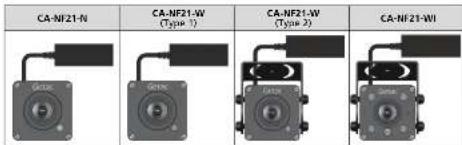
Depending on your purchase, your IP camera is one of the below four models.
Accessories
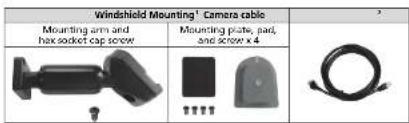
^1 The Windshield Mounting kit is supplied with CA-NF21-N and CA-NF21-W (Type 1) only ^2 The camera cable is optional and supplied separately, not to be found in the CA-NF21 packaging box.
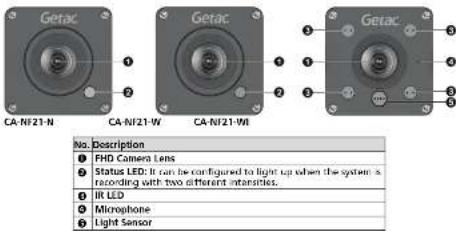
2. Identifying Components
Front
Rear
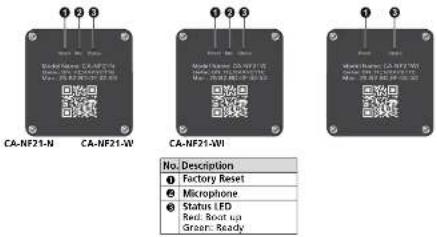
Connector

3. Notices
See Installation Diagram for more information.
FCC Regulations
This device complies with Part 15 of the FCC Rules. Operation is subject to the following two conditions: (1) This device may not cause harmful interference, and (2) this device must accept any interference received, including interference that may cause undesired operation.
To assure continued compliance, follow the attached installation instructions and do not make any unauthorized modifications.
FCC Note:
This equipment has been tested and found to comply with the limits for a class A digital device, pursuant to Part 15 of the FCC Rules. These limits are designed to provide reasonable protection against harmful interference when the equipment is operated in a commercial environment. This equipment generates, uses, and can radiate radio frequency energy, and if not installed and used in accordance with the instruction manual, may cause harmful interference to radio communications. Operation of this equipment in a residential area is likely to cause harmful interference in which case the user will be required to correct the interference at his own expense.
Warning:
To assure continued FCC emission limit compliance, the user must only use shielded interface cables when connecting to external units. Also, any unauthorized changes or modifications to this equipment could void the user's authority to operate this device.