
CA-NF42 - Camera Getac - Free user manual and instructions
Find the device manual for free CA-NF42 Getac in PDF.


| Product Type | Security Camera |
| Resolution | 4K (8MP) |
| Lens Configuration | Dual 4K (8MP) lenses |
| Power Supply | Power over Ethernet (PoE) |
| Connectivity | RJ45 PoE connector |
| Indicators | Status LED (configurable, red/green) |
| Audio | Built-in microphone |
| Compliance | NDAA compliant, FCC Part 15 Class A |
| Installation | Professional installation required |
| Safety | Avoid skin contact when hot; use shielded cables for FCC compliance |
Frequently Asked Questions - CA-NF42 Getac
User questions about CA-NF42 Getac
0 question about this device. Answer the ones you know or ask your own.
Ask a new question about this device
Download the instructions for your Camera in PDF format for free! Find your manual CA-NF42 - Getac and take your electronic device back in hand. On this page are published all the documents necessary for the use of your device. CA-NF42 by Getac.
USER MANUAL CA-NF42 Getac
2. Identifying Components
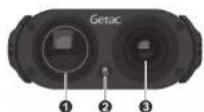
Front
| No. | Description |
| 1 | 4K (8MP) camera lens and sensor |
| 2 | Status LED: It can be configured to light up when the system is recording with different intensities. |
| 3 | 4K (8MP) camera lens and sensor |
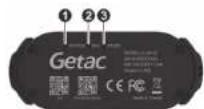
Rear
| No. | Description | |
| 1 | Status LED | Red: Boot upGreen: Ready |
| 2 | Microphone | |
| 3 | Factory reset | |
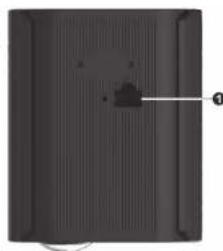
Top
| No. | Description |
| 1 | PoE connector |
natural_image
Top-down view of a black rectangular panel with a small protrusion and label '1' pointing to the side (no text or symbols on the panel itself)5618xxxx0001 R00
3. Cautions and Notices
Notices
- The sale of this product is controlled by the National Defense Authorization Act (NDAA), H.R. 5515.
• The camera must be professionally installed. - Do not twist, squash, or bend the PoE cable (supplied separately).
• See Installation Diagram for more information.
Cautions
- Do not expose your skin to the camera when operating it in a very hot or cold environment.
- The camera can get uncomfortably warm when you use it in high temperatures. As a safety precaution in such a circumstance, do not touch it with your bare hands for extended periods of time. Prolonged contact can cause discomfort and potentially a burn.
- The camera may become very warm during normal use. It complies with the user-accessible surface temperature limits defined by the International Standards for Safety. Still, sustained contact with warm surfaces for long periods of time may cause discomfort or injury.
- If the camera is used for long periods, its surface can become very warm. While the temperature may not feel hot to the touch, if you maintain physical contact with the camera for a long time, for example if you touch it with your bare hands, your skin might suffer a low-heat injury.
FCC Regulations
This device complies with Part 15 of the FCC Rules. Operation is subject to the following two conditions: (1) This device may not cause harmful interference, and (2) this device must accept any interference received, including interference that may cause undesired operation.
To assure continued compliance, follow the attached installation instructions and do not make any unauthorized modifications.
FCC Note
This equipment has been tested and found to comply with the limits for a class A digital device, pursuant to Part 15 of the FCC Rules. These limits are designed to provide reasonable protection against harmful interference when the equipment is operated in a commercial environment. This equipment generates, uses, and can radiate radio frequency energy, and if not installed and used in accordance with the instruction manual, may cause harmful interference to radio communications. Operation of this equipment in a residential area is likely to cause harmful interference in which case the user will be required to correct the interference at his own operation.
Warning
To assure continued FCC emission limit compliance, the user must only use shielded interface cables when connecting to external units. Also, any unauthorized changes or modifications to this equipment could void the user's authority to operate this device.
Brand : Getac
Model : CA-NF42
Category : Camera