HDR-2000VA - Voltage regulator Imarflex - Free user manual and instructions
Find the device manual for free HDR-2000VA Imarflex in PDF.


| Product Type | Voltage Regulator |
| Brand | Imarflex |
| Model | HDR-2000VA |
| Power Rating | 2000 VA |
| Input Voltage | 100-240 V AC |
| Output Voltage | 220 V AC (adjustable) |
| Frequency | 50/60 Hz |
| Protection Features | Overload, short circuit, surge protection |
| Display | LED indicators for input/output status |
| Cooling | Fan cooling |
| Output Sockets | Multiple universal sockets |
| Dimensions (W x D x H) | 300 x 200 x 150 mm |
| Weight | 5.0 kg |
| Warranty | 1 year |
| Maintenance | Clean with dry cloth; keep away from moisture |
| Safety | Ensure proper grounding; do not expose to water |
| Spare Parts Availability | Contact authorized service center |
Frequently Asked Questions - HDR-2000VA Imarflex
User questions about HDR-2000VA Imarflex
0 question about this device. Answer the ones you know or ask your own.
Ask a new question about this device
Download the instructions for your Voltage regulator in PDF format for free! Find your manual HDR-2000VA - Imarflex and take your electronic device back in hand. On this page are published all the documents necessary for the use of your device. HDR-2000VA by Imarflex.
USER MANUAL HDR-2000VA Imarflex
PRODUCT SPECIFICATIONS
Power: 2000VA
Technology: CPU Based Digital Circuit + EI Transformer
Input:
Input Voltage Range - 140-260 Va.c.
Input Frequency - 50/60Hz
Output Voltage - 110/220 Va.c.+/-8%
or 10%; 98%
Output Precision - ±10%
Efficiency: 98%
Relay Type
Single Phase
LED Display Status:
Green LED - Device On
Yellow LED - Delay in Progress
Red LED – Output Suppressed Input Voltage Out of Range and Overheating
Protection:
Overload
High Voltage
High Temperature
Short Circuit
Safety standards:
CE, EN 60950, EN 55024
Operating Conditions:
Operating Temperature - 0-40°C
Storage Temperature - -15-45°C
Operating Relative Humidity –
10% RH-102% RH, Non-condensing
Dimensions:
Inner box (mm) - 300x195x215
Unit weight (kgs) - 6.8
IMPORTANT SAFEGUARDS
This manual contains important safety instruction that should be followed during the installation and maintenance of the AVR. Please read this manual thoroughly before attempting to install or operate in this AVR.
- Read all instructions carefully.
- This equipment is available for 220Va.c. supply voltage and loads.
Please verify that this model matches your AC main /load voltage requirements.
- This equipment is designed for normal use only. The manufacturer neither recommends nor knowingly sells this product for use in critical life support application. Connect if possible to main supply socket outlet with an earth connector. A means of disconnection of the main supply should be within 2 meters of the AVR.
- The AVR relies on your building wiring over-current protection, which must be rated between 30 amperes.
- This unit is not intended for use by persons (including children) with reduced physical, sensory or mental capabilities, or lack of experience and knowledge, unless they have been given supervision or instruction concerning use of the appliances by a person responsible for their safety.
-
Children should be supervised to ensure that they do not play with the AVR.
-
Although your AVR has been designed and manufactured to assure personal safety, improper use can result in electrical shock of fire. To insure safety, please observe the following rules:
- Turn off and unplug your AVR before cleaning. Do not use liquid or aerosol cleaners. A dry cloth is recommended to remove dust from the surface of the AVR.
- Do not install or operate your AVR near water.
- Do not place the AVR on an unstable cart, stand or table.
- Do not place the AVR under direct sunlight or close to heat emitting sources.
- Do not place the AVR power cord in any area where it may get damaged by heavy objects.
- Do not overload or short circuit the AVR.
- Follow all warnings and instructions marked on the AVR.
- When connected to any appliance with the built-in motor compressor, the starting power is generally several times of the appliances listed power rating. Make sure that the total starting power capacity of all connected appliance does not exceed the listed maximum output power capacity of the regulator. For color TV, calculate it twice as its listed capacity.
- Make sure that the regulator is of the same output voltage and frequency as the appliance's it connected.
- Make sure that the voltage of electrical source is within the listed range of input voltage of the regulator.
8. ATTENTION:
Turn off and unplug the your AVR from the convenience outlet and contact or bring the AVR to Imarflex Authorized Service Center if;
- The power cord or plug damaged.
- Liquid has been spilled on the AVR or it emits a strange smell from inside.
- The fuse blows frequently or the circuit breaker trips frequently.
- The AVR does not operate even when user follows the operating instruction.
- Save this instruction manual for reference.
DESCRIPTION OF PARTS

REAR VIEW OF AVR
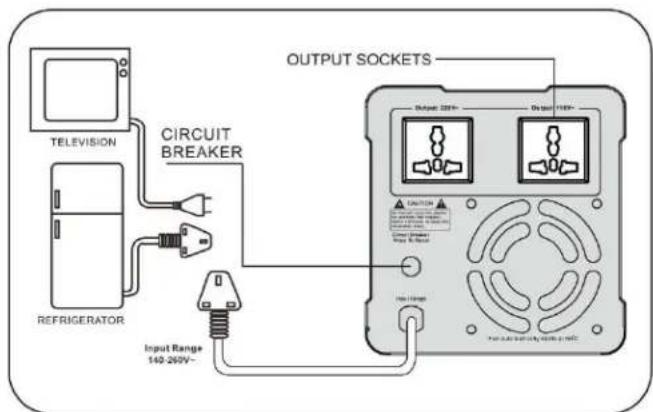
NOTE:
BE SURE TO CONNECT THE PLUG INTO THE CONVENIENCE OUTLET PROPERLY. OPERATE THE REGULATOR IN THE RANGE OF RATED INPUT VOLTAGE ONLY.
CAUTION
Avoid overloading. Do not use the regulator beyond its maximum power
The AVR has an overload protection, the regulator will automatically turns OFF once the power exceed on its maximum power capacity. Remove the load/appliance plugged on the AVR and wait for at least 5 minutes. The AVR will turn ON again once the temperature of the motor/transformer decrease.
INSTALLATION
Inspection
Inspect the AVR upon receipt. The packaging is recyclable. Save it for reuse or dispose of it properly.
Placement
Install the AVR in a secure area with adequate airflow, and away from direct sunlight and excessive dust.
Connecting
Connect the AC input power plug into the convenience outlet.
Follow the steps below:
- Make sure that the AVR do not have any mechanical damages.
- If necessary, perform grounding of the casing of the AVR by connecting the grounding wire to the corresponding terminal, or at least make sure that the main outlet is grounded and available with 2 or 3 pins connection.
- Plug the AVR to 220Va.c convenience outlet.
- Select the proper delay time.
- Switch on the AVR and read the voltage meter LED display if it has output.
- Switch OFF the AVR every after use.
Connecting the Loads
Plug the load into the output sockets of the AVR. Switch ON the AVR and then turn ON the load.
INDICATORS
LED Display
Display the input and output voltage values.
LED
Green LED "Power
Indicate that the power is ON and the convenience outlet where the AVR is plugged in is working.
Yellow LED "Delay"
When the delay time is selected, this light indicator will blink continuously until the selected delay time is finished, or upon the restoration of the main voltage. During delay time, the AVR has no output voltage. It will automatically turn off once delay time is finished.
Red LED "Protection"
Indicating the AVR is executing protection: the load exceeds to its maximum power capacity, low and high voltage protection activated.
PERFORMANCE
Automatic Voltage Regulator
Automatically regulate the input voltage to a more stable level for your appliances to avoid damages to the appliances.
Microprocessor Control
By means of innovative software control programs, the complicated hardware circuitry is inlaid in the powerful microprocessor. Apart from reduced size, it also lowers the defective rate of AVR and the accuracy in the regulations.
Voltage Display
Through an analogue meter or an LED meter, shows the input or output voltage of the device.
Delay Time
Upon switching on or resuming from the protection, the AVR will wait 6 seconds or 180 seconds (selectable) before it give output voltage, this time is called DELAY TIME, the delay function is designed to avoid the transfer to load of surges and spikes and distortions of sine wave voltage occurring upon the switching of the device. The default delay time is 6 seconds. We recommend a 180 seconds delay time selection where the unit is designated for the protection of a motor based appliance.
Surge and Spike Protection
Protect the hardware from damage.
Operation Principle
The CPU based intelligent circuit samples the input voltage and controls the action of the delays and opening of the tap of the transformer in a proper combination to adjust the output voltage. The output adjusting is performed based on the following algorithm: If the mains voltage stays within the range of 140 ± 10 Va.c to 260 ± 10 Va.c, then the output voltage being regulated to 220 Va.c±8%.
If the main voltage drops below 140Va.c, then the output voltage equals to the main voltage increases by 30% until it reaches the value of 180Va.c±10 which is the down threshold of the AVR. If the output voltage drops below than 180Va.c±10, the output will complete cut off.
If the main voltage rises above 260Va.c, then the output voltage equals to the main voltage decreases by 10% until it reaches the value of 255Va.c±10, which is the upper threshold of the AVR. If the output voltage exceeds 255Va.c±10, the output will complete cut off.
The loading capability of the AVR varies from the input voltage;
- If the main voltage stays within the range of 200Va.c±10 to 260Va.c, then the AVR performs a maximum loading capacity to its rated level.
- If the main voltage drops below 200Va.c or exceed 260Va.c, then the loading capacity of the AVR drops accordingly to the input voltage dropping or exceeding percentage.
| TROUBLE SHOOTING | ||
| PROBLEM | POSSIBLE CAUSE | REMEDY |
| AVR switch off but the power supply is operating | -The load exceed to AVR maximum capacity-Low and High Input Voltage Protection Activated | -Check the load power. Unplugged the load from the AVR,wait for at least 5 minutes. |
| -Input Voltage exceed to AVR voltage range capacity.-Circuit Breaker of the AVR activated. | Switch off the load. Unplug the AVR.Check the Voltage supply. Plug the AVR on the outlet that is in the voltage range of the AVR. Plug the AVR and press the reset button. Switch on the AVR. | |
Reminder: Please do not forget to fill up and send the warranty card
- PRODUCT SPECIFICATIONS
- IMPORTANT SAFEGUARDS
- ATTENTION:
- NOTE:
- CAUTION
- INSTALLATION
- Inspection
- Placement
- Connecting
- Connecting the Loads
- INDICATORS
- LED Display
- LED
- Green LED "Power
- Yellow LED "Delay"
- Red LED "Protection"
- PERFORMANCE
- Automatic Voltage Regulator
- Microprocessor Control
- Voltage Display
- Delay Time
- Surge and Spike Protection
- Operation Principle
Brand : Imarflex
Model : HDR-2000VA
Category : Voltage regulator