IFC-980i - Household Fan Imarflex - Free user manual and instructions
Find the device manual for free IFC-980i Imarflex in PDF.


| Product Type | Evaporative Air Cooler |
| Brand | Imarflex |
| Model | IFC-980i |
| Rated Voltage | 230V a.c. ~ 60Hz |
| Power Consumption | 200 Watts |
| Water Tank Capacity | 18 Liters |
| Fan Speeds | 3 (Low, Medium, High) |
| Oscillation | Yes (via OSC button) |
| Timer | 0.5 to 10 hours (in 0.5 hour increments) |
| Ionizer | Yes (generates negative ions) |
| Cooling Mode | Yes (evaporative cooling with water/ice) |
| Filters | Honeycomb, Carbon, Dust Filter |
| Remote Control | Yes (included) |
| Wheels | Yes (with stoppers for easy movement) |
| Cord Storage | Yes |
| Handle | Yes |
| Display | Room temperature and set time |
| Cleaning Interval | Every 3 months (monthly for hard water) |
| Usage | Household use only; not for bathrooms |
| Safety | Requires supervision for children; do not operate with wet hands |
Frequently Asked Questions - IFC-980i Imarflex
User questions about IFC-980i Imarflex
0 question about this device. Answer the ones you know or ask your own.
Ask a new question about this device
Download the instructions for your Household Fan in PDF format for free! Find your manual IFC-980i - Imarflex and take your electronic device back in hand. On this page are published all the documents necessary for the use of your device. IFC-980i by Imarflex.
USER MANUAL IFC-980i Imarflex
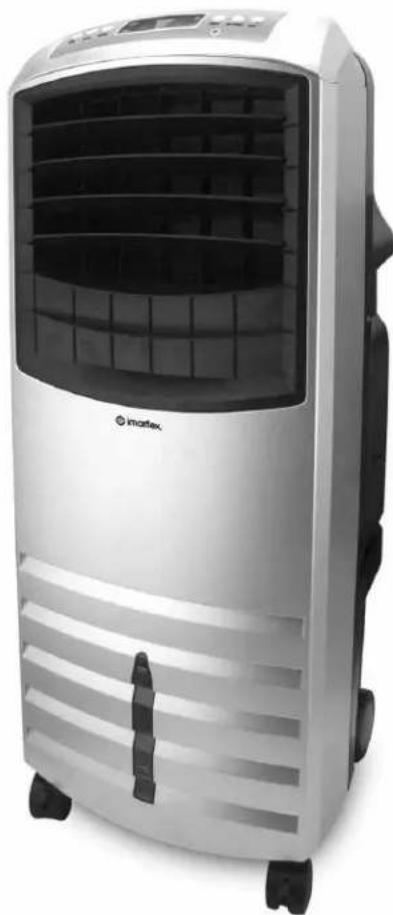
E V A P O R A T I V E
AIR COOLER
natural_image
Exterior view of a modern electric air conditioner unit (no visible text or symbols)
imarflex®
In Every Home.
www.imarflex.com
IFC-980i
SPECIFICATION
MODEL NO. : IFC-980i
RATED VOLTAGE : 230Va.c. \~ 60Hz
POWER CONSUMPTION : 200 Watts T
WATER TANK CAPACITY : 18L
IMPORTANT SAFEGUARDS
When using electrical appliances, basic safety precautions should always be followed, including the following:
- Read all instructions carefully before use.
- Check the condition of the unit after taking out from the box. Ensure that all parts are in good condition.
- Before using the unit, check if the voltage indicated corresponds with the convenience outlet (230Va.c.).
- Do not use any appliance with a damaged cord or plug. If the cord is damaged it should be replaced with the same type and size or bring the unit to the nearest authorized service center.
- Do not attempt to repair, adjust or replace parts in the unit. It must be check and repair by an Authorized Imarflex Technician or by similar qualified persons in order to avoid electric hazard.
- Do not place the unit near gas stove or electric stove.
- Children should be supervised to ensure that they do not play with the appliance.
- This appliance is not intended for use by persons (including children) with reduced physical, sensory or mental capabilities, or lack of experience and knowledge, unless they have been given supervision or instruction concerning use of the appliances by a person responsible for their safety.
- This unit must only be used for room ventilation. Do not use in bathrooms.
- Do not insert any object into the Air Vent.
- Do not use the plug to stop or start the operation of the unit, use the Power Button.
- To prevent the risk of electric shock do not operate the unit by wet hands.
- For household use only.
- Save this instruction manual for future reference.
INTRODUCTION
AIR COOLER is a unit that cools air through simple evaporation of the water.
This unit is using a Honeycomb Filter design for better cooling effect. For additional cooling effect put ice into the water inlet.
IONIZER is a high efficiency and energy saving device that can generate negative ions to eliminate smoke, dust odor, and improve air quality to promote good blood circulation.
DESCRIPTION OF PARTS
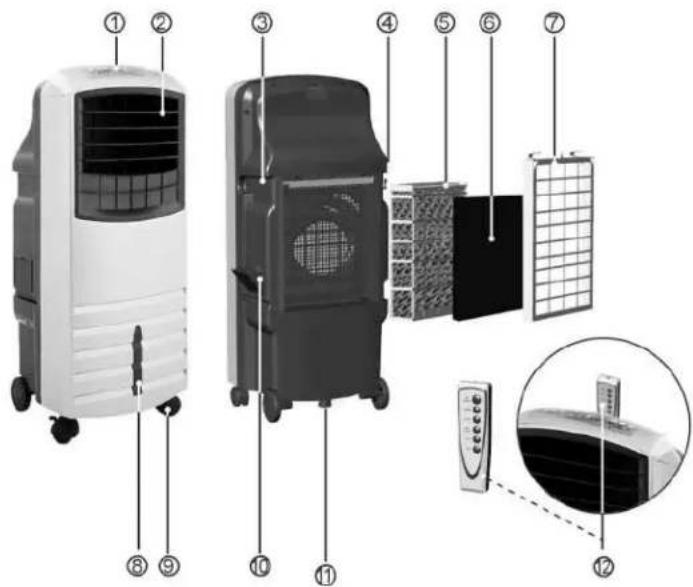
- Control Panel
- Air Vent
- Handle
- Cord Storage
- Honeycomb Filter
- Carbon Filter
7.Dust Filter - Water Level Indicator
- Moving Wheels
- Water Inlet
- Drain Hole
- Remote Control
HOW TO USE
-
Plug unit into the convenience outlet (230Va.c.), light indicator will turn on. To Turn ON the unit, press the "On/Speed" button. Initially, it is set to no.2 (medium) speed and will drop to no.1 (low) speed after few seconds; it will also display the room temperature and the light indicator turn on.
-
To Adjust the Speed—it can be adjusted in 3 different speeds by pressing the "On/Speed" button repeatedly until the desired speed appears on the display.
| 1 | Low range speed of the fan |
| 2 | Medium range speed of the fan |
| 3 | High range speed of the fan |
- To Oscillate – it can oscillate by pressing the "OSC" button once,
Indicator will appear on the display. Press again to stop.
-
To set the Timer – It can be set by pressing the "Timer" button from 0.5 hour to 10 hours:
-
Press once – 0.5 hour
- Press twice – 1 hour
- Press 3 times – 1.5 hours
- Up to 10 hours
NOTE:
- Each time you press the "Timer" button, 0.5 hour will be automatically added.
- If you want the Air Cooler to run continuously, make sure the timer is OFF.
- The set time and temperature are alternately displayed on the screen.
- IONIZER – Press the "ION" button (light indicator will turn on) to start. To stop, press again.
- COOLING – Press the "COOL" button (light indicator will turn on) to start. Press again to stop.
NOTE:
a) Putting Water
- Pull the cover of the Water Inlet
- Put water carefully.
- Do not exceed to the "maximum" Water Level Indicator.
b) Put Ice through water inlet.
INSTALLATION OF THE WHEELS
-
Make sure to unplug the unit to the convenience outlet.
-
Place the unit on a soft mat on the floor. Gently turn unit upside down. Put the wheels into the corresponding slot, then screw it tightly. Make sure to install it properly otherwise the unit will get uneven and inconvenient to use.
NOTE: Install wheels with stopper at the front to obtain optimum effect.
CLEANING AND MAINTENANCE
-
Always unplug the unit from the convenience outlet and drain the water in the water tank before disassembling the unit.
-
Remove the Drain cap and release the remaining water.
-
Using a damp cloth, clean the louvers and the surface of the Air Cooler.
-
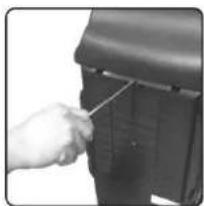
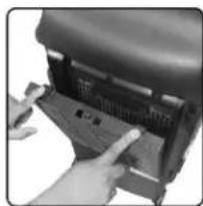
Cleaning the Dust Filter
- Unscrew and pull the Dust Filter. (See fig. 1 & fig. 2)
- Wash the Dust Filter with running water.
- Cleaning the Honeycomb Filter and Water Tank.
- Unscrew and pull the Dust Filter. (See fig. 1 & fig. 2)
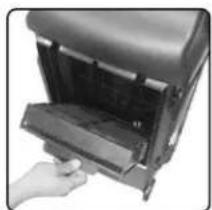
• Pull the Honeycomb filter. (See fig. 3)
- Use vacuum or brush to clean the Honeycomb Filter.
- Use a damp cloth with soap to clean and remove the reachable residue from the water tank.
- Rinse and drain the water tank.
- Put back the Honeycomb and Dust Filter. Make sure the filter is fitted correctly before tightening the screws.
NOTE:
If the unit is used every day, it is advisable to clean every 3 months. However, if you are using a hard water which is high in mineral content where residues can buildup, it is advisable to clean it every month.
natural_image
Close-up of a hand using a tool to adjust or install a mechanical component (no visible text or symbols)Fig. 1
natural_image
Close-up of hands pressing a button on a mechanical device (no visible text or symbols)Fig. 2
natural_image
Hand inserting a device into a rack (no visible text or symbols)Fig. 3
Brand : Imarflex
Model : IFC-980i
Category : Household Fan