IFC-612SR - Household Fan Imarflex - Free user manual and instructions
Find the device manual for free IFC-612SR Imarflex in PDF.


| Product type | Standing fan |
| Model number | IFC-612SR |
| Brand | Imarflex |
| Dimensions (H x W x D) | Approx. 135 x 45 x 45 cm |
| Weight | Approx. 4.5 kg |
| Power supply | AC 220-240V, 50Hz |
| Power consumption | 50 W |
| Number of speed settings | 3 |
| Oscillation | Yes, 90° wide angle |
| Remote control | Yes, included |
| Timer | Up to 7.5 hours |
| Blade diameter | 45 cm (18 inches) |
| Material | ABS plastic body, metal stand |
| Noise level | ≤ 65 dB |
| Safety features | Overheating protection, tip-over switch |
| Cleaning | Detachable front grille for easy cleaning |
| Spare parts availability | Replacement blades and grilles available |
| Reparability index | 8/10 (easy disassembly) |
| Warranty | 2 years |
Frequently Asked Questions - IFC-612SR Imarflex
User questions about IFC-612SR Imarflex
0 question about this device. Answer the ones you know or ask your own.
Ask a new question about this device
Download the instructions for your Household Fan in PDF format for free! Find your manual IFC-612SR - Imarflex and take your electronic device back in hand. On this page are published all the documents necessary for the use of your device. IFC-612SR by Imarflex.
USER MANUAL IFC-612SR Imarflex
The New Generation of Cooling Fans
AIR CONDITIONER COMPANION • 90° TILT ANGLE 3-SPEED SETTINGS • 24-HOUR OPERATION • 8-HOUR TIMER

SPECIFICATION
MODEL NO. : IFC-612SR
RATED VOLTAGE : 230Va.c. \~60Hz
When using electrical appliances, basic safety precautions should always be followed, including the following:
- Read all instructions carefully before use.
- Check the condition of the unit after taking out from the box. Ensure that all parts are in good condition.
- Before using the unit, check if the voltage indicated corresponds with the convenience outlet (230Va.c.).
- Do not use any appliance with a damaged cord or plug. If the cord is damaged it should be replaced with the same type and size or bring the unit to the nearest authorized service center.
- Do not attempt to repair, adjust or replace parts in the unit. It must be check and repair by an Authorized Imarflex Technician or by similar qualified persons in order to avoid electric hazard.
- Do not place the unit near gas stove or electric stove.
- Children should be supervised to ensure that they do not play with the appliance.
- This appliance is not intended for use by persons (including children) with reduced physical, sensory or mental capabilities, or lack of experience and knowledge, unless they have been given supervision or instruction concerning use of the appliances by a person responsible for their safety.
- This unit must only be used for room ventilation. Do not use in bathrooms.
- Do not insert any object into the Fan Guard.
- Do not use the plug to stop or start the operation of the unit, use the Speed Control Knob.
- To prevent the risk of electric shock do not operate the unit by wet hands.
- For household use only.
- Save this instruction manual for future reference.
FEATURES AND FUNCTIONS
Air circulator acts as a flow-straightener and further assists in focusing the outward stream of air into tight cyclone airflow.
- Summer: The cyclone air hits a wall across the room roughly halfway to decrease the room temperature.
- Rainy: This forces the hot air of the ceiling and mixes it with the cooler air resulting in an even room temperature.
- Ionizer: It releases a negative ion to purify the circulating air inside the room.
APPLICATION
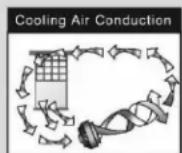


Base on hot air rises and cool air falls of aerodynamic.
DESCRIPTION OF PARTS

ASSEMBLY INSTRUCTION
- Attached the stand pipe to the base.
- Unscrew the fastening screw on the main body and insert it onto the stand pipe. Tighten the fastening screw.
Note:
The main body assembly is heavier than the other traditional fans due to the powerful motor. To avoid the risk of falling damage, please be careful when assembling the unit.
HOW TO USE
- Plug the unit into the convenience outlet (230Va.c.).
- Press the "ON/SPEED" button to turn on the unit.
Note:
- Press once the no. 2 light indicator will initially turn on and will turn to no.1 after few seconds.
• The no. 1, 2 and 3 light indicators will turn on to determine the desired speed setting.
| 0 | Fan is switched off |
| 1 | Low range speed of the fan (weak air flow) |
| 2 | Medium range speed of the fan (medium air flow) |
| 3 | High range speed of the fan (strong air flow) |
- Press the "TIMER" button to set the timer.
| Press once | For 1 hour |
| Press twice | For 2 hours |
| Press 3 times | For 4 hours |
| Press 4 times | For 8 hours |
Note:
- The no. 1, 2, 4 and 8 light indicators will turn on to determine the desired time setting. As the set time runs the light indicator (1, 2, 4, and 8) will shift to determine the remaining time.
-
Do not press the “TIMER” button if you intended to use it for more than 8 hours.
-
Press the "OSC" button (light indicator will turn on) to start the unit to oscillate side-to-side and it can be stop by pressing again the oscillation button (light indicator will turn off).
- Press the "IONIZER" button (light indicator will turn on) to start the unit to purify the air inside the room by releasing a negative ion and can be stop by pressing it again (light indicator will turn off).
- Press the "OFF" button to turn off the unit.
Note: If the light indicator is
RED – the unit is turned off
GREEN – the unit is turned on
- HEAD TILT ADJUSMENT – this is equipped with a 90^ tilt head for whole room air circulation.
Control Panel and Remote Control

CLEANING MAINTENANCE
- Always unplug the unit from the convenience outlet before disassembling the unit.
- Unscrew and remove the Front Fan Guard. (See fig.1)
- Clean the Rear Fan Guard with moisten cloth. Wash the Front Fan Guard and Fan Blade with soap and water then rinse thoroughly.
- Use vacuum or soft brush to clean the dust on the motor.
- After cleaning return the Front Fan Guard and tighten the screws. (See fig. 2)
- Wipe the Base with damp cloth.
- Do not immerse the unit in water or other liquids.


natural_image
Close-up of a person's hand holding a fan-shaped object, possibly a fan or mechanical component (no visible text or symbols)Fig. 2
Brand : Imarflex
Model : IFC-612SR
Category : Household Fan