IF-732R - Household Fan Imarflex - Free user manual and instructions
Find the device manual for free IF-732R Imarflex in PDF.


| Product Type | Oscillating Tower Fan |
| Brand | Imarflex |
| Model | IF-732R |
| Rated Voltage | 230V a.c. ~ 60Hz |
| Power Consumption | 40 watts |
| Height | 32 inches (81 cm) |
| Weight | Approx. 5 kg |
| Motor Type | High Density Carbon Steel Induction Motor |
| Number of Speeds | 3 (Low, Medium, High) |
| Wind Modes | Normal and Natural |
| Oscillation | Yes |
| Remote Control | Included |
| Timer | Up to 7 hours (1-hour increments) |
| Material | Shatter-resistant plastic |
| Warranty | 2 years on motor |
| Safety Features | Automatic shut-off via timer; safety instructions include not using near water, keeping away from children, and unplugging before cleaning |
| Cleaning | Remove back grill, wash with soap and water, dry, and brush cross fan |
| Assembly Required | Yes (base assembly) |
| Control Panel | On-unit buttons and display |
| Recommended Use | Room ventilation (not bathrooms) |
Frequently Asked Questions - IF-732R Imarflex
User questions about IF-732R Imarflex
0 question about this device. Answer the ones you know or ask your own.
Ask a new question about this device
Download the instructions for your Household Fan in PDF format for free! Find your manual IF-732R - Imarflex and take your electronic device back in hand. On this page are published all the documents necessary for the use of your device. IF-732R by Imarflex.
USER MANUAL IF-732R Imarflex
Oscillating Tower Fan WITH Remote CONTROL

32" Vertical HEIGHT
21" LOUVER DESIGN
REVOLUTIONARY HD HIGH DENSITY CS CARBON STEEL INDUCTION MOTOR
ULTRA Silent technology
Jet turbine VECTORING
2 year warranty ON MOTOR SHATTER RESISTANT MATERIAL
EXPORTED TO THE USA & JAPAN

SPECIFICATION
MODEL NO. : IF-732R
RATED VOLTAGE : 230Va.c. \~ 60Hz
POWER CONSUMPTION : 40 watts
IMAPORTANT SAFEGUARDS
- Read all instructions carefully.
- Check the condition of the unit after taking out from the box. Ensure that all parts are in good condition.
- Before using the unit, check if the voltage indicated corresponds with the convenience outlet (230Va.c.).
- Do not use any appliance with a damaged cord or plug. If the cord is damaged it should be replaced with the same type and size or bring the unit to the nearest authorized service center.
- Do not place the unit near gas stove or electric burner.
- This appliance is not intended for use by persons (including children) with reduced physical, sensory or mental capabilities, or lack of experience and knowledge, unless they have been given supervision or instruction concerning use of the appliances by a person responsible for their safety.
- Children should be supervised to ensure that they do not play with the appliance.
- This unit must only be used for room ventilation. Do not use in bathrooms.
- Do not insert any object into the Fan Guard.
- Never touch the unit with wet hands.
- Do not use the plug to stop or start the operation of the unit, use the switch button.
- Always unplug the unit before cleaning.
- Keep this instruction for future reference.
ASSEMBLY
Follow the illustration below for base assembly.

DESCRIPTION OF PARTS

REMOTE CONTROL
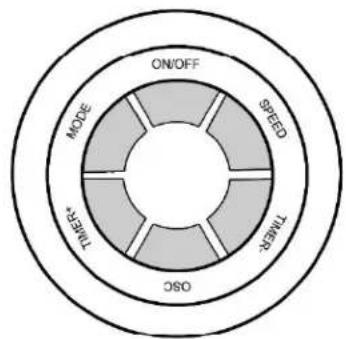
flowchart
graph TD
    A["ON/OFF"] --> B["SPEED"]
    B --> C["TIMER"]
    C --> D["OSC"]
    D --> E["INLET*"]
    E --> F["MODE"]
    F --> A
CONTROL PANEL
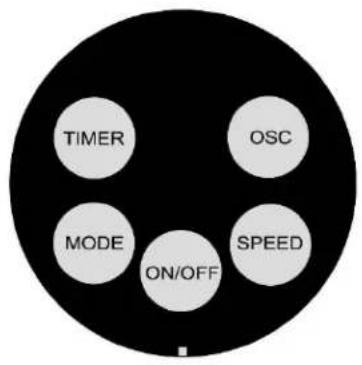
DISPLAY
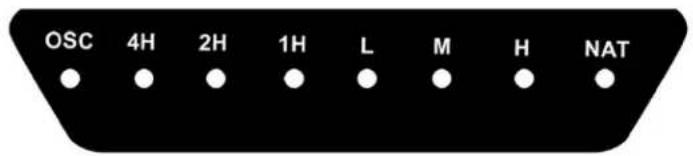
HOW TO USE
- Plug the unit into the convenience outlet (230Va.c).
- Press ON/OFF Button.
- Press the SPEED Button:
a. Turn ON- LOW
b. Once - MEDIUM
c. Twice - HIGH speed
- Press MODE Button for Natural wind and press it again for Normal wind.
- Press the OSC Button for oscillation, and press again to fix the position.
- Press ON/OFF Button to turn it OFF.
TO SET THE TIMER:
- Press the TIMER Button:
Once - 1 hour
5 times - 5 hours
Twice - 2 hours
6 times - 6 hours
3 times - 3 hours
7 times - 7 hours
4 times - 4 hours
- The unit will automatically turn OFF as soon as the set time had lapsed.
TO USE THE REMOTE CONTROL

flowchart
graph TD
    A["ON/OFF"] --> B["SPEED"]
    B --> C["TIME+T"]
    C --> D["OSC"]
    D --> E["TIME+"]
    E --> F["MODE"]
    F --> G["Speed"]
Press the ON/OFF Button to turn ON and press again to turn OFF.
Press SPEED BUTTON to desired speed Low, Medium, High.
Press TIMER Button repeatedly to set the Timer (1 hour, 2 hours and 4 hours).
Press OSC button to turn ON the oscillation and press again to turn OFF.
Press MODE Button for Natural wind and press it again for Normal wind.
CLEANING MAINTENANCE
- Always disconnect the unit from the convenience outlet before disassembling the unit.
- Unscrew and remove the Back Grill Cover wash with soap and water. Let it dry.
- Brush out the dirt from the Cross Fan.
- Return the Back Grill Cover.
- Do not immerse the unit in water or other liquids.
Brand : Imarflex
Model : IF-732R
Category : Household Fan