
AVS1424 - Bluetooth speaker DAEWOO - Free user manual and instructions
Find the device manual for free AVS1424 DAEWOO in PDF.


| Product Type | Bluetooth Speaker |
| Brand | Daewoo |
| Model | AVS1424 |
| Dimensions (approx.) | 15 x 7 x 5 cm |
| Weight (approx.) | 0.3 kg |
| Power Source | Built-in rechargeable battery, USB 5V/1A charging |
| Battery Capacity | 1200 mAh (typical) |
| Playing Time | Up to 6 hours at moderate volume |
| Bluetooth Version | 5.0 |
| Wireless Range | Up to 10 meters |
| Audio Inputs | Bluetooth, AUX 3.5mm, microSD card |
| FM Radio | Yes |
| Output Power | 5W RMS |
| Frequency Response | 100 Hz – 20 kHz |
| Controls | Power, Volume +/-, Play/Pause, Mode, TF card slot |
| Care and Cleaning | Wipe with a soft, dry cloth. Do not use abrasive cleaners. |
| Safety Warnings | Do not expose to water or extreme temperatures. Keep away from children. |
| Spare Parts & Repairability | No user-serviceable parts. Contact support for battery replacement. |
| Package Contents | Speaker, USB charging cable, AUX cable, user manual |
Frequently Asked Questions - AVS1424 DAEWOO
User questions about AVS1424 DAEWOO
0 question about this device. Answer the ones you know or ask your own.
Ask a new question about this device
Download the instructions for your Bluetooth speaker in PDF format for free! Find your manual AVS1424 - DAEWOO and take your electronic device back in hand. On this page are published all the documents necessary for the use of your device. AVS1424 by DAEWOO.
USER MANUAL AVS1424 DAEWOO
natural_image
Abstract black fan-like pattern on light background (no text or symbols)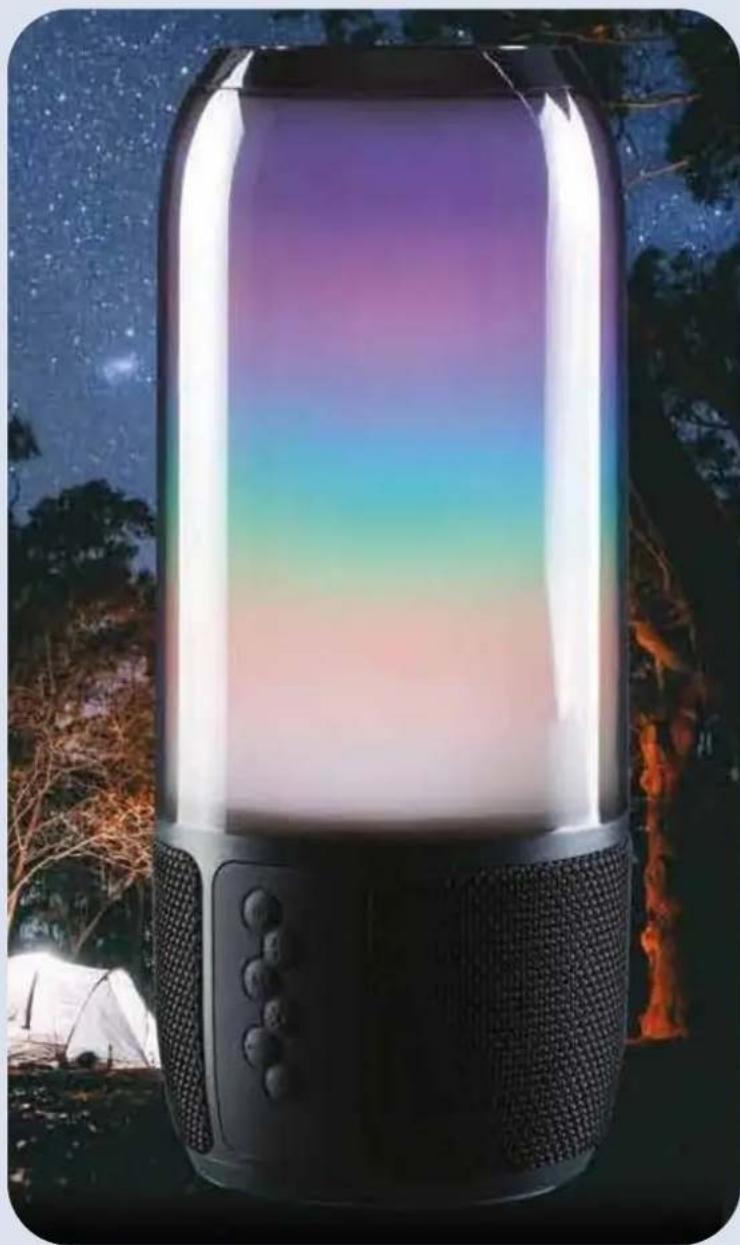
natural_image
Exterior view of a modern, colorful nightlight device with ambient lighting against a starry night sky (no text or symbols visible)Sound Glow Bluetooth Party Speaker
with colour changing lights
User Manual

IMPORTANT SAFEGUARDS
When using electrical appliances, basic safety precautions should always be followed. These instructions should be saved for future reference:
- Read and familiarise yourself with all operating instructions before using this Speaker.
- Before plugging your unit into the USB supply, visually check that the unit is intact and has not suffered any transit damage.
- Check that the voltage indicated on the data plate corresponds with that of the local network before connecting the appliance to the mains power supply.
- Always use this appliance on a solid, level, non-flammable surface.
- Ensure that there is clearance of at least 100mm (4 Inches) minimum around the Speaker for sufficient ventilation.
- Ensure that the ventilation openings are not covered with items, such as newspapers, table-cloths, curtains, etc.
- No naked flame sources, such as lighted candles, should be placed on the Speaker.
- Do not position the Speaker close to sources of heat such as radiators, heaters, other electronic equipment, etc.
- The Speaker shall not be exposed to dripping or splashing and that no objects filled with liquids, such as vases, shall be placed on the apparatus.
- Do not immerse the Speaker or its supply in water or any other liquids.
- Do not leave the Speaker unattended during use.
- Do not leave the Speaker unattended whilst connected to a USB supply.
- Close supervision is required when using this Speaker near children.
- Never leave this Speaker within reach of children.
- This appliance can be used by children aged from 8 years and above and persons with reduced physical, sensory or mental capabilities or lack of experience and knowledge if they have been given supervision or instruction concerning use of the appliance in a safe way and understand the hazards involved. Children shall not play with the appliance. Cleaning and user maintenance shall not be
made by children without supervision.
- Children of less than 3 years should be kept away unless continuously supervised.
- Do not use this Speaker outdoors.
- It is imperative to unplug the power supply after the Speaker has been used, before it is cleaned and whilst being repaired.
- Repairs to electrical appliances should only be performed by qualified personnel. Improper repairs may place the user at serious risk.
- Do not operate this appliance after a malfunction or after being dropped or damaged in any way.
- Do not allow the USB cable to hang over sharp edges or come in contact with hot surfaces.
- Do not run the USB charging cable under carpets, rugs, etc.
- This product is intended for household use only and should not be used for industrial purposes.
- Do not use any accessories or attachments with this product other than those supplied or recommended by supplier.
- Do not use this product for anything other than its intended use.
- Do not push objects into any openings as damage to the product and/or electric shock may occur.
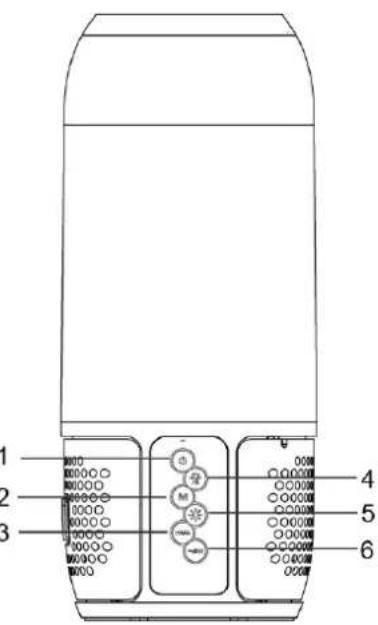
Description of Front Panel Functions
 | 1. Press and hold the button to turn the speaker on and off. |
| M | 2. Mode: Switch between Bluetooth/ Aux/ TF (SD) card/USB Memory Stick. |
| ▶▶|+ | 3. Press and hold the button to increase the volume, briefly press to skip to the next track. |
 | 4. Briefly press the Phone button once to answer an incoming call.Briefly press the Phone button to end a call.Press and hold the Phone button for 2 seconds to reject a call.Short press the Phone button twice to redial last numberPress the button to pause a song while playing music, press again to continue playing. |
 | 5. Press to change LED colour changing light mode. |
| —|◀◀ | 6. Press and hold the button to decrease the volume; briefly press to skip to the previous track. |
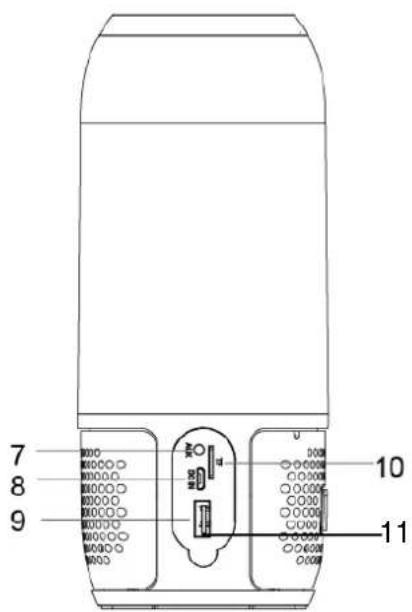
Description of Parts – Rear Panel
- AUX – External 3.5mm input.
- Micro USB DC Port.
- USB – USB Memory Stick Port.
- Micro SD/TF Card Player.
- Charge indicator (Next to the USB port).
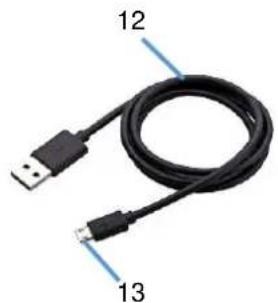
- USB Charging Cable.
- Micro USB Plug.
- 3.5mm Jack to Jack Lead
natural_image
Coiled black cable with two USB connectors, labeled 12 and 13 (no additional text or symbols)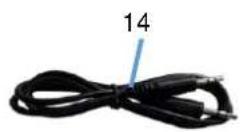
Before the first time you use your Sound glow Speaker
Please read these operating instructions thoroughly and keep them in a safe place for future reference.
Remove all packing materials and discard responsibly.
Charging the internal Battery
Before use, please ensure that the internal rechargeable battery is fully charged as follows:
- Insert the Micro USB Plug (13) of the USB Charging Cable (12) into the Micro USB DC Port (8) on rear panel of the Speaker to charge the internal battery.
- Insert the large USB plug on the other end of the USB Charging Cable (12) into a suitable USB charger rated at 5 volts 1 amp minimum.
- The Charging Indicator (11) will light red to show the internal battery is charging. Once the battery is fully charged, the Charging Indicator (11) will go out showing that the internal battery is fully charged and the USB Charging Cable (12) can be removed.
NB the Speaker can be used normally during charging.
NB If two beeps are heard during use then the battery will need to be re-charged.
Operating Instructions
Using the Bluetooth Mode
- Press and hold the Power button ⏻ (1) on the Front Panel for three seconds to power up the speaker.
- The speaker will light up in a multicolour mode.
- Enable the Bluetooth mode on your Phone, Tablet or other Bluetooth compatible device and set it to search.
- Select 'AVS1424' from the search results found by your device which will now pair with the speaker. Once the device has paired the speaker will chime.
- Enable the music player on your Phone, Tablet or other device you are using.
- Press the Play/Pause/Phone button (4) to start and stop (pause) the connected device playing.
- Briefly press the skip forwards ▶▶/+ (3) and skip backwards —◀◀ buttons (6) to change the track being played.
- Press and hold the skip forwards▶▶|+ (3) and skip backwards—◀◀ buttons (6) to increase and decrease the volume level.
- Alternatively use your devices controls in the usual manner.
Using the AUX/LINE Input
The AUX/LINE Input allows a direct wired connection of an external audio device (such as a mobile phone, music player, etc.) via a 3.5mm jack socket input on the rear Panel.
- Press and hold the Power button ⏻ (1) on the Front Panel for three seconds to power up the speaker.
- Insert a suitable 3.5mm jack lead (3.5mm Jack to Jack lead supplied (14)) into the AUX socket (7) on the rear panel of the Speaker.
- The speaker will automatically detect the lead and switch to AUX mode.
-
Insert the other end of the lead into the device you are playing from.
-
Press and hold the skip forwards ▶▶|+ (3) and skip backwards —◀◀ buttons (6) to increase and decrease the volume level.
Playing Music from a USB Memory Stick
- Press and hold the Power button ⏻ (1) on the Front Panel for three seconds to power up the speaker.
- Insert a USB Memory Stick (pre-loaded with audio tracks – Mp3, WAV, files etc.) into the USB memory stick port (9) on the rear panel. NB the USB port supports USB 2.0 and up to 32GB capacity max.
- The tracks on the memory stick will begin to play automatically.
- Briefly press the Play/Pause/Phone button (4) to play and pause the memory stick.
- Briefly press the skip forwards ▶▶|+ (3) and skip backwards —◀◀ buttons (6) to step through the tracks on the memory stick.
- Press and hold the skip forwards ▶▶|+ (3) and skip backwards —◀◀ buttons (6) to increase and decrease the volume level.
Playing Music from a Micro SD/TF Card
- Insert a Micro SD or TF card (pre-loaded with audio tracks – Mp3, WAV, files etc.) into the MICRO SD Player (10) on the rear panel. NB the Micro SD/TF card player supports cards up to 32GB capacity max.
- The tracks on the card will begin to play automatically.
- Press the Play/Pause/Phone button (4) to play and pause the memory card.
- Briefly press the skip forwards ▶▶|+ (3) and skip backwards —◀◀ buttons (6) to step through the tracks on the SD/TF card.
- Press and hold the skip forwards ▶▶/+ (3) and skip backwards —◀◀buttons (6) to increase and decrease the volume level.
Handling Telephone Calls
Answering a Call
- A call coming in will mute (cut) the music you are listening to.
- Briefly press the Play/Pause/Phone button (4) to answer the call.
- Press and hold down the skip forwards ▶▶/+ button (3) to increase the call volume level.*
- Press and hold down the skip backwards —◀◀ button (6) to decrease the call volume level.
- Briefly press the Play/Pause/Phone button ▶ (4) again to end the call.
- The callers voice will be heard through the speaker and your voice will be picked up by the built in Microphone inside the speaker.
Rejecting a Call
- A call coming in will mute (cut) the music you are listening to.
- Press and hold the Play/Pause/Phone button ▶ (4) for two seconds to reject the call.
Redialling the Last Call Made
- Briefly press the Play/Pause/Phone button ▶ (4) twice to redial the last number you called.
- Briefly press the Play/Pause/Phone button 📋 (4) once to end the call.
*Three high pitched beeps will be heard warning when the maximum volume setting has been reached.
Changing the Light Mode
Press the light mode button ✪ (5) to select from the following LED light modes:
a. Continuous colour changing lights
b. Sound to light colour changing mode – the lights change colour in time with the music.
c. White night light.
d. Press the light mode button again to turn the lights off.
Care and Use of your Speaker
- Always disconnect the Speaker from the USB charging supply before cleaning.
- Clean outside of the Speaker with a clean damp cloth. Never clean with harsh or abrasive cleaners.
- Do not submerge the Speaker in water or any other liquids.
Technical Specification
| Model Number | AVS1424 |
| Power Supply/Charger | DC 5V @1A |
| Total audio output power | 2x 3W |
| Audio Frequency Response | 100Hz – 20Khz |
| Unpacked Weight | Approx. 600gs |
| Dimensions (Approx.) | Approx. 85 mm (dia.) x 220mm (h) |
| Operation temperature | 0°C to + 40°C |
| Built in Battery type | Lithium Ion, 1800 mAh |
| Bluetooth Frequency Range | 2402 - 2480MHz |
| Bluetooth Transmission power | ≤-3.325dBm |
| This product conforms to Radio Equipment Directive 2014/53/EU | |
Waste batteries should not be disposed of with household waste. Please recycle where facilities exist. Check with your Local Authority or retailer for recycling advice.
DAEWOO
ELECTRICALS

natural_image
Abstract black-and-white geometric pattern resembling a stylized fan or leaf (no text or symbols)GUARANTEE
This product is guaranteed for twenty-four months from the date of original purchase. If any defect should occur due to faulty materials or workmanship, please return it to the store it was purchased from.
You will need to have your receipt of purchase to hand. The guarantee is subject to the following provisions:
- It is only valid within the boundaries of the country of purchase.
- The product must be correctly installed and operated in accordance with the instructions contained in the User Manual.
- The product must be used solely for domestic purposes.
- The guarantee will be rendered invalid if the product is re-sold or has been damaged by inexpert repair.
- The manufacturer disclaims any liability for incidental or consequential damages.
- The guarantee is in addition to, and does not diminish, your statutory or legal rights.
Waste electrical products should not be disposed of with household waste. Please recycle where facilities exist. Check with your Local Authority or retailer for recycling advice.

Daewoo Electricals is a registered trademark. Produced and imported under licence by ESG Ltd Manchester M3 1JS www.esgld.com
- IMPORTANT SAFEGUARDS
- When using electrical appliances, basic safety precautions should always be followed. These instructions should be saved for future reference:
- Description of Front Panel Functions
- Description of Parts – Rear Panel
- Before the first time you use your Sound glow Speaker
- Charging the internal Battery
- Operating Instructions
- Using the Bluetooth Mode
- Using the AUX/LINE Input
- Playing Music from a USB Memory Stick
- Playing Music from a Micro SD/TF Card
- Handling Telephone Calls
- Answering a Call
- Rejecting a Call
- Redialling the Last Call Made
- Changing the Light Mode
- Care and Use of your Speaker
- Technical Specification
- DAEWOO
- ELECTRICALS
- GUARANTEE
Brand : DAEWOO
Model : AVS1424
Category : Bluetooth speaker