
Dash Pro - Hard Drive Oyen Digital - Free user manual and instructions
Find the device manual for free Dash Pro Oyen Digital in PDF.


| Product Type | Portable SSD Flash Drive |
| Brand | Oyen Digital |
| Model | Dash Pro |
| Interface | USB-A (via adapter: USB-C, USB-A extender) |
| Data Transfer Speed | Up to 10 Gbps (USB 3.2 Gen 2) |
| Memory Type | TLC NAND Flash |
| SSD Controller | Phison E13 |
| System Compatibility | Windows, Mac, Linux |
| Operating Temperature | 0°C to 60°C |
| Material | Aluminum Alloy |
| Dimensions | 3.1 x 0.99 x 0.34 inches |
| Box Contents | Dash Pro Flash Drive, USB-C adapter, USB-A extender, Lanyard |
| File System | Pre-formatted exFAT |
| Warranty | 3 years repair/replacement |
| Power Source | USB bus-powered |
| Connection Technology | USB 3.2 Gen 2 |
| Included Adapters | USB-C adapter, USB-A extender |
| Compatibility | Thunderbolt 3 and 4 (via USB-C adapter) |
| Form Factor | Portable flash drive |
Frequently Asked Questions - Dash Pro Oyen Digital
User questions about Dash Pro Oyen Digital
0 question about this device. Answer the ones you know or ask your own.
Ask a new question about this device
Download the instructions for your Hard Drive in PDF format for free! Find your manual Dash Pro - Oyen Digital and take your electronic device back in hand. On this page are published all the documents necessary for the use of your device. Dash Pro by Oyen Digital.
USER MANUAL Dash Pro Oyen Digital
natural_image
Black DASH PRO remote control device with control panel and display (no readable text or symbols beyond branding)Dash Pro Flash Drive
For more information, visit our website at www.oyendigital.com
(1) Specifications
| Interface/Port | • USB-A |
| Data Transfer | • USB 3.2 Gen 2 (up to 10Gbps) |
| Memory | • TLC NAND Flash |
| System Requirements | • Windows, Mac, Linux |
| SSD Controller | • Phison E13 |
| Operating Environment | • Temperature: 0°C ~ 60°C |
| Material | Aluminum Alloy |
| Housing size | 3.1 x 0.99 x 0.34 inches |
| Box Includes | Dash Pro Flash Drive, USB-C adapter, USB-A extender, Lanyard |
(2) Detailed View
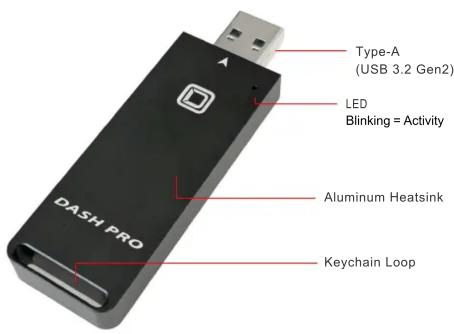
(3) Connecting the Dash Pro
Using USB C Adapter
- If the host computer has a USB-C port, simply connect the included adapter to the connector on the flash drive.
Using USB-A Extender
- If more space is needed to allow for neighboring USB devices at the computer, simply connect the USB-A extender to the connector on the flash drive.
(4) Using the Dash Pro
The drive is pre-formatted as exFAT, which is compatible with Windows and Mac OS. Simply connect the Dash Pro to the computer and it will appear and be ready for use.
The Dash Pro does not include backup software. For data backup, we recommend the apps within Windows and Mac.
Win 10 https://support.microsoft.com/en-us/help/17143/windows-10-back-up-your-files
Mac Time Machine - https://support.apple.com/en-us/HT201250
Carbon Cloner- www.bombich.com
For users who wish to reformat the drive, please visit the link for instructions. http://oyendigital.com/format
(5) Disconnecting the Dash Pro
Windows: Close applications that are accessing the drive. Click the "Eject Hardware" (Safely Remove Hardware) icon in the system tray and highlight the drive. Wait for a few seconds until the system prompts "You may safely remove this device."
MAC: Close applications that are accessing the drive. Drag the external drive to the Trash/Eject icon. After the disk icon has disappeared from the desktop, you may safely disconnect the drive.
(6) Warranty Information
This product includes a three (3) year repair/replacement warranty provided by Oyen Digital. This warranty is non-transferable and is limited to the original purchaser. Warranty service may be requested by completing the form at the following link: www.oyendigital.com/support
For our complete warranty policy, visit: www.oyendigital.com/warranty
(7) FAQ
Q: The Dash Pro is getting very warm. Is this normal?
A: Yes, the Dash Pro is made from Aluminum, unlike competitor models made from plastic. The Aluminum absorbs and dissipates heat, which prevent the internal components from overheating and allows for extended life and performance.
Q: Is the Dash Pro compatible with Thunderbolt ports?
A: The Dash Pro is compatible with Thunderbolt 3 and 4 ports using the included USB-C adapter. It is not compatible with Thunderbolt 1 or 2.
Q: The speed is not as fast as expected. Why?
A: To experience the fastest capable speed, the Dash Pro must be connected to a Thunderbolt 3 or 4 port, or a USB 3.2 Gen2 port (10Gbps). A USB 3.0 port is limited to 5Gbps (\~500 MB/s). A USB 2.0 port is limited to 480Mbps (\~40 MB/s).
For other questions please contact tech support or visit the FAQ section of our Web site (www.oyendigital.com/support).
Technical Support: info@oyendigital.com


Brand : Oyen Digital
Model : Dash Pro
Category : Hard Drive