
GeminII SF524 - PC Cooler COOLER MASTER - Free user manual and instructions
Find the device manual for free GeminII SF524 COOLER MASTER in PDF.


| Product Type | CPU Cooler (Low-Profile) |
| Brand | Cooler Master |
| Model | GeminII SF524 |
| Compatible Sockets | Intel LGA 1366, 1156, 1155, 775; AMD FM1, AM3+, AM3, AM2 |
| Fan Size (Pre-installed) | 120 mm |
| Max Fan Support | 140 mm (user-replaceable) |
| Dimensions (Cooler Only) | Approx. 120 x 120 x 64 mm (estimated) |
| Weight | Approx. 400 g (estimated) |
| Heat Sink Material | Aluminum fins with copper heat pipes (typical) |
| Fan Speed (120mm) | Not specified; typical 800-2000 RPM |
| Airflow | Not specified |
| Noise Level | Not specified |
| Power Connector | 4-pin PWM (typical) |
| Power Consumption | Not specified |
| Installation Orientation | 4 possible directions |
| Included Accessories | Back plate, retention plate, screws, nuts, thermal grease |
| Special Features | Insulating tape on backplate; diagonal tightening method |
| Warranty | Not specified; typically 2 years |
| Maintenance | Clean fan and heatsink with compressed air or soft brush |
| Safety Notes | Do not peel insulating tape; ensure tape faces motherboard |
| Spare Parts | Contact Cooler Master support |
| Repairability | Fan replaceable; cooler can be re-installed |
Frequently Asked Questions - GeminII SF524 COOLER MASTER
User questions about GeminII SF524 COOLER MASTER
0 question about this device. Answer the ones you know or ask your own.
Ask a new question about this device
Download the instructions for your PC Cooler in PDF format for free! Find your manual GeminII SF524 - COOLER MASTER and take your electronic device back in hand. On this page are published all the documents necessary for the use of your device. GeminII SF524 by COOLER MASTER.
USER MANUAL GeminII SF524 COOLER MASTER
Intel® LGA 1366 / 1156 / 1155 / 775


- There are three different sets of holes available for Intel® sockets (LGA 1366 / 1156 / 1155 / 775). Please adjust the pin and screw position based on your CPU specification.
- Place the cooler onto the CPU surface, hold the cooler while turning over the motherboard.


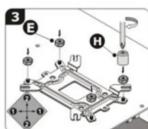
- Place the back plate onto the motherboard.
- Tighten up the nuts diagonally at the same time.
* Don't peal off the insulating tape * The insulating tape should be facing the motherboard
Installation Procedures
Before installation, please select the proper type suitable for your CPU platform
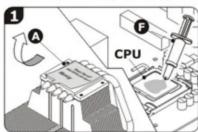
- Start with removing the protective cover on the bottom of the cooler Apply a thin layer of thermal grease onto the surface of the installed CPU


- Fasten the retention plate onto the cooler


AMD Socket FM1 / AM3+ / AM3 / AM2
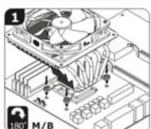

- Place the cooler onto the CPU surface, hold the cooler while turning over the motherboard.
- Place the back plate onto the motherboard.
- Tighten up the nuts diagonally at the same time. * Don't peal off the insulating tape * The insulating tape should be facing the moth
Install the optional fan


Remove: 120mm fan pre-installed on cooler
- Loosen the screws and remove the 120mm fan.
- Place the 140mm fan on heatsink as shown in the illustration and fix it by screws.
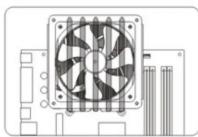
Installation Direction
4 possible installation directions.
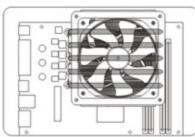


Connect fan cable to mainboard
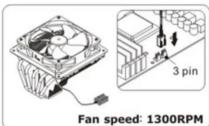
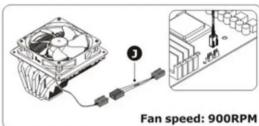

- Picture for reference only. - Information in this document is subject to change without notice. - Please visit our website (www.coolermaster.com) for the latest installation update.
This manual has been validated and reviewed for accuracy.
The instructions and descriptions it contains are accurate
at the time of this manual's production.however, succeeding devices and manuals
are subject to change without notice. Cooler Master Co., Ltd.
assumes no liability for damages incurred directly or indirectly from errors,
omissions or discrepancies between the computer and the manual.
Live Main
Live Help
http://www.coolermaster.com/livehelp
http://www.coolermaster.com/in/help
For the most updated information, please visit our official
website:http://www.coolermaster.co
©2011 Cooler Master Co., Ltd. All Rights Reserved.
All trademarks are registered to their respective owners.

510005590-GP
In no event shall Cooler Master be liable for any special, indirect, incidental or consequential damages arising from any defect or error in this manual or product.
Brand : COOLER MASTER
Model : GeminII SF524
Category : PC Cooler