
ZPR-111 - Home Automation Nexa - Free user manual and instructions
Find the device manual for free ZPR-111 Nexa in PDF.


| Product Type | Wireless Remote Control / Receiver |
| Brand | Nexa |
| Model | ZPR-111 |
| Category | Home Automation |
| Dimensions (approx.) | 50 x 25 x 15 mm |
| Weight (approx.) | 20 g |
| Power Supply | 3V CR2032 battery |
| Main Functions | On/Off control, dimming, timer, scene activation |
| Wireless Protocol | 433 MHz / 868 MHz (depending on region) |
| Range | Up to 30 meters indoors |
| Compatibility | Nexa wireless receivers and actuators |
| Maintenance & Cleaning | Wipe with a dry, soft cloth; avoid liquids |
| Safety Precautions | Keep away from water and extreme temperatures; do not disassemble |
| Spare Parts | CR2032 battery (replaceable) |
| Repairability | Battery replacement only; no user-serviceable parts |
| General Information | Designed for Nexa home automation systems; suitable for lighting, appliances, and more |
Frequently Asked Questions - ZPR-111 Nexa
User questions about ZPR-111 Nexa
0 question about this device. Answer the ones you know or ask your own.
Ask a new question about this device
Download the instructions for your Home Automation in PDF format for free! Find your manual ZPR-111 - Nexa and take your electronic device back in hand. On this page are published all the documents necessary for the use of your device. ZPR-111 by Nexa.
USER MANUAL ZPR-111 Nexa
natural_image
Top-down view of a white electrical socket with three circular holes and two metallic pins (no text or symbols visible)natural_image
Line drawing of a hexagonal electronic component with pins and a pointer (no text or symbols)NEXA

natural_image
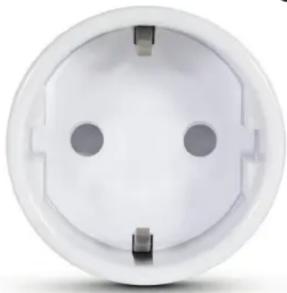
Top-down view of a white electrical socket with three circular holes (no text or symbols)ZPR-111
Plugin on/off with energy measurement
TECHNICAL DATA
| ZPR-111 | |
| Power supply 220–240 V~50 Hz | |
| Max. load 2300 W R | |
| Protocol Z-Wave (868.42 MHz) | |
| Range up to 30 m | |
| Operating temperature 0–40 °C | |
| Own consumption < 1 W | |
| Energy measurement Voltage, current | |
| IP classification Indoor use | |
| Dimensions ( × D ) 43 x 65 mm | |
NEXA
NEXA AB, DATAVÄGEN 37B, 436 32 ASKIM, SWEDEN
info@nexa.se | www.nexa.se
ENGLISH
Z-Wave plugin receiver (On/Off) with power consumption measurement function, LED indicator, build-in switch-off timer and on/off button. Controlled using Nexa Bridge or another Z-Wave controller.
The power consumption measurement function reports voltage, current, momentary and accumulated power consumption.
CONNECT TO A Z-WAVE NETWORK
Installation:
- Connect the ZPR-111 to a power socket
- Start inclusion in the Z-Wave controller
- Press the link button three times within 1.5 seconds; the LED flashes Yellow 5 times.
Exclusion:
- Start exclusion in the Z-Wave controller.
- Press the link button three times within 1.5 seconds: the LED flashes Purple 5 times.
Restore factory settings:
- Disconnect the ZPR-111 from the wall socket, wait 10 seconds and then reconnect it.
- Wait 20 seconds, press and hold the link button until the LED first flashes Red once and then Purple 5 times.
- Release the button.
POWER & ENERGY MEASUREMENT
The ZPR-111 reports information about voltage, current and power to the Z-Wave controller as follows:
Voltage - Current drive voltage in Volts (V)
Current – The connected load current consumption in Amperes (A) Momentary power – The connected load power consumption in Watts (W)
Accumulated power – Power consumption over time in kilowatt hours (kWh)
LED colour LED status MAX. OUTPUT
| Purple | Flashes 5 times at 1 second intervals Not connected to Z-Wave network | |
| Flashes 5 times at 0.5 second intervals Exclusion mode | ||
| Flashes 5 times | Restored to factory settings | |
| Blue Flashes 5 times at 0.3 second intervals Connected to Z-Wave network | ||
| Yellow | Flashes 5 times at 0.5 second intervals Inclusion mode | |
| Non-flashing light | Power consumption reaching alarm level (parameter #4) | |
| Red | Flashes at 1 second intervals | Power consumption higher than set max. power (parameter #3) |
| Non-flashing light | Error in connection to Z-Wave network | |
| Green | Non-flashing light | Mode ON |
ASSOCIATION GROUPS & ADVANCED CONFIGURATION
See separate document at www.nexa.se
SAFETY AND INFORMATION
Range indoors: up to 30 m (optimal conditions). The range is heavily dependent on local conditions – such as if there are any metals nearby. For example, the heavy metal coating in low-emission energy glass has a negative impact on the range of the radio signals. There may be limitations on the use of the unit outside the EU. If appropriate, check that the unit complies with the local regulations.
Max. load: Never connect lights or equipment that exceeds the maximum load of the receiver. This can result in faults, short circuit or fire.
Life support equipment: Never use Nexa products for life support equipment or other devices where faults or disruptions can have life-threatening consequences.
Disruptions: All wireless units can be affected by disruptions that may have an impact on performance and range. The minimum distance between two receivers should therefore be at least 50 cm. Repairs: Do not attempt to repair the product. It does not contain any serviceable parts.
Waterproofing: The product is not waterproof. Make sure that it is always dry. Moisture will corrode the electronic components inside and may result in short circuit, faults and risk of electric shock. Cleaning: Clean the product with a dry cloth. Do not use chemicals, solvents or potent cleaning agents.
Environment: Do not expose the product to extreme heat or cold, as this may damage the electronic circuits or shorten their service life.
LED indication
and link button,
as well as On/Off

natural_image
Line drawing of a hexagonal electronic component with pins and a pointer (no text or symbols)NEXA
natural_image
Top-down view of a white electrical socket with two circular holes and three metallic pins (no text or symbols visible)ZPR-111 Kontakt med energimåler, av/på
TEKNISK INFORMASJON
ZPR-111
| Strømkilde | 220–240 V AC 50 Hz |
| Maksimallast | 2300 W R |
| Protokoll | Z-Wave (868,42 MHz) |
| Rekkevidde Opptil 30 m |
natural_image
Line drawing of a hexagonal electronic component with pins and a pointer (no text or symbols)NEXA


natural_image
Top-down view of a white electrical socket with two circular holes and three metallic pins (no text or symbols visible)TEKNISET TIEDOT
ZPR-111
natural_image
Line drawing of a hexagonal electronic component with pins and a pointer (no text or symbols)
Brand : Nexa
Model : ZPR-111
Category : Home Automation