
RD 2016 - Mp3 player RCF - Free user manual and instructions
Find the device manual for free RD 2016 RCF in PDF.


| Product Type | MP3 Player / Recorder |
| Brand | RCF |
| Model | RD 2016 |
| Supported Media | SD/MMC card, USB flash drive (max 32 GB) |
| File Format | MP3 (stereo, 44.1 kHz, fixed bitrate ≥128 kbps recommended) |
| Recording Format | MP3, 192 kbps, stereo, 44.1 kHz |
| Max Number of Files | 2000 per media |
| Max Directory Depth | 8 levels (including root) |
| Programmable Sequence | Up to 64 files |
| Direct Play Buttons | 18 front panel buttons for files 1-18 |
| Remote Trigger Inputs | 7 dry contact screw terminals for files 1-7 |
| Audio Inputs | REC IN (RCA, line level), AUX IN (RCA, line level) |
| Audio Outputs | REC OUT (RCA, line level), AUX OUT (RCA, line level) |
| Remote Control | Infrared, included (range ~4-5 m) |
| RS-232 Port | Yes (9600 baud, 8 data bits, no parity, 1 stop bit) |
| Power Supply | 12 V DC via included adapter; input 100-240 V AC, 50/60 Hz, 0.2 A |
| Dimensions (W x H x D) | 482 x 44 x 185 mm (19", 1U rack) |
| Net Weight | 3 kg |
| Remote Control Dimensions | 52 x 156 x 20 mm |
| Remote Control Batteries | 2 x AAA (1.5 V) non-rechargeable |
| Mounting Options | 19" rack (1U) or desktop (remove rack ears) |
| Display | LCD with file/folder numbers, elapsed time, ID3 tags |
| Repeat Modes | REPEAT, REPEAT ALBUM, REPEAT ALL, OFF |
| Special Functions | A-B loop, random play, intro mode (10 sec), mute, play once |
Frequently Asked Questions - RD 2016 RCF
User questions about RD 2016 RCF
0 question about this device. Answer the ones you know or ask your own.
Ask a new question about this device
Download the instructions for your Mp3 player in PDF format for free! Find your manual RD 2016 - RCF and take your electronic device back in hand. On this page are published all the documents necessary for the use of your device. RD 2016 by RCF.
USER MANUAL RD 2016 RCF
USER MANUAL MANUALE D'USO
RD 2016
- MP3 PLAYER / RECORDER
- LETTORE / REGISTRATORE DIGITALE DI FILE AUDIO MP3
INDEX INDICE

ENGLISH
SAFETY AND OPERATING PRECAUTIONS
INSTALLATION 6
INSERT / REMOVE / CHANGE THE REMOTE CONTROL BATTERIES
DESCRIPTION 7
FRONT PANEL 8
REAR PANEL 10
REMOTE CONTROL 12
MP3 FILE PLAYBACK 13
RECORDING AND MP3 FILE CREATION 14
PROGRAMMING A PREDEFINED SEQUENCE OF MP3 FILES 15
RS 232 | 16
SPECIFICATIONS 17
CONNECTION EXAMPLE 17
ITALIANO
AVVERTENZEPERLASICUREZZA
INSTALLAZIONE 20
SAFETY AND OPERATING PRECAUTIONS

IMPORTANT NOTES
Before connecting and using this product, please read this instruction manual carefully and keep it on hand for future reference. The manual is to be considered an integral part of this product and must accompany it when it changes ownership as a reference for correct installation and use as well as for the safety precautions.
RCF S.p.A. will not assume any responsibility for the incorrect installation and / or use of this product.
WARNING: To prevent the risk of fire or electric shock, never expose these products to rain or humidity.
SAFETY PRECAUTIONS
-
All the precautions, in particular the safety ones, must be read with special attention, as they provide important information.
-
Use the dedicated adapter only. Verify the mains voltage corresponds to the voltage shown on the adapter rating plate and the adapter output voltage value and type (direct / alternating) corresponds to the product input voltage. If not, please contact your RCF dealer.
Check also that the adapter has not been damaged due to possible clashes / hits or overloads.
The mains voltage, which the adapter is connected to, is sufficiently high to involve a risk of electrocution: pay attention during the connection (i.e. never do it with wet hands) and never open the adapter.
Make sure that the adapter cable is not (or cannot be) stepped on or crushed by other objects (pay particular attention to the cable part near the plug and the point where it leads out from the adapter).
-
Make sure that no objects or liquids can get into the product and its adapter, as this may cause a short circuit. All devices shall not be exposed to dripping or splashing. No objects filled with liquid (such as vases) and no naked sources (such as lighted candles) shall be placed on the player.
-
Never attempt to carry out any operations, modifications or repairs that are not expressly described in this manual.
Contact your authorized service centre or qualified personnel should any of the following occur:
- The product does not function (or functions in an anomalous way).
- The adapter or its power supply cable has been damaged.
- Objects or liquids have got into the player.
-
The player has been subject to a heavy impact.
-
If this product is not used for a long period, unplug its adapter and remove all batteries from its remote control.
-
If the player begins emitting any strange odours or smoke, switch it off immediately and unplug its adapter. Should it happen in the remote control, remove all batteries.
-
Do not connect this product to any equipment or accessories not foreseen. Check the suitability of the surface on which the player is placed, considering (for example) the mechanical vibrations normally generated by loudspeakers.
To prevent the risk of falling equipment, do not stack more players.
IMPORTANT

WARNING

- RCF S.p.A. strongly recommends this product is only installed by professional qualified installers (or specialised firms) who can ensure correct installation and certify it according to the regulations in force.
The entire audio system must comply with the current standards and regulations regarding electrical systems.
- Supports and trolleys
The equipment should be only used on trolleys or supports, where necessary, that are recommended by the manufacturer.
The equipment / support / trolley assembly must be moved with extreme caution.
Sudden stops, excessive pushing force and uneven floors may cause the assembly to overturn.
-
Mechanical and electrical factors need to be considered when installing a professional audio system (in addition to those which are strictly acoustic, such as sound pressure, angles of coverage, frequency response, etc.).
-
Hearing loss
Exposure to high sound levels can cause permanent hearing loss.
The acoustic pressure level that leads to hearing loss is different from person to person and depends on the duration of exposure. To prevent potentially dangerous exposure to high levels of acoustic pressure, anyone who is exposed to these levels should use adequate protection devices.
When using a transducer capable of producing high sound levels, it is necessary to wear ear plugs or protective earphones.
See the technical specifications in the instruction manual for the maximum sound pressure loudspeakers are capable of producing.
-
To prevent the occurrence of noise on the cables for audio signals, only use screened cables and avoid running them in the vicinity of:
-
Equipment that produces high-intensity electromagnetic fields
- Mains cables
-
Loudspeaker lines.
-
Place the player far from any heat sources and always ensure adequate air circulation.
-
Never force the control elements (keys, knobs,etc.).
-
Do not use solvents, alcohol, benzene or other volatile substances for cleaning external parts. Clean with a dry cloth only.
RCF S.P.A. THANKS YOU FOR PURCHASING THIS PRODUCT, WHICH HAS BEEN DESIGNED TO GUARANTEE RELIABILITY AND HIGH PERFORMANCE.
INSTALLATION

This device can be either installed into a 19" rack cabinet (1 unit) thanks to its rack ears or put on a desk (after taking its rack ears off by removing the 4 screws on each side).
INSERT / REMOVE / CHANGE THE REMOTE CONTROL BATTERIES

- Use 2 new AAA (1.5 V) non-rechargeable batteries, better if alkaline.
- Do NOT use old and new batteries at the same time.
- Do NOT put together different models of batteries.
- Do NOT attempt to charge non rechargeable batteries.
- Verify the polarity of batteries is correct (inserted properly, following the indication on the relevant compartment).
- Remove batteries when empty or the player will not be used for a long time.
- Do NOT short-circuit batteries (i.e. connecting the 2 opposite poles together with metallic wires).
- Throw empty batteries into dedicated garbage cans, according to your country laws about ecology and environment protection.
The battery compartment is on the bottom of the remote control rear side.
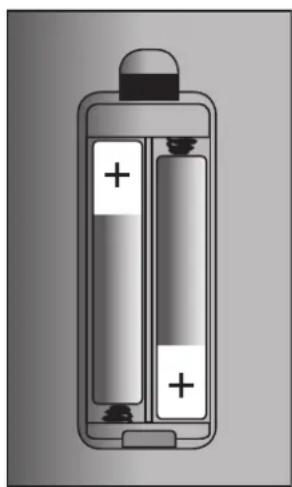
Push down the cover lock to remove the battery compartment cover (picture 1).
Remove old batteries (if present), by raising them from their positive pole.
The right polarity is indicated in the battery compartment (picture 2).
Insert 2 new AAA type (1.5 V) non-rechargeable batteries, better if alkaline. Make sure the polarity is correct when inserting. Battery insertion: first push its negative pole against the compartment spring, then push down its positive pole (to fix the battery; picture 3).

natural_image
Simple line drawing of a battery with an arrow pointing to its cap (no text or symbols)
natural_image
Illustration of a battery with two internal compartments, one showing positive charge and the other empty (no text or symbols)PICTURE 3PICTURE 1 PICTURE 2
RD 2016 is a MP3 stereo player / recorder on SD cards and USB flash drives (at least one media, either SD or USB, is necessary).
Max. readable size of a SD card / USB flash drive is 32 GB.
Only one MP3 file can be played / recorded at a time.
Each file could be, for instance, a song, a message, advertisement, etc. .
It is possible to set a programme: a predefined sequence made of max. 64 files.
MP3 files directly recorded on RD 2016 have a fixed format: 192 kbps, stereo, 44.1 kHz.
The first 7 MP3 files can also be triggered by remote commands (dry closing contacts of other devices).
The first 18 MP3 files can be directly played by pushing the respective front panel button.
An auxiliary input (AUX IN) and its parallel output (AUX OUT) allow to interrupt the audio signal of another device (for example, background music of a tuner, a CD player, etc.) when a RD 2016 MP3 file is played.
The front panel buttons can be disabled, allowing the device control only via the dedicated remote control (included).
NOTES ABOUT MP3 FILES
- MP3: means MPEG Audio Layer 3 and refers to an audio compression type.
- This player only reads MP3 files on USB flash drives and SD cards.
- If available, track titles, artists and albums are displayed (ID3 TAG).
- The file extension must be .mp3.
- The max. directory (/ folder) level is 8, including the 'root'.
- Max. 2000 MP3 files per media.
- It is advisable to use MP3 files having a sampling frequency of 44.1 kHz and a fixed bit-rate of at least 128 kbps (if higher, for instance 192 kbps, the sound quality will be better).

1 POWER ON main switch (O = OFF, I = ON)
2 USB port for USB flash drive (max. 32 GB)
3 LCD
4 Remote control infrared receiver (note: the remote control is included)
5 FRONTAL KEYS ON / OFF indication. The green LED (ON) indicates that all the front panel buttons are enabled, the red LED (OFF) that all the front panel buttons are disabled. Use the rear panel FRONTAL KEYS switch 32 to enable / disable all the front panel buttons.
6 REPEAT button: push (once or more times) to change the 'repeat' mode.
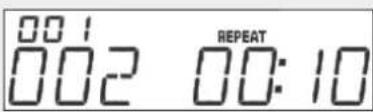
REPEAT: it continuously repeats the selected file only.
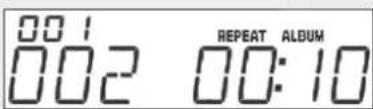
REPEAT ALBUM: it continuously repeats all files included in the selected album (that corresponds to a folder / directory).

REPEAT ALL: it continuously repeats all files (in their original sequence) available in the selected media (SD or USB).

Default mode: it plays all files once (in their original sequence).
7 A-B button: loop playback of a part of the selected MP3 file. When playing a file, push the A-B button exactly at the time location to be set as loop start ("A").
The 'A' letter is displayed.

Before the MP3 file ends, push the A-B button again to set the loop end ("B"). The 'B' letter is displayed and the loop playback starts.

To stop the loop playback, push either A-B (again) or the STOP button 10.
8 SKIPI ◀ button
- In stop mode: press to select the previous MP3 file (from the first, it skips to the last). Press several times (or press and hold) to select another file.
- In play mode: press once (only) for a while to select the previous MP3 file (press several times to select another file); press and hold for fast reversing.
- When programming the file sequence: it selects the previous folder / file.
9 SKIP ▶▶ | button
- In stop mode: press to select the next MP3 file (from the last, it skips to the first). Press several times (or press and hold) to select another file.
- In play mode: press once (only) for a while to select the next MP3 file (press several times to select another file); press and hold for fast forwarding.
- When programming the file sequence: it selects the next folder / file.
10 STOP ■ button
It stops playback / recording.
If pressed when the player is stopped, it completely erases the programmed file sequence (if set).
11 PLAY / PAUSE▶II button
It starts playback of the selected file (or the first of the chosen media) or toggles play / pause.
12 FUNCT button
It selects the media (SD card or USB flash drive).
13 PLAY ONCE button
Press once to enable the 'play once' function ('1 STOP' is displayed), the current file is played once only, then the player automatically stops.
Press again to disable the 'play once' function ('1 STOP OFF' is displayed).
14 FOLDER ◀ button
Press to select the previous folder (note: from the first, it skips to the last).
15 FOLDER▶▶ button
Press to select the next folder (note: from the last, it skips to the first).
16 REC button
It starts recording the stereo audio signal on REC IN 28 input. Read the 'Recording and MP3 file creation' manual section.
17 DEL button
It deletes the current selected / played file (only). Press once briefly: 'DEL FILE' is displayed.
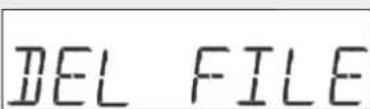
At this point, it is still possible to exit by pressing the STOP ■ 10 button.
To proceed (within 15 seconds): press and hold the DEL button for at least 3 seconds until 'DEL---' is displayed (the file has been deleted).
DEL----
18 1 ÷ 18 buttons
Each button starts playback (once only) of the respective file (among the first 18 available). At the file end, the player automatically stops.
19 REC INPUT LEVEL control
The recording level can be adjusted when an audio signal is present on REC IN 28 input. Turn it either clockwise to increase the level or counterclockwise to decrease it.
Look at the REC LEVEL LED bar 20: the proper level is when the fourth yellow LED occasionally blinks and the fifth red LED never gets lit.
20 REC LEVEL (5 LED bar): recording level indication (on REC IN 28 input).
The proper level is when the fourth yellow LED occasionally blinks and the fifth red LED never gets lit.
REAR PANEL


21 REMOTE COMMANDS: screw terminals to start the playback of the first 7 available files on the selected media (USB or SD) through other device commands (dry closing contacts).
The GND 26 ground screw terminal is the common one.
For example: link either the screw terminal 1 to GND to play the first file (only) or the screw terminal 2 to GND to play the second file or 3 to GND for the third file, etc...
The last activated command always gets priority and its respective file is immediately played.
If a contact is kept shorted, the file will be continuously repeated ('loop' mode).
After releasing (opening) a contact, as soon as the file ends, the player will stop automatically.
22 REC screw terminal
If linked to GND 26 (though a dry closing contact of another device), it starts recording the stereo audio signal on REC IN 28 input.
Read the 'Recording and MP3 file creation' manual section.
23 REPEAT screw terminal
If linked to GND 26 (though a dry closing contact of another device), it changes the 'repeat' mode.
Read the REPEAT button 6 description in the 'Front panel' manual section.
24 PLAY screw terminal
If linked to GND 26 (though a dry closing contact of another device), it starts playback of the selected file (or the first of the chosen media) or toggles play / pause.
25 STOP screw terminal
If linked to GND 26 (though a dry closing contact of another device), it stops playback / recording. When the player is stopped, it completely erases the programmed file sequence (if set).
26 GND ground screw terminal
Common screw terminal for commands.
27 ACT.SW screw terminals.
Internal relay dry contact that can be used for remote control other devices. During the playback, the two screw terminals are shorted; when in STOP / PAUSE, the two screw terminals are open.
28 REC IN stereo audio input (dual RCA connector, 'LINE' level)
Connect the audio output of the device used as source for recording to this input.
29 REC OUT stereo audio output (dual RCA connector, 'LINE' level)
MP3 player stereo audio output to be linked to a mixer input.
30 AUX IN stereo audio input (dual RCA connector, 'LINE' level)
The stereo signal on this audio input is directly sent to its parallel output AUX OUT [31] only when the MP3 player is stopped.
Its purpose is to interrupt the audio signal of another device (e.g. background music from a tuner) when a MP3 file is played by RD 2016.
31 AUX OUT stereo audio output (dual RCA connector, 'LINE' level)
Stereo audio output that sends the same signal present on the AUX IN 30 input only when the MP3 player is stopped.
32 FRONTAL KEYS switch to enable / disable all the front panel buttons
Set it to ON to enable all the front panel buttons (or OFF to disable them).
33 'Secure Digital' (SD) card slot (also compatible for 'MultiMedia' cards), max. 32 GB.
34 12 V dc power supply input
Connect the output of the included adapter to this input.
35 EIA RS-232 serial port (that could be used by a remote control device).
Read the 'RS 232' manual section.
The remote control (included) has some exclusive functions.
Most of its keys correspond to respective RD 2016 front panel buttons.
It is necessary to aim the remote control to the RD 2016 front panel from a distance not longer than 4 / 5 metres (the working range depends on the battery state).
MESSAGE ACTIVATION: numeric keyboard to directly select a MP3 file (among all the available, considering all folders / directories) on the selected media.
For instance, to select the eleventh file, press twice the '1' key (the number 011 is displayed with small segments in the top left-hand corner).

Press PLAY PAUSE (within 4 seconds) to start the selected file playback.
PLAY PAUSE: it starts playback of the selected file (or the first of the chosen media) or toggles play / pause.
STOP: it stops playback / recording. If pressed when the player is stopped, it completely erases the programmed file sequence (if set).
PROG: programme mode (a sequence made of max. 64 files).
Read the 'Programming a predefined sequence of MP3 files' manual section.
ID3: it toggles on/off the display information (if available) about the played MP3 file, for example (about music): the artist, the album and the song title.
RANDOM: it toggles on /off the random playback.

FOLDER ← press to select the previous folder (note: from the first, it skips to the last).
FOLDER ▶ press to select the previous folder (note: from the first, it skips to the last).
SKIP |
- In stop mode: press to select the previous MP3 file (from the first, it skips to the last). Press several times (or press and hold) to select another file.
- In play mode: press once (only) for a while to select the previous MP3 file (press several times to select another file); press and hold for fast reversing.
- When programming the file sequence: it selects the previous folder / file.
SKIP
- In stop mode: press to select the next MP3 file (from the last, it skips to the first). Press several times (or press and hold) to select another file.
- In play mode: press once (only) for a while to select the next MP3 file (press several times to select another file); press and hold for fast forwarding.
- When programming the file sequence: it selects the next folder / file.
REPEAT: it changes the 'repeat' mode.
Read the REPEAT button 6 description in the 'Front panel' manual section.

INTRO: the 'intro' mode allows to listen to the first 10 seconds (only) of every MP3 file.

MUTE: it mutes the audio output (without stopping the playback).

FUNCT: It selects the media (SD card or USB flash drive).
REC: it starts recording the stereo audio signal on REC IN 28 input. Read the 'Recording and MP3 file creation' manual section.
DEL: it deletes the current selected / played file (only). Read the DEL button 17 description in the 'Front panel' manual section.
PLAY ONCE: press once to enable the 'play once' function ('1 STOP' is displayed), the current file is played once only, then the player automatically stops. Press again to disable the 'play once' function ('1 STOP OFF' is displayed).
A-B: loop playback of a part of the selected MP3 file. Read the A-B button 7 description in the 'Front panel' manual section.
MP3 FILE PLAYBACK
Insert a USB flash drive into the front panel port ② and / or a SD card into the respective rear panel slot ③ (at least one media is necessary). Press the FUNCT button ⑫ to select the media (USB or SD).
USB
50
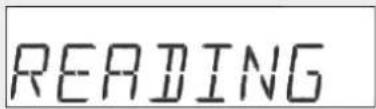
The player starts searching all available MP3 files ('READING' is displayed).
At the end, the display will show:
- The number of all available folders / directories in the top left-hand corner (with small segments).
- The number of all found MP3 files (in all folders).
For example, the number 001 with small segments indicates only one directory. The number 013 indicates that 13 MP3 files have been found in the selected media (USB or SD).


If necessary, select the first file to be played through the FOLDER buttons 14 15 (to choose the folder) and/or the SKIP 8 9 buttons (to choose the file inside the selected folder).
Press the PLAY / PAUSE▶II button 11 to start the selected MP3 file playback. The elapsed time is displayed on the right.

To pause, press the PLAY / PAUSE▶II button 11 again. To stop playback, press the STOP ■ button 10.
RECORDING AND MP3 FILE CREATION

Connect the audio output of the device used as source for recording to the REC IN 28 input.
The recording level can be adjusted by turning the REC INPUT LEVEL 19 control: turn it either clockwise to increase the level or counterclockwise to decrease it. Look at the REC LEVEL bar 20 : the proper level is when the fourth yellow LED occasionally blinks and the fifth red LED never gets lit.
After selecting the media (SD card or USB flash drive) for recording by pressing the FUNCT 12 button, press the REC 16 button to start recording.
Await the media initialisation ('DEV INIT' is displayed).

After a few seconds, it starts recording automatically (the elapsed time is displayed).
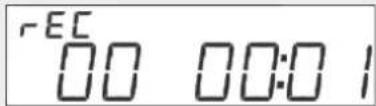
At this point, press the 'play' button on the device used as source for recording. To stop recording, press the STOP ■ 10 button. The display will confirm that recording ended successfully.

Press the REC 16 button again to record another file (the previous recorded MP3 files are not deleted).
All recorded files are in the MP3 format (192 kbps, stereo, 44.1 kHz), numbered sequentially (001.mp3, 002.mp3, 003.mp3, etc.) and are stored to the following directory of the selected media:
(root)\RECORD\EXREC
To delete a single file, use the DEL 11 button (read its description in the 'Front panel' manual section).
It is possible to programme a single sequence including up to 64 files.
Press PROG on the remote control to enter the programming mode.
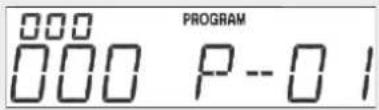
Use the remote control numeric keyboard to choose the right folder / directory that includes the file to be added as first in the sequence, then press PROG. For example, press 1 and then PROG to select the folder no.1.

Use the numeric keyboard again to select the file (e.g. no.5).

Press PROG to confirm and continue (folder and file) for the second memory location.

When the sequence is complete, press PLAY PAUSE to start playback (according to the stored file order).

If the maximum limit of 64 memory locations is reached, 'PROGFULL' will be displayed.

Note: the technical information reported in this section are for informational purposes only and necessary to develop a dedicated software (not included with the player and in no case supplied by RCF) to control the RD 2016 by a remote device via RS 232 interface.
RS 232 settings:
- baud rate: 9600
- 8 data bits
- no parity
- 1 stop bit
- no flow control
TOTAL HARMONIC DISTORTION:
SIGNAL / NOISE RATIO:
REC IN MAX. INPUT LEVEL:
ADAPTER (INCLUDED):
NET WEIGHT:
DIMENSIONS (w, h, d):
REMOTE CONTROL DIMENSIONS (w, h, d):
REMOTE CONTROL BATTERIES:
SD/MMC card, USB flash drive, max. 32 GB
MP3
+2 dBu ±2 dB
60 dB
< 0.2 %
70 dB
-4 dBu
input: 100 ÷ 240 V ac 50/60 Hz, 0.2 A
output: 12 V dc, 0.5 A
3 kg
482 mm, 44 mm, 185 mm (19" 1 unit rack)
52 mm, 156 mm, 20 mm
2 x AAA (1.5 V) non-rechargeable (non included)
CONNECTION EXAMPLE


AVVERTENZE PER LA SICUREZZA

IMPORTANTE
natural_image
Simple line drawing of a bottle with a downward arrow pointing to the top (no text or symbols)

natural_image
Illustration of a battery with two internal compartments filled with positive charges (no text or symbols)FIGURA 3 FIGURA 1 FIGURA 2
Except possible errors and omissions.
RCF S.p.A. reserves the right to make modifications without prior notice.
- USER MANUAL MANUALE D'USO
- RD 2016
- INDEX INDICE
- ENGLISH
- ITALIANO
- SAFETY AND OPERATING PRECAUTIONS
- IMPORTANT NOTES
- SAFETY PRECAUTIONS
- IMPORTANT
- WARNING
- INSERT / REMOVE / CHANGE THE REMOTE CONTROL BATTERIES
- NOTES ABOUT MP3 FILES
- SKIPI ◀ button
- SKIP ▶▶ | button
- STOP ■ button
- PLAY / PAUSE▶II button
- FUNCT button
- PLAY ONCE button
- FOLDER ◀ button
- FOLDER▶▶ button
- REC button
- DEL button
- 1 ÷ 18 buttons
- REC INPUT LEVEL control
- REC LEVEL (5 LED bar): recording level indication (on REC IN 28 input).
- REMOTE COMMANDS: screw terminals to start the playback of the first 7 available files on the selected media (USB or SD) through other device commands (dry closing contacts).
- REC screw terminal
- REPEAT screw terminal
- SKIP |
- SKIP
- MP3 FILE PLAYBACK
- RECORDING AND MP3 FILE CREATION
- CONNECTION EXAMPLE
- AVVERTENZE PER LA SICUREZZA
- IMPORTANTE
Brand : RCF
Model : RD 2016
Category : Mp3 player