RoadRunner 507GPS - Dash cam PRESTIGIO - Free user manual and instructions
Find the device manual for free RoadRunner 507GPS PRESTIGIO in PDF.


| Product Type | Dash Cam |
| Brand | Prestigio |
| Model | RoadRunner 507GPS |
| Dimensions | Approx. 5.5 x 4.5 x 2.5 cm |
| Weight | Approx. 50 g |
| Power Source | 12V car cigarette lighter adapter; built-in rechargeable battery |
| Video Resolution | Full HD 1080p @ 30 fps |
| Lens | Wide angle (approx. 120°-140°) |
| GPS | Built-in GPS module for speed and location logging |
| Loop Recording | Yes, overwrites oldest footage |
| G-Sensor | 3-axis accelerometer, locks files on impact |
| Night Vision | Low-light enhancement via WDR technology |
| Storage | MicroSD card up to 32 GB (not included) |
| Display | 2.0-inch LCD screen |
| Mounting | Suction cup or adhesive mount to windshield |
| Cleaning | Wipe lens with soft, dry cloth; avoid solvents |
| Safety | Do not obstruct driver's view; use in accordance with local laws |
| Spare Parts | USB cable, car charger, mount available from Prestigio or authorized retailers |
| Repairability | Not user-serviceable; contact Prestigio support for repairs |
| General Information | Designed for continuous recording while driving; supports GPS tracking for trip data |
Frequently Asked Questions - RoadRunner 507GPS PRESTIGIO
User questions about RoadRunner 507GPS PRESTIGIO
0 question about this device. Answer the ones you know or ask your own.
Ask a new question about this device
Download the instructions for your Dash cam in PDF format for free! Find your manual RoadRunner 507GPS - PRESTIGIO and take your electronic device back in hand. On this page are published all the documents necessary for the use of your device. RoadRunner 507GPS by PRESTIGIO.
USER MANUAL RoadRunner 507GPS PRESTIGIO
natural_image
Exterior view of a Prestigio camera with visible lens and control panel (no text or symbols on device body)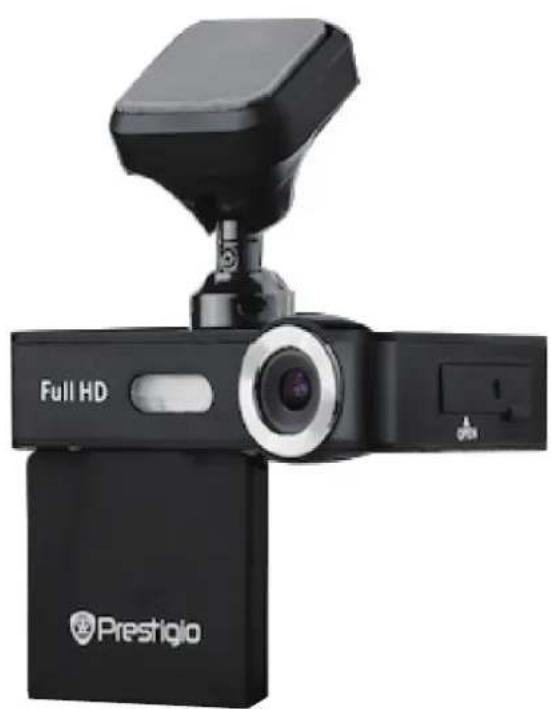
natural_image
Black Full HD digital camera with a mounted sensor and brand logo (Prestigio) on the base, shown without any text or symbols on the device itself.Car Video Recorder
RoadRunner 506|506GPS
RoadRunner 507|507GPS
User Manual
Version 1.0
www.prestigio.com
About this user manual
This user manual is specially designed to detail the device's functions and features.
- Please read this manual before using the device to ensure safe and proper use.
- Descriptions are based on the device's default settings.
- Prestigio continuously strives to improve its products. Due to software upgrading, some contents in this user manual may be different from your product. Prestigio reserves the rights to revise this user manual or withdraw it at any time without prior notice. Please take your product as standard.
Conventions used in this manual
In this user manual, we use the following symbols to indicate useful and important information:

Caution: provides safety precaution and important information.

Note: gives additional information.

Tips: usage tips.
The order of options or menus you must select to perform a step.
Note:
The italicized text in this manual is only for RoadRunner 506GPS / 507 GPS.
Contents
- Unboxing .... 1
Inside your package ....1
Device overview....1
- Getting started....2
Insert the battery 2
Insert a microSD card....2
Install the suction mount 2
Charge the battery 2
- Settings 4
Video settings....4
Picture settings....4
General settings 4
- Recording....5
Record a video 5
Take a picture....5
Lock and unlock a file....5
- Playback....6
Play video on DVR 6
Playback on PC....6
- Specifications....6
1. Unboxing
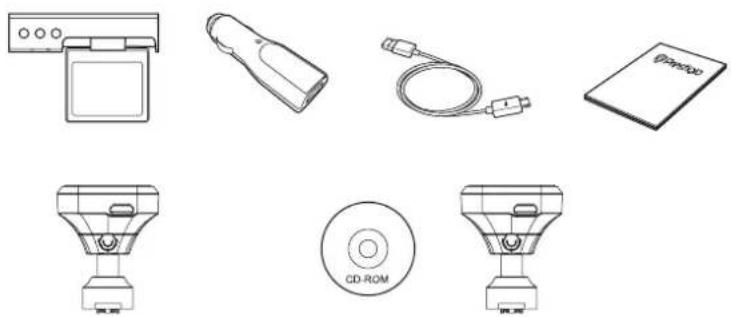
Inside your package
1
natural_image
Illustration of various electronic devices including a washing machine, bulb, cable, CD-ROM, and an open book (no text or symbols present)RoadRunner 506GPS | 507GPS
Car Video Recorder
Car Charger
USB Cable
Magnetic Cradle
CD (for GPS version only)
Quick Start Guide
Warranty Card
Device overview
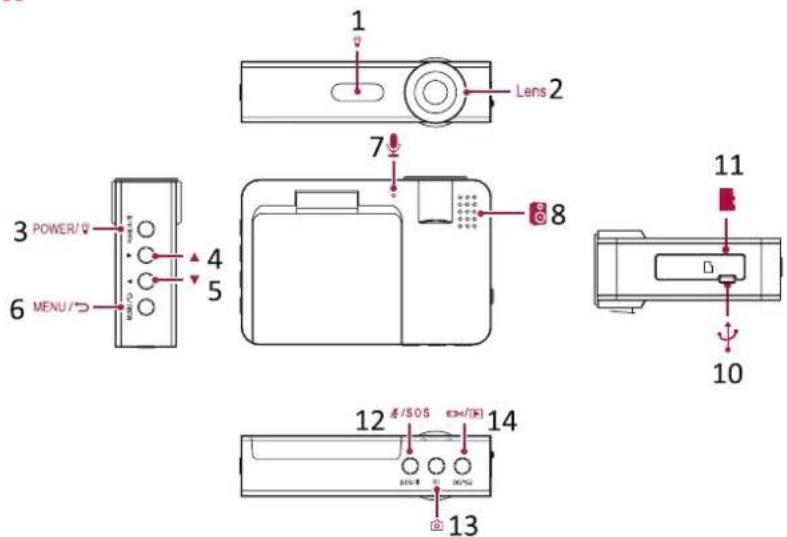
1 Infrared light
2 Lens
3 Power button/light button
4 Up button
5 Down button
6 Menu button/Exit
7 Microphone
8 Speaker
10 Mini USB port
11 SD card slot
12 Microphone button/SOS
13 Photo button
14 Record/Playback/OK button
2. Getting started

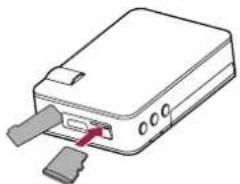
Insert a microSD card
Before starting video recording, please insert a microSD card (not included) into the slot until it locks in place.
natural_image
Illustration of a device with a USB port and two inserted slots (no text or symbols)
The device will automatically recognize it as default storage and all the data will be saved on this card.
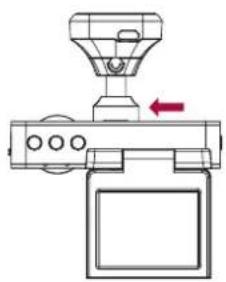
Install the Magnetic Cradle
natural_image
Diagram of a mechanical device with a funnel and control panel, showing no text or symbolsCharge the battery
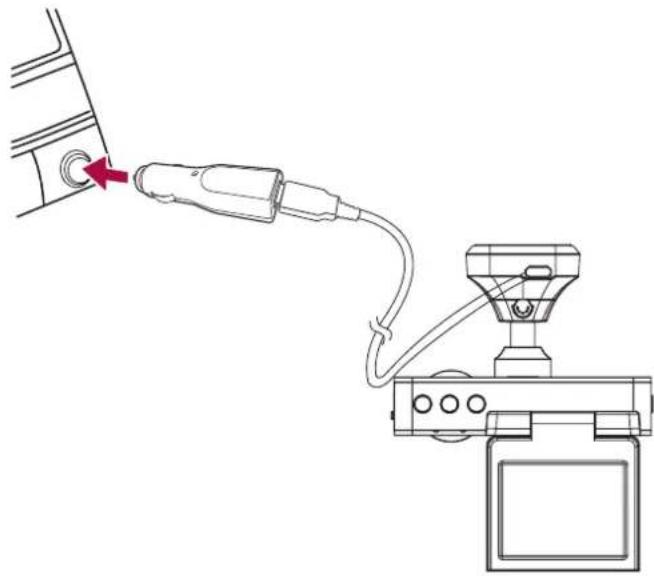
Before using the device for the first time, please fully charge the Li-ion battery. The battery will be completely charged in 2-3 hours.
natural_image
Line drawing of a cable being inserted into a device, showing cable routing and a sensor device (no text or symbols)- Using the car charger: charge the device through cigarette lighter. The device will start charging after the car engine is turned on. The GPS receiver is built in the magnetic cradle. Please connect the car charger to the micro USB port on the cradle.
- Using USB cable: connect the device to AC 5V adapter or the USB port of a computer/laptop.
3. Settings
Before recording, you can set up the device according to your requirements.
- In video/picture preview mode, press [MENU] to enter video/picture settings, press it again to go to general settings, press it third time to exit.
- In setting list, use [▲]/[▼] to navigate the menu, press [○/▶] to confirm the selection, and [MENU] to exit.
3
Video settings
- Resolution: Select the resolution of recorded video: 1920x1080p 25fps, 1440x1080i 30fps, 1280x720p 50fps, 1280x720p 30fps.
- Loop recording: Set the video duration (1, 2, 3, 5, 10 minutes or off) for loop recording. When the microSD card is full, the device will delete the oldest unlocked video file automatically.
- Exposure: Set exposure value to determine how much light the camera's sensor receives. For lowlight situations, use a higher exposure.
- Motion detection: Turn on or off motion detection. If there is any motion detected while the car engine is stopped, your car DVR will start recording automatically.
- Record audio: Set to record sound or not.
- Date stamp: Add date stamp onto videos.
• GPS stamp: Add information stamp to video/photos - Speed stamp: choose the speed measurement km/h or MPH
• G sensor: Select the sensitivity of the G-sensor.
Picture settings
- Capture mode: Select the capture mode from Single/ 2S Timer/5S Timer/10S Timer.
- Resolution: Select the picture image size from 12M / 4032x3024, 10M 3648X2736, 8M / 3264x2448, 5M / 2592x1944, 3M / 2048x1536, 2MHD / 1920X1080, VGA / 640x480, 1.3M / 1280x960.
- Sequence: Select to turn the burst on or off. In burst mode, several photos are captured in quick succession. This is used mainly when the subject is in successive motion, such as sports.
• Quality: Select quality from Fine / Normal / Economy. - Sharpness: Adjust the sharpness.
- White balance: Select an appropriate white balance, so images have a true-to-life color range. It is for specific lighting situations.
• Color: Select color from normal / black & white / sepia. - ISO: This controls camera light sensitivity. It is measured in filmcamera equivalents. Low values are for stationary or brightly-lit objects. Higher values are for fast-moving or poorly-lit objects.
- Exposure: Set exposure value to determine how much light the camera's sensor receives. For lowlight situations, use a higher exposure.
- Date stamp: Add date and time stamp onto photos.
General settings
In preview mode, double press [MENU] twice to enter general settings.
• Time Zone: Select the local GMT (Greenwich Mean Time)
- Date/Time: Set date and time on device.
- Auto power off: Set automatic power off when the device is not in use.
- Beep sound: Turn on or off the sound when pressing buttons.
• Language: Choose your language.
• TV mode: Select from PAL and NTSC.
- Frequency: For a given luminance, the frequency of light fluctuation that evokes a sensation of flicker. Set a right flickering frequency to avoid horizontal stripe interference.
- LCD off: Set automatic LCD off when the device is not in use, press any button to wake up.
- Format: Format the memory card.
Formatting will erase all your stored data. Back up your data before proceeding. - Default setting: Restore to default setting.
- Version: Display the current system version.

4. Recording

Record a video
Auto video recording
Connect the device to car charger, when the car engine launches, the device will automatically turn on and start loop video recording. When shut off the car engine, the device will save the last file and turn off.
Manual video recording
In preview mode, press [ˈɒktrəʊ/ɪt] button to start and stop video recording.
Record the sound
In preview mode or recording mode, press [1/sos] to turn on or off microphone.
Turn on the infrared light
When recording video in night, press power button to turn on light.
Zoom in or out
In preview mode or recording mode, press [▲]/[▼] to zoom in or zoom out.
Take a picture
- Press [icon] to select the picture mode, and then press [icon] to take photos.
5. File management
You can manage your videos and pictures in playback mode.

Browse files
-
In preview mode, press and hold [ˈɒd/] to enter the playback mode.
-
Press [▲]/[▼] to scroll through the files.
Delete a file
Press [MENU] to delete one file or all the files, and press [ˈɪŋkər/ɪd] to confirm the deletion.

To delete a protected file, remove the protection first.
Lock and unlock a file
Press [MENU] to protect or unprotect the selected file or all.
6. Playback

Play video on DVR
- In playback mode, press [▲]/[▼] to scroll through the files.
- Press [ˈɒktrɪp/] to start playback.
- Press [▲]/[▼] to slow down or speed up playing.
Playback on PC
Remove memory card from DVR and insert it into computer's card reader.

DVR's USB port is for charging purpose only.
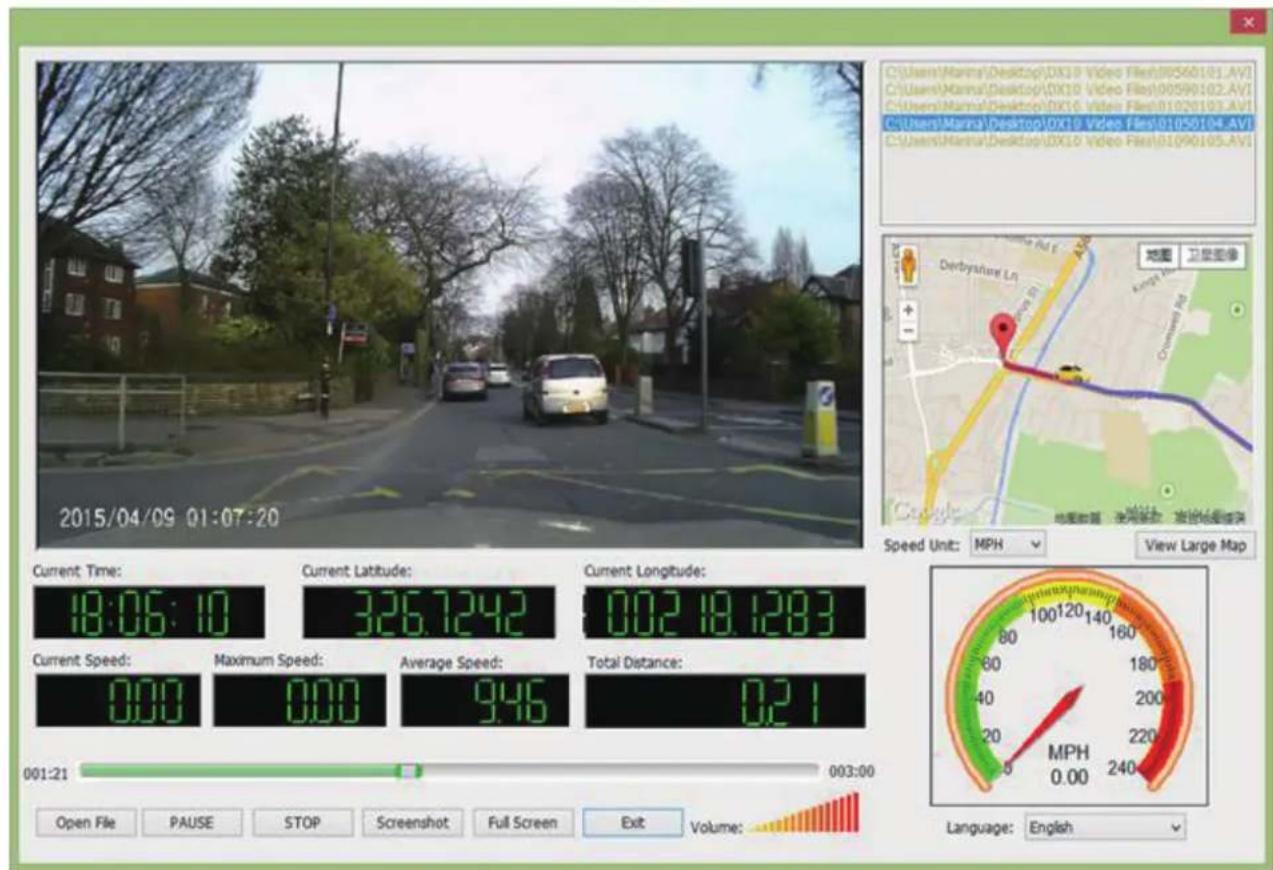
Playback on GPS video player
- Remove memory card from DVR and insert it into Computer's card reader.
--DVR's USB port is for charging purpose only. - Find your files in memory card.
- Install the "Player.exe" stored on the included CD-ROM to your PC.
- Open the player, select the file and start playback.
- It will show your video and tracks.
7. Specifications
7
| Display | 2.0", 480 x 240 pixels |
| Processor | NT96223 |
| Image sensor | 2.0 MP, CMOS Sensor |
| View angle | 120° |
| Video resolution | 1920x1080p (25 fps) 10 GB/Hour1440x1080p (30 fps) 12 GB/Hour1280x720p (30 fps) 8 GB/Hour |
| Photo resolution | 12.0/10.0/8.0/5.0 M |
| Video codec | AVI |
| Picture format | JPG |
| Memory | up to 32 GB (high-speed micro SD card recommended, SDHC) |
| Microphone | Built-in |
| Motion Detection | Yes |
| G-sensor | yes |
| GPS | Optional (for GPS model only) |
| Power source | Rechargeable battery, car charger |
| Interfaces | Micro USB 2.0 (for charging only) |
| Operating temperature | 0 °C ~ 45°C |
| Dimension | 82 x 55 x 20 mm (H x W x D) |
| Weight | 90 g |