Vi2408A - Wi-Fi repeater Barox - Free user manual and instructions
Find the device manual for free Vi2408A Barox in PDF.


| Product Type | Wi-Fi Repeater |
| Model | Vi2408A |
| Brand | Barox |
| Wi-Fi Standards | IEEE 802.11 b/g/n |
| Frequency Band | 2.4 GHz |
| Wireless Speed | Up to 300 Mbps |
| Coverage | Up to 300 m² |
| Power Supply | 5V DC, 1A (via USB) |
| Dimensions | 60 x 30 x 50 mm |
| Weight | 150 g |
| Security | WEP, WPA/WPA2 |
| Buttons | Reset, WPS |
| LED Indicators | Power, WLAN, WPS |
| Operating Temperature | 0°C to 40°C |
| Storage Temperature | -20°C to 70°C |
| Relative Humidity | 10% to 90% (non-condensing) |
| Compliance | CE, RoHS |
| Package Contents | Repeater, Ethernet cable, Quick Guide |
| Cleaning | Wipe with a dry, soft cloth |
| Safety | Keep away from water; do not disassemble |
| Repairability | No user-serviceable parts; contact support |
Frequently Asked Questions - Vi2408A Barox
User questions about Vi2408A Barox
0 question about this device. Answer the ones you know or ask your own.
Ask a new question about this device
Download the instructions for your Wi-Fi repeater in PDF format for free! Find your manual Vi2408A - Barox and take your electronic device back in hand. On this page are published all the documents necessary for the use of your device. Vi2408A by Barox.
USER MANUAL Vi2408A Barox
Vi2404A/Vi2408A/Vi2416A Coax Ethernet Extender's Installation Manual

natural_image
Two black industrial Ethernet connectors with ports and indicator lights, no visible text or labelsThe MaxiiCopper Model Vi2404A, Vi2408A and Vi2416A are revolutionary data transmission devices that extend full-duplex High-Speed Ethernet over existing coaxial infrastructures. For data, they extend 10BaseT signal up to 5,000 ft. (1,524m) and 100BaseT up to 1,800 ft. (546m). When using Pass Through PoE (PTP™), they extend 10BaseT up to 3,000 ft. (914m) and 100BaseT up to 1,800 ft. (546m). They employ MaxiiCopper, an innovative and unique Ethernet extension technology, that is designed to take full advantage of high-bandwidth coaxial cables and maintain a full-duplex 10 or 100 Mb/s Ethernet connection up to the maximum range with minimum transmission error and latency. Multiple remote network devices such as Mega-pixel IP cameras or VoIP can be connected to a central LAN switching fabric with ease. Their dual-rate capability provides an easy way to balance the best possible network throughput and long-reach distance design. The Vi2404A, Vi2408A and Vi2416A support 4, 8 and 16 ports.
These hubs need to be deployed along with Vi2401A on the remote end of each coaxial cable. They are equipped with LEDs to provide link status and configured data rate for each port. They are completely transparent to the corporate IP network and higher layer protocols and require no IP programming or other configurations.
The Vi2408A and Vi2416A are offered in 19 inch 1U heigh enclosure for rack-mount or wall-mount applications. They are ideal for medium to large scale IT networking or digital CCTV projects. The coaxial cable needs to be point to point without any branches. Multiple segments can be joined together using barrel connectors.
Important Safety Warning
- Read and keep these instructions.
- Heed all warnings.
- Follow all instructions.
- Do not use this apparatus near water.
- Clean only with a dry cloth.
- Install in accordance with the manufacturer's instructions.
- This installation should be made by a qualified service person and should conform to all local codes.
- DO NOT bundle UTP or Coax signals in the same conduit as high-voltage wiring.
- To reduce the risk of fire or electrical shock, do not expose these products to rain, moisture, dripping or splashing.
- No objects filled with liquids, such as vases, shall be placed on Vigitron equipment.
- DO NOT install the unit in a place where the operating ambient temperature exceeds 75°C.
- Make sure that the external power supply output voltage is in the recommended range.
- Do not install near any heat sources such as radiators, heat registers, stoves or other apparatus (including DVRs) that produce heat.
- Protect the power cord from being walked on or pinched particularly at power source, convenience receptacles, and the point where they exit from the apparatus.
- Only use attachments/accessories specified by the manufacturer.
- Unplug this apparatus during lightning storms or when unused for long periods of time.
- Refer all servicing to qualified service personnel. Servicing is required when the apparatus has been damaged in any way, such as when a power supply cord or plug is damaged, liquid has been spilled, objects have fallen inside the apparatus, the apparatus has been exposed to rain or moisture, does not operate normally, or has been dropped.
- The main plug is used as the disconnect device and shall remain readily operable.
text_image
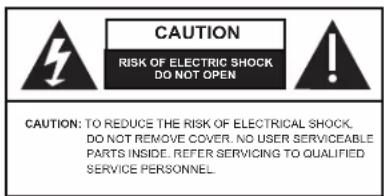
CAUTION RISK OF ELECTRIC SHOCK DO NOT OPEN CAUTION: TO REDUCE THE RISK OF ELECTRICAL SHOCK. DO NOT REMOVE COVER. NO USER SERVICEABLE PARTS INSIDE. REFER SERVICING TO QUALIFIED SERVICE PERSONNEL.WARNING! - To reduce the risk of fire or electric shock, do not expose this apparatus to rain or moisture. This apparatus shall not be exposed to dripping or splashing and no objects filled with liquids, such as vases shall be placed on the apparatus.
WARNING! - This apparatus is a Class I product. This product must be connected to a mains socket outlet thru an AC to DC Power supply.
WARNING! - The mains plug is used as the disconnect device and shall remain readily operable.
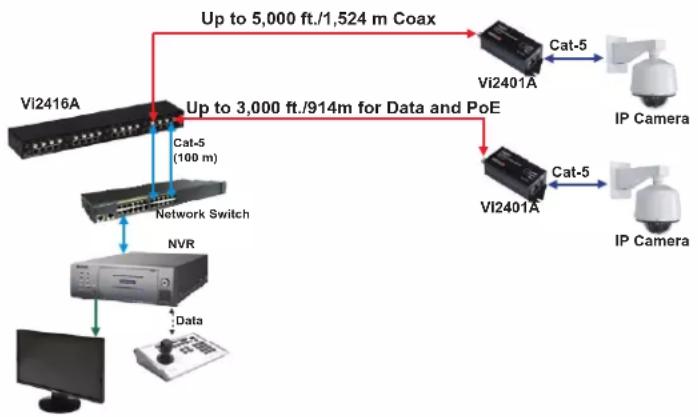
Application Drawing
flowchart
graph TD
    A["Vi2416A"] -->|Up to 5,000 ft./1,524 m Coax| B["Vi2401A"]
    A -->|Up to 3,000 ft./914m for Data and PoE| C["Vi2401A"]
    B -->|Cat-5 (100 m)| D["NVR"]
    C -->|Cat-5| E["IP Camera"]
    C -->|Cat-5| F["IP Camera"]
    D --> G["Computer"]
    E --> H["Data"]
    F --> I["Data"]
IP Camera-end Installation
- Use a Vi2401A single port extender for the camera side transmission.
- Set the Master/Slave dip switch to "Master" mode.
- Connect the external 12VDC power supply to the power connector of the Vi2401A. An optional power adapter connector can be provided to simplify connection. If no local power supply is present the Vi2401A will use POE.
- Connect the IP camera's RJ45 connector to the 10/100BaseT Ethernet port of Vi2401A using a standard Cat5/6 patch cable of maximum 330 feet (100 m) in length.
- Connect one end of the long coax cable to the BNC connector of Vi2401A.
The link LED on the 10/100 connector should be "ON" to indicate proper connection between the camera and Vi2401A.
Ethernet Switch/NVR-end Installation
- Connect the chassis ground screw to a solid earth ground.
- Connect the RJ45 connector of the Ethernet switch to the 10/100BaseT Ethernet port of Vi2404A/Vi2408A/Vi2416A using a standard Cat5/6 cable of maximum 328 feet (100m) in length.
- Connect long coax cables to the BNC connectors of Vi2404A/Vi2408A/Vi2416A.
- Connect the 12VDC power supply to the power connector of Vi2404A/Vi2408A/Vi2416A.
The link LED on the 10/100 Ethernet connectors should be "ON" to indicate proper connection between the switch and Ethernet ports of Vi2404A/Vi2408A/Vi2416A. While the Link LED, Orange for 100BaseT and Green for 10BaseT, on the coax side, in a steady state will indicate confirmed connection between extenders.
Technical Specifications\*
Electrical
Ethernet Interface Standard 10/100BaseT
Ethernet Rate Auto select 10/100 Mb/s
Full speed / full duplex at maximum rated distance
Coax (data only)** 75 Ohm, 5000 ft (1,524 m) at 10BaseT
1,800 ft (548 m) at 100BaseT
Coax (with PTP ^TM )** 3,000 ft (914m) at 10 BaseT
1,800 ft (546m) at 100 BaseT
Power Supply 12 VDC, 3A maximum
Status LEDs Extended Ethernet:Green/OrangeLED, 10/100BaseT
Standard Ethernet: Green LED, Activity
Yellow LED, Link
Power On: Red LED
Connectors Ethernet Interface: RJ-45 Connector
Extended Interface: Female BNC
Power: IEC380-8 inlet
Environmental
Humidity 0 to 95%, non-condensing
Temperature Operating: -40°C to +75°C
Storage: -40°C to +80°C
Mechanical
Dimensions Vi2404A: 1.15x3.6x3.3 in., 4.2x9.2x8.4 cm (HxWxL)
Vi2408A: 1.75x3.25x17 in., 4.4x8.25x43 cm (HxWxL)
Vi2416A: 1.75x3.25x17 in., 4.4x8.25x43 cm (HxWxL)
Weight Vi2404A: 0.584 lb, 265 g
Vi2408A: 1.8 lb (0.82 Kg)
Vi2416A: 3.25 lb (1.5 Kg)
Material Aluminum
Accessories
12 VDC, 3 A wall-mount power supply (optional)
Rack mount brackets
*Specifications subject to change without notice.
**Distance figures are obtained using in house testing mirroring installations. Factors such as cabling, connections,
Note:
Single pair wire application designs need to be confirmed by Vigitron tech support.
Status LEDs

text_image
10BaseT 100BaseT 100BaseT 1 2 3 4 Extended Ethernet Standard Ethernet Traffic Link| LED Name | Color | Status | Function |
| Power | RED | OFF | Power is OFF |
| ON | Power is ON | ||
| Traffic(Standard Side) | GREEN | OFF | No connection |
| FLASHING | Connection is OK with Traffic | ||
| Link(Standard Side) | YELLOW | OFF | No connection |
| ON | Connection is OK |

Limited Lifetime Warranty
Vigitron, Inc. warrants that all Vigitron products ("Product"), if used in accordance with these instructions, will be free of defects in material and workmanship for lifetime defined as the duration period of time until product end of life is announcement. After which Vigitron will continue to provide warranty services for a period of 3 years. Period covering valid warranty will be determined by proof of purchase in the form of an invoice from an authorized Vigitron dealer.
Warranty will only be provided for as long as the original end user purchaser owns the product. Warranty is not transferrable. At Vigitron's option, defective product will be repaired, replaced or substituted with a product of equal value. This warranty does not apply if, in the judgment of Vigitron, Inc., the Product fails due to damage from shipment, handling, storage, accident, abuse or misuse, or if it has been used or maintained not conforming to Product manual instructions, has been modified, or serial number removed or defaced. Repair by anyone other than Vigitron, Inc. or an approved agent will void this warranty. Vigitron, Inc. shall not under any circumstances be liable to any person for any incidental, indirect or consequential damages, including damages resulting from use or malfunction of the product, loss of profits or revenues or costs of replacement goods. The maximum liability of Vigitron, Inc. under this warranty is limited to the original purchase price of the Product only.
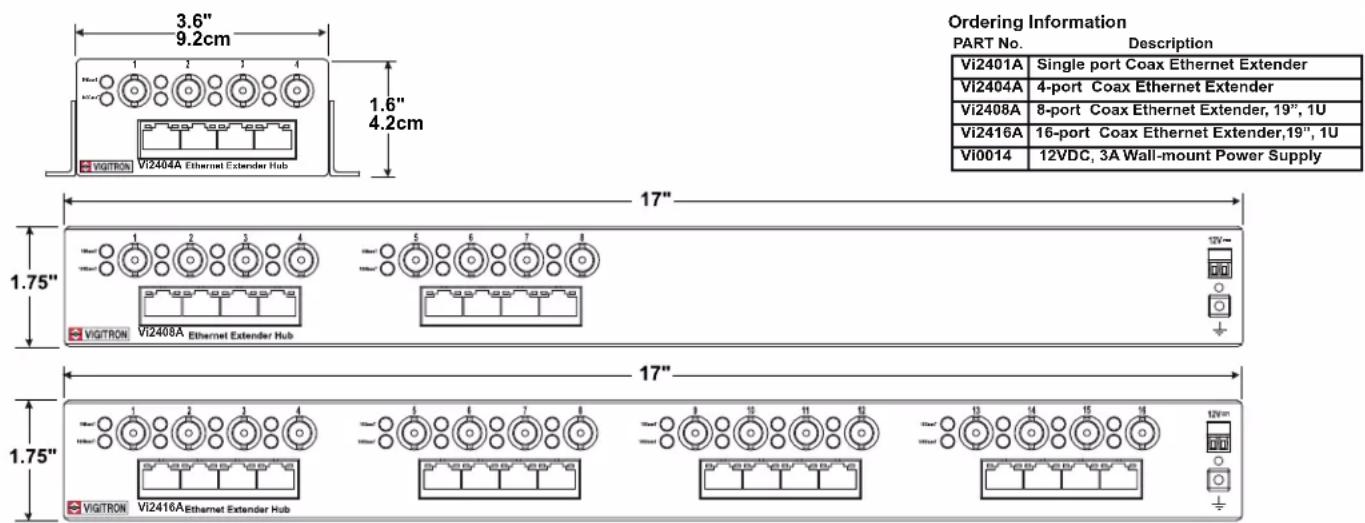
Drawings
text_image
3.6" 9.2cm 1.6" 4.2cm Vi2401A Single port Coax Ethernet Extender Vi2404A 4-port Coax Ethernet Extender Vi2408A 8-port Coax Ethernet Extender, 19", 1U Vi2416A 16-port Coax Ethernet Extender,19", 1U Vi0014 12VDC, 3A Wall-mount Power Supply 17" 1.75" ViGITRON Vi2408A Ethernet Extender Hub 17" 1.75" ViGITRON Vi2416A Ethernet Extender Hub Ordering Information PART No. Description 12V~ 12V~ 12V~ 12V~ 12V~ 12V~ 12V~ 12V~ 12V~ 12V~ 12V~ 12V~ 12V~ 12V~ 12V~ 12V~ 12V~ 12V~ 12V~ 12V~ 12V~ 12V~ 12V~ 12V~ 12V~ 12V~
VIGITRON
TEL (+1) 858 - 484 - 5209 • FAX (+1) 858 - 484 - 1205
7810 Trade Street, Suite 100, San Diego, CA 92121, USA • support@vigitron.com • www.vigitron.com
© Copyright 2013 Vigitron, Inc.
Vi2416A Instruction Manual