RCNE724E30XBI - Refrigerator BEKO - Free user manual and instructions
Find the device manual for free RCNE724E30XBI BEKO in PDF.


| Product Type | Refrigerator with Freezer |
| Installation Type | Freestanding |
| Colour | Stainless Steel |
| Cooling System | R600a refrigerant (flammable) |
| Water Tank Capacity | 3 liters |
| Freezing Capacity | 4.5 kg per 100 liter freezer volume per 24 hours |
| Adjustable Feet | Yes |
| Door Open Warning | Audio signal after 1 minute |
| Child Lock | Yes (key lock function) |
| Quick Fridge Function | Yes, auto-cancels after 8 hours |
| Quick Freeze Function | Yes, auto-cancels after 4 hours |
| Eco Mode | Yes |
| Vacation Mode | Yes (fridge compartment off) |
| Sabbath Mode | Yes, auto-cancels after 76 hours |
| Ice Maker | Icematic and ice tray (optional) |
| Water Dispenser | Yes, with drip tray |
| Deodoriser Module | FreshGuard (automatic periodic activation) |
| Humidity-Controlled Crisper | Ever Fresh with 3 settings (vegetable, fruit, mixed) |
| Chiller Compartment | Optional, for delicatessen |
| Spare Parts Availability | 10 years after purchase |
| Lighting Source | LED, energy class G |
Frequently Asked Questions - RCNE724E30XBI BEKO
User questions about RCNE724E30XBI BEKO
0 question about this device. Answer the ones you know or ask your own.
Ask a new question about this device
Download the instructions for your Refrigerator in PDF format for free! Find your manual RCNE724E30XBI - BEKO and take your electronic device back in hand. On this page are published all the documents necessary for the use of your device. RCNE724E30XBI by BEKO.
USER MANUAL RCNE724E30XBI BEKO
natural_image
Simple line drawing of a pear and a carrot (no text or symbols)RCNE720E3VZP-RCNE720E3VZW-RCNE720E30XB
RCNE722E30W-RCNE722E30XB-RCNE724E30XBI
Dear Customer,
Please read this manual before using the product.
Thank you for choosing this product. We would like you to achieve the optimal efficiency from this high quality product which has been manufactured with state of the art technology. To do this, carefully read this manual and any other documentation provided before using the product and keep it as a reference.
Heed all information and warnings in the user manual. This way, you will protect yourself and your product against the dangers that may occur.
Keep the user manual. Include this guide with the unit if you hand it over to someone else.
The following symbols are used in the user guide:

Hazard that may result in death or injury.
NOTICE A hazard that may cause material damage to the product or its surroundings

Important information or useful tips on operation.

Read the user manual.

Risk of fire / Flammable materials
| i INFORMATION | |
| .The model information as stored in the product data base can be reached by entering following website and searching for your model identifier (*) found on energy label.https://eprel.ec.europa.eu/ | |
1 Important Instructions Regarding Safety and Environment 4
1.1. General Safety 4
1.1.1 Hydrocarbon (HC) Warning....6
1.1.2 For Products with a Water Dispenser/Ice Machine 6
1.2. Intended Use 7
1.3. Children's Safety 7
1.4. Compliance with the WEEE Directive and Disposing the Waste Product: 7
1.5. Compliance with the RoHS Directive:....7
1.6. Packaging Information 7
2 Your Refrigerator 8
3 Installation 9
3.1. Appropriate location for installation ..... 9
3.2. Installing the plastic wedges ..... 9
3.3. Adjusting the feet....9
3.4. Electrical connection.... 10
4 Preparation 11
4.1. Things to be done for energy saving ..... 11
4.2. Initial use.... 11
5 Operating the product 12
5.1. Indicator panel 12
5.2. Indicator panel 13
5.3. Ice machine.... 16
5.4. Icematic.... 16
5.5. Ice tray 16
5.6. Deodoriser Module ..... 17
(FreshGuard) 17
5.7. Chiller compartment....18
5.8. Crisper....18
5.9. Using the water dispenser 19
5.10.Filling the water dispenser's tank ..... 19
5.11. Cleaning the water tank 19
5.12.Drip tray....20
5.13. Humidity-controlled crisper (Ever Fresh).....21
5.14.Freezing fresh food....21
5.15. Recommendations for preserving the frozen food22
5.16. Deep-freeze information ..... 22
5.17.Placing the food 22
5.18. Door open warning....22
5.19.Illumination lamp 22
6 Care and Cleaning 23
6.1. Avoiding Bad Odours 23
6.2. Protection of plastic surfaces ..... 23
6.3. Cleaning the Inner Surface ..... 23
6.4. Stainless Steel Outer Surfaces 23
6.5. Cleaning Products with Glass Doors ..... 24
7 Troubleshooting 25
1 Important Instructions Regarding Safety and Environment
This chapter contains safety information that will help you avoid the risk personal injury or property damage. Failure to follow these instructions shall render any product warranty void.
Intended use
| WARNING:Keep ventilation openings, in the appliance enclosure or in the built-instructure, clear of obstruction. | |
| WARNING:Do not use mechanical devices or other means to accelerate the defrosting process, other than those recommended by the manufacturer. | |
| WARNING:Do not damage the refrigerant circuit. | |
| WARNING:Do not use electrical appliances inside the food storage compartments of the appliance, unless they are of the type recommended by the manufacturer. |
This appliance is intended to be used in household and similar applications such as
- staff kitchen areas in shops, offices and other working environments;
– farm houses and by clients in hotels, motels and other residential type environments; - bed and breakfast type environments;
– catering and similar non-retail applications.
1.1. General Safety
- This product is not suitable to be used, approached or entered in by children, or persons with physical, sensory or mental disabilities, or by persons who lack experience and information. Children should not play with the product. Cleaning and care should not be performed by children unless they are supervised by an adult. Failure to comply with the instructions and uncontrolled use may result in dangerous situations!
- Unplug the product if you encounter a failure during use.
- If the product malfunctions, it must not be operated until repaired by the authorised service provider. Risk of electric shock!
- Plug the product into a grounded socket protected by a fuse that corresponds to the value on its nameplate. Have a qualified electrician ground the product. Our company cannot be held responsible for damages resulting from the failure to use the product with a grounded socket pursuant to local regulations.
- Unplug the product when not in use.
- Never wash the product by spreading or pouring water onto it! Risk of electric shock!
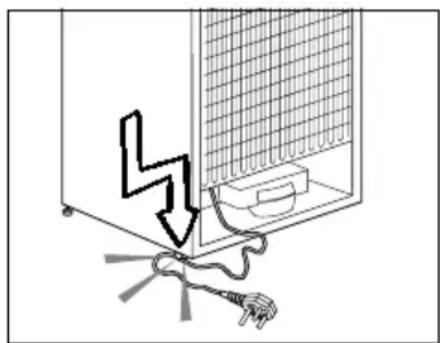
• Never touch the plug with wet hands! - Never unplug the product by pulling the cable. Always pull the plug by holding the socket.
natural_image
Diagram showing a device with a lightning bolt and cable, no text or symbols presentInstructions for safety and environment
- Do not plug the refrigerator if the wall socket is loose.
- Never connect your refrigerator to energy saving devices. Such systems are harmful to your product.
- Unplug the product during installation, care, cleaning and repairing procedures.
- Always have the Authorised Service Provider install the product and establish its electrical connections. The manufacturer cannot be held responsible for damages caused by procedures performed by unauthorised persons.
- Do not eat cone ice cream or ice cubes immediately after you take them out of the freezer compartment! This may cause frostbite in your mouth!
- Do not touch frozen food with wet hands! They may stick to your hand!
- Do not put bottled or canned liquid beverages in the freezer compartment. They may burst!
- Never use steam or steam cleaners to clean or defrost the refrigerator. Steam gets into contact with the live parts in your refrigerator, causing short circuit or electric shock!
- Do not use mechanical devices or other means to accelerate the defrosting process other than those recommended by the manufacturer.
- Never use the parts in your refrigerator such as the door and drawer as a means of support or step. This may cause the product to tip over or damage the parts of it.
- Do not damage the parts where the refrigerant is circulating with drilling or cutting tools. The refrigerant
that might blow out when the gas channels of the evaporator, pipe extensions or surface coatings are punctured causes skin irritations and eye injuries.
- Do not cover or block the ventilation holes in your refrigerator with any object.
- Place the beverage with higher proofs tightly closed and vertically.
- Do not use gaseous sprays near the product since there is the risk or fire or explosion!
- Flammable items or products that contain flammable gases (e.g. spray) as well as explosive materials should never be kept in the appliance.
- Do not place vessels filled with liquid onto the product. Splashing water on an electrical part may cause electric chock or the risk of fire.
- Do not store items that need precise temperature adjustment (such as vaccines, heat-sensitive medication, science materials etc.) in the refrigerator.
- If you are not going to use the product for a long time, unplug it and remove the food in it.
- If there is a blue light on the refrigerator, do not look at this light with optical tools.
- Exposing the product to rain, snow, sun or wind is dangerous in terms of electrical safety.
- In products with mechanical control (thermostat), wait for 5 minutes to plug in the product again after unplugging.
- Do not overload the refrigerator. Objects in the refrigerator may fall down when the door is opened,
Instructions for safety and environment
causing injury or damage. Similar problems may arise if any object is placed onto the product.
- If the product has a door handle, do not pull the handle when re-locating the product. The handle might be loose.
- Be careful not to jam your hand or any other body part in the moving parts of the refrigerator.
- Do not put your hand or any other foreign materials into the ice machine while it is operating.
- When positioning the appliance, ensure the supply cord is not trapped or damaged
- Do not locate multiple portable socket-outlets or portable power supplies at the rear of the appliance.
1.1.1 Hydrocarbon (HC) Warning
- If your product's cooling system contains R600a:
This gas is flammable. Therefore, pay attention not to damage the cooling system or the piping during use and transportation. If damaged, keep the product away from potential fire sources that may cause it to catch fire and ventilate the room where the product is placed.

If the product is damaged and if you see gas leak, please keep away from the gas. It may cause frostbite when it gets into contact with the skin. (including R134)
| i | Ignore this warning if the cooling system of your product contains R134a. |
| i | Type of gas used in the product is stated on the type plate which is on the left wall inside the refrigerator. |
| ! | WARNING: Never throw the product into fire for disposal. |
1.1.2 For Products with a Water Dispenser/Ice Machine
- Pressure for cold water inlet shall be maximum 90 psi (620 kPa). If your water pressure exceeds 80 psi (550 kPa), use a pressure limiting valve in your mains system. If you do not know how to check your water pressure, ask for the help of a professional plumber.
- If there is a risk of water impact in your installation, always use a water impact protection equipment in that installation. Please consult professional plumbers if you are not sure if there is water impact in your installation.
- Do not make installation on the hot water inlet.
- Take the necessary measures against the freezing risk of the hoses. The water temperature operating range must be 0.6^ C ( 33^ F) minimum and 38^ C ( 100^ F) maximum.

WARNING:
Never connect the product to a cold water mains with a pressure of 550 kPa (80 psi) or above.
1.2. Intended Use
- This product has been designed for domestic use. It is not suitable for commercial use and it must not be used out of its intended use.
- It must be used only for storing food.
- The manufacturer will not take any responsibility for damages resulting from improper use or transport.
- Original spare parts will be available for 10 years after the purchase date of the product.
1.3. Children's Safety
- If there is a lock on the door of the product, the key should be kept out of the reach of children.
- Do not let children play with the product.

DANGER:
Before disposing your old refrigerator or freezer:
• Children may get locked inside.
- Remove the doors.
- Leave the shelves to prevent children from getting inside the product easily.
1.4. Compliance with the WEEE Directive and Disposing the Waste Product:

This product conforms to the EU WEE Directive (2012/19 EU). This product bears a classification symbol for waste electrical and electronic equipment (WEEE). This product has been manufactured from high quality parts and materials which can be
reused and are suitable for recycling. Therefore, do not dispose the product with normal domestic waste or other waste at the end of its service life. Take it to a collection centre for recycling electrical and electronic equipment. Please consult local authorities to learn about the locations of such collection centres.
1.5. Compliance with the RoHS Directive: The unit you have purchased conforms to the EU RoHS Directive (2011/65/EU). It does not contain harmful or prohibited materials specified in the Directive.
1.6. Packaging Information
- Packaging materials of the product have been manufactured from recyclable materials in accordance with our National Environment Regulations. Do not dispose the packaging materials with normal domestic waste or other types of waste. Take these materials to a recycling point designated by local authorities.

DANGER:
Risk of Fire or Explosion:
- This product uses flammable refrigerant.
- Do not use mechanical devices to defrost the refrigerator.
• Do not use chemicals for cleaning. - Do not pierce the refrigerant pipe.
- If the refrigerant pipe is pierced, it must be repaired only by licensed service personnel.
- Please consult the repair/user manual before cleaning the product. All safety instructions must be followed.
- Dispose the product according to federal or local regulations.
2 Your Refrigerator

natural_image
Interior view of a white refrigerator with open doors and numbered compartments (no text or symbols visible)
natural_image
Interior view of a fully open refrigerator with numbered compartments (1–12), no visible text or symbols beyond part numbers.- Door shelves of fridge compartment
- Freezer compartment drawers
- Icematic
- Water tank
- Crisper
- Crisper cover
- Chiller compartment
-
Glass shelves of fridge compartment
-
Odour filter (violed)
-
Inside display
- Glass shelves of fridge compartment
- Freezer compartment
*Optional
It may not apply to all models
i
*Optional:Figures in this user manual are given as an example and may not match the product exactly. If the relevant parts are not available in the product you purchased, the figure applies to other models.
3 Installation
3.1. Appropriate location for installation
Contact an Authorized Service for the installation of the product. In order to prepare the product for use, refer the information in the user manual and ensure that electrical installation and water installation are appropriate. If not, call a qualified electrician and technician to have any necessary arrangements carried out.
 | WARNING: Manufacturer shall not be held liable for damages that may arise from procedures carried out by unauthorized persons. |
 | WARNING: Product must not be plugged in during installation. Otherwise, there is the risk of death or serious injury! |
 | WARNING: : If the door clearance of the room where the product will be placed is so tight to prevent passing of the product, contact the authorised service provider. |
- Place the product on a level floor surface to prevent jolts.
- Install the product at least 30 cm away from heat sources such as hobs, heater cores and stoves and at least 5 cm away from electrical ovens.
- Product must not be subjected to direct sun light and kept in humid places.
- Appropriate air ventilation must be provided around your product in order to achieve an efficient operation. If the product is to be placed in a recess in the wall, pay attention to leave at least 5 cm distance with the ceiling and the side walls.
- In environments where the room temperature drops below 10°C, the refrigerator will continue to run to preserve the food in the freezer. However, fresh food in the fridge compartment might freeze due to the cold environment.
- Your product requires adequate air circulation to function efficiently. If the product will be placed in an alcove, remember to leave at least 5 cm clearance between the product and the ceiling, rear wall and the side walls.
- If the product will be placed in an alcove, remember to leave at least 5 cm clearance between the product and the ceiling, rear wall and the side walls. Check if the rear wall clearance protection component is present at its location (if provided with the product). If the component is not available, or if it is lost or fallen, position the product so that at least 5 cm clearance shall be left between the rear surface of the product and the wall of the room. The clearance at the rear is important for efficient operation of the product.
3.2. Installing the plastic wedges
Plastic wedges supplied with the product are used to create the distance for the air circulation between the product and the rear wall.
- To install the wedges, remove the screws on the product and use the screws supplied together with the wedges.

natural_image
Line drawing of a hand inserting a screwdriver into a device panel (no text or symbols)- Insert the 2 plastic wedges onto the rear ventilation cover as illustrated in the figure.

natural_image
Line drawing of a hand using a screwdriver to adjust or install a device panel (no text or symbols visible)3.3. Adjusting the feet
If the product stands unbalanced after installation, adjust the feet on the front by rotating them to the right or left.

natural_image
Diagram showing a rectangular structure with upward and downward arrows indicating rotational or directional motion, no text or symbols present.Installation
3.4. Electrical connection
 | WARNING: Do not make connections via extension cables or multi-plugs. |
 | WARNING: Damaged power cable must be replaced by the Authorized Service Agent. |
| [DD02] | If two coolers are to be installed side by side, there should be at least 4 cm distance between them. |
 | Hot surface warning!Your product is equipped with coolant pipes to improve the cooling system for the side walls. The hot fluid might flow through these surfaces, causing heat on the side walls. This is normal and does not require service maintenance. Be careful when touching these areas. |
- Our company shall not be liable for any damages that will arise when the product is used without grounding and electrical connection in accordance with the national regulations.
- Power cable plug must be within easy reach after installation.
- Do not extension cords or cordless multiple outlets between your product and the wall outlet.

natural_image
Exterior view of a stainless steel industrial component with a magnified inset showing internal structure (no text or symbols)
WARNING: "The protective films on the vertical handle" will be removed.
4 Preparation
4.1. Things to be done for energy saving

Connecting the product to electric energy saving systems is risky as it may cause damage on the product.
- For a freestanding appliance; ‘this refrigerating appliance is not intended to be used as a built-in appliance’;
- Do not leave the doors of your refrigerator open for a long time.
- Do not put hot food or drinks in your refrigerator.
- Do not overload the refrigerator, cooling capacity will fall when the air circulation inside is hindered.
- To be able to store maximum food in the freezer compartment of your refrigerator, the upper flap and drawer must be removed and placed on top of glass shelves. Power consumption stated for your refrigerator has been determined after removing the icebox, ice tray and flap and the middle drawer as to allow maximum loading. Using the upper flap and lower drawer while loading is highly recommended.
- Depending on the features of your product, thawing frozen food in fridge compartment will both provide energy saving and preserve the food quality.
- Airflow should not be blocked by placing foods in front of the freezer compartment fan. Foods should be loaded by leaving minimum 5 cm space in front of the protective fan grid.
- Since hot and humid air will not directly penetrate into your product when the doors are not opened, your product will optimize itself in conditions sufficient to protect your food. Functions and components such as compressor, fan, heater, defrost, lighting, display and so on will operate according to the needs to consume minimum energy under these circumstances.
- In case of multiple options are present glass shelves must be placed so that the air outlets at the backwall are not blocked, preferably air outlets are remaining below the glass shelf. This combination may help impoving air distribution and energy efficiency.
- The temperature sensor in the freezer compartment must not directly contact food packages. In case of contact with the sensor, the power consumption of the product may increase.
| i | Inside of your product must be cleaned. |
| i | If two coolers are to be installed side by side, there should be at least 4 cm distance between them. |
4.2. Initial use
Before starting to use your refrigerator, ensure that all preparations are made in accordance with the instructions in sections "Instructions for safety and environment" and "Installation".
Run the product without putting any food for 6 hours and do not open its door unless certainly required.
| i | You will hear a noise when the compressor starts up. The liquids and gases sealed within the refrigeration system may also give rise to noise, even if the compressor is not running. This is normal. |
| i | It is normal that the front edges of the refrigerator are hot. These areas are designed to be warm to avoid condensation. |
5 Operating the product
5.1. Indicator panel
Indicator panels may vary according to the product model.
Audio – visual functions on the indicator panel helps you in using your product.

- Temperature Adjustment / Temperature Increase
- Temperature Adjustment- Slider / Temperature value indicator
- Temperature Unit Selection (°C) Celsius indicator
- Temperature Unit Selection (°F) Fahrenheit indicator
- Temperature Adjustment / Temperature Decrease
- Quick Fridge function indicator / button
- * Wireless
- Eco Mode indicator/button
- *Joker Freezer indicator/button
- *Auto Door
-
High Temperature Warning/Error
-
*Bottle Cooler
- *Filter Replacement Warning/Button
- Menu Button
- Product On/Off indicator/button
- *Icematic indicator/button
- *Sabbath Mode
- Vacation Mode indicator/button
- Key Lock indicator
- Quick Freeze function indicator/button
- Cabin Selection
- Fridge compartment indicator
- Freezer compartment indicator
It may not apply to all models
i
*Optional: Figures in this user manual are given as an example and may not match the product exactly. If the relevant parts are not available in the product you purchased, the figure applies to other models.
Operating the product
5.2. Indicator panel
Indicator panels may vary according to the product model.
Audio – visual functions on the indicator panel helps you in using your product.

1. Temperature Adjustment / Temperature Increase
When pressed, increases the temperature of the selected compartment.
2. Temperature Adjustment- Slider/ Temperature value indicator
Shows the temperature value of the selected compartment. Plus, you can slide your finger up or down to increase or decrease the temperature.
3. Temperature Unit Selection (°C) Celsius indicator
When the button is pressed, the temperature unit is selected as Celsius.
It is the Celsius indicator. When the Celsius indication is activated, temperature set values are shown in Celsius and the relevant icon turns on by 100%.
Fahrenheit icon turns on by 50%.
4. Temperature Unit Selection (°F) Fahrenheit indicator
When the button is pressed, the temperature unit is selected as Celsius.
It is the Fahrenheit indicator. When the Fahrenheit indication is activated, temperature set values are shown in Fahrenheit and the relevant icon turns on completely.
Celsius icon turns on by 50%.
5. Temperature Adjustment / Temperature Decrease
When pressed, decreases the temperature of the selected compartment.
6. Quick fridge function indicator
When the quick fridge function is activated, the indicator turns on by 100%. When the function is cancelled, the product returns to its normal settings and the indicator turns on by 50%.
Quick fridge function button
It is used to activate or deactivate the quick fridge function.
| i | Use quick fridge function when you want to quickly cool the food placed in the fridge compartment. If you want to cool large amounts of fresh food, activate this function before putting the food into the product. |
| i | If you do not cancel it, quick fridge will cancel itself automatically after 8 hours at the most or when the fridge compartment reaches to the required temperature. |
| i | If you press the quick fridge button repeatedly with short intervals, the electronic circuit protection will be activated and the compressor will not start up immediately. |
| i | This function is not recalled when power restores after a power failure. |
7. \*Wireless
When the button is pressed, the product is introduced to the home network. When the function
It may not apply to all models
| i | *Optional: Figures in this user manual are given as an example and may not match the product exactly. If the relevant parts are not available in the product you purchased, the figure applies to other models. |
Operating the product
is activated, the indicator turns on by 100%, when it is cancelled, the indicator turns on by 50%.
8. Eco mode indicator/button
Press this button to activate and deactivate the Eco mode.
When the Eco mode is activated, the indicator turns on by 100%. When the function is active, the freezer will start to run in the eco mode at least 6 hours later. When the function is cancelled, the indicator will turn on by 50%.
9a. \*Joker freezer indicator/button
When the button is pressed, the joker compartment runs as a freezer and the indicator turns on by 100%. Joker fridge compartment turns on by 50%.
9b. \*Joker fridge indicator/button
When the button is pressed, the joker compartment runs as a fridge and the indicator turns on by 100%. Joker freezer compartment turns on by 50%.
10.\* Auto Door
Press this button to activate or deactivate the Auto Door mode. When the function is activated, the indicator turns on by 100%. When the function is cancelled, the indicator will turn on by 50%. When the function is active, touch the relevant section on the door handle to make the door open automatically.
11. High Temperature Warning/Error
This indicator illuminates during power failure, high temperature failures and error warnings. During long-term power failures, the highest temperature value that the freezer compartment reaches will blink on the digital display. After checking the food located in the freezer compartment, press the high temperature button to clear the warning.
12. \*Bottle Cooler
Press this button to activate or deactivate the bottle cooler mode.
When the function is activated, the indicator turns on by 100%. When the function is cancelled, the indicator turns on by 50%.
13. \*Filter Replacement Warning/Button
This icon turns on when the filter needs to be reset. When the button is pressed, the filter will be reset and the reset icon will go off.
14. Menu Button
It is used the activate or deactivate the sleep mode for the display. If you do not press any button or open the door in 30 seconds, it switches to sleep mode automatically.
15. Product On/Off indicator/button
Press and hold the On/Off button for 3 seconds to switch on or off the product.
When the product is turned off, the product on/off indicator turns on by 100%, and all the other indicators go off. To turn on the product, press and hold the button for 3 seconds again. The refrigerator will turn on and the on/off indicator will turn on by 50%.
16. \*Icematic indicator/button
Press this button to activate or deactivate the icematic. If the indicator is on by 100%, this means that the icematic is running. If the indicator is on by 50%, this means that the icematic is off.

Water flow from water tank will stop when this function is not selected. However, ice made previously can be taken from the icematic.
17. \*Sabbath Mode
Press this button to activate or deactivate the Sabbath mode. When the function is activated, the indicator turns on by 100%. When the function is cancelled, the indicator will turn on by 50%.
When Sabbath Mode is activated, the display, alarm, door opening or light buttons will not function.
If the user does not deactivate the Sabbath mode, the refrigerator will automatically cancel it in 76 hours.
18. Vacation Mode indicator/button
Press this button to activate the vacation mode The vacation mode indicator will turn on by 100%. When the vacation mode is active, “- -” will be shown on the Temperature Value Indicator and no active cooling is performed in the fridge compartment. It is not suitable to keep the food in the fridge compartment when this function is activated. Other compartments will continue to be cooled according to their set temperatures.
Operating the product
To cancel this function press Vacation function button again. When the function is cancelled, the indicator will turn on by 50%.
19. Key Lock indicator
Press and hold the quick fridge and vacation buttons simultaneously for 3 seconds. When pressing the button, a countdown will start in the temperature value indicator. When the key lock is activated, the key lock indicator will turn on by 100% and the key lock mode will be enabled. Buttons will not function when the key lock mode is active. Press and hold the quick fridge and vacation buttons again simultaneously for 3 seconds. When pressing the button, a countdown will start in the temperature value indicator. When the key lock is cancelled, the key lock indicator will turn on by 50% and the key lock mode will be disabled.
Activate this function if you want to prevent changing of the temperature setting of the refrigerator.
20. Quick freeze function indicator
When the quick freeze function is activated, the indicator will turn on by 100%. When the function is cancelled, the product will return to its normal settings and the indicator will turn on by 50%.
Quick freeze function button
It is used to activate or deactivate the quick freeze function.
Press this button to activate or deactivate the quick freeze function. When you activate the function, the freezer compartment will be cooled to a temperature lower than the set value.

Use the quick freeze function when you want to quickly freeze the food placed in freezer compartment. If you want to freeze large amounts of fresh food, activate this function before putting the food into the product.
 | If you do not cancel it, Quick Freeze will cancel itself automatically after 4 hours at the most or when the fridge compartment reaches to the required temperature. |
 | This function is not recalled when power restores after a power failure. |
21. Cabin Selection
Press the cabin selection button to see and change the temperature value of the fridge or freezer on the Temperature Value indicator.
22. Fridge compartment indicator
When this indicator is active, the temperate of the fridge compartment is displayed on the temperature value indicator.
23. Freezer compartment indicator
When this indicator is active, the temperate of the freeze compartment is displayed on the temperature value indicator.
Operating the product
5.3. Ice machine
(This feature is optional)
Ice machine allows you to obtain ice from the product easily.
Using the ice machine
- Remove the water tank from the fridge compartment.
- Fill the water tank with water.
- Replace the water tank. First ice cubes will be ready in approximately four hours in the ice machine drawer located in the freezer compartment.
| i | While the water tank is completely filled, you will be able to obtain approximately 60-70 ice cubes. |
| i | The water within the tank should be renewed in every 2-3 weeks. |

natural_image
Line drawing of a cabinet interior with drawers and doors (no text or symbols)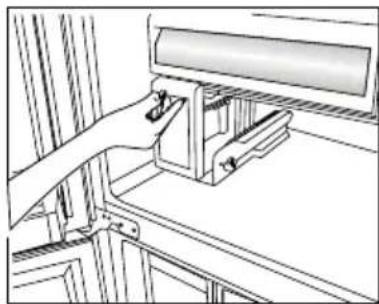
natural_image
Technical line drawing of a mechanical assembly with no visible text or symbols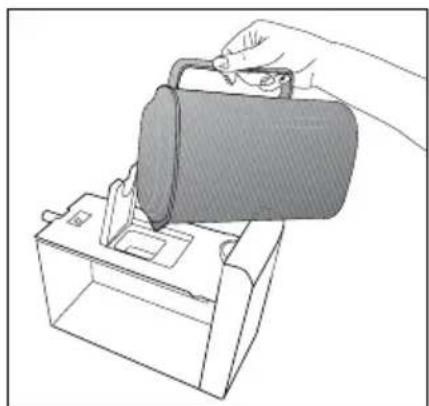
natural_image
Line drawing of a hand pouring liquid into a container (no text or symbols)5.4. Icematic
(This feature is optional)
Icematic allows you to obtain ice from the product easily.
Using the icematic
- Take out the icematic pulling it out carefully.
- Fill the Icematic with water.
- Place Icematic in place. About two hours later, the ice is ready.
- To obtain ice, turn the knobs on the ice reservoirs clockwise by 90° degrees. Ice cubes in the reservoirs will fall down into the ice storage container below.
- You may take out the ice storage container and serve the ice cubes.
| i | Do not remove the icematic from its seating to obtain ice. |
| i | If you wish, you may keep the ice cubes in the ice storage container.The ice storage container is just for accumulating ice cubes. Do not put water in it. Otherwise, it will break. |
5.5. Ice tray
(This feature is optional)
Ice tray allows you to obtain ice from the product easily.
Using the ice tray
- Remove the ice tray from the freezer compartment.
- Fill the ice tray with water.
- Place the ice tray in the freezer compartment. About two hours later, the ice is ready.
- Remove the ice tray from the freezer compartment and bend it over the service plate. Ice cubes will easily fall down to the service plate.
Operating the product
Blue Light/HarvestFresh
\*May not be available in all models
For Blue light,
Vegetables and fruit stored in crispers illuminated with blue light continue to perform photosynthesis and retain their levels of C vitamin thanks to the effect of the wavelength of the blue light.
For HarvestFresh,
Vegetables and fruit stored in crispers illuminated with HarvestFresh technology retain their vitamin levels (vitamins A and C) for a longer period thanks to the cycles of blue, green, red lights and dark that simulate the cycle of the day.
When the door of your refrigerator is opened during the dark period of the HarvestFresh technology, your refrigerator shall sense this automatically and illuminate the crisper with one of the blue, green or red lights respectively for your convenience. The dark period shall be continued when you close the door of your refrigerator so that it shall represent the night period of the day cycle.
5.6. Deodoriser Module
(FreshGuard)
(This feature is optional)
The deodoriser module quickly eliminates the bad smells in your refrigerator before they permeate the surfaces. Thanks to this module, which is placed on the ceiling of the fresh food compartment, the bad odours dissolve while the air is actively being passed on the odour filter, then the air that has been cleaned by the filter is re-emitted to the fresh food compartment. This way, the unwanted odours that may emerge during the storage of foods in the refrigerator are eliminated before they permeate the surfaces.
This is achieved thanks to the fan, LED and the odour filter integrated into the module. The deodoriser module will get activated automatically on a periodical basis. The sound you will hear during periodical activation of the module is normal; it is emitted by the integrated fan. If you open the door of the fresh food compartment while the module is active, the fan will pause temporarily and resume where it has left off when the door is closed again. In case of a power failure, the deodoriser module will get activated when the power is back.
Info: It is recommended to store aromatic foods (such as cheese, olives and delicatessen foods) in their packaging and sealed to avoid bad odours that may result when smells of various foods get mixed. Besides, it is recommended to take spoiled foods out of the refrigerator quickly to prevent the other foods from getting spoiled and avoid bad odours.

natural_image
Interior view of a modern refrigerator with clear glass doors and open shelves (no visible text or symbols)Operating the product

natural_image
Line drawing of a hand placing a component into a storage cabinet shelf (no text or symbols)
natural_image
Line drawing of a hand holding an open electronic device (no text or symbols visible)
natural_image
Illustration of hands using a screwdriver to adjust or install a mechanical component (no text or symbols visible)5.7. Chiller compartment
(This feature is optional)
Use this compartment to store delicatessen that shall be stored in a lower temperature or meat products that you will consume in a short time. Do not store your vegetables or fruits in this compartment.
You can increase the inner volume of your product by removing any of the chiller compartments:
To remove, just pull forwards until it stops and then lift it and pull towards yourself.
5.8. Crisper
Crisper of the refrigerator is designed specially to keep the vegetables fresh without loosing their humidity. For this purpose, cool air circulation is intensified around the crisper in general. Store your fruits and vegetables in this compartment. Do not place leafy greens next to fruits to prolong their life.
Operating the product
5.9. Using the water dispenser (This feature is optional)
| i | It is normal for the first few glasses of water taken from the dispenser to be warm. |
| i | If the water dispenser is not used for a long period of time, dispose of first few glasses of water to obtain fresh water. |
- Push in the lever of the water dispenser with your glass. If you are using a soft plastic cup, pushing the lever with your hand will be easier.
- After filling the cup up to the level you want, release the lever.

natural_image
Simple line drawing of a test tube inside a rectangular container (no text or symbols)| Please note, how much water flows from the dispenser depends on how far you depress the lever. As the level of water in your cup / glass rises, gently reduce the amount of pressure on the lever to avoid overflow. If you slightly press the arm, the water will drip; this is quite normal and not a failure. |
5.10. Filling the water dispenser's tank
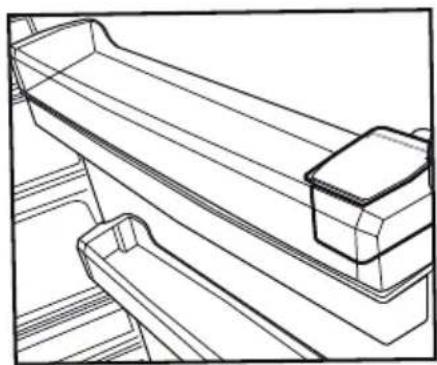
Water tank filling reservoir is located inside the door rack.
- Open the cover of the tank.
- Fill the tank with fresh drinking water.
- Close the cover.
| i | Do not fill the water tank with any other liquid except for water such as fruit juices, carbonated beverages or alcoholic drinks which are not suitable to use in the water dispenser. Water dispenser will be irreparably damaged if these kinds of liquids are used. Warranty does not cover such usages. Some chemical substances and additives contained in these kinds of drinks/liquids may damage the water tank. |
| i | Use clean drinking water only. |
| i | Capacity of the water tank is 3 liters;do not overfill. |
5.11. Cleaning the water tank
- Remove the water filling reservoir inside the door rack.
natural_image
Line drawing of a wooden shelf with two compartments and a side shelf (no text or symbols)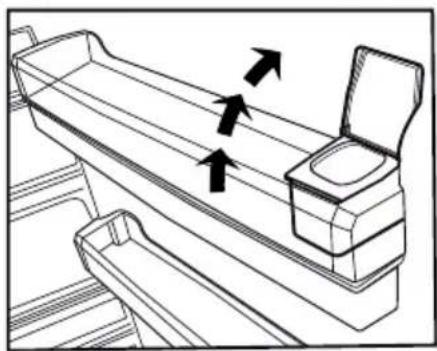
natural_image
Line drawing of a mechanical device with arrows indicating motion or force direction (no text or symbols)Operating the product
- Remove the door rack by holding from both sides.
- Grab the water tank from both sides and remove it with an angle of 45^ C.
- Remove the cover of the water tank and clean the tank.

natural_image
Line drawing of a hand opening a box with an upward arrow and three horizontal lines above (no text or symbols)
natural_image
Line drawing of hands operating a mechanical component with an upward arrow (no text or symbols)

natural_image
Technical line drawing of a mechanical clamp or bracket assembly (no text or symbols)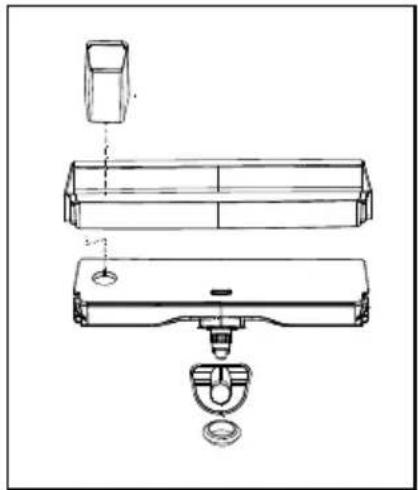
natural_image
Technical line drawing of a mechanical assembly with exploded view (no text or symbols)
Components of the water tank and water dispenser should not be washed in dishwasher.
5.12. Drip tray
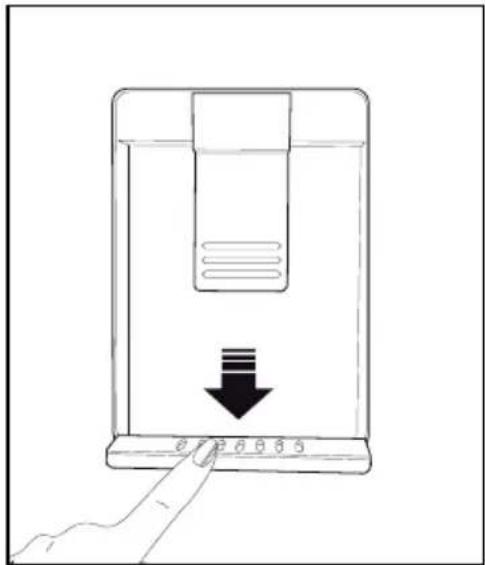
Water that dripped while using the water dispenser accumulates in the spillage tray.
Remove the plastic filter as shown in the figure.
With a clean and dry cloth, remove the water that has accumulated.
natural_image
Line drawing of a hand pressing down on a device with a black arrow indicating downward motion (no text or symbols)Operating the product
5.13. Humidity-controlled crisper (Ever Fresh)
(This feature is optional)
Thanks to the humidity-controlled crisper, fruits and vegetables can be stored for a longer time in an environment with ideal humidity conditions. With the humidity adjustment system with 3 options in front of the crisper, you can control the humidity level inside depending on the food you store. It is recommended to select the vegetable option if you are storing vegetables only, the fruit option if you are storing fruits only, and mixed option when you are storing both fruits and vegetables.
To benefit from the humidity control system and prolong the storage life of foods, it is recommended not to store fruits and vegetables in plastic bags. If the vegetables are left inside their bags, this will cause them to decompose in a short period of time. In particular, we recommend not to store cucumbers or broccoli in sealed plastic bags. In case contacting with other vegetables is not preferred for hygiene concerns, use a perforated paper bag and other similar packaging materials instead of a bag.
While the vegetables are being placed, specific gravity of the vegetables should be taken into consideration. Heavy and hard vegetables should be put at the bottom of the crisper and the lightweight and soft vegetables should be placed over.
Do not place together the pear, apricot, peach, etc. and apple in particular which have a high level of generation of ethylene gas in the same crisper with the other vegetables and fruit. The ethylene gas which is emitted by these fruit may cause the other fruit to ripen faster and decompose in a shorter time.

natural_image
Close-up of a white cylindrical roller with a blue logo, mounted on a metal panel (no visible text or symbols)5.14. Freezing fresh food
- In order to preserve the quality of the food, it shall be frozen as quickly as possible when it is placed in the freezer compartment, use the fast freezing feature for this purpose.
- You may store the food longer in freezer compartment when you freeze them while they are fresh.
- Pack the food to be frozen and close the packing so that it would not allow entrance of air.
- Ensure that you pack your food before putting them in the freezer. Use freezer containers, foils and moisture-proof papers, plastic bags and other packing materials instead of traditional packing papers.
- Label each pack of food by adding the date before freezing. You may distinguish the freshness of each food pack in this way when you open your freezer each time. Store the food frozen before in the front side of compartment to ensure that they are used first.
- Frozen food must be used immediately after they are thawed and they should not be re-frozen.
- Do not freeze too large quantities of food at one time.
Operating the product
| Freezer Compartment Setting | Fridge Compartment Setting | Remarks |
| -18°C 4°C This is | the normal recommended setting. | |
| -20, -22 or -24°C | 4°C | These settings are recommended when the ambient temperature exceeds 30°C. |
| Quick Freeze 4°C | Use when you wish to freeze your food in a short time. Your product will return to its previous mode when the process is over. | |
| -18°C or colder 2°C | Use these settings if you think that your fridge compartment is not cold enough because of the hot ambient conditions or frequent opening and closing of the door. | |
5.15. Recommendations for preserving the frozen food
Compartment shall be set to -18^ at least.
- Put packages in the freezer as quickly as possible after purchase without allowing the to thaw.
- Check whether the "Use By" and "Best Before" dates on the packaging are expired or not before freezing it.
- Ensure that the package of the food is not damaged.
5.16. Deep-freeze information
According to IEC 62552 standards, the product shall freeze at least 4.5 kg of food at 25^ C ambient temperature to -18^ C or lower within 24 hours for every 100-litres of freezer volume.
It is possible to preserve the food for a long time only at -18^ C or lower temperatures.
You can keep the freshness of food for many months (at -18^ C or lower temperatures in the deep freeze).
Foods to be frozen should not be allowed to come in contact with the previously frozen items to prevent them from getting thawed partially.
Boil the vegetables and drain their water in order to store vegetables for a longer time as frozen. After draining their water, put them in air-proof packages and place them inside the freezer. Food such as bananas, tomatoes, lettuce, celery, boiled eggs, potatoes are not suitable for freezing. When these foods are frozen, only their nutritional value and taste shall be affected negatively. They shall not be spoiled so that they would create a risk for human health.
5.17. Placing the food
| Freezer compartment shelves | Various frozen food such as meat, fish, ice cream, vegetables and etc. |
| Refrigerator compartment shelves | Food in pans, covered plates and closed containers, eggs (in closed container) |
| Door shelves of fridge compartment | Small and packaged food or beverage |
| Crisper Vegetables and fruits | |
| Fresh zone compartment | Delicatessen (breakfast food, meat products that shall be consumed in a short time) |
5.18. Door open warning
(This feature is optional)
An audio warning signal will be given when the door of your product is left open for 1 minute. This warning will be muted when the door is closed or any of the display buttons (if any) are pressed.
5.19. Illumination lamp
LED lamps are used as illumination lamps. Contact authorised service in case of any problem with this type of light.
Illumination lamps used in product are not designed for, nor are they suitable for household lighting. The illumination lamps in your fridge and/or freezer are aimed to ensure comfortable and safe food loading.
This product is equipped with a lighting source of the "G" energy class.
The lighting source in this product shall only be replaced by professional repairers.
6
Care and Cleaning
Service life of the product will extend and frequently encountered problems will decrease if the product is cleaned periodically.
 | WARNING: Switch off the product before cleaning. |
 | WARNING: It is recommended to clean the condenser every six months using gloves. You must not use vacuum cleaners. |
- Never use gasoline, benzene or similar substances for cleaning purposes.
- Never use any sharp abrasive instruments, soap, household cleaners, detergent or wax polish for cleaning.
- Dissolve one teaspoon of carbonate in half liter of water. Soak a cloth in the solution and wring it thoroughly. Wipe the interior of the refrigerator with this cloth and the dry thoroughly.
- Make sure that no water enters the lamp housing or other electrical parts.
- If you will not use the refrigerator for a long time, unplug it, remove all food inside, clean it and leave the door ajar.
- Check regularly that the door gaskets are clean. If not, clean them.
- Take out all items in the product to remove the door and body shelves.
- Remove the door shelves by pulling them up. Slide the shelves downwards to re-install them after cleaning.
- Never use chloric cleaning agents or water to clean outer surfaces or chrome-coated parts of the product. Chlorine causes abrasion on such metal surfaces.
- For non-No Frost products, water drops and frosting up to a fingerbreadth occur on the rear wall of the Fridge compartment. Do not clean it; never apply oil or similar agents on it.
- Only use slightly damp microfiber cloths to clean the outer surface of the product. Sponges and other types of cleaning cloths may scratch the surface.
6.1. Avoiding Bad Odours
Materials that may cause odour are not used in the production of our refrigerators. However, odour may be emitted if foods are stored improperly or if the inner surface of the product is not cleaned as required. Please consider the following to avoid this problem:
- It is important that the refrigerator is kept clean. Food residuals, stains, etc. can cause odour. For this reason, clean your refrigerator with carbonate solved in water every 15 days. Never use detergents or soap.
- Keep your foods in closed vessels. Microorganisms emitted from vessels without a cover may cause unpleasant odours.
- Never keep expired or spoiled foods in your refrigerator.
6.2. Protection of plastic surfaces
Do not put liquid oils or oil-cooked meals in your refrigerator in unsealed containers as they damage the plastic surfaces of your refrigerator. If oil is spilled or smeared onto the plastic surfaces, clean and rinse the relevant part of the surface with warm water immediately.
6.3. Cleaning the Inner Surface
To clean the inner surfaces and all removable parts, wash them with a mild solution comprising soap, water and carbonate. Rinse and dry thoroughly. Prevent the water from contacting the lighting means and control panel.

ATTENTION:
Do not use vinegar, rubbing alcohol or other alcohol-based cleaning agents on any of the inner surfaces.
6.4. Stainless Steel Outer Surfaces
Use a stainless steel cleaning agent that is non-abrasive and apply it with a lint-free, soft cloth. For polishing, wipe the surface softly with a damp microfiber cloth and use dry wash-leather. Always follow the strands of the stainless steel.
6.5. Cleaning Products with Glass Doors
Remove the protection foil on the glass.
There is a coating on the surface of the glass. This coating minimises stain formation and ensures that stains and dirt are cleaned easily. Glasses that are not protected by a coating might be exposed to permanent bonding of organic or inorganic, air or waterborne pollutants such as limescale, mineral salts, unburned hydrocarbons, metal oxides an silicons, which lead to stains and physical damage in a short time. Despite regular washing, the glass becomes very hard to keep clean, though not impossible. As a result, the clarity and good appearance of the glass reduces. Hard and abrasive cleaning compounds and methods increase these defects even further and accelerate the deterioration process.
*Non-alkali, non-abrasive and water-based cleaning products must be used for routing cleaning procedures.
For the coating to have long service life, alkali or abrasive substances must not be used during cleaning processes.
These glasses were subject to a tempering process to increase their impact and breakage resistance.
As an additional safety measure, there is a safety film on the back surfaces of the glasses to ensure that they will not harm the environment in case of breakage.
7 Troubleshooting
Please review this list before calling the service. This will save you time and money. This list contains frequently encountered problems that are not results of faulty workmanship or material use. Your product may not have some of the features described here.
The refrigerator is not operating.
- It may not be plugged in properly. >>>Plug in the product properly.
- The fuse of the socket to which your refrigerator is connected or the main fuse may have blown.
Check the fuse.
Condensation on the side wall of the fridge compartment (MULTI ZONE, COOL CONTROL and FLEXI ZONE).
- The door may have been opened/closed frequently. >>>Do not open/close the refrigerator door frequently.
- The environment may be too humid. >>>Do not install the refrigerator at locations with a very high level of humidity.
- Foods containing liquid may have been placed into the refrigerator in vessels without covers. >>>Do not place foods containing liquid into the refrigerator in unsealed vessels.
- Door of the refrigerator may have been left ajar.
Do not keep the doors of your refrigerator open for a long time.
- The thermostat may have been set to a very cold level. >>>Set the thermostat to an appropriate level.
The compressor is not operating.
- Protective thermal of the compressor will blow out during sudden power failures or plug-out plug-ins as the refrigerant pressure in the cooling system of the refrigerator has not been balanced yet. The refrigerator will start running approximately after 6 minutes. Please call the Authorised Service Provider if the refrigerator does not start at the end of this period.
- The freezer is in defrosting cycle. >>>This is normal for a refrigerator that performs full-automatic defrosting. Defrosting cycle is performed periodically.
- The refrigerator may not be plugged in. >>>Make sure that the plug fits the socket.
- Temperature settings may be incorrect.
Select the correct temperature value.
- Possible power failure. >>>The refrigerator will start to operate normally when power restores.
The operation noise increases when the refrigerator is running.
- Operating performance of the refrigerator may vary based on the ambient temperature changes. This is normal and not a fault.
The fridge is running frequently or for a long time.
- Your new product may be bigger than the previous one. Larger refrigerators operate for a longer period of time.
- The room temperature may be high. >>> It is normal that the product operates for longer periods in hot environments.
- The refrigerator may have just been plugged in or loaded with food. >>>It takes the product longer to reach the set temperature when it has just been plugged in or loaded with food. This is normal.
- Large amounts of hot food may have been placed into the refrigerator recently. >>>Do not place hot foods into the refrigerator.
- The doors may have been opened frequently or left ajar for a long time. >>>The warm air that enters the refrigerator causes it to operate for a longer period of time. Do not open the doors frequently.
- Freezer or fridge compartment door may have been left ajar. >>> Check if the doors are closed completely.
- The appliance may be set to a very low temperature. >>> Set the refrigerator temperature to a warmer degree and wait until the product reaches this temperature.
- Door seal of the fridge or freezer compartment may be soiled, worn out, broken or not properly seated. >>> Clean or replace the seal. Damaged/broken seal causes the refrigerator to run for a longer period of time to maintain the current temperature.
Fridge temperature is adequate but the freezer temperature is very low.
- The freezer compartment temperature may be set to a very low value. >>> Set the freezer compartment temperature to a higher value and check.
Freezer temperature is adequate but the fridge temperature is very low.
- The fridge temperature is adjusted to a very low value. >>> Adjust the fridge temperature to a higher value and check.
Troubleshooting
Food kept in the fridge compartment drawers is frozen.
- The fridge compartment temperature may be set to a very high value. >>> Set the fridge compartment temperature to a lower value and check.
Temperature in the fridge or freezer is very high.
- The fridge compartment temperature may be set to a very high value. >>> Fridge compartment temperature setting has an effect on the temperature of the freezer. Change the temperature of the fridge or freezer compartment until the fridge or freezer compartment temperature reaches an adequate level.
- The doors may have been opened frequently or left ajar for a long time. >>>Do not open the doors frequently.
- The door may have been left ajar. >>>Close the door completely.
- The refrigerator may have been just plugged in or loaded with food. >>>This is normal. It takes the product longer to reach the set temperature when it has just been plugged in or loaded with food.
- Large amounts of hot food may have been placed into the refrigerator recently. >>>Do not place hot foods into the refrigerator.
Vibration or noise.
- The floor may not be stable or level. >>>If the refrigerator shakes when moved slightly, adjust the feed to balance it. Make sure that the floor is level and capable of carrying the refrigerator.
- Objects placed onto the refrigerator may cause noise. >>>Remove the objects on the refrigerator.
There are noises coming from the refrigerator like liquid spilling or spraying.
- Liquid and gas flows occur in accordance with the operating principles of the refrigerator. >>>This is normal and not a fault.
Whistle is heard from the refrigerator.
- There are fans that are used to cool the refrigerator. This is normal and not a fault.
Damp accumulates on the inner walls of refrigerator.
- Hot and humid weather increases icing and condensation. This is normal and not a fault.
- The doors may have been opened frequently or left ajar for a long time. >>>Do not open the doors frequently. Close the doors, if open.
- The door may have been left ajar. >>>Close the door completely.
Humidity occurs on the outer surface of the refrigerator or between the doors.
- Air might be humid. This is quite normal in humid weathers. >>>Condensation will disappear when the humidity level decreases.
- There might be external condensation at the section between two doors of the refrigerator if you use your product rarely. This is normal. Condensation will disappear upon frequent use.
There is a bad odour inside the refrigerator.
- No regular cleaning may have been performed. Clean the inside of the refrigerator with a sponge, lukewarm water or carbonated water.
- Some vessels or packaging materials may cause the odour. >>>Use another vessel, or packaging materials from another brand.
- Foods may have been placed into the refrigerator in vessels without covers. >>>Store the foods in closed vessels. Microorganisms emitted from vessels without a cover may cause unpleasant odours.
- Take out expired or spoiled foods from the refrigerator.
The door cannot be closed.
- Food packages may be preventing the door from closing. >>> Re-locate the packages that are obstructing the door.
- The refrigerator may be unstable on the floor. >>>Adjust the refrigerator feet as required to keep the refrigerator in balance.
- The floor may not be level or solid. >>>Make sure that the floor is level and capable of carrying the refrigerator.
Crispers are stuck.
- Foods may be touching the upper wall of the crisper. >>>Re-organise the foods in the crisper.
If The Surface Of The Product Is Hot.
High temperatures may be observed between the two doors, on the side panels and at the rear grill while the product is operating. This is normal and does not require service maintenance!
Fan keeps running when the door is open.
The fan may keep running when the door of the freezer is open.

WARNING: If you cannot eliminate the problem although you follow the instructions in this section, consult your dealer or the Authorised Service Provider. Never attempt to repair a malfunctioned product.
natural_image
Diagram showing a lightning bolt striking a wall-mounted device with a plug, no text or symbols presentHC _تحذير .1.2

natural_image
Simple line drawing of a rectangular frame with a numbered label '1' inside, no text or symbols present.إجراء
natural_image
Pure electrical circuit lines without any symbols

natural_image
Interior view of a white refrigerator with open doors and numbered compartments (no text or symbols visible)natural_image
Line drawing of a hand inserting a screwdriver into a device panel (no text or symbols)natural_image
Line drawing of a hand using a screwdriver to adjust or install a device panel (no text or symbols visible)3.3 ضبط الأقدم
natural_image
Diagram showing a rectangular structure with upward and downward arrows indicating rotational or directional motion, no text or symbols present.3.1MarketTurkishMinas
natural_image
Exterior view of a stainless steel refrigerator with a magnified inset showing internal components (no text or symbols)natural_image
Line drawing of a double-door refrigerator with open door, cabinet, and window (no text or symbols)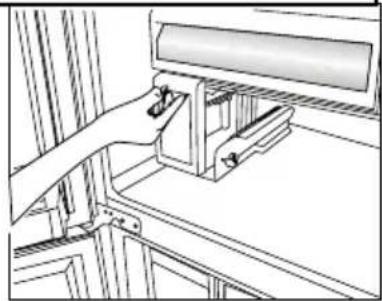
natural_image
Technical line drawing of a mechanical assembly with no visible text or symbols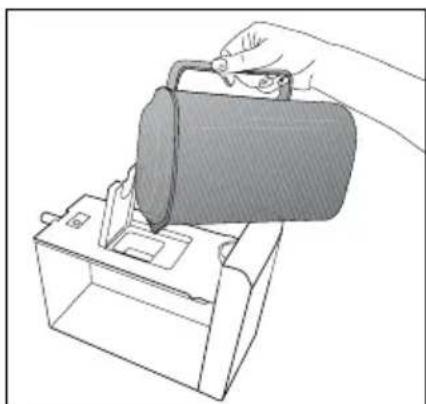
natural_image
Line drawing of a hand using a tool to lift a cylindrical object into a container (no text or symbols)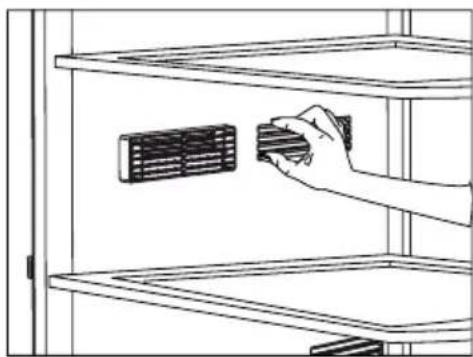
natural_image
Line drawing of a hand inserting a component into a rack (no text or symbols)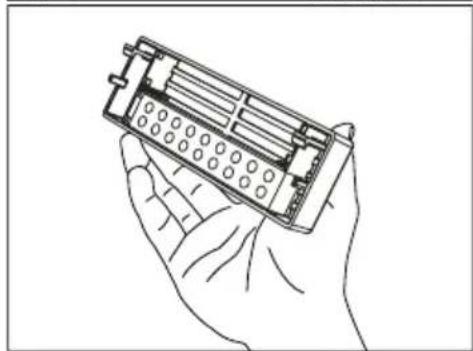
natural_image
Line drawing of a hand holding an electronic device with a grid-like internal structure (no text or symbols)
natural_image
Line drawing of hands using a screwdriver to adjust a component (no text or symbols present)استخدام الجهاز
حيز التبريد 5.7
natural_image
Interior view of a modern refrigerator with clear glass doors and a visible 'Crisps' oven (no text or symbols on the door itself)5.9 الضوع الأزرق
natural_image
Line drawing of a cabinet or rack with two rectangular compartments and diagonal striped panels (no text or symbols)natural_image
Close-up of a white air conditioner cover with a label showing 'Airflow' and icons, mounted on a metal shelf (no readable text beyond label)natural_image
Simple line drawing of a container with a submerged object inside (no text or symbols)natural_image
Technical line drawing of a mechanical component or bracket assembly (no text or symbols)natural_image
Line drawing of a mechanical device with two arrows indicating direction (no text or symbols)natural_image
Line drawing of a hand placing a tray with an upward arrow above it, no text or symbols presentnatural_image
Line drawing of hands operating a mechanical component with an upward arrow indicating motion (no text or symbols)

natural_image
Line drawing of a hand using a tool to adjust or install a mechanical component, with an upward arrow indicating motion (no text or symbols present)
natural_image
Technical line drawing of a mechanical assembly with no visible text or symbolsnatural_image
Line drawing of a device with a hand pressing a button and a downward arrow indicating action (no text or symbols)https://eprel.ec.europa.eu/
natural_image
Diagram showing a device with a lightning bolt and cable, no text or symbols presentnatural_image
Interior view of a white refrigerator with open doors and numbered compartments (no text or symbols visible)
natural_image
Interior view of a white refrigerator with open doors and numbered compartments (no text or symbols visible)natural_image
Line drawing of a hand inserting a screwdriver into a device panel (no text or symbols)2
natural_image
Line drawing of a hand using a screwdriver to adjust or install a device panel (no text or symbols visible)3.3
natural_image
Diagram showing directional arrows and curved arrows around a rectangular structure (no text or symbols)natural_image
Close-up of a metallic cylindrical device with a dashed oval outline highlighting a mechanical component, showing internal structure and directional arrows (no text or symbols)natural_image
Line drawing of a room interior with furniture and fixtures (no text or symbols)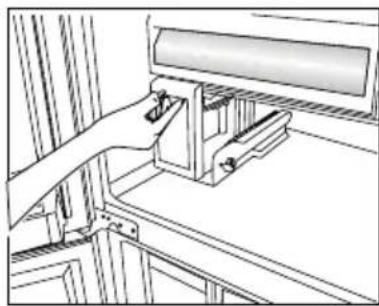
natural_image
Technical line drawing of a mechanical assembly with a lever and bracket (no text or symbols)
natural_image
Line drawing of a hand pouring liquid into a container using a tool (no text or symbols)natural_image
Interior view of a modern refrigerator with open doors and clear plastic shelves (no visible text or symbols), וְרַעֹת אָאִי
natural_image
Line drawing of a hand placing a component into a rack with a grid-patterned cabinet (no text or symbols)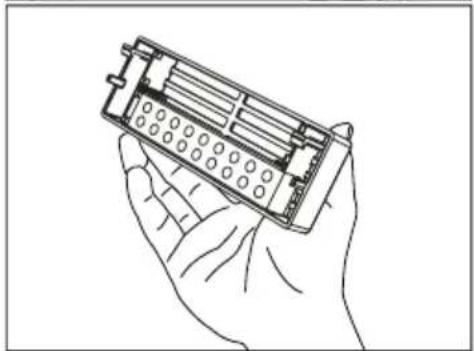
natural_image
Line drawing of a hand holding an electronic device casing (no text or symbols)
natural_image
Line drawing of two hands holding a handheld electronic device (no text or symbols visible)natural_image
Line drawing of a wooden shelf with two compartments and a side drawer (no text or symbols)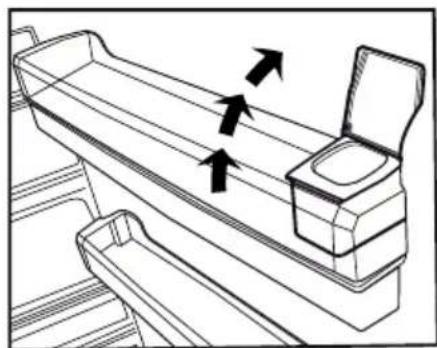
natural_image
Line drawing of a mechanical device with arrows indicating motion or force direction (no text or symbols)natural_image
Simple line drawing of a rectangular container with a U-shaped tube inside (no text or symbols)natural_image
Technical line drawing of a mechanical assembly with no visible text or symbols5.13.
natural_image
Line drawing of a hand pressing down on a device with a black arrow indicating downward motion (no text or symbols)
natural_image
Illustration of hands operating a mechanical component with an upward arrow indicating motion (no text or symbols present)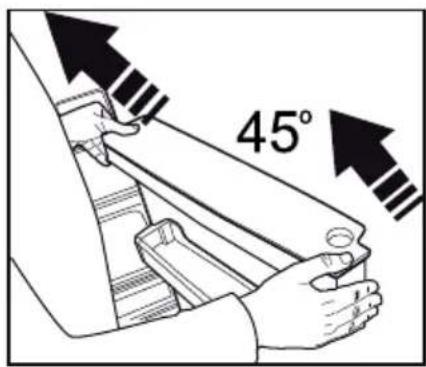

natural_image
Line drawing of a hand using a tool to adjust or install a mechanical component (no text or symbols present)5.15. וְרָה אַלְאָה
5.14.
natural_image
Close-up of a white air conditioner cover with a blue logo and 'CERZELIE' label, mounted on a metal shelf (no readable text beyond branding)תָרְשִׁי
| הכלה | הכלההכלה | הכלההכלה |
| -18°C4°C. | ||
| 30 bis 20 bis 10 bis 5 bis 10 bis 10 bis 10 bis 10 bis 10 bis 10 bis 10 bis 10 bis 10 bis 10 bis 10 bis 10 bis 10 bis 10 bis 10 bis 10 bis 10 bis 10 bis 10 bis 10 bis 10 bis 10 bis 10 bis 10 bis 10 bis 15 bis 15 bis 15 bis 15 bis 15 bis 15 bis 15 bis 15 bis 15 bis 15 bis 15 bis 15 bis 15 bis 15 bis 15 bis 15 bis 15 bis 15 bis 15 bis 15 bis 15 bis 15 bis 15 bis 15 bis 15 bis 10 bis 10 bis 10 bis 10 bis 10 bis 10 bis 10 bis 10 bis 10 bis 10 bis 10 bis 10 bis 10 bis 10 bis 10 bis 10 bis 10 bis 10 bis 10 bis 10 bis 10 bis 10 bis 10 bis 10 bis 20 bis 20 bis 20 bis 20 bis 20 bis 20 bis 20 bis 20 bis 20 bis 20 bis 20 bis 20 bis 20 bis 20 bis 20 bis 20 bis 20 bis 20 bis 20 bis 20 bis 20 bis 20 bis 20 bis 20 bis 20 bis 15 bis 15 bis 15 bis 15 bis 15 bis 15 bis 15 bis 15 bis 15 bis 15 bis 15 bis 15 bis 15 bis 15 bis 15 bis 15 bis 15 bis 15 bis 15 bis 15 bis 15 bis 15 bis 15 bis 15 bis 20 bis 20 bis 20 bis 20 bis 20 bis 20 bis 20 bis 20 bis 20 bis 20 bis 20 bis 20 bis 20 bis 20 bis 20 bis 20 bis 20 bis 20 bis 20 bis 20 bis 20 bis 20 bis 20 bis 20 bis 25 bis 25 bis 25 bis 25 bis 25 bis 25 bis 25 bis 25 bis 25 bis 25 bis 25 bis 25 bis 25 bis 25 bis 25 bis 25 bis 25 bis 25 bis 25 bis 25 bis 25 bis 25 bis 25 bis 25 bis 25 bis 20 bis 20 bis 20 bis 20 bis 20 bis 20 bis 20 bis 20 bis 20 bis 20 bis 20 bis 20 bis 20 bis 20 bis 20 bis 20 bis 20 bis 20 bis 20 bis 20 bis 20 bis 20 bis 20 bis 20 bis 10 bis 10 bis 10 bis 10 bis 10 bis 10 bis 10 bis 10 bis 10 bis 10 bis 10 bis 10 bis 10 bis 10 bis 10 bis 10 bis 10 bis 10 bis 10 bis 10 bis 10 bis 10 bis 10 bis 10 bis 25 bis 25 bis 25 bis 25 bis 25 bis 25 bis 25 bis 25 bis 25 bis 25 bis 25 bis 25 bis 25 bis 25 bis 25 bis 25 bis 25 bis 25 bis 25 bis 25 bis 25 bis 25 bis 25 bis 25 bis 15 bis 15 bis 15 bis 15 bis 15 bis 15 bis 15 bis 15 bis 15 bis 15 bis 15 bis 15 bis 15 bis 15 bis 15 bis 15 bis 15 bis 15 bis 15 bis 15 bis 15 bis 15 bis 15 bis 15 bis 25 bis 25 bis 25 bis 25 bis 25 bis 25 bis 25 bis 25 bis 25 bis 25 bis 25 bis 25 bis 25 bis 25 bis 25 bis 25 bis 25 bis 25 bis 25 bis 25 bis 25 bis 25 bis 25 bis 25 bis 10 bis 10 bis 10 bis 10 bis 10 bis 10 bis 10 bis 10 bis 10 bis 10 bis 10 bis 10 bis 10 bis 10 bis 10 bis 10 bis 10 bis 10 bis 10 bis 10 bis 10 bis 10 bis 10 bis 10 bis 30 bis 30 bis 30 bis 30 bis 30 bis 30 bis 30 bis 30 bis 30 bis 30 bis 30 bis 30 bis 30 bis 30 bis 30 bis 30 bis 30 bis 30 bis 30 bis 30 bis 30 bis 30 bis 30 bis 30 bis 30 bis 15 bis 15 bis 15 bis 15 bis 15 bis 15 bis 15 bis 15 bis 15 bis 15 bis 15 bis 15 bis 15 bis 15 bis 15 bis 15 bis 15 bis 15 bis 15 bis 15 bis 15 bis 15 bis 15 bis 15 bis 30 bis 30 bis 30 bis 30 bis 30 bis 30 bis 30 bis 30 bis 30 bis 30 bis 30 bis 30 bis 30 bis 30 bis 30 bis 30 bis 30 bis 30 bis 30 bis 30 bis 30 bis 30 bis 30 bis 30 bis 35 bis 35 bis 35 bis 35 bis 35 bis 35 bis 35 bis 35 bis 35 bis 35 bis 35 bis 35 bis 35 bis 35 bis 35 bis 35 bis 35 bis 35 bis 35 bis 35 bis 35 bis 35 bis 35 bis 35 bis 35 bis 30 bis 30 bis 30 bis 30 bis 30 bis 30 bis 30 bis 30 bis 30 bis 30 bis 30 bis 30 bis 30 bis 30 bis 30 bis 30 bis 30 bis 30 bis 30 bis 30 bis 30 bis 30 bis 30 bis 30 bis 10 bis 10 bis 10 bis 10 bis 10 bis 10 bis 10 bis 10 bis 10 bis 10 bis 10 bis 10 bis 10 bis 10 bis 10 bis 10 bis 10 bis 10 bis 10 bis 10 bis 10 bis 10 bis 10 bis 10 bis 35 bis 35 bis 35 bis 35 bis 35 bis 35 bis 35 bis 35 bis 35 bis 35 bis 35 bis 35 bis 35 bis 35 bis 35 bis 35 bis 35 bis 35 bis 35 bis 35 bis 35 bis 35 bis 35 bis 35 bis 10 bis 10 bis 10 bis 10 bis 10 bis 10 bis 10 bis 10 bis 10 bis 10 bis 10 bis 10 bis 10 bis 10 bis 10 bis 10 bis 10 bis 10 bis 10 bis 10 bis 10 bis 10 bis 10 bis 10 bis 40 bis 40 bis 40 bis 40 bis 40 bis 40 bis 40 bis 40 bis 40 bis 40 bis 40 bis 40 bis 40 bis 40 bis 40 bis 40 bis 40 bis 40 bis 40 bis 40 bis 40 bis 40 bis 40 bis 40 bis 40 bis 15 bis 15 bis 15 bis 15 bis 15 bis 15 bis 15 bis 15 bis 15 bis 15 bis 15 bis 15 bis 15 bis 15 bis 15 bis 15 bis 15 bis 15 bis 15 bis 15 bis 15 bis 15 bis 15 bis 15 bis 40 bis 40 bis 40 bis 40 bis 40 bis 40 bis 40 bis 40 bis 40 bis 40 bis 40 bis 40 bis 40 bis 40 bis 40 bis 40 bis 40 bis 40 bis 40 bis 40 bis 40 bis 40 bis 40 bis 40 bis 45 bis 45 bis 45 bis 45 bis 45 bis 45 bis 45 bis 45 bis 45 bis 45 bis 45 bis 45 bis 45 bis 45 bis 45 bis 45 bis 45 bis 45 bis 45 bis 45 bis 45 bis 45 bis 45 bis 45 bis 45 bis 40 bis 40 bis 40 bis 40 bis 40 bis 40 bis 40 bis 40 bis 40 bis 40 bis 40 bis 40 bis 40 bis 40 bis 40 bis 40 bis 40 bis 40 bis 40 bis 40 bis 40 bis 40 bis 40 bis 40 bis 10 bis 10 bis 10 bis 10 bis 10 bis 10 bis 10 bis 10 bis 10 bis 10 bis 10 bis 10 bis 10 bis 10 bis 10 bis 10 bis 10 bis 10 bis 10 bis 10 bis 10 bis 10 bis 10 bis 10 bis 45 bis 45 bis 45 bis 45 bis 45 bis 45 bis 45 bis 45 bis 45 bis 45 bis 45 bis 45 bis 45 bis 45 bis 45 bis 45 bis 45 bis 45 bis 45 bis 45 bis 45 bis 45 bis 45 bis 45 bis 10 bis 10 bis 10 bis 10 bis 10 bis 10 bis 10 bis 10 bis 10 bis 10 bis 10 bis 10 bis 10 bis 10 bis 10 bis 10 bis 10 bis 10 bis 10 bis 10 bis 10 bis 10 bis 45 bis 45 bis 40 bis 40 bis 40 bis 40 bis 40 bis 40 bis 40 bis 40 bis 40 bis 40 bis 40 bis 40 bis 40 bis 40 bis 40 bis 40 bis 40 bis 40 bis 40 bis 40 bis 40 bis 40 bis 45 bis 45 bis 40 bis 40 bis 40 bis 40 bis 40 bis 40 bis 40 bis 40 bis 40 bis 40 bis 40 bis 40 bis 40 bis 40 bis 40 bis 40 bis 40 bis 40 bis 40 bis 40 bis 40 bis 40 bis 15 bis 15 bis 10 bis 10 bis 10 bis 10 bis 10 bis 10 bis 10 bis 10 bis 10 bis 10 bis 10 bis 10 bis 10 bis 10 bis 10 bis 10 bis 10 bis 10 bis 10 bis 10 bis 10 bis 45 bis 45 bis 45 bis 40 bis 40 bis 40 bis 40 bis 40 bis 40 bis 40 bis 40 bis 40 bis 40 bis 40 bis 40 bis 40 bis 40 bis 40 bis 40 bis 40 bis 40 bis 40 bis 40 bis 40 bis 45 bis 45 bis 45 bis 40 bis 40 bis 40 bis 40 bis 40 bis 40 bis 40 bis 40 bis 40 bis 40 bis 40 bis 40 bis 40 bis 40 bis 40 bis 40 bis 40 bis 40 bis 40 bis 40 bis 40 bis 15 bis 15 bis 10 bis 15 bis 10 bis 15 bis 15 bis 15 bis 15 bis 15 bis 15 bis 15 bis 15 bis 15 bis 15 bis 15 bis 15 bis 15 bis 15 bis 15 bis 15 bis 15 bis 15 bis 45 bis 45 bis 45 bis 40 bis 40 bis 40 bis 40 bis 40 bis 40 bis 40 bis 40 bis 40 bis 40 bis 40 bis 40 bis 40 bis 40 bis 40 bis 40 bis 40 bis 40 bis 40 bis 40 bis 40 bis 10 bis 10 bis 10 bis 15 bis 15 bis 15 bis 15 bis 15 bis 15 bis 15 bis 15 bis 15 bis 15 bis 15 bis 15 bis 15 bis 15 bis 15 bis 15 bis 15 bis 15 bis 15bis 15bis 15bis 15bis 15bis 15bis 15bis 15bis 15bis 15bis 15bis 15bis 15bis 15bis 15bis 15bis 15bis 15bis 15bis 15bis 15bis 15bis 15bis 15bis 15bis 15dis 15bis 15bis 15bis 15bis 15bis 15bis 15bis 15bis 15bis 15bis 15bis 15bis 15bis 15bis 15bis 15bis 15bis 15bis 15bis 15bis 15bis 15bis 15bis 15bis 15his 15his 15his 15his 15his 15his 15his 15his 15his 15his 15his 15his 15his 15his 15his 15his 15his 15his 15his 15his 15his 15his 15his 15his 15his 15 hisis is his his his his his his his his his his his his his his his his his his his his his his his his his his his his his his his his his his his his his his his his his his his his his his his his his his his his his his his his his his his his his his his his his his his his his his his his his his his his his his his his his his his his his his his his his his his his his his his his his his his his its his his his his his his his his his his his his his his his his his his his his his his his his his his his his his his his his his his his his his his his his his his his his his his his his his his his his his his his his his his his his his his his his his his his his his his his his his his his his his his his his his his his his his his his his his his his his his his his his his his his this his his his his his his his his his his his his his his his his his his his his his his his his his his his his his his his his his his his his his his his his his his his his his his his his his his his his his his his his his his his his his his his his his his his his his his his his his his his his his his his his his his his his his his his his his his his his his his his his his his his he's his his his his his his his his his his his his his his his his his his his his his his his his his his his his his his his his his his his his his his his his his his his his his his his his his his his his his his his his his his his his his his his his his his his his his his his his his his his his his his his his his his his his his his his his his his his his his his his his his his his hi' s his his his his his his his his his his his his his his his his his his his his his his his his his his his his his his his his his his his his his his his his his his his his his his his his his his his his his his his his his his his his his his his his his his his his his his his his his his his his his his his his his his his his his his his his his his his his his his his his his his his h' s his his his his his his his his his his his his his his his his his his his his his his his his his his his his his his his his his his his his his his his his his his his his his his his his his his his his his his his his his his his his his his his his his his his his his his his his his his his his his his his his his his his his his his his his his his his his his his his his his h's his his his his his his his his his his his his his his his his his his his his his his his his his his his his his his his his his his his his his his his his his his his his his his his his his his his his his his his his his his his his his his his his his his his his his his his his his his his his his his his his his his his his his his his his his his his his his his his his his his his i' s his his his his his his his his his his his his his his his his his his his his his his his his his his his his his his his his his his his his his his his his his his his his his his his his his his his his his his his his his his his his his his his his his his his his his his his his his his his his his his his his his his his his his his his his his his his his his his his his his |
5.18.
- Dear Customer,
- Please read this manual before using the product.
- Important Instructions Regarding Safety and Environment 4
- Your Refrigerator 8
- Installation 9
- Preparation 11
- Operating the product 12
- Care and Cleaning 23
- Troubleshooting 25
- Important Instructions Regarding Safety and Environment
- General Safety
- Instructions for safety and environment
- Hydrocarbon (HC) Warning
- For Products with a Water Dispenser/Ice Machine
- WARNING:
- Intended Use
- Children's Safety
- DANGER:
- Compliance with the WEEE Directive and Disposing the Waste Product:
- Compliance with the RoHS Directive: The unit you have purchased conforms to the EU RoHS Directive (2011/65/EU). It does not contain harmful or prohibited materials specified in the Directive.
- Packaging Information
- Risk of Fire or Explosion:
- Your Refrigerator
- It may not apply to all models
- Installation
- Appropriate location for installation
- Installing the plastic wedges
- Adjusting the feet
- Installation
- Electrical connection
- Preparation
- Things to be done for energy saving
- Initial use
- Operating the product
- Indicator panel
- Operating the product
- Indicator panel
- Temperature Adjustment / Temperature Increase
- Temperature Adjustment- Slider/ Temperature value indicator
- Temperature Unit Selection (°C) Celsius indicator
- Temperature Unit Selection (°F) Fahrenheit indicator
- Temperature Adjustment / Temperature Decrease
- Quick fridge function indicator
- Quick fridge function button
- \*Wireless
- Eco mode indicator/button
- 9a. \*Joker freezer indicator/button
- 9b. \*Joker fridge indicator/button
- 10.\* Auto Door
- High Temperature Warning/Error
- \*Bottle Cooler
- \*Filter Replacement Warning/Button
- Menu Button
- Product On/Off indicator/button
- \*Icematic indicator/button
- \*Sabbath Mode
- Vacation Mode indicator/button
- Key Lock indicator
- Quick freeze function indicator
- Quick freeze function button
- Cabin Selection
- Fridge compartment indicator
- Freezer compartment indicator
- Ice machine
- (This feature is optional)
- Icematic
- Using the icematic
- Ice tray
- Using the ice tray
- Blue Light/HarvestFresh
- \*May not be available in all models
- For Blue light,
- For HarvestFresh,
- Deodoriser Module
- (FreshGuard)
- Chiller compartment
- Crisper
- Using the water dispenser (This feature is optional)
- Filling the water dispenser's tank
- Cleaning the water tank
- Drip tray
- Humidity-controlled crisper (Ever Fresh)
- Freezing fresh food
- Recommendations for preserving the frozen food
- Deep-freeze information
- Placing the food
- Door open warning
- Illumination lamp
- 6
- Care and Cleaning
- Avoiding Bad Odours
- Protection of plastic surfaces
- Cleaning the Inner Surface
- ATTENTION:
- Stainless Steel Outer Surfaces
- Cleaning Products with Glass Doors
- Troubleshooting
- The refrigerator is not operating.
- Condensation on the side wall of the fridge compartment (MULTI ZONE, COOL CONTROL and FLEXI ZONE).
- The compressor is not operating.
- The operation noise increases when the refrigerator is running.
- The fridge is running frequently or for a long time.
- Fridge temperature is adequate but the freezer temperature is very low.
- Freezer temperature is adequate but the fridge temperature is very low.
- Troubleshooting
- Food kept in the fridge compartment drawers is frozen.
- Temperature in the fridge or freezer is very high.
- Vibration or noise.
- There are noises coming from the refrigerator like liquid spilling or spraying.
- Whistle is heard from the refrigerator.
- Damp accumulates on the inner walls of refrigerator.
- Humidity occurs on the outer surface of the refrigerator or between the doors.
- There is a bad odour inside the refrigerator.
- The door cannot be closed.
- Crispers are stuck.
- If The Surface Of The Product Is Hot.
- Fan keeps running when the door is open.
- ضبط الأقدم
- 3.1MarketTurkishMinas
- الضوع الأزرق
- 2
- 3.3
- , וְרַעֹת אָאִי
- וְרָה אַלְאָה
Brand : BEKO
Model : RCNE724E30XBI
Category : Refrigerator