
WE550 - Weather Station Global Water - Free user manual and instructions
Find the device manual for free WE550 Global Water in PDF.


| Product Type | Weather Station |
| Brand | Global Water |
| Model | WE550 |
| Dimensions | Approximately 150 x 100 x 50 mm |
| Weight | Approximately 0.3 kg |
| Power Supply | 2 x AAA batteries (not included) |
| Display Type | LCD screen |
| Temperature Range | -20°C to 60°C (-4°F to 140°F) |
| Humidity Range | 20% to 95% RH |
| Wireless Range | Up to 100 meters (open area) |
| Main Functions | Indoor/outdoor temperature and humidity, weather forecast, barometric pressure, wind speed and direction (optional sensor), rainfall (optional sensor) |
| Weather Forecast | Sunny, partly cloudy, cloudy, rainy, stormy |
| Care and Cleaning | Clean with a soft dry cloth; avoid water and solvents |
| Safety Precautions | Keep away from direct sunlight and heat sources; do not immerse in water |
| Spare Parts and Repairability | Contact manufacturer or authorized dealer for replacement parts; not user-serviceable |
| General Information | Indoor use only; batteries included for remote sensor; compatible with additional sensors |
Frequently Asked Questions - WE550 Global Water
User questions about WE550 Global Water
0 question about this device. Answer the ones you know or ask your own.
Ask a new question about this device
Download the instructions for your Weather Station in PDF format for free! Find your manual WE550 - Global Water and take your electronic device back in hand. On this page are published all the documents necessary for the use of your device. WE550 by Global Water.
USER MANUAL WE550 Global Water
natural_image
Simple black-and-white icon with a stylized wavy line inside a rounded square (no text or symbols)Global Water
Instrumentation, Inc.
151 Graham Road
P.O. Box 9010
College Station, TX 77842-9010
T: 800-876-1172
Int'l: (979) 690-5560, F: (979) 690-0440
Barometric Pressure: WE100
Solar Radiation: WE300
Wind Speed: WE550
Wind Direction: WE570
Humidity: WE600
Temperature Sensor: WE700
Solar Shield: WE770

Global Water
800-876-1172 • globalw.com
Congratulations on your purchase of the Global Water Weather Sensor. This instrument has been quality tested and approved for providing accurate and reliable measurements. We are confident that you will find the sensor to be a valuable asset for your application. Should you require assistance, our technical staff will be happy to help.
Table of Contents
| I. Checklist | ● | ● | ● | ● | ● | ● | Page | 3 |
| II. Inspection | ● | ● | ● | ● | ● | ● | 3 | |
| III. General Sensor Installation | ● | ● | ● | 4 | ||||
| IV. Barometric Pressure Sensor | ● | ● | ● | 5 | ||||
| V. Solar Radiation Sensor | ● | ● | ● | ● | ● | 7 | ||
| VI. Wind Speed Sensor | ● | ● | ● | ● | ● | 8 | ||
| VII. Wind Direction Sensor | ● | ● | ● | ● | ● | 9 | ||
| VIII. Humidity Sensor | ● | ● | ● | ● | ● | 10 | ||
| IX. Temperature Sensor | ● | ● | ● | ● | ● | 11 | ||
| X. Solar Shield | ● | ● | ● | ● | ● | 12 | ||
| XI. Maintenance | ● | ● | ● | ● | ● | 12 | ||
| XII. Troubleshooting | ● | ● | ● | ● | ● | 13 | ||
| XIII. Warranty | ● | ● | ● | ● | ● | 15 | ||
| XIV. Appendix A: Temperature Calibration Check | 16 | |||||||
| XV. Appendix B: 2 Wire Sensor Measurement Diagram | 17 | |||||||
| XVI. Appendix C: 3 Wire Sensor Measurement Diagram | 18 | |||||||
* Copyright © Global Water Instrumentation, Inc. 2002

Global Water
800-876-1172 • globalw.com
I. Sensor Checklist
a. Weather Sensor
b. Weather Sensor Manual
II. Inspection
a. Your Weather sensor was carefully inspected and certified by our Quality Assurance Team before shipping. If any damage has occurred during shipping, please notify Global Water Instrumentation, Inc. and file a claim with the carrier involved.
Use the checklist to ensure that you have received everything needed to operate the weather instrument(s).

Global Water
800-876-1172 • globalw.com
III. General Sensor Installation
a. Weather sensors have many applications and therefore many installation options. The sensors should be located in a clear area on a level surface.
b. Install your Weather sensor so that it is easily accessible for calibration purposes. You may need to remove and reinstall it in the future, so plan ahead!
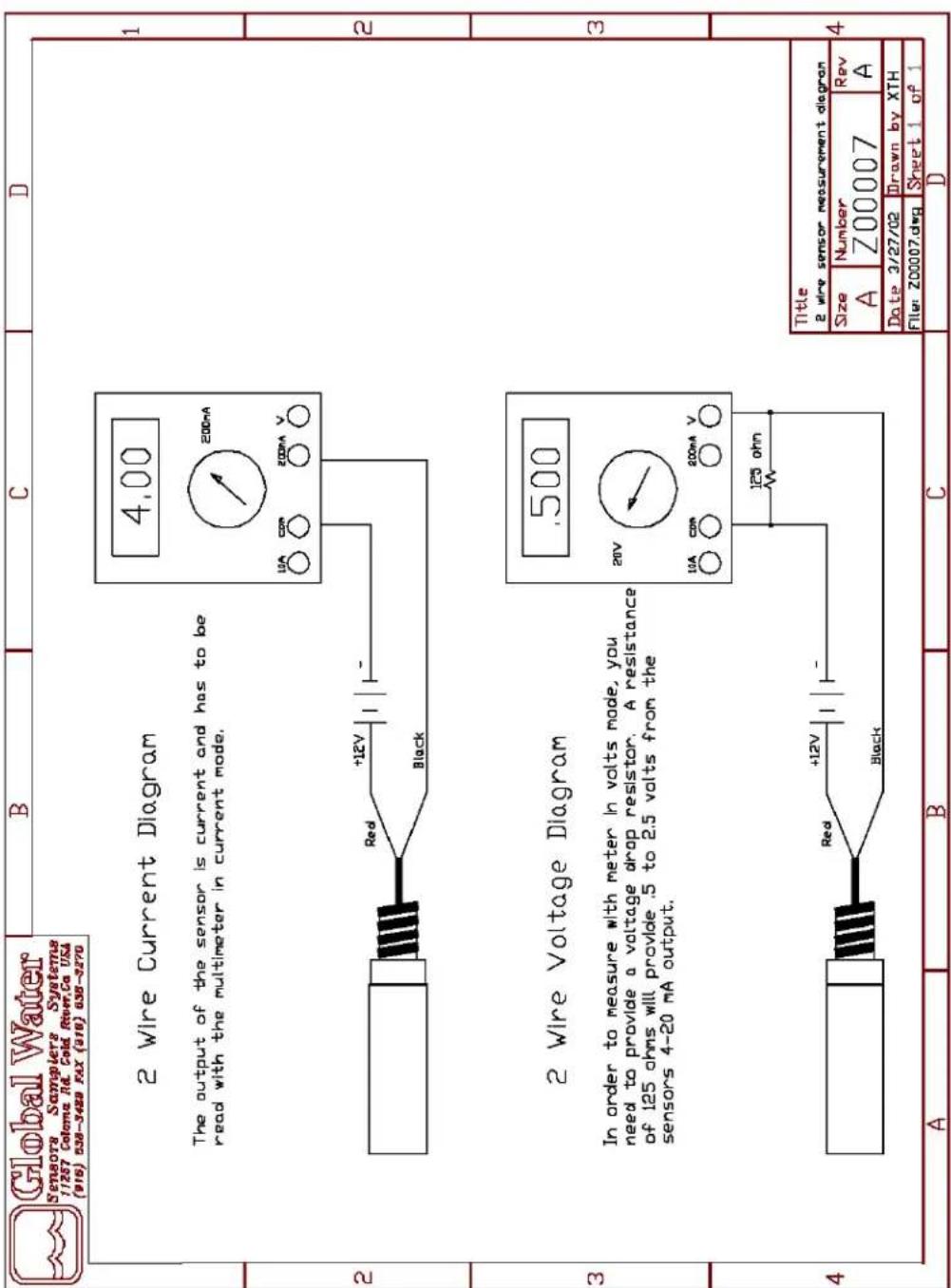
c. All Global Water Weather sensors produce a 4-20 mA output signal. 4-20 mA is an industrial standard signal for process control monitoring. Most PLCs (Programmable Logic Controller), RTUs (Remote Telemetry Unit), and data acquisition systems accept this signal directly. If the system only accepts voltage signals, the sensor output must be converted to a voltage signal by reading the voltage across a precision resistor in series with the signal wire. Since Ohms Law states that V = IR, if the 4-20 mA signal is dropped across a 250 ohm resistor, the output will be 1 to 5 volts DC. If the 4-20 mA signal is dropped across a 125 ohm resistor, the output will be halved to 0.5 to 2.5 VDC. The 4-20 signal wire is connected to the datalogger voltage input terminal. The resistor is placed between this input and the ground terminal of the datalogger's battery. The power (or voltage to the sensor) must be connected to positive battery terminal of the datalogger.
d. The sensors may be pulsed on or turned on by the logging system prior to taking a reading. Use a warm up time appropriate to the Weather sensor you are using to assure that the sensor is fully on. The sensors can run continuously for real time applications. Each sensor draws between 4 and 20 mA depending on whether the sensor is reading at the minimum or maximum of its range.
e. Weather sensors may be stored without any special provisions. Place the sensor inside a bag to keep the sensor clean and store on a shelf or hang it on a wall.

Global Water
800-876-1172 • globalw.com
IV. Barometric Pressure Sensor
a. Barometric Pressure sensor specifications.
Output: 4-19mA
Range: 800-1100 millibars
Accuracy: +1% of full scale
Operating Voltage: 10-36VDC
Current Draw: Same as sensor output
Warm Up Time: 3 seconds minimum
Operating Temperature: -40^ to +55^ C
Size of Probe: 3"x2"x1"
Weight: .13 lb.
b. The sensor is a two-wire sensor using the red wire for power and the black wire for the output signal. Warning: Always connect the sensor with the power turned off.
c. The barometric pressure sensor may be stored without any special provisions. Place the sensor inside a bag to keep the sensor clean and store on a shelf or hang it on a wall.
d. When you read a barometer the reading directly from it is the "station pressure."
Two things affect the barometer's reading, the high or low air pressure caused by weather systems, and the air pressure caused by the station's elevation, or how high it is above sea level. No matter what weather systems are doing, the air's pressure decreases with height. If you're trying to draw a weather map of air pressure patterns, you need a way to remove the effects of the station's elevation. That is, you want to see what the pressure would be at the station if it were at sea level.
You need to calculate, sea-level pressure, which is defined as: "A pressure value obtained by the theoretical reduction of barometric

Global Water
800-876-1172 • globalw.com
pressure to sea level. Where the Earth's surface is above sea level, it is assumed that the atmosphere extends to sea level below the station and that the properties of that hypothetical atmosphere are related to conditions observed at the station." To do this, you have to take into account the barometric reading at the station, the elevation above sea level, and the temperature.

Global Water
800-876-1172 • globalw.com
V. Solar Radiation Sensor
a. Solar Radiation sensor specifications.
Output: 4-20mA
Range: 0-3000 Wm 2
Accuracy: 1% of full scale
Operating Voltage: 10-36VDC
Current Draw: Same as sensor output
Warm Up Time: 3 seconds minimum
Operating Temperature: -40^ to +55^
Size of Probe: 3" diameter x 1 1/2" high
Weight: 1/4 lb.
b. The sensor is a two-wire sensor using the red wire for power and the black wire for the output signal. Warning: Always connect the sensor with the power turned off.
c. Ensure that the sensor is placed on a level surface, use the alignment bolts to adjust the sensor until it is level. Remove the red cap to begin taking readings.
d. The solar radiation sensor or pyranometer is an instrument for measuring solar radiation received from a whole hemisphere. It is suitable for measuring global sun plus sky radiation. Solar radiation varies significantly among regions. Season and time of day are major considerations, but surrounding terrain elevation, man-made obstructions, and surrounding trees can also cause large variations in locations with a small area. Often, the required measurement is, energy flux density of both direct beam and diffuse sky radiation passing through a horizontal plane of known unit area (i.e., global sun plus sky radiation).
e. Calibration should be confirmed annually.

Global Water
800-876-1172 • globalw.com
VI. Wind Speed Sensor
a. Wind Speed sensor specifications.
Output: 4-20mA
Range: 0-110 MPH
Accuracy: .2 MPH over the range 11 to 55 MPH
Operating Voltage: 10-36VDC
Current Draw: Same as sensor output
Warm Up Time: 3 seconds minimum
Operating Temp: -40^ to +55^ C
Size of Probe: 7" diameter x 8 1/2" long
Weight: 1 lb.
b. The sensor is a two-wire sensor using the red wire for power and the black wire for the output signal. Warning: Always connect the sensor with the power turned off.
c. The sensor comes with a stainless steel elbow that can be mounted on a 1" diameter tube. For best results ensure that the sensor is mounted parallel to the ground surface.
d. The wind speed sensor or anemometer produces a sine wave voltage signal with a frequency that changes linearly with the wind speed. The frequency is transformed into a 4-20 mA sensor signal output.

Global Water
800-876-1172 • globalw.com
VII. Wind Direction Sensor
a. Wind Direction sensor specifications.
Output: 4-19 mA
Range: 0 to 360° (352° electrical, 8° open)
Accuracy: 1% of full scale
Operating Voltage: 10-36VDC
Current Draw: Same as sensor output
Warm Up Time: 3 seconds minimum
Operating Temp: -40^ to +55^ C
Size: 8 12 " diameter x 10 12 " long
Weight: 1 lb.
b. The sensor is a two-wire sensor using the red wire for power and the black wire for the output signal. Warning: Always connect the sensor with the power turned off.
c. The ridge on the fixed portion of the sensor represents the 0^ direction of the sensor. The sensor comes with a stainless steel elbow that can be mounted on a 1" diameter tube. For best results ensure that the sensor is mounted parallel to the ground surface.
d. A wind direction sensor produces a ratiometric voltage signal. That voltage signal is transformed into a 4-19 mA sensor output signal.

Global Water
800-876-1172 • globalw.com
VIII. Humidity Sensor
a. Humidity sensor specifications.
Output: 4-19mA
Range: 0-100% RH
Accuracy: + 2% RH
Operating Voltage: 10-36VDC
Current Draw: 3 mA plus sensor
Warm Up Time: 3 seconds minimum
Operating Temp: -40^ to +55^ C
Size of Probe: 1 ½" diameter x 7" long
Weight: 12 lb.
b. The humidity sensor is a three-wire sensor. Three wire sensors use the red wire for positive voltage, the white wire for the output signal, and the black wire for ground. Warning: Always connect the sensor with the power turned off.
c. Do not install the humidity sensor in direct sunlight.
d. A humidity sensor utilizes a thin polymer that varies in dielectric constant directly proportional to changes in the amount of water vapor at the sensor element. The element provides a linear voltage output that is converted into a 4-19 mA sensor output signal.

Global Water
800-876-1172 • globalw.com
IX. Temperature Sensor
a. Temperature sensor specifications.
Output: 4-19mA
Range: -50^ C to +50^ C
Accuracy: ±0.2^ F or ±0.1^ C
Operating Voltage: 10-36VDC
Current Draw: Same as sensor output
Warm Up Time: 5 seconds minimum
Operating Temperature: -50^ to +100^
Size of Probe: 34 " diameter x 4 12 " long
Weight: 12 lb.
b. The sensor is a two-wire sensor using the red wire for power and the black wire for the output signal. Warning: Always connect the sensor with the power turned off.
c. Do not install the temperature sensor in direct sunlight.
d. To check the temperature sensor calibration you will need:
1 thermometer
3 containers of water
1 power supply
1 current meter
Connecting wires as necessary
Connect the sensor to the power supply and current meter in the following way. Attach the black wire to the positive input of the current meter. Connect the ground terminal of the power supply to the ground of the current meter. Attach the red wire to the positive terminal of the power supply. Warning: Always connect the sensor with the power turned off.
See Appendix A for the temperature calibration worksheet.

Global Water
800-876-1172 • globalw.com
X. Solar Shield
a. Solar Shield specifications.
Size:
4" diameter x 8 ½" long
Weight: 1 lb.
b. The solar shield is used to protect sensors, typically humidity and temperature, from direct sunlight. Insert a sensor into one of the two holes located on the underside of the shield. The shield provides a friction lock so the sensors will not accidentally fall out. The sensors can be removed by firmly twisting and pulling them out of the solar shield.
c. The shield comes with a stainless steel elbow that can be mounted on a 1" diameter tube. For best results ensure that the shield is mounted vertically.
XI. Maintenance
a. Global Water recommends confirming the calibration annually.
b. The sensors should be cleaned periodically. Sensors can be cleaned using a damp cotton cloth. NOTE: DO NOT submerge sensors. The sensors are water resistant, not water proof.

Global Water
800-876-1172 • globalw.com
XII. Trouble Shooting
Issue: Sensor reading incorrectly
a. Verify power source is supplying correct voltage.
b. Clean the sensor.
c. Confirm the sensor's calibration.
Other issues
d. Call Global Water for tech support: 800-876-1172 or 979-690-5560 (many problems can be solved over the phone). Fax: 979-690-0440 or Email: globalw@globalw.com.
When calling for tech support, please have the following information ready;
- Model #.
- Unit serial number.
- P.O.# the equipment was purchased on.
- Our sales number or the invoice number.
- Repair instructions and/or specific problems relating to the product.
Be prepared to describe the problem you are experiencing including specific details of the application, installation, and any additional pertinent information.
e. In the event that the equipment needs to be returned to the factory for any reason, please call to obtain an RMA# (Return Material Authorization). Do not return items without an RMA# displayed on the outside of the package.
Clean and decontaminate the sensor if necessary.
Include a written statement describing the problems.

Global Water
800-876-1172 • globalw.com
Send the package with shipping prepaid to our factory address. Insure your shipment, Global Water's warranty does not cover damage incurred during transit.

Global Water
800-876-1172 • globalw.com
XIII. Warranty
a. Global Water Instrumentation, Inc. warrants that its products are free from defects in material and workmanship under normal use and service for a period of one year from date of shipment from factory. Global Water's obligations under this warranty are limited to, at Global Water's option: (I) replacing or (II) repairing; any products determined to be defective. In no case shall Global Water's liability exceed the products original purchase price. This warranty does not apply to any equipment that has been repaired or altered, except by Global Water Instrumentation, Inc., or which has been subject to misuse, negligence or accident. It is expressly agreed that this warranty will be in lieu of all warranties of fitness and in lieu of the warranty of merchantability.
b. The warranty begins on the date of your invoice.

Global Water
800-876-1172 • globalw.com
XIV. Appendix A: Temperature Calibration check
Step 1) Fill a container of water with enough ice that it will not melt quickly.
Step 2) Place the temperature sensor and thermometer into the container. Turn on the power supply and the current meter. Let the sensor stabilize for 30 minutes before taking any measurements.
Step 3) Record the ice bath temperature, I_ = ____, and record the output current of the sensor, I_C = ____.
Step 4) Fill a container with enough warm water that it will not cool down quickly.
Step 5) Place the temperature sensor and thermometer into the container. Turn on the power supply and the current meter. Let the sensor stabilize for 30 minutes before taking any measurements.
Step 6) Record the warm water temperature, W_T = , and record the output current of the sensor, W_C = .
Step 7) Subtract I C from W C , W C- I C = ____ = C.
Step 8) Subtract I T from W T ,W T -I T = ____ = T.
Step 9) Calculate B. W c - (C/T)(W_T) = ____ = B.
Step 10) Find the low current value for the sensor. -(C/T)(50)+B= ____ = L_c . This current is the output current the sensor would produce if the temperature were -50^ .
Step 11) Find the high current value for the sensor. (C/T)(50)+B= ____ = Hc. This current is the output current the sensor would produce if the temperature were 50°C.
Step 12) Use these new current values to recalibrate the system that is monitoring the sensor output.

Global Water
800-876-1172 • globalw.com
XV. Appendix B: 2 Wire Sensor Measurement Diagram

Global Water
800-876-1172 • globalw.com
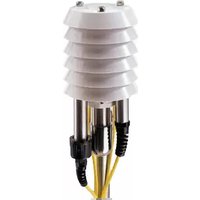
XVI. Appendix C: 3 Wire Sensor Measurement Diagram


- Global Water
- 800-876-1172 • globalw.com
- Sensor Checklist
- Inspection
- General Sensor Installation
- Barometric Pressure Sensor
- Solar Radiation Sensor
- Wind Speed Sensor
- Wind Direction Sensor
- Humidity Sensor
- Temperature Sensor
- Solar Shield
- Maintenance
- Trouble Shooting
- Other issues
- Warranty
- Appendix A: Temperature Calibration check
Brand : Global Water
Model : WE550
Category : Weather Station