Trident Eco - Pool Robot Waterco - Free user manual and instructions
Find the device manual for free Trident Eco Waterco in PDF.


| Product Type | Robotic Pool Cleaner |
| Brand | Waterco |
| Model | Trident Eco |
| Dimensions (L x W x H) | Approx. 45 x 40 x 25 cm |
| Weight | About 8.5 kg |
| Power Supply | 24V DC via transformer |
| Cable Length | 15 m |
| Filtration System | Fine mesh filter bag |
| Cleaning Coverage | Floor, walls, and waterline |
| Cleaning Cycle Time | 2 hours (programmable) |
| Drive System | Dual motor, tracked wheels |
| Climbing Ability | Climbs walls up to 90° |
| Waterline Scrubbing | Yes, with rotating brushes |
| Energy Efficiency | Low power consumption (Eco mode) |
| Maintenance | Clean filter after each use; store in shade |
| Safety Features | Automatic shut-off, low voltage |
| Spare Parts Availability | Brushes, filters, tracks available separately |
| Warranty | 2 years |
Frequently Asked Questions - Trident Eco Waterco
User questions about Trident Eco Waterco
0 question about this device. Answer the ones you know or ask your own.
Ask a new question about this device
Download the instructions for your Pool Robot in PDF format for free! Find your manual Trident Eco - Waterco and take your electronic device back in hand. On this page are published all the documents necessary for the use of your device. Trident Eco by Waterco.
USER MANUAL Trident Eco Waterco
natural_image
Exterior view of a modern robotic device with visible wheels and a 'TRIENT' branding (no additional text or symbols)Thank you for purchasing a Maytronics Robotic Pool Cleaner.
The Robotic Pool Cleaners by Maytronics deliver advanced cleaning technologies, long lasting performance and easy maintenance. You and your family will be free to enjoy swimming with full confidence that your pool is completely clean.

Cautions & Warnings
• Use the originally supplied power supply only.
- Do not use an extension cable in any case whatsoever.
- Ensure the electrical outlet is protected by a ground fault interrupter (GFI) or an earth leakage interrupter.
- Keep the power supply out of standing water.
• Take the Robot Pool Cleaner out of the pool before allowing people to enter the pool.
• Unplug the power supply before servicing.
- Do not pull the Pool cleaner from the pool using the cable.
- Use the Pool Cleaner in the following water conditions only: Chlorine Max 4 ppm; pH 7.0 - 7.8; Temperature 6 -34°C (43-93°F); NaCl Maximum = 5000 ppm.
- Specifications:
Motor protection: IP 68
Minimum depth: 0.80m/2.6ft
Maximum depth: 5m/16.4ft

Helpful hints
- When working, the Power Supply should be placed in the shade.
- If the Dolphin is fitted with combined or wonder brushes, gently aqueeze the brushes until they are soaked with water.
-
Release minimal required floating cable length to ensure proper pool coverage. Leave excess cable rolled outside the pool.
-
After each cleaning cycle wash the filter bag or cartridge. Clogged filter bags reduce scanning and cleaning efficiency.
- Once a week unplug the cable from the power supply, unwind the tangled portions of the cable, straighten it out and leave it in the sun for several hours.
- Store the pool cleaner in a shady place on its Caddy, if not on a caddy, place the pool cleaner upside down.

For a detailed manual (including videos):
manuals.maytronics.com/

Robot operation
Set Up
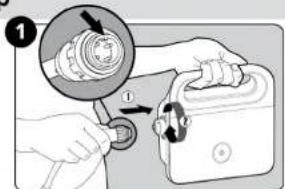
Attach the floating cable to the power supply.
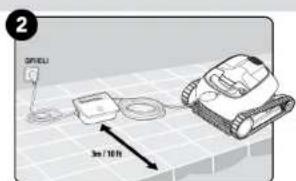
Position the power supply at least 3m/10ft away from the edge of the pool.
Into the pool
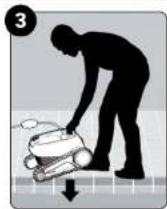
Put the Pool Cleaner into the pool. Release the Pool Cleaner and let it sink to the floor of the pool. Make sure that the floating cable is free of any obstructions.
Operation
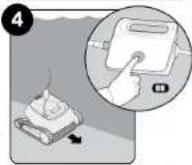
Turn the power supply ON. The Pool Cleaner will now operate until it has reached the end of the cleaning cycle.
Out of the pool
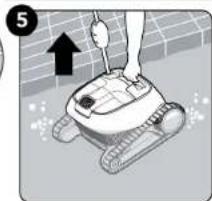
natural_image
Illustration of a robotic device with a hand and arrow indicating motion (no text or symbols)
Cleaning the filter
It is highly recommended to clean the filter basket after each cleaning cycle. Note: Don't let the filter cartridges dry out before cleaning.

Unplug the power supply before servicing

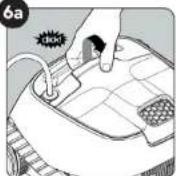
Open the filter cover.

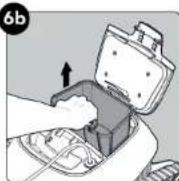
Lift up the basket.

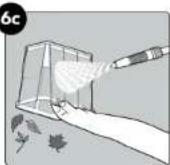
Clean the filter basket with a hose.

Storage
Coil the cable and store in a cool, dry place on the Caddy.
Do NOT store the robot where it will be exposed to direct sunlight, excessive heat or to frost.

Maintenance
Cleaning the impeller
If you notice debris trapped in the impeller:
⚠ Unplug the power supply before servicing
Clean the debris trapped in the impeller opening, according to the following steps:

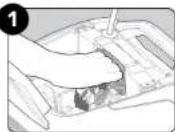
If the debris is not reachable follow the next steps.

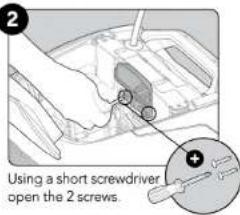

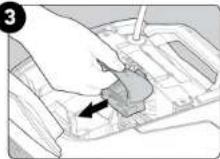
Pull the impeller cover backwards to release it. Clean the debris trapped around the impeller. Assemble the impeller cover.