
Fun Touch 6 - Camera NIKON - Free user manual and instructions
Find the device manual for free Fun Touch 6 NIKON in PDF.


| Product Type | 35mm Film Compact Camera |
| Model | Nikon Fun Touch 6 |
| Dimensions (W x H x D) | Approx. 130 x 70 x 50 mm |
| Weight (without batteries) | Approx. 200 g |
| Power Source | 2 x AA alkaline batteries |
| Film Type | 35mm film (ISO 100/200/400) |
| Lens | Nikon 35mm f/3.5 fixed lens |
| Focus System | Passive autofocus |
| Exposure Control | Automatic program AE |
| Flash | Built-in auto flash (red-eye reduction) |
| Film Advance | Automatic (motorized) |
| Film Rewind | Automatic at end of roll |
| Shutter Speed | 1/200 sec (fixed or program) |
| Self-Timer | Electronic, approx. 10 sec |
| Viewfinder | Direct optical finder with frame |
| Battery Check | LED indicator when pressing shutter halfway |
| Maintenance & Cleaning | Clean lens gently with soft lint-free cloth; use blower brush for dust; store in dry place |
| Safety Precautions | Do not disassemble; avoid moisture; remove batteries if not used for long periods |
| Spare Parts & Repairability | Available through authorized Nikon service centers; common spare: battery compartment cover |
| General Information | Point-and-shoot film camera ideal for beginners; uses standard 35mm film |
Frequently Asked Questions - Fun Touch 6 NIKON
User questions about Fun Touch 6 NIKON
0 question about this device. Answer the ones you know or ask your own.
Ask a new question about this device
Download the instructions for your Camera in PDF format for free! Find your manual Fun Touch 6 - NIKON and take your electronic device back in hand. On this page are published all the documents necessary for the use of your device. Fun Touch 6 by NIKON.
USER MANUAL Fun Touch 6 NIKON
natural_image
Grayscale astronomical image showing star fields and faint celestial objects against a dark sky (no text or symbols)Nikon
Fun▶Touch6
Instruction Manual
Thank you for purchasing the Nikon Fun Touch 6.
It is a very enjoyable, easy-to-use camera. However, in order to obtain the best results, be sure to read this instruction manual thoroughly before you begin.
Camera parts
(Fig. A)
1 Film frame counter
2 Shutter release button
3 Autofocus windows
4 Auto exposure metering window
5 Lens
6 Strap eyelet
7 Lens cover
8 Viewfinder window
9 Red-eye reduction lamp
10 Flash
11 Flash cancel button
12 Anytime flash button
13 Power (lens cover) switch
(Fig. B)
14 Viewfinder eyepiece
15 Flash ready LED (green)
16 Film take-up spool
17 Camera back lock-release lever
18 Film leader position index
19 Film guides
20 Camera back
21 Film cartridge confirmation window
22 Film chamber
23 Film rewind fork
24 Battery chamber lid
25 Mid-roll rewind lever
26 Picture frame
(Viewfinder)
Precautions
- Be sure to read this instruction manual thoroughly before use, and keep it close at hand.
- Do not subject the camera to high temperatures such as those encountered near a heater or stove or the interior of a car during summer.
- Store the camera in a cool, dry, clean place. Do not expose it to chemicals such as camphor or naphthalene. Using a desiccant during storage is recommended.
- Close the lens cover to turn the camera off when not in use. This prevents accidental release of the shutter and resulting battery drain.
- Do not attempt to disassemble, repair, or modify the camera yourself, as it houses high-voltage circuitry which can cause an electric shock. Another reason is that these actions could cause the camera to malfunction.
Attaching the strap (See Fig. C—page 25.)
Thread the wrist strap through the eyelet, then pass the other end through the loop and pull it tight.
Installing batteries (See Fig. D—page 25.)
-
Pull the battery chamber lid in the direction of the arrow to open.
-
Install two AA-type alkaline-manganese batteries with the + and - poles oriented as shown inside the battery chamber.
-
Push the battery chamber lid back into place until it clicks shut.
Notes
- Do not use NiCd batteries.
- Remove batteries from the camera when not in use for a long time.
- Do not break open or try to recharge batteries.
- Do not throw batteries into a fire.
- Keep batteries out of the reach of children.
Film speed setting
The camera is designed to use DX-coded ISO 100 or 400 film, and correct film speed is automatically set. If non DX-coded film or DX-coded ISO 200 film is loaded, film speed is automatically set to ISO 100.
Loading film (See Fig. E—page 26.)
- Slide the camera back lock-release lever in the direction of the arrow to open.
- Position the hole in the bottom of the film cartridge over the film rewind fork and insert the film cartridge into the film chamber.
- Pull the film leader across to the film leader position index.
- Make sure the film lies flat between the film guides.
- Close the camera back. The film automatically advances to the first frame. Make sure that the number "1" is visible in the frame counter.
- To confirm that film is loaded in the camera, glance at the film cartridge confirmation window.
Taking pictures (See Fig. F—page 27.)
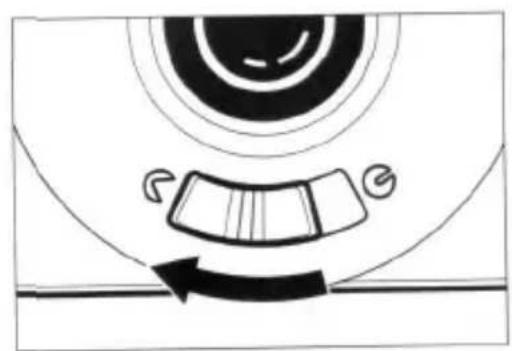
- Slide the power switch in the direction of the arrow.
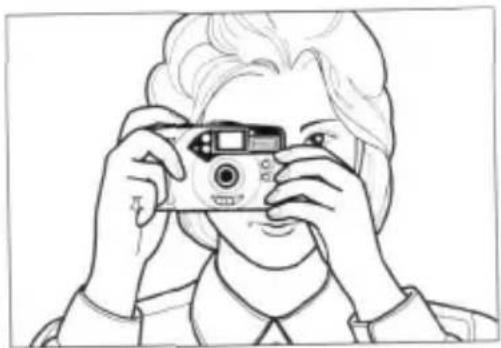
- Hold the camera steady with both hands. Be careful not to block the flash, autofocus windows or lens with your fingers or hair.
- To ensure sharp pictures, make sure your subject is at least 1m (3.3 ft) away from the camera.*
- Look through the viewfinder and center the main subject in the viewfinder.
- Press the shutter release button lightly to focus the subject.
- Fully depress the shutter release button to take the picture.
- The lens cover is interlocked with the camera's safety mechanism. You can take pictures only when the lens cover is open all the way.
* Note: If the camera-to-subject distance is closer than 1m (3.3 ft), an out-of-focus picture may result.
Flash photography (See Fig. G—page 28.) Auto flash mode (default)
The camera determines when flash is needed and fires the flash automatically. Recommended flash shooting range is as follows:
Flash shooting distance range
| Film speed | Flash shooting range |
| ISO 100 | 1 to 2.7m (3.3 to 8.9 ft) |
| ISO 200 | 1 to 3.8m (3.3 to 12.5 ft) |
| ISO 400 | 1 to 5.4m (3.3 to 17.7 ft) |
As soon as the flash is fully charged, the green flash ready LED lights up; the LED automatically goes out after approx. 20 seconds; it lights up again when you press the shutter release button lightly. To take a picture with flash, fully depress the shutter release button. Recharging takes approx. 6 seconds.
- The flash ready LED blinks while the flash is being charged and the shutter release button is locked.
Flash cancel mode (See Fig. G-2—page 28.)
When you don't wish to use flash to achieve a more natural lighting effect, press the flash cancel button while shooting.
Anytime flash mode (See Fig. G-3—page 28.)
Whenever you want to use fill-flash for backlit situations, press the anytime flash button while shooting.
Red-eye reduction
In flash photography, the subject's eyes sometimes appear bright red in color pictures (white in b/w ones) due to a phenomenon known as "red-eye." To reduce this effect, your camera comes with a red-eye reduction lamp. When the shutter release button is pressed lightly, the red-eye reduction lamp lights up, causing the size of the subject's pupil to grow smaller, thus reducing the possibility of red-eye effect. Be sure to hold down the shutter release button halfway for a few seconds to light up the red-eye reduction lamp before pressing the button all the way to fire the flash. The red-eye reduction lamp goes out after 10 seconds automatically while holding the shutter release button halfway.
How to use focus lock (See Fig. H—page 29.)
- Center the main subject in the viewfinder.
- Lightly press the shutter release button to lock focus on the subject.
- Keeping the shutter release button lightly pressed, recompose the scene. Then fully depress the shutter release button.
Note: To cancel focus lock, simply remove your finger from the shutter release button.
Special focusing situations (See Fig. I—page 30.)
The following subjects may be too difficult to focus:
a. Subjects too small
b. Subjects behind glass
c. Dark subjects with no reflection
d. Glossy, light-reflecting surfaces, such as shiny cars or water
e. Subjects without solid content (i.e. candle flame, fireworks, etc.)
In the above cases, use focus lock.
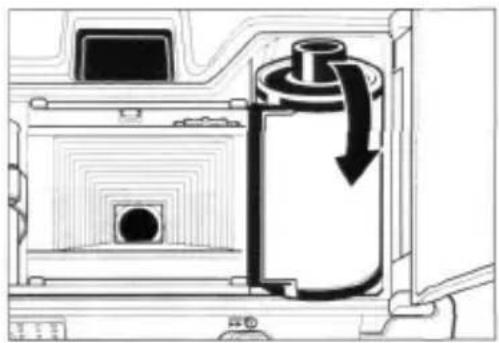
Rewinding the film (See Fig. J—page 31.)
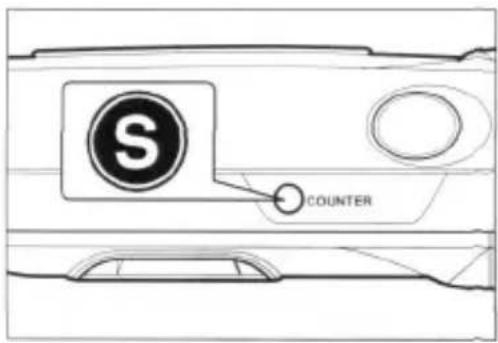
- When the film reaches the end of the roll, it rewinds automatically until it is fully rewound inside the film cartridge. The frame counter counts backwards until the end of the rewind, then stops automatically.
- Check to see if the frame counter has returned to "S".
- Open the camera back and remove the film for processing without delay.
To rewind the film in mid-roll, slide the mid-roll rewind lever in the direction of the arrow.
Specifications
| Type: | 35mm lens shutter camera with built-in flash |
| Film format: | 24mm x 36mm (standard 35mm format) |
| Lens: | 28mm f/5.6 lens (3 elements in 3 groups) |
| Focusing: | Active autofocus system with focus lock |
| Shooting distance: | 1m (3.3 ft.) to infinity |
| Shutter: | Mechanical lens shutter, fixed shutter speed of 1/100 sec. |
| Viewfinder: | Reverse-Galilean Albada bright-frame type(Magnification: 0.63x; field coverage approx. 85%) |
| Frame counter: | Additive type, automatic resetting to “S” when the camera back is opened. |
| Film speed: | Auto setting to ISO 100 or 400 for DX-coded film(ISO 100 for non-DX-coded film or DX-coded ISO 200 film) |
| Film transport: | Automatic advancing and rewinding, mid-roll rewind possible |
| Flash: | Built-in auto flash with recycling time of approx. 6 sec. Flash cancel and anytime flash functions provided. |
| Flash shooting distance range: | 1-2.7m (3.3-8.9 ft) at ISO 100, 1-3.8m (3.3-12.5 ft) at ISO 200, and 1-5.4m (3.3-17.7 ft) at ISO 400 |
| Battery life: | Approx. 30 rolls of 24-exposure film (20 rolls of 36-exposure film) with flash for half of all exposures |
| Red-eye reduction function: | Provided |
| Auto power off: | With the power switch ON, camera power automatically turns OFF after approx. 20 seconds when the camera is not in use. To turn the power ON again, lightly press the shutter release button or turn the power switch ON. |
Power source: Two 1.5V AA-type alkaline-manganese (LR6) batteries, NiCd battery not usable
Dimensions (WxHxD): Approx. 110 x 67 x 37mm [4.3 x 2.6 x 1.5 in.]
Weight
(without batteries): Approx. 155 g (5.5 oz.)
Specifications and design are subject to change without notice.
Prefacio
Español
natural_image
Diagram of a cable being inserted into a wall-mounted bracket, showing rope routing and angle of attack (no text or symbols)Fig. D

2

natural_image
Diagram of a mechanical device with battery and switch components, showing directional arrows (no text or symbols)Fig. E
1

2

natural_image
Cross-sectional diagram of a mechanical device showing internal components and a downward arrow indicating motion (no text or symbols)3

4
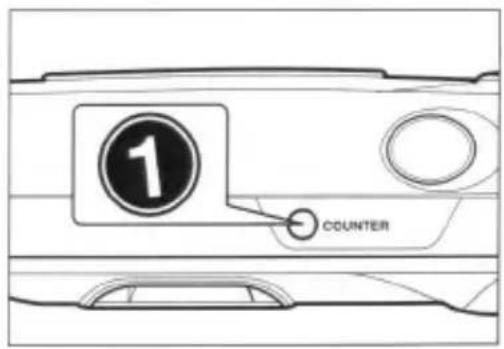
Fig. F
1
natural_image
Diagram of a car wheel with gear and wheel rim, showing rotational motion (no text or symbols)2
natural_image
Line drawing of a person holding a camera, no text or symbols present3

Fig. G

natural_image
Top-down schematic of a vehicle or road intersection with directional arrows and a central circular area (no text or symbols)2

1

3
Fig. H
1

natural_image
Illustration of a woman and child in a scenic landscape with mountains and sailboats (no text or symbols)2

natural_image
Illustration of a woman and child by a lakeside with mountains and a sailboat in the background (no text or symbols)Fig. I

natural_image
Simple line drawing of a flowering plant with two blooms and leaves, no text or symbols presenta.

natural_image
Line drawing of a car driver inside the windshield (no text or symbols)b.

natural_image
Black-and-white illustration of a woman wearing a wide-brimmed hat, posing with her hand on her shoulder (no text or symbols)C.

natural_image
Line drawing of a car crash with an explosion effect (no text or symbols)d.

natural_image
Simple line drawing of a lit candle with flame (no text or symbols)e.
Fig. J
1
2
natural_image
Diagram of a device interior showing a cylindrical component with a black arrow indicating flow or movement (no text or symbols present)3

Fun·Touch6
Nikon
IMPORTANT NOTICE:
YOU MUST PRESENT THE ATTACHED WARRANTY FORM (PART 1) TOGETHER WITH PROOF-OF-PURCHASE AND PROOF-OF-PURCHASE DATE TO OBTAIN WARRANTY SERVICE.
THIS FORM MUST BE PRESENTED FOR WARRANTY SERVICE
Fun>Touch6
This is your Nikon Inc. One Year Limited Warranty (valid in the Continental United States, Alaska, Hawaii, Puerto Rico, U.S. and U.S. Virgin Islands).
YOU MUST PRESENT THIS FORM (PART 1) TOGETHER WITH PROOF-OF-PURCHASE AND PROOF-OF-PURCHASE DATE TO OBTAIN WARRANTY SERVICE.
This Nikon product is warranted by Nikon Inc. to be free from defects in materials and workmanship for a period of one (1) year from the date of purchase. During this period, if this product is found to be defective in materials or workmanship, Nikon Inc. or its authorized service station will at its option either repair or replace this product without charge subject to the following limitations and exclusions:
This warranty extends to the original consumer purchaser only and is not assignable or transferable.
This warranty shall not apply to the following:
-
Any product which has been subject to misuse, abuse, negligence or accident.
-
Any defects or damage directly or indirectly caused by the use of unauthorized replacement parts and/or service performed by unauthorized personnel.
-
Any batteries
ALL WARRANTIES IMPLIED BY LAW INCLUDING ANY WARRANTY OF MERCHANTABILITY OR FITNESS FOR A PARTICULAR PURPOSE SHALL BE OF A DURATION OF ONE (1) YEAR FROM DATE OF PURCHASE. THE WARRANTIES HEREIN ARE EXPRESSLY IN LIEU OF ALL OTHER EXPRESS WARRANTIES INCLUDING THE PAYMENT OF CONSEQUENTIAL OR INCIDENTAL DAMAGES FOR THE BREACH OF ANY WARRANTY.
Some states do not allow (a) limitations on how long an implied warranty lasts or (b) the exclusion or limitation of incidental I or consequential damages so the above limitations or exclusions may not apply to you. This warranty gives you specific legal rights and you may also have other rights which vary from state to state.
In order to obtain performance of the warranty obligations, the original consumer purchaser must return this
warranty and this Nikon product together with proof of purchase and proof of purchase date (bill of sale) either
in person or addressed to the warranty department of Nikon Inc., New York headquarters at 1300 Walt Whitman Road, Melville, New York 11747-3064, Los Angeles branch at 19601 Hamilton Avenue, Torrance, California 90502-1309, or any one of the authorized service stations at their respective addresses listed on the reverse side. The original consumer purchaser in returning this Nikon product must prepay all postage, shipping, transportation, insurance and delivery costs to the repair facility.

THIS WARRANTY FORM MAY NOT BE REPRODUCED OR COPIED AND SHALL BE VALID ONLY WITH PRODUCTS
SOLD BY Nikon Inc.
Nikon
PART 1
Nikon AUTHORIZED SERVICE STATIONS
ARIZONA
Phoenix Camera Repair Inc
3232 North 16th Street
Phoenix AZ 85016
Principal Ernest H. Weyer
(502)277-1811
Tucson Camera Repair
742 West Limber Lost
Turcón AZ 65706
Principal Betty Cookson
(520) 887-1841
CALIFORNIA
Nelson inc
19601 Hamilton Avenue
Torrance: CA 90502-1309
(802) 545 6678
Authorized Camera Service
12918 Riverside Drive
Sherman Oaks CA 91423
Principal-Peter Nicciard
(816) 788-0404
Horizon ELECTRONICS
3961 Homer St
Union City, CA 94587
Principal-Charles Provance
(801) 223-6159
Kurf's Camera Repair Inc.
75(1) *P Mission George Rd
Sai Dmeo, CA 92126
Principal-But Kuerper
Paul Brücken
(714)266-1810
Metro Camera Service Inc
30 Mason Street
San Francisco, C
Principal: Nahai
(415) 421 3681
California Precision Service Inc
1714 28th Street
Sacramento, CA 95816
Principal: Tad Moszoro
(836) 451-1300
Pro Camera Service Inc.
2965 E. Hillcrest Dr. #302
Thousand Oaks, CA 91360
Principal Klaus Kelenburg
(805) 497-7240
COLORADO
Metro Carrata Service Inc
425 N. Federal Bank
Denver: CO 80204
Physical, James Tourt & Co.
(301) 924-2471
State Housing, County Bureau
Hobby Mountain
240 Broadway
Denver, CO 80213
(四)信息披露内容
(301) 144-24558
DISTRICT OF COLUMBIA
Staves Photo-Tech Services Inc.
1240 Mt Oliver Road N.E
Washington: DC 35060
Principal Steve Strauss
(202) 529-3200
FLORIDA
Greens Camera Tech
1238 Ridgewood Ave
Holly Hill FL 32117
Principal-Fecha
(804) 257-1366
Sr. Pham Tech Services Inc
324* Search Bid-incent
(1) 陈俊波 王一勋
Michael Mohnel, 1/2017
054-268-7572
Sr. Photo Tech Service Inc
14362 Biscayne Blvd
Mami, FL 33181-1204
Principal Karl Will II
(305) 349-4586
So. Photo-Tech Service of
Orlando Inc.
814 Virginia Drive
Orlando: FL 32803
Principal Ford Browse
(437) 896-0322
So: Philo Tech Service Inc.
1753 5th Avenue North
Principal-Tonery Ohada
(770) 451-5961
Carvera Servico Distribusi
4391 Atlanta Road
Seyura GA 30080
Principal-21 Park
(770) 432-4262
K&M Electronics
2020 Mountain Ind. Blvd
Tucker GA 30086
Personal Mich Micaul
(770)034-2151
ILLINOIS
Authorized Price: Service
8120 N. Lethigh Ave. Suite 105
Morton Grove: 1,60053
Principal-line
(347)966-4091
International Camera Corp
S17-S.Jefferson St
Chicago, IL 6060?
Principal K. Kim
(312) 361-6940
INDIANA
Focal Point Camera Service
3309 East State Blvd
F: Wayne, N 46805
Principal David J Linaguist
(2)91 484-2543
KANSAS
Pho-Tech Service Center
110 North Main Stro
P.O. 8618 638
Hesston: KS 67082
Principal Berrie Surge
(216) 327-2190
LOUISIANA
- Photo Tech Service Inc
1101 N Causeway
Mertaire: LA 70001
Principal-Charles Song
(504) 835-3379
MASSACHUSETTS
Precision Camera Repair Inc.
41 Sheridan St. P.O. Bow 180
Chicopee Falls, MA 0102
Principal:Anthony J Kvs
(413) 596 8005
Sanford Camera Repair
1256 Massachusetts Ave
Arlington, MA 02174
Principal Paul C. Sahford
(617) 648-2505
S. K. Gomes Cameta Repair
23 Drydock Avenue
Boston - MA 32210
Principal Steve Grumes
(51)第1.14版
MICHIGAN
Midwest Camera Inc. 215 Park Street
3rd Oak Street
Wyavichke, M: 487; Az
Principal Raymond 2, Handoka
(313)285-222
MINNESOTA
Marquette Camera Repair Inc
6.31.1 Wasziata Blvd
Minneapolis: M's 35410
Principal Joseph Stark
(3)215411252
Custom Camera Service Inc
623 W. Lake Street
Minneapolis MN 55408
Principal-Robert Moen
612)8223421
(1) 2024年1月
Laemis C
4229 W. Sahara
Las Vegas NV 89102
Principal-George Wolff
(753) 876/0468
NEW HAMPSHIRE
Apex Photo-Technical Services
13 Columbia Dr. Uni 16A
Restaurian 504 019231
Principal David Marsh
(6)23 RR1-5/20
NEW MEXICO
Albursenque Photo
Technologies
2500 Garfield Ave. S.E
Albuquerque, NM 8710
Portugal-Michael Mybairse
(505) 256-3004
NEW YORK
Nikon inc
1300 Wall Whitman Road
Melville, NY 31747-3054
(801)6456679
Hudson Valley Camera
Regal Inc.
233 West Route 59
Nariuet, NY 10954
Principal-uel Vose
(314)6225(397)
(五) 本次股东大会
Pluto-Tech Regan Service Inc
110E 739-58
New York, NY 10003
Principal Harry Fea
(21)173448
Professional Camera
Service Inc
37 West 47th Street
New York, NY 10036
Principal-Rick Rankin
(212) 3820650
NORTH CAROLINA
Sc Photo Tech Service Inc.
2610 South Blvd
Charlotte, NC 25028
Principal/Larry Heidr
(794) 523 0012
OHIO
Camtronics Camera & Video
Regui
6587 North High Street
Columbus: OH 43214
Principal-William: R. Schoen
(614)2622764
OKLAHOMA
Photo Products Repair Inc
3109 Classen Blvd
Oklahoma City, OK 73118
Principal Charles Smith
(405)521-8022
OREGON
Associated Carolina Regan Inc
3421 N.E. Sandy Blvd
Portland OR 97232
Principal: Paul Osbu
:503 282-5625
Sharper Video
2645 SE 50th Ave
Portland, OR 97206
Principal-Mik Flack
(53) 233-5871
PENNSYLVANIA
Corvet Camera Repair Shop
460 N. 9th Stove
Philadelphia, PA 19123
Personal Desert I. Wave
(218) 765.6431
TEXAS
Ams Engineering
723 W. MI. Houston
Houston TX 7703B
Principal Missoud Moosnight
(7)(3) 200-4443
Archivial Camera Report
203 W. Main St
Richardson TX 7508
Principal Robert Fenuro
(972) 544 7655
Cambeia Services Inc
3407 South Shepherd
Houston, TX 27038-3391
Principal Maylin County
(713)528-6652
Haval Camera Service Inc
1102 Basse Road
San Antonio TX 78212-1095
Principal Curtis Haven
2016.735.7412
UTAH
Forster's Camera Service Inc
40 West 2950 South
Salt Lake City, UT 84115
Principal-John Pontier
(801)687-1288
VIRGINIA
Strauss Photo-Tech Service
4CM West 21st Shau
Norfolk VA 235
Principal William Wright
(804) 625-5341
WASHINGTON
Photo-Transcis Inc
223 Westlake Avenue North
Seattle: WA 109139
Principal Jimmy Werlsworth
(208)5823646
WISCONSIN
BOC Enterprises Inc
313 West Johnson Street
Madison: WI 53703
Principal Dial Realistic
(608) 257-6315
公司代码:600517
WYOMING
Photo Electronics
145 S Washington St
Сверг. WY 82801
Princeau Set Wallingford
(307)234-8082
THE AUTHORIZED SERVICE STATIONS LISTED ABOVE ARE SUBJECT TO CHANGE WITHOUT NOTICE.
Fun·Touch6
Retain this Worldwide Warranty with proof of purchase for your records
Nikon ONE YEAR WORLDWIDE LIMITED WARRANTY
(Excluding the Continental United States, Alaska, Hawaii, Puerto Rico, U.S. and U.S. Virgin Islands)
Welcome to the worldwide family of Nikon owners.
Your Nikon equipment has been manufactured to the highest quality standards by NIKON CORPORATION, Tokyo, Japan. This warranty entitles the original consumer to worldwide warranty protection in accordance with the terms and conditions. It affords the consumer warranty protection outside the continental United States, Alaska, Hawaii, Puerto Rico and the U.S. Virgin Island. Such warranty coverage is supplemental to and not in lieu of the United States Nikon One Year Limited Warranty which is received by the customer with the Nikon product.
This Nikon product except for batteries is warranted by NIKON CORPORATION, Tokyo, Japan to be free from defects in materials or workmanship for a period of one year from the date of purchase. During this period any one of the worldwide repair facilities listed on the reverse side will repair without charge any parts or assembly of parts found to be defective in materials or workmanship subject to the following limitations:
-
This warranty extends to the original consumer purchaser only and is not assignable or transferable.
-
This warranty shall not extend to any product which has been subject to misuse, abuse, negligence, accident or unauthorized repair. All warranties implied by law including any warranty of merchantability or fitness for a particular purpose shall be of a duration of one (1) year from date of purchase. The warranties herein are expressly in lieu of all other express warranties including the payment of consequential or incidental damages for the breach of any warranty.
No warranties, whether express or implied, including the warranties of merchantability or fitness for a particular purpose are made by any distributor or dealer of the product herein warranted; nor shall such dealer or distributor be liable for the payment of any direct incidental or consequential damages.
in order to obtain worldwide service, the consumer should return the Nikon product, either in person or addressed to the Warranty Department of any authorized service repair station listed on the reverse side together with proof of purchase and this warranty. The original consumer in returning this product, must prepay all postage, shipping, transportation, insurance and delivery costs to the repair facility.
For prompt response of worldwide warranty inquiries, please direct all correspondence to:

NIKON CORPORATION
Nikon
PART 2
Nikon SERVICE FACILITIES
| Argentinist: Eduzich Udano y Gia,S.A.C.F.I. | Ayasuchu 1230, Buenos Aires (1111)Phone: +4-1-6150867 | Potanei Camera Sy Z.O.O.Portagah Altari Photo Image S.L. | UL, Tamya 36.00205 Kranazawa Phone: +48-22-6281250Rus Karamde Heritiano, 41 A9, 1290 LatoioPhone: -361-1-3849209 |
| Australia: Microsoft OpticurIndustrial Pty Ltd. | Unit d Northbank Industrial Park20-36, Nanopintiv Avenue, Mechatbank, NSW 2114Phone: +11-2-6590-0200 | Renkian: Dinacogot S.A. | 1. Rue, Robert Shunham, 21 n 3, BP268, 87026 Le Port CedexPhone: -252-42-80-30 |
| Austria: Kirca Kanara SensorBelgamb: H. De Guakalkar & Co. N.V. | Pularelli: 002177, A-1020 wam Phone: +43-1-2160910Peter Benobatisl 719, B-2018 AntwerpPhone: +32-3-216-0660 | Seuck Andria: Ahmed AbdulwahedAbdullah TradingEstablishment | P.O. Box 2611 Jiegash 21481 (Postal Address)Hall Commercial Centre, 3rd Floor, 1-6, HallRoad, Bendie Caravan Centre, JordanPhone: -466-2-6425333/482077 |
| Brazil: T. Tanaka & Cie. Ltda. | Rua Martin Francisco, 406 (1028-006, São Paulo-SPPhone: +55-11-8252055) | Singapore: Strisa (Singapore)Pe. Ltd. | 11 Chang Cham Road, 400-01 Shira HouviSingapore: 159840. Phone: +89-47277777 |
| Canada: Nikon Cathoda Inc. | 1396, Atkinson Olova, Mississauga, Ontario L481-1C1Phone: +1-905-0259610 | Spain: African S.A. | Calle Labrón, 95, Pril. 71, 38021 BarcelonaPhone: +34-2-3402101 |
| Chile: Reischmacher Polo S.A.G. #. | Jose Manuel Injola F1830, Cattava 4216, Providence, SantiagoPhone: +56-2-2048030 | Sweden: Nikon Svetiska AB | Calle Nanta Mercadays, 7, Madrid-20Phone: +34-1-5539893 |
| Cyprus: K.H. Papanlan Ltd.Czech Rep.: Nikon K.f.o. | 240 Ludha Street, Rosella R.O. Box 1407. Phone: +347-2-483705Slipodnik 45-640, 111 21 Parla 1, P.O. Box 431Phone: +025-2-02232971 +020-2-22200025 | Switzerland: Nikon AG | Anton Tamma Vág 3 Box 64, 194 22 Upplandá-VladyPhone: +48-8-544119900 |
| Denmark: Danak Fotogantur, A/SFinland: Nikon Svenika AB | Leno Parkelle 41, DK 2100 Kobertham: Phone: +45-36-162020Ophaparnine 4, 01900 VartatPhone: +58-8-5659990 | Taiwan: Yang Tai Trading Corp. Ltd. | Kassar-Ferrner-Strasse 6, CH-8700 Kranach92HPhone: +41-1-8136111 |
| France: Nikon France S.A. | 191, Rue du Marchi Relay, 94504 Chemigny Sur Mérne CedexPhone: +33-1-45164518 | Thailand: Niko (Thailand) Co., Ltd. | SF, 30 Viala-Hing Street, Taipei 19037Phone: -886-2-2311-7970, 2311-3480160 Silion Road 12, Bangkok 10500 |
| Greece: D. J. Dj Khalidali S.A. | 44-1-6545101 St, 175-54 Palco Falto, Athens: Phone: +30-1-0416888 | Turkey: Nur Fotografistik PazavamaVir Tracel A.S. | Nikko telaksian Caf. No. 133, Finland,80040 Istanbul: +90-212-293-3613 |
| German: Nikon GmbHHong Kong: Nikon Hong Kong Ltd. | Talisendrocher Weg 25, 45472 Diasekatr Phone: +49-211-84140Sute 1001, 10F, Chiplaza One, 1111 King's Road,Takoo Shing. Phone: +652-2902-9000 | U.A.E.J.: Grand Stores | Saiah Myrammed Bir Lahje Bldg., Al Sarhoud, P.O. Box 2144,Dena, Duble Phone: +871-4-825790 |
| Hungary: Nikon KitIndia: Marita Camera Center | Deva Utra 26-28, H-1134 Budapest Phone: +36-1-250-5525306, Vijana Kildayor Bldg., Fado Street,Khadra Mareg, Bombay (Muniba) 402-011Phone: +91-22-3679354 | United Kingdom: Nikon U.K. Ltd. | 388 Richmond Road, Kingston,Sunny KT3 SPR Phone: +44-181-541-6440 |
| Photo Vision | 223, Delta Industrial Estate, New Delhi 110020Phone: +91-11-6831836 | Uruguay: Micro S.C. | Casilla Carlos 27, Anta, 18 de Jairo 1392, MontevideoPhone: +598-2-015516 |
| Capital Electronics | 12, J.L. Nehru Road, Calcutta X06-913Phone: +91-33-2293991, 2205847 | U.S.A.: Nikon Inc. | 1360 Wai Whirman Rd, Metville, N.Y. 11747-3064Phone: +1-800-645-6578 |
| Indonesia: PT Alta Semaraya | Akada Belanja Duul Mangga Dua RuloNo. 91, A Arteni Mangga Club RussiaJakarta 19520 Phone: +62-21-0127554 | Vietnam: Pham The Camera RepairCenter | 19601 Hamilton Avenue, Torrsack, CA 90502-1309Phone: +1-800-645-6578 |
| PT Indyink Kandi | J. Torrang Raya No. 49 B, Jakarta 11440Phone: +92-21-5609874 | Yugoslavia: Relot & | 11 Le Corp Kue Sp. Dist. 1, Seajom CityPhone: +84-8-829-5686 |
| Ireland: Nikon U.K. Ltd. | 380, Richmond Road, Kingston, Surrey KT2 SPRPhone: +44-181-5414445 | Japan: NIKON CORPORATIONOh! Service Sec | Ponjaka BR, 12, 11005 BeogradPhone: +80-11-4444552 |
| Israel: Hidal Photo Supply AgropeciusLia. | P.O. Box 15886, Tel Aviv 61016Phone: +972-3-6830947 | Sapporo Service Center | 6-3, Nishashi 1-choma, Shimagawa-ku, Tokyo 140-6601Phone: +81-3-3773-2221 |
| Italy: Nati S.p.A. | Via Tabacchi 33, 10132 Toowo Phone: +30-11-6998504 | Shinjuku Service Center | Dhodon Bldg., 2F, 1-13, Ondorikashi, Chuo-ku, Sapporo 880-0042Phone: +81-11-231-1996 |
| Kuwait: Ahmir & Co., Ltd. | P.O. Box 3556, Salat, P. Code (13036-Salis) GunetPhone: +95-52129849-9 | Nihombashi Service Center | Shinjuku NS Bldg., 1F, 2-4-1, Kathi-Shinjuku, Shinjuku-ku, Tokyo 163-0805Phone: +1-3-3321-4466 |
| Malaysia: Shiro (sakayaya),Sdn. Bhd. | Los 22 & 94, Jalan 355, Section 51A, 45103 Petaling Jaya,Selangor IP O. Box 13271, 50314 Kuala LumpurPhone: +83-3-1749842 | Yokohama Service Station | Nihombashi First Bldg., 9, 3-19, Nihombashi 1-choma, Chuo-ku, Tokyo 103-0027Phone: +3-1-3391-8610 |
| Mexico: Mayoritas Fotograficoi,S.A. de CV. | Dr. Jimenez 158, Doitures, D.F. Mexico City,Mexica 66720 Phone: +52-5-5887011, 5864744 | Nagoya Service Center | TS Plaza Bldg., 4F, 398-8, Tsukuyoshiho, Klarigawa-ku, Yokohama 221-0835Phone: +85-312-1131 |
| Netherlands: Via lejpor B.V. | Ruthenfordstras 7, 2514 K.A. HarlemPhone: +31-23-5131410 | Kanzawa Service Station | Chugu Tokyo Kasa Bldg., 6F, 3-20-17, Manouchi, Naka-ku, Nagoya 460-0002Phone: +51-52-954-0122 |
| New Canada: PhodiolaBudz | B.P. 2358 Rounias, Phone: +687-28-6370 | Osisko Camera Service Setc. | Kanazawa Tokyo Kasa Bldg., 2F, 3-18, Oyana-chu, Karastawa 820-0018Phone: +78-79-222-1001 |
| New Zealand: T.A. Macielier LiF | 05-13 Pymati Raj, AucklandPhone: +64-9-3634334 | Osaka Umeza Service Sestion | Delawarehiro Bldg., 2F, 2-3, Kalahiraabash, Chuo-ku, Osaka 542-0066Phone: +61-6-0253-7026 |
| Norway: Interfoto A.S. | O.H. Banglora 51, N-1322 HuvikPhone: +7-07-534850 | Osaka Umeza Service Sestion | Shinjuku Bldg., 1F, 2-5-2, Umeda, Kita-ku, Osaka 530-0001Phone: +1-6-0488-0730 |
| Panama: Teletoto (immacional) 2HnLiBa. S. | Calle 18 y Di Edficio No. 24, Zona Libre de CloronPhone: +37-4411558 | Fukushima Service Center | Halata Ekumas Dakosi Selmi Bldg., 1F, 1-4-1, Hakala Ekimai, Hakala-ku,Fukushima 813-0011 Phone: +80-22-415-6362 |
NO
МОТАЯО ОО ИОКИ
No reproduction in any form of this manual, in whole or in part (except for brief quotation in critical articles or reviews), may be made without written authorization from NIKON CORPORATION.
- Nikon
- Fun▶Touch6
- Camera parts
- (Fig. A)
- (Fig. B)
- (Viewfinder)
- Precautions
- Attaching the strap (See Fig. C—page 25.)
- Installing batteries (See Fig. D—page 25.)
- Notes
- Film speed setting
- Loading film (See Fig. E—page 26.)
- Taking pictures (See Fig. F—page 27.)
- Flash photography (See Fig. G—page 28.) Auto flash mode (default)
- Flash cancel mode (See Fig. G-2—page 28.)
- Anytime flash mode (See Fig. G-3—page 28.)
- Red-eye reduction
- How to use focus lock (See Fig. H—page 29.)
- Special focusing situations (See Fig. I—page 30.)
- Rewinding the film (See Fig. J—page 31.)
- Specifications
- Prefacio
- Español
- THIS FORM MUST BE PRESENTED FOR WARRANTY SERVICE
- Fun>Touch6
- Nikon AUTHORIZED SERVICE STATIONS
- ARIZONA
- CALIFORNIA
- COLORADO
- DISTRICT OF COLUMBIA
- FLORIDA
- ILLINOIS
- INDIANA
- KANSAS
- MASSACHUSETTS
- MICHIGAN
- MINNESOTA
- Laemis C
- NEW HAMPSHIRE
- NEW MEXICO
- NEW YORK
- NORTH CAROLINA
- OHIO
- OKLAHOMA
- OREGON
- PENNSYLVANIA
- TEXAS
- UTAH
- VIRGINIA
- WASHINGTON
- WISCONSIN
- WYOMING
- Fun·Touch6
- Nikon ONE YEAR WORLDWIDE LIMITED WARRANTY
- Welcome to the worldwide family of Nikon owners.
Brand : NIKON
Model : Fun Touch 6
Category : Camera