
VMA447 - Electric pump VELLEMAN - Free user manual and instructions
Find the device manual for free VMA447 VELLEMAN in PDF.


| Product Type | Digital Multimeter |
| Model | VMA447 |
| Brand | Velleman |
| Dimensions (approx.) | 150 x 70 x 30 mm |
| Weight (approx.) | 200 g |
| Power Supply | 9V battery (6F22 or NEDA 1604) |
| Display | LCD, 3.5 digits, max reading 1999 |
| DC Voltage Range | 200 mV to 600 V |
| AC Voltage Range | 200 V to 600 V |
| DC Current Range | 200 μA to 10 A |
| Resistance Range | 200 Ω to 2 MΩ |
| Diode Test | Yes |
| Continuity Buzzer | Yes |
| Safety Rating | CAT II 600 V |
| Accessories Included | Test leads, user manual |
| Warranty | 2 years |
Frequently Asked Questions - VMA447 VELLEMAN
User questions about VMA447 VELLEMAN
0 question about this device. Answer the ones you know or ask your own.
Ask a new question about this device
Download the instructions for your Electric pump in PDF format for free! Find your manual VMA447 - VELLEMAN and take your electronic device back in hand. On this page are published all the documents necessary for the use of your device. VMA447 by VELLEMAN.
USER MANUAL VMA447 VELLEMAN
MINI PERISTALTIC PUMP 6 V

natural_image
Close-up of a blue and white plastic mechanical component with a coiled white tube, no visible text or symbols.USER MANUAL
1. Introduction
To all residents of the European Union
Important environmental information about this product

This symbol on the device or the package indicates that disposal of the device after its lifecycle could harm the environment. Do not dispose of the unit (or batteries) as unsorted municipal waste; it should be taken to a specialized company for recycling. This device should be returned to your distributor or to a local recycling service. Respect the local environmental rules.

If in doubt, contact your local waste disposal authorities.
Thank you for choosing Velleman ^® ! Please read the manual thoroughly before bringing this device into service. If the device was damaged in transit, do not install or use it and contact your dealer.
2. Safety Instructions

- This device can be used by children aged from 8 years and above, and persons with reduced physical, sensory or mental capabilities or lack of experience and knowledge if they have been given supervision or instruction concerning the use of the device in a safe way and understand the hazards involved. Children shall not play with the device. Cleaning and user maintenance shall not be made by children without supervision.

- Indoor use only. Keep away from rain, moisture, splashing and dripping liquids.
3. General Guidelines

- Refer to the Velleman ^ Service and Quality Warranty on the last pages of this manual.
• Familiarise yourself with the functions of the device before actually using it.
- All modifications of the device are forbidden for safety reasons. Damage caused by user modifications to the device is not covered by the warranty.
- Only use the device for its intended purpose. Using the device in an unauthorised way will void the warranty.
- Damage caused by disregard of certain guidelines in this manual is not covered by the warranty and the dealer will not accept responsibility for any ensuing defects or problems.
- Nor Velleman nv nor its dealers can be held responsible for any damage (extraordinary, incidental or indirect) – of any nature (financial, physical...) arising from the possession, use or failure of this product.
- Due to constant product improvements, the actual product appearance might differ from the shown images.
- Product images are for illustrative purposes only.
- Do not switch the device on immediately after it has been exposed to changes in temperature. Protect the device against damage by leaving it switched off until it has reached room temperature.
- Keep this manual for future reference.
4. What is Arduino ®
Arduino ^® is an open-source prototyping platform based in easy-to-use hardware and software. Arduino ^® boards are able to read inputs – light-on sensor, a finger on a button or a Twitter message – and turn it into an output – activating of a motor, turning on an LED, publishing something online. You can tell your board what to do by sending a set of instructions to the microcontroller on the board. To do so, you use the Arduino programming language (based on Wiring) and the Arduino ^® software IDE (based on Processing).
Surf to www.arduino.cc and www.arduino.org for more information.
5. Overview
VMA447
A peristaltic pump is a type of positive displacement pump used for pumping a variety of fluids.
power supply: 6 VDC, 5 W
tube dimensions: 2.0 x 4.0 mm
tube material: silicon
tube life: > 200 h
flow rate: ≥ 39 ml/min
dimensions: 65 x 40 mm
weight: 95 g
connections: solder tag 3 mm
6. Replacing the Silicon Tube
Gently press on the two clips and remove the pump module from the motor.

natural_image
Close-up of a blue plastic electrical plug with red arrows pointing to its side (no visible text or symbols)To open the pump module, gently press on the other two clips and remove the pump cover.

natural_image
Close-up of a blue mechanical component with red arrows indicating motion, next to a black electrical socket (no text or symbols visible)This should be the result:
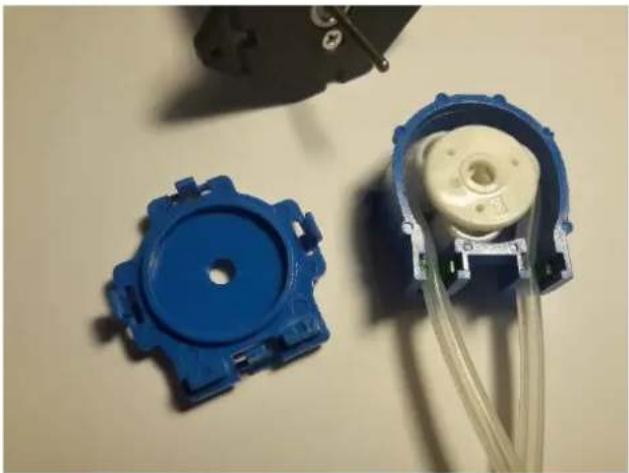
natural_image
Two blue plastic mechanical components with attached white housing and connecting wires, placed on a plain surface (no text or symbols visible)Take out the rollers and the tube. This tube can be replaced by our VMA448.

natural_image
Close-up of blue plastic mechanical components including a coiled cable and a black electrical component (no text or symbols visible)Proceed in reverse order to re-assemble.
7. More Information
Please refer to the VMA447 product page on www.velleman.eu for more information.
Use this device with original accessories only. Velleman nv cannot be held responsible in the event of damage or injury resulting from (incorrect) use of this device. For more info concerning this product and the latest version of this manual, please visit our website www.velleman.eu. The information in this manual is subject to change without prior notice.
© COPYRIGHT NOTICE
The copyright to this manual is owned by Velleman nv. All worldwide rights reserved. No part of this manual may be copied, reproduced, translated or reduced to any electronic medium or otherwise without the prior written consent of the copyright holder.
Velleman® Service and Quality Warranty
Since its foundation in 1972, Velleman® acquired extensive experience in the electronics world and currently distributes its products in over 85 countries.
All our products fulfil strict quality requirements and legal stipulations in the EU. In order to ensure the quality, our products regularly go through an extra quality check, both by an internal quality department and by specialized external organisations. If, all precautionary measures notwithstanding, problems should occur, please make appeal to our warranty (see guarantee conditions).
General Warranty Conditions Concerning Consumer Products (for EU):
- All consumer products are subject to a 24-month warranty on production flaws and defective material as from the original date of purchase.
- Velleman® can decide to replace an article with an equivalent article, or to refund the retail value totally or partially when the complaint is valid and a free repair or replacement of the article is impossible, or if the expenses are out of proportion.
You will be delivered a replacing article or a refund at the value of 100% of the purchase price in case of a flaw occurred in the first year after the date of purchase and delivery, or a replacing article at 50% of the purchase price or a refund at the value of 50% of the retail value in case of a flaw occurred in the second year after the date of purchase and delivery.
- Not covered by warranty:
- all direct or indirect damage caused after delivery to the article (e.g. by oxidation, shocks, falls, dust, dirt, humidity...), and by the article, as well as its contents (e.g. data loss), compensation for loss of profits;
- consumable goods, parts or accessories that are subject to an aging process during normal use, such as batteries (rechargeable, non-rechargeable, built-in or replaceable), lamps, rubber parts, drive belts... (unlimited list);
- flaws resulting from fire, water damage, lightning, accident, natural disaster, etc....;
- flaws caused deliberately, negligently or resulting from improper handling, negligent maintenance, abusive use or use contrary to the manufacturer's instructions;
- damage caused by a commercial, professional or collective use of the article (the warranty validity will be reduced to six (6) months when the article is used professionally);
- damage resulting from an inappropriate packing and shipping of the article;
- all damage caused by modification, repair or alteration performed by a third party without written permission by Velleman®.
- Articles to be repaired must be delivered to your Velleman® dealer, solidly packed (preferably in the original packaging), and be completed with the original receipt of purchase and a clear flaw description.
- Hint: In order to save on cost and time, please reread the manual and check if the flaw is caused by obvious causes prior to presenting the article for repair. Note that returning a non-defective article can also involve handling costs.
• Repairs occurring after warranty expiration are subject to shipping costs. - The above conditions are without prejudice to all commercial warranties.
The above enumeration is subject to modification according to the article (see article's manual).
- MINI PERISTALTIC PUMP 6 V
- USER MANUAL
- Introduction
- To all residents of the European Union
- Important environmental information about this product
- Safety Instructions
- General Guidelines
- What is Arduino ®
- Overview
- VMA447
- Replacing the Silicon Tube
- More Information
- © COPYRIGHT NOTICE
- Velleman® Service and Quality Warranty
- General Warranty Conditions Concerning Consumer Products (for EU):
- - Not covered by warranty:
Brand : VELLEMAN
Model : VMA447
Category : Electric pump