
ARD912-W2 - Detector Dahua Technology - Free user manual and instructions
Find the device manual for free ARD912-W2 Dahua Technology in PDF.


| Product Type | Wireless Water Leak Detector |
| Brand | Dahua Technology |
| Model | ARD912-W2 |
| Sensor Type | Water leak detection probe (positive and negative probes) |
| Sensitivity | Adjustable by rotating the positive probe |
| Wireless Frequency | 433.1–434.6 MHz or 868.0–868.6 MHz (depending on variant) |
| Communication Range (Open Space) | Up to 1200 m (868 MHz) / Up to 800 m (433 MHz) |
| Encryption | AES128 |
| Power Supply | 1 × CR123A battery (3V) |
| Battery Life | Up to 3 years (when triggered once daily) |
| Operating Temperature | -10°C to +55°C (indoor) |
| Operating Humidity | 10% to 90% RH |
| Dimensions (Product) | 84.7 mm × 84.7 mm × 32.5 mm |
| Net Weight | 0.1 kg |
| Protection Rating | IPX5 |
| Material | PC + ABS |
| Indicator Light | Multi-color LED for pairing, power status, and alarm |
| Installation Methods | All-in-one, split mount with screw, or split mount with adhesive tape |
| Compatible App | DMSS (iOS/Android) via DHUA hub |
| Additional Features | Low battery alarm, remote update, cloud update, temporary deactivate, siren linkage, alarm-video linkage, signal strength detection, detector test |
| Certifications | CE, FCC (depending on variant) |
| Package Contents | Water leak detector, screw package, QR code, double-sided adhesive tape, legal and regulatory information, quick start guide |
Frequently Asked Questions - ARD912-W2 Dahua Technology
User questions about ARD912-W2 Dahua Technology
0 question about this device. Answer the ones you know or ask your own.
Ask a new question about this device
Download the instructions for your Detector in PDF format for free! Find your manual ARD912-W2 - Dahua Technology and take your electronic device back in hand. On this page are published all the documents necessary for the use of your device. ARD912-W2 by Dahua Technology.
USER MANUAL ARD912-W2 Dahua Technology
Wireless Water Leak Detector
User's Manual

natural_image
Abstract geometric composition with gray and red color blocks (no text or symbols)Foreword
General
This manual introduces the installation, functions and operations of the Wireless Water Leak Detector (hereinafter referred to as the "water leak detector"). Read carefully before using the device, and keep the manual safe for future reference.
Safety Instructions
The following signal words might appear in the manual.
| Signal Words | Meaning |
 DANGER DANGER | Indicates a high potential hazard which, if not avoided, will result in death or serious injury. |
 WARNING WARNING | Indicates a medium or low potential hazard which, if not avoided, could result in slight or moderate injury. |
 CAUTION CAUTION | Indicates a potential risk which, if not avoided, could result in property damage, data loss, reductions in performance, or unpredictable results. |
 IPS IPS | Provides methods to help you solve a problem or save time. |
 YTE YTE | Provides additional information as a supplement to the text. |
Revision History
| Version | Revision Content | Release Time |
| V1.0.0 | First release. | November 2022 |
Privacy Protection Notice
As the device user or data controller, you might collect the personal data of others such as their face, fingerprints, and license plate number. You need to be in compliance with your local privacy protection laws and regulations to protect the legitimate rights and interests of other people by implementing measures which include but are not limited: Providing clear and visible identification to inform people of the existence of the surveillance area and provide required contact information.
About the Manual
- The manual is for reference only. Slight differences might be found between the manual and the product.
- We are not liable for losses incurred due to operating the product in ways that are not in compliance with the manual.
- The manual will be updated according to the latest laws and regulations of related jurisdictions. For detailed information, see the paper user's manual, use our CD-ROM, scan the QR code or visit our official website. The manual is for reference only. Slight differences might be found between
the electronic version and the paper version.
- All designs and software are subject to change without prior written notice. Product updates might result in some differences appearing between the actual product and the manual. Please contact customer service for the latest program and supplementary documentation.
- There might be errors in the print or deviations in the description of the functions, operations and technical data. If there is any doubt or dispute, we reserve the right of final explanation.
- Upgrade the reader software or try other mainstream reader software if the manual (in PDF format) cannot be opened.
- All trademarks, registered trademarks and company names in the manual are properties of their respective owners.
- Please visit our website, contact the supplier or customer service if any problems occur while using the device.
- If there is any uncertainty or controversy, we reserve the right of final explanation.
Important Safeguards and Warnings
This section introduces content covering the proper handling of the water leak detector, hazard protection, and protection of property damage. Read carefully before using the water leak detector, and comply with the guidelines when using it.
Operation Requirements

- Make sure that the power supply of the water leak detector works properly before use.
- Do not pull out the power cable of the water leak detector while it is powered on.
- Only use the water leak detector within the rated power range.
- Transport, use and store the device under allowed humidity and temperature conditions.
- Prevent liquids from splashing or dripping on the device. Make sure that there are no objects filled with liquid on top of the water leak detector to avoid liquids flowing into it.
- Do not disassemble the water leak detector.
Installation Requirements

WARNING
- Connect the water leak detector to the adapter before power on.
- Strictly abide by local electrical safety standards, and make sure that the voltage in the area is steady and conforms to the power requirements of the water leak detector.
- Do not connect the water leak detector to more than one power supply. Otherwise, the might become damaged.

- Observe all safety procedures and wear required protective equipment provided for your use while working at heights.
- Do not expose the water leak detector to direct sunlight or heat sources.
- Do not install the water leak detector in humid, dusty or smoky places.
- Install the water leak detector in a well-ventilated place, and do not block the ventilator of the device.
- Use the power adapter or case power supply provided by the device manufacturer.
- The power supply must conform to the requirements of ES1 in IEC 62368-1 standard and be no higher than PS2. Note that the power supply requirements are subject to the device label.
- Connect class I electrical appliances to a power socket with protective earthing.
Table of Contents
Foreword ....
Important Safeguards and Warnings....III
1 Introduction .... 1
1.1 Overview ...... 1
1.2 Technical Specifications.... 1
2 Checklist....3
3 Appearance ....4
4 Adding the Wireless Water Leak Detector to the Hub .... 5
5 Installation....6
5.1 All-in-one Installation....6
5.2 Split Mount with Screw 7
5.3 Split Mount with Adhesive Tape....8
6 Configuration ....11
6.1 Viewing Status....11
6.2 Configuring the Water Leak Detector ....11
Appendix 1 Cybersecurity Recommendations....13
1 Introduction
1.1 Overview
Wireless Water Leak Detector can be used to detect water leaks in indoor pipes, baths, sinks, washing machines, and dishwashers. It triggers alarms and provides timely notifications to keep you up to date on ongoing events. It is easy to install and does not require wiring. It also provides communication security, supporting the use of wireless communication with encryption technology.
1.2 Technical Specifications
This section contains technical specifications of the water leak detector. Please refer to the ones that correspond with your model.
Table 1-1 Technical specification
| Type Parameter Description | |||
| Function | Indicator Light | 1 for multiple statuses (pairing, power status, and alarm) | |
| Button Power button | |||
| Remote Update Cloud update | |||
| Low Battery Alarm | Yes | ||
| Tamper No | |||
| Technical | Sensor Water leak detector | ||
| Sensitivity Adjustable | |||
| Operating Current | 28.5 uA | ||
| Alarm Current 5.8 mA | |||
| Wireless | Carrier Frequency | DHI-ARD912-W2 (868), DHI-ARD912-W2 (868D): 868.0 MHz–868.6 MHz | DHI-ARD912-W2, DHI-ARD912-W2 (D): 433.1 MHz–434.6 MHz |
| Communication Distance | DHI-ARD912-W2 (868), DHI-ARD912-W2 (868D): Up to 1,200 m (3937.01 ft) in an open space | DHI-ARD912-W2 (868), DHI-ARD912-W2 (868D): Up to 800 m (2624.67 ft) in an open space | |
| Transmit Power | DHI-ARD912-W2 (868), DHI-ARD912-W2 (868D): Limit 25 mW | DHI-ARD912-W2 (868), DHI-ARD912-W2 (868D): Limit 15.8 mW | |
| Communication Mechanism | Two-way | ||
| Encryption Mode | AES128 | ||
| Frequency Hopping | Yes | ||
| General | Power Supply CR123A×1 | ||
| Battery Life 3 years when triggered once a day. | |||
| Power Consumption | Max 144 mW | ||
| Operating Temperature | -10 °C to +55 °C (+14 °F to +131 °F) (indoor) | ||
| Storage Temperature | -10 °C to +55 °C (+14 °F to +131 °F) | ||
| Operating Humidity | 10%-90% (RH) | ||
| Storage Humidity | 10%-90% (RH) | ||
| Product Dimensions | 84.7 mm×84.7 mm×32.5 mm (3.33" × 3.33" × 1.28") | ||
| Packaging Dimensions | 135.0 mm×98.0 mm×56.0 mm (5.32" × 3.86" × 2.20") | ||
| Net Weight 0.1 kg (0.22 lb) | |||
| Gross Weight 0.2 kg (0.44 lb) | |||
| Casing PC + ABS | |||
| Protection IPX5 | |||
| Certifications | DHI-ARD912-W2 (868), DHI-ARD912-W2 (868D): CE | DHI-ARD912-W2, DHI-ARD912-W2 (D): CE, FCC | |
2 Checklist
Figure 2-1 Checklist
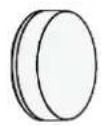
1
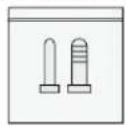
2
3

4
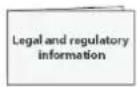
5

6
Table 2-1 Checklist
| No. | Item Name | Quantity | No. | Item Name | Quantity |
| 1 Water | leak detector 1 4 | Double-sided adhesive tape | 1 | ||
| 2 Screw | package 1 5 | Legal and regulatory information | 1 | ||
| 3 QR code | 1 6 Quick start guide 1 |
3 Appearance
Figure 1-1 Appearance
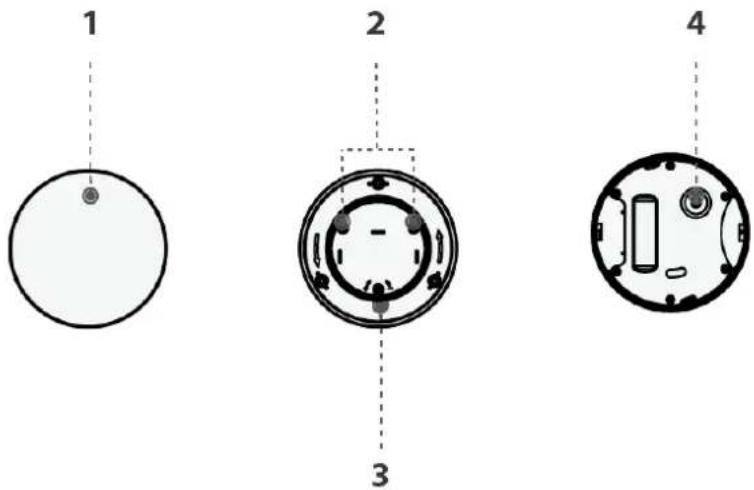
Table 1-1 Structure
| No. Name Description | ||
| 1 Indicator | Press and hold the button for 2 seconds, and then the device is powered on, and the system enters pairing mode.Solid on for 2 seconds: Pairing successful.Slowly flashes for 3 times: Pairing failed.Flashes green quickly for 100 seconds, and then off: Sensitivity mode.Solid on for 0.4 seconds: An alarm event was triggered. | |
| 2 Negative probe | When the water reaches the terminal of the probe, the indicator flashes green for 0.4 seconds.You can adjust the height of the positive probe. Turn the positive prove clockwise, and the detection sensitivity of the probe will increase. Turn it anticlockwise to decrease the sensitivity. | |
| 3 Positive probe | ||
| 4 Power | button Turn on or off the | device. |
4 Adding the Wireless Water Leak Detector to the Hub
Before you connect water leak detector to the hub, install the DMSS app to your phone. This manual uses iOS as an example.

- Make sure that the version of the DMSS app is 1.99.300 or later, and the hub is V1.001.0000004.0 or later.
- Make sure that you have already created an account, and added the hub to DMSS.
- Make sure that the hub has a stable internet connection.
- Make sure that the hub is disarmed.
Step 1 Go to the hub screen, and then tap Peripheral to add the water leak detector.
Step 2 Tap + to scan the QR code at the bottom of the water leak detector, and then tap Next.
Step 3 Tap Next after the water leak detector has been found.
Step 4 Follow the on-screen instructions and switch the water leak detector to on, and then tap Next.
Step 5 Wait for the pairing.
Step 6 Customize the name of the water leak detector, and select the area, and then tap Completed.
5 Installation
Water leak detector supports all-in-one installation and split mount with screw or adhesive tape.
5.1 All-in-one Installation
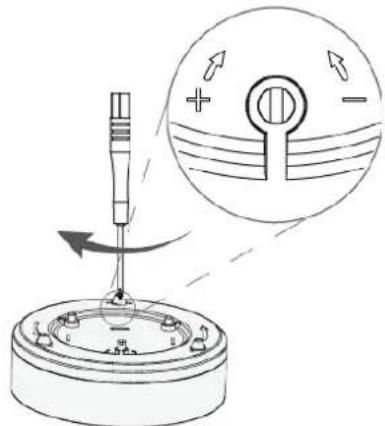
You can adjust the height of the positive probe to adjust the sensitivity first, and then place the water leak detector at a place where the water is likely to leak directly.
Step 1 Adjust the height of the positive probe with screw to adjust the sensitivity.
Figure 5-1 Adjust the height of the positive probe (1)
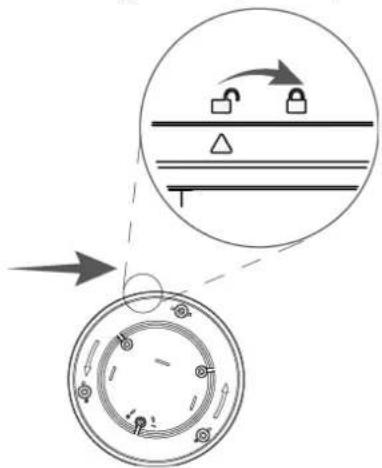
Figure 5-2 Adjust the height of the positive probe (2)
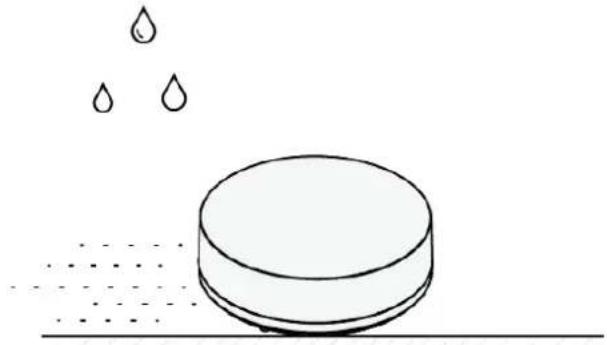
Step 2 Place the detector in a place where the water is likely to leak.
Figure 5-3 Place the water leak detector
natural_image
Simple line drawing of a cylindrical object with three water droplets above it, no text or symbols present.5.2 Split Mount with Screw
You can use the screw to install the water leak detector.
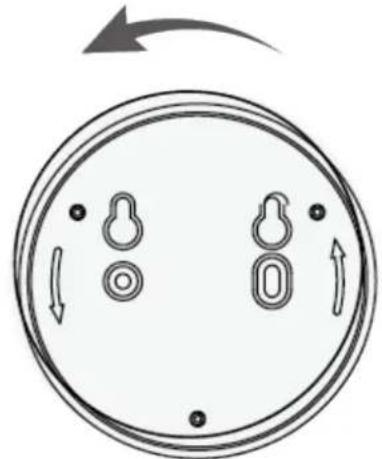
Step 1 Rotate the back cover to remove it from the water leak detector.
Figure 5-4 Remove the back cover
natural_image
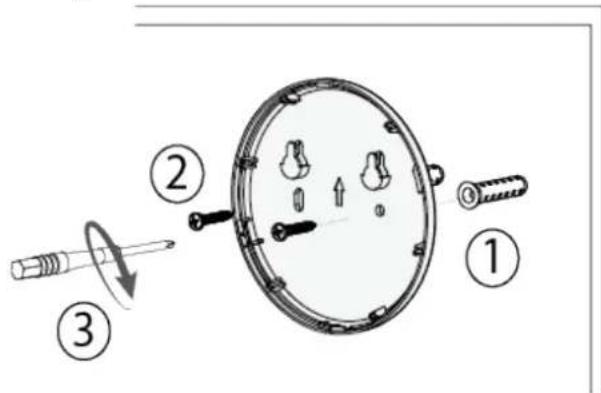
Diagram of a circular object with internal compartments and directional arrows, no text or symbols presentStep 2 Drill 2 holes into the wall according to the hole positions of the water leak detector, and then put the expansion bolts into the holes.
Figure 5-5 Remove the back cover
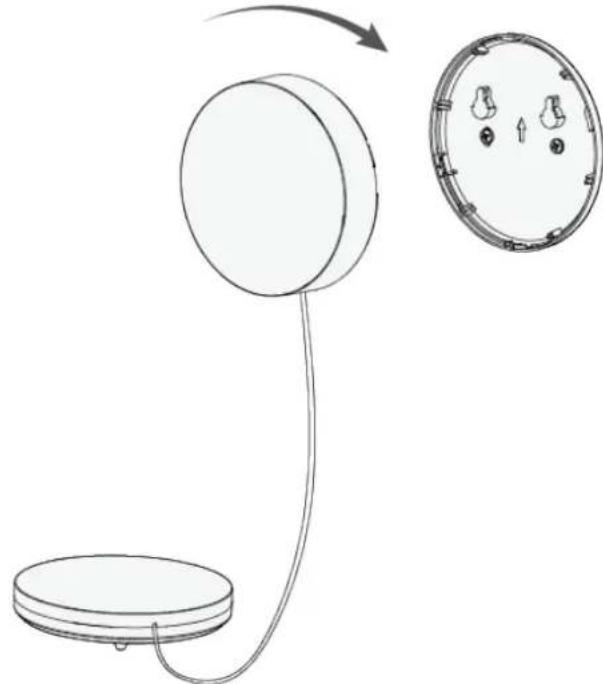
Step 3 Attach the water leak detector to the back cover.
Figure 5-6 Attach the water leak detector to the back cover
natural_image
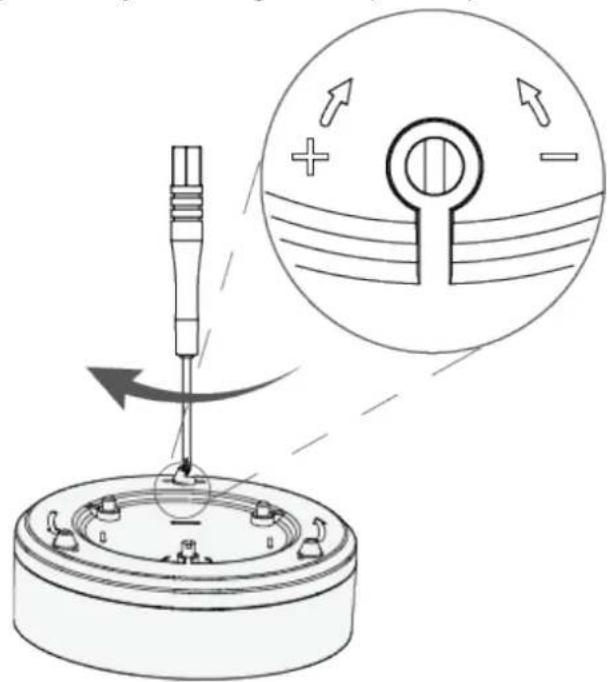
Diagram showing a device with a circular component connected to a base, alongside its internal view (no text or symbols)Step 4 Adjust the height of the positive probe with screws to adjust the sensitivity.
Figure 5-7 Adjust the height of the positive probe
5.3 Split Mount with Adhesive Tape
You can use adhesive tape to install the water leak detector.
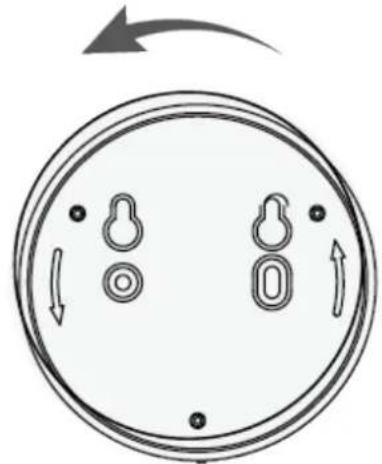
Step 1 Rotate the back cover to remove it from the water leak detector.
Figure 5-8 Remove the back cover
natural_image
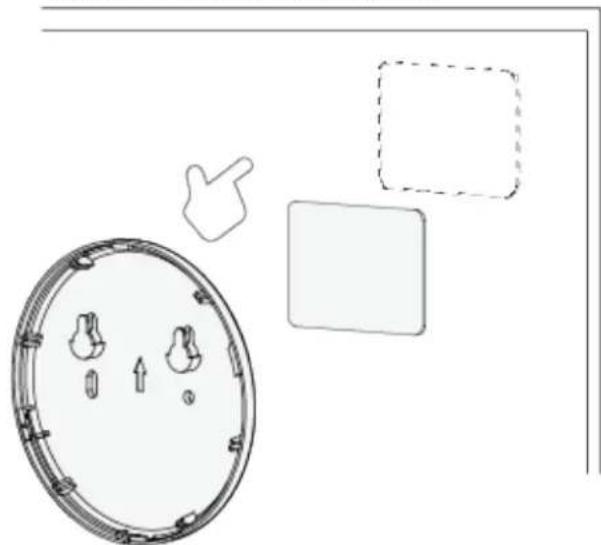
Diagram of a circular structure with internal compartments and directional arrows, no text or symbols presentStep 2 Attach the water leak detector to the wall with the double-sided adhesive tape.
Figure 5-9 Remove the back cover
natural_image
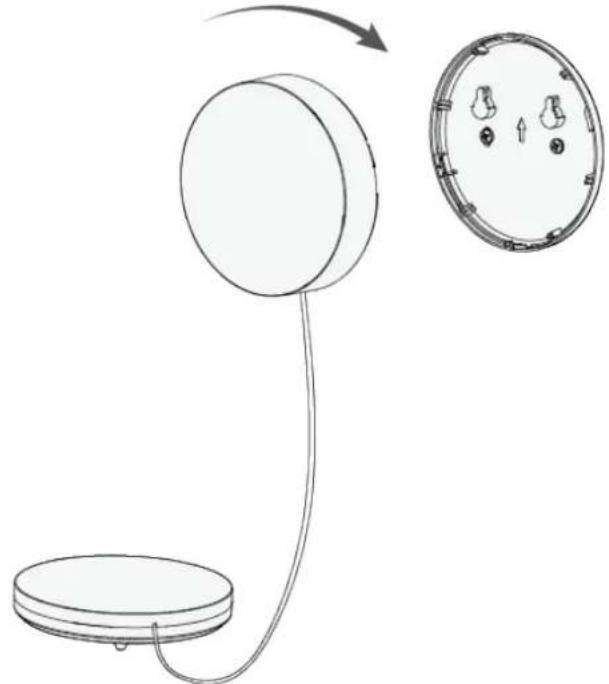
Diagram showing a circular device with internal components and three separate shapes: a square, a dashed rectangle, and a hand pointing to it (no text or symbols)Step 3 Attach the water leak detector to the back cover.
Figure 5-10 Attach the water leak detector to the back cover
natural_image
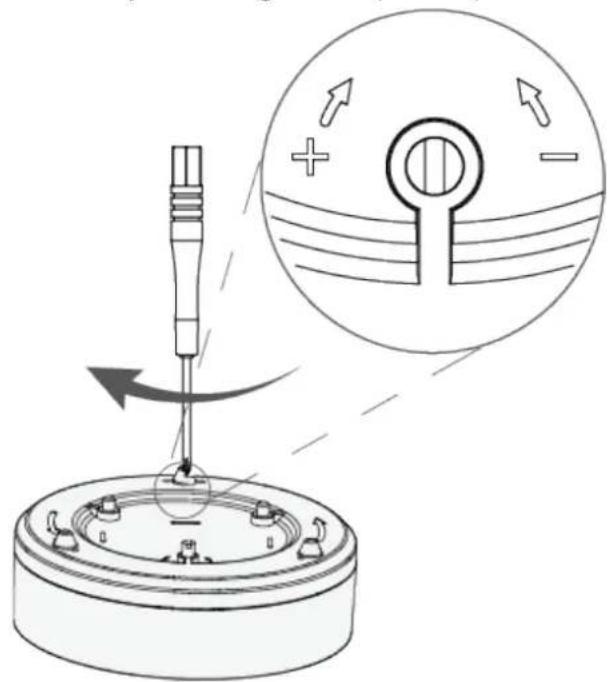
Diagram showing a device with a circular component connected to a base, and its close-up view of a circular component with three small holes (no text or symbols)Step 4 Adjust the height of the positive probe with the screw to adjust the sensitivity.
Figure 5-11 Adjust the height of the positive probe
6 Configuration
You can view and edit general information of the water leak detector.
6.1 Viewing Status
On the hub screen, select a water leak detector from the peripheral list, and then you can view the status of the water leak detector.
Table 6-1 Status
| Parameter Value | |
| Temporary Deactivate | The status for whether the functions of the repeater are enabled or disabled.● : Enable.● : Disable. |
| Signal Strength | The signal strength between the hub and the water leak detector.● : Low.● : Weak.● : Good.● : Excellent.● : No. |
| Battery Level | The battery level of the water leak detector.● : Fully charged.● : Sufficient.● : Moderate.● : Insufficient.● : Low. |
| Online Status | Online and offline status of the water leak detector.● : Online.● : Offline. |
| Water Leak Status | The status of water leak.● : Normal.● : Alarm. |
| Transmit through Repeater | The status of whether the water leak detector forwards its messages to the hub through the repeater. |
| Program Version | The program version of the water leak detector. |
6.2 Configuring the Water Leak Detector
On the hub screen, select a water leak detector from the peripheral list, and then tap ☑ to configure the parameters of the water leak detector.
Table 6-2 Parameter description
| Parameter Description | |
| Device Configuration | View water leak detector name, type, SN and device model.Edit water leak detector name, and then tapSaveto save configuration. |
| Area | Select the area to which the water leak detector is assigned. |
| Temporary Deactivate | Whether send sensor information to the alarm hub.TapEnable, and then the water leak detector will send alarm messages to the hub.Enableis set by default.TapDisable, and then the water leak detector will not send alarm messages to the hub. |
| LED Indicator | LED Indicator is enabled by default. If LED Indicator is disabled, the LED indicator will remain off regardless of whether the water leak detector is functioning normally or not. If LED Indicator is disabled, the LED indicator will remain off regardless of whether the water leak detector is functioning normally or not. |
| Siren Linkage | When an alarm is triggered, the peripherals will report the alarm events to the hub and alert with siren. |
| Alarm-video Linkage | When an alarm is triggered, the peripherals will report the alarm events to the hub and then will link events. |
| Video Channel | Select the video channel as needed. |
| Over-temperature Alarm | Enable theOver-temperature Alarmfunction, and then the alarm will be triggered when the temperature of the area where the water leak detector is installed is higher or lower than the defined one. |
| Signal Strength Detection | Test the current signal strength. |
| Detector Test | Detect whether the peripheral works. |
| Transit Power | Select from high, low, and automatic.The higher transmission power levels are, the further transmissions can travel, but power consumption increases. If you selectLow, the will enter into reduced sensitivity mode.We recommend you selectingLowwhen installing the device, and then adjusting toHighorAutomatic.The indicator flashes when setting asLow. If you selectLow, the will enter into reduced sensitivity mode.We recommend you selectingLowwhen installing the device, and then adjusting toHighorAutomatic.The indicator flashes when setting asLow. |
| User's Manual View user's manual of the device. | |
| Cloud Update Update online. | |
| Delete | Delete the water leak detector.Go to the hub screen, select the water leak detector from the list, and then swipe left to delete it. |
Appendix 1 Cybersecurity Recommendations
Cybersecurity is more than just a buzzword: it's something that pertains to every device that is connected to the internet. IP video surveillance is not immune to cyber risks, but taking basic steps toward protecting and strengthening networks and networked appliances will make them less susceptible to attacks. Below are some tips and recommendations from Dahua on how to create a more secured security system.
Mandatory actions to be taken for basic device network security:
1. Use Strong Passwords
Please refer to the following suggestions to set passwords:
- The length should not be less than 8 characters.
- Include at least two types of characters; character types include upper and lower case letters, numbers and symbols.
- Do not contain the account name or the account name in reverse order.
- Do not use continuous characters, such as 123, abc, etc.
- Do not use overlapped characters, such as 111, aaa, etc.
2. Update Firmware and Client Software in Time
- According to the standard procedure in Tech-industry, we recommend to keep your device (such as NVR, DVR, IP camera, etc.) firmware up-to-date to ensure the system is equipped with the latest security patches and fixes. When the device is connected to the public network, it is recommended to enable the "auto-check for updates" function to obtain timely information of firmware updates released by the manufacturer.
- We suggest that you download and use the latest version of client software.
"Nice to have" recommendations to improve your device network security:
1. Physical Protection
We suggest that you perform physical protection to device, especially storage devices. For example, place the device in a special computer room and cabinet, and implement well-done access control permission and key management to prevent unauthorized personnel from carrying out physical contacts such as damaging hardware, unauthorized connection of removable device (such as USB flash disk, serial port), etc.
2. Change Passwords Regularly
We suggest that you change passwords regularly to reduce the risk of being guessed or cracked.
3. Set and Update Passwords Reset Information Timely
The device supports password reset function. Please set up related information for password reset in time, including the end user's mailbox and password protection questions. If the information changes, please modify it in time. When setting password protection questions, it is suggested not to use those that can be easily guessed.
4. Enable Account Lock
The account lock feature is enabled by default, and we recommend you to keep it on to guarantee the account security. If an attacker attempts to log in with the wrong password several times, the corresponding account and the source IP address will be locked.
5. Change Default HTTP and Other Service Ports
We suggest you to change default HTTP and other service ports into any set of numbers between
1024–65535, reducing the risk of outsiders being able to guess which ports you are using.
6. Enable HTTPS
We suggest you to enable HTTPS, so that you visit Web service through a secure communication channel.
7. MAC Address Binding
We recommend you to bind the IP and MAC address of the gateway to the device, thus reducing the risk of ARP spoofing.
8. Assign Accounts and Privileges Reasonably
According to business and management requirements, reasonably add users and assign a minimum set of permissions to them.
9. Disable Unnecessary Services and Choose Secure Modes
If not needed, it is recommended to turn off some services such as SNMP, SMTP, UPnP, etc., to reduce risks.
If necessary, it is highly recommended that you use safe modes, including but not limited to the following services:
- SNMP: Choose SNMP v3, and set up strong encryption passwords and authentication passwords.
- SMTP: Choose TLS to access mailbox server.
- FTP: Choose SFTP, and set up strong passwords.
- AP hotspot: Choose WPA2-PSK encryption mode, and set up strong passwords.
10. Audio and Video Encrypted Transmission
If your audio and video data contents are very important or sensitive, we recommend that you use encrypted transmission function, to reduce the risk of audio and video data being stolen during transmission.
Reminder: encrypted transmission will cause some loss in transmission efficiency.
11. Secure Auditing
- Check online users: we suggest that you check online users regularly to see if the device is logged in without authorization.
- Check device log: By viewing the logs, you can know the IP addresses that were used to log in to your devices and their key operations.
12. Network Log
Due to the limited storage capacity of the device, the stored log is limited. If you need to save the log for a long time, it is recommended that you enable the network log function to ensure that the critical logs are synchronized to the network log server for tracing.
13. Construct a Safe Network Environment
In order to better ensure the safety of device and reduce potential cyber risks, we recommend:
- Disable the port mapping function of the router to avoid direct access to the intranet devices from external network.
- The network should be partitioned and isolated according to the actual network needs. If there are no communication requirements between two sub networks, it is suggested to use VLAN, network GAP and other technologies to partition the network, so as to achieve the network isolation effect.
- Establish the 802.1x access authentication system to reduce the risk of unauthorized access to private networks.
- Enable IP/MAC address filtering function to limit the range of hosts allowed to access the
device.
More information
Please visit Dahua official website security emergency response center for security announcements and the latest security recommendations.
ENABLING A SAFER SOCIETY AND SMARTER LIVING
- Wireless Water Leak Detector
- User's Manual
- Foreword
- General
- Safety Instructions
- Revision History
- Privacy Protection Notice
- About the Manual
- Important Safeguards and Warnings
- Operation Requirements
- Installation Requirements
- WARNING
- Table of Contents
- Foreword ....
- Important Safeguards and Warnings....III
- Appendix 1 Cybersecurity Recommendations....13
- Introduction
- Overview
- Technical Specifications
- Checklist
- Appearance
- Adding the Wireless Water Leak Detector to the Hub
- Installation
- All-in-one Installation
- Split Mount with Screw
- Split Mount with Adhesive Tape
- Configuration
- Viewing Status
- Configuring the Water Leak Detector
- Appendix 1 Cybersecurity Recommendations
- Mandatory actions to be taken for basic device network security:
- Use Strong Passwords
- Update Firmware and Client Software in Time
- "Nice to have" recommendations to improve your device network security:
- Physical Protection
- Change Passwords Regularly
- Set and Update Passwords Reset Information Timely
- Enable Account Lock
- Change Default HTTP and Other Service Ports
- Enable HTTPS
- MAC Address Binding
- Assign Accounts and Privileges Reasonably
- Disable Unnecessary Services and Choose Secure Modes
- Audio and Video Encrypted Transmission
- Secure Auditing
- Network Log
- Construct a Safe Network Environment
- More information
- ENABLING A SAFER SOCIETY AND SMARTER LIVING
Brand : Dahua Technology
Model : ARD912-W2
Category : Detector