Fresnel Studio LED2000 - Video projector Dracast - Free user manual and instructions
Find the device manual for free Fresnel Studio LED2000 Dracast in PDF.


User questions about Fresnel Studio LED2000 Dracast
0 question about this device. Answer the ones you know or ask your own.
Ask a new question about this device
Download the instructions for your Video projector in PDF format for free! Find your manual Fresnel Studio LED2000 - Dracast and take your electronic device back in hand. On this page are published all the documents necessary for the use of your device. Fresnel Studio LED2000 by Dracast.
USER MANUAL Fresnel Studio LED2000 Dracast
natural_image
Technical diagram of a mechanical component with three labeled parts (①, ②, ③), no readable text or symbols beyond labels.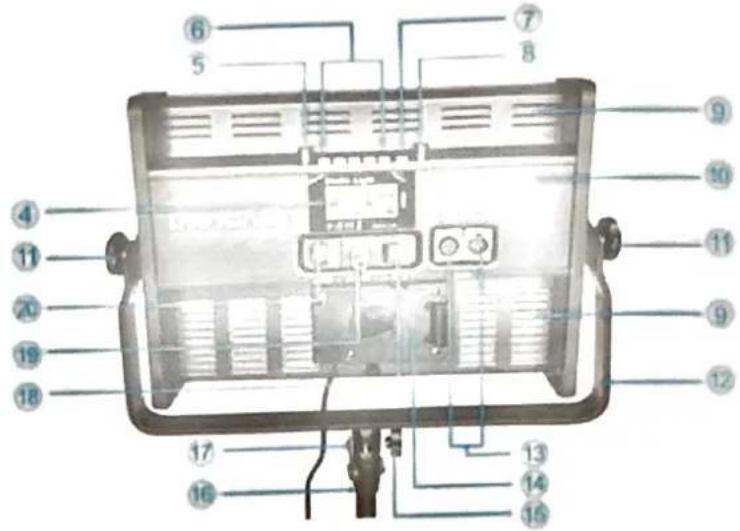
text_image
Labeled diagram of a portable lamp case with numbered components for identification- LED Surface
- Removeable Diffusion Panel
- Dimmer
- LCD Display
- CCT Adjustment Knob
- CCT Preset Buttons
-
Option Selector
-
Brightness Knob
- Cooling Vent
- Aluminum Housing
- Yoke Lock Knob
- Mounting Yoke
- DMX Input and Output
-
V-Mount Battery Plate
-
5/8" Baby Pin Locking Knob
- Light Stand (Not included)
- 5/8" Baby Pin Receiver
- On / Off Switch
- DC Power Input
-
AC Power Input
-
TECHNICAL DATA
| Model No. | DRKP1000B | DRKP2000B | DRKP3000B |
| Power | 60W | 120W | 150W |
| 0.5W SMD LED | 576PCS | 1152PCS | 1440PCS |
| Luminous Flux | 7200LM | 14400LM | 18000LM |
| Brightness | 2300Lux/1M | 4800Lux/1M | 5700Lux/1M |
| CCT | Bi-Color 2800K~6500K | ||
| CRI | Ra≥96 | ||
| TLCI | Qa≥96 | ||
| Beam Angle | Approx 120^ | ||
| LED Lifetime | 50000 hrs (estimated) | ||
| Power Adapter | DC15-18V,>5A | DC15-18V,>10A | DC28-32V, >7A |
| AC Power Supply | AC100-240V | ||
| Battery Compatibility | V-mount lithium battery | ||
| Control Mode | Host control + Mobile APP + DMX | ||
| Dimmer | 0-100% | ||
| Dimensions | 35.5×39×8CM | 62×39×8CM | 75×39×8CM |
| Weight | 2.9KG | 4.7KG | 5.6KG |
3. OPERATING INSTRUCTIONS
3.1 Remove the panel light from packaging, plug the output of the power adapter into the (19) DC Power Input and connect to AC.
3.2 Turn on (18) On / Off Switch. (4) LED Display will turn on and enter the default Bi-Color mode.
3.2.1 Turn (8) Brightness Knob to adjust the dimmer level. The (4) LCD Display will read 0% - 100%
3.2.2 Rotate (5) CCT Adjustment Knob to change the color temperature. The (4) LCD Display will read 2800K - 6500K.
3.2.3 Press (6) CCT Preset Buttons to quickly set the color temperature, (6) CCT Preset Buttons are set to 2800K, 3500K, 4500K, 5500K, and 6500K.
3.3 Press (7) Option Selector once. The CH flashes on the (4) LCD Display and will enter the mobile APP channel value setting mode.
3.3.1 Rotate (8) Brightness Knob to change the value of the mobile APP, the mobile APP channel value is set to channel 1 – 99.
2. When the mobile APP channel value is set to CH.FF, the Bluetooth function of the panel light is red off.
3 Related mobile APP download and instructions, please refer to Mobile APP Operation Instruction.
Press (7) Option Selector again. DMX flashes on the LCD Display and the light enters the DMX dress setting mode.
4.1 Rotate (8) Brightness Knob to adjust the DMX address. DMX address can be set to DMX.001 - MX.512.
4.2 Connect DMX control device.
3.4.2.1 Plug one end of the data cable into the (13) DMX Input and the other end into the DMX control device (or other lamp's DMX socket controlled by DMX).
3.4.2.2 After connecting the DMX control device, if you need to modify the DMX address, press (7) Option Selector once. DMX flashes on the (4) LCD Display. Follow step 3.4.1 to modify the DMX address, then press (7) Option Selector again to exit DMX address mode.
3.4.2.3 With the DMX address set on the light, the corresponding channel on the DMX control device can now be used to adjust the brightness.
3.4.2.4 With the DMX address set on the light, the second channel after the corresponding channel on the DMX control device can now be used to adjust color temperature. (e.g. DMX address 1. CCT is controlled on channel 2)
3.5 Press (7) Option Selector again to exit the settings mode and enter the default Bi-Color mode.
3.6 The Kala Plus Series will beep when adjustments are made in settings. Press and hold (7) Option Selector for 3 seconds to mute or unmute the notification sound.
3.7 The Kala Plus Series includes a v-mount battery plate that is compatible with most 14.4V v-mount lithium-ion batteries.
3.8 Some models have built-in power supply, which can be used for AC direct power supply. When using DMX control mode, it is recommended to use power adapter (or battery) for power supply. AC direct power supply is prone to high-frequency interference.
3.9 All models are equipped with universal (12) Mounting Yoke and (17) 5/8" Baby Pin Receiver which can be used with a compatible light stand, c-clamp, or other mounting accessory.
3.10 When using battery power, please pay attention to the display of battery power. When the battery power is insufficient, the light will automatically turn off and wait for the battery or power supply to be replaced.
3.11 When used continuously for a long time the light may reach temperatures exceeding of 65^ C, if this happens, the light may need to shut down until the unit cools. Some models include built-in overheating protection and automatic power-off protection when temperature remains above 65^ C for an extended time period.
-
Attention
-
Please do not expose the light to excessive heat or moisture.
- Please do not immerse the light in water or expose it to rain.
- Never put the light or any battery into fire or excessive heat.
- Remove the battery when not in use for a long time to avoid damage to the product.